How to Debug Programming Assignments Faster: A Step-by-Step Guide
The assignment is due in the morning. Your code worked an hour ago. Now it doesn’t, and you have no idea why.
How to Debug Programming Assignments Faster: A Step-by-Step Guide
The assignment is due in the morning. Your code worked an hour ago. Now it doesn’t, and you have no idea why.
One minute to midnight has a way of making a bug feel personal. You stare at a wall of red text, your cursor blinking in the same spot it’s been for ten minutes, and the thought creeps in: maybe I’m just not cut out for this.
You are. You’re just missing a process.
Here’s something nobody tells you in an intro CS course: writing code and debugging code are two completely different skills. School teaches the first one. Almost nobody formally teaches the second you’re expected to “figure it out.”
So most students do the only thing that feels like progress: changing lines at random and hoping something sticks.
This guide walks through the method that actually works instead — what debugging is, why it’s harder than it looks, a full five-step framework with real code, and the tools and habits that separate students who lose hours to a bug from students who lose minutes.
The short version: Debugging faster means reproducing the bug reliably, reading the entire error message instead of skimming the first line, isolating the smallest section of code responsible, testing one hypothesis at
a time, and confirming the fix doesn’t break something else. Everything below is how to actually do each step, with examples.
What Is Debugging, Really?
Debugging is the process of locating and correcting the cause of unexpected behavior in a program — not just making an error message disappear, but understanding why the program did something other than what you intended.
That distinction matters more than it sounds. Making an error message disappear is easy: delete the line that crashes, wrap it in a broad try/except, or change a value until the symptom goes away.
None of that is debugging. It's symptom suppression, and it often just moves the actual bug somewhere it's harder to find.
Coding is the act of expressing a solution in a language a computer can execute. Debugging is the act of figuring out why your expressed solution and your intended solution have diverged.
They use overlapping skills but very different mental modes: coding is mostly generative — building something from a blank state. Debugging is mostly investigative working backward from a broken outcome to a root cause, closer to forensic work than construction work.
This is exactly why debugging feels so much harder for beginners than writing new code. Writing new code lets you follow a tutorial’s structure.
Debugging requires you to form a hypothesis about a system you didn’t fully understand to begin with, then test it — a skill that has almost nothing to do with memorizing syntax.
Every programmer debugs. Not occasionally — constantly. Senior engineers at major tech companies spend a large share of their working hours debugging existing systems, not writing brand-new code from scratch. The skill doesn’t go away with experience; it gets faster.
Why Students Struggle With Programming Assignments
Programming assignments fail students in predictable ways, and recognizing the pattern is often half the fix.
Lack of Problem Decomposition
Most assignment prompts describe a finished outcome (“write a program that calculates student grades”) without describing the steps to get there. Students who jump straight into code without first breaking the problem into smaller pieces — read input, validate it, calculate, format output — end up with a single tangled block where one bug can hide behind three others.
Reading Errors Incorrectly
A TypeError gets read as "the computer hates me" instead of as the specific, useful claim it actually is: a value's type doesn't match what an operation expected. Skimming the first line of an error and ignoring the rest — including the line number and the call stack — throws away most of the diagnostic information the language is handing you for free.
Fear of Touching Code
Once something runs — even barely — there’s a strong instinct to avoid touching it, out of fear that any change makes things worse. This leads to bugs being patched around instead of fixed, and it’s how a 10-line function ends up with four redundant if statements that all do almost the same thing.
Last-Minute Submissions
Assignments started the night before mean debugging happens under time pressure and sleep deprivation — the exact conditions under which methodical thinking is hardest to access. Most “I have no idea why this is broken” panic isn’t a skill problem; it’s a timing problem.
Copy-Paste Coding
Pulling a snippet from a forum or an AI tool without understanding why it works creates code the student can’t actually debug, because they never built a mental model of what it’s supposed to do in the first place. When it breaks, there’s no internal map to consult — just someone else’s logic with no explanation attached.
The Hidden Cost of Bad Debugging Habits
Bad debugging habits don’t just cost time on the assignment in front of you — they compound.
Random code changes without a hypothesis create a second, harder problem: even when something starts working, you often don’t know why, which means you can’t apply that fix the next time a similar bug appears.
Stack Overflow dependency — pasting an error directly into a search bar with no context — frequently returns answers for a similar-looking but different problem. Copying a “fix” that doesn’t match your actual code can mask the real bug while introducing a new one.
AI-generated code without understanding has the same problem at a larger scale. Asking an AI tool to fix a function and pasting the result back in without reading it means you’ve outsourced the one part of the assignment that was supposed to build your debugging skill in the first place. The assignment gets submitted; the skill doesn’t get built. The next assignment is exactly as hard as this one was.
Debugging fatigue — the mental exhaustion of an unresolved bug — degrades decision-making the longer it continues. Past a certain point, more time spent doesn’t produce more insight; it just produces more frustration.
Lost learning opportunities are the real long-term cost. Every bug you actually understand and fix yourself is a pattern you’ll recognize instantly next time. Every bug you patch around or outsource is a pattern you’ll get stuck on again in the next course, the internship technical screen, or the job.
The Four Phases Every Student Cycles Through
Before the technical method, it’s worth naming what’s happening in your head when a bug hits — because the phase you’re in determines whether more time will even help.
Phase 1 — Denial. “This worked five minutes ago.” You assume the bug is small and obvious, so you don’t read the error carefully. This phase wastes the most time relative to effort, because confidence is high and actual information-gathering is near zero.
Phase 2 — Shotgun Debugging. You start changing things with no real theory — swap a == for =, delete a line, add it back. Sometimes this accidentally "fixes" it, which feels like a win but usually just relocates the problem somewhere harder to find.
Phase 3 — The Google Spiral. You paste the raw error into a search bar with zero context, open six tabs for vaguely related problems, and try fixes that don’t actually match your code.
Phase 4 — The Systematic Reset. This is the phase that ends the bug hunt. You stop guessing, slow down, and follow a repeatable method instead of your gut. Experienced developers don’t have fewer bugs than students — they just reach Phase 4 faster.
Everything below is designed to get you to Phase 4 immediately.
The D.E.B.U.G. Framework (With Real Examples)
Built around the word “debug” itself, on purpose — easier to recall under deadline pressure than an unrelated acronym.
D — Duplicate the Bug, Reliably
You can’t fix what you can’t consistently trigger.
- Identify the exact input or action that causes the failure
- Run it again to confirm it’s not a one-off
- If it fails sometimes, that inconsistency is a clue — usually pointing to uninitialized variables, boundary conditions, or timing-dependent code
Python example:
def average(scores):
    total = sum(scores)
    return total / len(scores)
print(average([])) # crashes here, every single timeThis fails 100% of the time with an empty list — a reliably reproducible bug, which is the easiest kind to fix.
Java example:
String name = getUserName(); // sometimes returns null
System.out.println(name.length());
This one is intermittent — it only fails when getUserName() returns null, which might not happen on every run. Intermittent bugs need you to find the specific condition that triggers them before you can reproduce them reliably.
E — Examine the Full Error Message
Most students read line one and stop scrolling. The most diagnostic information is usually further down.
Traceback (most recent call last):
  File "grades.py", line 12, in <module>
    print(average([]))
  File "grades.py", line 3, in average
    return total / len(scores)
ZeroDivisionError: division by zero
Reading bottom to top: the actual failure is ZeroDivisionError: division by zero, on line 3, inside the average function, triggered by the call on line 12. That's not "my code is broken" — that's a precise, fixable claim: somewhere, you're dividing by a length of zero.
TypeError: unsupported operand type(s) for +: 'int' and 'str'Broken down: TypeError means a value's type doesn't match what an operation expected. unsupported operand type(s) for + tells you the specific operation involved is addition. 'int' and 'str' tells you exactly which two types collided — meaning somewhere, you're adding a number to a piece of text. You don't need to guess; the error already told you the category of mistake.
B — Bisect the Code
The highest-leverage debugging skill nobody teaches directly: cutting the search space in half until you isolate the exact line.
print("A")
total = sum(scores)
print("B")
result = total / len(scores)
print("C")
return result
If you see A and B printed but not C, the failure is between B and C — meaning the division line itself is where things break. If you only see A, the problem is in the sum() call. Each checkpoint cuts your search space roughly in half, the same way binary search finds a value faster than scanning a list item by item.
U — Use One Hypothesis, Test Only That
Bad debugging: change the division, the input validation, and the loop structure all at once, then rerun and hope.
Good debugging: write down one specific, falsifiable guess —
“I think this crashes because
len(scores)is zero when the list is empty."
— then change only what’s needed to test that one idea. If you change five things simultaneously and the bug disappears, you won’t know which change mattered, and you may have buried a second bug under the fix.
G — Generalize the Fix
Getting the original failing case to pass isn’t the finish line.
def average(scores):
    if not scores:
        return 0  # or raise a clear error, depending on requirements
    return sum(scores) / len(scores)
Now stress-test it: empty input (handled), a single score, negative numbers, a very large list, duplicate values. Re-run the original failing scenario to confirm it’s genuinely resolved. Then ask whether the same root cause — assuming a collection always has at least one item — might be hiding anywhere else in the file.
Real Debugging Walkthrough: Fixing a Python Grade Calculator
Putting the full framework together on one realistic assignment bug.
The assignment: write a function that returns the average of a list of test scores.
The original code:
def average(scores):
    total = sum(scores)
    return total / len(scores)
class_scores = []
print(f"Class average: {average(class_scores)}")Running it produces:
ZeroDivisionError: division by zeroStep 1 — Duplicate. Run it again with the same empty list. It fails every time — a perfectly reproducible bug.
Step 2 — Examine. The error is specific: ZeroDivisionError: division by zero, on the return line. Nothing vague about it — somewhere, a division has a zero denominator.
Step 3 — Bisect. Add a checkpoint before the division:
def average(scores):
    total = sum(scores)
    print(f"total={total}, count={len(scores)}")
    return total / len(scores)
Output: total=0, count=0. The bisect step instantly confirms the exact condition: an empty list produces a count of zero, and dividing by that zero is the crash.
Step 4 — Hypothesis. “If scores is empty, len(scores) is 0, and dividing by it will always crash — regardless of what total is." One clear, testable claim.
Step 5 — Fix and Verify:
def average(scores):
    if not scores:
        return 0
    return sum(scores) / len(scores)
Re-run the original failing case: now returns 0 instead of crashing. Test additional edge cases — a list of one score, a list with negative values, a very long list — all pass. The fix generalizes; it's not just patched for the one input that happened to break.
That’s the entire loop, from a crash to a verified fix, without a single random guess.
Beginner vs. Intermediate vs. Advanced Debuggers
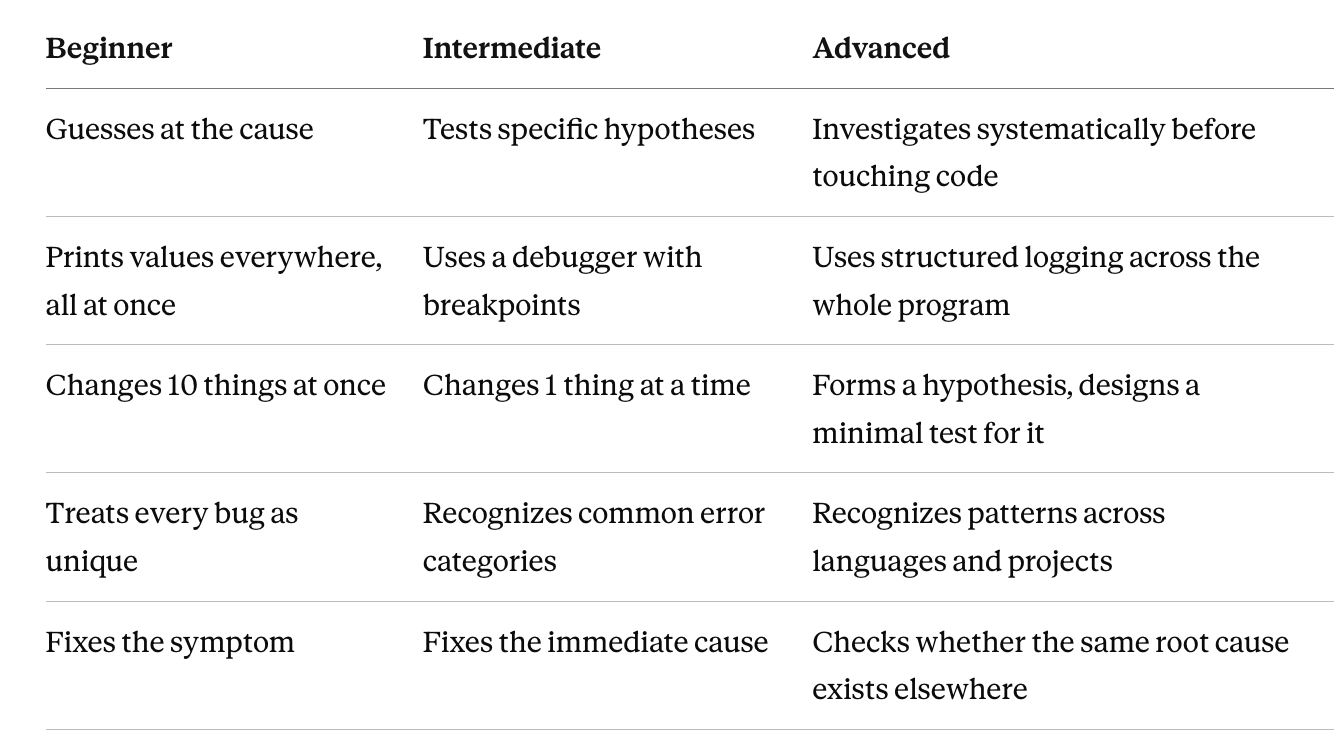
The jump from beginner to intermediate is almost entirely about discipline one hypothesis at a time, instead of ten simultaneous changes.
The jump from intermediate to advanced is about pattern recognition built from doing the first two columns enough times that root causes start looking familiar before you even open the debugger.
Most Common Programming Assignment Bugs, by Language
Python
**NoneTypeerrors** — calling a method on a function's result when that function doesn't explicitlyreturnanything, so it silently returnsNone**IndexError** — accessing a list position that doesn't exist, frequently from an off-by-one mistake in a loop boundary**KeyError** — looking up a dictionary key that was never set, often from a typo or a key that depends on conditional logic**IndentationError** — mixed tabs and spaces, or a block indented inconsistently with the lines around it
Java
**NullPointerException** — calling a method on an object reference that was never initialized, the single most common runtime error in introductory Java courses**ArrayIndexOutOfBoundsException** — looping with<=instead of<against an array's length, or assuming an array has more elements than it does
JavaScript
**undefined is not a function** — a typo in a method name, or calling a function before the script that defines it has finished loading- Async errors — code that reads a variable before a
fetch()orPromisehas actually resolved, producing a value that looks "wrong" but is really just early
C++
- Segmentation faults — dereferencing a null or already-freed pointer, or writing past the bounds of an array
- Memory leaks — allocating memory with
newormallocand never matching it withdeleteorfree, which doesn't crash immediately but degrades performance over a long-running program
Best Debugging Tools for Students
VS Code Debugger — set breakpoints, step through code line by line, inspect every variable’s live value without writing a single print statement. The single highest-leverage tool on this list for most students.
PyCharm — Python-specific debugger with the same breakpoint/step-through model as VS Code, plus deeper integration with virtual environments and test runners.
IntelliJ — the Java equivalent, especially useful for tracing NullPointerExceptions back to exactly where a reference went unset.
Chrome DevTools — essential for JavaScript and web assignments; the Console tab surfaces runtime errors with clickable stack traces, and the Sources tab supports the same breakpoint debugging as a desktop IDE.
Git — version control isn’t just for backups. It’s a debugging tool: if an assignment worked yesterday and doesn’t today, your commit history is the list of suspects.
Git Diff — shows exactly what changed between the last working commit and the current state, which often reveals the bug directly without any further investigation.
GitHub History — useful when a bug was introduced several commits ago and you need to narrow down which commit, not just the most recent change; git bisect automates this search.
AI Tools — genuinely useful for explaining an unfamiliar error message or reviewing logic for a specific function, and genuinely harmful when used to generate or fix an entire assignment without understanding the result (more on this below).
When to use which: reach for the debugger first for anything happening inside a single function. Reach for git diff first when something that used to work has stopped working. Reach for an AI tool first when you don't understand what an error message even means, not when you want the bug solved for you.
How Professional Developers Debug Code
Industry debugging looks less dramatic than student debugging, mostly because it’s built on habits that prevent bugs from becoming mysteries in the first place.
Reproducing bugs is step one in any professional setting too — a bug report without reliable reproduction steps is treated as unverified, because an engineer can’t fix what they can’t trigger on demand.
Logging replaces most ad hoc print statements. Professional code logs structured, timestamped information at defined severity levels (debug, info, warning, error), so when something goes wrong in a live system, the history of what happened is already recorded — no need to add print statements after the fact.
Monitoring extends logging to production systems: automated alerts that flag unusual behavior — error rate spikes, slow response times — often before any human notices a problem.
Unit testing means individual functions are tested in isolation, automatically, every time code changes. A function that breaks something will usually fail a test immediately, rather than surfacing as a confusing bug somewhere downstream weeks later.
Regression testing re-runs the full test suite before any change ships, specifically to catch the case where a fix for one bug quietly introduces another.
The throughline: professionals don’t debug faster because they’re smarter. They debug faster because their process generates the evidence (logs, tests, history) needed to debug efficiently before the bug ever happens.
How AI Can Help (Without Making You Worse at This)
AI tools are genuinely useful for debugging in 2026 — and genuinely risky if used the wrong way.
Good use:
- Asking an AI to explain what an unfamiliar error message actually means
- Asking it to review the logic of a specific function you wrote, and explain why it thinks something is wrong
- Asking it to suggest edge-case tests you might not have thought of
Bad use:
- Pasting an entire assignment in and asking for a working solution
- Copying a suggested fix without reading or understanding what it changed
- Using it as a substitute for learning the debugging process, rather than a tool that speeds the process up
The test that separates the two: after using the tool, could you explain — without looking — exactly what was wrong and why the fix works? If yes, you used it as a tutor. If no, you used it as a replacement, and the next bug like this one will be just as hard as this one was.
The same logic applies to any third party, human or AI, that hands back a finished solution: it can relieve the deadline pressure for one night, but it doesn’t build the skill that makes the next assignment easier.
15-Point Debugging Checklist Before Submission
- [ ] Run all provided test cases, not just the one you were debugging
- [ ] Test edge cases: empty input, zero, negative numbers, very large input
- [ ] Test duplicate or repeated values where relevant
- [ ] Remove or comment out leftover debug print statements
- [ ] Check variable names for typos, especially similarly-named variables
- [ ] Review any compiler/interpreter warnings, not just hard errors
- [ ] Validate all user inputs the way the assignment spec requires
- [ ] Re-read the assignment instructions once more against your actual output format
- [ ] Confirm output formatting matches exactly what’s expected (spacing, capitalization, line breaks)
- [ ] Check for off-by-one errors in any loop boundaries
- [ ] Verify functions that should return a value always do, on every code path
- [ ] Re-run the originally failing case one final time
- [ ] Check for hardcoded values that should be calculated dynamically
- [ ] Confirm the program handles the smallest valid input and the largest expected input
- [ ] Save and back up your final working version before submitting
Frequently Asked Questions
What is debugging in programming?
Debugging is the process of locating and correcting the root cause of unexpected behavior in a program, rather than just making the error message disappear.
Why is debugging so difficult for beginners?
Because it requires investigative thinking — forming and testing hypotheses about a system you don’t fully understand — which is a fundamentally different skill from the generative thinking used to write new code.
What is the fastest way to debug code?
Follow a structured method: reproduce the bug reliably, read the full error message, isolate the smallest section of code responsible, test one hypothesis at a time, then verify the fix doesn’t break anything else.
How do professional programmers find bugs?
Mostly by relying on habits that generate evidence ahead of time — logging, automated testing, and version history — so that when something breaks, the diagnostic information is already available rather than needing to be created from scratch.
Which debugging tools should students learn first?
A built-in IDE debugger (VS Code, PyCharm, or IntelliJ depending on the language) and git diff. Together they cover both "something inside this function is wrong" and "something that used to work just broke."
How long should debugging take?
There’s no fixed time, but if you’ve spent more than 30–45 minutes on a single bug with no progress and no new information, it’s usually a sign to step back and apply a more structured method — or take a short break — rather than to keep pushing the same approach longer.
Should I use print statements or a debugger?
Print statements are fine for quick, simple checks. A real debugger is faster once a bug requires inspecting multiple variables at once or stepping through several functions, because it shows the full program state without you having to predict in advance what to print.
Can AI help with debugging?
Yes, for explaining error messages and reviewing specific logic — but using it to generate a full fix without understanding it skips the exact skill the assignment was meant to build, and leaves the next similar bug just as hard to solve.
Final Takeaway
Faster debugging isn’t about knowing more syntax. It’s about replacing guesswork with a repeatable loop: duplicate the bug, read the whole error, bisect to isolate it, test one hypothesis, then generalize the fix.
메타데이터
- post_id
- 41b112d324bc
- slug
- how-to-debug-programming-assignments-faster-a-step-by-step-guide-41b112d324bc
- url
- https://medium.com/@Alexcole3/how-to-debug-programming-assignments-faster-a-step-by-step-guide-41b112d324bc
- canonical_url
- https://medium.com/@Alexcole3/how-to-debug-programming-assignments-faster-a-step-by-step-guide-41b112d324bc
- author_url
- https://medium.com/@Alexcole3
- status
- ok
- fetched_at
- 2026-07-16 18:08:31