The AWS Security Mistake That Doesn’t Trigger Any Alerts
How Overly Permissive Trust Policies, Forgotten IAM Roles, and PassRole Abuse Create Silent Paths to Privilege Escalation
The AWS Security Mistake That Doesn’t Trigger Any Alerts
How Overly Permissive Trust Policies, Forgotten IAM Roles, and PassRole Abuse Create Silent Paths to Privilege Escalation
Introduction
Most AWS security incidents don’t start with a sophisticated exploit.
They start with a permission someone forgot to review.
A role that nobody uses anymore.
A trust policy that was created during a migration project.
A developer role was granted iam:PassRole because "the deployment wasn't working."
No malware.
No vulnerability.
No GuardDuty finding.
No Security Hub alert.
No CloudWatch alarm.
Nothing.
And that’s exactly what makes these mistakes dangerous.
During a security assessment for a cloud-native application, we discovered a path from a low-privileged deployment role to full administrative access in less than ten minutes.
There was no active attack.
No compromised workload.
No exposed secret.
Just IAM configurations that looked harmless when viewed individually.
But together, they created a privilege escalation chain that AWS considered completely valid.
This article explores one of the most overlooked AWS security risks:
Silent IAM privilege escalation through trust policies, unused roles, and PassRole abuse.
We’ll examine:
- Why traditional monitoring misses it
- How attackers abuse it
- Real-world attack paths
- Practical demonstrations
- Detection techniques
- Hardening recommendations
Let’s start with a simple question.
Why No Alerts?
Security teams often assume:
“If something dangerous happens, GuardDuty will tell us.”
Unfortunately, IAM misuse rarely looks malicious.
AWS services are performing exactly as designed.
When an attacker abuses IAM permissions:
- No malware is executed
- No suspicious network traffic occurs
- No vulnerability is exploited
- No unauthorized API call is made
The actions are technically allowed.
And that’s why they often bypass detection.
Understanding the IAM Triangle of Risk
Three IAM issues frequently combine to create security gaps:
1. Overly Permissive Trust Policies
Trust policies define:
Who can assume a role
Example:
{
  "Version": "2012-10-17",
  "Statement": [
    {
      "Effect": "Allow",
      "Principal": {
        "AWS": "*"
      },
      "Action": "sts:AssumeRole"
    }
  ]
}
This effectively says:
Anyone can attempt to assume this role.
While AWS permissions may still restrict access, trust policies like these create unnecessary attack surfaces.
2. Forgotten IAM Roles
Large AWS environments accumulate roles over time:
- Migration projects
- Temporary testing
- CI/CD experiments
- Third-party integrations
Example:
LegacyAdminRole
MigrationRole
TerraformOldRole
JenkinsRole
DevOps-TestRole
Nobody uses them anymore.
Nobody reviews them.
Nobody deletes them.
But many still have:
AdministratorAccessattached.
3. iam:PassRole Permissions
PassRole is one of the most misunderstood IAM permissions.
Example:
{
  "Effect": "Allow",
  "Action": "iam:PassRole",
  "Resource": "*"
}
This permission allows a user to pass an IAM role to AWS services.
At first glance:
“That doesn’t seem dangerous.”
In reality, it can become a direct path to privilege escalation.
The Real Attack Scenario
Imagine the following environment.
Developer User
       │
       ▼
Deployment Role
       │
       ▼
PassRole Permission
       │
       ▼
Admin Role
       │
       ▼
AdministratorAccess
The developer cannot directly assume the admin role.
So everything appears secure.
But they can create AWS resources that run using the admin role.
And that’s where the problem begins.
Practical Demonstration
Environment Setup
Admin Role
Role Name:
AdminAutomationRole
Permissions:
AdministratorAccessDeveloper Role
{
  "Effect": "Allow",
  "Action": [
    "ec2:RunInstances",
    "iam:PassRole"
  ],
  "Resource": "*"
}
Seems harmless.
Developers need EC2 access.
Developers need deployment permissions.
Right?
Let’s see what happens.
Step 1: Launch an EC2 Instance
The developer launches:
aws ec2 run-instances \
--image-id ami-xxxxxx \
--iam-instance-profile Name=AdminAutomationRole
AWS checks:
Can user launch EC2?
YES
Can user pass role?
YESInstance launches successfully.
Step 2: Access Temporary Credentials
From the EC2 instance:
curl \
http://169.254.169.254/latest/meta-data/iam/security-credentials/
Response:
AdminAutomationRoleRetrieve credentials:
curl \
http://169.254.169.254/latest/meta-data/iam/security-credentials/AdminAutomationRole
Now the attacker has:
Access Key
Secret Key
Session Token
for the admin role.
Step 3: Become Administrator
aws sts get-caller-identityOutput:
AdminAutomationRoleThe attacker now effectively owns the AWS account.
Did Any Alert Trigger?
In many environments:
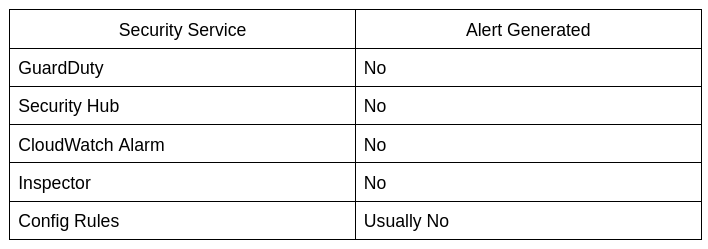
Because AWS sees:
Authorized User
Authorized Role
Authorized Action
Everything appears legitimate.
The Trust Policy Problem
Now let’s add another issue.
Consider this trust policy:
{
  "Effect": "Allow",
  "Principal": {
    "AWS": "arn:aws:iam::111111111111:root"
  },
  "Action": "sts:AssumeRole"
}
Years ago, this account belonged to a trusted vendor.
Today:
- Vendor contract ended
- The team forgot the role exists
- Nobody reviewed the trust relationship
The role remains active.
If that external account is compromised:
Attacker
     │
     ▼
External Account
     │
     ▼
Assume Role
     │
     ▼
Your AWS Account
Again:
No vulnerability.
No malware.
No alerts.
The Hidden Risk of Unused Roles
One of the most common IAM findings during security audits:
Role Last Used:
Never
or
Last Activity:
3 Years Ago
Yet these roles often retain:
AdministratorAccess
PowerUserAccess
IAMFullAccess
permissions.
Unused roles become:
Security Debt
Just like unused code creates technical debt, unused IAM roles create security debt.
The longer they exist:
- The less visibility teams have
- The more likely permissions become excessive
- The easier privilege escalation becomes
How Attackers Discover These Roles
Attackers often start with IAM enumeration.
Examples:
aws iam list-rolesaws iam get-role \
--role-name AdminAutomationRoleaws iam list-attached-role-policiesThey are looking for:
- Admin roles
- Service roles
- Legacy roles
- Cross-account trust policies
- PassRole opportunities
The attack path is often discovered within minutes.
Detection Techniques
Instead of only monitoring threats, monitor privilege escalation opportunities.
1. Find Roles With Wildcard Trust
AWS CLI:
aws iam get-role \
--role-name ExampleRole
Review:
"Principal": "*"Immediately investigate.
2. Identify Roles Not Used Recently
aws iam get-role \
--role-name RoleName
Check:
RoleLastUsedFlag:
- Never used
- Not used in 90+ days
3. Detect Dangerous PassRole Permissions
Search IAM policies for:
iam:PassRoleEspecially:
"Resource": "*"This is a major red flag.
4. CloudTrail Queries
Example Athena query:
SELECT
 eventTime,
 eventName,
 userIdentity.arn
FROM cloudtrail_logs
WHERE eventName='PassRole';
Track:
- Who passed roles
- Which roles were passed
- Which services received them
Security Best Practices
Restrict Trust Policies
Bad:
"AWS": "*"Good:
"AWS":
"arn:aws:iam::123456789012:role/DeploymentRole"
Scope PassRole
Bad:
"iam:PassRole":"*"Good:
"iam:PassRole":
"arn:aws:iam::123456789012:role/AppRole"
Remove Unused Roles
Quarterly review:
Last Used Date
Attached Policies
Trust Relationships
Delete what is no longer required.
Use IAM Access Analyzer
Access Analyzer identifies:
- External access
- Public trust relationships
- Cross-account assumptions
before attackers do.
Create PassRole Monitoring
Alert on:
PassRole
AttachRolePolicy
AssumeRole
CreateRole
UpdateAssumeRolePolicy
These events are often more valuable than traditional infrastructure alerts.
Final Thoughts
The most dangerous AWS security mistakes are rarely the ones generating alarms.
They’re the permissions everyone forgot about.
The role created during a migration.
The trust relationship nobody reviewed.
The PassRole permission is granted to “make deployment easier.”
Because AWS sees these actions as legitimate, security tools often stay silent.
And that silence creates opportunity.
If you review only vulnerabilities, you’ll miss them.
If you review IAM relationships, you’ll find them.
The next AWS compromise in your environment may not begin with a hacked server.
It may begin with a role nobody remembers exists.
And nobody gets alerted when it’s used.
Until it’s too late.
메타데이터
- post_id
- 41bdb39d2d00
- slug
- the-aws-security-mistake-that-doesnt-trigger-any-alerts-41bdb39d2d00
- url
- https://medium.com/@davebhargavi507/the-aws-security-mistake-that-doesnt-trigger-any-alerts-41bdb39d2d00
- canonical_url
- https://medium.com/@davebhargavi507/the-aws-security-mistake-that-doesnt-trigger-any-alerts-41bdb39d2d00
- author_url
- https://medium.com/@davebhargavi507
- status
- ok
- fetched_at
- 2026-07-09 22:34:41