Giving Coding Agents a Safe Place to Run: A Complete Guide to OpenSandbox
How a Unified Sandbox Runtime Brings Containment, Repeatability, and Audit Trails to Autonomous AI Workloads
Giving Coding Agents a Safe Place to Run: A Complete Guide to OpenSandbox
How a Unified Sandbox Runtime Brings Containment, Repeatability, and Audit Trails to Autonomous AI Workloads
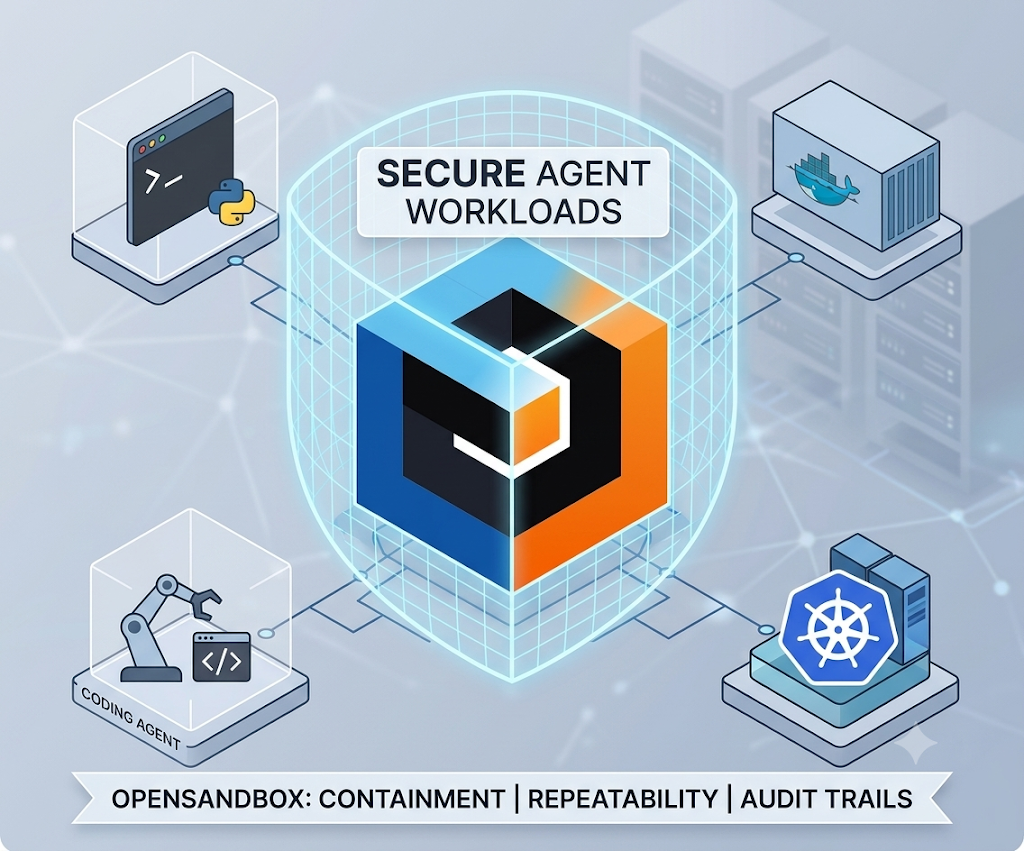
Coding agents have moved quickly from novelty to something teams actually rely on for real work: writing code, running tests, browsing documentation, calling internal services, and iterating on tasks with minimal supervision. That shift raises a question that most teams have not fully solved yet. Where, exactly, should an autonomous agent be allowed to run? Letting it operate directly on a developer’s laptop, with full access to private repositories, local credentials, and whatever network the machine happens to be connected to, is convenient in a demo but becomes uncomfortable very quickly once real work, real secrets, and real production systems enter the picture.
OpenSandbox, an open source project maintained under Alibaba’s GitHub organization, is built specifically to answer that question. It describes itself as a general purpose sandbox platform for AI applications, offering multi language software development kits, a unified sandbox API, and both Docker and Kubernetes runtimes suited to scenarios such as coding agents, graphical user interface agents, agent evaluation pipelines, general AI code execution, and reinforcement learning training. In practical terms, it gives a team a controlled runtime layer sitting between an agent and the outside world, so an agent can still do everything it needs to do, running shells, editing files, browsing the web, calling internal services, without doing all of that directly on someone’s personal machine or inside an uncontained environment.
The Core Problem OpenSandbox Solves
Running an agent safely at scale involves several distinct concerns that tend to get bundled together in ad hoc ways when a team improvises its own solution. There is the question of isolation: can an agent’s actions inside its working environment be contained so that a mistake, or a genuinely malicious instruction slipped into a prompt, cannot spill out and affect anything beyond its intended workspace. There is the question of repeatability: can the exact same task be run again later and produce a comparable result, which matters enormously for evaluation, debugging, and trust. There is the question of auditability: is there a clear record of what commands an agent actually executed and what files it touched. And there is the question of network control: can an agent reach the specific internal services or approved external endpoints it legitimately needs, without also being able to reach everything else on a corporate network or the broader internet without restriction.
OpenSandbox addresses all four of these concerns through one consistent interface, rather than requiring a team to stitch together separate tooling for isolation, orchestration, logging, and network policy. The project provides a documented sandbox protocol defining both lifecycle management, meaning how sandboxes are created and destroyed, and execution, meaning how commands and file operations happen inside a running sandbox, which means custom sandbox runtimes can be built against a stable specification rather than against implementation details that might change over time.
What Is Actually Inside the Platform
At the heart of OpenSandbox sits a sandbox runtime with built in lifecycle management, supporting both a straightforward Docker backend for local development and testing, and a more capable Kubernetes backend for large scale, distributed scheduling across many concurrent sandboxes. This dual backend approach matters in practice, since a team can develop and test an agent workflow locally against Docker, then move the identical workflow to a Kubernetes deployment once it needs to run at a scale a single machine cannot handle, without rewriting the underlying integration.
Inside a running sandbox, three built in environments cover the majority of what an agent typically needs: a command execution environment for running shell commands, a filesystem environment for reading and writing files, and a code interpreter environment for executing code directly. Beyond these fundamentals, example environments in the project cover more specialized scenarios, including coding agents such as Claude Code running inside a contained workspace, browser automation through Chrome and Playwright, and full desktop environments accessible through VNC alongside a browser based version of VS Code for remote development.
Network behavior is handled through what the project calls a unified ingress gateway, supporting multiple routing strategies for traffic coming into a sandbox, paired with per sandbox egress controls governing what a sandbox is allowed to reach on its way out. This separation of ingress and egress policy is a meaningful design choice, since agent security in practice tends to depend far more on tightly scoping what an agent can reach outward, particularly credentials and internal services, than on inbound traffic alone.
Handling secrets safely is addressed through a dedicated credential vault, which allows credentials to be injected into a sandbox’s outbound requests without the actual secret values ever being exposed directly to the workload running inside the sandbox. This is a subtle but important distinction: an agent can make an authenticated request to an internal API without ever actually holding, printing, or accidentally leaking the underlying API key or token itself.
For teams with stricter isolation requirements, particularly organizations running genuinely untrusted or unpredictable agent behavior, OpenSandbox supports several hardened container runtimes as alternatives to standard container isolation, including gVisor, Kata Containers, and Firecracker style micro virtual machines. These technologies each provide a stronger isolation boundary between a sandbox workload and the underlying host system than a standard container alone offers, at some additional operational and performance cost, and the choice among them is something a team can tune based on how much it trusts the workloads it expects to run.
Installing the SDKs
OpenSandbox ships client libraries across a wide range of languages, reflecting the reality that agent tooling today is built across a genuinely mixed technology landscape rather than a single dominant language.
Python developers install the SDK through the standard package manager:
pip install opensandboxJava and Kotlin projects can add the dependency through Gradle’s Kotlin DSL:
dependencies {
    implementation("com.alibaba.opensandbox:sandbox:{latest_version}")
}
or through Maven:
<dependency>
    <groupId>com.alibaba.opensandbox</groupId>
    <artifactId>sandbox</artifactId>
    <version>{latest_version}</version>
</dependency>
JavaScript and TypeScript projects install through npm:
npm install @alibaba-group/opensandbox.NET projects use the standard dotnet tooling:
dotnet add package Alibaba.OpenSandboxAnd Go projects fetch the module directly:
go get github.com/alibaba/OpenSandbox/sdks/sandbox/goHaving first class support across Python, Java, Kotlin, JavaScript, TypeScript, C#, and Go removes a common source of friction in adopting sandboxing infrastructure, since a platform team does not need to force every application team onto a single shared language just to get consistent sandbox behavior.
Using the Command Line Interface
Beyond the programmatic SDKs, OpenSandbox provides a dedicated terminal tool called osb, aimed at the common day to day sandbox workflow: creating sandboxes, running commands inside them, moving files in and out, inspecting diagnostics, and managing runtime egress policy directly from a terminal session.
Installation follows either of two common Python tooling conventions:
pip install opensandbox-cli
# or
uv tool install opensandbox-cli
A typical first session configures a connection to a running sandbox server, then creates and interacts with a sandbox directly:
osb config init
osb config set connection.domain localhost:8080
osb config set connection.protocol http
osb config set connection.api_key <your-api-key>
osb sandbox create --image python:3.12 --timeout 30m -o json
osb command run <sandbox-id> -o raw -- python -c "print(1 + 1)"
This kind of direct command line access is particularly useful during development and debugging, letting an engineer poke at a sandbox interactively before wiring the same sandbox creation and execution calls into an actual agent pipeline.
Connecting Through MCP
For teams building on top of the Model Context Protocol, OpenSandbox exposes its core capabilities, namely sandbox creation, command execution, and text file operations, directly to any MCP capable client, including tools such as Claude Code and Cursor.
Getting the MCP server running is a short sequence:
pip install opensandbox-mcp
opensandbox-mcp --domain localhost:8080 --protocol http
A minimal configuration entry for an MCP client connecting over standard input and output looks like this:
{
  "mcpServers": {
    "opensandbox": {
      "command": "opensandbox-mcp",
      "args": ["--domain", "localhost:8080", "--protocol", "http"]
    }
  }
}
This means an existing agent tool that already understands how to talk to MCP servers can gain sandboxed execution capability without any custom integration work beyond adding this configuration entry, since OpenSandbox handles translating MCP tool calls into actual sandbox lifecycle and execution operations behind the scenes.
Getting a Local Environment Running
For anyone evaluating the platform for the first time, the most direct path starts with a local Docker based server. The prerequisites are straightforward: a working Docker installation for local execution, and Python 3.10 or later for running the examples and local runtime tooling.
Setting up and starting the sandbox server locally involves generating an example configuration file and then launching the server against it:
uvx opensandbox-server init-config ~/.sandbox.toml --example docker
uvx opensandbox-server
Help output describing available options is accessible directly from the same command:
uvx opensandbox-server -hWorking With the Code Interpreter
One of the more immediately useful built in environments is the code interpreter, which lets an application create a sandbox, run arbitrary code inside it, and retrieve both the output and any returned result value, all through a small, readable asynchronous API.
Installing the code interpreter SDK follows the same pattern as the base SDK:
uv pip install opensandbox-code-interpreterA complete, minimal example demonstrates the typical lifecycle of creating a sandbox, running a shell command, writing and reading a file, executing Python code through the interpreter, and finally cleaning up:
import asyncio
from datetime import timedelta
from code_interpreter import CodeInterpreter, SupportedLanguage
from opensandbox import Sandbox
from opensandbox.models import WriteEntry
async def main() -> None:
    # Create a sandbox
    sandbox = await Sandbox.create(
        "opensandbox/code-interpreter:v1.1.0",
        entrypoint=["/opt/code-interpreter/code-interpreter.sh"],
        env={"PYTHON_VERSION": "3.11"},
        timeout=timedelta(minutes=10),
    )
    async with sandbox:
        # Execute a shell command
        execution = await sandbox.commands.run("echo 'Hello OpenSandbox!'")
        print(execution.logs.stdout[0].text)
        # Write a file
        await sandbox.files.write_files([
            WriteEntry(path="/tmp/hello.txt", data="Hello World", mode=644)
        ])
        # Read a file
        content = await sandbox.files.read_file("/tmp/hello.txt")
        print(f"Content: {content}")
        # Create a code interpreter and execute Python code
        interpreter = await CodeInterpreter.create(sandbox)
        result = await interpreter.codes.run(
            """
            import sys
            print(sys.version)
            result = 2 + 2
            result
            """,
            language=SupportedLanguage.PYTHON,
        )
        print(result.result[0].text)
        print(result.logs.stdout[0].text)
        # Cleanup the sandbox
        await sandbox.kill()
if __name__ == "__main__":
    asyncio.run(main())
This short example touches nearly every core capability of the platform at once: creating an isolated environment from a specified image, running shell commands, performing file operations, executing code and capturing both its printed output and its returned value, and finally tearing the sandbox down cleanly once the work is finished.
A Broader Set of Examples
Beyond the core workflow, the project maintains a fairly extensive collection of runnable examples spanning several distinct categories of use.
Basic examples cover a full code interpreter workflow, an all in one sandbox setup pattern, integration with the Kubernetes native agent sandbox project, and several persistent storage patterns covering Docker persistent volume claims, Docker OSSFS integration, and Kubernetes persistent volume claims for scenarios requiring durable or shared storage across sandbox runs.
Coding agent integrations demonstrate running several major vendor coding assistants, including Claude Code, Gemini CLI, OpenAI’s Codex CLI, Qwen Code, and Kimi CLI, each operating from inside a contained sandbox rather than directly on a host machine. Additional examples show a LangGraph based state machine workflow that creates and runs a sandbox job with automatic fallback retry behavior, a Google Agent Development Kit example using OpenSandbox tools to read and write files and execute commands, and an example launching an OpenClaw gateway from inside a sandbox.
Browser and desktop environment examples cover a Chromium sandbox exposing both VNC access and developer tools for interactive automation and debugging, a Playwright driven headless scraping and testing example, a complete desktop environment reachable through VNC, and a browser accessible instance of VS Code running as code-server for full remote development from inside a sandbox.
Training and evaluation examples include a reinforcement learning demonstration training a DQN agent on the classic CartPole task with checkpointing and summary reporting, alongside an example running a Harbor based agent evaluation, allocating one dedicated sandbox per individual evaluation trial to keep results cleanly isolated from one another.
How the Project Is Organized
The repository itself follows a fairly conventional layout for a project of this scope. Multi language SDKs live under a dedicated sdks directory. OpenAPI specifications and lifecycle definitions live under specs. A Python based FastAPI server implementing sandbox lifecycle management lives under server. The command line interface has its own cli directory. Kubernetes deployment manifests and examples live under kubernetes. Lower level components are split out individually, including an execution daemon responsible for running commands and file operations inside a sandbox, an ingress component handling traffic routing into sandboxes, and an egress component enforcing outbound network control. Runtime sandbox implementations themselves live under sandboxes, runnable example code lives under examples with accompanying documentation under docs/examples, formal enhancement proposals for the project live under oseps, broader architecture and design documentation lives under docs, cross component end to end tests live under tests, and development and maintenance scripts live under scripts.
This structure reflects a project designed with a clear separation between protocol, implementation, and tooling, which tends to age well as a platform grows, since new runtime backends or new client languages can generally be added without disturbing the core protocol definition that everything else depends on.
Why This Matters for Teams Adopting Agents at Work
For an organization moving from experimenting with coding agents to actually relying on them for real engineering work, the appeal of a platform like OpenSandbox comes down to a small number of practical guarantees. Agents that need access to private repositories, live browsers, interactive shells, or internal services can get exactly that access, scoped tightly through egress policy and credential injection, without requiring uncontrolled access from an individual laptop. Runs become genuinely repeatable, since a sandbox created from a specified image with a specified configuration behaves consistently regardless of which machine happens to be orchestrating it.
A clear audit trail of executed commands and file operations becomes available as a natural byproduct of routing all agent activity through a common execution daemon, rather than something bolted on afterward. And containment becomes a structural property of the system, backed where necessary by genuinely hardened isolation technologies, rather than something that depends entirely on an agent behaving exactly as expected every single time.
Conclusion
As coding agents move from interesting demonstrations into genuine daily tooling inside real engineering organizations, the question of where those agents are allowed to run stops being an afterthought and becomes a first order infrastructure decision. OpenSandbox offers a coherent, well documented answer to that question: one consistent API and protocol, a capable command line tool, native MCP support, both Docker and Kubernetes backends depending on scale, a dedicated execution daemon for commands and files, fine grained network egress policy, secure credential handling, and optional hardened isolation runtimes for the highest risk workloads. Rather than every team independently improvising its own combination of containers, network rules, and logging around agent activity, OpenSandbox packages that entire concern into a single, extensible platform, letting teams focus their attention on what their agents actually accomplish rather than on the infrastructure required to run them safely.
The repository is available at: https://github.com/opensandbox-group/OpenSandbox
메타데이터
- post_id
- 41cc841a1d1c
- slug
- giving-coding-agents-a-safe-place-to-run-a-complete-guide-to-opensandbox-41cc841a1d1c
- url
- https://medium.com/open-intelligence/giving-coding-agents-a-safe-place-to-run-a-complete-guide-to-opensandbox-41cc841a1d1c
- canonical_url
- https://medium.com/open-intelligence/giving-coding-agents-a-safe-place-to-run-a-complete-guide-to-opensandbox-41cc841a1d1c
- author_url
- https://medium.com/@eng.fadishaar
- status
- ok
- fetched_at
- 2026-07-08 18:29:56