Why Transactions Matter in Modern Applications
When you start working with databases or backend systems, one concept keeps coming up again and again: transactions. Before jumping into…
Why Transactions Matter in Modern Applications
When you start working with databases or backend systems, one concept keeps coming up again and again: transactions. Before jumping into frameworks or annotations, let’s understand the idea in the simplest possible way.
What Is a Transaction?
At its core, A transaction is a set of actions that must either succeed together or fail together.
There is no partial success. Either everything happens, or nothing happens.
A Simple Non-Technical Example: ATM Withdrawal
Check balance → Deduct money → Dispense cash → Update accountNow think about this scenario: Money is deducted from your account. But the ATM fails to dispense cash
That’s unacceptable. So if step 3 fails, step 2 must be undone.
This entire sequence is treated as one transaction.
Why Do We Even Need Transactions?
Transactions exist to prevent systems from reaching inconsistent or broken states. Without them, one operation may succeed while another fails — like an order being saved without a payment — whereas transactions ensure that if any step fails, everything is rolled back and the system remains correct.
Transaction States (Very Important)
A transaction has only a few possible states:
- Begin — the transaction starts
- Commit — everything succeeded, changes are saved permanently
- Rollback — something failed, all changes are undone
Transactions in Database Terms
DECLARE
    -- You can declare variables if needed
    v_order_id    orders.order_id%TYPE := 101;
    v_payment_id  payments.payment_id%TYPE := 201;
BEGIN
    -- Start the transaction (implicit in PL/SQL block)

    -- Insert into orders table
    INSERT INTO orders (order_id, customer_id, order_date, total_amount)
    VALUES (v_order_id, 1, SYSDATE, 500);

    -- Insert into payments table
    INSERT INTO payments (payment_id, order_id, payment_date, amount)
    VALUES (v_payment_id, v_order_id, SYSDATE, 500);

    -- Commit the transaction if everything is fine
    COMMIT;

EXCEPTION
    WHEN OTHERS THEN
        -- If any error occurs, rollback the transaction
        ROLLBACK;
        DBMS_OUTPUT.PUT_LINE('Transaction failed: ' || SQLERRM);
END;
/
ACID Properties of Transactions
ACID stands for: Atomicity, Consistency, Isolation, and Durability.
- Atomicity: Either the whole transaction happens, or nothing happens.
- Consistency: Transactions always leave the database in a valid state.
- Isolation: Each transaction behaves as if it’s the only one in the system.
- Durability: Once a transaction is committed, the changes cannot be lost, even if the system crashes.
How Spring Transactions Work
- Spring does not actually create or manage transactions itself in your method.
- Instead, it uses AOP (Aspect-Oriented Programming) to “wrap” your method in transactional behavior.
- Think of AOP like a wrapper or interceptor: it adds extra logic before and after your method runs.
Transaction Manager
Spring delegates the actual transaction work to a transaction manager. They handle opening connections or sessions, starting Transactions, committing or rolling back, and releasing the resources.
- JDBC → DataSourceTransactionManager
- JPA/Hibernate → JpaTransactionManager
- Hibernate native → HibernateTransactionManager
@Transactional
public void placeOrder() {
    // do stuff
}
Spring does these things under the hood:
When you annotate a method with @Transactional, Spring:
- Creates a proxy for the bean.
2. Proxy Intercepts Call
- Spring AOP intercepts the call to
placeOrder(). - Decides to start a transaction because of
@Transactional.
3. Transaction Started
PlatformTransactionManager.getTransaction()is called.- Checks propagation rules.
- Opens a connection (JDBC) or session (JPA/Hibernate).
4. Method Execution
- Calls
orderRepository.save(order)→ executed inside transaction. - Calls
paymentService.processPayment(order).
5. Outcome
- No exception:
commit()called → transaction committed. - RuntimeException / Error:
rollback()called → transaction rolled back. - Checked exception: By default, the transaction is not rolled back unless
rollbackForis set.
6. Cleanup
- Connection/session is released.
- Proxy returns control to the caller.
There are two main types of proxies:
- JDK Dynamic Proxy → used if the bean implements an interface.
- CGLIB Proxy → used if the bean is a class without an interface.
Important:
- Only public methods called from outside the bean go through the proxy.
- Internal method calls won’t trigger a transaction if called from within the same class.
Transaction Propagation
Transaction propagation tells Spring what to do when a transactional method is called from another transaction method(should it reuse the existing transactions, create a new transaction, or run without transactions). Spring provides 7 propagation behaviours.
- REQUIRED(default): Use the existing transaction if there is one; otherwise, create a new transaction.
- REQUIRES_NEW: Always create a new transaction, suspend the existing one if there is one.
@Service
public class OuterService {

    @Autowired
    private InnerService innerService;

    @Transactional
    public void outer() {
        // Step 1: do something
        innerService.inner();
        // Step 3: do something else
    }
}

@Service
public class InnerService {

    @Transactional(propagation = Propagation.REQUIRES_NEW)
    public void inner() {
        // inner operation
    }
}- MANDATORY: Must run inside an existing transaction; throws an exception if there is none.
@Service
public class InnerService {

    @Transactional(propagation = Propagation.MANDATORY)
    public void inner() {
        System.out.println("Doing something inside a transaction");
    }
}

@Service
public class OuterService {

    @Autowired
    private InnerService innerService;

    @Transactional
    public void outer() {
        innerService.inner();  // ✅ Works fine
    }

    public void test() {
        innerService.inner();  // ❌ Throws exception
    }
}-
SUPPORTS: Use existing transaction if there is one; otherwise, run non-transactionally.
-
NOT_SUPPORTED: Always run non-transactionally; suspend any existing transaction.
-
NEVER: Must run outside a transaction; throws an exception if a transaction exists.
-
NESTED: Run in a nested transaction if a transaction exists; otherwise, behaves like REQUIRED. Nested transactions can rollback independently without affecting the parent.
Isolation Level in Transactions
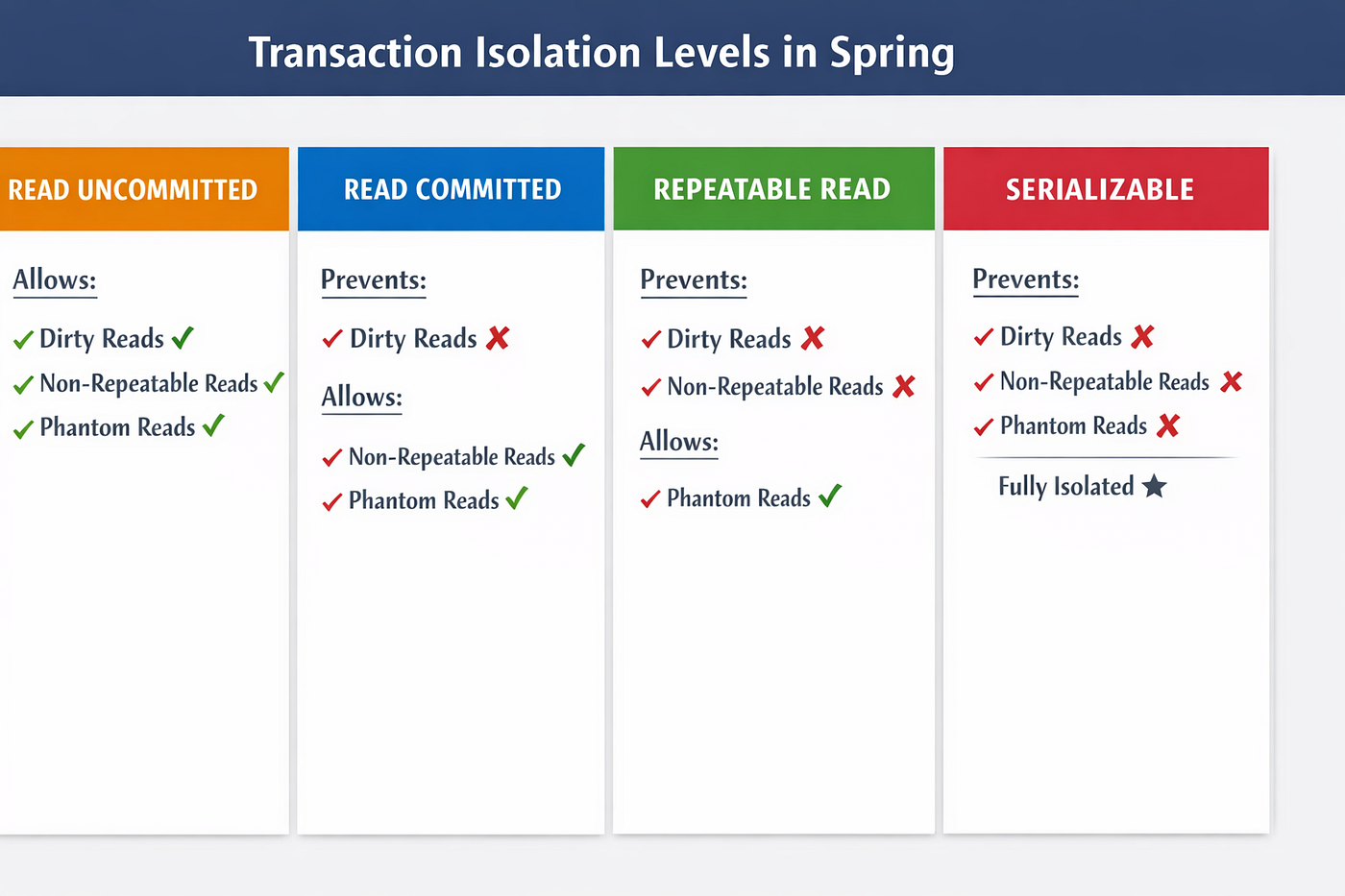
Isolation level determines how and when changes made by one transaction become visible to other transactions.
It’s about data consistency and concurrency control.
Types of Data Anomalies
- Dirty Read: Transaction A reads data that Transaction B has changed but not yet saved. If Transaction B rolls back, A has read something that never really existed.
- Non-Repeatable Read: Transaction A reads the same row twice, but Transaction B changes it in between. So, Transaction A gets different results in the same transaction.
- Phantom Read: Transaction A reads a set of rows that match a condition. Transaction B inserts new rows that also match that condition. Transaction A reads again → new “phantom” rows appear.
Rollback Rules
- By default: Rollback only on unchecked exceptions (
RuntimeException,Error). - Checked exceptions do not trigger rollback unless specified:
@Transactional(rollbackFor = {Exception.class, SQLException.class})
public void doSomething() throws Exception { ... }
You can also prevent rollback for certain exceptions:
@Transactional(noRollbackFor = {CustomRuntimeException.class})Transaction in Testing
In integration testing, you often insert data into the database, run business logic, and assert results. Without transactions, each test leaves data behind, polluting the database and making it hard to reset the state between tests. Spring solves this by wrapping each test in a transaction that, by default, is rolled back at the end of the test, ensuring a clean database every time.
**@Transactional**
- Each test runs in a separate transaction.
- The transaction is rolled back after the test by default.
- No manual cleanup needed.
- Works with
@SpringBootTestor@DataJpaTest.
2. @Rollback Annotation
- transaction commits at the end of the test.
- Useful for debugging or populating test data.
- By default,
@Transactionalin tests → rollback = true.
3. @TestExecutionListeners and Transaction Management
Spring test framework uses TransactionalTestExecutionListener:
- Intercepts before and after the test method
- Starts transaction before test
- Rolls back after test
Important Notes
- Propagation Matters
- Default
@TransactionalusesPropagation.REQUIRED. - Service method transactions are nested inside the test transaction.
- If the service uses
REQUIRES_NEW, it will commit independently, even if the test rolls back.
- Read-Only Transactions
- Optimizes DB operations for read-only tests.
- Can prevent accidental writes.
@Transactional(readOnly = true)3. Integration vs Unit Tests
@TransactionalTests are integration tests, not pure unit tests.- They require Spring context and database.
Simple Example:
@SpringBootTest
@Transactional
class OrderServiceIntegrationTest {

    @Autowired
    private OrderService orderService;

    @Autowired
    private OrderRepository orderRepository;

    @Test
    void testSuccessfulOrder() {
        Order order = new Order("Laptop", 1);
        orderService.placeOrder(order);

        // Test DB state inside transaction
        assertEquals(1, orderRepository.count());
    }

    @Test
    void testOrderRollbackOnException() {
        Order order = new Order("Laptop", 1);

        assertThrows(RuntimeException.class, () -> {
            orderService.placeOrderWithFailure(order);
        });

        // DB should remain clean after rollback
        assertEquals(0, orderRepository.count());
    }
}
메타데이터
- post_id
- 41e6b84fcaf4
- slug
- why-transactions-matter-in-modern-applications-41e6b84fcaf4
- url
- https://medium.com/@yramcharanteja/why-transactions-matter-in-modern-applications-41e6b84fcaf4
- canonical_url
- https://medium.com/@yramcharanteja/why-transactions-matter-in-modern-applications-41e6b84fcaf4
- author_url
- https://medium.com/@yramcharanteja
- status
- ok
- fetched_at
- 2026-08-07 21:47:05




