From push() to reduce(): Mastering JavaScript Array Methods
1. Introduction
From push() to reduce(): Mastering JavaScript Array Methods
1. Introduction
If you’ve worked with JS arrays , you’ve probably used method like push() or pop() to add and remove elements . But JS arrays come with a whole toolbox of built-in methods that can help you search , transform , filter , sort and manipulate data without writing everything form scratch .
In this blog we’ll explore some of the most useful JS array methods , understanding how they work and see practical eg of when to use them . Whether you’re just getting started with JS or want to strengthen your fundamentals , mastering these method will make working with arrays much easier.
2 . Push() and Pop() method
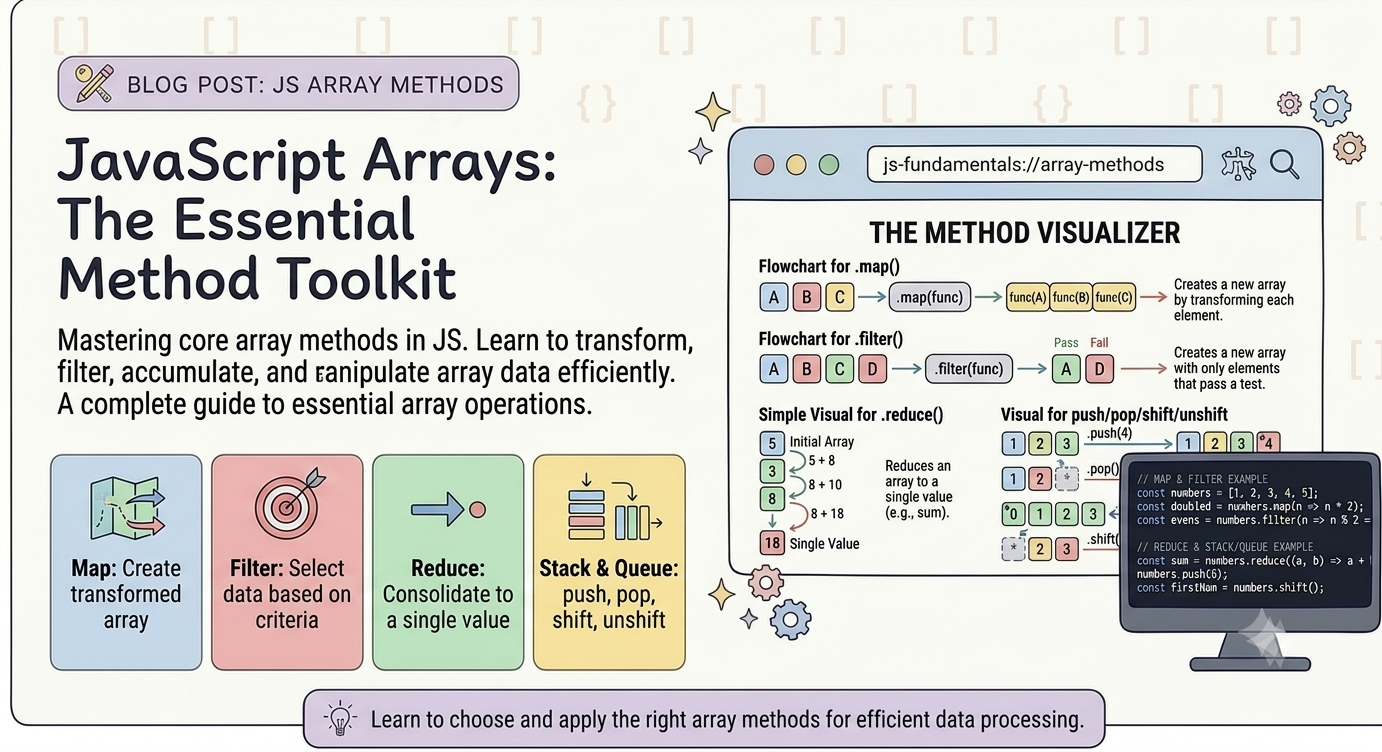
In JS push() adds one or more elements to the end of an array , while pop() removes the very last element from that same array . Both methods directly mutate (modify) the original array .
Together , they allow us to easily implement a LIFO ( last-in , First-Out) stack data structure in JS .
1 . The push() Method : It allows us to append the values to the end of an array instance and returns the new length of the array .
const tools = ['hammer', 'screwdriver'];

// Add a single item
const newLength = tools.push('wrench');

console.log(tools);     // Output: ['hammer', 'screwdriver', 'wrench']
console.log(newLength); // Output: 3

// Add multiple items at once
tools.push('saw', 'drill');
console.log(tools);     // Output: ['hammer', 'screwdriver', 'wrench', 'saw', 'drill']
As we can see from the above eg that the push() method allow us to add elements to the end and it can accept one or more items .
2 . The pop() Method : It allows us to remove the last element from an array and returns that removed element , If the array is empty , it returns undefined without throwing an error .
const tools = ['hammer', 'screwdriver', 'wrench'];

// Remove the last item
const removedItem = tools.pop();

console.log(tools);       // Output: ['hammer', 'screwdriver']
console.log(removedItem); // Output: 'wrench'

// Calling pop on an empty array
const emptyArray = [];
console.log(emptyArray.pop()); // Output: undefined
As we can see from the above eg that the pop() method allow us to remove the last element and it does not accept any arguments .
3 . shift() and unshift() method
shift() and unshift() are built-in JS array methods used to modify the beginning of an array , both methods are destructive , meaning they alter the original array directly rather than creating a new one .
1 . The shift() Method : It helps to removes the first element from an array and returns that removed element. This action shifts all subsequent elements down by one index .
- Syntax :
array.shift()
const colors = ["red", "blue", "green"];

const firstColor = colors.shift();

console.log(firstColor); // Output: "red"
console.log(colors);     // Output: ["blue", "green"]
From the above eg we can understand that shift() method helps to remove the first item and it returns the removed element .
2 . The unshift() Method : It helps to add one or more elements to the beginning of an array .
- Syntax :
array.unshift(element1 , element2 ,... elementx
const numbers = [3, 4];

const newLength = numbers.unshift(1, 2);

console.log(newLength); // Output: 4
console.log(numbers);   // Output: [1, 2, 3, 4]
From the above eg we can understand that unshift() method helps to add elements to the beginning of the array and it return the new array length.
4 . The Map() Method
The JS map() method creates a new array by applying a specific callback function to every element of the original array . It loops through each item sequentially , transforms it based on our logic and returns the newly constructed array without changing the original one .
- Basic syntax : const newArr = originalArray.map((element , index ,array) => { return the new value for this element });
element: The current item being processed in the array .index: The index position of the current item .array: The original arraymap()was called upon .
Common use cases :
1 . Transforming Array Elements : We can apply a mathematical or string operation to every item .
const numbers = [1, 2, 3, 4];
const doubled = numbers.map(num => num * 2);

console.log(doubled); // [2, 4, 6, 8]
console.log(numbers); // [1, 2, 3, 4] (Original remains unchanged)
2 . Extracting specific Data from object : This is highly useful when handling APIs responses where we only need one propety .
const users = [
  { id: 1, name: "Alice" },
  { id: 2, name: "Bob" }
];

const names = users.map(user => user.name);
console.log(names); // ["Alice", "Bob"]
The map() method returns a new array and it does not change the original array , it help us to transform data into a new format and it provide chainability i.e we can attach more method to it .
5 . The filter() Method
JS Array.prototype.filter() method creates a new array containing all elements form the original array that pass a specific test implemented by a provided callback function , It does not mutate the original array .
- Syntax : filter(callbackFn)
The Callback Parameters :The callback function executes for every element and accepts three arguments.
element: The current item being processed .index: The index of the current item and it is optional .array: The original array being iterated and this is optional as well .
const numbers = [5, 12, 8, 130, 44];

const bigNumbers = numbers.filter(num => num > 10);

console.log(bigNumbers);
// Output: [12, 130, 44]
As we can see the above example is of basic number filtering and it filter an array to keep only numbers greater than 10 .
Now we can say that the filter() method returns a new array of all matching elements and returns an empty array [] if no matches are found .
6 . The Reduce Method
The Array.prototype.reduce() method in JS executes a user-supplied “reducer” callback function on each element of an array to calculate and return a single accumulated value . It passes the return value from the calculations on the preceding element to the next iteration , effectively “reducing” the array down to one result .
- Syntax :
array.reduce(( accumulator , currentValue , currentIndex , array ) => {

// some code here

return accumulator ;
}, initialValue);accumulator: It is the callback’s return value . It is the accumulated result from the previous iteration .currentValue: The current element being processed in the array .currentIndex: The index of the current element being processed and it is optional .array: The original array upon whichreduce()was called .initialValue: The value to use as the first argument to the first call of the callback .- The return value of that results from running the “reducer” callback function to completion over the entire array .
const numbers = [10, 20, 30, 40];

const totalSum = numbers.reduce((accumulator, currentValue) => {
  return accumulator + currentValue;
}, 0); // initialValue is 0

console.log(totalSum); // Output: 100
The above eg is the most common use case i.e summing an array of numbers .
const fruits = ['apple', 'banana', 'apple', 'orange', 'banana', 'apple'];

const fruitCount = fruits.reduce((accumulator, fruit) => {
  // If the fruit exists in the object, increment it; otherwise, set it to 1
  accumulator[fruit] = (accumulator[fruit] || 0) + 1;
  return accumulator;
}, {}); // initialValue is an empty object

console.log(fruitCount);
// Output: { apple: 3, banana: 2, orange: 1 }
We can use an empty object {} as the initialValue to map and count items inside an array .
7 . The forEach() Method
The forEach() method in JS executes a provided callback function once for every element in an array . It is primarily used to trigger side effects such as logging data , modifying external variables or updating DOM elements rather than creating new arrays .
Syntax :
array.forEach(( element , index , array ) => {
// some code here
});
The callback function can accept up to three arguments in this strict order .
element : The current item being processed .
index : The index number of the current item .
array : The entire array that forEach() was called on .
const fruits = ['apple', 'banana', 'cherry'];

fruits.forEach(fruit => console.log(fruit));
// Output:
// apple
// banana
// cherry
Note : A loop is a general tool to repeat any code . A map transforms every item in a list to make a new list of the same size . A filter checks items and keeps only the one that pass a test , making a new list that can be smaller .
8 . Conclusion
JavaScript array methods are one of the most powerful tools for working with collections of data. From adding and removing elements with push(), pop(), shift(), and unshift() to transforming and filtering data with map(), filter(), and reduce(), these methods can make your code cleaner, shorter, and easier to understand.
You don’t need to memorize every method at once. Start with the commonly used ones, understand when and why to use them, and gradually explore the rest as you build projects.
The more you work with arrays, the more naturally these methods will become part of your JavaScript toolkit.
Keep practicing , keep building and keep exploring !!!!!!
Please share your feedback with us !!!!
Thank You 😀
메타데이터
- post_id
- 41ecf1e2ddd6
- slug
- from-push-to-reduce-mastering-javascript-array-methods-41ecf1e2ddd6
- url
- https://medium.com/@anshultrip1234/from-push-to-reduce-mastering-javascript-array-methods-41ecf1e2ddd6
- canonical_url
- https://medium.com/@anshultrip1234/from-push-to-reduce-mastering-javascript-array-methods-41ecf1e2ddd6
- author_url
- https://medium.com/@anshultrip1234
- status
- ok
- fetched_at
- 2026-08-19 13:10:02