Testing in Jetpack Compose — A Beginner's Guide
Introduction
Testing in Jetpack Compose — A Beginner's Guide
Introduction
You have built a beautiful Compose app with proper architecture, navigation, animations and performance. But how do you make sure everything keeps working as your app grows?
The answer is Testing!
Most developers skip testing because it feels complicated and time consuming. But in Jetpack Compose, testing is actually fun and easy once you know the basics!
In this beginner-friendly guide, I will walk you through everything you need to know about testing in Jetpack Compose — with real examples you can use right away!
Why Testing Matters?
- Catches bugs before users do 🐛
- Makes refactoring safe and confident 💪
- Saves hours of manual testing time ⏰
- Makes your code more reliable ✅
- Impresses in job interviews 🎯
Types of Tests in Android
┌─────────────────────────────────────┐ │ UI Tests (Compose) │ ← Test what user sees ├─────────────────────────────────────┤ │ Integration Tests │ ← Test layers together ├─────────────────────────────────────┤ │ Unit Tests │ ← Test single functions └─────────────────────────────────────┘
Step 1 — Add Dependencies
dependencies { // Unit Testing testImplementation “junit:junit:4.13.2” testImplementation “org.jetbrains.kotlinx:kotlinx-coroutines-test:1.7.3” testImplementation “io.mockk:mockk:1.13.8”
// Compose UI Testing androidTestImplementation “androidx.compose.ui:ui-test-junit4:1.5.4” androidTestImplementation “androidx.test.ext:junit:1.1.5” androidTestImplementation “androidx.test.espresso:espresso-core:3.5.1”
// Hilt Testing androidTestImplementation “com.google.dagger:hilt-android-testing:2.48” kaptAndroidTest “com.google.dagger:hilt-android-compiler:2.48”
debugImplementation “androidx.compose.ui:ui-test-manifest:1.5.4” }
Part 1 — Unit Tests
Unit tests test single functions or classes in isolation — no Android device needed!
Testing a ViewModel:
// ViewModel to test
@HiltViewModel
class CounterViewModel @Inject constructor() : ViewModel() {
    private val _count = MutableStateFlow(0)
    val count: StateFlow<Int> = _count.asStateFlow()
   fun increment() { _count.value++ }
    fun decrement() { _count.value-- }
    fun reset() { _count.value = 0 }
}
Unit Test:
class CounterViewModelTest {
  private lateinit var viewModel: CounterViewModel
 @Before
    fun setup() {
        viewModel = CounterViewModel()
    }
 @Test
    fun `initial count should be zero`() {
        assertEquals(0, viewModel.count.value)
    }
  @Test
    fun `increment should increase count by 1`() {
        viewModel.increment()
        assertEquals(1, viewModel.count.value)
    }
 @Test
    fun `decrement should decrease count by 1`() {
        viewModel.increment()
        viewModel.decrement()
        assertEquals(0, viewModel.count.value)
    }
  @Test
    fun `reset should set count to zero`() {
        viewModel.increment()
        viewModel.increment()
        viewModel.reset()
        assertEquals(0, viewModel.count.value)
    }
}
Testing a UseCase:
// UseCase to test
class GetArticlesUseCase @Inject constructor(
    private val repository: NewsRepository
) {
    suspend operator fun invoke(): Result<List<Article>> {
        return repository.getArticles()
    }
}
UseCase Test with MockK:
class GetArticlesUseCaseTest {
    private val repository: NewsRepository = mockk()
    private lateinit var useCase: GetArticlesUseCase
   @Before
    fun setup() {
        useCase = GetArticlesUseCase(repository)
    }
    @Test
    fun `returns articles on success`() = runTest {
        // Given
        val fakeArticles = listOf(
            Article("1", "Title 1", "Desc 1", ""),
            Article("2", "Title 2", "Desc 2", "")
        )
        coEvery { repository.getArticles() } returns Result.success(fakeArticles)
   // When
        val result = useCase()
  // Then
        assertTrue(result.isSuccess)
        assertEquals(2, result.getOrNull()?.size)
    }
 @Test
    fun `returns error on failure`() = runTest {
        // Given
        coEvery { repository.getArticles() } returns
            Result.failure(Exception("Network error"))
  // When
        val result = useCase()
 // Then
        assertTrue(result.isFailure)
        assertEquals("Network error", result.exceptionOrNull()?.message)
    }
}
Part 2 — Compose UI Tests
Compose UI tests let you interact with your UI and verify what is shown on screen.
Setting Up Compose Test Rule:
class MyComposeTest {
@get:Rule
    val composeTestRule = createComposeRule()
}
Testing a Simple Composable:
// Composable to test
@Composable
fun GreetingScreen(name: String) {
    Column(
        modifier = Modifier.fillMaxSize(),
        horizontalAlignment = Alignment.CenterHorizontally,
        verticalArrangement = Arrangement.Center
    ) {
        Text(
            text = "Hello, $name!",
            fontSize = 24.sp
        )
        Button(onClick = {}) {
            Text("Click Me")
        }
    }
}
UI Test:
class GreetingScreenTest {
 @get:Rule
    val composeTestRule = createComposeRule()
  @Test
    fun greetingScreen_showsCorrectName() {
        // Set content
        composeTestRule.setContent {
            GreetingScreen(name = "Anuradha")
        }
  // Check text is displayed
        composeTestRule
            .onNodeWithText("Hello, Anuradha!")
            .assertIsDisplayed()
    }
  @Test
    fun greetingScreen_buttonIsDisplayed() {
        composeTestRule.setContent {
            GreetingScreen(name = "Anuradha")
        }
.onNodeWithText("Click Me")
            .assertIsDisplayed()
    }
}
Testing User Interactions:
// Composable to test
@Composable
fun CounterScreen() {
    var count by remember { mutableStateOf(0) }
 Column(horizontalAlignment = Alignment.CenterHorizontally) {
        Text(
            text = "Count: $count",
            modifier = Modifier.testTag("countText")
        )
        Button(
            onClick = { count++ },
            modifier = Modifier.testTag("incrementButton")
        ) {
            Text("Increment")
        }
        Button(
            onClick = { count-- },
            modifier = Modifier.testTag("decrementButton")
        ) {
            Text("Decrement")
        }
    }
}
Interaction Test:
class CounterScreenTest {
    @get:Rule
    val composeTestRule = createComposeRule()
   @Test
    fun counterScreen_incrementsCorrectly() {
        composeTestRule.setContent {
            CounterScreen()
        }
    // Initial state
        composeTestRule
            .onNodeWithTag("countText")
            .assertTextEquals("Count: 0")
  // Click increment
        composeTestRule
            .onNodeWithTag("incrementButton")
            .performClick()
 // Verify count increased
        composeTestRule
            .onNodeWithTag("countText")
            .assertTextEquals("Count: 1")
    }
 @Test
    fun counterScreen_decrementsCorrectly() {
        composeTestRule.setContent {
            CounterScreen()
        }
 // Click increment then decrement
        composeTestRule.onNodeWithTag("incrementButton").performClick()
        composeTestRule.onNodeWithTag("decrementButton").performClick()
  // Verify count is back to 0
        composeTestRule
            .onNodeWithTag("countText")
            .assertTextEquals("Count: 0")
    }
}
Part 3 — Testing with ViewModel
class NewsScreenTest {
 @get:Rule
    val composeTestRule = createComposeRule()
 @Test
    fun newsScreen_showsLoadingIndicator() {
        val fakeUiState = NewsUiState(isLoading = true)
 composeTestRule.setContent {
            NewsScreenContent(uiState = fakeUiState)
        }
 composeTestRule
            .onNodeWithTag("loadingIndicator")
            .assertIsDisplayed()
    }
@Test
    fun newsScreen_showsArticles() {
        val fakeArticles = listOf(
            Article("1", "Test Article 1", "Description 1", ""),
            Article("2", "Test Article 2", "Description 2", "")
        )
        val fakeUiState = NewsUiState(articles = fakeArticles)
 composeTestRule.setContent {
            NewsScreenContent(uiState = fakeUiState)
        }
  composeTestRule
            .onNodeWithText("Test Article 1")
            .assertIsDisplayed()
  composeTestRule
            .onNodeWithText("Test Article 2")
            .assertIsDisplayed()
    }
 @Test
    fun newsScreen_showsErrorMessage() {
        val fakeUiState = NewsUiState(errorMessage = "Network error")
 composeTestRule.setContent {
            NewsScreenContent(uiState = fakeUiState)
        }
  composeTestRule
            .onNodeWithText("Network error")
            .assertIsDisplayed()
    }
}
Most Useful Compose Test APIs
// Finding nodes
onNodeWithText("Hello")          // find by text
onNodeWithTag("myTag")           // find by test tag
onNodeWithContentDescription("") // find by content description
// Assertions
.assertIsDisplayed()             // is visible on screen
.assertIsEnabled()               // is clickable
.assertIsSelected()              // is selected
.assertTextEquals("text")        // exact text match
.assertExists()                  // exists in tree
// Actions
.performClick()                  // tap
.performTextInput("hello")       // type text
.performScrollTo()               // scroll to node
.performTouchInput { swipeLeft() } // swipe
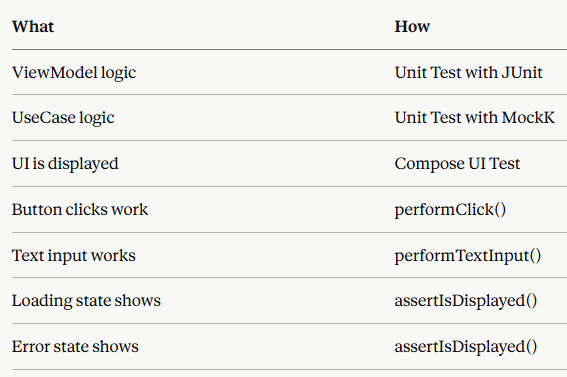
Quick Reference — What to Test
If this article helped you, please clap 👏 and follow for more Jetpack Compose content. See you in the next one!
메타데이터
- post_id
- 41f435169334
- slug
- testing-in-jetpack-compose-a-beginners-guide-41f435169334
- url
- https://medium.com/@anusingh9117/testing-in-jetpack-compose-a-beginners-guide-41f435169334
- canonical_url
- https://medium.com/@anusingh9117/testing-in-jetpack-compose-a-beginners-guide-41f435169334
- author_url
- https://medium.com/@anusingh9117
- status
- ok
- fetched_at
- 2026-06-13 12:55:53