[TIL] Using Fast Node Manager
Installing and setting up shell to use fnm
[TIL] Using Fast Node Manager
fnm, or Fast Node Manager is a cross platform version manager for Node.
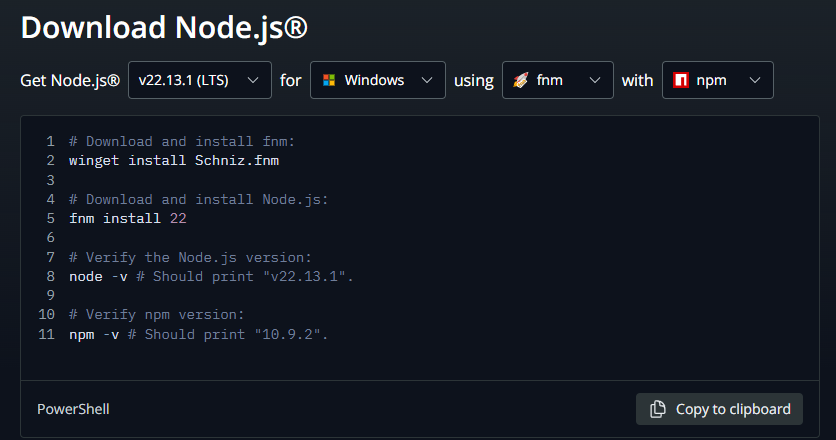
Node.js download page
Today I had to upgrade Nodejs on my home setup (Windows) and came across this line of code alongside the usual Windows installers.
Curious, I installed and fumbled around with fnm until I got it working decently.
While I currently have little use for node version management, it may be something useful in the future.
My current home setup is Windows with PowerShell so I will be focusing on that. Other OS setups can be found here.
Installation
winget install Schniz.fnmShell Setup — Important!
Without the setup, you will not be able to access your downloaded node or use fnm properly.
Create or open your PowerShell profile file. The location of your file is either
%userprofile%\Documents\WindowsPowerShell\Microsoft.PowerShell_profile.ps1for Powershell 5%userprofile%\Documents\PowerShell\Microsoft.PowerShell_profile.ps1for Powershell 6+
Edit from location or create said folder and file, then add
fnm env --use-on-cd --shell powershell | Out-String | Invoke-ExpressionPhoto by Cookie the Pom on Unsplash
I hope you found today’s TIL to be informative. Thank you.
메타데이터
- post_id
- 42234d0d52be
- slug
- til-using-fast-node-manager-42234d0d52be
- url
- https://medium.com/@sdgwsld/til-using-fast-node-manager-42234d0d52be
- canonical_url
- https://medium.com/@sdgwsld/til-using-fast-node-manager-42234d0d52be
- author_url
- https://medium.com/@sdgwsld
- status
- ok
- fetched_at
- 2026-07-21 02:43:51





