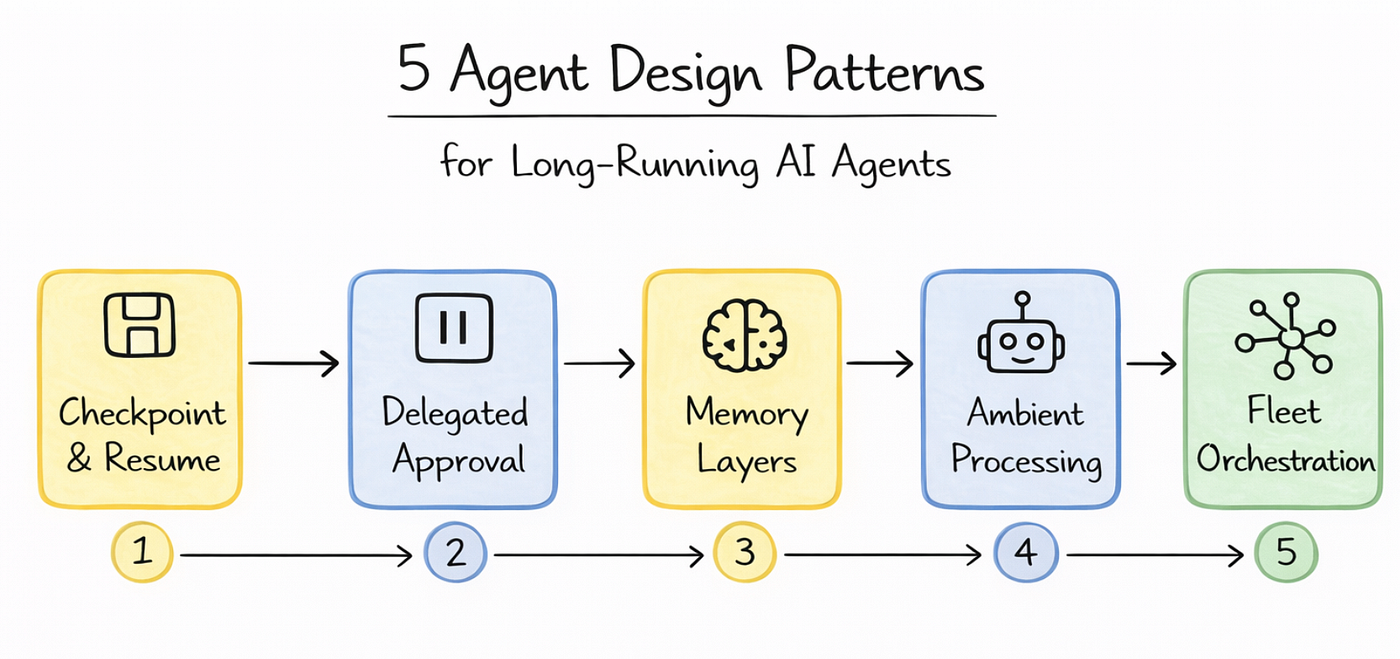
5 Agent Design Patterns for Long-Running AI Agents
From demos to production: How to build AI agents that don’t forget, don’t hallucinate, and actually get work done
Your AI Agent Crashes After 4 Hours. Here’s Why — and How to Fix It
Five production patterns from Google’s Agent Runtime that demos never show you.
Developers spend weeks perfecting prompt engineering, tool calling, and response latency. But none of it matters when your agent crashes on document 251 out of 300 — and you have no way to resume.
I’ve seen this happen in various pilots over the last six months. Each time, the root cause was the same: the agent was built like a request handler, not like a process. And each time, the incident ticket said the same thing: “Claims processing agent stopped unexpectedly. Context lost. Manual reprocessing required. Estimated recovery time: 2 hours.”
The workflows that actually matter in production — processing thousands of claims, running week-long sales sequences, or reconciling financial data across systems — do not fit inside a single conversation turn. They take days, not seconds. Yet most agent architectures are stateless. They reconstruct context from databases on every interaction, losing the reasoning chain, the soft signals, and the confidence gradients that made previous decisions make sense.
At Cloud Next 26, Google announced that Agent Runtime now supports long-running agents that maintain state for up to seven days. That announcement matters only if you know the five design patterns that make it production-ready. Here they are.
Step 1: Checkpoint-and-Resume
The most common failure mode in multi-day workflows is context loss. Imagine an agent processing 300 documents over four hours, only to hit an error on document 201. Without checkpointing, you have to restart from scratch.
Long-running agents must maintain persistent execution state in a secure cloud sandbox. Because the agent has full access to bash commands and a sandboxed file system, you can write intermediate results to disk, maintain processing logs, and recover gracefully from failures.
You must treat your agent like a long-running server process, not a simple request handler. Just as you would build a data pipeline that processes millions of records, you need to checkpoint progress, handle partial failures, and ensure idempotency.
For example, checkpointing every 30 documents balances durability against computational overhead. If an error occurs, the agent simply resumes from the last saved state.
# Pattern 1: Checkpoint-and-Resume
def process_documents(docs, checkpoint_file="state.json"):
    state = load_checkpoint(checkpoint_file) or {"processed": 0, "results": []}

    for i in range(state["processed"], len(docs)):
        try:
            result = agent.analyze(docs[i])
            state["results"].append(result)
            state["processed"] = i + 1

            # Checkpoint every 30 documents
            if (i + 1) % 30 == 0:
                save_checkpoint(checkpoint_file, state)

        except Exception as e:
            save_checkpoint(checkpoint_file, state) # Save before crashing
            raise e

    return state["results"]
Step 2: Delegated Approval (Human-in-the-Loop)
Every framework advertises “human-in-the-loop” capabilities. But in practice, most implementations are flawed: they serialize state to JSON, send a webhook, and hope someone checks it.
The problems compound fast.
JSON serialization loses implicit reasoning context, and notifications compete with dozens of other alerts. When the human finally responds hours later, the agent has to deserialize, re-establish context, and hope nothing changed in the meantime.

Long-running agents handle this differently. When the agent hits an approval gate, it pauses in place. The full execution state stays intact: the reasoning chain, working memory, tool call history, and pending actions.
The critical detail here is efficiency. If an agent waits 24 hours for a human to click “Approve,” those 24 hours are dead time for the agent but active time for the human. The agent consumes zero compute while paused, and sub-second cold starts mean there is zero latency penalty when it resumes.
# Pattern 2: Delegated Approval
@agent.tool
def request_human_approval(action_plan: dict, context: str):
    """Pauses agent execution and requests human review."""
    approval_id = db.create_approval_request(
        plan=action_plan,
        context=context,
        status="pending"
    )

    # Yield execution back to the orchestrator
    # The agent consumes 0 compute until the webhook fires
    raise SuspendExecution(
        reason="human_approval_required",
        resume_webhook=f"/api/resume/{approval_id}"
    )
Step 3: Memory-Layered Context
A seven-day agent needs more than just session state. It needs to remember things from previous sessions, user preferences from weeks ago, and organizational context that no single conversation could contain.
Memory-Layered Context separates long-term storage from working memory, governed by strict policies.
This is where a layered memory approach becomes vital. You need a Memory Bank (long-term memory that dynamically curates conversations) and Memory Profiles (working memory for low-latency, high-accuracy details).
But there is a hidden danger: memory drift. If an agent “learns” from a few atypical interactions that a procedural shortcut is acceptable, it might start applying that shortcut broadly. Furthermore, if multiple agents read and write to shared memory pools, data leakage becomes a real risk.
You cannot let agents write to a vector database unchecked. You must govern them the same way you govern microservices, using three core components:
- Agent Identity: Works like IAM for agents, determining exactly which memory banks and tools it is authorized to access.
- Agent Registry: Works like service discovery, tracking which agents are active, their prompt versions, and execution states.
- Agent Gateway: Works like an API gateway, evaluating requests against organizational policies (e.g., blocking an agent from committing PII to long-term memory).
# Pattern 3: Memory-Layered Context
class AgentGateway:
    def __init__(self, identity_provider, policy_engine):
        self.iam = identity_provider
        self.policies = policy_engine

    def write_to_memory_bank(self, agent_id, data):
        # 1. Verify identity
        if not self.iam.can_write(agent_id, "long_term_memory"):
            raise UnauthorizedError()

        # 2. Enforce policies (e.g., PII redaction)
        safe_data = self.policies.redact_pii(data)

        # 3. Write to curated storage
        vector_db.upsert(
            collection="memory_bank",
            metadata={"source_agent": agent_id},
            content=safe_data
        )
Step 4: Ambient Processing
Not every long-running agent interacts with humans. Some are ambient. They watch for events, process data streams, and take action in the background without any user prompting.

Ambient Processing allows agents to run unsupervised, reacting to events as they happen.
Consider a content moderation agent connected directly to Pub/Sub streams. This agent runs for days, processing user-generated content as it arrives. It maintains its own state about trends and patterns, and escalates to a human only when necessary.
The most important architectural decision here ties back to governance. You should never hardcode content policies into the agent itself. Instead, define them in the Agent Gateway. When policies change, you update the Gateway once, and every ambient agent in your fleet picks up the new rules immediately.
# Pattern 4: Ambient Processing
async def ambient_moderation_agent(pubsub_stream):
    """Runs continuously, reacting to events without prompting."""
    async for event in pubsub_stream.listen("user_content"):

        # Agent evaluates content autonomously
        analysis = await agent.evaluate(event.text)

        if analysis.flagged:
            if analysis.confidence > 0.95:
                # Auto-process high confidence
                await api.ban_user(event.user_id)
            else:
                # Escalate edge cases
                await request_human_approval(
                    action_plan={"action": "ban", "user": event.user_id},
                    context=analysis.reasoning
                )
Step 5: Fleet Orchestration
In production, you rarely have a single agent working alone. You have a coordinator agent that delegates sub-tasks to specialist agents, each running independently for different durations.

Fleet Orchestration uses a coordinator to manage independent specialist agents.
Imagine a sales prospecting sequence. The Coordinator Agent delegates to five specialists: a Research Agent that gathers public data on each lead, a Scoring Agent that ranks leads by fit and intent signals, a Draft Agent that writes a personalised first message, an Outreach Agent that sends it via the right channel, and a Reporting Agent that summarises the full run.
Each specialist has its own Agent Identity (so it only accesses what it needs), its own policy enforcement through the Agent Gateway, and its own entry in the Agent Registry. The Coordinator Agent maintains global state and handles handoffs between the specialists.
The operational advantage of treating each specialist as an independent unit is that you can update them independently. If your Scoring Agent’s ranking logic needs improvement, you can deploy the new version without risking a cascading failure across the rest of the fleet.
# Pattern 5: Fleet Orchestration
async def coordinator_agent(lead_list):
    results = []

    for lead in lead_list:
        # 1. Research Agent — gather public data on the lead
        research = await fleet.call("research_agent", target=lead)

        # 2. Scoring Agent — rank lead by fit and intent signals
        score = await fleet.call("scoring_agent", data=research)

        if score > 80:
            # 3. Draft Agent — write a personalised first message
            draft = await fleet.call("draft_agent",
                                     context=research,
                                     tone="professional")

            # 4. Outreach Agent — send the message via the right channel
            await fleet.call("outreach_agent",
                             lead=lead,
                             message=draft)

            results.append({"lead": lead, "score": score, "draft": draft})

    # 5. Reporting Agent — summarise the full run
    await fleet.call("reporting_agent", summary=results)
Take Aways
When you put it all together, these five patterns represent a step forward in how AI agents operate in the real world. And yes — they are directly linked to the next shift in agentic AI: agents that do not just respond, but persist, govern themselves, and coordinate at scale.
The principle is simple: structured, stateful, governed execution is a better foundation than stateless request-response loops.
By separating deterministic checkpointing from probabilistic inference, by pausing in place rather than serializing to JSON, and by governing memory through identity and policy rather than trusting agents blindly, these patterns ensure that the reasoning chain within your workflow is preserved and recoverable.
The agent is the process. Everything else is just scaffolding.
The next generation of production AI will not be about making agents smarter in a single turn — it will be about making them reliable across many turns, many days, and many handoffs. Teams that separate what is known from what is inferred, and that build governance in from the start rather than bolting it on later, will define how serious organisations work with AI at scale.
To start today, pick the one pattern that matches your most painful failure mode. If your agents crash and restart from scratch — begin with Checkpoint-and-Resume. If your team does not trust autonomous decisions — begin with Delegated Approval. The patterns compose naturally from there.
Thank you for reading. See you in the next one.
If this was useful, the clap button helps more people find it.
I write about agentic AI governance, long-running agent architecture, and the infrastructure decisions that separate production systems from fragile demos. 🔔 → Subscribe
Deploying long-running agents in a regulated environment? Let’s talk → LinkedIn
메타데이터
- post_id
- 423ff3f73850
- slug
- 5-agent-design-patterns-for-long-running-ai-agents-423ff3f73850
- url
- https://medium.com/agentic-builders/5-agent-design-patterns-for-long-running-ai-agents-423ff3f73850
- canonical_url
- https://medium.com/agentic-builders/5-agent-design-patterns-for-long-running-ai-agents-423ff3f73850
- author_url
- https://medium.com/@anna.bildea
- status
- ok
- fetched_at
- 2026-06-13 07:35:29