Keychron G3 Review: Familiar Shape, Unusual Coating
The G3 immediately struck me as a new Keychron line — light mice, focused on performance, and built around a tried-and-true competitive…
Keychron G3 Review: Familiar Shape, Unusual Coating
G3 Frosted
The G3 immediately struck me as a new Keychron line — light mice, focused on performance, and built around a tried-and-true competitive shape. It is very close to the popular Sora-style wedge form-factor family, but with a slightly longer, wider frame. There are also two very different material tales to tell: there’s the high-end Carbon Fiber variant, and then there’s the decidedly odder Frosted version.
Specs and Features
Keychron G3 is an ultra-light symmetrical wireless gaming mouse built around the PixArt PAW3950 sensor, with 8K polling in both 2.4 GHz and wired modes, 100–30,000 DPI, up to 750 IPS, adjustable LOD at 0.7 / 1.0 / 2.0 mm, and glass-surface tracking support. Both versions use Huano micro switches rated for 120 million clicks.
The mouse weighs 44 g, has a 500 mAh battery, and is rated for up to 37 hours at 8K 2.4 GHz and 140 hours at 1K 2.4 GHz. Connectivity is tri-mode: 2.4 GHz wireless, Bluetooth 5.3, and wired USB-C. The 2.4 GHz polling rate can be switched from 125 Hz to 8000 Hz across six levels.
The G3 uses Keychron Launcher, the same browser-based software used by newer Keychron keyboards and mice. Shape-wise, it is a medium-sized symmetrical mouse designed mainly for claw grip, with a somewhat wide body, rearward hump, and a silhouette that sits close to the Ninjutso Sora family.
Two versions: Carbon Fiber vs Frosted
The G3 comes in two versions that feel more different than the spec sheet suggests.
The Black / Carbon Fiber version is the premium variant on paper. It uses ABS + carbon fiber, with a carbon-fiber top cover and carbon-fiber main buttons. Its grip does not come from a typical rubberized or matte paint coating. Instead, it has an engraved carbon-fiber texture with cloud, bird, and wave patterns. The texture adds friction and gives the mouse a more technical, expensive feel. The official price is $109.99.
These coatings are very different
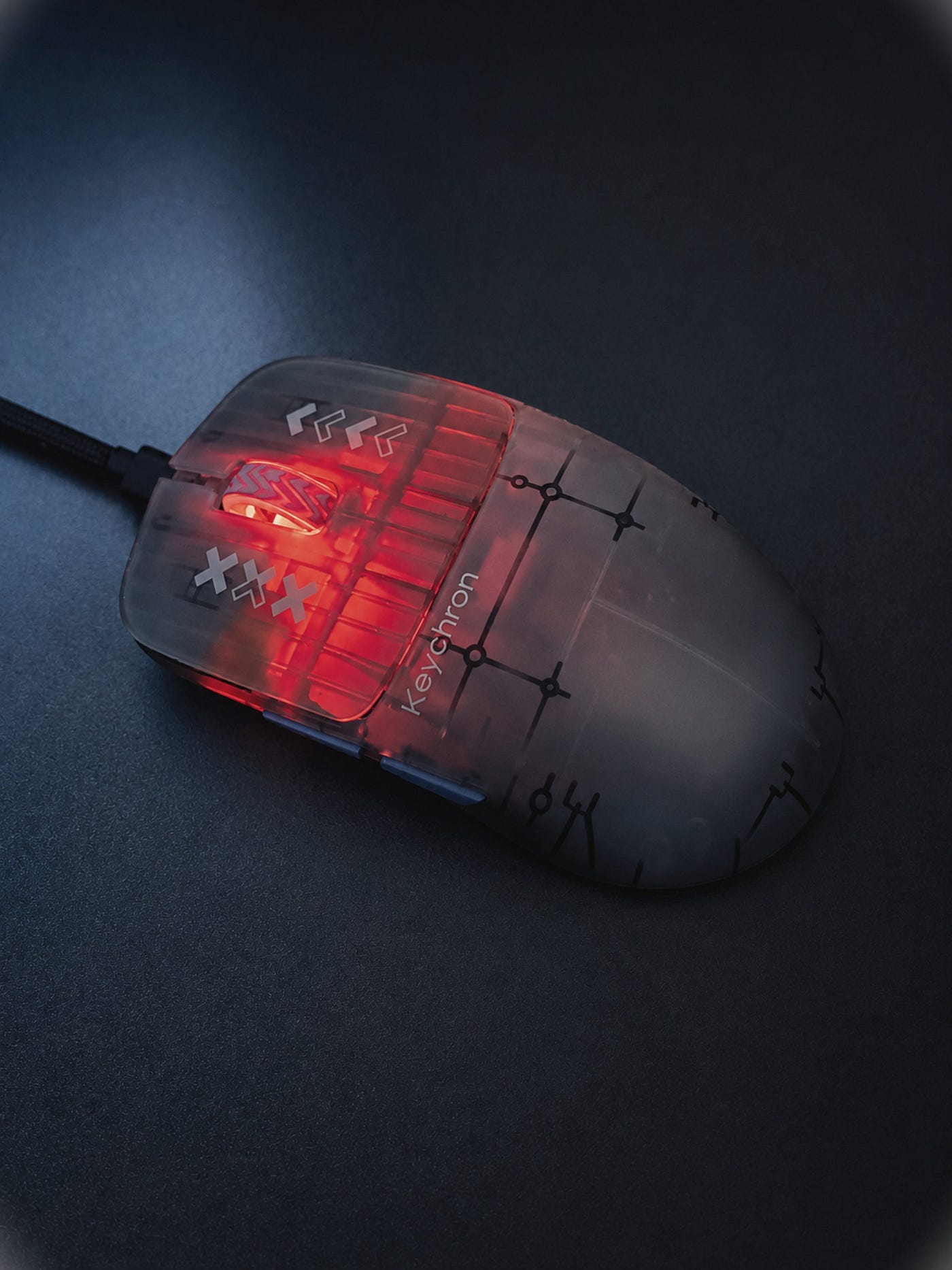
The Frosted Gray version uses ABS + PC, with a translucent frosted shell. It is less premium in terms of materials, and the official price is lower at $84.99, but honestly, it may be the more interesting version. The semi-transparent shell looks very cool during evening sessions, especially when it catches desk lighting, but the real surprise is the coating. It has this denim-like, cool-touch texture — almost like touching a pair of jeans, but cleaner and smoother. It is one of the most unique coatings I have felt on a mouse, and I actually prefer it over the Carbon Fiber version.
Unboxing, Glide and Click Test
The box
In the box you get:
- Keychron G3 Carbon Fiber/Frosted Gray
- USB-C to C cable + USB-A adapter
- 8K dongle
- Manual
- Spare skates, including dots
Shape/How it compares to Sora V3
First off, shape-wise, the G3 definitely fits into that popular category of claw-centric mice, along with the likes of the Sora V3. It features that recognizable low front with a steady rise and back hump to provide plenty of support. That signature wedge-style shape is great for claw-style users and those who utilize a more relaxed claw. However, the G3 is by no means a replica. It’s just a bit bigger take on that formula.

vs Sora v3
The Sora V3 measures around 119.2 × 59 × 37.3 mm and weighs roughly 40 g. The G3, on the other hand, is around 120 × 63 × 38 mm and approximately 44 g. Numbers don’t always speak directly to the feel of a mouse, but I will say that the added width is noticeable. The G3 feels more “grounded”, more supportive under your palm, and simply not as thin-feeling on your desk. If you have medium hands or larger and find yourself constantly fighting for stability while tracking or during longer sessions, the additional space can certainly provide benefits. The same applies if you enjoy Sora-shaped mice but normally find them too narrow for you. Your hands will also appreciate the extra room on the sides, which your thumb, pinky, and ring finger can occupy.
The V3 still feels like the sharper, lightweight, and esports-focused product of the two. It’s more minimal too. While sharing many similarities, the G3 offers the same claw-friendly concept but with more chassis and comfort built into the design. If you are a fan of the Sora formula but wish for a bit more width to your mouse, that extra hand support and a shape that doesn’t feel as tiny, then the G3 may be right up your alley.
Design and Build Quality
From a design standpoint, the G3 feels like a giant leap from Keychron’s previous crop of M-series mice. While those were certainly good value/performance mice, the G3 feels like Keychron is stepping up to deliver a more serious gaming mouse lineup. It has a more focused shape, utilizes more interesting materials, is much lighter, and just feels less like a “good budget option” and more like a legitimate lightweight FPS mouse.
Keychron even did a better job with the design language. It’s cleaner, more confident. There isn’t any unnecessary gaming flair here. Just a straightforward competitive shell utilizing two very distinct material identities. The Carbon Fiber model looks technical/premium, while the Frosted model feels more playful and interesting due to its semi-transparent shell.
Wedge-shapes gallore
Build quality was pretty good overall, although there was a disparity between my two mice. The black Carbon Fiber variant had some flex in the middle when pressure was applied with force. It wasn’t game-changing or noticeable when playing, but it was there. The Frosted model had no such problem, and actually felt ever-so-slightly more sturdy in terms of build quality. Which was surprising to me, considering the carbon fiber model is obviously the more premium/expensive material-wise, but in my experience, the Frosted model felt like the more solid of the two.
Outside of that one complaint, nothing else was off-putting. No internal rattling, no lateral side play in the main buttons, no additional shell flex I could find. Despite the small variation in quality between my two mice, the G3 feels much more mature and refined than Keychron’s past attempts at gaming mice.
Clicks and Buttons
The G3 uses Huano White Dot mechanical switches rated at 120 million clicks, and overall, the implementation is pretty good. They aren’t the best clicks I’ve felt, and they don’t come close to something like G-Wolves’ SPDT implementation, but they’re really far from something I would complain about.
The main switches have decent tactility, good rebound, and feel responsive enough for super-fast FPS tapping. There’s zero side play on the main buttons and the overall click feel is consistent. Nothing about them screams “wrong!” but they don’t have that ultra-crisp feel that some of the best implementations have that are addicting to bottom out. Still, they feel solid, safe, and like you can trust them in-game. The clicks on both versions also feel like they sound a bit different than the others, but I may be imagining that.
Head-to-head
The side buttons are decent as well. There’s a bit of mushiness, but you can still feel tactility, and they’re easy to actuate without feeling super loose or annoying. The scroll wheel continues this trend: not too stiff, not too loose. Easy actuation and plenty of definition in the steps.
The buttons on the G3 aren’t something I could go on and on about for three paragraphs. There are better clicky switches out there, but it gets the basics down: good main clicks, usable side buttons, comfortable scroll wheel, and zero annoying mechanical issues in day-to-day or gaming use.
Skates and Weight
We’ve already talked about coating, which is one of the defining features of the G3. Let’s talk about the other obvious factor: weight and skates.
The stock skates are actually pretty good. Rounded, properly made from PTFE material (vs some cheaper plastics that some companies use), about 0.8mm thick, and glide nicely on surfaces. I wouldn’t consider them extremely fast or precise. They feel nicely balanced. They do have a break-in period after a few days of use, and lose a bit of glide on glass/carbon steel.
There are 4 medium-sized skates located in well-thought-out locations on the mouse, and I really like that they don’t feel tacked on as an afterthought. It’s also nice to see a mouse that doesn’t use a center sensor ring these days.
G3 is a bit wider than Sora v3
On glide, the G3 feels stable, predictable, and easy to get used to. I don’t get that scratchy/plastic-y feeling that some stock skates transmit. Keychron also includes replacement dot skates in the package, but through my testing, they glide in a similarly neutral way vs transforming the mouse into something else entirely.
Weight also lands in a nice spot. It’s perfectly balanced in the center. It is about 4 grams heavier than the Sora V3, but that is nearly impossible to notice in regular use. The biggest difference when you pick it up is just the size and shape. The G3 just feels ever so slightly larger, wider, and more “planted”. That is the first thing you will notice.
Personally, I feel like the mid-40-gram range is rapidly becoming the sweet spot for modern gaming mice. It’s light enough to feel speedy/futuristic but still allows the rest of the shell/clicks/structure to have heft to them. I think 2026 may be the year we will comfortably put the “60 grams is already considered lightweight” statement in the past.
Software and Battery Performance
The G3 is controlled by Keychron Launcher, and this is legitimately an area I think Keychron should be praised for. Keychron does not try to shove yet another big, bloated gaming app at you. Everything is accomplished through a browser-based interface. Plug in the mouse, open the Launcher, make your changes, save to the mouse; you’re done.
You’ve got all the basics here. Button remapping, shortcuts/macros, DPI steps, polling rate, lift-off distance, sleep settings, onboard profiles. Keychron also includes some advanced mouse features, like Motion Sync, Ripple Control, Angle Snap, sensor angle correction, debounce time, and even Competitive Mode.

Keychron Launcher works like a hub
Speaking of Competitive Mode, if you’re going to use the G3 for FPS, I would recommend keeping your configuration simple. Set your DPI, pick 1K or 2K if you’re going to use it for practical day-to-day purposes, fiddle with your LOD if you want, but leave the fancier artificial correction stuff disabled unless you know you want it. You have it as an option if you want it, but I wouldn’t feel like you need to use it. Competitive Mode does seriously improve battery life when disabled, and I find the usefulness of it to be minimal and generally overhyped. It can have a minor benefit for sweeping across larger distances at higher DPI, but for most players and sensible settings it’s not going to suddenly make your mouse teleport around.
Also, I really appreciate Keychron including all these options without making the software itself feel unnecessarily bloated. This is honestly up there with some of the best mouse software experiences out there, and they get the important stuff right. Everything is simple to locate, settings are intuitive, and you aren’t forcing a desktop application to run in the background.
Speaking of background, battery life is another area where the G3 excels. Keychron equips the G3 with a 500 mAh battery, and in my usage, it was able to last me up to two full weeks with 2K polling and Competitive Mode on. That is excellent for a lightweight performance mouse, and you can extend that battery life even further by turning Competitive Mode off. Does it beat out the Sora V3 for battery life? No, the Sora V3 absolutely smokes it in that department and is still my favorite example of just how long a modern gaming mouse can last. However, that doesn’t mean the G3’s battery life is bad. It’s still an incredibly strong showing, and battery life is actually one reason why the G3 feels more “put together” than your average spec-sheet 8K mouse.
Sensor and Performance
The G3 houses the PixArt 3950 sensor, and that is easily one of the first things you want to see inside a modern and lightweight gaming mouse. On paper, the specs here look fantastic: up to 30,000 DPI, up to 750 IPS, customizable LOD (0.7/1.0 /2.0 mm), glass tracking support, up to 8000 Hz polling rate in both 2.4 GHz and wired modes. Keychron goes even further by mentioning a high-speed 20,000 FPS sensor mode, as well as boasting very low 2.4 GHz latency. This is not gonna be your average office mouse masquerading as a gaming mouse.
Performance-wise, I encountered zero problems. There was no odd sensor antics to speak of. No spinouts, no cutouts, no LOD weirdness, and none of those moments where you feel like your mouse got lost and wasn’t connected to what you were doing. Tracking felt precise, snappy, and predictable whether I was on cloth surfaces, faster mouse pads, or even glass. Which, incidentally, is my favorite way to gauge modern sensor implementation.
This new Keychron mouse line-up is much better than the earlier line-ups
The G3 also felt snappy enough that I didn’t really have to think about the sensor while playing. Now that’s usually the highest compliment you can give a gaming mouse. If tracking is smooth, wireless connection is rock solid, and you never encounter any odd issues during fast swipes / micro-corrections/lift-offs, then they’ve done their job.
Here are some numbers. Just for you (polling rate: 2k, DPI: 3200, Competitive Mode: ON, Motion Sync: OFF):
- average click latency: 0.6ms
- average jitter: 2.68px, precision 99%
- click speed: 8 clicks/ sec
- sensor input lag: 0.5 ms
In all seriousness, I would consider this a damn good PAW3950 implementation even if it does not have quite the cool-factor patented sensor story that Sora V3 had with its AimNinja 2 sensor, but it didn’t need to. G3 provides accurate tracking, solid wireless responsiveness, glass tracking, and an all-around feel like a clean, modern package that’s ready for some serious FPS-ing. Test results were excellent, especially at the higher polling rates that were stable (not so obvious for most mice), as getting consistent 8000Hz on a wireless connection is usually tough.
Who is it for?
The G3 plays very similarly to some of today’s popular lightweight claws, but has some differences that make it appeal to a unique subset of mouse players. If you enjoy the current lightweight claw meta but feel like the smallest wedge-style mice are just a little too unforgiving, the G3 could be great for you. I found Sora V3 to be a little narrow/harsher in hand than I really enjoyed, and G3 answered a lot of my concerns.
The G3 keeps the claw-optimized shape — low front section, gradual rise section, supportive back section — but adds width and a slightly larger frame to create a mouse that feels more planted and easier to control. Compared to the Sora V3, G3 is not as razor-sharp an esports weapon. It’s heavier, less focused, and still feels like the “right” choice if you really want the most wedge-shaped mouse possible.
Frosted one is my favourite out of the two
Compared to something more aggressive like the G-Wolves Lycan, G3 simply feels more forgiving. Lycan is lower, lighter, more specialized, and feels more like a pure FPS adventure. G3 is faster than average and will absolutely kill it in competition, but features a safer shape, better battery life, more conventional day-to-day usage, and comes in not one but two distinct coating experiences.
As a recommendation, I’d say the G3 will primarily appeal to claw users and relaxed claw users with medium to large hands. Users with smaller hands can still use it just fine, but there are some lighter and smaller mice out there. Palm users can use it if their hands are small enough, but this is definitely not designed with you in mind.
Choose your version wisely. I think the Carbon Fiber version will appeal to more people because of the premium look, but if I had to pick, I would go Frosted every day of the week. It feels more interesting in hand, has a really cool denim-looking coating, looks awesome in the dark when gaming at night, and, in my experience, was built with slightly better quality.
Frosted G3 is where it’s at.
Bullet Points
- Keychron G3 feels like the real start of a more serious Keychron gaming mouse lineup and a big leap over the older M-series mice.
- Shape-wise, it sits close to the Sora-style wedge family but is slightly longer and wider, making it better suited for medium to larger hands.
- Sora V3 still feels sharper, lighter, and more esports-focused, but G3 is more comfortable and forgiving.
- The Carbon Fiber version is the premium one on paper, with a carbon-fiber top shell, carbon-fiber main buttons, and engraved texture.
- The Frosted version is the surprise winner for me: semi-transparent, cool-looking in evening sessions, and with a unique denim-like coating.
- In my copies, the Frosted version also felt slightly more reliable in build quality, with no middle-shell flex.
At night, it shines
- No internal rattling, no main-button side play, and no other worrying shell issues.
- Main clicks are not on the level of G-Wolves SPDT clicks, but the implementation is still solid.
- Mid-40 grams feels like the new sweet spot for modern FPS mice in 2026.
- Keychron Launcher is clean, browser-based, and does not force another heavy desktop app.
- The 500 mAh battery is one of the G3’s strongest assets, easily lasting around two weeks at 2K polling with Competitive Mode on.
- PAW3950 implementation is very good: no weird sensor behavior, no spinouts, no cutouts, good glass tracking, and accurate, snappy responsiveness.
Get your version of G3
Disclaimer
This review is not a paid endorsement. I want to ensure transparency and let you know that I am not receiving any monetary or other compensation for evaluating or discussing this tech product. Certain images might have undergone digital enhancement to improve visual clarity. These adjustments do not alter the product’s true appearance, shape, or physical characteristics.
메타데이터
- post_id
- 42a29449b2fd
- slug
- keychron-g3-review-familiar-shape-unusual-coating-42a29449b2fd
- url
- https://medium.com/@damiancooper/keychron-g3-review-familiar-shape-unusual-coating-42a29449b2fd
- canonical_url
- https://medium.com/@damiancooper/keychron-g3-review-familiar-shape-unusual-coating-42a29449b2fd
- author_url
- https://medium.com/@damiancooper
- status
- ok
- fetched_at
- 2026-07-16 01:52:49