Building Reproducible Machine Learning Environments with Conda and Docker
The Complete Beginner-to-Advanced Guide for Data Scientists, ML Engineers, DevOps Engineers, Developers, and Students
Building Reproducible Machine Learning Environments with Conda and Docker
The Complete Beginner-to-Advanced Guide for Data Scientists, ML Engineers, DevOps Engineers, Developers, and Students
Machine learning is no longer limited to researchers or data scientists.
Today, developers, DevOps engineers, cloud engineers, SREs, backend developers, and even students are building AI-powered applications.
But there’s one hidden problem almost every team faces:
The code works perfectly on one machine… and completely fails on another.
Different Python versions, missing libraries, incompatible CUDA drivers, broken dependencies, and OS-level mismatches create chaos in ML projects.
This is exactly why environment reproducibility has become one of the most critical skills in modern AI and MLOps engineering.
**Not a member? Read here for free.**
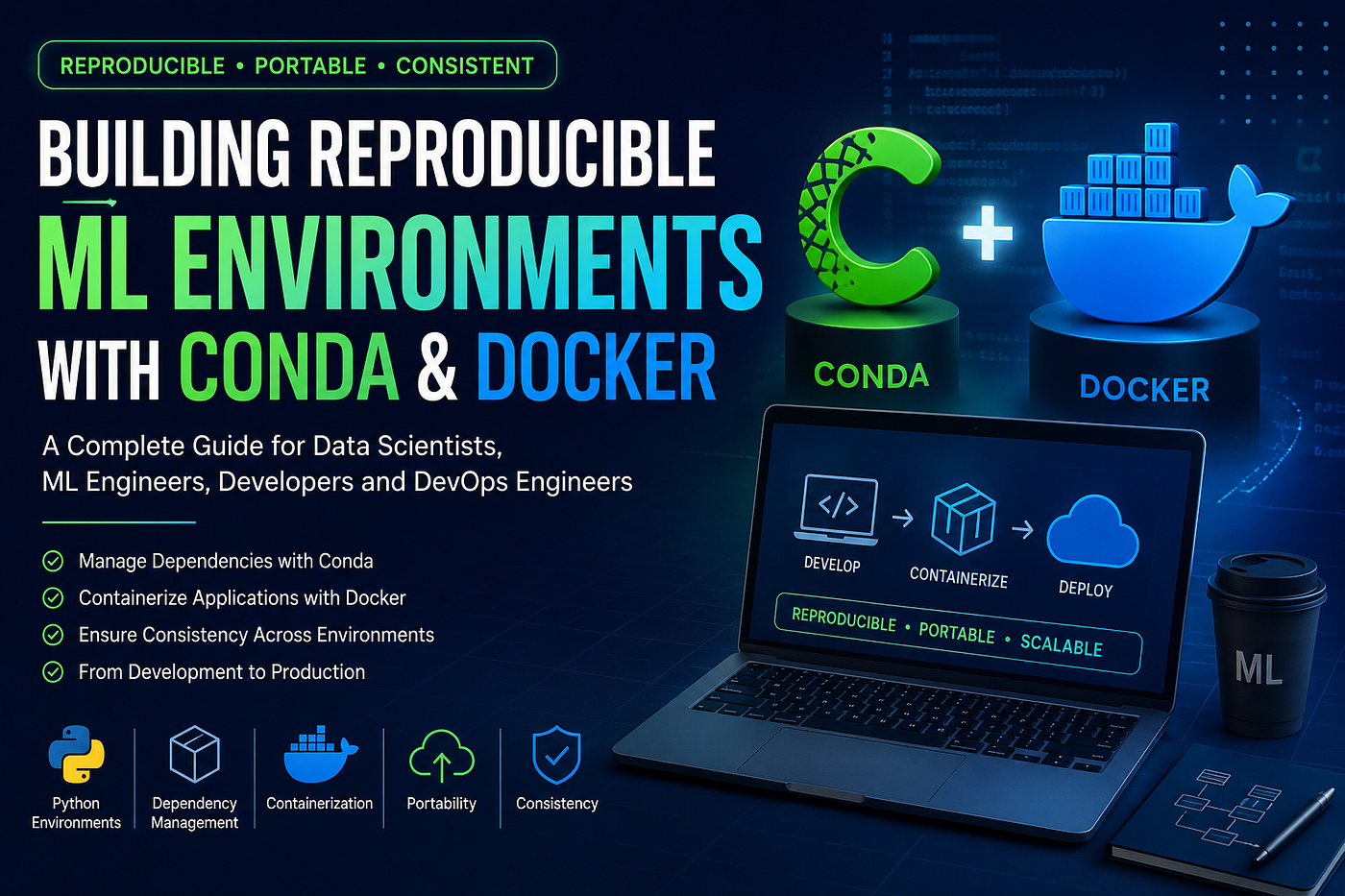
“Stop Saying ‘Works on My Machine’”
In this guide, you’ll learn:
- What reproducibility means in ML
- Why Conda is popular in data science
- How Docker solves environment problems
- Why combining Docker + Conda is extremely powerful
- Real-world best practices used in production
- Common mistakes beginners make
- How this fits into modern MLOps and Kubernetes workflows
Whether you’re a beginner or an experienced engineer, this guide will help you build portable, scalable, and production-ready ML environments.
Why Environment Reproducibility Matters
Imagine this situation:
You trained a model successfully on your laptop.
But when your teammate runs the same code:
- The model crashes
- Libraries fail
- Predictions differ
- Dependencies conflict
- GPU support breaks
This happens because machine learning projects depend on many layers:
- Python versions
- Package versions
- System libraries
- CUDA drivers
- Operating systems
- Hardware architecture
Even a tiny version mismatch can completely break a workflow.
Environment reproducibility ensures:
✅ Same code ✅ Same dependencies ✅ Same runtime ✅ Same results everywhere
What is Environment Reproducibility in ML?
Environment reproducibility means recreating the exact same environment across:
- Development
- Testing
- CI/CD pipelines
- Staging
- Production
This includes:
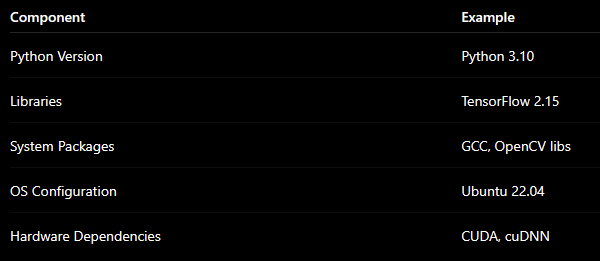
The goal is simple:
A model should behave consistently everywhere.
Problems Caused by Non-Reproducible Environments
Dependency Conflicts
One library upgrade breaks another package.
“Works on My Machine” Syndrome
The most common problem in engineering teams.
Inconsistent Model Results
Different package versions may change predictions.
Deployment Failures
Production environments fail due to missing dependencies.
Difficult Debugging
Teams waste hours reproducing issues.
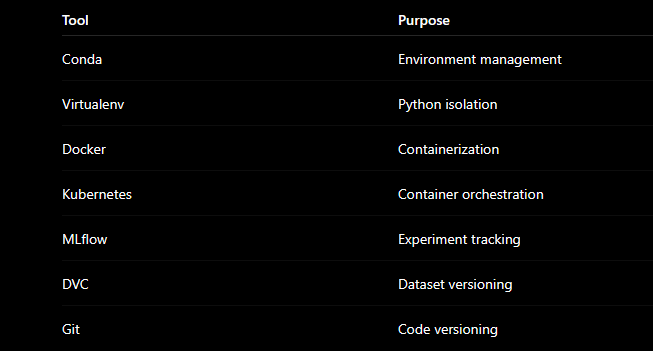
Tools Commonly Used for Reproducibility
Understanding Conda
What is Conda?
Conda is a package and environment manager widely used in:
- Machine Learning
- Data Science
- AI Research
- Scientific Computing
Unlike pip, Conda can manage:
- Python packages
- Non-Python packages
- System-level dependencies
This makes it extremely useful for ML projects.
Why ML Engineers Love Conda
Environment Isolation
Each project gets its own isolated environment.
Better Dependency Resolution
Conda handles complex package compatibility better than pip.
Supports Scientific Libraries
Works smoothly with:
- NumPy
- TensorFlow
- PyTorch
- CUDA
- OpenCV
Easy Environment Sharing
Export environments using YAML files.
Installing Miniconda
Linux / Mac (x86)
wget https://repo.anaconda.com/miniconda/Miniconda3-latest-Linux-x86_64.sh
bash Miniconda3-latest-Linux-x86_64.sh
macOS ARM
curl -O https://repo.anaconda.com/miniconda/Miniconda3-latest-MacOSX-arm64.shWindows PowerShell
wget "https://repo.anaconda.com/miniconda/Miniconda3-latest-Windows-x86_64.exe" -outfile ".\Downloads\Miniconda3-latest-Windows-x86_64.exe"Creating a Machine Learning Environment
Basic Setup
conda create -n ml-env python=3.10Setup with Libraries
conda create -n ml-env python=3.10 numpy pandas scikit-learn jupyterActivating the Environment
conda activate ml-envInstalling ML Dependencies
Data Science Libraries
conda install matplotlib seaborn jupyterlabUsing conda-forge
conda install -c conda-forge xgboostDeep Learning Frameworks
PyTorch
conda install -c pytorch pytorch torchvision torchaudioTensorFlow
conda install -c conda-forge tensorflowUsing Conda with Jupyter Notebook
pip install ipykernel
python -m ipykernel install --user --name ml-env --display-name "Python (ml-env)"
Exporting the Environment
This creates a reproducible snapshot.
conda env export > environment.ymlRecreating the Environment Anywhere
conda env create -f environment.ymlExample ML Project Structure
my-ml-project/
├── data/
├── notebooks/
├── src/
├── models/
├── environment.yml
├── requirements.txt
└── README.md
Conda Best Practices
Commit environment.yml to Git
This helps teams recreate environments easily.
Prefer conda-forge
It often contains updated ML packages.
Avoid Installing Everything Globally
Always isolate project dependencies.
Use pip Carefully
Recommended order:
- Install packages with Conda
- Use pip only if necessary
- Install pip packages last
Understanding Docker
Conda handles package reproducibility.
Docker solves a bigger problem:
System-level reproducibility.
Docker packages:
- Operating system
- Runtime
- Libraries
- Dependencies
- Application code
into one portable container.
Why Docker is a Game Changer for ML
Portable
Runs the same everywhere.
Consistent
No OS mismatch issues.
Isolated
Containers avoid dependency conflicts.
Scalable
Perfect for cloud-native ML.
CI/CD Friendly
Ideal for automated pipelines.
Creating a Docker-Based ML Environment
Step 1: Create a Dockerfile
FROM python:3.11-slim

WORKDIR /app

RUN apt-get update && apt-get install -y \
    build-essential \
    git \
    wget \
    && rm -rf /var/lib/apt/lists/*

COPY . .

RUN pip install --no-cache-dir -r requirements.txt

CMD ["python", "train.py"]
Step 2: Create requirements.txt
numpy
pandas
scikit-learn
matplotlib
jupyterlab
tensorflow
Step 3: Build the Docker Image
docker build -t ml-env:latest .Step 4: Run the Container
Standard Run
docker run -it --rm -v $(pwd):/app ml-env:latestStart Jupyter Lab
docker run -it -p 8888:8888 -v $(pwd):/app ml-env:latest jupyter lab --ip=0.0.0.0 --allow-rootOptimizing Docker Builds with .dockerignore
__pycache__/
*.pyc
.env
data/
models/
Benefits:
- Faster builds
- Smaller images
- Cleaner containers
Docker Compose for Multi-Service ML Applications
Example:
- ML application
- Database
- Redis cache
- Monitoring stack
version: '3'

services:
  ml:
    build: .
    volumes:
      - .:/app
    ports:
      - "8888:8888"

  mongo:
    image: mongo:latest
    ports:
      - "27017:27017"
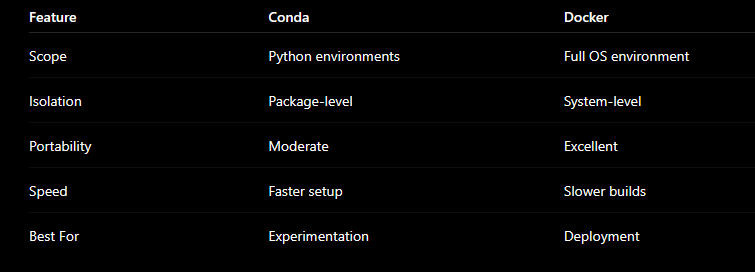
Conda vs Docker
Why Docker + Conda Together is Powerful
This is the foundation of many modern MLOps platforms.
Conda Handles
- Python libraries
- Data science tooling
- CUDA compatibility
Docker Handles
- OS consistency
- Runtime isolation
- Deployment portability
Together they create:
✅ Fully reproducible ML environments ✅ Stable deployments ✅ Cloud portability ✅ CI/CD compatibility ✅ Kubernetes-ready workloads
Docker + Conda Example
Dockerfile
FROM continuumio/miniconda3

COPY environment.yml .
RUN conda env create -f environment.yml

SHELL ["conda", "run", "-n", "mlenv", "/bin/bash", "-c"]

WORKDIR /app
COPY . .

CMD ["python", "train.py"]
environment.yml
name: mlenv

channels:
  - defaults

dependencies:
  - python=3.9
  - pandas
  - numpy
  - scikit-learn
Real-World Industry Use Cases
AI Startups
Portable environments for rapid experimentation.
Enterprise MLOps
Standardized deployments across teams.
Kubernetes-Based ML Platforms
Containerized ML workloads for scalability.
CI/CD Pipelines
Reliable automated testing and deployment.
GPU-Based Training
Consistent CUDA environments.
Common Beginner Mistakes
Installing Packages Globally
This creates conflicts quickly.
Not Pinning Versions
Always specify versions for production.
Mixing pip and Conda Randomly
This often breaks environments.
Huge Docker Images
Use slim base images whenever possible.
Ignoring Environment Files
Always version-control your configs.
Advanced Tips for Production ML
Use Multi-Stage Docker Builds
Smaller and cleaner images.
Use Mamba Instead of Conda
Faster dependency resolution.
Scan Docker Images for Vulnerabilities
Important for enterprise security.
Use Kubernetes for Scaling
Especially for inference workloads.
Integrate with CI/CD
Automate testing and deployments.
How This Fits into Modern MLOps
- MLOps
- AI Platforms
- Kubeflow
- ML Pipelines
- AI Infrastructure
- Production AI Systems
Without reproducible environments:
- Automation breaks
- Scaling becomes risky
- Debugging becomes painful
Final Thoughts
Machine learning is evolving rapidly.
But one thing remains constant:
Reproducibility is non-negotiable.
Conda simplifies dependency management.
Docker guarantees runtime consistency.
Together, they help engineers build:
- Stable ML systems
- Scalable AI platforms
- Reliable deployment pipelines
- Production-ready infrastructure
Whether you’re:
- A student learning AI
- A developer entering ML
- A DevOps engineer moving into MLOps
- A cloud engineer building AI infrastructure
Mastering reproducible environments will give you a massive advantage in modern engineering.
Key Takeaways
✅ Reproducibility prevents deployment chaos ✅ Conda simplifies ML dependency management ✅ Docker ensures system-level consistency ✅ Docker + Conda is ideal for production ML ✅ Reproducibility is foundational for MLOps and AI scalability
Suggested Next Learning Path
After mastering this topic, explore:
- Docker Networking
- Kubernetes for ML Workloads
- MLflow
- Kubeflow
- GPU Containers
- CI/CD for ML
- Model Serving
- Observability in MLOps
If this article helped you, consider following for more practical content on:
- DevOps
- MLOps
- Kubernetes
- Cloud Engineering
- AI Infrastructure
- Real-world Production Systems
메타데이터
- post_id
- 430d18010d35
- slug
- building-reproducible-machine-learning-environments-with-conda-and-docker-430d18010d35
- url
- https://blog.devops.dev/building-reproducible-machine-learning-environments-with-conda-and-docker-430d18010d35
- canonical_url
- https://blog.devops.dev/building-reproducible-machine-learning-environments-with-conda-and-docker-430d18010d35
- author_url
- https://medium.com/@inanibharat
- status
- ok
- fetched_at
- 2026-06-10 21:21:38