Understanding DNS in a Simple Way
How Does Typing a Website Name Open the Correct Server on the Internet? When we type something like facebook.com or google.com in your…
Understanding DNS in a Simple Way
How Does Typing a Website Name Open the Correct Server on the Internet? When we type something like facebook.com or google.com in your browser, have you ever thought about how your computer knows where that website is actually located?
Computers do not understand website names the way humans do. They communicate using IP addresses like 44.28.236.35. Since remembering numbers for every website would be difficult, we use easy-to-remember domain names instead.
This is where DNS (Domain Name System) comes in. DNS works like the phonebook of the internet. Its job is to convert human-friendly website names into machine-friendly IP addresses, helping your browser connect to the correct server within seconds.
Let’s Understand This with a Simple Example
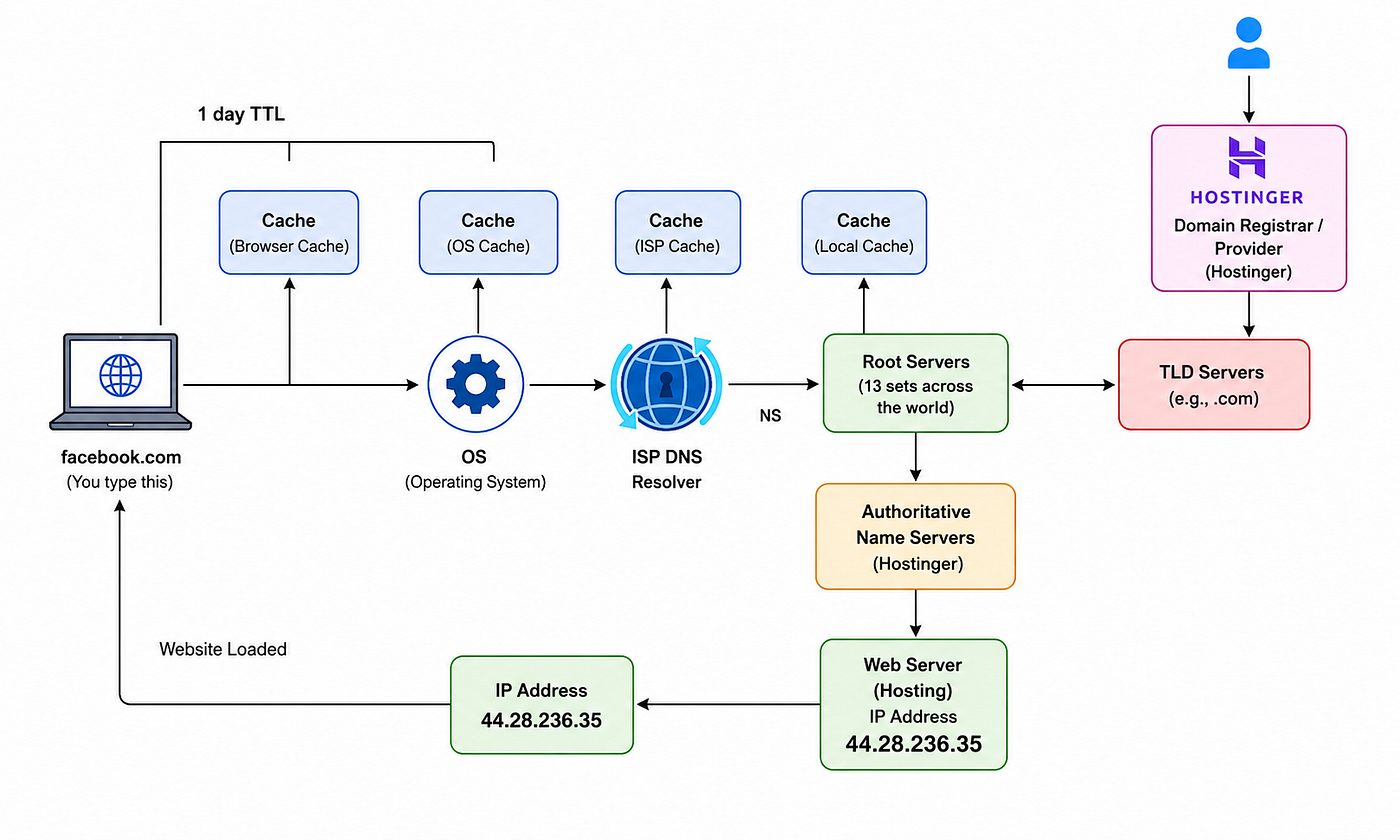
Imagine typing facebook.com into a browser and pressing Enter. Within a few seconds, the Facebook website opens successfully. But behind the scenes, several systems work together to find the correct server where the website is hosted.
1. Browser Cache Check
First, the browser checks its own cache memory.
If the IP address was recently used, the browser already remembers it and opens the website immediately without performing another DNS lookup.
2. Operating System (OS) Cache Check
If the browser does not have the IP address, the request moves to the Operating System cache.
The OS also stores DNS records temporarily to improve speed and reduce repeated DNS requests.
3. ISP DNS Resolver
If the IP address is still not found, the request goes to the ISP DNS Resolver provided by the internet service provider like Jio, Airtel, ACT, BSNL. The resolver now starts searching for the correct IP address.
4. Root Servers
The ISP resolver contacts the Root Servers. There are 13 main root server systems across the world managed under ICANN. Thay do not know the exact IP address. But knows where to find the correct Top Level Domain (TLD) servers. Since the domain is facebook.com, the resolver is directed to the .com TLD server.
What is a TLD?
TLD means Top Level Domain.
Examples:
- .com
- .org
- .in
- .net
For:
facebook.com
The TLD is:
.com
The root server says: Ask the .com TLD server.
TLD Owners
Different organizations or governments manage TLDs.
Examples:
- .com → managed by Verisign
- .in → managed by Indian authorities
- .ai → managed by Anguilla government
When you purchase a domain, your information gets registered:
- Name
- Phone number
- Address
- Payment details
- Nameservers
Domain Registrars
Companies where we purchase domains are called Domain Registrars.
Popular registrars: GoDaddy, Hostinger
Many registrars enable auto-renewal by default.
After purchasing a domain:
- Verify the domain
- Disable auto-renew if not needed
- Remove UPI auto-pay if enabled
Sometimes:
- First year price is very low
- Renewal price becomes expensive later
5. TLD Servers
The TLD server identifies which nameservers are managing the domain.
In this example, the domain is managed by Hostinger.
The TLD server returns the details of the authoritative nameservers.
6. Authoritative Name Servers
The resolver now contacts the authoritative nameserver.
This server contains the actual DNS records of the domain, including the website’s IP address.
Example:
44.28.236.35
7. IP Address Returned to Browser
The IP address is returned back through the same path to the browser.
Now the browser knows exactly where the website is hosted.
8. Website Opens Successfully
Finally, the browser connects to the web server using the IP address and loads the website.
All these steps happen within milliseconds, which is why websites open almost instantly.
DNS Cache and TTL
What is TTL?
TTL means: Time To Live
TTL decides:
“How long should DNS information stay in cache?”
Example:
- 1 minute
- 30 minutes
- 1 hour
- 1 day
Why TTL is Important
Suppose your website IP changes.
If TTL is:
1 day
Users may continue using the old IP for 24 hours because it is cached.
Before changing servers or migrating applications:
- Reduce TTL to 1 minute
- Wait some time
- Then change the IP
This helps DNS changes update faster.
Final Thoughts
DNS is one of the most important systems behind the internet, even though most users never notice it working. Every time a website name is entered into a browser, DNS quickly finds the correct IP address and connects the request to the right server.
From browser cache to ISP resolvers, Root Servers, TLD servers, and authoritative nameservers, multiple components work together within milliseconds to make website access simple and fast.
Understanding how DNS works is very useful for anyone learning Linux, Networking, Cloud, or DevOps, because DNS plays a major role in website hosting, application deployment, and infrastructure management.
메타데이터
- post_id
- 4359b15f5b0a
- slug
- understanding-dns-in-a-simple-way-4359b15f5b0a
- url
- https://medium.com/@ashwinidevops.03/understanding-dns-in-a-simple-way-4359b15f5b0a
- canonical_url
- https://medium.com/@ashwinidevops.03/understanding-dns-in-a-simple-way-4359b15f5b0a
- author_url
- https://medium.com/@ashwinidevops.03
- status
- ok
- fetched_at
- 2026-06-13 16:00:06
