Upgrade Your Deep Agent With a Local Open-Source Sandbox
No cloud sandbox provider, and no per-minute billing.
Upgrade Your Deep Agent With a Local Open-Source Sandbox
No cloud sandbox provider, and no per-minute billing.

Image created by the author
Most of the chatbots we use daily (such as ChatGPT, Claude, Gemini, and Qwen) allow us to upload files, like images, PDFs, and spreadsheets, which they can ingest and analyze to answer our queries.
Many of these requests can be handled solely by the Large Language Model (LLM)’s native capabilities, such as describing an image, summarizing a PDF, or extracting specific text from a document.
However, if you provide a chatbot with an Excel sheet or a .csv file and ask it to produce a comprehensive statistical analysis report with charts, the task requires more than just basic reasoning.
Such complex requests demand active data manipulation, statistical calculations, and visual chart generation.
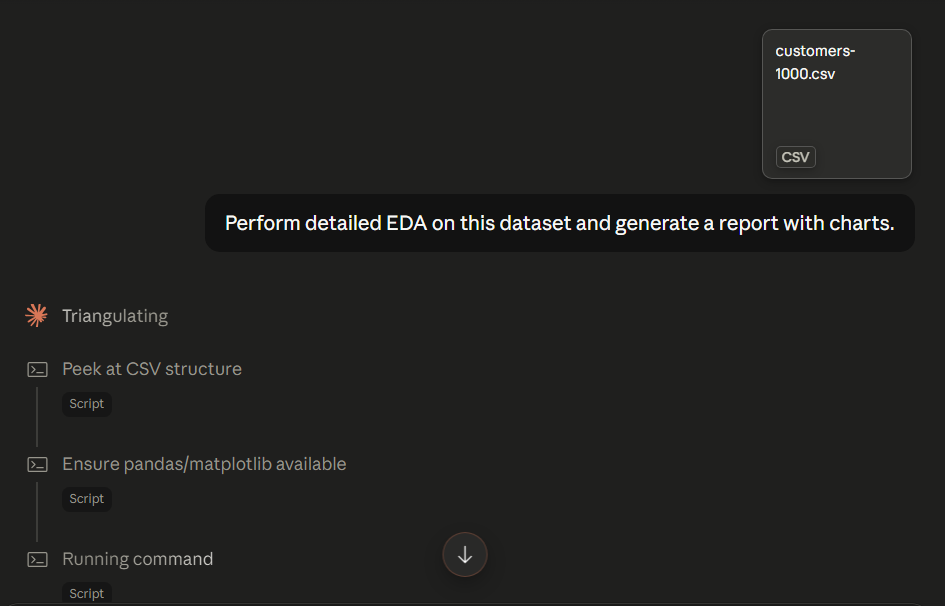
Claude running Python scripts to perform EDA
While an LLM cannot perform these mathematical and visual tasks natively, it is perfectly capable of writing a Python script that utilizes essential data science libraries like pandas, NumPy, and Matplotlib, to do the heavy lifting.
After the script runs, the LLM's job is simply to synthesize the results into a final, readable report.
Executing these Python scripts is made possible through agentic tools.
But we generally do not want an AI agent executing code directly on our own local systems because unsupervised code execution poses a severe security and stability risk, and it could accidentally modify system configurations, delete critical files, or expose sensitive personal data.
That is exactly why we rely on sandboxes: Secure, isolated environments where the AI can safely run its code without accessing our underlying operating system.
This post is specifically about sandboxes for the Deep Agents python library.
What a sandbox is, and why agents need one
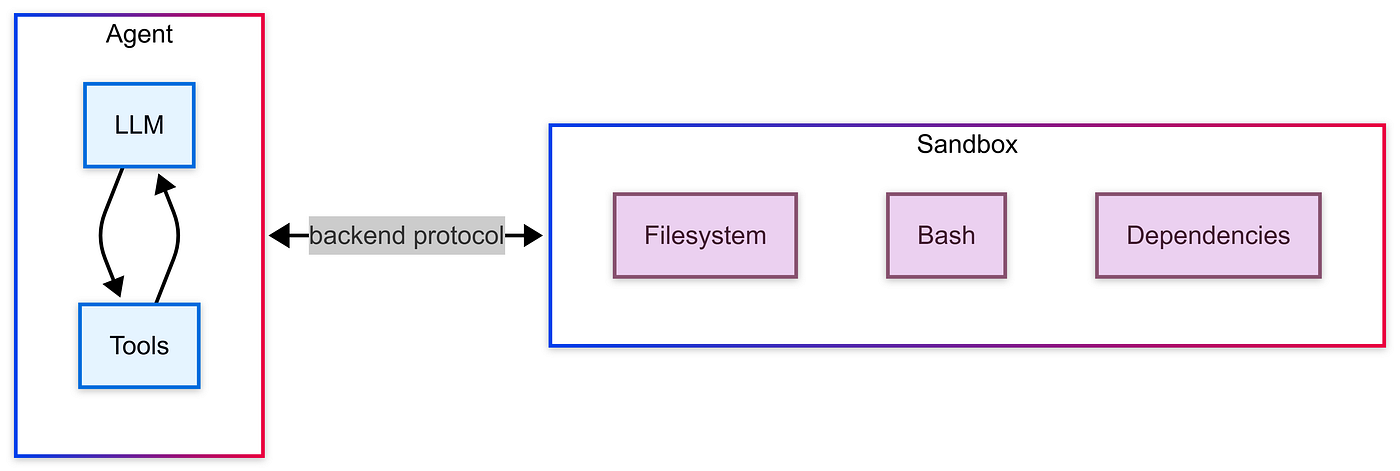
A sandbox, in this context, is an isolated environment, usually a container, where code executes without touching the rest of your system.
It has its own filesystem and process space, with no direct path back to your host machine’s files, credentials, or network unless you explicitly allow it.
For a human developer, a sandbox is a nice-to-have, but for an autonomous agent, it’s close to mandatory, for a few concrete reasons:
- The agent decides what code to run, not you: Even a well-behaved agent will occasionally write something that deletes the wrong file, or runs a command that just wasn’t what you meant. Without isolation, that mistake happens on your actual machine.
- Prompt injection is still real: If your agent reads any untrusted content (a webpage, or a file someone else sent), a cleverly worded instruction hidden in that content can attempt to redirect what the agent does next. A sandbox limits the blast radius of that attempt to a disposable container, not your host.
- Agents want a clean slate: Every task benefits from starting in a known, empty environment rather than accumulating state from every previous run.
- You want to run more than one agent at a time:
Isolation means one agent’s
pip installdoesn't collide with another's, and a crashed sandbox doesn't take your whole process down with it. - Resource limits matter: An agent stuck in a runaway loop, or one that decides to load an entire dataset into memory twice, should exhaust a disposable container’s resources, not your pc’s.
This is why frameworks built for coding agents, Deep Agents among them, treat “sandbox” as a first-class concept rather than an afterthought.
Deep Agents ships an abstraction, BaseSandbox, along with official integrations for a few cloud sandbox providers. Point your agent at one of those, and it gets a real, isolated place to run code.
The catch
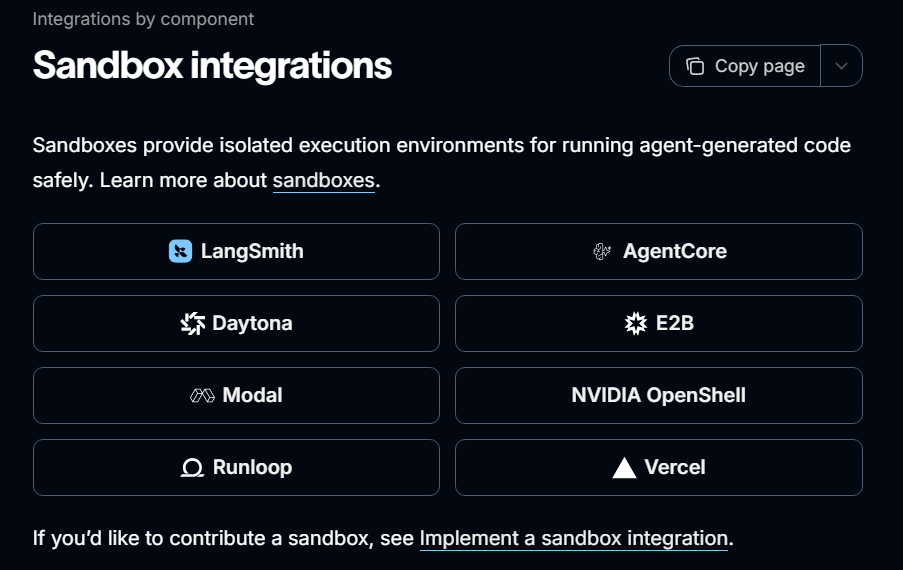
Those are paid, cloud-hosted services, billed by the minute or by usage. Fine for production. Overkill if you just want to build, test, or demo an agent locally.
Enter OpenSandbox
OpenSandbox is a free, open-source sandbox runtime you run yourself, via Docker. It gives you the same core primitive as the paid providers:
- Spin up an isolated container.
- Execute commands in it.
- Read and write files to it.
- Tear it down when you’re done.
Run its control-plane server locally, point it at Docker, and you have a local endpoint that can create and manage sandboxes on demand. It isn’t trying to be a hosted product. It’s infrastructure you own and run yourself, which makes it a genuinely good fit for local development, testing, and demos like the one I’ll show you in what follows.
The remaining question is how you connect something like OpenSandbox to Deep Agents, when Deep Agents doesn’t ship an OpenSandbox integration out of the box.
Deep Agents sandbox extension point
This is where BaseSandbox comes into play.
It's an abstract class with four methods to implement:
class BaseSandbox(ABC):
    def execute(self, command: str, *, timeout: int | None = None) -> ExecuteResponse: ...
    @property
    def id(self) -> str: ...
    def upload_files(self, files: list[tuple[str, bytes]]) -> list[FileUploadResponse]: ...
    def download_files(self, paths: list[str]) -> list[FileDownloadResponse]: ...
These are the only necessary methods to implement when integrating your own sandbox:
- Execute: Execute a command in the sandbox and return
ExecuteResponse. - id: Unique identifier for the sandbox backend.
- upload_files: Upload multiple files to the sandbox.
- download_files: Download multiple files from the sandbox.
Implement those four, and Deep Agents automatically derives ls, read_file, write_file, edit_file, glob, and grep on top of execute().
You don't write those yourself.
This is the entire integration surface, so any sandbox that can run a shell command and move files in and out qualifies.
That seems like a pretty straightforward path, at least until you actually start coding and the bugs start showing up, same as always.
Building the integration
To build this sandbox integration properly, we need first to understand how it should work behind the scene.
How OpenSandbox work?
OpenSandbox uses docker containers to create and manage sandboxes, and it has a Python SDK that provides capabilities to create, manage, and interact with secure sandbox environments, including executing shell commands, managing files, and monitoring resources.
To setup an opensandbox docker container, we need first to have docker installed and running, then we need to create the opensandbox server using:
# Generate a starter config
uvx opensandbox-server init-config ~/.sandbox.toml --example docker

# Start the server
uvx opensandbox-server
Using the SDK we can then connect to the running server, and that would allow us to access all the capabilities of opensandbox.
Simplified integration code
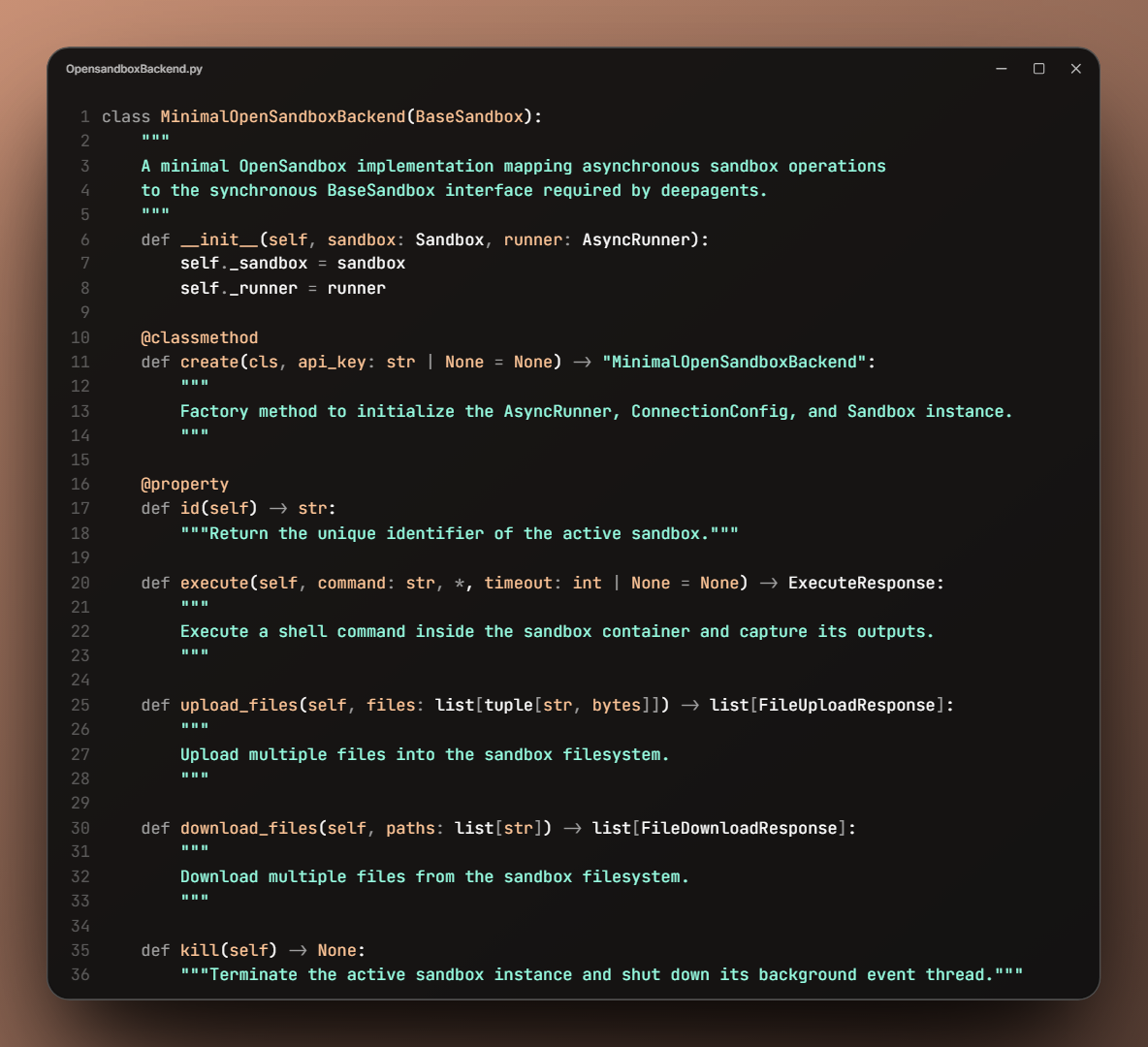
Minimal OpenSandbox integration class skeleton
That’s the main class that we need to populate, following the BaseSandbox abstraction.
Let’s explain it one method at a time.
.create()
class MinimalOpenSandboxBackend(BaseSandbox):
    def __init__(self, sandbox: Sandbox, runner: AsyncRunner):
        self._sandbox = sandbox
        self._runner = runner
__init__ itself is nothing special, it just holds onto the two objects that make everything else work:
- The live
Sandboxconnection to the server. - The
AsyncRunnerthat will drive it.
Neither of these is something you construct by hand. They both come out of a factory method, that we need to create as well.
Notice, too, that this class ends up with more than the four methods
BaseSandboxactually requires.
Most notably, there's a .create() class method.
To see why that's needed, it helps to look at how a sandbox object actually comes into being:
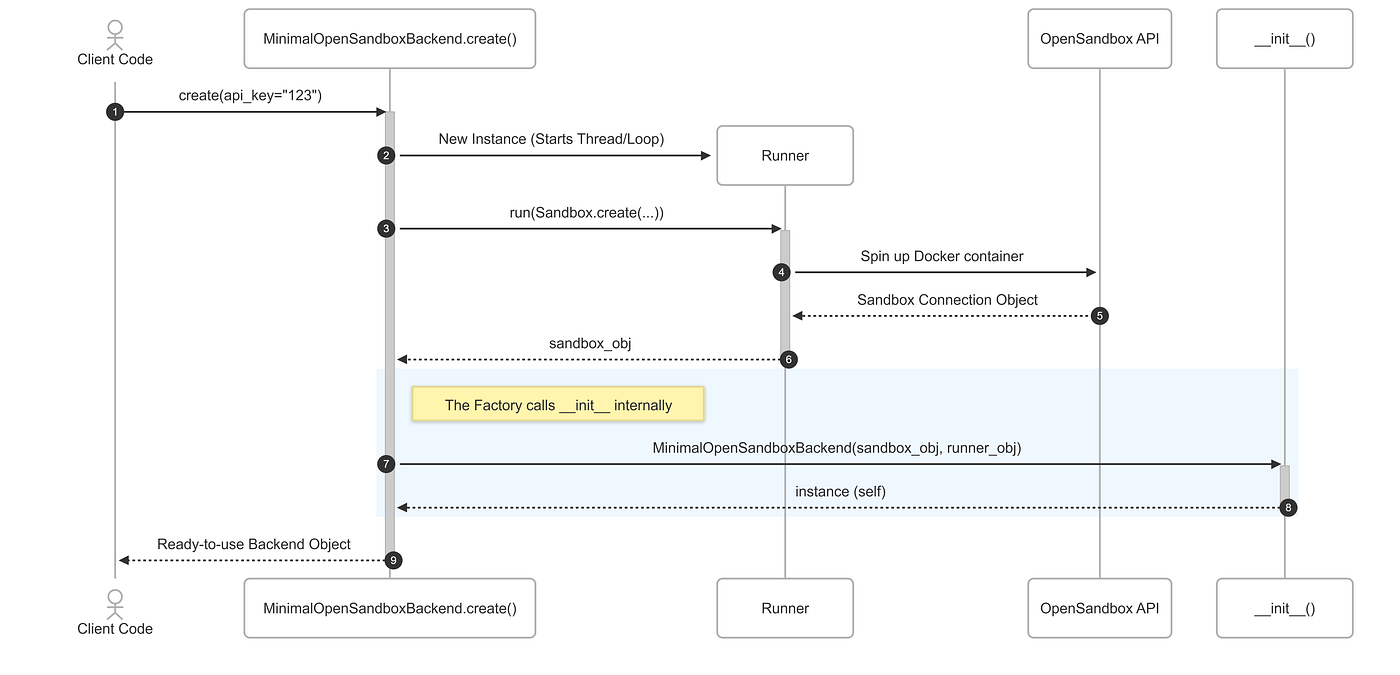
Behind-the-scenes sequence of the OpenSandbox container initialization
The Sandbox connection object and the background runner both have to exist before __init__ can do anything with them, and that's the whole reason create() exists as a separate step.
Here's what it actually looks like:
from opensandbox import Sandbox
from opensandbox.config import ConnectionConfig

IMAGE = "opensandbox/code-interpreter:v1.1.0"
ENTRYPOINT = ["/opt/code-interpreter/code-interpreter.sh"]

@classmethod
def create(cls, api_key: str | None = None) -> "MinimalOpenSandboxBackend":
    runner = AsyncRunner()
    config = ConnectionConfig(domain="localhost:8080", api_key=api_key)
    sandbox = runner.run(
        Sandbox.create(IMAGE, entrypoint=ENTRYPOINT, connection_config=config, timeout=timedelta(minutes=30))
    )
return cls(sandbox, runner)domain="localhost:8080"is what ties this to the OpenSandbox server you started earlier withuvx opensandbox-server.timeout=timedelta(minutes=30)is a safety net: if you forget to callkill(), the sandbox tears itself down instead of running forever in the background.
IMAGE and ENTRYPOINT are the pair to watch. They need to be compatible with the opensandox version you’re running.
Now let’s talk about the runnner usage here.
Sandbox.create is a coroutine, but BaseSandbox.create needs to return a plain object, not something you have to await. For now, you can read runner.run(coro) as "block until this async call finishes, then give me the result".
We'll open up what's actually happening inside AsyncRunner shortly.
But that’s basically why we handSandbox.create(...) to runner.run(...) instead of awaiting it directly.
.id()
With create() done, the rest of the class is about using a sandbox that already exists.
@property
def id(self) -> str:
    return self._sandbox.id
Nothing really complicated about it, this just exposes the underlying sandbox’s own id, which BaseSandbox requires as a property and which is handy for logging.
.execute()
from deepagents.backends.protocol import ExecuteResponse

def execute(self, command: str, *, timeout: int | None = None) -> ExecuteResponse:
    execution = self._runner.run(self._sandbox.commands.run(command))
    stdout = "\n".join(c.text for c in execution.logs.stdout)
    stderr = "\n".join(c.text for c in execution.logs.stderr)
    output = "\n".join(p for p in (stdout, stderr) if p)
    return ExecuteResponse(output=output, exit_code=execution.exit_code or 0)
This is the one that looks trivial and isn’t.
OpenSandbox streams command output as a list of chunks, one chunk per line, with the newline already stripped off by the time it reaches you. That’s why we need to reconstruct the execution response correctly so that it can be processed correctly aftewards by the agent.
That matters more than it sounds like, because execute() isn't just for us to run. It's the foundation ls, glob, and grep are built on inside Deep Agents, and all of them parse command output one line at a time.
Feed them a badly formatted response, and they just fail to match anything and quietly hand back an empty result.
So ls returns [], and there's no traceback pointing you at the join bug. Just a sandbox that looks empty when it isn't.
The rest of execute() is more straightforward.
stdout and stderr get concatenated (skipping whichever one is empty), and a missing exit code is treated as success (0) rather than left as None.
.upload_files()
from opensandbox.models import WriteEntry
from deepagents.backends.protocol import FileUploadResponse

def upload_files(self, files: list[tuple[str, bytes]]) -> list[FileUploadResponse]:
    entries = [WriteEntry(path=path, data=data, mode=644) for path, data in files]
    try:
        self._runner.run(self._sandbox.files.write_files(entries))
        return [FileUploadResponse(path=p) for p, _ in files]
    except Exception as exc:
        return [FileUploadResponse(path=p, error=str(exc)) for p, _ in files]
Each (path, bytes) pair becomes a WriteEntry with standard file permissions (owner read/write, everyone else read-only), and the whole batch goes over in a single write_files() call.
.download_files()
from deepagents.backends.protocol import FileDownloadResponse

def download_files(self, paths: list[str]) -> list[FileDownloadResponse]:
    results = []
    for path in paths:
        try:
            content = self._runner.run(self._sandbox.files.read_bytes(path))
            results.append(FileDownloadResponse(path=path, content=content))
        except Exception as exc:
            results.append(FileDownloadResponse(path=path, error=str(exc)))
    return results
The detail that actually matters here is read_bytes, not read_file. OpenSandbox's SDK offers both, and read_file assumes UTF-8 text.
Since a sandbox running an LLM's code has no way of knowing in advance whether the next file it's asked to pull out is a CSV or a chart it just rendered, read_bytes is the only choice that's safe for both.
.kill()
def kill(self) -> None:
    self._runner.run(self._sandbox.kill())
    self._runner.shutdown()
Two important things happen on teardown:
- The sandbox container itself gets killed.
- The runner’s background thread gets explicitly shut down.
If you skip that second call, the thread (and the event loop running inside it) just keeps sitting there after you're done with the sandbox.
That’s the whole class!
Two lifecycle methods (create, kill) wrapped around the four BaseSandbox actually requires (id, execute, upload_files, download_files).
The one piece we’ve been stepping around this whole time is self._runner.run(...) . The thing making every one of these async SDK calls look synchronous to BaseSandbox.
Let's open that up next.
The sync/async bridge
BaseSandbox is a synchronous interface. That means execute(), upload_files(), download_files() are all plain function calls, with no await anywhere.
But the OpenSandbox SDK is async: Sandbox.create(), sandbox.commands.run(), sandbox.files.write_files() are all coroutines.
We create AsyncRunner just to close that gap.
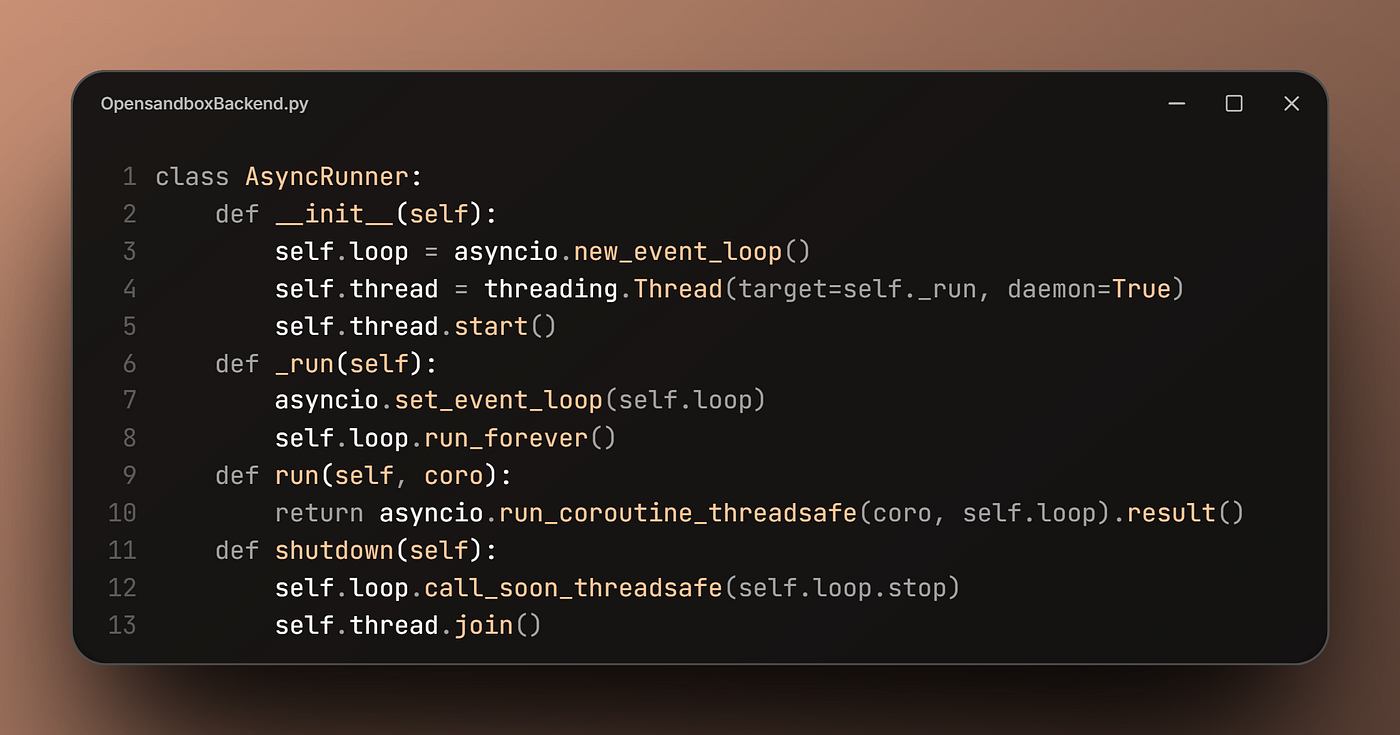
The idea is simple: Spin up one event loop, hand it to a dedicated background thread, and leave it running for the lifetime of the sandbox.
run() is the only method the rest of the class ever touches.
It sends the task to the background loop with run_coroutine_threadsafeand pauses the main program until the job is completely finished and returns a result.
From execute()'s point of view, self._runner.run(some_coroutine) behaves exactly like calling a normal function.
Keeping one persistent loop alive, rather than spinning up a fresh one per call, is also what lets the sandbox connection behave like a single, long-lived session instead of being torn down and rebuilt on every execute().
The shutdown() method is just the cleanup step. It stops the background loop and shuts down the thread properly. This is why kill() calls it directly, rather than just leaving the thread running uselessly in the background.
Let’s now see it in motion.
A data analysis agent in the sandbox
Now that we have the integration ready. Let’s test in in a Jupyter notebook.
We start by setting up environment variables, constants, and importing necessary packages. But, most importantly, we need to create a MinimalOpenSandboxBackend backend object.
It requires an API key that you create yourself and set in the ~/.sandbox.toml file as: api_key = “SANDBOX_API_KEY”
import asyncio
import nest_asyncio
import threading
from datetime import timedelta
from pathlib import Path

from deepagents import create_deep_agent
from deepagents.backends.protocol import ExecuteResponse, FileDownloadResponse, FileUploadResponse
from deepagents.backends.sandbox import BaseSandbox
from langchain.chat_models import init_chat_model

from opensandbox import Sandbox
from opensandbox.config import ConnectionConfig
from opensandbox.models import WriteEntry

# nest_asyncio for running async functions in Jupyter.
nest_asyncio.apply()

IMAGE = "opensandbox/code-interpreter:v1.1.0"
ENTRYPOINT = ["/opt/code-interpreter/code-interpreter.sh"]

backend = MinimalOpenSandboxBackend.create(api_key="SANDBOX_API_KEY")
print("Sandbox ready:", backend.id)
We instantiate the chat model (We can use local models via ollama, but we still need a model that can handle agentic tasks):
llm = init_chat_model(
    model="gemini-3.5-flash",
    model_provider="google_genai",
    api_key=os.environ["GOOGLE_API_KEY"],
    max_tokens=14750,
    max_retries=5,
)
Then, we create the agent itself:
agent = create_deep_agent(
    model=llm,
    system_prompt=(
        "You are a Python coding assistant with sandbox access. "
        "You specialize in performing data analysis and data visualization with python,"
        "you generate clear reports with good looking charts using seaborn."
    ),
    backend=backend,
)
That backend=backend is the whole point of everything built so far — Deep Agents takes that one object and derives ls, read_file, write_file, glob, and grep from it automatically, on top of our execute().
Next, let’s get some real data in front of it, using upload_files() directly. Here I am using a fake dataset of 1000 customers:

Snapshot of the fake customers dataset
csv_bytes = Path("customers-1000.csv").read_bytes()
results = backend.upload_files([("/workspace/customers-1000.csv", csv_bytes)])
for r in results:
    if r.error:
        print(f"Upload failed for {r.path}: {r.error}")
    else:
        print(f"Uploaded {r.path}")
And then, we call the agent to perform the actual task:
result = agent.invoke({
    "messages": "Perform a deep exploratory data analysis on the customers-1000.csv file "
                "and summarize the findings in a markdown report with clear charts."
})
From here the agent is on its own.
It has the necessary tools and infrastructure to write and run pandas/seaborn code inside a sandbox via execute(), save chart images to the sandbox's filesystem, and iterate until it produces a full markdown report.
One catch: The report lives partly in the sandbox The markdown the agent hands back references its charts by their sandbox-local paths (i.e., paths that don’t exist on your machine).
So before the report is actually readable, two things have to happen: pull the chart images out with download_files(), and rewrite the image paths in the markdown to point at wherever you saved them locally.
Tip: Rather than scanning the agent’s freeform markdown for image links to swap, it’s a lot less fragile to have the agent return structured output (e.g., a report field plus an explicit list of image paths). So post-processing is just “download each path in the list, then replace it,” with nothing to parse.
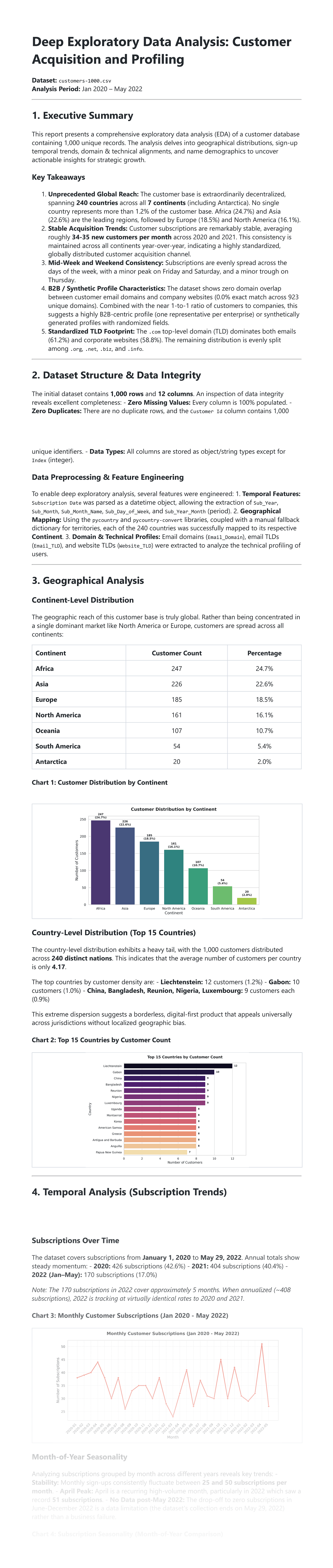
Once that swap is done, here’s what the sandbox actually produced from the raw CSV:
# Deep Exploratory Data Analysis: Customer Acquisition and Profiling
**Dataset:** `customers-1000.csv`
**Analysis Period:** Jan 2020 – May 2022
---
## 1. Executive Summary
This report presents a comprehensive exploratory data analysis (EDA) of a customer database containing 1,000 unique records. The analysis delves into geographical distributions, sign-up temporal trends, domain & technical alignments, and name demographics to uncover actionable insights for strategic growth.
### Key Takeaways
1. **Unprecedented Global Reach:** The customer base is extraordinarily decentralized, spanning **240 countries** across all **7 continents** (including Antarctica). No single country represents more than 1.2% of the customer base. Africa (24.7%) and Asia (22.6%) are the leading regions, followed by Europe (18.5%) and North America (16.1%).
2. **Stable Acquisition Trends:** Customer subscriptions are remarkably stable, averaging roughly **34-35 new customers per month** across 2020 and 2021. This consistency is maintained across all continents year-over-year, indicating a highly standardized, globally distributed customer acquisition channel.
3. **Mid-Week and Weekend Consistency:** Subscriptions are evenly spread across the days of the week, with a minor peak on Friday and Saturday, and a minor trough on Thursday.
4. **B2B / Synthetic Profile Characteristics:** The dataset shows zero domain overlap between customer email domains and company websites (0.0% exact match across 923 unique domains). Combined with the near 1-to-1 ratio of customers to companies, this suggests a highly B2B-centric profile (one representative per enterprise) or synthetically generated profiles with randomized fields.
5. **Standardized TLD Footprint:** The `.com` top-level domain (TLD) dominates both emails (61.2%) and corporate websites (58.8%). The remaining distribution is evenly split among `.org`, `.net`, `.biz`, and `.info`.
---
## 2. Dataset Structure & Data Integrity
The initial dataset contains **1,000 rows** and **12 columns**. An inspection of data integrity reveals excellent completeness:
- **Zero Missing Values:** Every column is 100% populated.
- **Zero Duplicates:** There are no duplicate rows, and the `Customer Id` column contains 1,000 unique identifiers.
- **Data Types:** All columns are stored as object/string types except for `Index` (integer).
### Data Preprocessing & Feature Engineering
To enable deep exploratory analysis, several features were engineered:
1. **Temporal Features:** `Subscription Date` was parsed as a datetime object, allowing the extraction of `Sub_Year`, `Sub_Month`, `Sub_Month_Name`, `Sub_Day_of_Week`, and `Sub_Year_Month` (period).
2. **Geographical Mapping:** Using the `pycountry` and `pycountry-convert` libraries, coupled with a manual fallback dictionary for territories, each of the 240 countries was successfully mapped to its respective **Continent**.
3. **Domain & Technical Profiles:** Email domains (`Email_Domain`), email TLDs (`Email_TLD`), and website TLDs (`Website_TLD`) were extracted to analyze the technical profiling of users.
---
## 3. Geographical Analysis
### Continent-Level Distribution
The geographic reach of this customer base is truly global. Rather than being concentrated in a single dominant market like North America or Europe, customers are spread across all continents:
| Continent | Customer Count | Percentage |
| :--- | :---: | :---: |
| **Africa** | 247 | 24.7% |
| **Asia** | 226 | 22.6% |
| **Europe** | 185 | 18.5% |
| **North America** | 161 | 16.1% |
| **Oceania** | 107 | 10.7% |
| **South America** | 54 | 5.4% |
| **Antarctica** | 20 | 2.0% |
#### Chart 1: Customer Distribution by Continent

### Country-Level Distribution (Top 15 Countries)
The country-level distribution exhibits a heavy tail, with the 1,000 customers distributed across **240 distinct nations**. This indicates that the average number of customers per country is only **4.17**.
The top countries by customer density are:
- **Liechtenstein:** 12 customers (1.2%)
- **Gabon:** 10 customers (1.0%)
- **China, Bangladesh, Reunion, Nigeria, Luxembourg:** 9 customers each (0.9%)
This extreme dispersion suggests a borderless, digital-first product that appeals universally across jurisdictions without localized geographic bias.
#### Chart 2: Top 15 Countries by Customer Count

---
## 4. Temporal Analysis (Subscription Trends)
... (Trimmed to keep blog (estimated read time short))Rendered report (cropped):
From notebook to a PyPi package
The notebook version was enough to show how the pieces fit. But, it’s more practical to have this integration as a Python package that you can download and use from anywhere using Pip.
So, turning it into deepagents_opensandbox_backend, a real package, meant fixing everything that only breaks once other people start running it against setups I hadn't tested.
The public surface didn't change, we still use the same BaseSandbox methods, same create()/kill().
But here’s what changed:
- Single shared loop: Backends now share a single module-level
_BackgroundLoopinstead of running their own separate threads. - Security warning by default: Since the API is unauthenticated,
create()now raises anInsecureSandboxWarningif you don't provide anapi_key(previously, it connected silently). - Docker Desktop fix: Direct container-port access often times out on Docker Desktop. Setting
use_server_proxy=Truebypasses this by routing traffic through the server instead. - Path validation:
upload_filesanddownload_filesnow reject relative paths upfront, preventing the server from silently resolving them to incorrect directories. - Clearer error messages: The client now checks file info to distinguish between “permission denied” and “file not found,” mapping them to expected error codes rather than passing along misleading raw errors.
- Working timeouts: The
timeoutargument is no longer ignored. It is now passed to the server to kill runaway commands, rather than letting them run orphaned after the client gives up. - Removed manual async methods: Real async variants (like
aexecute) were deleted because they caused silent, empty outputs in LangGraph'sToolNode. The system now safely falls back to running standard sync methods in a thread pool.
That’s the difference between a demo that works on one machine and a package meant for anyone to pip install.
I packaged all of it, plus a real conformance test suite against Deep Agents own standard sandbox tests, as **deepagents-opensandbox-backend**:
!pip install deepagents-opensandbox-backendIt’s the same integration this post walks through, with the sharp edges filed down.
Check it out
If you want to try this yourself or get the source code, the full package (install instructions, usage examples, and contribution guidelines) is on GitHub: **deepagents-opensandbox-backend**.
Issues and PRs are welcome if you run into rough edges or want to help extend it.

Thanks for taking a few minutes out of your day to read this.
Leave a comment and follow me for more insights on AI, ML, and coding. You can also check out my work and socials: Website | YouTube | GitHub | LinkedIn | X | Substack
Looking to level up your engineering library? I’ve compiled a curated collection of must-read books covering software architecture, deep learning, system design, and AI fundamentals. 👉 **Explore my AI Engineering Reading List**
메타데이터
- post_id
- 43662eb4f13d
- slug
- upgrade-your-deep-agent-with-a-local-open-source-sandbox-43662eb4f13d
- url
- https://pub.towardsai.net/upgrade-your-deep-agent-with-a-local-open-source-sandbox-43662eb4f13d
- canonical_url
- https://pub.towardsai.net/upgrade-your-deep-agent-with-a-local-open-source-sandbox-43662eb4f13d
- author_url
- https://medium.com/@hamzamlwh
- status
- ok
- fetched_at
- 2026-08-03 19:12:03