Zero-Restart Deployments in Java: Build a 24/7 Live-Updating System
How to Achieve Zero-Downtime Updates in Core Java with Hot Code Swapping
Zero-Restart Deployments in Java: Build a 24/7 Live-Updating System
How to Achieve Zero-Downtime Updates in Core Java with Hot Code Swapping
Downtime is a dirty word in modern software. Here’s how to eliminate it during deployments.
In the world of high-frequency trading, global e-commerce, and real-time IoT systems, a single minute of downtime can mean millions in lost revenue or critical system failures. The traditional “stop, deploy, restart” cycle is no longer acceptable.
But Java has a well-known limitation: the JVM doesn’t support unloading and reloading classes by default. This is why most applications require a full restart for every update.
🌟 Open Access Version
✨ Knowledge wants to be free. 📚 **Enjoy the full read — free & unrestricted**
What if you could update your application’s business logic without stopping the JVM? Without dropping a single user session, losing a shopping cart, or interrupting a single transaction?
In this deep-dive, we’ll move beyond theory and build a production-ready, zero-restart deployment system in core Java. You’ll learn the architectural secrets that power tools like JRebel and how to apply them to your own mission-critical applications.
By the end of this article, you will understand:
- The role of ClassLoaders in achieving hot deployment
- How to build a PluginManager to live-reload JAR files
- How to use Byte Buddy for runtime bytecode redefinition
- Best practices for managing state and avoiding memory leaks in production
- How commercial tools like JRebel automate this process
Why Zero-Restart Deployments Are Non-Negotiable
Imagine an e-commerce engine processing thousands of transactions per minute. A critical bug is discovered in the discount calculation logic. A simple code fix is ready, but a full restart to deploy it would be a business disaster:
- Dropped User Sessions: Logged-in users are kicked out
- Abandoned Carts: Active shopping sessions are lost, directly impacting sales
- Operational Disruption: In-flight transactions and orders are delayed or failed
Zero-restart architecture is the solution. Instead of restarting the entire JVM, we replace the faulty logic at runtime, preserving all live application state.
The Architectural Blueprint: Separation of Concerns
The core secret is to separate the stable infrastructure from the volatile business logic.
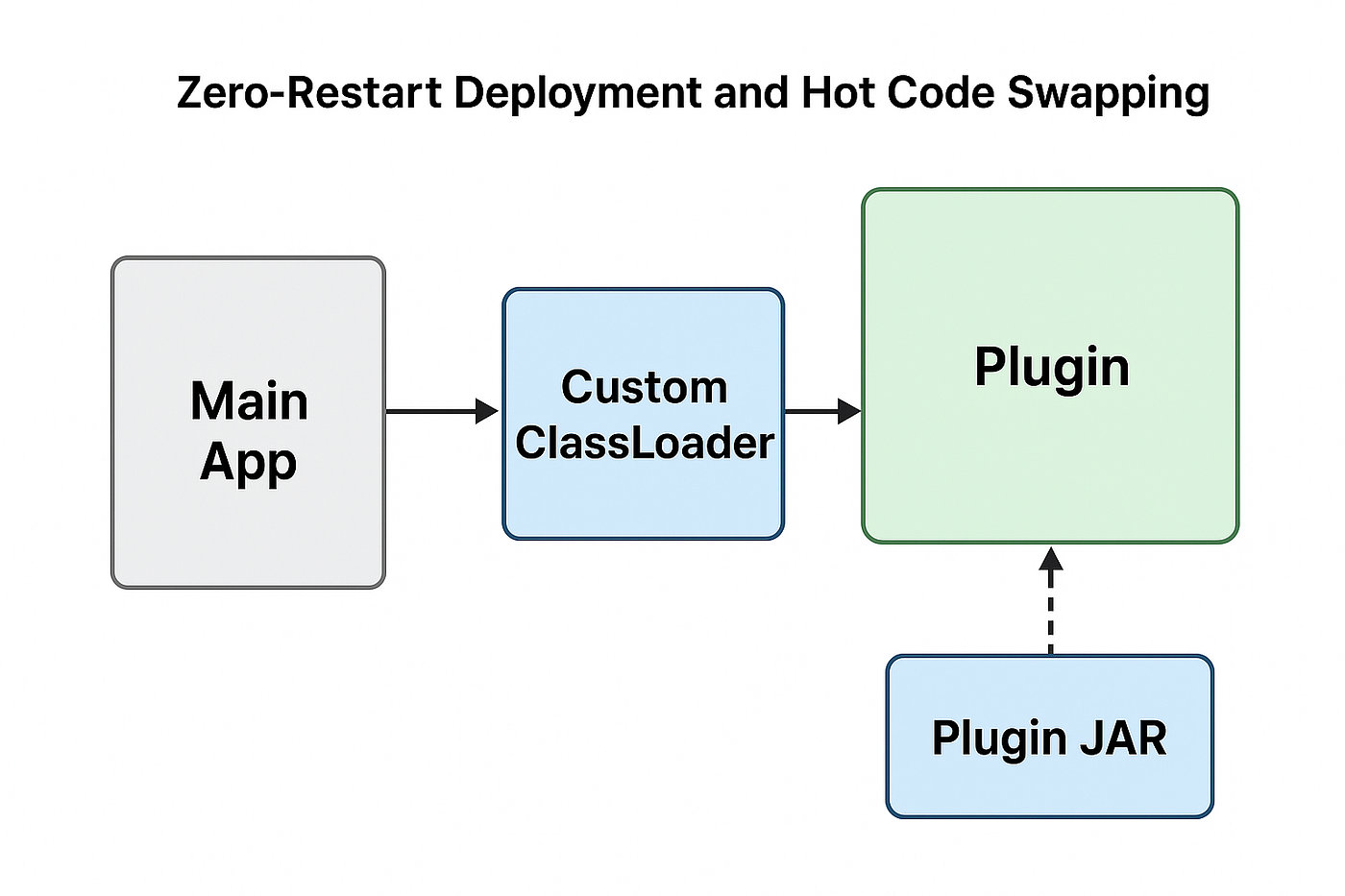
Your core application (the “framework”) should call into a well-defined, stable interface. The business logic is then packaged into isolated, replaceable modules (plugins). This allows us to hot-swap the implementation without touching the core.
Let’s define our contract.
Step 1: Define a Stable Plugin Interface
This interface is the immutable contract between your core system and the dynamic modules. It must never change once deployed.
// File: Plugin.java
package com.example.hotdeploy;

public interface Plugin {
    String getName();
    double applyDiscount(double orderAmount);
}
Building the Engine: The Custom ClassLoader
The JVM’s default ClassLoader caches classes forever. The key to unloading an old version of a class is to discard its entire ClassLoader. A new ClassLoader can then load the new version of the class from the updated JAR.
We use a URLClassLoader for this purpose.
// File: DynamicModuleLoader.java
package com.example.hotdeploy;

import java.io.File;
import java.net.URL;
import java.net.URLClassLoader;
public class DynamicModuleLoader extends URLClassLoader {
    public DynamicModuleLoader(String jarPath, ClassLoader parent) throws Exception {
        super(new URL[]{ new File(jarPath).toURI().toURL() }, parent);
    }
    @Override
    public void close() throws Exception {
        super.close();
        // This is crucial for allowing the old classes to be garbage collected.
        System.out.println("[Loader] Module closed and ready for GC");
    }
}
The Brain: The Plugin Manager
This is the orchestrator. It handles the lifecycle of plugins: loading, unloading, and execution. The key is to use a new DynamicModuleLoader for each version of the plugin.
// File: PluginManager.java
package com.example.hotdeploy;

public class PluginManager {
    private DynamicModuleLoader loader;
    private Plugin plugin;
    public void loadPlugin(String jarPath, String className) throws Exception {
        // 1. Unload the previous version
        if (loader != null) {
            System.out.println("[Manager] Unloading previous plugin...");
            loader.close();
        }
        // 2. Create a new ClassLoader for the new JAR
        loader = new DynamicModuleLoader(jarPath, getClass().getClassLoader());
        // 3. Load and instantiate the new class
        Class<?> clazz = loader.loadClass(className);
        plugin = (Plugin) clazz.getDeclaredConstructor().newInstance();
        System.out.println("[Manager] Loaded: " + plugin.getName());
    }
    public void applyLogic(double amount) {
        if (plugin == null) {
            throw new IllegalStateException("No plugin loaded");
        }
        double result = plugin.applyDiscount(amount);
        System.out.println("[Manager] Result: " + result);
    }
}
🧩 Creating Our Business Logic Modules
Let’s create two versions of a discount calculator to demonstrate the live update.
Version 1: 10% Discount
// File: DiscountV1.java
package com.example.plugin;

import com.example.hotdeploy.Plugin;
public class DiscountV1 implements Plugin {
    public String getName() { return "DiscountV1 (10% Off)"; }
    public double applyDiscount(double orderAmount) { return orderAmount * 0.9; }
}
Version 2: 20% Discount
// File: DiscountV2.java
package com.example.plugin;

import com.example.hotdeploy.Plugin;
public class DiscountV2 implements Plugin {
    public String getName() { return "DiscountV2 (20% Off)"; }
    public double applyDiscount(double orderAmount) { return orderAmount * 0.8; }
}
Compile and package these into JAR files:
javac -cp . com/example/plugin/*.java
jar cf DiscountV1.jar com/example/plugin/*.class
jar cf DiscountV2.jar com/example/plugin/*.class
mkdir plugins
mv DiscountV1.jar DiscountV2.jar plugins/
⚡ The Grand Finale: A Live Demo
This main class brings it all together, providing an interactive way to see the hot swap in action.
// File: HotReloadDemo.java
package com.example.hotdeploy;

import java.util.Scanner;
public class HotReloadDemo {
    public static void main(String[] args) throws Exception {
        PluginManager manager = new PluginManager();
        Scanner sc = new Scanner(System.in);
        // Load V1 initially
        manager.loadPlugin("plugins/DiscountV1.jar", "com.example.plugin.DiscountV1");
        manager.applyLogic(100.0); // Output: 90.0
        while (true) {
            System.out.println("\nType 'reload' to swap plugin or 'exit' to quit:");
            String cmd = sc.nextLine();
            if ("reload".equalsIgnoreCase(cmd)) {
                // Hot-swap to V2 without stopping the JVM!
                manager.loadPlugin("plugins/DiscountV2.jar", "com.example.plugin.DiscountV2");
                manager.applyLogic(100.0); // Output: 80.0
            } else if ("exit".equalsIgnoreCase(cmd)) break;
        }
        sc.close();
    }
}
Console Output:
[Manager] Loaded: DiscountV1 (10% Off)
[Manager] Result: 90.0
Type 'reload' to swap plugin or 'exit' to quit:
reload
[Manager] Unloading previous plugin...
[Loader] Module closed and ready for GC
[Manager] Loaded: DiscountV2 (20% Off)
[Manager] Result: 80.0
✅ No restarts. No downtime. Fully live reload.
Automating with Byte Buddy
Manually managing JARs is powerful, but for finer-grained control — like replacing a single method in a running class — we can use Byte Buddy, a powerful bytecode manipulation library.
This is how many profiling and APM tools work under the hood.
import net.bytebuddy.ByteBuddy;
import net.bytebuddy.agent.ByteBuddyAgent;
import net.bytebuddy.dynamic.loading.ClassReloadingStrategy;
import static net.bytebuddy.matcher.ElementMatchers.named;
import net.bytebuddy.implementation.FixedValue;

public class ByteBuddyDemo {
    public static void main(String[] args) {
        // Before redefinition
        DiscountService service = new DiscountService();
        System.out.println("Before: " + service.applyDiscount(1000)); // Output: 900.0
        // Install the Byte Buddy agent
        ByteBuddyAgent.install();
        // Redefine the class at runtime
        new ByteBuddy()
            .redefine(DiscountService.class)
            .method(named("applyDiscount"))
            .intercept(FixedValue.value(800.0)) // New fixed logic
            .make()
            .load(
                DiscountService.class.getClassLoader(),
                ClassReloadingStrategy.fromInstalledAgent()
            );
        // After redefinition
        System.out.println("After: " + service.applyDiscount(1000)); // Output: 800.0
    }
}
class DiscountService {
    public double applyDiscount(double amount) {
        return amount * 0.9;
    }
}
Requirements:
- Add the Byte Buddy dependencies to your
pom.xml:
<dependency>
    <groupId>net.bytebuddy</groupId>
    <artifactId>byte-buddy</artifactId>
    <version>1.14.9</version>
</dependency>
<dependency>
    <groupId>net.bytebuddy</groupId>
    <artifactId>byte-buddy-agent</artifactId>
    <version>1.14.9</version>
</dependency>- Run your application with the Java agent.
Enterprise-Grade Solution: JRebel
While building custom solutions is educational, for enterprise-scale applications, a proven tool like JRebel is the best choice. JRebel seamlessly integrates into your development and production workflow, automatically detecting and reloading changes to classes, resources, and framework configurations.
How it works:
- Install the JRebel plugin in your IDE (IntelliJ IDEA or Eclipse)
- Start your application with the JRebel agent:
java -javaagent:/path/to/jrebel.jar -jar yourapp.jar - Change your code. Save. Watch as JRebel instantly applies the changes to your running application
It supports a vast ecosystem of frameworks (Spring, Quarkus, Micronaut, etc.) and eliminates the need for custom code, making developer productivity skyrocket.
Critical Production Consideration: Preserving State
The holy grail is changing logic without losing in-memory state (user sessions, caches, connection pools).
The solution is to decouple state from behavior. Pass the stateful context to the plugin, don’t let the plugin manage it.
public class ApplicationContext {
    // This is your live, in-memory state
    private Map<String, UserSession> activeSessions = new ConcurrentHashMap<>();
    private Cache productCache = new Cache();

    public Map<String, UserSession> getActiveSessions() { return activeSessions; }
    public Cache getProductCache() { return productCache; }
}

public interface StatefulPlugin {
    void execute(ApplicationContext context);
}
When reloading:
StatefulPlugin newPlugin = loadNewPlugin();
newPlugin.execute(sharedApplicationContext); // State persists!
⚠️ Best Practices & Pitfalls
- Avoid Memory Leaks: Ensure you nullify references and close old ClassLoaders. Use
WeakReferencefor cached objects - Thread Safety: Use
AtomicReferenceor synchronized blocks when swapping plugin instances to prevent race conditions - Validation: Always validate a new plugin after loading it, perhaps with a quick integration test or a canary deployment strategy
- Monitoring: Use JMX or similar tools to monitor your ClassLoader count and memory usage to ensure old versions are being garbage collected
- Know the Limits: You cannot change the method signature of a class using bytecode redefinition. The schema of a class must remain compatible
🎯 Conclusion: The Future of Java is Zero-Downtime
Zero-restart deployment is more than a technical trick; it’s a fundamental shift in how we think about application architecture and reliability. By leveraging ClassLoaders, the Instrumentation API, and powerful tools like Byte Buddy and JRebel, we can build Java systems that truly never sleep.
This approach powers the world’s most demanding financial trading systems, e-commerce platforms, and real-time data processors. Now, you have the knowledge to build them too.
What’s your experience with hot deployment? Have you tried JRebel or built a custom solution? Share your stories and challenges in the comments below!
If you found this article helpful, feel free to clap 👏 and share it with your team. Follow me for more deep-dives into Java performance and architecture.
메타데이터
- post_id
- 438aa4ddcb1b
- slug
- zero-restart-deployments-in-java-build-a-24-7-live-updating-system-438aa4ddcb1b
- url
- https://medium.com/javarevisited/zero-restart-deployments-in-java-build-a-24-7-live-updating-system-438aa4ddcb1b
- canonical_url
- https://medium.com/javarevisited/zero-restart-deployments-in-java-build-a-24-7-live-updating-system-438aa4ddcb1b
- author_url
- https://medium.com/@pat.vishad
- status
- ok
- fetched_at
- 2026-07-16 00:29:35