Using symbolic links(symlinks) in airflow to manage DAGs across multiple folders.
If you’ve ever run a dag file in airflow, we know that airflow manages one folder for DAG files i.e /dags_folder. That begs the question…
Using symbolic links(symlinks) in airflow to manage DAGs across multiple folders.

airflow dags multiple folders
If you’ve ever run a dag file in airflow, we know that airflow manages one folder for DAG files i.e /dags_folder. That begs the question how would it be able to track dags in different folders without copy pasting the file to /dags_folder.
After being faced with such a situation symbolic links(symlinks) was the simplest solution to my problem. In this post I will walk through what are symlinks and the solution that they bring.
Symbolic Links(Symlinks)
Symlinks are pointers in filesystem, they say “The real content lies somewhere else.” When a program reads a symlink, the OS silently redirects it to the target.
That property is exactly what is needed for this to work. We can make airflow /dags_folder to appear to contaning different directories inside it without coping the files.
Setting it up
1. Confirming the original dag folder
After making sure apache-airflow is installed you can check the dags_folder location
airflow config get-value core dags_folderSuch a response is expected /home/bryson/airflow/dags
The contents of the /dags_folder is:

2. Defining our secondary directory
Our secondary directory will be located at /home/bryson/dev/pipeline/dags

3. Current airflow api-server

Only the files inside the airflow/dags are currently displayed in the api-server dashboard.
4. Creating symlink for the secondary folder
ln -s source_path target_path
ln -s /home/bryson/dev/pipeline/dags /home/bryson/airflow/dags/fx_pricesThis will create a link from /home/bryson/airflow/dags to /home/bryson/dev/pipeline/dags
Sample of the symlink created:

5. Api-server after creating a symlink
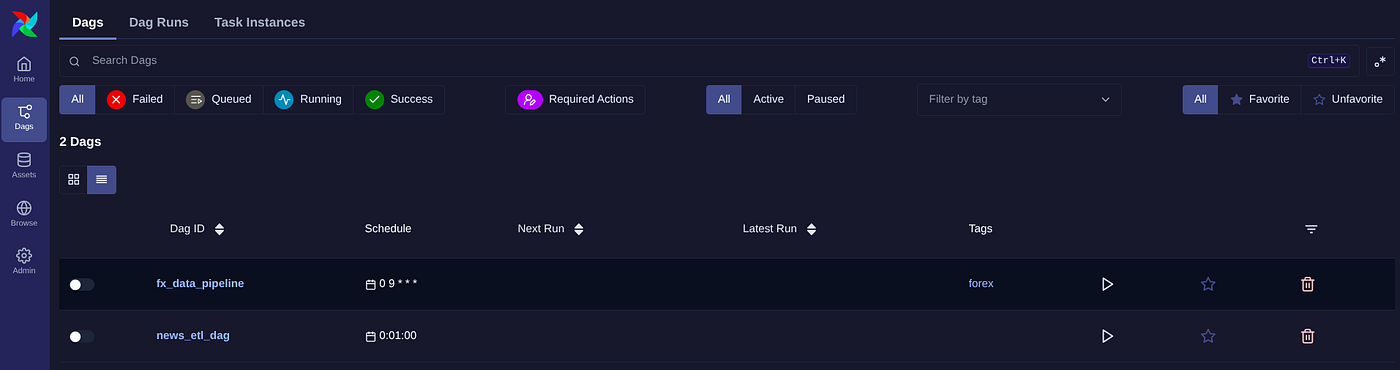
As you can notice our Api-server now also detects the dag files inside our secondary directory.
Why symlinks
Symlinking is great for local development as it’s fast to set up and keeps directories independent.
Points to note
Sometimes not all files in a folder are dags, to ensure only dags are detected we use .airflowignore to have the names of the files to be ignored.
This helps only to manage different folders containing dag files from the same api-server dashboard
메타데이터
- post_id
- 43c263b82502
- slug
- using-symbolic-links-symlinks-in-airflow-to-manage-dags-across-multiple-folders-43c263b82502
- url
- https://medium.com/@braebulimo/using-symbolic-links-symlinks-in-airflow-to-manage-dags-across-multiple-folders-43c263b82502
- canonical_url
- https://medium.com/@braebulimo/using-symbolic-links-symlinks-in-airflow-to-manage-dags-across-multiple-folders-43c263b82502
- author_url
- https://medium.com/@braebulimo
- status
- ok
- fetched_at
- 2026-07-09 05:53:33