Turn off org-modern-table styling for org-modern emacs package.
org-modern produces some chonkers column borders when running emacs in a terminal:
Turn off org-modern-table styling for org-modern emacs package.
org-modern produces some chonkers column borders when running emacs in a terminal:
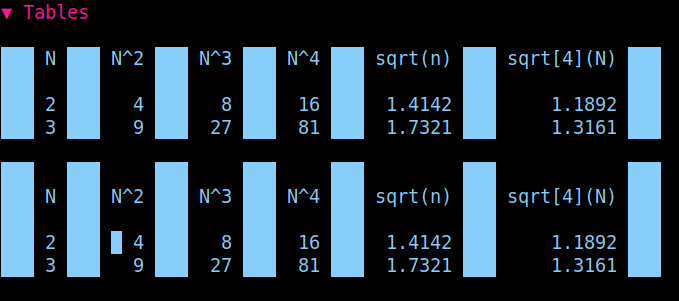
Screenshot of the table example in example.org of the org-modern emacs package.
It’s possible to turn off table styling only via customization options within org-modern:
Turn the org-mode table styling off via emacs customization options:
1. C-h v(or M-x describe-variable)
2. enter org-modern-tableat the prompt
3. Navigate to the newly opened help buffer, place cursor over the customizelink and press enter.
4. Navigate to [Toggle] in the newly opened Customize Option buffer.
Press enter.
5. The buffer should update to indicate the variable has been reassigned to off / nil.
6. Navigate to [Apply]to try things out or [Apply and Save] if you are totally ready.
Toggle org-modern mode off/on to see results:

메타데이터
- post_id
- 43e9520cf23f
- slug
- turn-off-org-modern-table-styling-for-org-modern-emacs-package-43e9520cf23f
- url
- https://medium.com/@andrea.parthemore/turn-off-org-modern-table-styling-for-org-modern-emacs-package-43e9520cf23f
- canonical_url
- https://medium.com/@andrea.parthemore/turn-off-org-modern-table-styling-for-org-modern-emacs-package-43e9520cf23f
- author_url
- https://medium.com/@andrea.parthemore
- status
- ok
- fetched_at
- 2026-06-23 17:05:31



