Building a Turbo Vision Log Viewer with Custom Tracing
Nostalgia Meets Modern Observability
Building a Turbo Vision Log Viewer with Custom Tracing
Nostalgia Meets Modern Observability
The exploration of custom tracing subscribers covered the fundamentals: capturing events, formatting output, managing span state. The result was functional but utilitarian. Events flowed to stdout or files. You could grep through them later, but the experience lacked immediacy.
What if the subscriber fed a live, interactive interface? What if you could scroll through events, filter by level, and watch spans enter and exit in real time? Not a web dashboard or a separate monitoring tool, but an interface running right in your terminal, rendered in the same text-mode aesthetic that defined computing for a generation.
Nostalgia
Turbo Vision makes this possible. The legendary framework that powered Borland’s IDEs in the 1990s now runs natively in Rust. Its event-driven architecture and composable views map surprisingly well to building observability tools. The result is a log viewer that feels simultaneously retro and modern: windowed dialogs, mouse support, keyboard navigation, all displaying tracing events as they happen.
Why Turbo Vision
Modern terminal UI libraries like ratatui provide immediate-mode rendering. You redraw everything each frame, describing the entire UI from current state. Turbo Vision takes a different approach: retained mode with a view hierarchy. Views persist between frames, handle their own events, and draw themselves when invalidated.
This distinction matters for a log viewer. In immediate mode, you rebuild the entire event list every frame. In retained mode, the list view maintains its own scroll state, selection, and rendering. Adding a new event means appending to the list; the framework handles the rest.

The subscriber captures and formats events, sending them through a channel. The Turbo Vision application receives them and updates the view hierarchy. Each component handles its own concerns: the list view manages scrolling, the status line shows current filters, the menu bar provides commands.
Setting Up the Project
The dependencies are minimal. Turbo Vision handles terminal interaction through crossterm internally:
// Cargo.toml
// [package]
// name = "tracing-tv-viewer"
// version = "0.1.0"
// edition = "2024"
// authors = ["Enzo Lombardi <enzinol@gmail.com>"]
//
// [dependencies]
// turbo-vision = "1.0"
// tracing = "0.1"
// crossbeam-channel = "0.5"
// chrono = "0.4"
The crossbeam channel provides better ergonomics than the standard library’s mpsc for this use case. Its try_recv method returns immediately, which fits the Turbo Vision event loop’s timing requirements.
The Event Data Model
Events need structure for display. The subscriber converts raw tracing events into a format optimized for the list view:
use chrono::{DateTime, Local};
use tracing::Level;

#[derive(Clone)]
pub struct LogEntry {
    pub timestamp: DateTime<Local>,
    pub level: Level,
    pub target: String,
    pub message: String,
    pub fields: Vec<(String, String)>,
}

impl LogEntry {
    pub fn format_line(&self) -> String {
        let level_str = match self.level {
            Level::ERROR => "ERR",
            Level::WARN => "WRN",
            Level::INFO => "INF",
            Level::DEBUG => "DBG",
            Level::TRACE => "TRC",
        };

        format!(
            "{} [{}] {}: {}",
            self.timestamp.format("%H:%M:%S%.3f"),
            level_str,
            self.target,
            self.message
        )
    }

    pub fn level_color(&self) -> u8 {
        match self.level {
            Level::ERROR => 0x4F, // White on red
            Level::WARN => 0x6E,  // Yellow on brown
            Level::INFO => 0x2F,  // White on green
            Level::DEBUG => 0x1F, // White on blue
            Level::TRACE => 0x07, // White on black
        }
    }
}
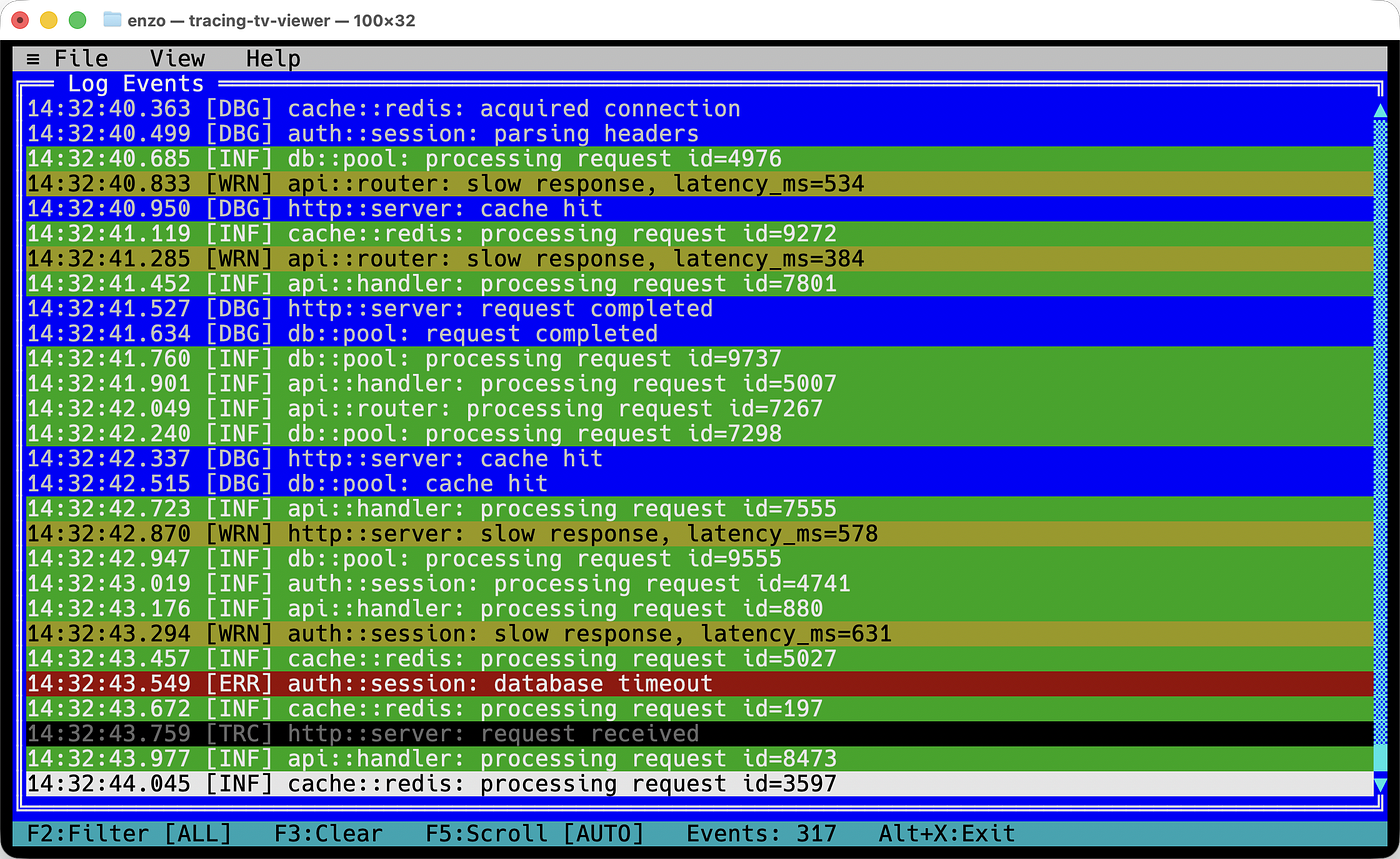
The color values follow Turbo Vision’s attribute format: high nibble for background, low nibble for foreground. These colors match the classic DOS palette, providing instant visual distinction between severity levels.
The Channel-Based Subscriber
The subscriber stays lightweight. It formats events and sends them; the UI thread handles everything else:
use crossbeam_channel::Sender;
use std::sync::atomic::{AtomicU64, Ordering};
use tracing::field::{Field, Visit};
use tracing::span::{Attributes, Record};
use tracing::{Event, Id, Metadata, Subscriber};

pub struct TvSubscriber {
    sender: Sender<LogEntry>,
    next_id: AtomicU64,
}

impl TvSubscriber {
    pub fn new(sender: Sender<LogEntry>) -> Self {
        Self {
            sender,
            next_id: AtomicU64::new(1),
        }
    }
}

impl Subscriber for TvSubscriber {
    fn enabled(&self, _metadata: &Metadata<'_>) -> bool {
        true
    }

    fn new_span(&self, _attrs: &Attributes<'_>) -> Id {
        Id::from_u64(self.next_id.fetch_add(1, Ordering::Relaxed))
    }

    fn record(&self, _span: &Id, _values: &Record<'_>) {}

    fn event(&self, event: &Event<'_>) {
        let mut visitor = EventVisitor::default();
        event.record(&mut visitor);

        let entry = LogEntry {
            timestamp: Local::now(),
            level: *event.metadata().level(),
            target: event.metadata().target().to_string(),
            message: visitor.message,
            fields: visitor.fields,
        };

        let _ = self.sender.try_send(entry);
    }

    fn enter(&self, _span: &Id) {}
    fn exit(&self, _span: &Id) {}
}

#[derive(Default)]
struct EventVisitor {
    message: String,
    fields: Vec<(String, String)>,
}

impl Visit for EventVisitor {
    fn record_debug(&mut self, field: &Field, value: &dyn std::fmt::Debug) {
        if field.name() == "message" {
            self.message = format!("{:?}", value).trim_matches('"').to_string();
        } else {
            self.fields
                .push((field.name().to_string(), format!("{:?}", value)));
        }
    }

    fn record_str(&mut self, field: &Field, value: &str) {
        if field.name() == "message" {
            self.message = value.to_string();
        } else {
            self.fields.push((field.name().to_string(), value.to_string()));
        }
    }
}
Using try_send instead of send prevents the subscriber from blocking if the channel fills up. Under extreme event volume, some events might drop, but the application continues running. Observability tools should never break the code they observe.
The Log List View
Turbo Vision provides ListView for scrollable lists of items. Each item can have custom rendering, and the list handles selection, scrolling, and keyboard navigation automatically:
use turbo_vision::prelude::*;
use std::sync::{Arc, RwLock};

pub struct LogListView {
    bounds: Rect,
    entries: Arc<RwLock<Vec<LogEntry>>>,
    scroll_offset: usize,
    selected: usize,
    filter_level: Option<Level>,
}

impl LogListView {
    pub fn new(bounds: Rect, entries: Arc<RwLock<Vec<LogEntry>>>) -> Self {
        Self {
            bounds,
            entries,
            scroll_offset: 0,
            selected: 0,
            filter_level: None,
        }
    }

    pub fn set_filter(&mut self, level: Option<Level>) {
        self.filter_level = level;
        self.scroll_offset = 0;
        self.selected = 0;
    }

    fn filtered_entries(&self) -> Vec<LogEntry> {
        let entries = self.entries.read().unwrap();
        entries
            .iter()
            .filter(|e| {
                self.filter_level
                    .map(|l| e.level <= l)
                    .unwrap_or(true)
            })
            .cloned()
            .collect()
    }

    fn visible_height(&self) -> usize {
        (self.bounds.height() - 2) as usize // Account for frame
    }

    pub fn scroll_to_bottom(&mut self) {
        let entries = self.filtered_entries();
        let visible = self.visible_height();
        if entries.len() > visible {
            self.scroll_offset = entries.len() - visible;
            self.selected = entries.len() - 1;
        }
    }
}

impl View for LogListView {
    fn bounds(&self) -> Rect {
        self.bounds
    }

    fn draw(&self, terminal: &mut Terminal) {
        let entries = self.filtered_entries();
        let visible = self.visible_height();

        // Draw frame
        terminal.draw_frame(self.bounds, "Log Events", FrameStyle::Double);

        // Draw visible entries
        for (i, entry) in entries
            .iter()
            .skip(self.scroll_offset)
            .take(visible)
            .enumerate()
        {
            let y = self.bounds.top() + 1 + i as i16;
            let x = self.bounds.left() + 1;
            let width = (self.bounds.width() - 2) as usize;

            let line = entry.format_line();
            let display: String = line.chars().take(width).collect();

            let attr = if self.scroll_offset + i == self.selected {
                0x70 // Black on white (selected)
            } else {
                entry.level_color()
            };

            terminal.write_str(x, y, &display, attr);

            // Pad remaining width
            let padding = width.saturating_sub(display.len());
            if padding > 0 {
                terminal.write_str(
                    x + display.len() as i16,
                    y,
                    &" ".repeat(padding),
                    attr,
                );
            }
        }

        // Draw scrollbar if needed
        if entries.len() > visible {
            self.draw_scrollbar(terminal, entries.len(), visible);
        }
    }

    fn handle_event(&mut self, event: &mut TvEvent) {
        if event.what != EventType::Keyboard {
            return;
        }

        let entries = self.filtered_entries();
        let visible = self.visible_height();

        match event.key_code {
            KeyCode::Up => {
                if self.selected > 0 {
                    self.selected -= 1;
                    if self.selected < self.scroll_offset {
                        self.scroll_offset = self.selected;
                    }
                }
                event.clear();
            }
            KeyCode::Down => {
                if self.selected < entries.len().saturating_sub(1) {
                    self.selected += 1;
                    if self.selected >= self.scroll_offset + visible {
                        self.scroll_offset = self.selected - visible + 1;
                    }
                }
                event.clear();
            }
            KeyCode::PageUp => {
                self.selected = self.selected.saturating_sub(visible);
                self.scroll_offset = self.scroll_offset.saturating_sub(visible);
                event.clear();
            }
            KeyCode::PageDown => {
                self.selected = (self.selected + visible).min(entries.len().saturating_sub(1));
                if self.selected >= self.scroll_offset + visible {
                    self.scroll_offset = self.selected.saturating_sub(visible - 1);
                }
                event.clear();
            }
            KeyCode::Home => {
                self.selected = 0;
                self.scroll_offset = 0;
                event.clear();
            }
            KeyCode::End => {
                self.scroll_to_bottom();
                event.clear();
            }
            _ => {}
        }
    }
}
The view maintains its own selection and scroll state. When events arrive, the application appends them to the shared entries vector; the view picks them up on the next draw. The scroll_to_bottom method enables auto-scroll behavior when following live logs.
The Status Line
Turbo Vision’s status line sits at the bottom of the screen, showing hints and hot keys. For the log viewer, it displays the current filter and event count:
pub struct LogStatusLine {
    bounds: Rect,
    filter_level: Option<Level>,
    event_count: usize,
    auto_scroll: bool,
}

impl LogStatusLine {
    pub fn new(bounds: Rect) -> Self {
        Self {
            bounds,
            filter_level: None,
            event_count: 0,
            auto_scroll: true,
        }
    }

    pub fn update(&mut self, filter: Option<Level>, count: usize, auto: bool) {
        self.filter_level = filter;
        self.event_count = count;
        self.auto_scroll = auto;
    }
}

impl View for LogStatusLine {
    fn bounds(&self) -> Rect {
        self.bounds
    }

    fn draw(&self, terminal: &mut Terminal) {
        let filter_str = match self.filter_level {
            Some(Level::ERROR) => "ERROR",
            Some(Level::WARN) => "WARN+",
            Some(Level::INFO) => "INFO+",
            Some(Level::DEBUG) => "DEBUG+",
            Some(Level::TRACE) => "ALL",
            None => "ALL",
        };

        let scroll_str = if self.auto_scroll { "AUTO" } else { "MANUAL" };

        let status = format!(
            " F2:Filter [{}]  F3:Clear  F5:Scroll [{}]  Events: {}  Alt+X:Exit ",
            filter_str,
            scroll_str,
            self.event_count
        );

        let width = self.bounds.width() as usize;
        let padded: String = format!("{:<width$}", status, width = width);

        terminal.write_str(
            self.bounds.left(),
            self.bounds.top(),
            &padded,
            0x30, // Black on cyan (classic TV status line)
        );
    }

    fn handle_event(&mut self, _event: &mut TvEvent) {
        // Status line doesn't handle events directly
    }
}
The cyan background with black text matches the classic Turbo Vision aesthetic. Function key hints tell users what actions are available without cluttering the main view.
The Menu Bar
A proper Turbo Vision application needs a menu bar. It provides access to commands, filter options, and help:
pub fn create_menu_bar(bounds: Rect) -> MenuBar {
    MenuBar::new(
        bounds,
        vec![
            Menu::new(
                "~F~ile",
                vec![
                    MenuItem::new("~C~lear logs", Command::CLEAR_LOGS, KeyCode::F3),
                    MenuItem::separator(),
                    MenuItem::new("E~x~it", Command::QUIT, KeyCode::AltX),
                ],
            ),
            Menu::new(
                "~V~iew",
                vec![
                    MenuItem::new("~A~ll levels", Command::FILTER_ALL, KeyCode::Char('a')),
                    MenuItem::new("~E~rror only", Command::FILTER_ERROR, KeyCode::Char('e')),
                    MenuItem::new("~W~arn+", Command::FILTER_WARN, KeyCode::Char('w')),
                    MenuItem::new("~I~nfo+", Command::FILTER_INFO, KeyCode::Char('i')),
                    MenuItem::new("~D~ebug+", Command::FILTER_DEBUG, KeyCode::Char('d')),
                    MenuItem::separator(),
                    MenuItem::new("~T~oggle auto-scroll", Command::TOGGLE_SCROLL, KeyCode::F5),
                ],
            ),
            Menu::new(
                "~H~elp",
                vec![
                    MenuItem::new("~A~bout", Command::ABOUT, KeyCode::F1),
                ],
            ),
        ],
    )
}

mod Command {
    pub const QUIT: u16 = 100;
    pub const CLEAR_LOGS: u16 = 101;
    pub const FILTER_ALL: u16 = 110;
    pub const FILTER_ERROR: u16 = 111;
    pub const FILTER_WARN: u16 = 112;
    pub const FILTER_INFO: u16 = 113;
    pub const FILTER_DEBUG: u16 = 114;
    pub const TOGGLE_SCROLL: u16 = 120;
    pub const ABOUT: u16 = 130;
}
The tilde characters mark hotkeys in menu items. Pressing Alt+F opens the File menu; pressing X within it executes Exit. This keyboard-driven interface works without a mouse, though Turbo Vision supports clicking menus too.
The Application Shell
The main application ties everything together. It creates the channel, installs the subscriber, builds the UI, and runs the event loop:
use crossbeam_channel::{bounded, Receiver};
use std::sync::{Arc, RwLock};
use std::time::Duration;
use turbo_vision::prelude::*;

pub struct LogViewerApp {
    terminal: Terminal,
    desktop: Desktop,
    menu_bar: MenuBar,
    log_view: LogListView,
    status_line: LogStatusLine,
    entries: Arc<RwLock<Vec<LogEntry>>>,
    receiver: Receiver<LogEntry>,
    running: bool,
    auto_scroll: bool,
    filter_level: Option<Level>,
}

impl LogViewerApp {
    pub fn new(receiver: Receiver<LogEntry>) -> Result<Self> {
        let mut terminal = Terminal::new()?;
        let screen = terminal.screen_size();

        let entries = Arc::new(RwLock::new(Vec::with_capacity(10_000)));

        let menu_bounds = Rect::new(0, 0, screen.width, 1);
        let log_bounds = Rect::new(0, 1, screen.width, screen.height - 2);
        let status_bounds = Rect::new(0, screen.height - 1, screen.width, 1);

        Ok(Self {
            terminal,
            desktop: Desktop::new(screen),
            menu_bar: create_menu_bar(menu_bounds),
            log_view: LogListView::new(log_bounds, entries.clone()),
            status_line: LogStatusLine::new(status_bounds),
            entries,
            receiver,
            running: true,
            auto_scroll: true,
            filter_level: None,
        })
    }

    pub fn run(&mut self) -> Result<()> {
        while self.running {
            // Drain pending log entries
            self.drain_events();

            // Update status line
            let count = self.entries.read().unwrap().len();
            self.status_line.update(self.filter_level, count, self.auto_scroll);

            // Draw everything
            self.terminal.clear();
            self.menu_bar.draw(&mut self.terminal);
            self.log_view.draw(&mut self.terminal);
            self.status_line.draw(&mut self.terminal);
            self.terminal.flush()?;

            // Handle input with timeout
            if let Ok(Some(mut event)) = self.terminal.poll_event(Duration::from_millis(50)) {
                self.handle_event(&mut event);
            }
        }

        Ok(())
    }

    fn drain_events(&mut self) {
        let mut new_entries = Vec::new();
        while let Ok(entry) = self.receiver.try_recv() {
            new_entries.push(entry);
        }

        if !new_entries.is_empty() {
            let mut entries = self.entries.write().unwrap();

            // Enforce maximum capacity
            const MAX_ENTRIES: usize = 10_000;
            let overflow = (entries.len() + new_entries.len()).saturating_sub(MAX_ENTRIES);
            if overflow > 0 {
                entries.drain(0..overflow);
            }

            entries.extend(new_entries);
            drop(entries);

            if self.auto_scroll {
                self.log_view.scroll_to_bottom();
            }
        }
    }

    fn handle_event(&mut self, event: &mut TvEvent) {
        // Let menu bar handle first
        self.menu_bar.handle_event(event);

        // Check for commands
        if event.what == EventType::Command {
            match event.command {
                Command::QUIT => self.running = false,
                Command::CLEAR_LOGS => {
                    self.entries.write().unwrap().clear();
                }
                Command::FILTER_ALL => self.set_filter(None),
                Command::FILTER_ERROR => self.set_filter(Some(Level::ERROR)),
                Command::FILTER_WARN => self.set_filter(Some(Level::WARN)),
                Command::FILTER_INFO => self.set_filter(Some(Level::INFO)),
                Command::FILTER_DEBUG => self.set_filter(Some(Level::DEBUG)),
                Command::TOGGLE_SCROLL => {
                    self.auto_scroll = !self.auto_scroll;
                    if self.auto_scroll {
                        self.log_view.scroll_to_bottom();
                    }
                }
                Command::ABOUT => self.show_about_dialog(),
                _ => {}
            }
            event.clear();
            return;
        }

        // Then log view
        self.log_view.handle_event(event);
    }

    fn set_filter(&mut self, level: Option<Level>) {
        self.filter_level = level;
        self.log_view.set_filter(level);
    }

    fn show_about_dialog(&mut self) {
        let dialog = DialogBuilder::new()
            .bounds(Rect::centered(40, 10))
            .title("About")
            .build();

        // Add centered text and OK button
        // Dialog runs modally, blocking until closed

        self.desktop.exec_dialog(dialog, &mut self.terminal);
    }
}
The 50-millisecond poll timeout balances responsiveness with CPU usage. Short enough that new events appear quickly; long enough that the application doesn’t spin burning cycles when idle.
Wiring the Subscriber
The main function creates the channel, installs the subscriber, spawns the application being observed, and runs the viewer:
use std::thread;

fn main() -> turbo_vision::Result<()> {
    let (sender, receiver) = bounded(1000);

    let subscriber = TvSubscriber::new(sender);
    tracing::subscriber::set_global_default(subscriber)
        .expect("Failed to set subscriber");

    // Spawn the application to observe
    thread::spawn(|| {
        demo_application();
    });

    // Run the viewer
    let mut app = LogViewerApp::new(receiver)?;
    app.run()
}

fn demo_application() {
    use std::time::Duration;
    use tracing::{info, warn, error, debug, trace, info_span};

    loop {
        let span = info_span!("request", id = rand::random::<u32>() % 10000);
        let _guard = span.enter();

        trace!("request received");
        debug!("parsing headers");
        info!("processing request");

        thread::sleep(Duration::from_millis(50));

        let outcome = rand::random::<f32>();
        if outcome < 0.05 {
            error!("request failed: internal error");
        } else if outcome < 0.15 {
            warn!(latency_ms = rand::random::<u32>() % 500, "slow response");
        } else {
            debug!("request completed");
        }

        thread::sleep(Duration::from_millis(100 + rand::random::<u64>() % 200));
    }
}
The bounded channel with capacity 1000 provides backpressure. If the viewer falls behind, the oldest unsent events drop. This prevents unbounded memory growth while keeping the most recent context visible.
The Detail Dialog
Clicking or pressing Enter on a log entry opens a detail dialog showing the full message and all fields:
fn show_entry_detail(&mut self, entry: &LogEntry) {
    let mut dialog = DialogBuilder::new()
        .bounds(Rect::centered(60, 16))
        .title("Event Details")
        .build();

    let content = format!(
        "Time:    {}\n\
         Level:   {}\n\
         Target:  {}\n\
         Message: {}\n\
         \n\
         Fields:\n{}",
        entry.timestamp.format("%Y-%m-%d %H:%M:%S%.3f"),
        entry.level,
        entry.target,
        entry.message,
        entry
            .fields
            .iter()
            .map(|(k, v)| format!("  {} = {}", k, v))
            .collect::<Vec<_>>()
            .join("\n")
    );

    let text_view = StaticText::new(
        Rect::new(2, 2, 56, 11),
        &content,
    );

    let ok_button = Button::new(
        Rect::new(25, 13, 10, 1),
        "~O~K",
        Command::OK,
        ButtonFlags::DEFAULT,
    );

    dialog.add(Box::new(text_view));
    dialog.add(Box::new(ok_button));

    self.desktop.exec_dialog(dialog, &mut self.terminal);
}
The dialog displays everything the subscriber captured. Fields that didn’t fit in the list view’s single line appear here with full values. Modal execution means the detail view blocks until dismissed, keeping the interaction model simple.
What This Reveals
Building the viewer surfaces the natural boundary between capture and presentation. The subscriber does minimal work: format, send, forget. The UI does the heavy lifting: store, filter, render, scroll. The channel provides the buffer that decouples their timing.
Turbo Vision’s retained-mode architecture fits surprisingly well. The log list maintains its own state. The menu bar handles its own input. The status line updates independently. Each component owns its behavior; the application coordinates without micromanaging.
The aesthetic is a bonus. There’s something satisfying about watching logs scroll through a blue-bordered window with a cyan status line. The interface conventions are forty years old and still work. Mouse support, keyboard navigation, hot keys, modal dialogs: these patterns persisted because they’re effective.
The pattern extends beyond log viewing. Any streaming data benefits from this architecture: metrics, network packets, system events. The subscriber/channel/UI split provides a template. Swap the data model and the view; the structure remains.
The complete implementation with all views, dialogs, and the demo application is available as a single-file gist.
Want more like this?
I write regularly about Rust, design patterns, and performance tips. Follow me here on Medium to stay updated.
Also on the topic, my new book:
메타데이터
- post_id
- 4405257c2650
- slug
- building-a-turbo-vision-log-viewer-with-custom-tracing-4405257c2650
- url
- https://medium.com/rustaceans/building-a-turbo-vision-log-viewer-with-custom-tracing-4405257c2650
- canonical_url
- https://medium.com/rustaceans/building-a-turbo-vision-log-viewer-with-custom-tracing-4405257c2650
- author_url
- https://medium.com/@enzo-lombardi
- status
- ok
- fetched_at
- 2026-06-11 05:11:55