Platform Engineering · FinOps · Azure
Azure Databricks Network Design — Replacing NAT Gateway with Central Firewall and Service Endpoints
Platform Engineering · FinOps · Azure
Azure Databricks Network Design — Replacing NAT Gateway with Central Firewall and Service Endpoints
How rethinking Databricks outbound connectivity on Azure saved platform budget, strengthened security, and eliminated NAT gateways entirely
8 min read · July 2026
The Quiet Cost Nobody Questioned
Every Databricks platform on Azure has an outbound connectivity problem.
It is not a dramatic problem. It does not break anything. It does not show up in your monitoring dashboards or trigger an alert at 2 AM. It just quietly adds to your infrastructure bill every month — workspace by workspace, environment by environment.
The problem is the NAT gateway.
When Microsoft retired default outbound internet access for Azure Virtual Machines in September 2025, platform teams across the industry faced an immediate decision: how do we give our Databricks clusters a path to the internet for package downloads, OS updates, and dependency resolution?
The default response was predictable. Attach a NAT gateway. It is well-documented. It is officially recommended. It works on the first try.
But working is not the same as being right.
What a NAT Gateway Actually Costs You
An Azure NAT gateway bills at approximately $0.045 per hour. That translates to roughly $32 per month per gateway — before a single byte of traffic has moved through it.
On top of that, every gigabyte of outbound data processed — Maven dependencies, PyPI packages, OS update repositories, Docker image pulls — is billed at $0.045 per GB.
The compounding problemThree workspaces across Dev, UAT, and Production. Multiple regions. Separate gateways per workspace for network isolation. You are looking at $100 to $300 per month in standing connectivity charges before your clusters have run a single job. At scale, this is a recurring tax on your data platform budget that most teams never consciously decided to pay.
The Microsoft Change That Forced a Decision
Until late 2025, Azure provided implicit outbound internet access to VMs that had no explicit outbound method configured. Microsoft called this default outbound access — a free, automatic public IP that allowed VMs to reach the internet without any additional configuration.
That is gone.
As of September 2025, all newly created VMs require an explicit outbound connectivity method. From March 2026, new Virtual Networks created using updated API versions default to private subnets with no outbound internet path at all unless one is deliberately configured.
Microsoft’s recommended response is a NAT gateway. Most teams followed that recommendation. But if your organisation already operates a hub-spoke network architecture with a central Azure Firewall — and most enterprise landing zones do — you already have everything you need to solve this problem without spending an extra dollar.
The Architecture
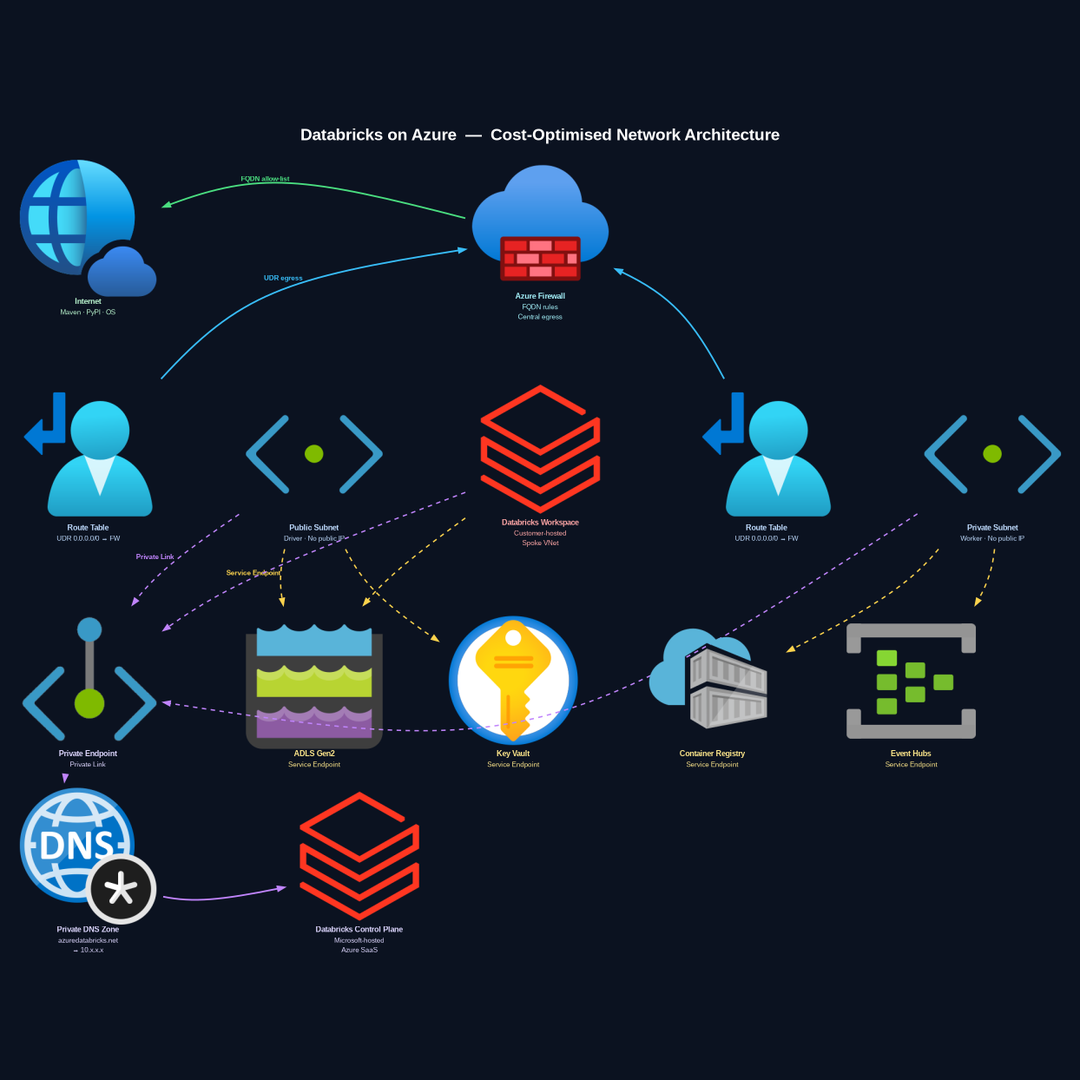
The solution centres on three principles, each addressing a different traffic type that Databricks clusters need to reach. Before diving into each principle, here is what the complete architecture looks like:
Databricks on Azure — Cost-Optimised Network Architecture · Hub-Spoke · No NAT Gateway · Private Endpoint Control Plane · Service Endpoints
Principle 1
Route All Internet Egress Through the Central Azure Firewall
Databricks clusters need to reach the public internet for a small, well-defined set of destinations: Maven Central for JVM dependencies, PyPI for Python packages, OS update repositories, and a handful of Databricks-specific endpoints.
In a hub-spoke network design, this is precisely what the Azure Firewall in your Hub VNet is for. Every subnet in your Databricks spoke VNet carries a User Defined Route with a default route of 0.0.0.0/0 pointing to the Azure Firewall. All cluster nodes — drivers and workers — are deployed with no public IP addresses. Their only outbound path is through the firewall.
On the firewall, FQDN-based application rules allow only the endpoints Databricks actually needs. Nothing else reaches the internet. Every connection is inspected, logged, and governed by explicit policy.
Cost impactThe Azure Firewall is already running in your Hub VNet serving your entire landing zone. The marginal cost of adding Databricks egress traffic to it is effectively zero.
Principle 2
Connect Azure PaaS Services via Service Endpoints
Databricks clusters communicate with several Azure PaaS services during normal operation: ADLS Gen2 for data, Azure Key Vault for secrets, Azure Container Registry for custom images, and Event Hubs for streaming ingestion.
Without explicit configuration, this traffic travels over the public internet — potentially through a NAT gateway, accruing data processing charges on every gigabyte.
Service Endpoints solve this cleanly. Configured at the subnet level, they route traffic to Azure PaaS services directly over the Microsoft backbone network. The traffic never leaves Microsoft’s infrastructure. There is no internet exposure, no NAT gateway involved, and no data processing charges on this path.
Principle 3
Reach the Databricks Control Plane via Private Endpoint
This is the most important traffic path in the architecture, and the most often overlooked. Your workspace needs to maintain a persistent connection to the Databricks control plane for all cluster management operations.
Without explicit configuration, this control plane traffic travels over the public internet. Your workspace resolves azuredatabricks.net to a public IP address.
A Private Endpoint backed by Azure Private Link eliminates this completely. A Private DNS Zone overrides public DNS resolution so azuredatabricks.net resolves to a private IP inside your spoke VNet. All control plane traffic flows entirely within the Microsoft backbone — it never touches the public internet.
Why this matters mostThe control plane connection carries cluster credentials, job configurations, and workspace metadata. Keeping it entirely private, with no public surface area, is the right posture for any enterprise deployment.
The Commercial Case in Plain Numbers
ItemWith NAT GatewayWith Central FirewallGateway cost per workspace~$32/month$0Data processing charges$0.045/GB$0 (service endpoints)Internet egress inspectionNoneFull FQDN governanceControl plane exposurePublic internetPrivate Link onlyPer-workspace network resourceRequiredNot requiredScales across workspacesLinear cost increaseZero marginal cost
For a platform with three workspaces, the firewall approach saves approximately $100 per month in standing charges. The firewall was already paid for. The saving is immediate and permanent.
The Security Argument Is Actually Stronger Than the Cost Argument
Most of this article has framed the NAT gateway replacement as a cost optimisation. That framing is accurate, but it undersells the architecture.
A NAT gateway provides outbound internet access with no visibility and no governance. Your cluster nodes can reach any internet endpoint. If a dependency is compromised and pulls a malicious package from an unexpected domain, nothing in your network layer will detect or block it.
The central firewall with FQDN allow-lists turns that risk profile around entirely. Your clusters can only reach the specific internet endpoints you have explicitly permitted. Every connection attempt is logged with source IP, destination FQDN, and policy outcome. Unexpected connection attempts are blocked and visible.
This is a Zero Trust network architecture applied to a Databricks platform. The cost saving is a consequence of getting the architecture right — not the primary reason to implement it.
Implementation Considerations
UDR route propagationIf you use Azure VPN Gateway or ExpressRoute in your hub, ensure your UDR for 0.0.0.0/0 has a higher priority than any routes propagated from the gateway. The explicit UDR to the firewall must win.
FQDN rule completenessDatabricks clusters need more FQDNs than just Maven and PyPI. The Databricks documentation maintains a current list of required FQDNs for your region. Implement all of them before disabling any existing outbound path. A missing FQDN causes cluster startup failures that can be difficult to diagnose.
Private DNS Zone linkageThe Private DNS Zone for azuredatabricks.net must be linked to your spoke VNet. Without this linkage, DNS resolution for the control plane will continue to return the public IP even though the Private Endpoint exists.
Staged rolloutDo not remove NAT gateways before validating that the firewall path, service endpoints, and Private Endpoint are all functional. Run a test cluster through the new path before decommissioning the old one.
Summary
- Microsoft retired default outbound access for Azure VMs in September 2025, forcing explicit outbound connectivity decisions on every platform team
- NAT gateways cost approximately $32 per month per gateway plus data processing charges that compound across workspaces and environments
- Central Azure Firewall with FQDN allow-lists handles all internet egress at zero marginal cost on an existing landing zone
- Service Endpoints route Azure PaaS traffic over the Microsoft backbone, eliminating internet exposure and data processing charges
- Private Endpoint with Private Link keeps Databricks control plane traffic entirely private with no public surface area
- The result is lower cost, full traffic inspectability, and Zero Trust network alignment across every workspace
The bottom lineOne firewall. Every workspace. No NAT gateway bill. Microsoft’s networking change forced a decision that many platforms were deferring. Teams that chose NAT gateways solved the immediate problem. Teams that designed deliberately built something better.
Azure Databricks Azure Firewall FinOps Cloud Architecture Network Security Data Engineering Platform Engineering Zero Trust
메타데이터
- post_id
- 440cf70fda90
- slug
- platform-engineering-finops-azure-440cf70fda90
- url
- https://medium.com/@samanth1992/platform-engineering-finops-azure-440cf70fda90
- canonical_url
- https://medium.com/@samanth1992/platform-engineering-finops-azure-440cf70fda90
- author_url
- https://medium.com/@samanth1992
- status
- ok
- fetched_at
- 2026-07-09 13:13:48