Deep dive into visionOS 30Days -Day 14
Original source code — satoshi0212
Deep dive into visionOS 30Days -Day 14
Original source code — satoshi0212
Day14App
import SwiftUI

@main
struct Day14App: App {
    var body: some Scene {
        WindowGroup {
            ContentView()
        }

        ImmersiveSpace(id: "ImmersiveSpace_Progressive") {
            ImmersiveView(imageName: "park_scene")
        }.immersionStyle(selection: .constant(.progressive), in: .progressive)

        ImmersiveSpace(id: "ImmersiveSpace_Full") {
            ImmersiveView(imageName: "beach_scene")
        }.immersionStyle(selection: .constant(.full), in: .full)
    }
}
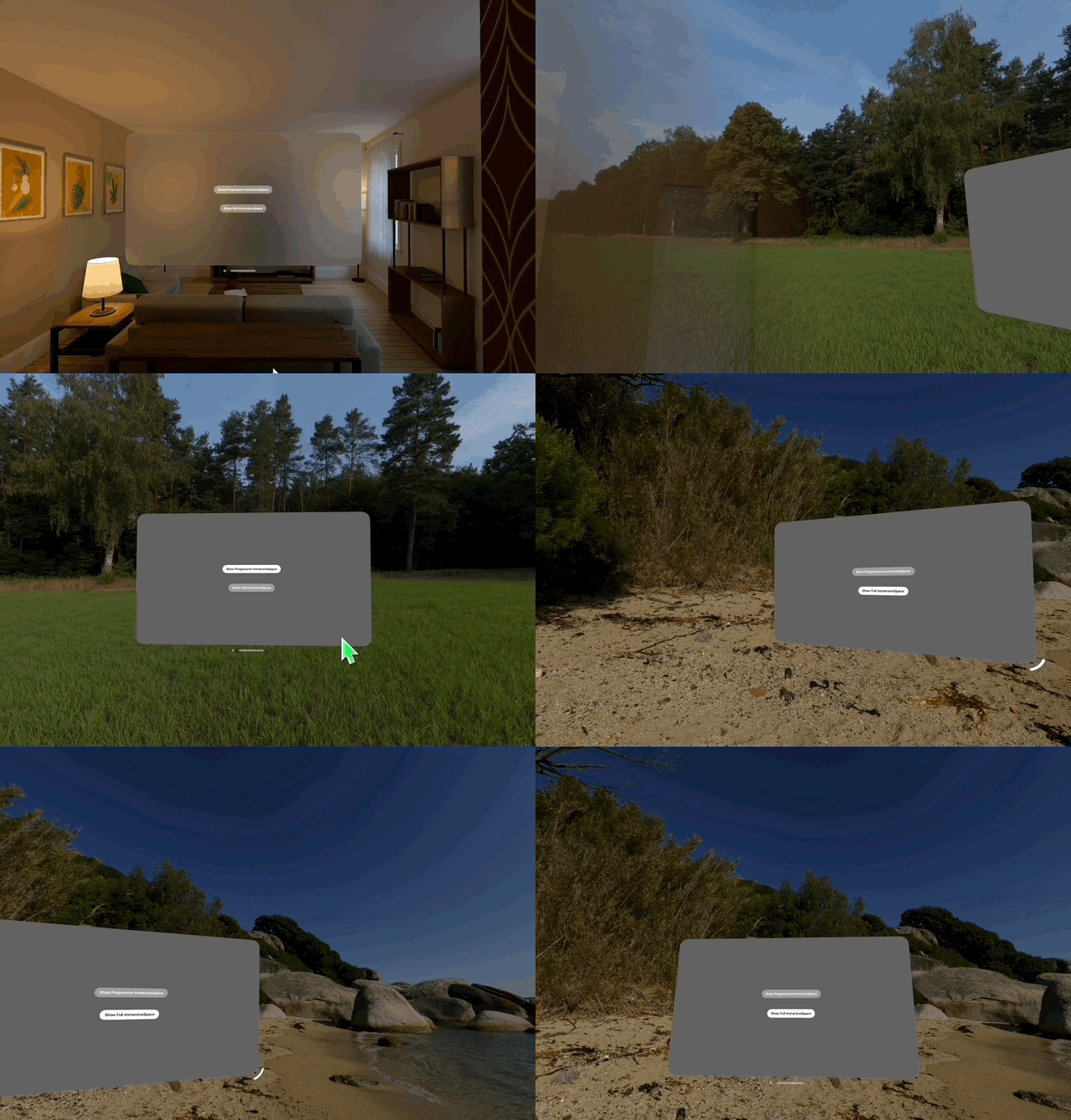
Entry point of this application. It has two ImmersiveSpace Scenes which are progressive immersive space and full immersive space. The scenes are identified with id parameter. The visual effects of the two types are as seen in the gif above.
ContentView
import SwiftUI
import RealityKit

struct ContentView: View {

    @State var showImmersiveSpace_Progressive = false
    @State var showImmersiveSpace_Full = false

    @Environment(\.openImmersiveSpace) var openImmersiveSpace
    @Environment(\.dismissImmersiveSpace) var dismissImmersiveSpace

    var body: some View {
        NavigationStack {
            VStack {
                Toggle("Show Progressive ImmersiveSpace", isOn: $showImmersiveSpace_Progressive)
                    .toggleStyle(.button)
                    .disabled(progressiveIsValid)

                Toggle("Show Full ImmersiveSpace", isOn: $showImmersiveSpace_Full)
                    .toggleStyle(.button)
                    .disabled(fullIsValid)
                    .padding(.top, 50)
            }
        }
        .onChange(of: showImmersiveSpace_Progressive) { _, newValue in
            Task {
                if newValue {
                    await openImmersiveSpace(id: "ImmersiveSpace_Progressive")
                } else {
                    await dismissImmersiveSpace()
                }
            }
        }
        .onChange(of: showImmersiveSpace_Full) { _, newValue in
            Task {
                if newValue {
                    await openImmersiveSpace(id: "ImmersiveSpace_Full")
                } else {
                    await dismissImmersiveSpace()
                }
            }
        }
    }

    var progressiveIsValid: Bool {
        return showImmersiveSpace_Full
    }

    var fullIsValid: Bool {
        return showImmersiveSpace_Progressive
    }
}
With this View user can toggle progressive or full immersive space. As a showImmersiveSpace_Progressive changed, “ImmersiveSpace_Progressive” is opened or dismissed depends on the value. Space “ImmersiveSpace_Full” works the same way.
ImmersiveView
import RealityKit
import SwiftUI

struct ImmersiveView: View {
    @State private var imageName: String

    init(imageName: String) {
        self.imageName = imageName
    }

    var body: some View {
        RealityView { content in

            let rootEntity = Entity()

            guard let texture = try? await TextureResource(named: imageName) else {
                return
            }

            var material = UnlitMaterial()
            material.color = .init(texture: .init(texture))

            rootEntity.components.set(ModelComponent(
                mesh: .generateSphere(radius: 1E3),
                materials: [material]
            ))
            rootEntity.scale *= .init(x: -1, y: 1, z: 1)
            rootEntity.transform.translation += SIMD3<Float>(0.0, 1.0, 0.0)

            content.add(rootEntity)
        }
    }
}
The view used to display the two immersive spaces we saw earlier. Load image for background using imageName . And then pass it to UnlitMaterial which is a simple material that doesn’t respond to lights in the scene. We use this material to wrap sphere ModelComponent.
UnlitMaterial
A simple material that doesn’t respond to lights in the scene.
struct UnlitMaterial메타데이터
- post_id
- 449e7f337779
- slug
- deep-dive-into-visionos-30days-day-14-449e7f337779
- url
- https://medium.com/@aspalt85/deep-dive-into-visionos-30days-day-14-449e7f337779
- canonical_url
- https://medium.com/@aspalt85/deep-dive-into-visionos-30days-day-14-449e7f337779
- author_url
- https://medium.com/@aspalt85
- status
- ok
- fetched_at
- 2026-06-17 08:20:12