External Hive MetaStore Migration Guide: Azure to GCP
When considering a platform migration, the focus often lands on evaluating ETL/ELT tools for Data-transfer, while the equally critical task…
External Hive MetaStore Migration Guide: Azure to GCP

When considering a platform migration, the focus often lands on evaluating ETL/ELT tools for Data-transfer, while the equally critical task which is Metadata-Migration is often overlooked. This is where an external Hive MetaStore (HMS) becomes essential. But why external HMS? By externalising the MetaStore, we establish a ‘Stateless’ architecture. This means, we can delete our entire compute environment, spin it up 10 minutes later, point it at the new External MetaStore, and — voila — all your objects are exactly where you left them.
In this article, we will examine two end-to-end migration strategies using DataStream and Database Migration Service (DMS).
POC Assumptions : You have already setup and created data objects at Azure side (SQL Server or MySQL Server) and GCP end (CloudSQL MySQL) for external Hive MetaStore. The Hive version used is hive.metastore.version 2.3.9 and schema is hive-schema-2.3.0.mssql.sql. Also please note that all of the resource we have created and utilized are in the US-Central (Iowa) region.
If you want to know how to create and setup external HMS using Databricks as the compute, you can read https://medium.com/searce/external-hive-metastore-setup-guide-for-multi-cloud-data-lakes-5b3d6d0239a7 article before jumping to this guide.
1. DataStream Approach
For the DataStream approach, we are going to use Azure SQL Server DB where by leveraging its native CDC capabilities, we can move away from batch loads and instead stream individual row-level changes as they occur.

(DataStream Architecture)
- Ingestion: Google DataStream is utilised to capture real-time metadata updates from the Azure SQL Server DB (Source HMS). These changes are streamed directly to Google Cloud Storage (GCS) as Avro files.
- Transformation: Upon the arrival of new files, a server-less Cloud Run Function is automatically getting triggered which parses the change logs, converts Azure storage paths into GCS compatible paths, and applies the upserts to the CloudSQL MySQL DB (Target HMS).
- Access: The GCP Databricks cluster is configured to use this synchronised Cloud SQL instance as its External Hive MetaStore. This setup allows for immediate querying of the replicated data lake without manual refresh.
1.1. Google DataStream — To configure an Azure Server SQL Database to stream data-changes, first we will need to enable CDC. To do so, go to the query editor and run the command below -
EXEC sys.sp_cdc_enable_db;
GO
For more details on enabling CDC for specific schemas and creating a DataStream user in your source DB with required permissions/roles, please follow from the link below https://docs.cloud.google.com/datastream/docs/configure-azure-sqlserver. Before creating the stream, you will need to create connection profiles for source and destination and the stream settings.
1.1.1. Connection Profile for Source :
- Connection Profile Name [Insert your desired profile name]
- Region ( us-central1 (Iowa))
- Hostname [Insert the Public IP or Hostname of your Azure SQL Server]
- Port — 1433
- Username [Insert the username created during CDC enablement]
- Password [Insert your database password]
- Database [Insert the name of the source database]
- Encryption Type [Basic/SSL]
- Connectivity Method : IP Whitelisting
Important Note: DataStream utilises specific static IP addresses for each region. You must add the IPs for us-central1 to your Azure SQL Server firewall rules. For the full list of IPs, refer to the https://docs.cloud.google.com/datastream/docs/ip-allowlists-and-regions.
1.1.2. Connection Profile for Destination :
Create a GCS Bucket beforehand with your required configurations
- Connection Profile Name [Insert your desired profile name]
- Region ( us-central1 (Iowa))
- BucketName [Insert the bucket name]
- Connection profile path prefix (optional)
1.1.3. Create Connection Stream :
- Stream Name [Insert your desired connection name]
- Region ( us-central1 (Iowa))
- Source Type — Azure SQL Server
- Destination — Cloud Storage
- Source configuration —
i. Objects to include : Specific Schemas And Specific Tablesor All Tables From All Schemas(For our case we have used the 2nd option)
ii. Choose backfill method for historical data : Automatic or Manual
- Destination configuration — Choose the destination connection that was already created and choose the Output format (Avro is preferred and used in our case)
After validating and creating the stream, we will need to manually enable backfill for the historical data (if backfill method was kept at default). Go to the Objects list, select all items, and click Initiate Backfill. DataStream will immediately begin streaming historical metadata to GCS. The files will be automatically structured within your bucket using a hierarchical folder path.
[bucket]/[prefix]/[object name]/yyyy/mm/dd/hh/mm/[filename(idempotent)]

1.2. Cloud Run Function — The Cloud Run Function serves as the core transformation engine for the HMS migration pipeline, triggered automatically based on the google.cloud.storage.object.v1.finalized eventarc trigger. The function queries the destination Cloud SQL schema at runtime to validate column mappings, effectively preventing schema drift errors. It parses payloads to detect Azure-specific storage paths (abfss://...) and rewrites them in-flight to Google Cloud Storage paths (gs://...). Data changes are applied using INSERT ... ON DUPLICATE KEY UPDATE logic. Deletions are handled by inspecting DataStream metadata tags such as is_deleted and change_type. The logic includes robust handling for SQL reserved words (e.g., GROUPS) to ensure syntax integrity during execution. (Find below the main.py code file and requirements.txt file)
(requirements.txt)

functions-framework
google-cloud-storage
fastavro
pymysql
(main.py)
import os
import io
import json
import pymysql
import fastavro
import functions_framework
from google.cloud import storage
DB_USER = os.environ.get('DB_USER')
DB_PASS = os.environ.get('DB_PASS')
DB_NAME = os.environ.get('DB_NAME')
INSTANCE_CONNECTION_NAME = os.environ.get('INSTANCE_CONNECTION_NAME')
storage_client = storage.Client()
def get_db_connection():
unix_socket = f'/cloudsql/{INSTANCE_CONNECTION_NAME}'
return pymysql.connect(
user=DB_USER,
password=DB_PASS,
database=DB_NAME,
unix_socket=unix_socket,
cursorclass=pymysql.cursors.DictCursor,
autocommit=True
)
@functions_framework.cloud_event
def process_datastream_files(cloud_event):
data = cloud_event.data
file_name = data['name']
bucket_name = data['bucket']
if not file_name.endswith('.avro'):
print(f"Skipping non-avro file: {file_name}")
return
try:
path_parts = file_name.split('/')
schema_and_table = path_parts[1]
table_name = schema_and_table.replace('dbo_', '')
if table_name == 'GROUPS': table_name = '`GROUPS`'
except IndexError:
print(f"Error parsing path: {file_name}")
return
print(f"Processing {file_name} for table {table_name}...")
bucket = storage_client.bucket(bucket_name)
blob = bucket.blob(file_name)
content = blob.download_as_bytes()
avro_file = io.BytesIO(content)
conn = None
try:
conn = get_db_connection()
cursor = conn.cursor()
cursor.execute("SET SESSION FOREIGN_KEY_CHECKS=0")
try:
cursor.execute(f"SHOW COLUMNS FROM {table_name}")
columns_info = cursor.fetchall()
valid_columns_map = {col['Field'].upper(): col['Field'] for col in columns_info}
except Exception as e:
print(f"Error fetching schema for {table_name}: {e}")
return
reader = fastavro.reader(avro_file)
count = 0
skipped = 0
debug_printed = False
for record in reader:
if not debug_printed:
debug_printed = True
is_deleted = False
ds_meta = record.get('datastream_metadata') or record.get('DATASTREAM_METADATA')
if ds_meta and isinstance(ds_meta, dict):
if ds_meta.get('is_deleted'): is_deleted = True
src_meta = record.get('SOURCE_METADATA') or record.get('source_metadata')
if src_meta and isinstance(src_meta, dict):
if src_meta.get('is_deleted'): is_deleted = True
if src_meta.get('change_type') == 'DELETE': is_deleted = True
if record.get('change_type') == 'DELETE': is_deleted = True
if str(record.get('is_deleted')).lower() == 'true': is_deleted = True
source_data = None
if record.get('PAYLOAD'): source_data = record.get('PAYLOAD')
elif record.get('payload'): source_data = record.get('payload')
elif record.get('OBJECT'): source_data = record.get('OBJECT')
elif record.get('object'): source_data = record.get('object')
else:
keys_upper = [k.upper() for k in record.keys()]
if any(k in valid_columns_map for k in keys_upper):
source_data = record
if not source_data or not isinstance(source_data, dict):
skipped += 1
continue
clean_record = {}
for key, value in source_data.items():
if key.upper() in valid_columns_map:
actual_col_name = valid_columns_map[key.upper()]
if isinstance(value, str):
azure_prefix = "abfss://hive-data@<AZURE_STORAGE_ACCOUNT>.dfs.core.windows.net"
gcs_prefix = "gs://<GOOGLE_CLOUD_STORAGE_BUCKET>"
if azure_prefix in value:
value = value.replace(azure_prefix, gcs_prefix)
elif 'abfss://' in value:
value = value.replace('abfss://', 'gs://')
if isinstance(value, (dict, list)):
clean_record[actual_col_name] = json.dumps(value)
else:
clean_record[actual_col_name] = value
if not clean_record:
skipped += 1
continue
pk_col = None
for k in clean_record.keys():
if k.upper().endswith('_ID'):
pk_col = k
break
if not pk_col:
pk_col = list(clean_record.keys())[0]
if is_deleted:
pk_val = clean_record.get(pk_col)
if pk_val:
sql = f"DELETE FROM {table_name} WHERE `{pk_col}` = %s"
cursor.execute(sql, (pk_val,))
count += 1
else:
cols_list = [f"`{k}`" for k in clean_record.keys()]
vals_list = list(clean_record.values())
placeholders = ', '.join(['%s'] * len(clean_record))
cols_str = ', '.join(cols_list)
update_clause = ", ".join([f"{col}=VALUES({col})" for col in cols_list])
sql = f"""
INSERT INTO {table_name} ({cols_str})
VALUES ({placeholders})
ON DUPLICATE KEY UPDATE {update_clause}
"""
cursor.execute(sql, vals_list)
count += 1
print(f"Success: Processed {count} rows. Skipped {skipped}. Table: {table_name}")
except Exception as e:
print(f"Error processing {file_name}: {e}")
raise e
finally:
if conn:
conn.close()
*(* Please replace <AZURE_STORAGE_ACCOUNT> and <GOOGLE_CLOUD_STORAGE_BUCKET> with your environment specifics values)
Once the data has been propagated to CloudSQL MySQL DB, you can connect to the CloudSQL instance to check the metadata table objects using cloud-shell.

With the metadata successfully migrated to GCP, we are going to use a Databricks cluster with the Cloud SQL (MySQL) DB as its External Hive Metastore. While this guide utilizes Databricks to query the data and metadata, the architecture is engine-agnostic; you may alternatively use Google Cloud DataProc, Trino, or other compatible query engines. The cluster will read metadata from Cloud SQL MySQL DB and fetch the actual data files from Google Cloud Storage.
(Ensure your data has been migrated from Azure using rclone (for small POCs like for our case) or Storage Transfer Service (STS) for production workloads)
In the notebook attached to the cluster read the migrated data:

(GCP Databricks Cluster reading migrated and translated data)
2. Database Migration Service (DMS) Approach
For DMS approach, we are going to use Azure MySQL DB and not SQL Server DB (since for heterogenous migration SQL Server to Cloud SQL for MySQL is not supported). DMS acts like a replica reading binlogs. Although DMS is capable of moving both data and metadata but for case we will DMS for only metadata migration.

(DMS Architecture)
- Migration: Continuous metadata replication is established using Google Database Migration Service (DMS), which mirrors the Azure MySQL source directly to a Cloud SQL target via native log-based CDC.
- Transformation: A scheduled stored procedure executes within the Cloud SQL replica to bulk-update storage descriptors, converting Azure-specific paths (
abfss://) into Google Cloud Storage paths (gs://). - Access: The GCP Databricks cluster connects to the CloudSQL (MySQL) instance as its External Hive MetaStore, enabling immediate query access to the data lake without cross-cloud latency.
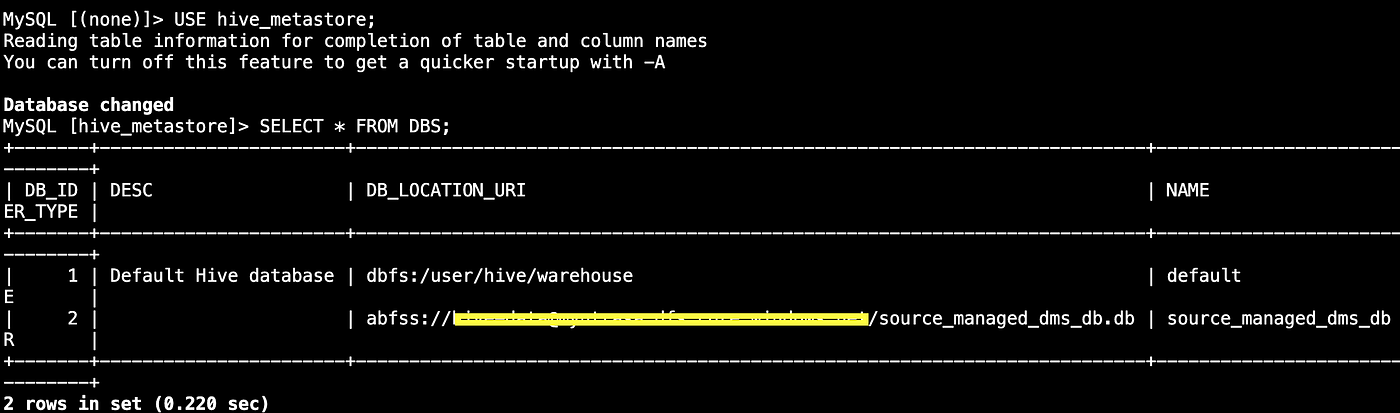
(Azure MySQL Server DB)
2.1. Google DMS — (DMS service can create a CloudSQL instance during the runtime or can use an existing CloudSQL instance)
2.1.1. Create Connection Profiles for Azure MySQL Server DB (Source):
- Connection profile name [Enter a unique name for this profile]
- Hostname — Give respective details
- Port — 3306
- Username [Enter the replication user created earlier]
- Password [Enter the corresponding password]
- Region [us-central1 (Iowa)]
- Encryption type [Select your preferred encryption, e.g., Basic/SSL]
- Database engine — Azure Database for MySQL
- Profile Role — Source
2.1.2. Create Migration Job :
- Migration Job Name [Enter a unique name]
- Source Database Engine — Azure Database for MySQL
- Destination — New Instance OR Existing Instance
- Migration Job Type — Continuous (for replication) or One Time
- Connectivity — IP White Listing (allowlist the Cloud SQL destination’s outgoing IP on the Azure MySQL Server Firewall rules)
- Define Source — Select the Source Profile created earlier. Then, edit the Dump Config settings with the following parameters:
i . Full Dump Method: Logical
ii. Dump File: Auto-generated
iii. Data Dump Parallelism: Optimal
- Test and create the job
2.2. CloudSQL — Once the DMS job reports completion, connect to your Cloud SQL (MySQL) DB to verify the metadata. You will notice that while the objects exist, their location properties still point to Azure storage paths (abfss://...). To fix this, you must update the location URIs to point to Google Cloud Storage (gs://...). Run the Stored Procedure provided below which iterates through the relevant Hive MetaStore tables objects (like DBS, SDS, SERDE_PARAMS, SD_PARAMS, SKEWED_COL_VALUE_LOC_MAP) .
DELIMITER //

CREATE PROCEDURE UpdateHiveLocations(
    IN old_prefix VARCHAR(255),
    IN new_prefix VARCHAR(255)
)
BEGIN
    -- Variables to track changes
    DECLARE dbs_changed INT DEFAULT 0;
    DECLARE sds_changed INT DEFAULT 0;
    DECLARE serde_changed INT DEFAULT 0;
    DECLARE sd_params_changed INT DEFAULT 0;
    DECLARE skewed_changed INT DEFAULT 0;

    -- 1. Update Database Locations
    UPDATE DBS
    SET DB_LOCATION_URI = REPLACE(DB_LOCATION_URI, old_prefix, new_prefix)
    WHERE DB_LOCATION_URI LIKE CONCAT(old_prefix, '%');
    SET dbs_changed = ROW_COUNT();

    -- 2. Update Table & Partition Locations (SDS)
    UPDATE SDS
    SET LOCATION = REPLACE(LOCATION, old_prefix, new_prefix)
    WHERE LOCATION LIKE CONCAT(old_prefix, '%');
    SET sds_changed = ROW_COUNT();

    -- 3. Update SerDe Properties (e.g., Avro schema paths)
    UPDATE SERDE_PARAMS
    SET PARAM_VALUE = REPLACE(PARAM_VALUE, old_prefix, new_prefix)
    WHERE PARAM_VALUE LIKE CONCAT(old_prefix, '%');
    SET serde_changed = ROW_COUNT();

    -- 4. Update Storage Descriptor Parameters
    UPDATE SD_PARAMS
    SET PARAM_VALUE = REPLACE(PARAM_VALUE, old_prefix, new_prefix)
    WHERE PARAM_VALUE LIKE CONCAT(old_prefix, '%');
    SET sd_params_changed = ROW_COUNT();

    -- 5. Update Skewed Column Location Maps
    UPDATE SKEWED_COL_VALUE_LOC_MAP
    SET LOCATION = REPLACE(LOCATION, old_prefix, new_prefix)
    WHERE LOCATION LIKE CONCAT(old_prefix, '%');
    SET skewed_changed = ROW_COUNT();

    -- Output results summary
    SELECT
        dbs_changed AS 'DBS Updated',
        sds_changed AS 'SDS (Tables/Partitions) Updated',
        serde_changed AS 'SerDe Params Updated',
        sd_params_changed AS 'SD Params Updated',
        skewed_changed AS 'Skewed Col Maps Updated';
END //

DELIMITER ;
(To execute the stored procedure follow the below commands)
-- Disable safe updates just in case the session prevents mass updates
SET SQL_SAFE_UPDATES = 0;

-- Execute the procedure
CALL UpdateHiveLocations(
    'abfss://<AZURE_STORAGE_PATH>',
    'gs://<GCP_STORAGE_PATH>'
);

-- Re-enable safe updates (optional)
SET SQL_SAFE_UPDATES = 1;
That’s all!! Your migrated metadata is GCP ready, it is time to use a Databricks cluster notebook to read the Data from Google-Cloud-Storage and Metadata from CloudSQL-MySQL-DB. Run the commands as shown in the image below (after changing the catalog to hive_metastore catalog) for showing the databases, data and tables migrated via DMS. Like before you can migrate the data files from azure to gcp using rclone (for POC) or STS (for Production).

(GCP Databricks Cluster Notebook)
The integration of Google DataStream and DMS facilitates a robust Change Data Capture (CDC) mechanism, keeping the Hive MetaStore synchronised across clouds in real-time.
By isolating the compute layer from the storage layer, this design allows for distributed querying — meaning Azure Databricks and GCP clusters can operate concurrently on the same dataset. This ensures continuous availability and provides a reliable failover strategy for enterprise-grade analytics. Thanks for reading!
메타데이터
- post_id
- 44c741e3d2f0
- slug
- external-hive-metastore-migration-guide-azure-to-gcp-44c741e3d2f0
- url
- https://blog.searce.com/external-hive-metastore-migration-guide-azure-to-gcp-44c741e3d2f0
- canonical_url
- https://blog.searce.com/external-hive-metastore-migration-guide-azure-to-gcp-44c741e3d2f0
- author_url
- https://medium.com/@anubhav.banerjee
- status
- ok
- fetched_at
- 2026-07-24 03:50:31