Stop Copy-Pasting to NuGet: How to Automate Package Publishing via GitHub Actions
If you are still manually compiling, packing, and uploading your NuGet packages, you are burning valuable engineering time on a problem…
Stop Copy-Pasting to NuGet: How to Automate Package Publishing via GitHub Actions
If you are still manually compiling, packing, and uploading your NuGet packages, you are burning valuable engineering time on a problem that was solved years ago.
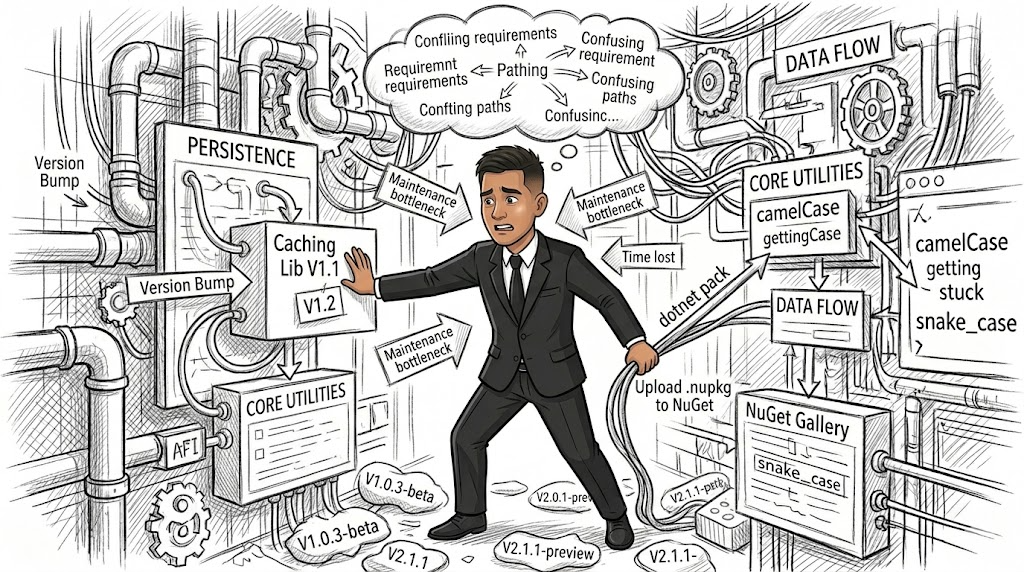
Image generated by author using Gemini
The Pain of Manual Maintenance
At a certain point in your engineering journey, you start extracting reusable code into internal libraries. Managing a few is fine. But when you find yourself maintaining a growing ecosystem of libraries — like a suite of custom persistence, caching, and core utility modules — the manual overhead becomes a bottleneck.
Every single release requires you to manually bump versions, run dotnet pack locally, log into the NuGet gallery, and upload the .nupkg file. When you multiply this workflow across several packages, a simple release cycle transforms into an afternoon of tedious, error-prone clicking.
The traditional way most developers start out is purely local and manual:
- Make changes to the code.
- Update the version inside the
.csprojfile. - Run
dotnet pack --configuration Releasevia the CLI. - Open a browser, log into the NuGet dashboard, drag, drop, and publish.
The Disadvantages of Manual Approach
- Context Switching: It pulls you away from actual development to perform administrative assembly line work.
- The “Works on My Machine” Risk: You risk publishing a package containing uncommitted local files, untracked dependencies, or a build target that hasn’t been verified on a clean server.
- Human Error: It is incredibly easy to accidentally upload the wrong
.nupkgfile or miss a package entirely when deploying interdependent updates. - Lack of Audit Trail: There is no centralized record linking a specific GitHub commit or Pull Request directly to a specific NuGet package version.
Continuous Delivery via GitHub Actions
We can entirely automate this pipeline by leveraging GitHub Actions. By writing a single .github/workflows/publish.yml file, we can configure our repository to compile, test, pack, and push our packages to the NuGet registry completely hands-free the moment a Pull Request merges into the main branch.
name: Publish to NuGet

on:
  workflow_dispatch:
  pull_request:
    branches: [ main ]
    types: [ closed ]y

jobs:
  deploy:
    runs-on: ubuntu-latest

    steps:
    - name: Checkout Repository
      uses: actions/checkout@v4

    - name: Setup .NET SDK
      uses: actions/setup-dotnet@v4
      with:
        dotnet-version: '8.0.x'

    - name: Restore Dependencies
      run: dotnet restore

    - name: Build Projects
      run: dotnet build --configuration Release --no-restore

    - name: Pack NuGet Packages
      run: dotnet pack --configuration Release --no-build --output ./nupkgs

    - name: Push to NuGet Registry
        run: |
          dotnet nuget push ".nuget/*.nupkg" \
            --api-key ${{ secrets.NUGET_API_KEY }} \
            --source https://api.nuget.org/v3/index.json \
            --skip-duplicate
Manual Publishing vs. GitHub Actions Automation
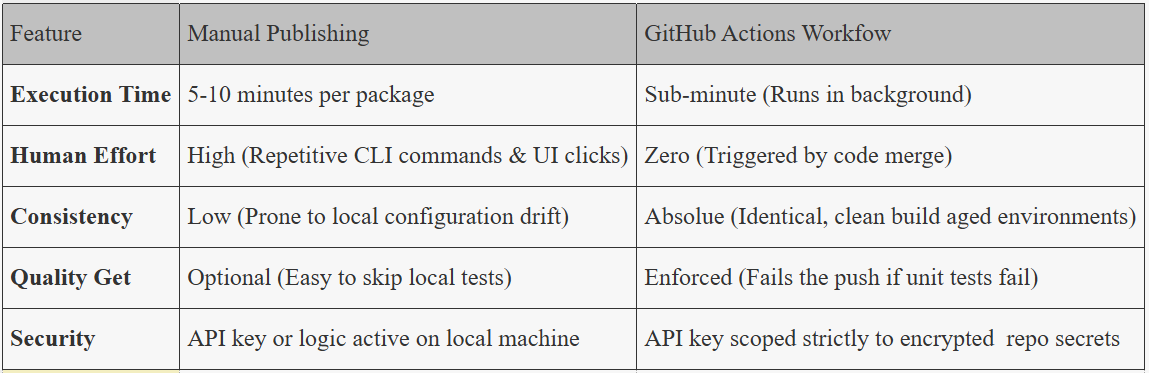
When the Manunal Approach Acceptable
Maintaining a manual workflow is acceptable only under narrow parameters:
- Micro-scale: You manage only 1 to 3 isolated packages that change less than once or twice a year.
- Local Sandboxing: You are testing a highly volatile dependency locally within your network before publishing an official specification.
Even in these scenarios, automated systems remain a vastly superior practice.
When the Automatic Approach Fits Better
Automation becomes absolutely mandatory the moment you scale to maintaining 3 or more packages that receive regular updates, patches, or feature iterations.
If you are shipping core library updates across multiple shared infrastructure layers, automating the pipeline ensures that your downstream applications can fetch verified, stable dependencies immediately without waiting for a manual deployment window.
If you want to see how the real workflow works, look into this repository.
Final Consideration
As software engineers, our primary asset is focus. Every minute spent running manual CLI commands, dragging files across a web browser, and cross-checking version strings is a minute stolen from deep architectural work.
Moving your packages to an automated GitHub Action workflow turns a chore into a seamless byproduct of your development lifecycle. You write code, you open a Pull Request, you merge — and the cloud handles the rest. It elevates your codebase from a collection of personal scripts into a mature, production-grade open-source or enterprise ecosystem.
Set up the workflow once, protect your main branch, and never run dotnet pack manually again.
https://github.com/muhammadirwanto-dev/sumapap/tree/main/.github/workflows
메타데이터
- post_id
- 44d2d4b8cb6a
- slug
- stop-copy-pasting-to-nuget-how-to-automate-package-publishing-via-github-actions-44d2d4b8cb6a
- url
- https://medium.com/@muhammadirwanto/stop-copy-pasting-to-nuget-how-to-automate-package-publishing-via-github-actions-44d2d4b8cb6a
- canonical_url
- https://medium.com/@muhammadirwanto/stop-copy-pasting-to-nuget-how-to-automate-package-publishing-via-github-actions-44d2d4b8cb6a
- author_url
- https://medium.com/@muhammadirwanto
- status
- ok
- fetched_at
- 2026-06-16 19:09:56




