Cloudkit
A Fast and Flexible IBM Spectrum Scale Multi-Cloud Orchestrator
Cloudkit — IBM Storage Scale Multi-Cloud Orchestrator
Unstructured data is still expanding at a record-breaking rate. New capabilities like cyber resilience, cloud integration, and data globalisation are being introduced in order to address the expanding difficulties.
Gartner 2022 Magic Quadrant for Distributed File Systems and Object Storage has put forward an interesting characteristic of SDS.
“SDS can also potentially leverage hybrid cloud workflows with public cloud infrastructure as a service (IaaS) integration to lower total cost of ownership (TCO) and improve data mobility.”
Wondering how to configure the IBM Storage Scale on the cloud and leverage the hybrid cloud workflows!! You’ve come to the correct place…
Cloudkit is an interactive-based CLI that offers a fast and flexible IBM Storage Scale multi-cloud orchestration, that is currently available as a GA in the Scale 5.1.7 release. This blog post aims to highlight its key features (For more details, refer to: cloudkit docs).
Cloudkit’s Key Features:
- Easy to get started
If you already have an AWS account and the IBM Storage Scale package extracted, you are all set!
Cloudkit is a binary available with IBM Storage Scale SE (Self-Extracting) package. This binary can be operated from an on-premise VM or a cloud VM.
Below figure illustrates the cloudkit — AWS solution overview.
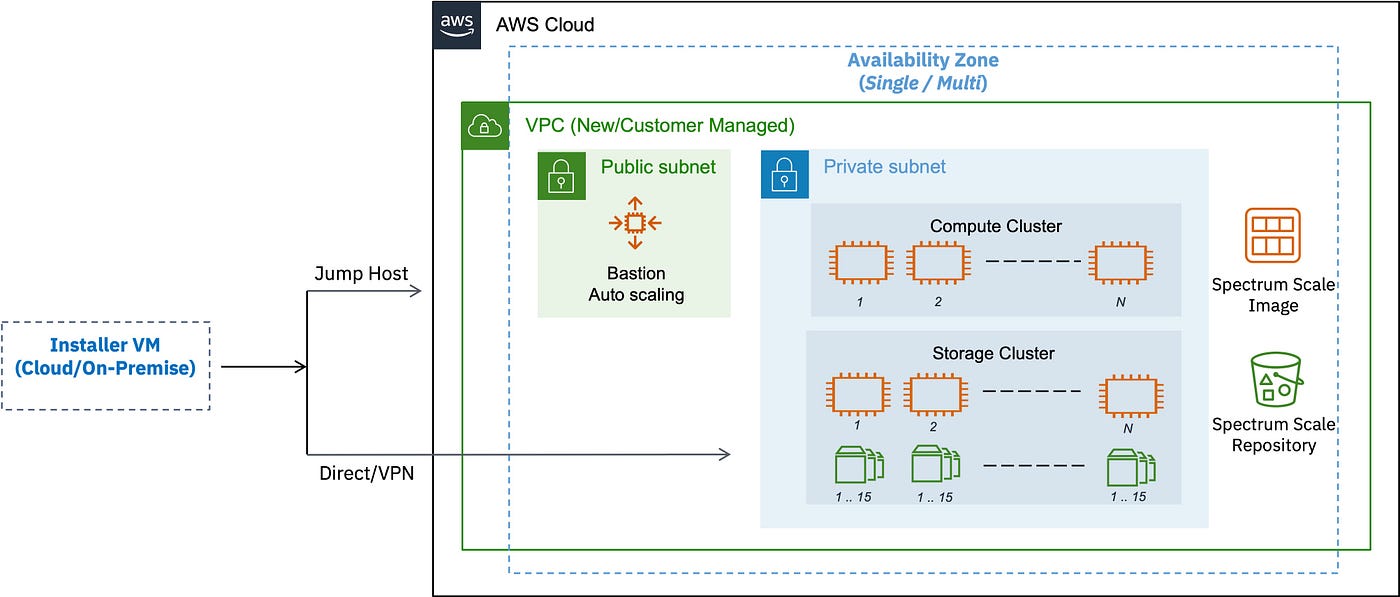
Cloudkit: IBM Storage Scale — AWS deployment architecture
2. Deployment Profiles
Cloudkit offers the following deployment profiles;
· Throughput-Performance-Persistent-Storage: This profile uses a single availability zone with persistent storage (i.e. Filesystem device will retain data after instance is stopped), and supports using either customer-managed AWS VPC (Virtual Private Cloud) or creating a new VPC and deploying the Storage Scale (Storage only or Compute only or a Combined) cluster (using a custom image or by creating a new image/ami).
· Throughput-Performance-Scratch-Storage: This profile uses a single availability zone with placement group optimized instance/temporary storage *(i.e. Filesystem device will lose data after instance is stopped). **Note: This storage is not recommended for long term storage.***
· Balanced: This profile uses multi-availability zones (3), supports the usage of either customer-managed AWS VPC (Virtual Private Cloud) or creating a new VPC and deploying the Storage Scale (Storage only or Compute only) cluster (using a custom image or by creating a new image/ami).

Preview of Cloudkit Deployment Patterns
Note: Cloudkit offers grant filesystem capability, using which one storage cluster can be remotely mounted to multiple compute clusters (including IBM Storage Scale Container Native Storage Access and IBM Storage Fusion remote mount use cases).
Refer here for a detailed throughput-performance architecture, and here for a balanced architecture.
3. Interactive mode for guided installation
The interactive mode offered by Cloudkit gathers the specifics of required cloud resources, validates, filters, and presents them to the user for selection.
A sample interactive mode is presented in the code snippet below, where the user input is denoted by “?” and will be presented with options that have been prepared by querying the relevant cloud resources. The current selection is denoted by “>” and multiple selections can be made using the “X” prompt.
# cloudkit create cluster
? Region:  [Use arrows to move, type to filter, ? for more help]
  ap-southeast-1
  ap-southeast-2
  eu-central-1
  us-east-1
> us-east-2
  us-west-1
  us-west-2
? Select availability zones (1): [Use arrows to move, space to select, type to filter, ? for more help]
> [x]  us-east-2a
  [ ]  us-east-2b
  [ ]  us-east-2c
? VPC ID:   [Use arrows to move, type to filter, ? for more help]
> vpc-03493a92875d14284 | 10.0.0.0/16 | spectrum-scale
  vpc-015a915e9001a6b1c | 172.31.0.0/16 | Default
4. Repeatable command generation
Although the interactive mode is very useful for new environments and configurations, it causes deployment to be delayed (as it involves human intervention). Based on the options chosen during interactive mode, Cloudkit generates command line arguments and their corresponding values, which can be used to have repeated deployments in the future.
A sample repetable deployment command is presented in the code snippet below.
I: To create this cluster again in the future, you can run:
      cloudkit create cluster --region us-east-2 \
               --cloud-platform AWS --resource-name scale-storage \
               --gpfs-rpms /usr/lpp/mmfs/5.1.6.0 --avail-zones "us-east-2a" \
               --vpc-type Existing --deployment-mode Storage-only \
               --network-mode JumpHost --profile-name Throughput-performance \
               --fs-mount-point /gpfs/fs1 --fs-block-size 4M \
               --fs-capacity 10000Gi --gui-username administrator \
               --operator-email scale@us.ibm.com --vol-type gp2 \
               --vpc-id vpc-0f4a751d00f1e83d5 --jumphost-key-path /root/aws_key
5. Estimate the solution cost before provisioning
Cloudkit is integrated with infracost to estimate the Scale solution cost.
A sample cost estimation for storage only cluster is presented in the code snippet below.
I: Writing storage cluster inputs to 'instance_template' completed.
I: Initializing the working directory 'instance_template' to be used by terraform.
Project: IBM/ibm-spectrum-scale-cloud-install/aws_scale_templates/sub_modules/instance_template/tfplan.json

 Name                                                               Monthly Qty  Unit                        Monthly Cost

 module.email_notification.aws_sns_topic.itself[0]
 ├─ API requests (over 1M)                                  Monthly cost depends on usage: $0.50 per 1M requests
 ├─ HTTP/HTTPS notifications (over 100k)                    Monthly cost depends on usage: $0.06 per 100k notifications
 ├─ Email/Email-JSON notifications (over 1k)                Monthly cost depends on usage: $2.00 per 100k notifications
 ├─ Kinesis Firehose notifications                          Monthly cost depends on usage: $0.19 per 1M notifications
 ├─ Mobile Push notifications                               Monthly cost depends on usage: $0.50 per 1M notifications
 ├─ MacOS notifications                                     Monthly cost depends on usage: $0.50 per 1M notifications
 └─ SMS notifications (over 100)                            Monthly cost depends on usage: $0.75 per 100 notifications

 module.storage_cluster_instances.aws_instance.itself["0"]
 ├─ Instance usage (Linux/UNIX, on-demand, t2.medium)                       730  hours                             $33.87
 ├─ root_block_device
 │  └─ Storage (general purpose SSD, gp2)                                     8  GB                                 $0.80
 └─ ebs_block_device[0]
    └─ Storage (general purpose SSD, gp2)                                 2,500  GB                               $250.00

 module.storage_cluster_instances.aws_instance.itself["1"]
 ├─ Instance usage (Linux/UNIX, on-demand, t2.medium)                       730  hours                             $33.87
 ├─ root_block_device
 │  └─ Storage (general purpose SSD, gp2)                                     8  GB                                 $0.80
 └─ ebs_block_device[0]
    └─ Storage (general purpose SSD, gp2)                                 2,500  GB                               $250.00

 module.storage_cluster_instances.aws_instance.itself["2"]
 ├─ Instance usage (Linux/UNIX, on-demand, t2.medium)                       730  hours                             $33.87
 ├─ root_block_device
 │  └─ Storage (general purpose SSD, gp2)                                     8  GB                                 $0.80
 └─ ebs_block_device[0]
    └─ Storage (general purpose SSD, gp2)                                 2,500  GB                               $250.00

 module.storage_cluster_instances.aws_instance.itself["3"]
 ├─ Instance usage (Linux/UNIX, on-demand, t2.medium)                       730  hours                             $33.87
 ├─ root_block_device
 │  └─ Storage (general purpose SSD, gp2)                                     8  GB                                 $0.80
 └─ ebs_block_device[0]
    └─ Storage (general purpose SSD, gp2)                                 2,500  GB                               $250.00

 OVERALL TOTAL                                                                                                  $1,138.69
──────────────────────────────────
28 cloud resources were detected:
∙ 5 were estimated, all of which include usage-based costs, see https://infracost.io/usage-file
∙ 23 were free:
  ∙ 18 x aws_security_group_rule
  ∙ 1 x aws_iam_instance_profile
  ∙ 1 x aws_iam_role
  ∙ 1 x aws_iam_role_policy
  ∙ 1 x aws_security_group
  ∙ 1 x aws_sns_topic_subscription

? Do you agree to proceed further:  Yes
I: Initiating resource provisioning actions proposed in the terraform plan.
 100% |███████████████████████████████████████████████████████████████████████████████████████████████████████████████████████████████████████████████| (7/10, 9 it/min)
I: Storage cluster resource provisioning actions proposed in the plan completed.                                                                      | (5/10, 56 it/min) [9s:5s]
Wrap up
It’s done! I hope this summary will be useful as you begin your cloud-based IBM Storage Scale journey. In the coming postings, I’ll try to delve more into a few of the integrations that may be put up using cloudkit.
Note: This feature is also available in developer edition. Try it now: https://www.ibm.com/account/reg/us-en/signup?formid=urx-41728
메타데이터
- post_id
- 4527731e2575
- slug
- cloudkit-4527731e2575
- url
- https://medium.com/@sasikeda/cloudkit-4527731e2575
- canonical_url
- https://medium.com/@sasikeda/cloudkit-4527731e2575
- author_url
- https://medium.com/@sasikeda
- status
- ok
- fetched_at
- 2026-06-29 22:44:20


