How we pivoted from App Center and reduce OTA costs by 90%
In fast-moving commerce products, waiting days for app-store approvals isn’t always an option.
How udaan cut React Native OTA costs by 90% after App Center shutdown
In fast-moving commerce products, waiting days for app-store approvals isn’t always an option. At udaan, OTA updates help us ship fixes quickly across multiple React Native apps. When Microsoft announced App Center shutdown, we had to replace a critical release system-without slowing engineering velocity. What followed was an unexpected lesson in cloud costs, bandwidth, and pragmatic infrastructure decisions.
Why CodePush Matters to Us
At udaan, our user-facing mobile apps support critical commerce and financial workflows for retailers and businesses across the country. These apps are deeply embedded in everyday operations, from product discovery and ordering to inventory planning and credit access. When issues arise in such workflows, delays in resolution can directly affect business continuity. OTA updates help us reduce that risk by allowing urgent fixes to reach users within hours, instead of waiting days for traditional app-store rollouts.
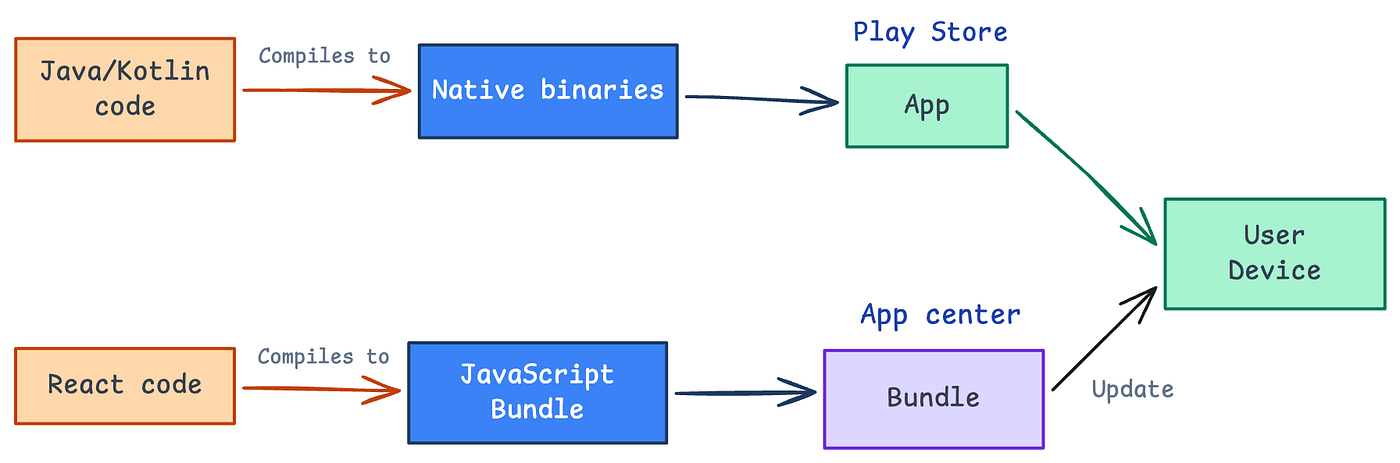
CodePush OTA update vs normal app update
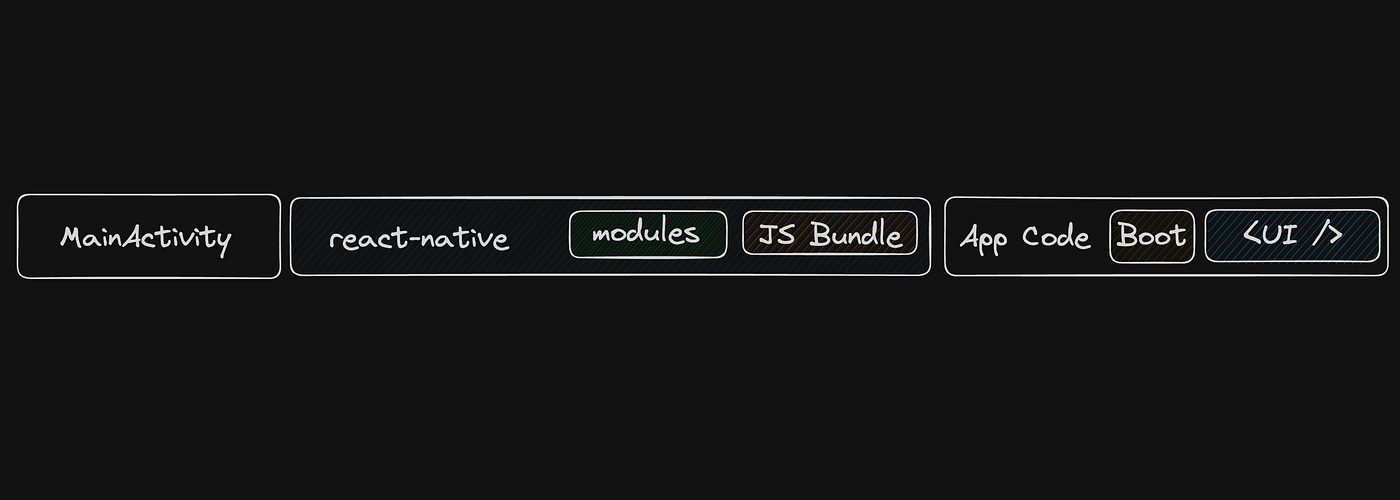
A React Native app ships with JavaScript files and assets bundled inside a platform-specific binary, such as an APK or IPA. After the app is released, changing JavaScript code or bundled assets normally requires rebuilding the binary, submitting it again, and waiting for store review or rollout. CodePush solves this for JavaScript and asset updates. Instead of shipping a new binary for every small React Native change, we can publish a new JS bundle to a CodePush server. The app checks that server, downloads the update if one is available, and applies it based on the configured install strategy.
This means no waiting for App Store reviews or slow user adoption. When there is a critical bug, users get the fix the moment they open the app. For regular updates, the process remains smooth: the download happens in the background, and the update applies on the next app launch. Adoption is healthy too.
So when App Center was scheduled to be shut down on March 31, 2025, we needed a pivot fast.
Our Options
We were not just choosing an OTA update provider. We had to balance reliability, scale, cost efficiency, migration risk, and team bandwidth without slowing down product delivery.
As a small frontend team, we needed a solution that kept our release pipeline stable in the short term while giving us enough room to plan a more sustainable long-term migration. That shaped how we evaluated each option.
Option 1: Move to Expo Application Services (EAS)
Expo Application Services was the most future-facing option due to its strong Expo ecosystem support, active maintenance, and structured release workflow. It offers cloud builds and OTA update capabilities, making it attractive for long-term maintenance.
However, adopting EAS would not be a simple drop-in replacement for our current setup, as it would require significant effort to make our existing bare React Native app compatible with Expo and to update the deployment process.
Pros:
- Actively maintained and backed by the Expo ecosystem.
- EAS also covers more than OTA updates: it can build app binaries, submit them to the stores, and publish compatible OTA updates from the same ecosystem.
- Supports structured deployment workflows using channels, branches, runtime versions, and rollouts.
Cons
- Requires migration work in an existing bare React Native app.
- Changes the build and release process, not just the OTA update command.
- High cost for our production OTA update usage and user scale.
Option 2: Use a third-party CodePush alternative
There were a few third-party alternatives available, such as RevoPush. This would have allowed us to continue using a CodePush-like workflow without owning the infrastructure ourselves.
The trade-off was confidence. Most OTA service providers in this space were still relatively new, and we did not have enough information about their reliability, operational maturity, or long-term support.
Pros
- Faster to adopt than a full Expo migration
- Less infrastructure ownership compared to self-hosting
- Similar mental model to CodePush
Cons
- Unclear reliability and maturity of newer providers
- Vendor dependency for a critical release path
- Risk of needing another migration if the provider changes direction
This option looked convenient, but we were not comfortable depending on a relatively new external service for such a critical part of our deployment pipeline.
Option 3: Host CodePush ourselves
The third option was to self-host the open-source CodePush server. This allowed us to keep our existing app and release workflow mostly intact while replacing the hosted dependency.
This was not a perfect long-term solution. Self-hosting meant we would own the infrastructure, monitoring, maintenance, and any future fixes. But compared to the other options, it caused the least disruption to the team and the product.
Pros
- Minimal changes to the existing app and deployment pipeline
- No immediate migration to Expo or another platform
- Full control over the OTA update infrastructure
- Gave us time to plan a proper long-term migration
Cons
- We own the operational responsibility
- Requires infrastructure setup and maintenance
We chose option 3 because it gave us the best balance between continuity and effort. Our immediate goal was not to redesign the release system, it was to keep OTA updates working without blocking product delivery. Self-hosting gave us control and cost flexibility. It allowed us to keep the existing React Native CodePush integration, preserve the release workflow used by CI/CD and our dashboard, and avoid a rushed migration to a new OTA platform.
But it also came with clear responsibilities. We now owned the server, storage, monitoring, operational fixes, and future maintenance. Any React Native upgrade also had to be checked against the CodePush SDK used inside the app, because OTA compatibility depends on the native binary and the bundled SDK continuing to work correctly together. For us, that trade-off was acceptable because it reduced immediate migration risk and kept product delivery moving. Self-hosting bought us time to continue shipping updates while we evaluated a proper Expo migration at a more reasonable pace.
Hosting Our Own CodePush System
Replacing an OTA update system is not a single code change. It touches the full path from bundle generation in CI/CD to update checks on a user’s device. Multiple systems need to work together: the CLI, the server, storage, the client SDK, and the release management UI.
Let’s start by understanding the CodePush architecture, then look at how we migrated from the hosted CodePush service to our own self-hosted setup.
CodePush Architecture
At a high level, a CodePush setup has five major parts:
- CodePush CLI
- CodePush server
- Client SDK inside the mobile app
- Storage layer
- Release management UI
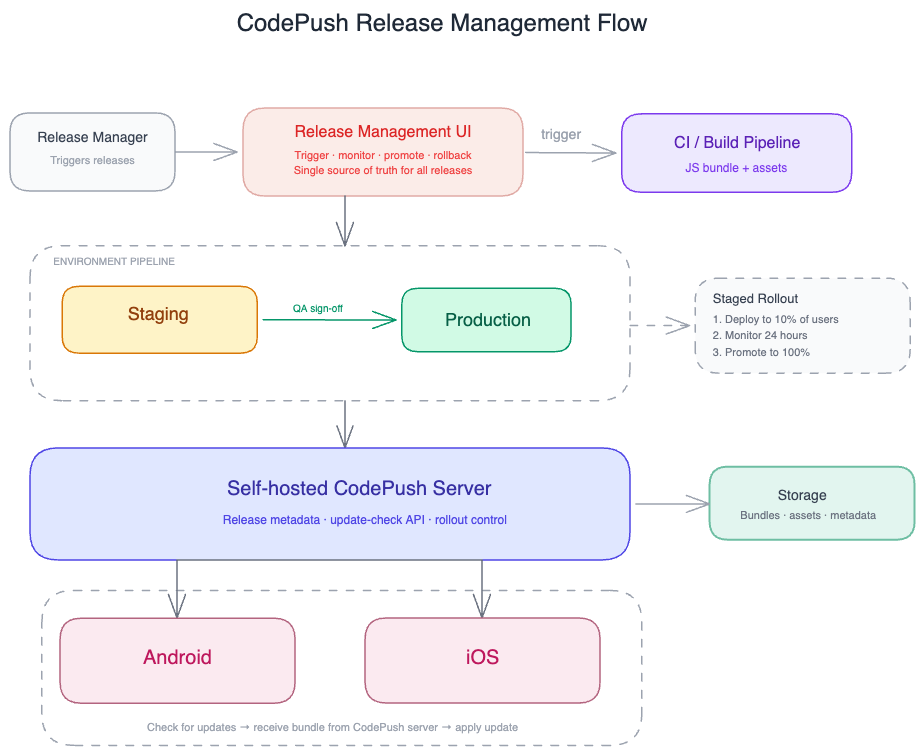
CodePush release management flow
The release flow looks like this:
- CI/CD pipeline creates a React Native bundle.
- The CodePush CLI uploads that bundle to the CodePush server.
- The server stores the bundle in blob storage and records release metadata.
- The mobile app asks the server whether an update is available.
- If the app is eligible for an update, the server returns update metadata and a download URL.
- The app downloads, installs, and applies the update using the client SDK.
- Rollout, rollback, and release state are managed through metadata on the server.
CodePush CLI
The CodePush CLI is the operational tool used to publish updates and manage releases from CI/CD or release workflows. For our setup, the most important CLI responsibility is release publishing. The CLI bundles the React Native changes and uploads the generated bundle to the CodePush server.
CodePush Server
The CodePush server is an Express.js service. It sits between release producers and mobile clients.
When a release is published, the server receives the uploaded bundle, stores it, and updates the metadata that describes the release. When a mobile app starts or explicitly checks for updates, the server evaluates whether that app should receive an update. If an update is available, the server responds with metadata and a bundle download URL.
Client SDK
The client SDK is embedded in the React Native app. Its responsibility is to check for updates, download them, install them, and apply them based on the app’s configured behavior.
Storage
Our self-hosted setup needs three storage systems.
Azure Blob Storage: Blob storage stores the actual JavaScript bundles and assets generated by the CLI. When a client is eligible for an update, it ultimately downloads the update package from this storage-backed URL.
Azure Table Storage: Table storage acts as the metadata database. It stores information such as: apps, deployment, releases, package metadata and release history.
Redis: Redis is needed for percentage-based rollout and runtime update tracking. CodePush uses it to track rollout-related state such as downloads, successful patching, active devices, and which users or devices are on which release.
Release Management UI
We already had our own release management UI before this migration. Even when the hosted CodePush service was active, we used our own UI for release operations because it allowed us to enforce our internal rules.
Our UI helped us manage:
- Who can release a specific app
- Promotion, disable and rollback
- Package size visibility
Migration Process
1. Host the CodePush Server
The first major step was to fork the CodePush server and host it ourselves.
The hosted server needs access to:
- Azure Blob Storage for bundle packages
- Azure Table Storage for metadata
- Redis for rollout state
Once the server was running, it became the new source of truth for apps, deployments, releases, and update checks.
2. Configure the CodePush CLI
Next, we forked the CodePush CLI and configured it to use our self-hosted server URL.
This was required because the CLI is used in CI/CD to publish bundles.
We also generated new access tokens from our self-hosted setup. Those tokens were then used by CI/CD and the release management UI to communicate with the CodePush server.
3. Create Apps and Deployments
We recreated the required apps and deployments in the new CodePush server.
For each mobile app, Android and iOS were created separately because they receive different bundles. Each app also needed its required deployments, such as Production and Staging.
This setup had to be created for every existing app that needed CodePush support.
4. Update CI/CD Pipelines
The CI/CD pipeline had to switch from the original CodePush CLI to our forked CLI.
The pipeline changes were:
- Use the forked CLI
- Replace old access keys with new access tokens
- Publish Android and iOS bundles to the self-hosted server
- Preserve the previous release path temporarily for emergency support
We did not remove the old flow immediately. Keeping it available during the migration reduced risk, especially for older app versions that might still be pointing to the old CodePush service.
5. Update the Native Apps
The native app change was minimal. We did not need to change the CodePush SDK dependency. We only needed to configure the SDK to use our self-hosted server URL.
On Android, we added the server URL in strings.xml. On iOS, we added the server URL in Info.plist.
After this change, we released new Android and iOS binaries. Those binaries started checking our self-hosted CodePush server for updates.
6. Continue Release Management Through the Dashboard
Since we already had a release management dashboard, we continued using it after the migration. We added the newly created apps to the dashboard and pointed those app configurations to the new self-hosted CodePush server.
The dashboard remained the operational layer for release managers, while the forked CLI and server handled the underlying CodePush operations.
Optimizing the cost
By this point, the self-hosted CodePush setup was running in production for two React Native apps: udaan and udaanCapital. Across these apps, thousands of users could fetch OTA bundles, and we typically had one or two updates per week.
A few weeks in, our cost monitoring dashboard started showing some concerning numbers. The self-hosted setup was already costing much more than we expected, and the trend was moving in the wrong direction.
From the cost dashboard, we could see it was related to storage, and on Azure we saw that blob storage usage had grown noticeably, so we initially thought this could be the issue.
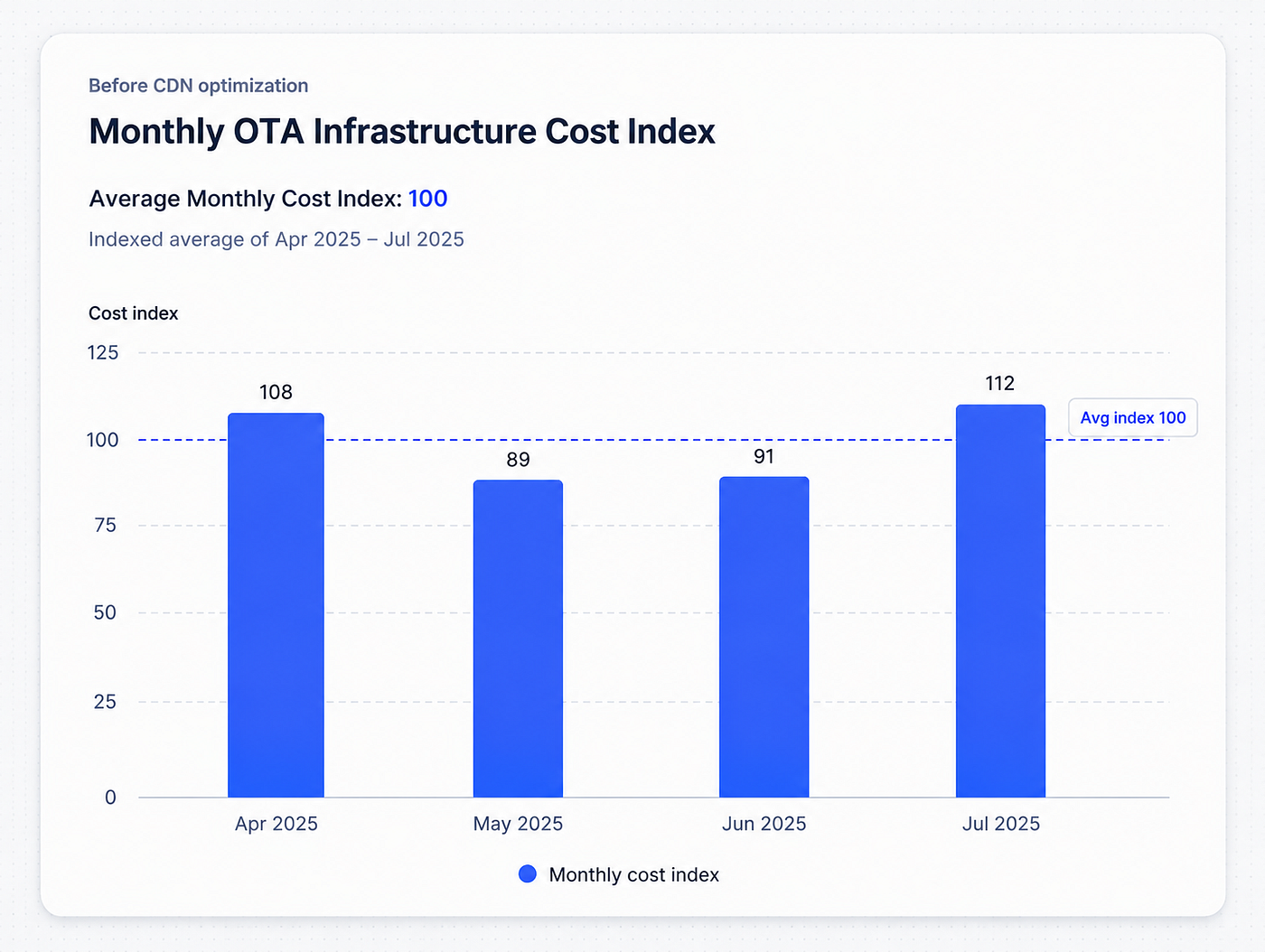
Monthly cost index for CodePush hosting before optimization
First Attempt: Clean Up Storage
We built a cleanup endpoint in our CodePush server. It would keep the last 5 bundles (configurable) and delete everything older. We could trigger it from our dashboard whenever storage got too heavy.
Results were disappointing 😔:
- Storage usage dropped by around 85%
- No change in cost
Wait, what? A 85% storage reduction for, …, nothing?!
The Real Problem
After talking with our DevOps team, we figured out what was actually happening. Storage in Azure Blob is dirt cheap. The real killer was bandwidth cost, ~₹10 per GB for data transfer. Every time thousands of users downloaded our bundles, we got charged for bandwidth. That’s where the money was going.
With one or two updates per week, and occasional hotfixes, the cost could increase quickly. You can see the variation in cost from the first screenshot. The number of users also impacts cost, and as we grow, the cost will grow as well. Since users need to download a single file at a time, setting up a CDN would be the best solution for us.
The bigger lesson was simple: optimizing the wrong bottleneck is common in cloud systems. A large storage reduction looked impressive, but it did not matter because storage was not the real cost driver. Network egress was.
Adding CDN
Our DevOps team already had a solution in their mind. We already had a Cloudflare contract with plenty of unused bandwidth allowances. Adding a CDN layer wouldn’t cost us anything extra.
The implementation was simple:
Before: CodePush API returns Azure Blob Storage URLs After: CodePush API returns CDN URLs
We changed a few lines in our Express server to return CDN links instead of direct blob storage URLs. DevOps configured Cloudflare to cache the blob storage content.
Here’s how it works: First user downloads an update: Azure → CDN → User (we pay bandwidth once) All other users: CDN cache → User (zero bandwidth cost)
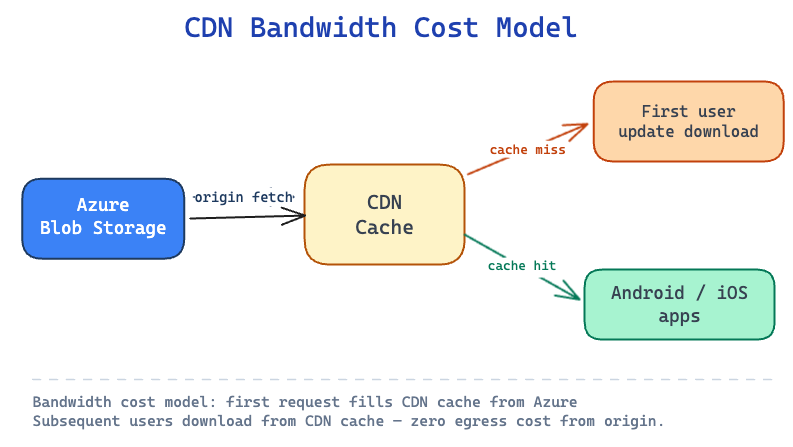
Impact
The final impact was measurable:
- 90% reduction in monthly OTA infrastructure cost.
- 99.6% reduction in blob storage-related spending.
- Faster bundle downloads for users through CDN edge caching.
- One self-hosted OTA infrastructure powering multiple React Native apps in production.
- No disruption to release velocity during the App Center migration.
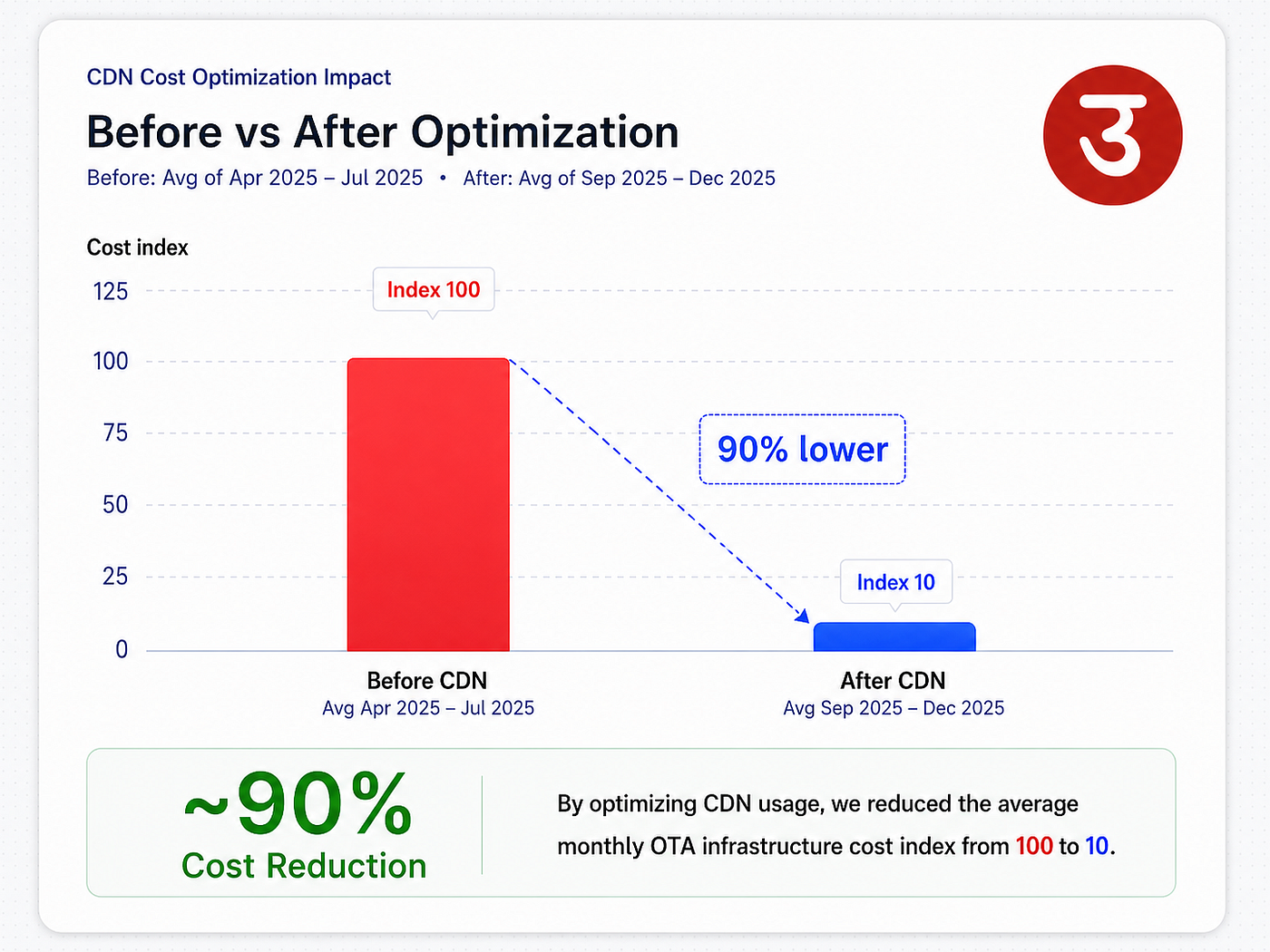
self hosted CodePush system is utilized by udaan and udaanCapital
Finding the right root cause is important. An 85% storage reduction sounds good, but barely moved the needle.
What We Learned
A few lessons from this whole experience:
Always dig into actual cost breakdowns first: The storage cleanup was actually just a one-day effort, but the real lesson is to understand what’s driving your costs before jumping into optimizations. Cloud billing isn’t always intuitive.
Simple fix can have huge impact: We didn’t migrate to Expo or move to a more expensive managed service. One URL change and CDN configuration solved most of the recurring spend problem.
Self-hosting can actually be cheaper: With smart optimizations, we’re running our deployment infrastructure for less than most SaaS alternatives cost. And since we control the infrastructure, we can host multiple apps and scale to more users without being boxed into a service provider’s pricing tiers.
The Road Ahead
There are still a couple of areas where we can reduce the cost further.
One promising direction is diff-based OTA updates. Today, CodePush updates serve the complete JavaScript bundle to the client. Instead, we can generate a patch between the previously installed bundle and the new bundle, and send only that patch to the device. We had already tried an experiment in this direction, where the update size reduced from around 7 MB to 100 KB, which is roughly a 98% reduction.
However, making this production-ready would require more than just generating binary diffs. We would need infra changes to store and serve patches based on base and target bundle versions, and client SDK changes to safely apply patches, validate them, and fall back to the full bundle when required.
Another area to explore is the CodePush Server itself. A meaningful part of the remaining cost now comes from running the Express server. Since this service mostly handles polling requests and returns update metadata, we can evaluate lighter alternatives such as workers or other serverless runtimes to reduce infra overhead further.
Closing Thoughts
App Center had made OTA updates effectively free for us. But once the hosted service was shutting down, we had to own that release path ourselves. Self-hosting the open-source CodePush server gave us continuity, but it also exposed the real infrastructure cost behind OTA delivery.
The initial version worked, but it was expensive. The meaningful improvement came only after we diagnosed the right bottleneck: storage was not the problem; repeated bundle downloads and network egress were. What had previously felt free through App Center now had visible infrastructure costs in our own environment, and adding a CDN made the self-hosted setup economically sustainable.
It was a reminder that pragmatic engineering is often about choosing continuity first, understanding the system deeply, and then optimizing the part that actually matters.
메타데이터
- post_id
- 45e3de5f9df4
- slug
- how-we-pivoted-from-app-center-and-reduce-ota-costs-by-90-45e3de5f9df4
- url
- https://udaan.dev/how-we-pivoted-from-app-center-and-reduce-ota-costs-by-90-45e3de5f9df4
- canonical_url
- https://udaan.dev/how-we-pivoted-from-app-center-and-reduce-ota-costs-by-90-45e3de5f9df4
- author_url
- https://medium.com/@abijith.b
- status
- ok
- fetched_at
- 2026-06-09 14:34:10