Sentinel Grid: Treating an Emergency Alert as an Operational Workflow
A Kestra-first emergency response prototype where React is only the command surface and Kestra owns intake, verification, responder…
Sentinel Grid: Treating an Emergency Alert as an Operational Workflow
A Kestra-first emergency response prototype where React is only the command surface and Kestra owns intake, verification, responder routing, dispatch, acceptance, live location, and audit visibility.
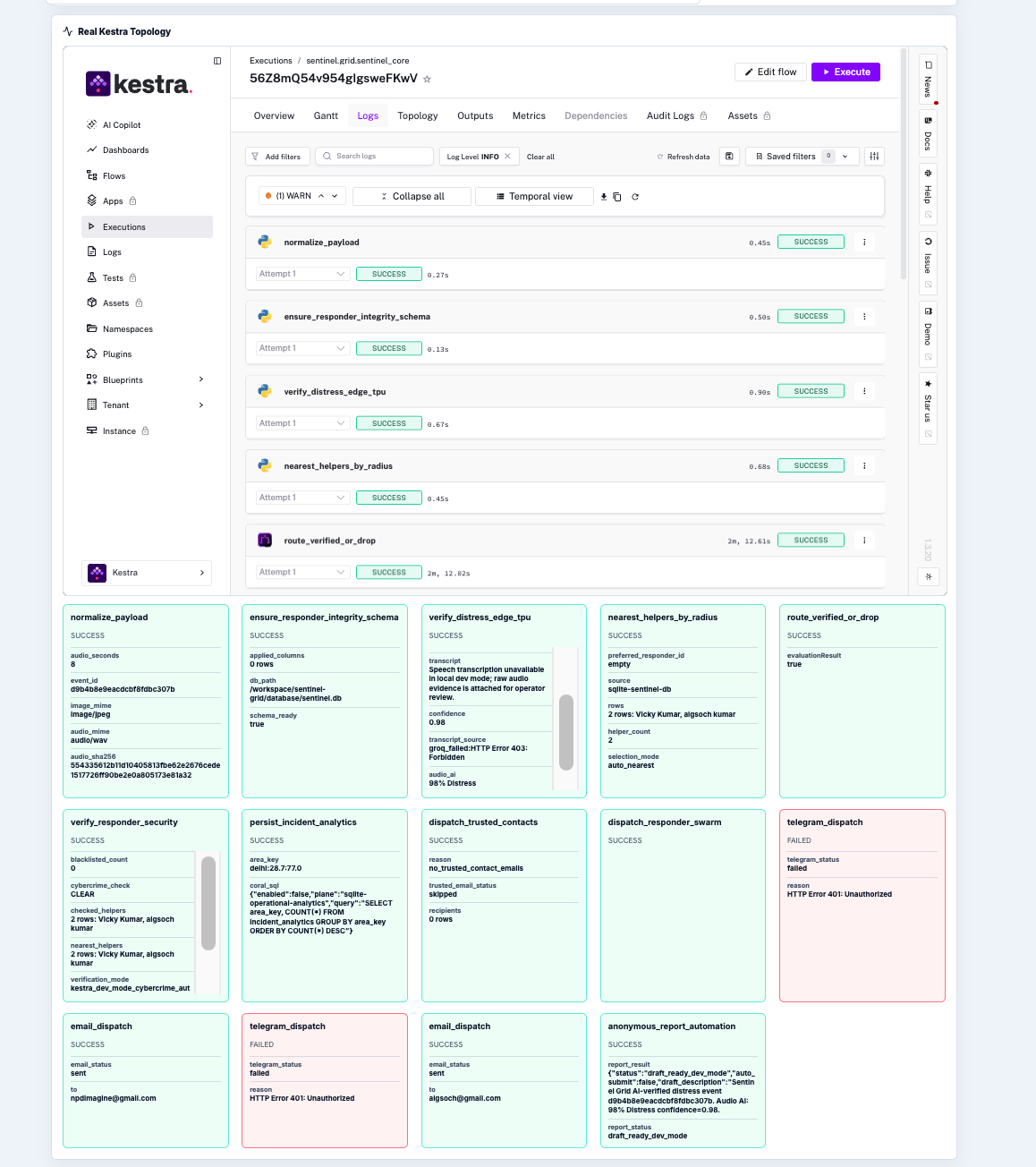
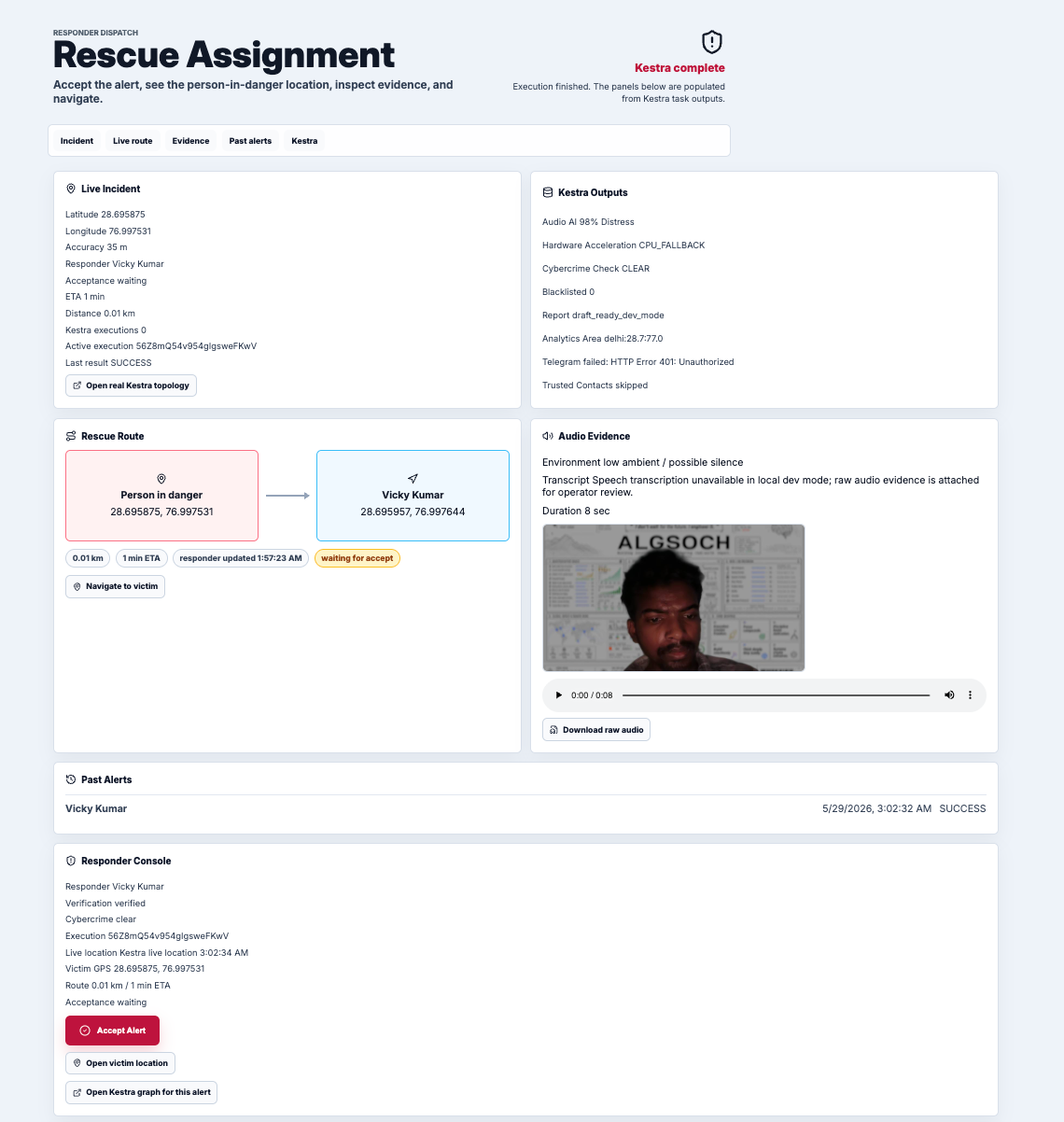
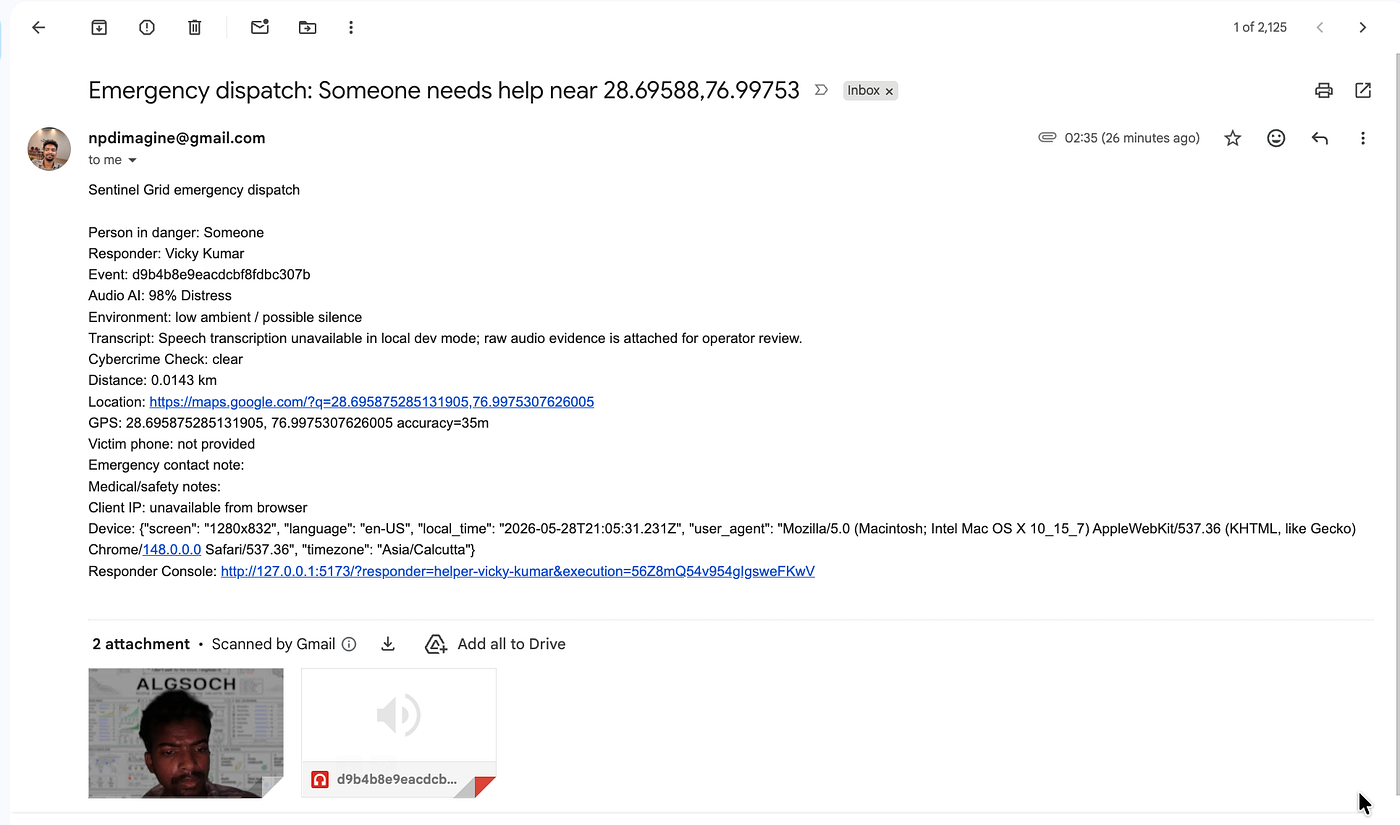
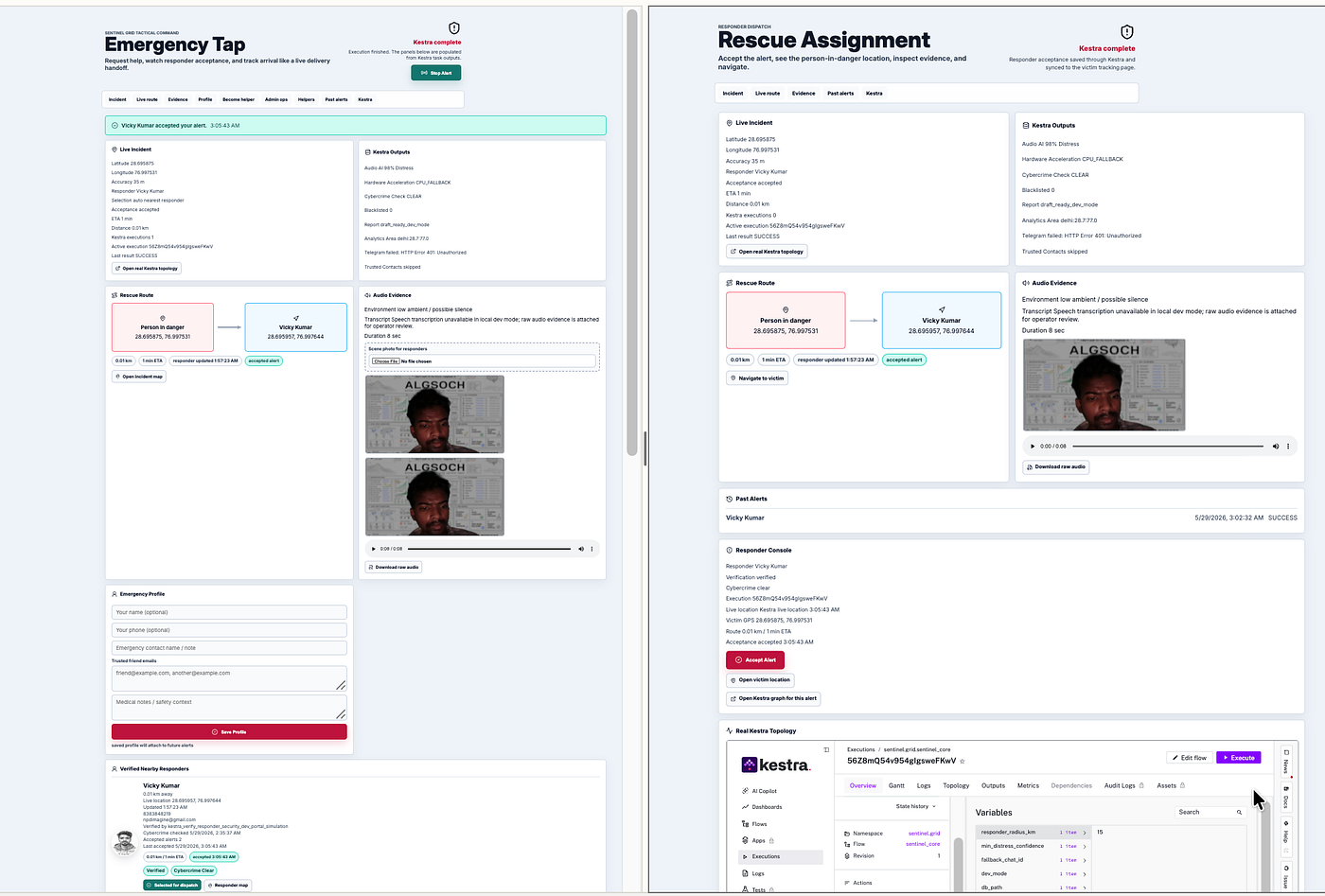
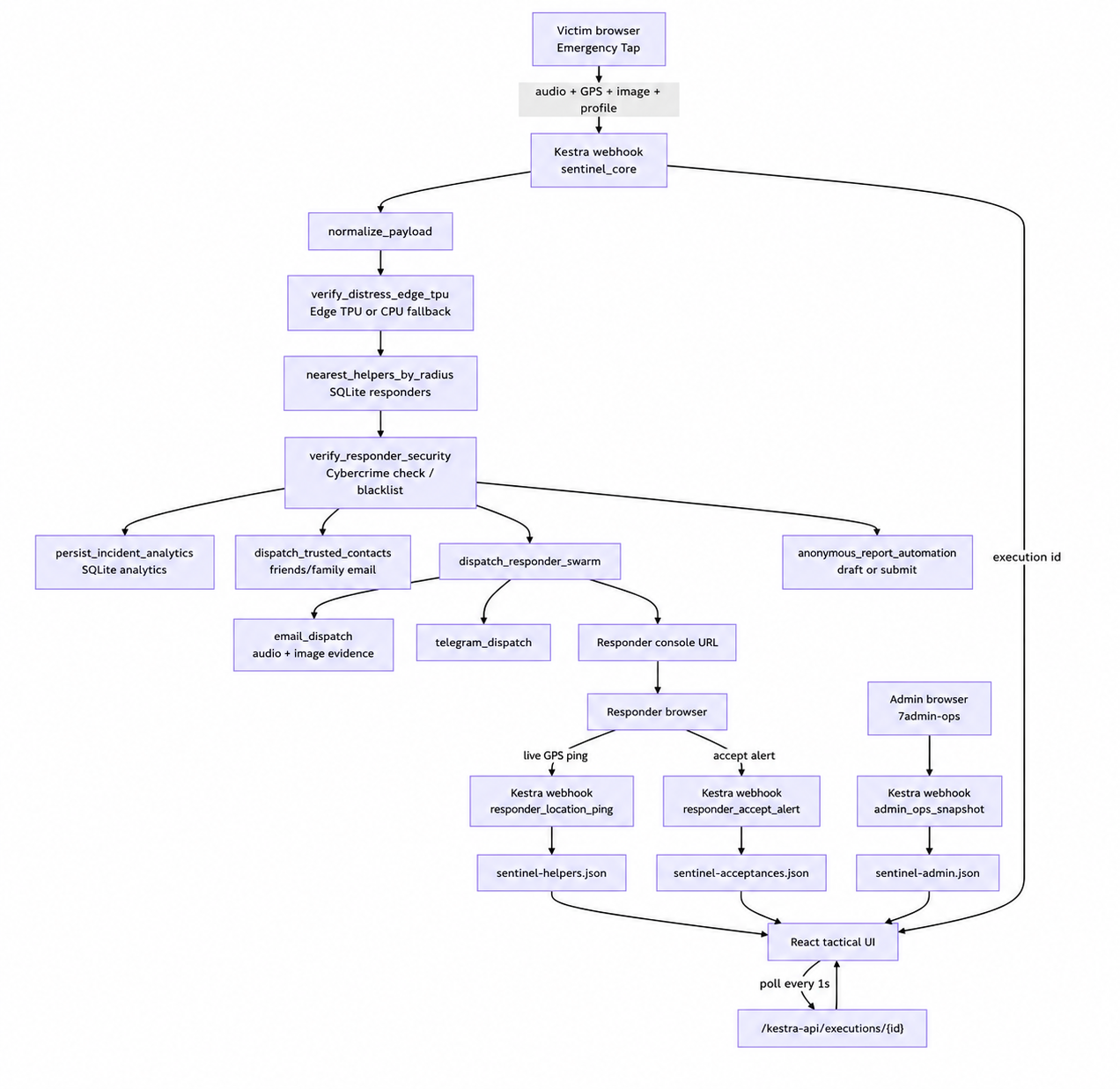
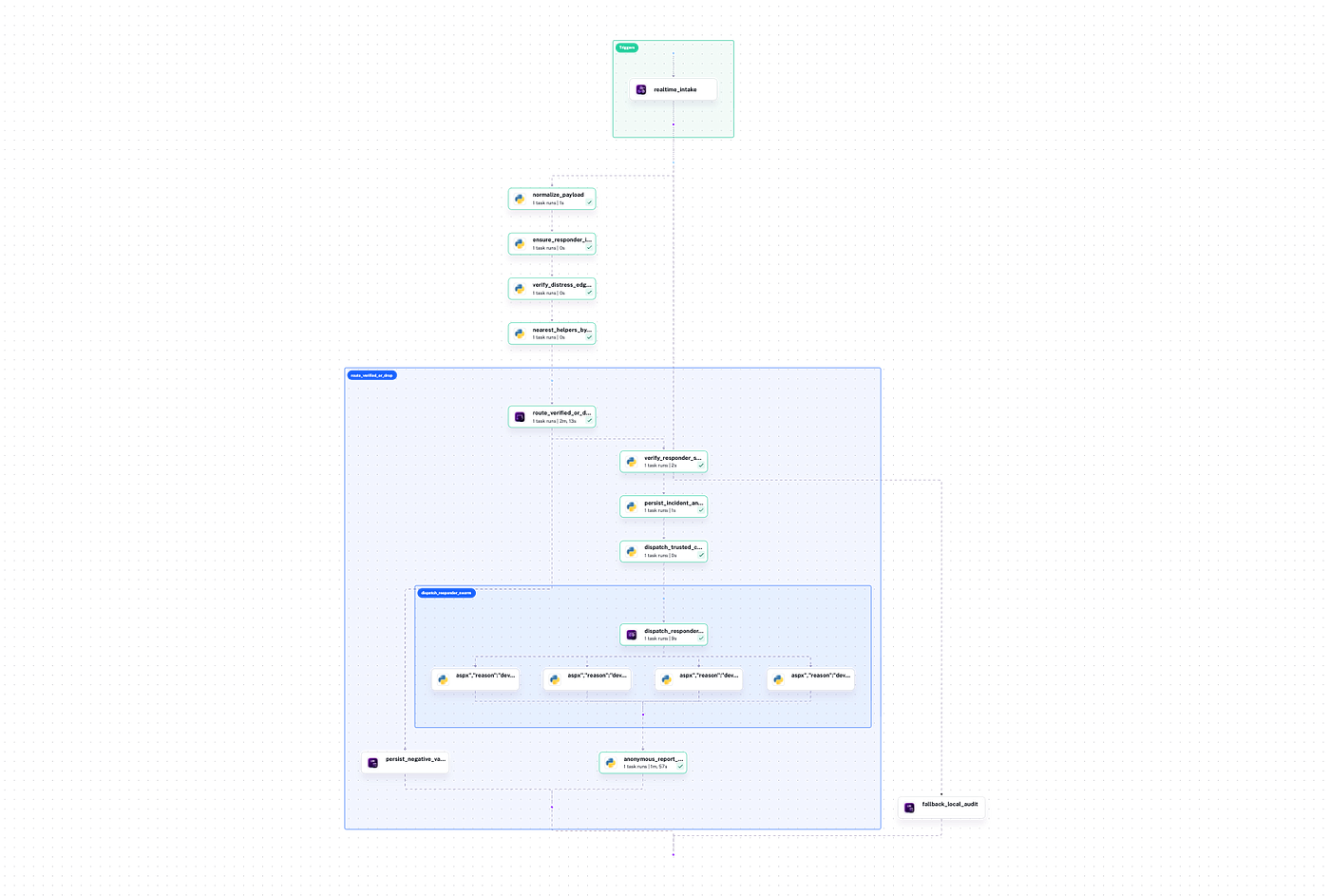
Topology
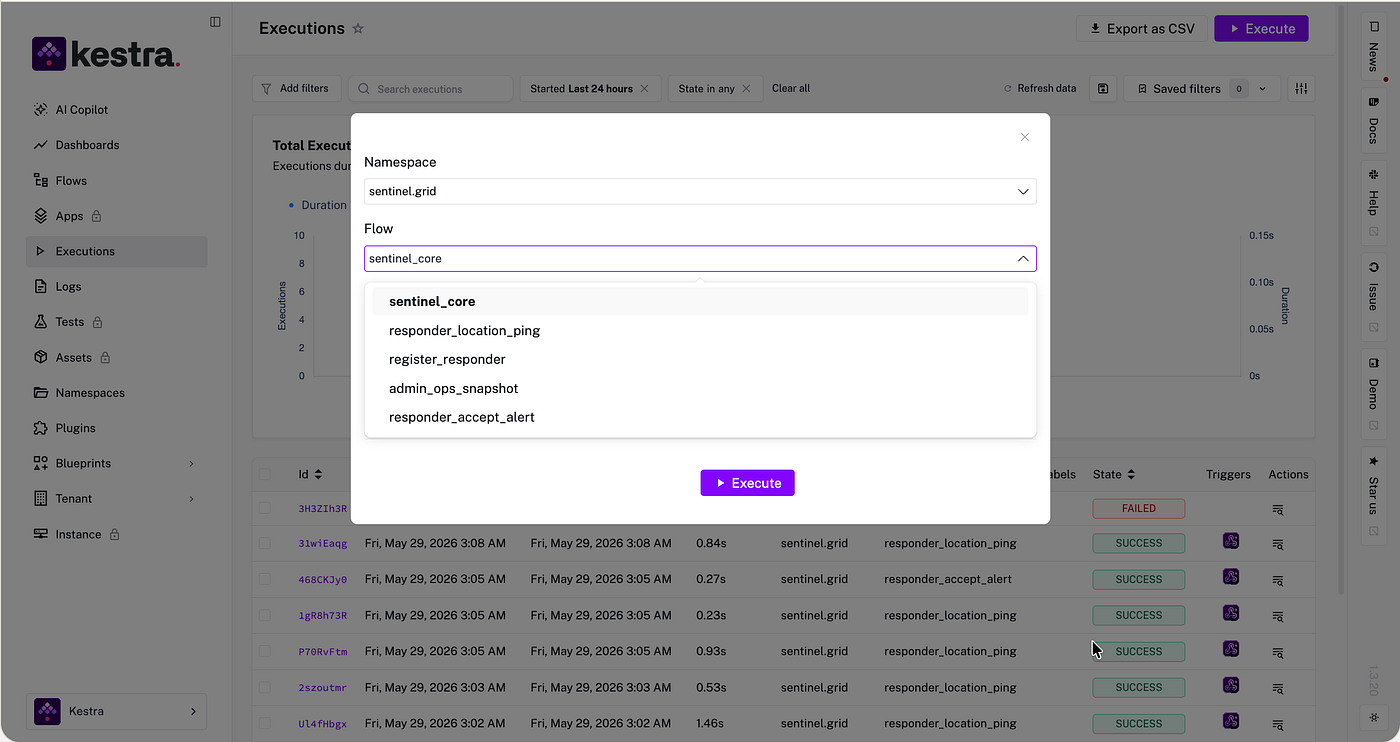
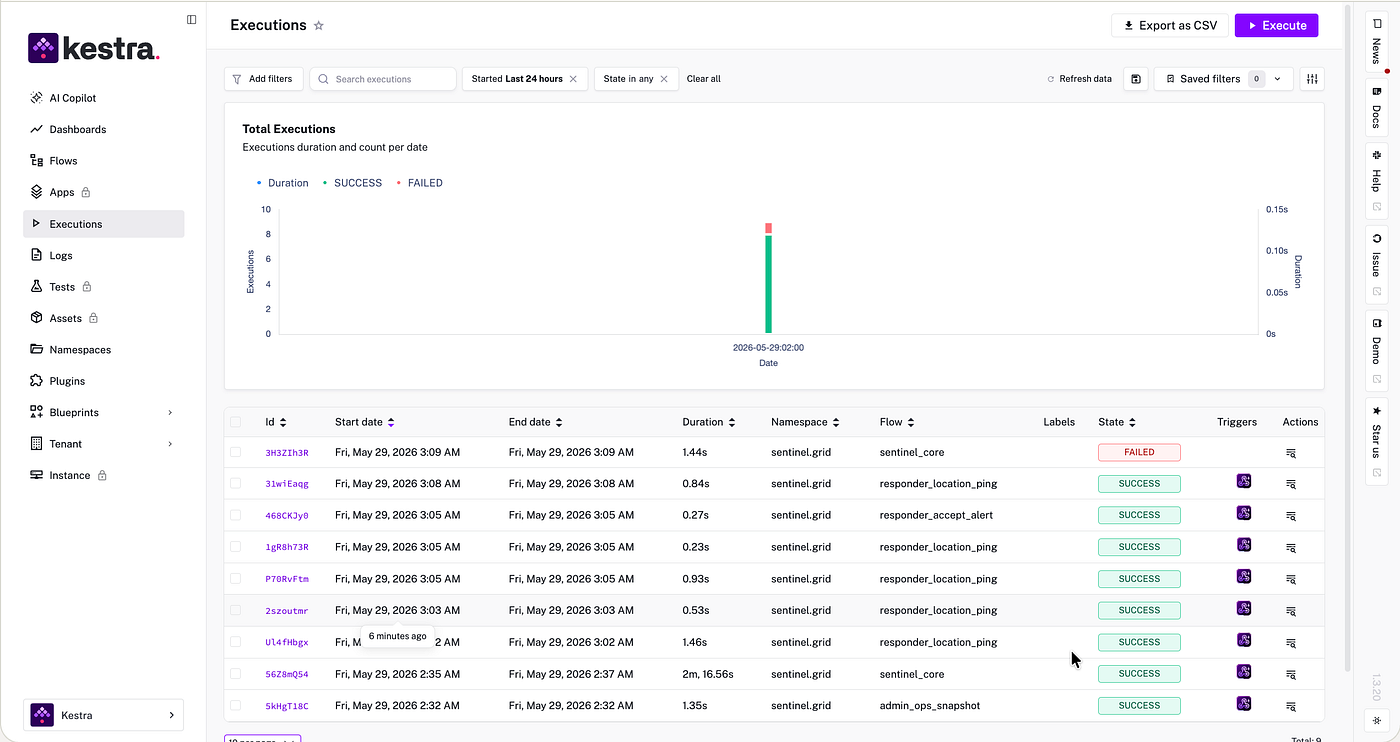
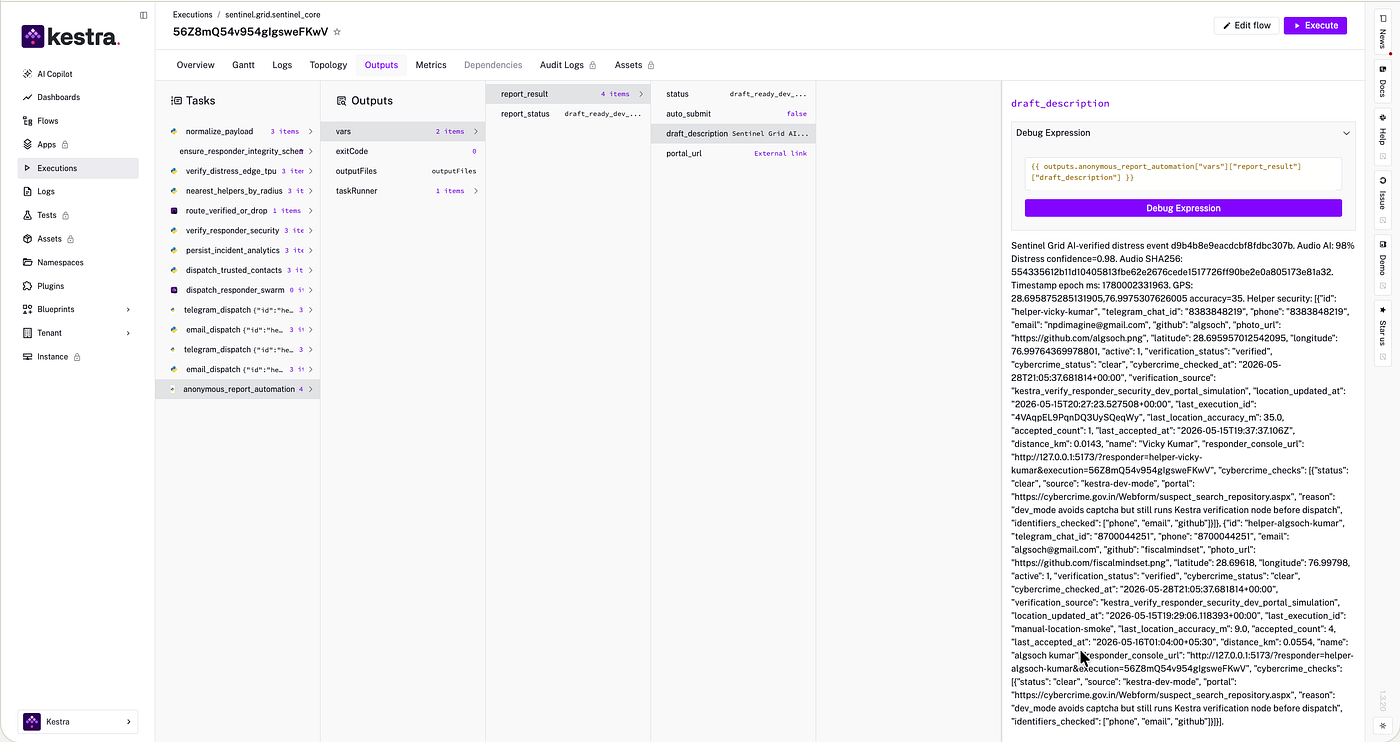
Most safety apps treat an emergency alert like a message.
A user presses a button. The app sends an SMS, triggers a call, or notifies saved contacts.
That is useful, but while building Sentinel Grid I wanted to test a different architecture:
What if an emergency tap behaved like an operational incident instead of a single backend API request?
That design choice changed the whole system.
An emergency alert is not just “send notification.” It is a sequence of decisions:
* capture GPS and evidence
* normalize unreliable browser input
* verify whether the signal looks like distress
* find nearby responders
* filter unsafe or unverified responders
* notify trusted contacts
* dispatch responders
* track acceptance
* update live responder location
* expose every step to an operator
If those steps are hidden across API routes, workers, cron jobs, and log files, the system becomes hard to reason about exactly when clarity matters most.
So Sentinel Grid uses Kestra as the operational brain.
The frontend is a React/PWA command surface. It captures the emergency tap, audio, GPS, optional scene image, and profile context. Then it sends the incident into a Kestra webhook. From that point, Kestra owns the workflow.
The repository is here: https://github.com/FiscalMindset/women
The main flow definition is here: https://github.com/FiscalMindset/women/blob/main/flows/sentinel_core.yaml
[embed]
The Design Decision
My first instinct would normally be a traditional backend:
- React sends the alert to an API route.
- The API writes the incident to a database.
- A worker classifies the audio.
- Another job searches nearby helpers.
- Another service sends email or Telegram messages.
- Another route handles responder acceptance.
- Another endpoint receives responder location pings.
- A dashboard tries to reconstruct state from the database.
That architecture can work, but it spreads the incident lifecycle across too many places.
For Sentinel Grid, I wanted the workflow itself to be inspectable. I wanted to see which task ran, what it produced, what branch executed, what failed, and what the frontend should show.
That is why the central question became:
Can Kestra own the emergency lifecycle end to end, while React only renders and submits events?
The answer, for this prototype, is yes.
How Sentinel Grid Works
The user flow is intentionally simple.
A person in danger opens the PWA and taps:
Send Alert
The browser captures:
- current GPS coordinates
- a short audio evidence window
- optional scene image
- emergency profile data
- trusted friend emails
- client context
That payload goes into Kestra through the sentinel_core webhook.
From there, the flow executes operational stages:
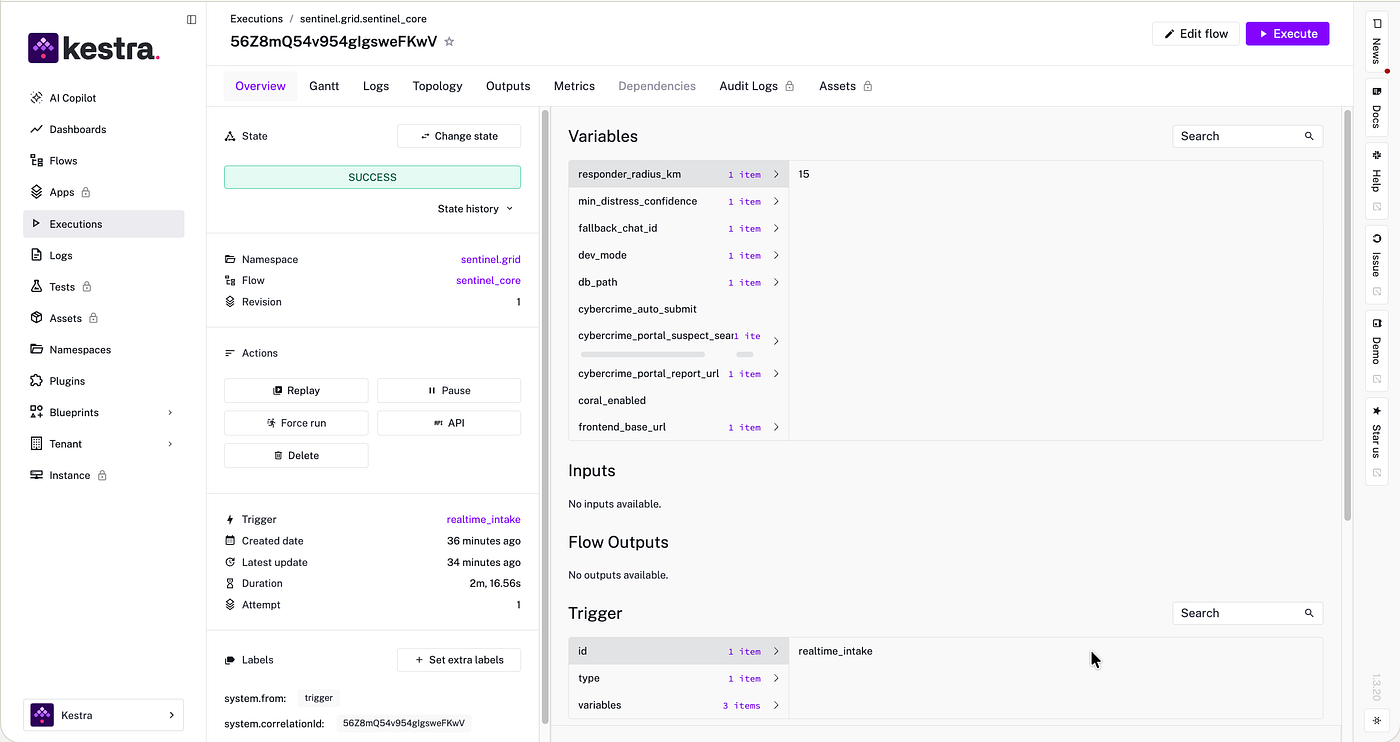
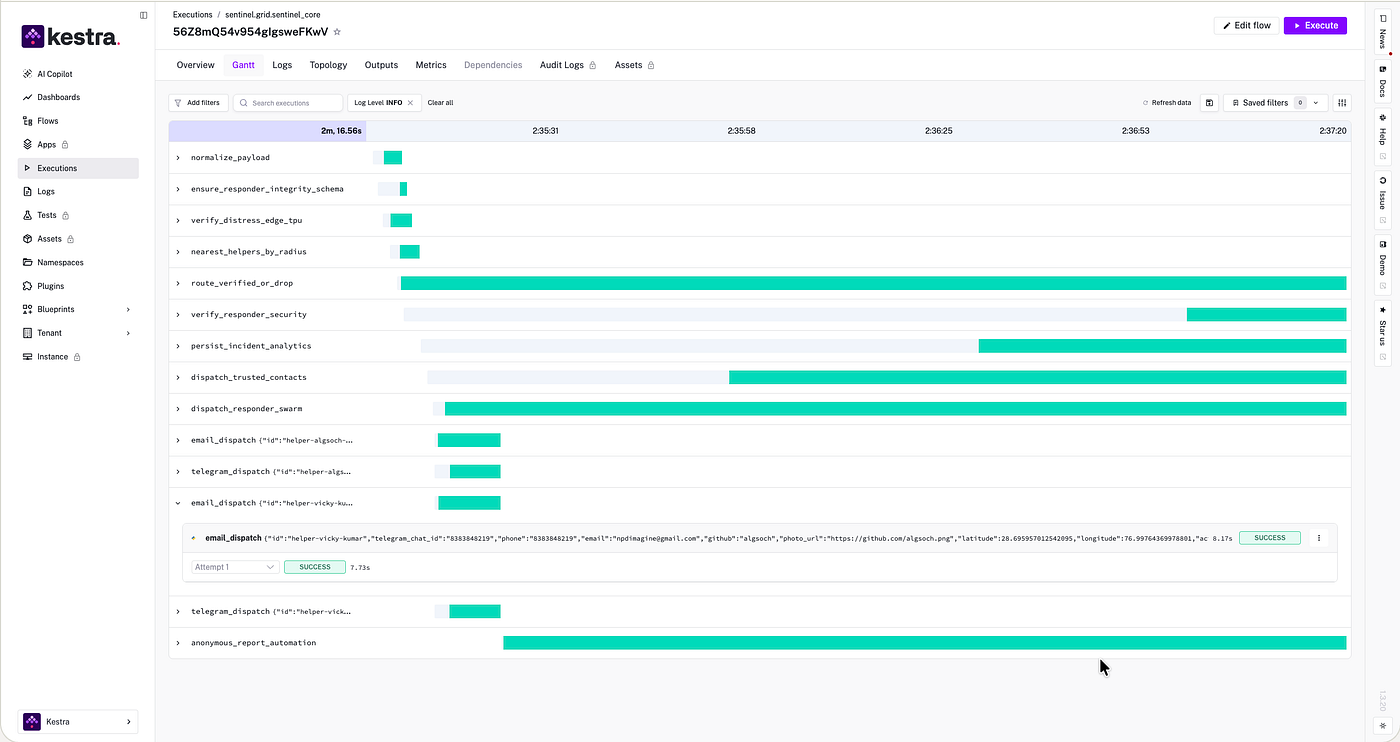
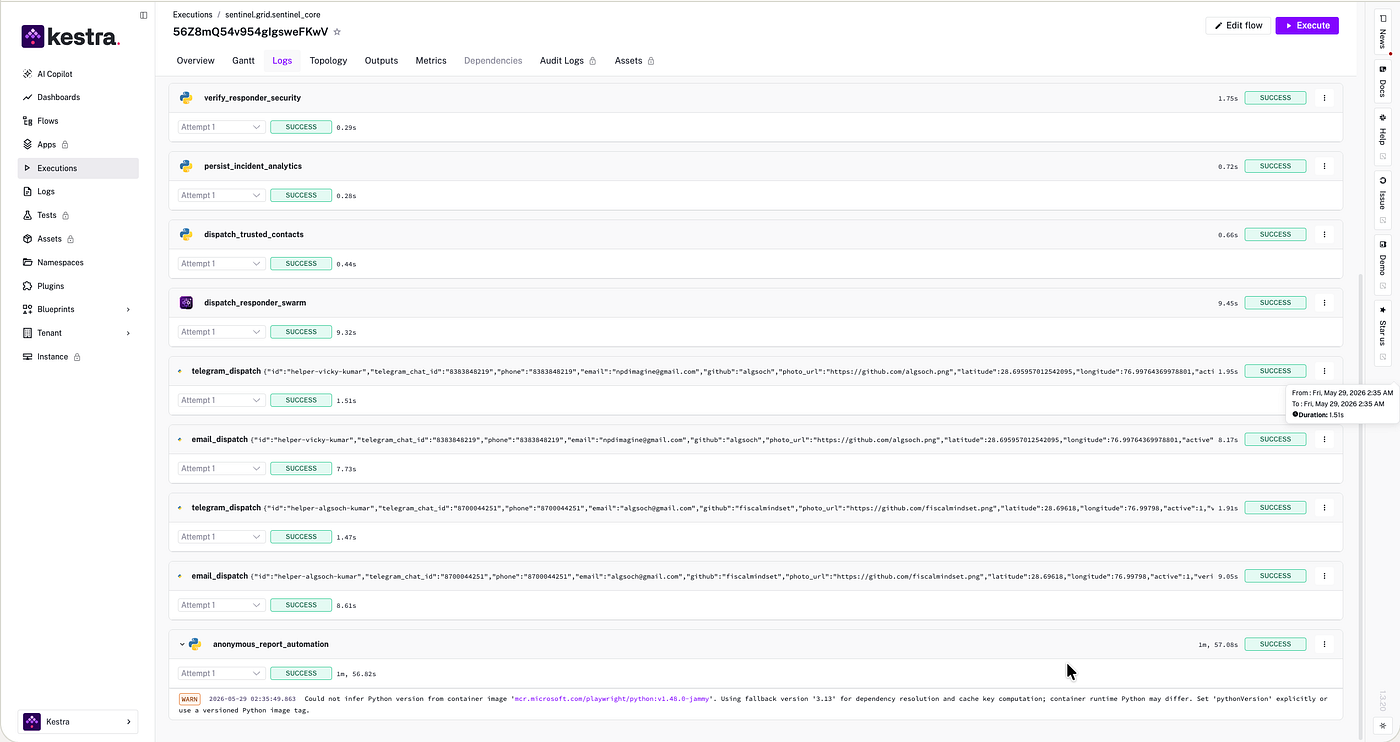
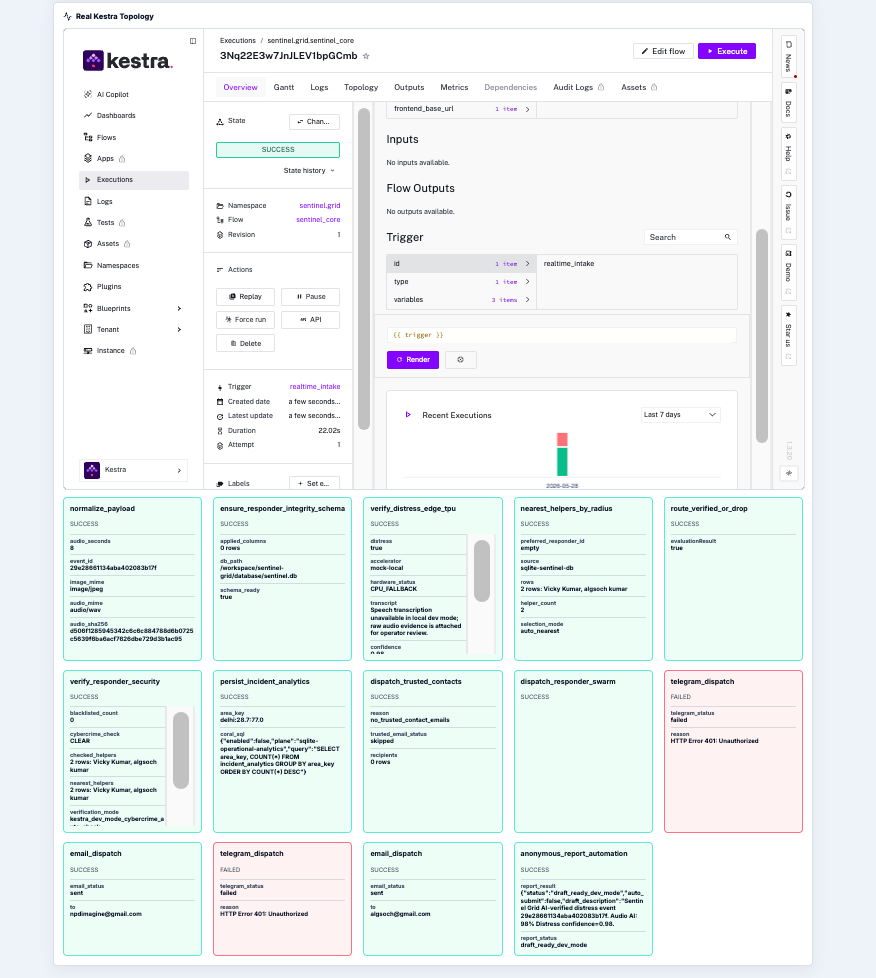
normalize_payloadensure_responder_integrity_schemaverify_distress_edge_tpunearest_helpers_by_radiusroute_verified_or_dropverify_responder_securitypersist_incident_analyticsdispatch_trusted_contactsdispatch_responder_swarmtelegram_dispatchemail_dispatchanonymous_report_automation
The important part is that each step has a real execution state and real outputs.
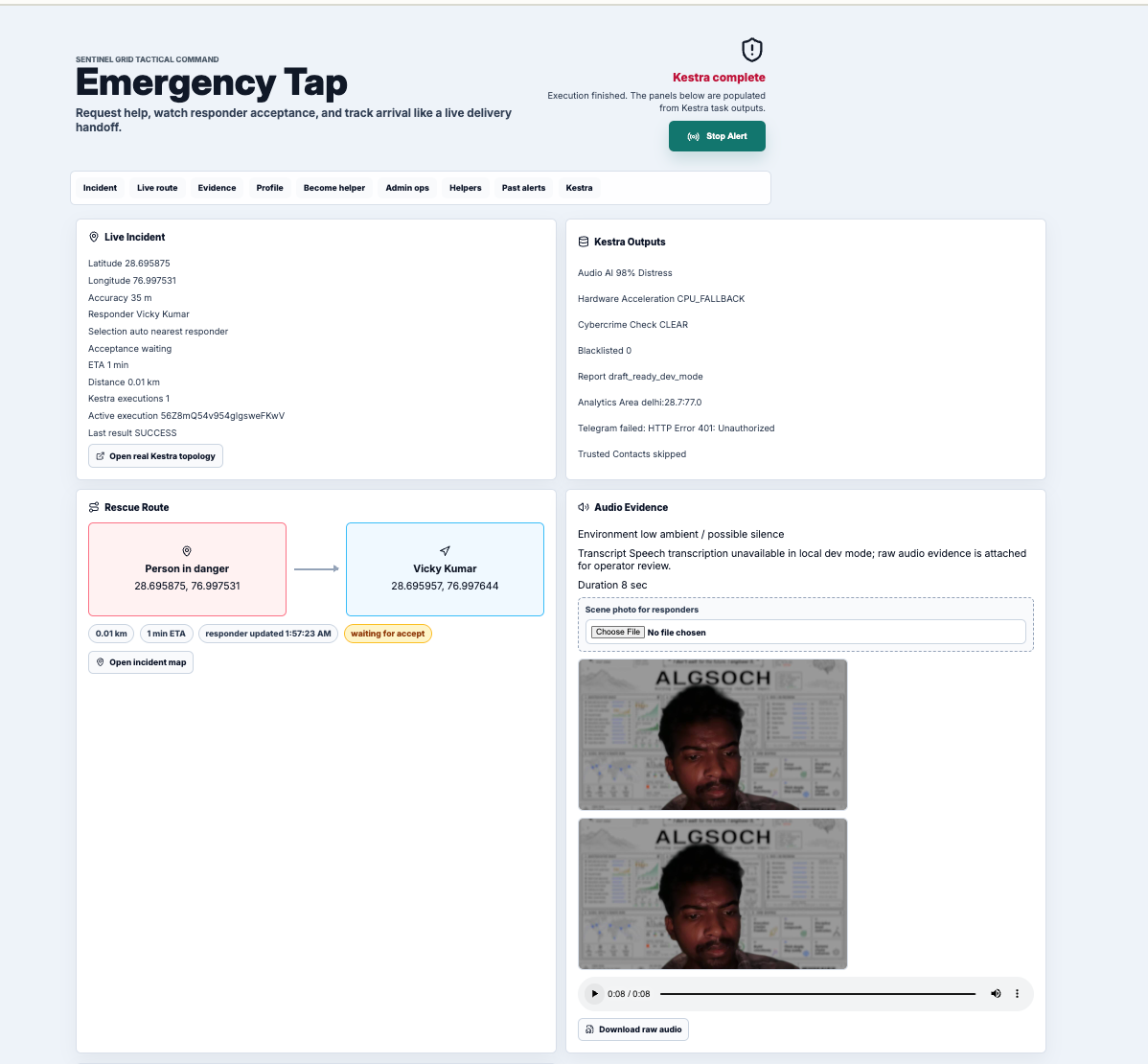
The React UI polls:
/kestra-api/executions/{execution_id}
That proxy reads the actual Kestra execution:
GET /api/v1/main/executions/{execution_id}
The UI maps over *taskRunList*, renders the actual Kestra task state, and displays task outputs. It is not a fake dashboard with hardcoded stages.
If verify_responder_security produces cybercrime_check: CLEAR, the UI shows that. If telegram_dispatch reports a failed delivery, the UI shows that too.
The Flow Shape
The full YAML is long, so I keep it in GitHub:
https://github.com/FiscalMindset/women/blame/main/flows/sentinel_core.yaml
```yaml
id: sentinel_core
namespace: sentinel.grid

triggers:
  - id: realtime_intake
    type: io.kestra.plugin.core.trigger.Webhook
    key: sentinel-grid-intake

tasks:
  - id: normalize_payload
    type: io.kestra.plugin.scripts.python.Script

  - id: ensure_responder_integrity_schema
    type: io.kestra.plugin.scripts.python.Script

  - id: verify_distress_edge_tpu
    type: io.kestra.plugin.scripts.python.Script

  - id: nearest_helpers_by_radius
    type: io.kestra.plugin.scripts.python.Script

  - id: route_verified_or_drop
    type: io.kestra.plugin.core.flow.If

  - id: verify_responder_security
    type: io.kestra.plugin.scripts.python.Script

  - id: persist_incident_analytics
    type: io.kestra.plugin.scripts.python.Script

  - id: dispatch_responder_swarm
    type: io.kestra.plugin.core.flow.ForEach

  - id: anonymous_report_automation
    type: io.kestra.plugin.scripts.python.Script
```There are also separate Kestra flows for responder registration, live responder location, responder acceptance, and admin snapshots:
https://github.com/FiscalMindset/women/blob/main/sentinel-grid/flows/register_responder.yaml
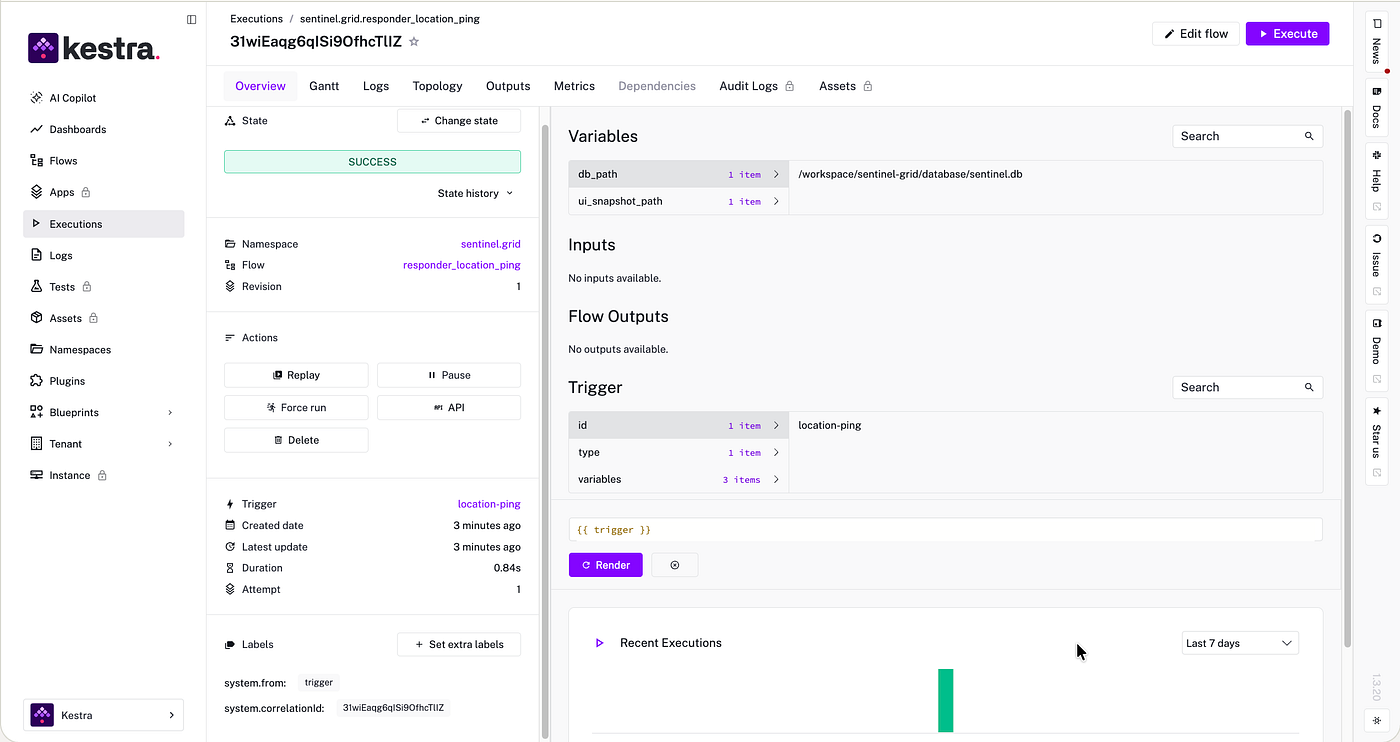
https://github.com/FiscalMindset/women/blob/main/flows/responder_location_ping.yaml
This split matters because the emergency flow is not the only workflow. A responder accepting an alert is also an operational event. A responder sharing live GPS is also an operational event. An admin requesting system state is also an operational event.
Architecture
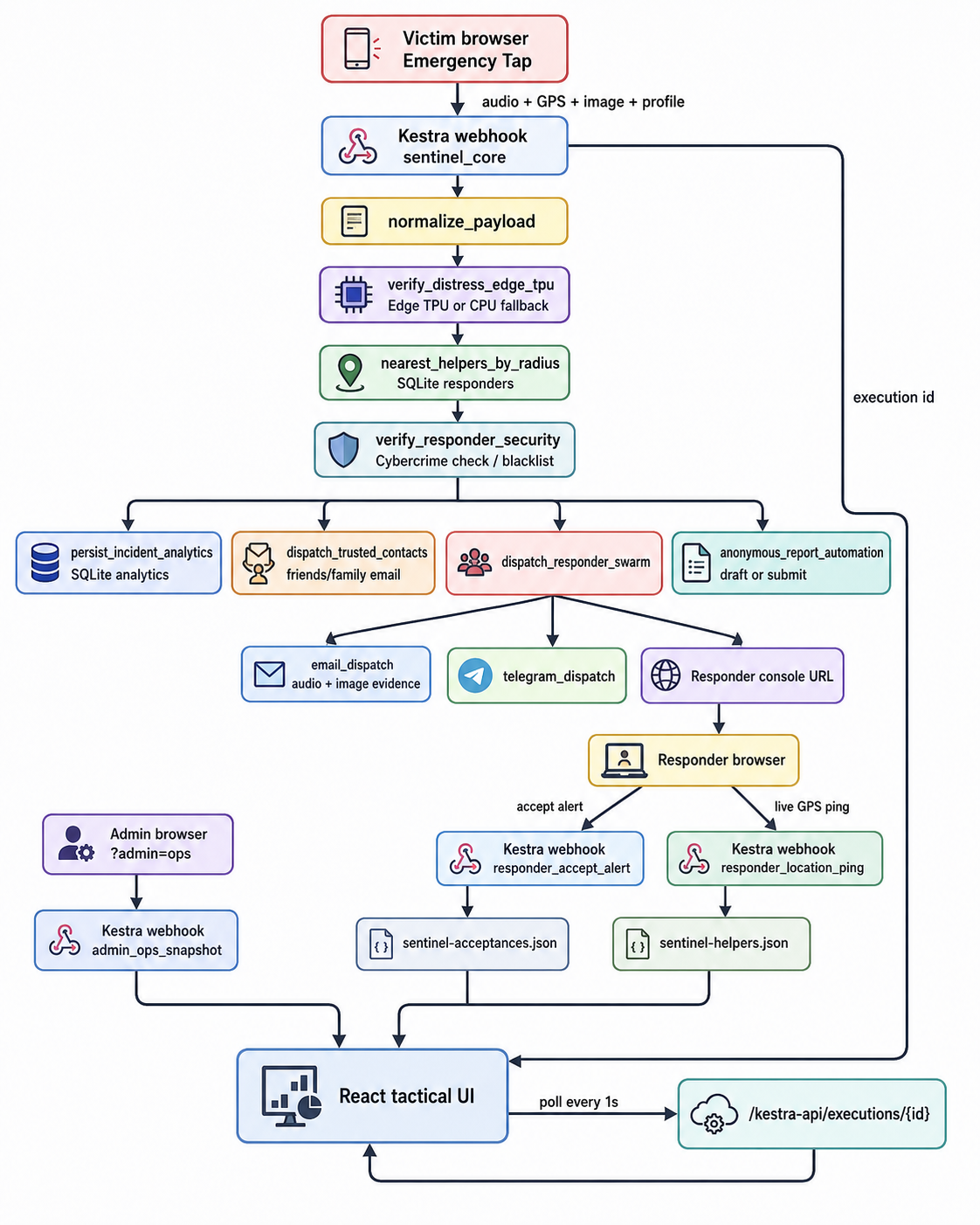
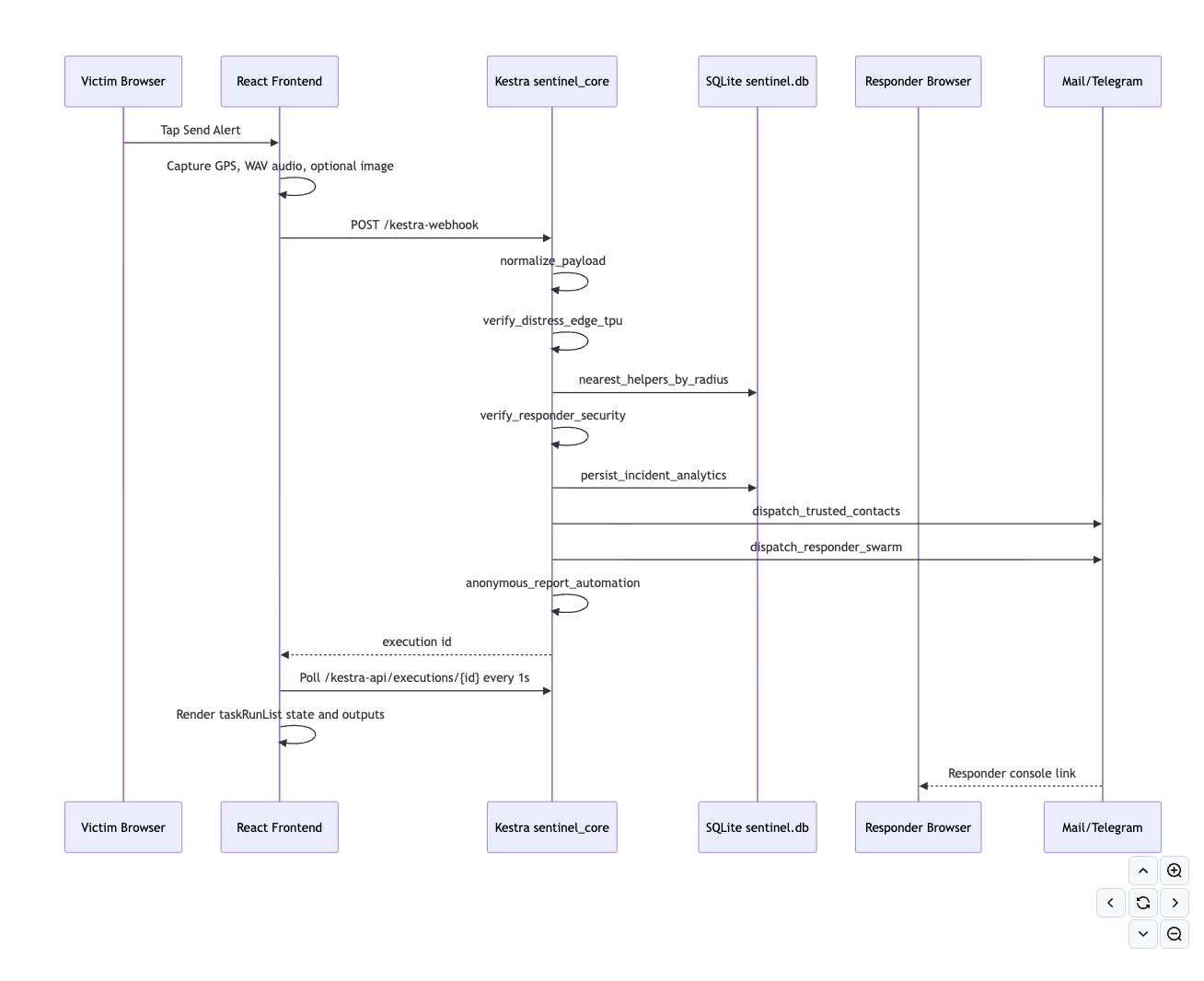
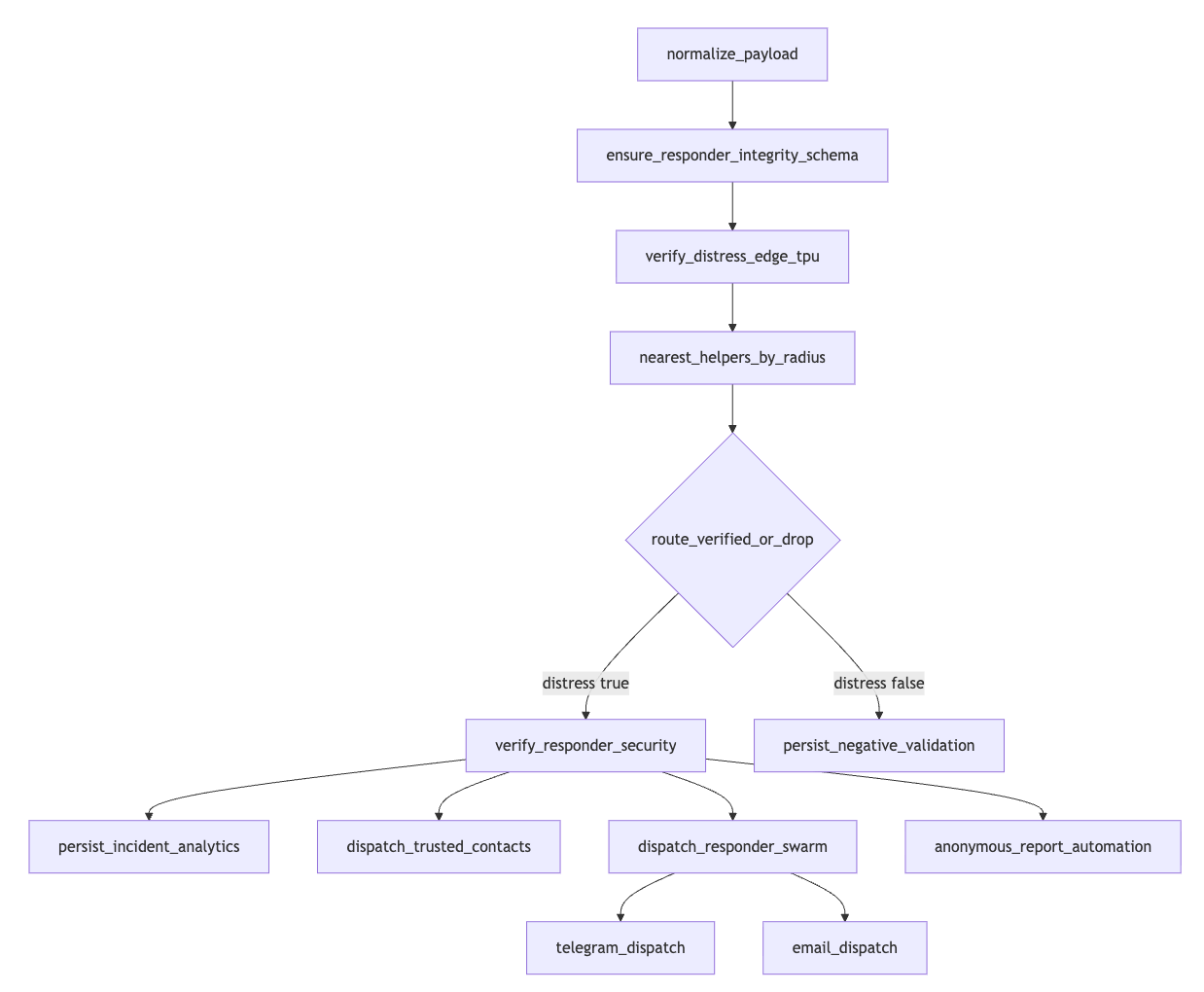
At a high level:
Victim PWA
 -> Kestra webhook: sentinel_core
 -> payload normalization
 -> distress verification
 -> nearby responder lookup
 -> responder integrity check
 -> trusted contact email
 -> responder dispatch
 -> responder acceptance flow
 -> responder live-location flow
 -> admin operations snapshot
 -> React command surface polls Kestra execution state
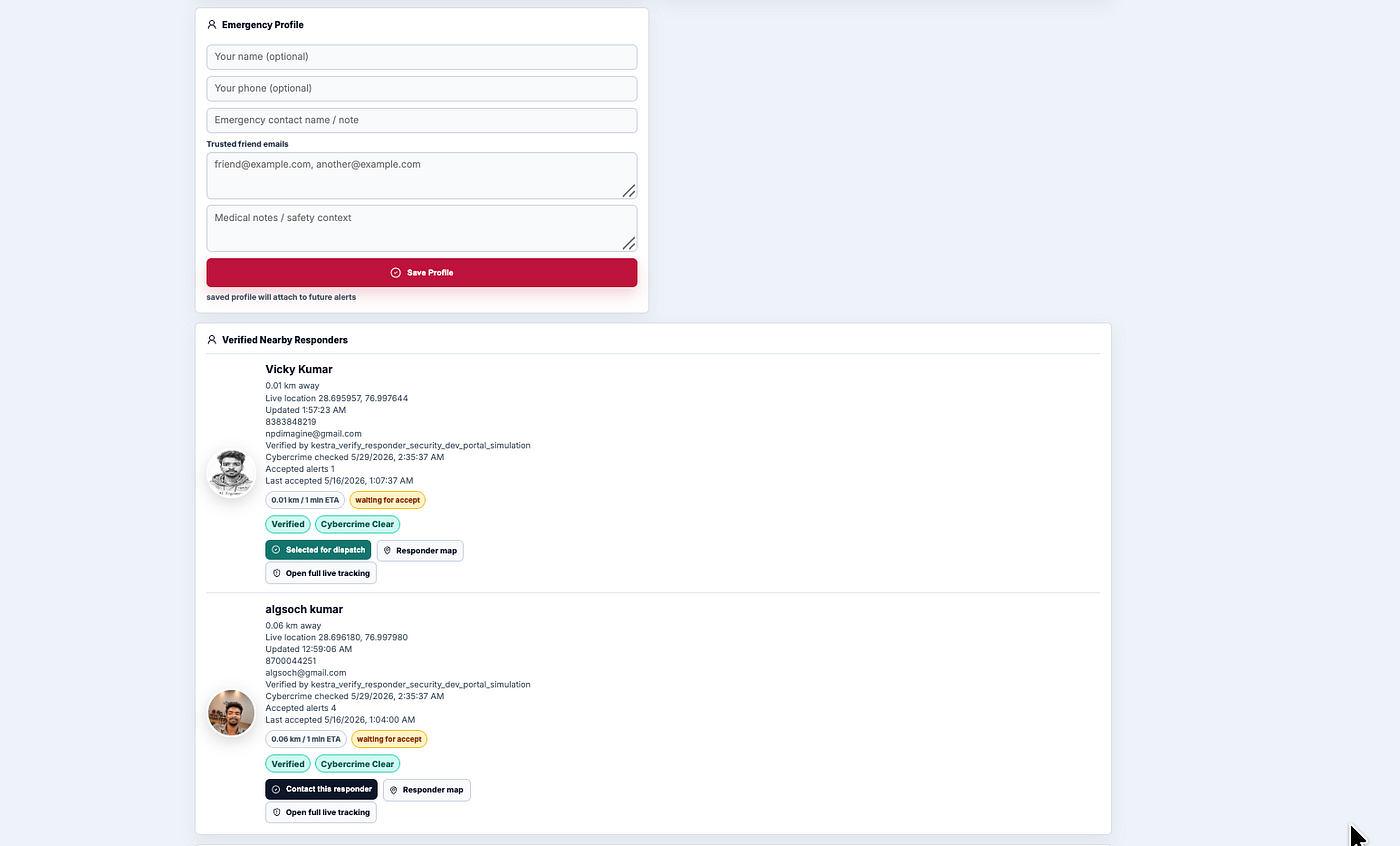
SQLite is used for the local prototype database. It stores registered responders, helper verification status, cybercrime/security status, location freshness, responder acceptances, and incident analytics.
The production direction would be PostgreSQL/PostGIS, but SQLite made local testing fast and kept the system easy to run.
Responder Integrity
One design constraint I cared about: speed alone is not enough.
If a system dispatches nearby people during an emergency, it also needs a trust boundary.
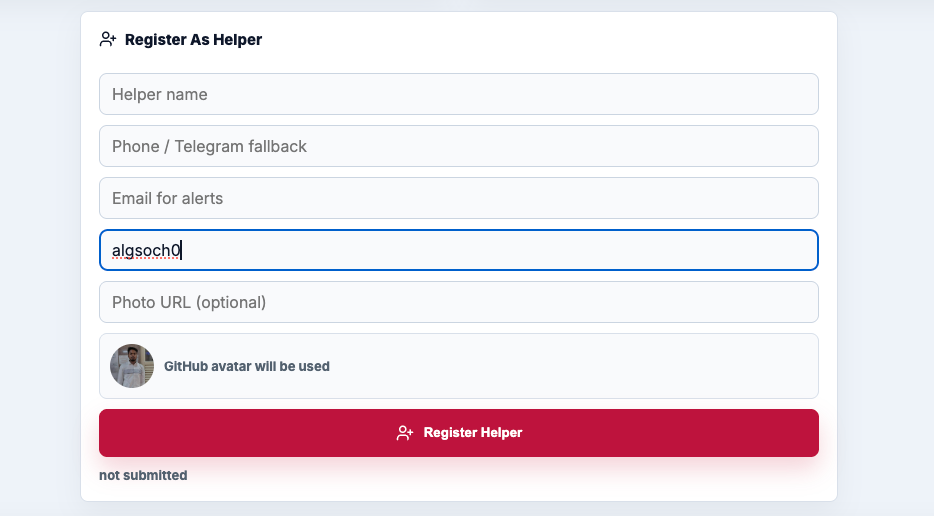
In Sentinel Grid, helper registration is not just a frontend form. The helper onboarding page sends the registration request into Kestra through register_responder.
That flow:
* validates helper identity fields
* normalizes phone, email, GitHub, and photo URL
* runs the registered responder security task
* writes verified status into SQLite
* updates the frontend helper snapshot
In local dev mode, the cybercrime/security check is simulated as clear because the real government portal can require captcha or operator presence.
In production mode, the flow is designed to fail closed as operator_required instead of pretending a portal check passed. That is important. A safety system should not fake verification just to keep a demo smooth.
The helper cards in the UI read this state from SQLite snapshots produced by Kestra:
verification_status: verified | unverified
cybercrime_status: clear | flagged | unchecked | operator_required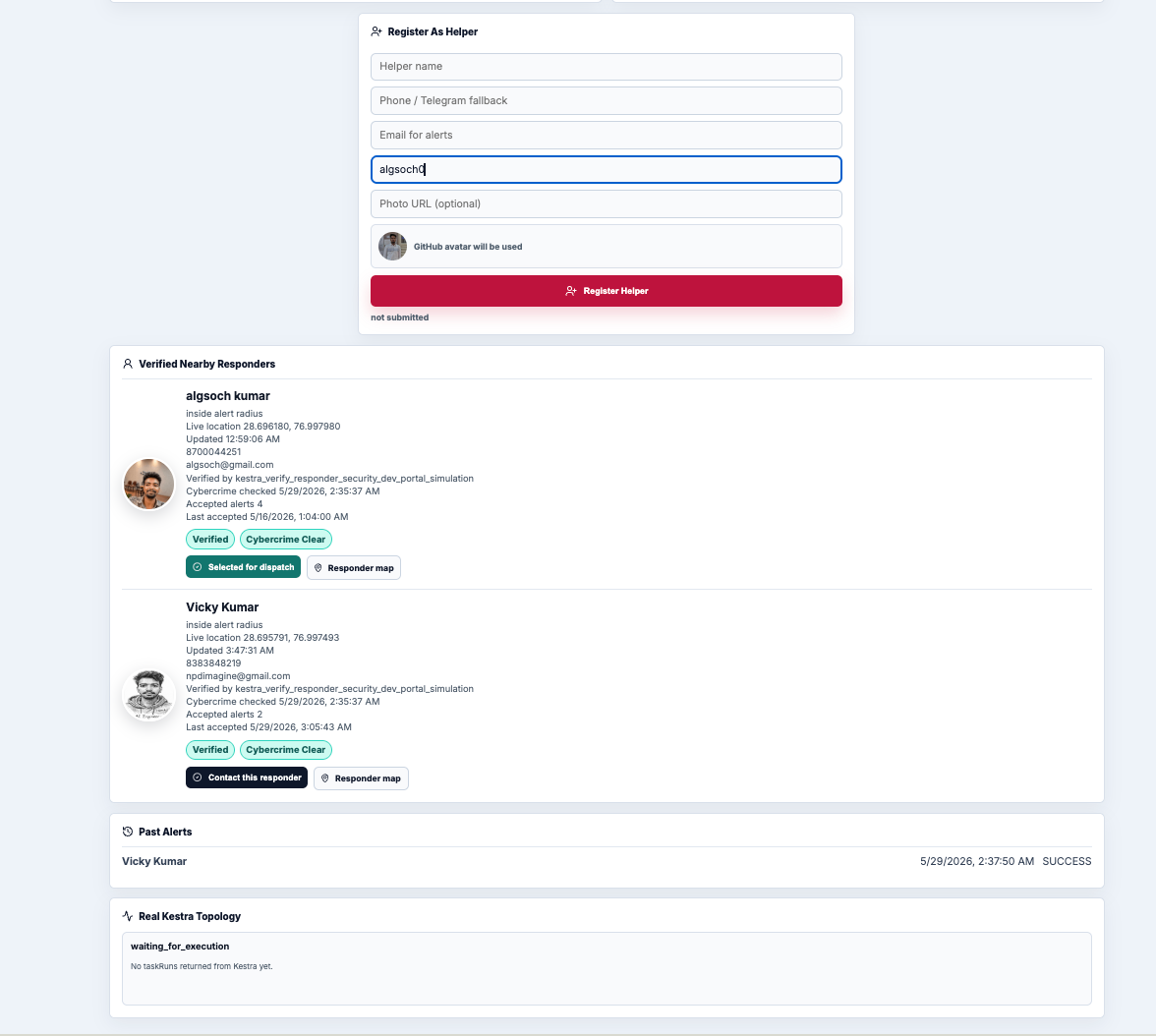
Edge TPU Gatekeeping
The verify_distress_edge_tpu task is the distress verification boundary.
The intended design is:
* use a quantized TFLite model on Google Coral Edge TPU when hardware is present
* fall back to CPU in local development
* always output hardware status so the UI can show whether acceleration is active
In the current local prototype, CPU fallback is expected on my machine. The important part is the workflow boundary: dispatch logic should not silently assume audio is distress. It should pass through a named verification stage with visible outputs.
The Frontend Is a Command Surface
The React UI does three jobs:
1. capture user/responder/admin actions
2. call Kestra webhooks through the Vite proxy
3. render Kestra state and SQLite snapshots
It does not own the emergency workflow.
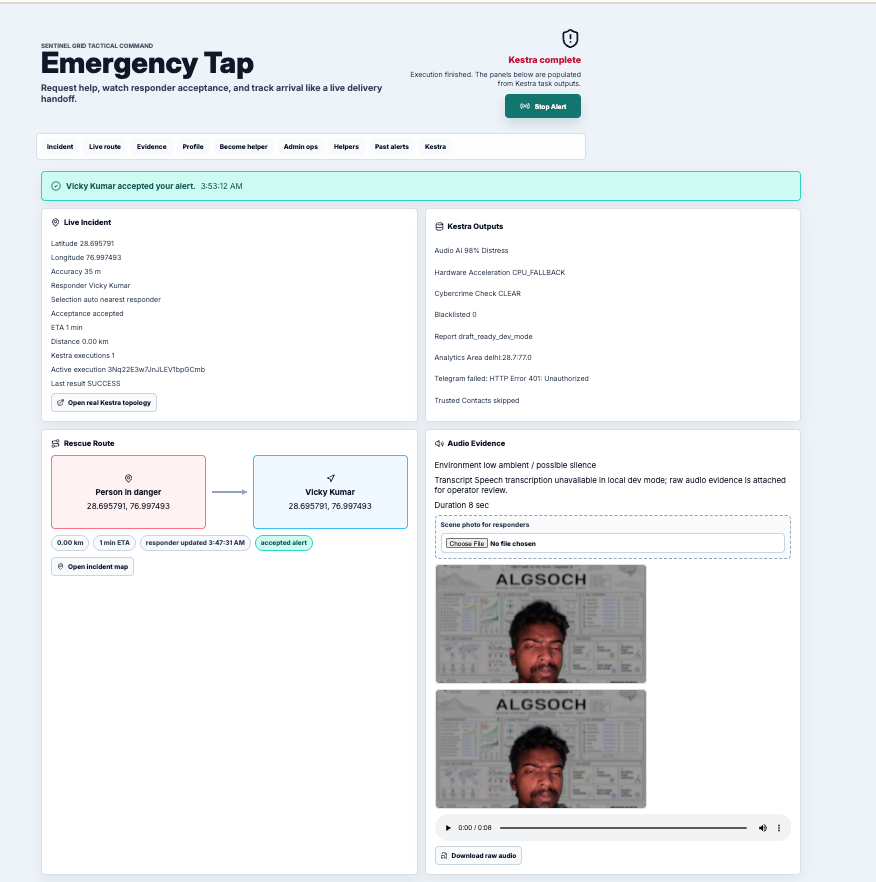
When an alert is triggered, the frontend receives an execution ID. Then it polls the Kestra execution every second and renders the real task list.
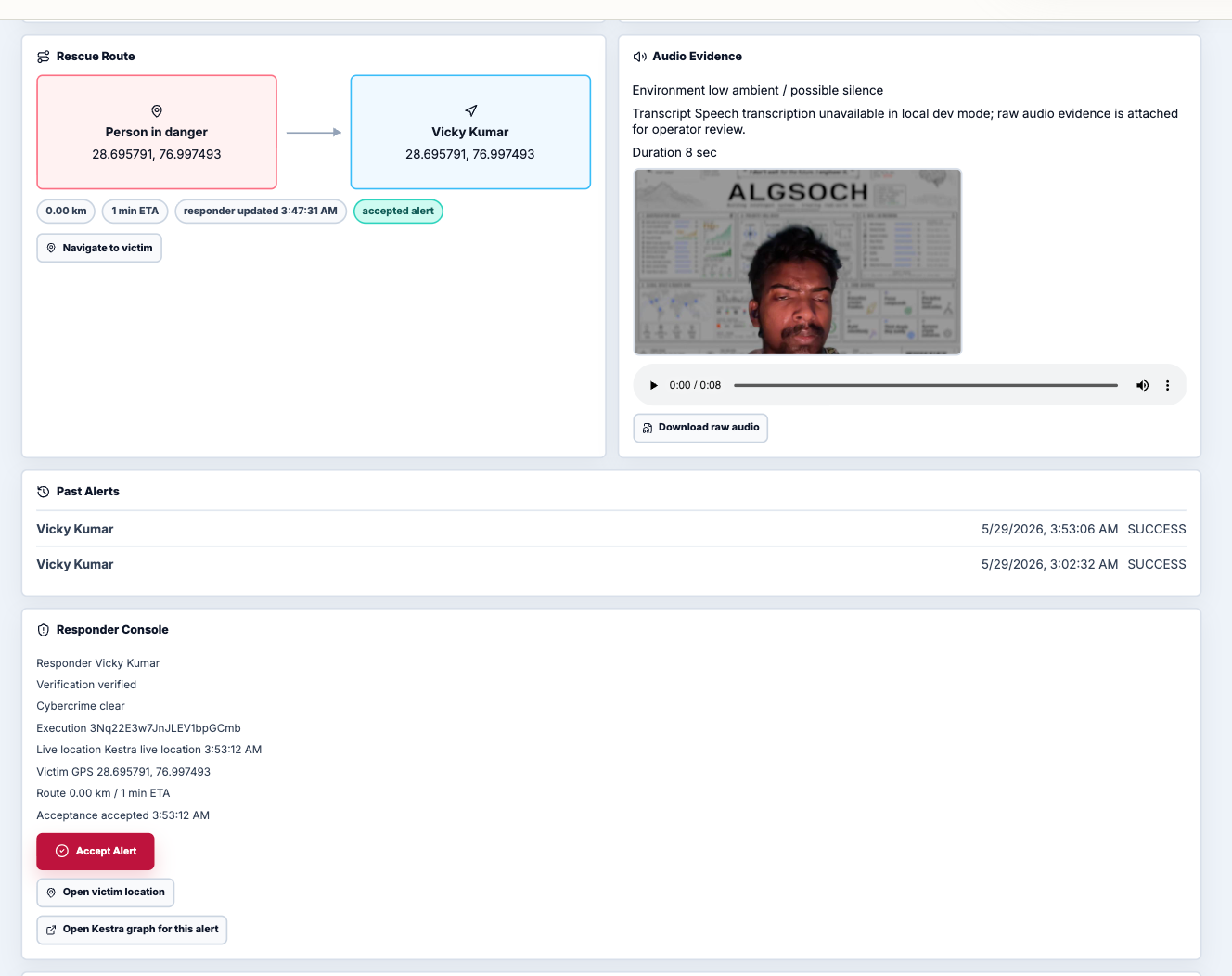
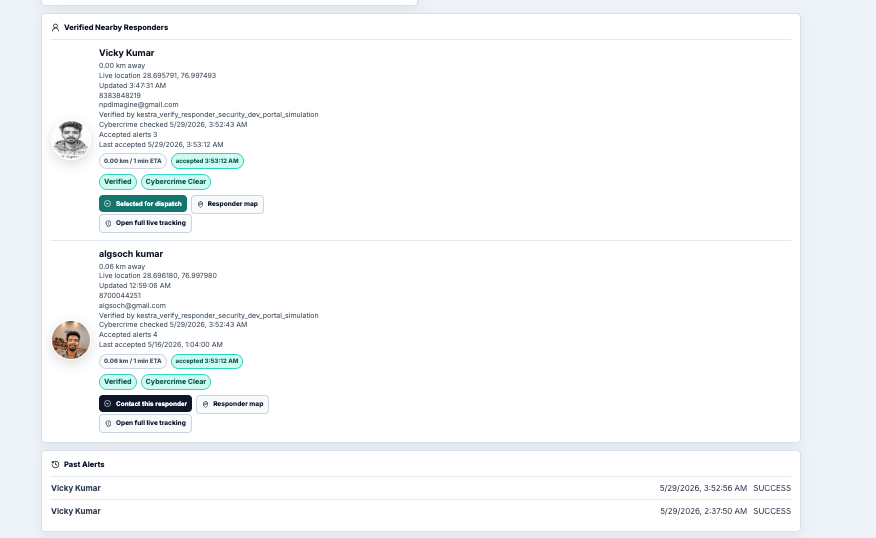
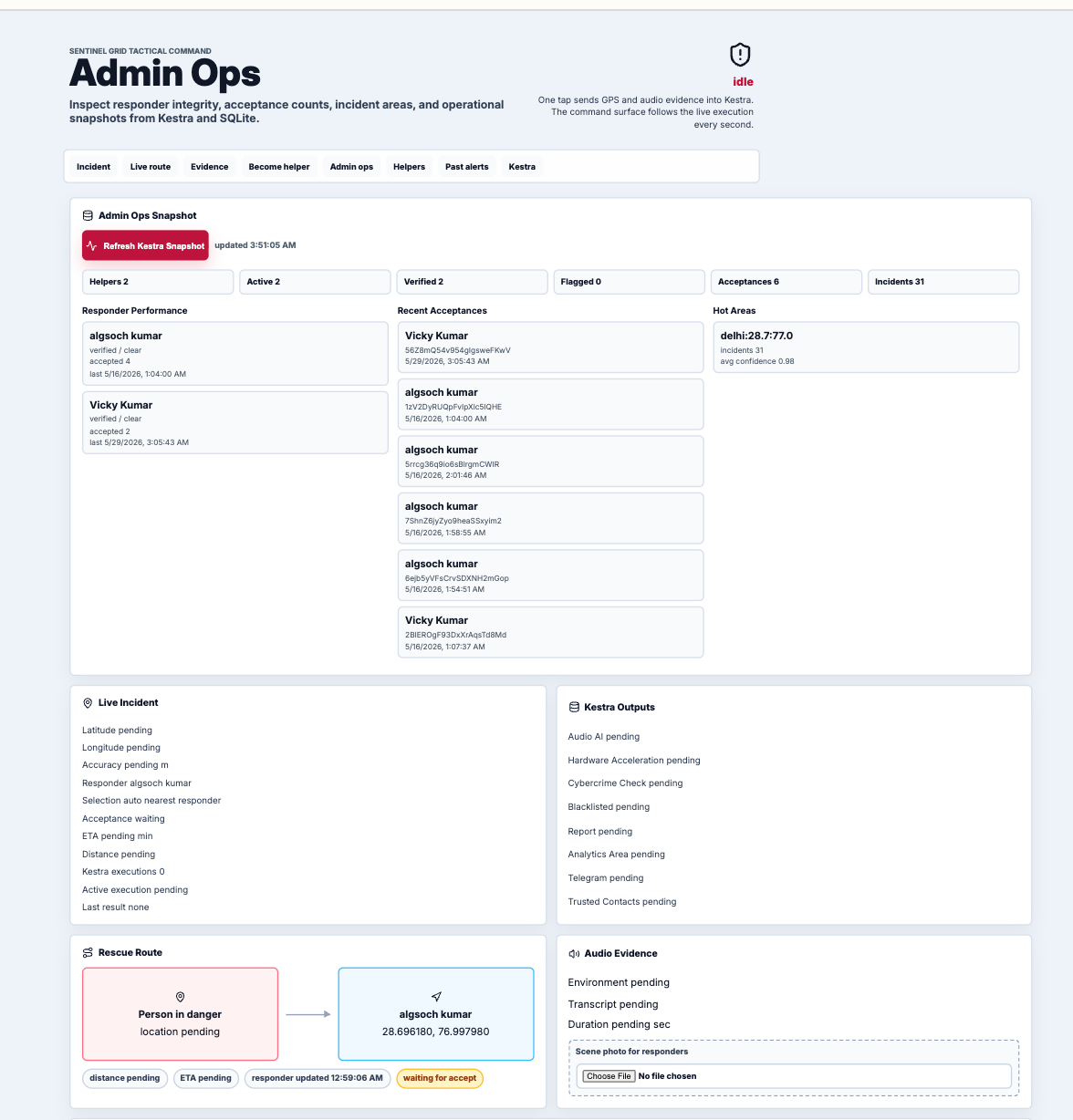
That made the UI feel more like an operations surface than a dashboard. The user can see the selected responder, acceptance state, route context, audio evidence, and task outputs. The responder gets a separate console URL with the victim location, evidence context, and accept button. The admin view reads a Kestra-generated snapshot of helper integrity, acceptance counts, and incident analytics.
A Real Debugging Moment: Success Was Not Always Success
The most useful Kestra moment came from a failure that initially looked like success.
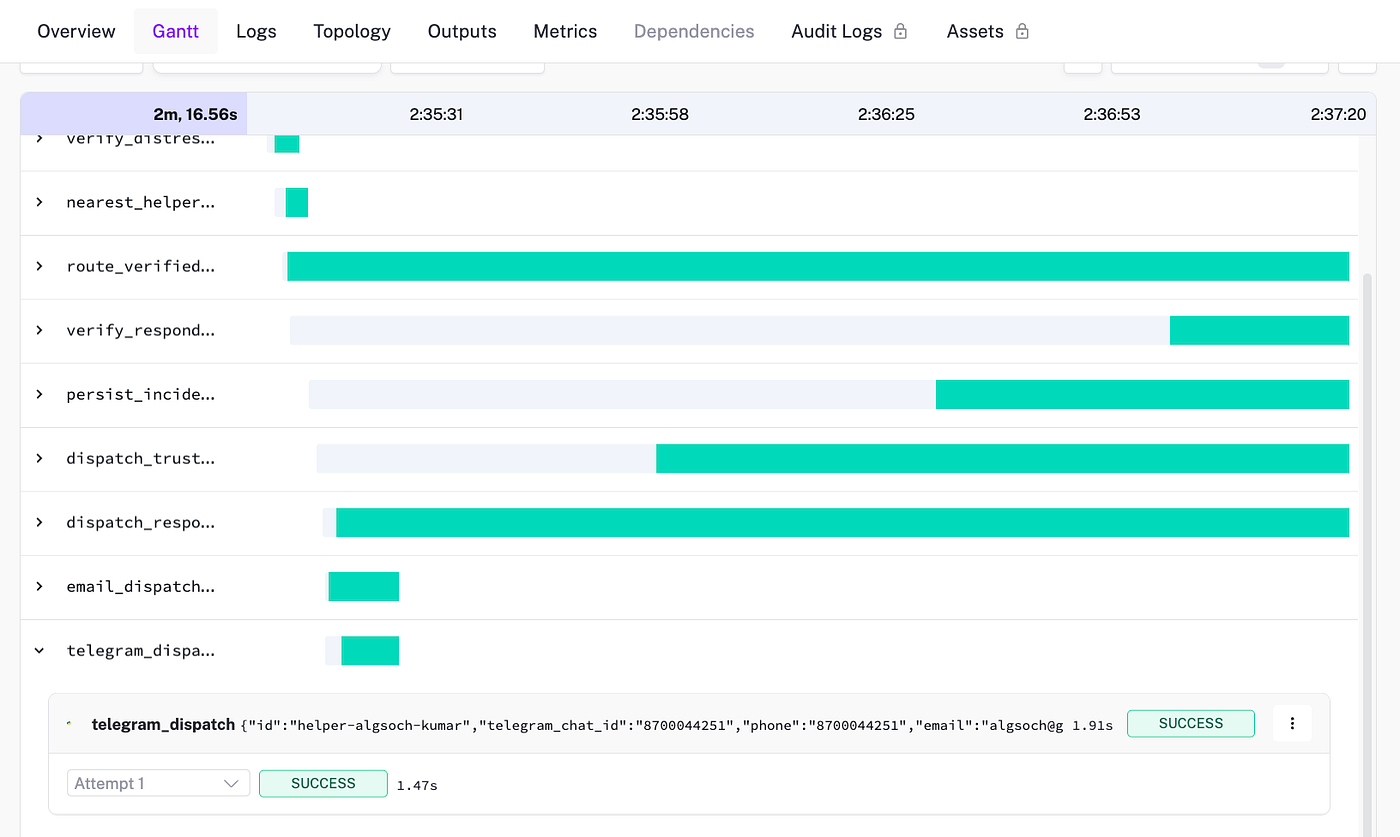
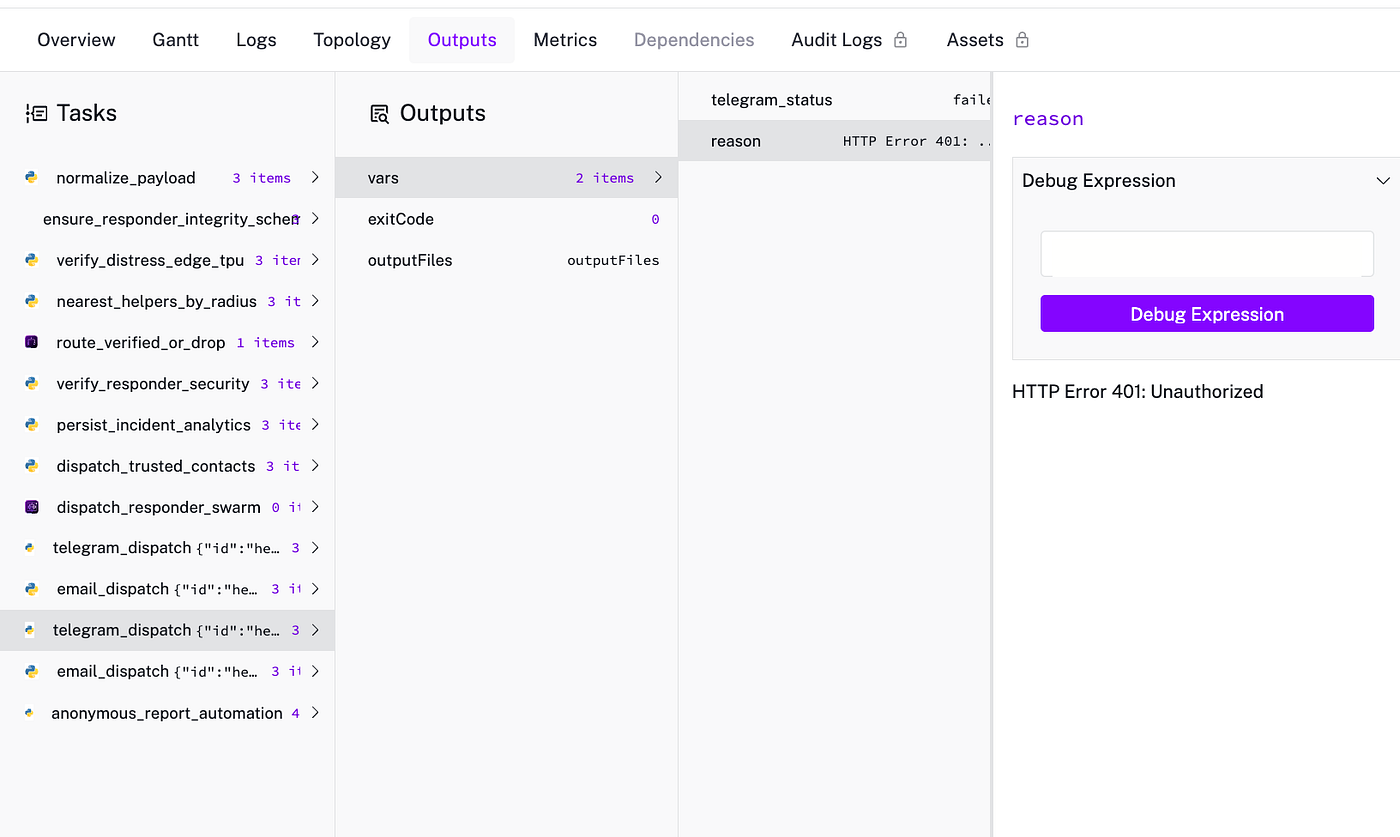
During one test, the emergency flow reached telegram_dispatch. In the Kestra graph, the task state was SUCCESS, because the Python task itself completed. But the actual delivery inside the task failed:
telegram_status: failed
reason: HTTP Error 401: Unauthorized
The bot token was wrong.
At first, my frontend only rendered the Kestra task state, so it showed the node as successful. That was technically true from Kestra’s process perspective, but wrong from the product perspective. The responder had not received the Telegram message.
This forced an important change:
The UI cannot stop at task state. It must also render task outputs.
After that, the topology panel showed both:
telegram_dispatch
SUCCESS
telegram_status: failed
reason: HTTP Error 401: Unauthorized
That distinction matters in real systems.
A task can execute successfully while the external operation inside it fails. Email can reject credentials. Telegram can reject a bot token. A portal can require captcha. A responder can be found but filtered out. A branch can run correctly and still produce a business-level warning.
Kestra made that visible because each task had an execution boundary and outputs.
That debugging moment also changed how I think about frontend orchestration views. A good operational UI should not only show green/red task boxes. It should expose the decision output that made the system choose the next action.

Another Edge Case: Browser Payloads Are Messy
The normalize_payload step became more important than I expected.
Browser-captured audio and images are not always clean workflow inputs. A small mismatch in base64 encoding, missing GPS permission, or a changed field name can break the downstream flow.
Keeping normalization as the first named Kestra task gave the system one place to validate:
* `audio_b64`
* audio SHA-256
* image MIME type
* GPS latitude and longitude
* trusted contact emails
* victim profile
* client IP hint
* browser context
That made later tasks simpler. They could depend on a structured payload instead of every task re-parsing messy frontend input.
2026-05-28T21:05:31.790839Z DEBUG Using task runner 'io.kestra.plugin.core.runner.Process'
2026-05-28T21:05:31.806846Z TRACE Provided 1 input(s).
2026-05-28T21:05:31.814082Z DEBUG Finding uv command
2026-05-28T21:05:31.814607Z DEBUG Executing command: uv --version
2026-05-28T21:05:31.846973Z DEBUG Use uv: uv 0.6.17
2026-05-28T21:05:31.846114Z DEBUG uv 0.6.17
2026-05-28T21:05:31.847265Z DEBUG Executing command: uv python find --system --no-managed-python
2026-05-28T21:05:31.864363Z DEBUG /usr/bin/python
2026-05-28T21:05:31.865433Z DEBUG Find local python version
2026-05-28T21:05:31.865548Z DEBUG Executing command: /usr/bin/python --version
2026-05-28T21:05:31.869340Z DEBUG Python 3.10.12
2026-05-28T21:05:31.896682Z TRACE Provided 2 input(s).
2026-05-28T21:05:31.903114Z DEBUG Starting command with pid 189 [/bin/sh -c set -e
python /tmp/38YBhNPm0EVlKgkwZfCrOQ/956181334423698121.py]
2026-05-28T21:05:32.061927Z DEBUG Command succeed with exit code 0
2026-05-28T21:05:32.062086Z TRACE Captured 0 output file(s).
What Is Real Today
I want to be clear about the current status.
This is a working local prototype, not a production emergency service.
Real today:
* Kestra runs the core emergency workflow.
* The React UI triggers Kestra through webhook proxies.
* The UI polls real Kestra executions and renders `taskRunList`.
* SQLite stores helper profiles, verification status, cybercrime/security status, acceptance counts, and live location updates.
* Helper onboarding goes through Kestra, not a custom backend API.
* Responder acceptance goes through Kestra.
* Responder live-location pings go through Kestra.
* Trusted friend email dispatch is implemented through Kestra when SMTP is configured.
* Raw audio evidence and optional image evidence can be attached to email dispatch.
* Admin ops snapshot is generated by a Kestra flow.
Still prototype or dev-mode:
* Cybercrime portal automation is draft/operator-required by design when captcha or manual checks are present.
* Edge TPU acceleration depends on actual Coral hardware and a compiled quantized model.
* Telegram dispatch requires a valid bot token and real chat IDs.
* Browser push notifications are not yet implemented.
* Production auth, consent, abuse prevention, encryption, audit policy, and legal review are still required.
That honesty is important. I do not want Sentinel Grid to look more finished than it is.
The value of the prototype is the architecture: Kestra gives the alert lifecycle a visible, inspectable operational structure.
Why This Matters
A distress alert should not be a hidden chain of side effects.
It should be a workflow.
That workflow should answer:
* What did the user send?
* Did the system verify the signal?
* Which responder was selected?
* Why was that responder selected?
* Was the responder verified?
* Did notification delivery actually happen?
* Did anyone accept?
* Where is the responder now?
* What did each task output?
* What failed and what can be retried?
Kestra made those questions first-class.
It gave Sentinel Grid:
* webhook intake
* task boundaries
* execution IDs
* visible branching
* task outputs
* retry points
* logs
* local and future production deployment paths
The biggest architectural shift was not “I used a workflow tool.”
The shift was that I stopped treating the backend as the center of the system.
For this kind of product, the workflow is the center.
Where AutoPR and DevAlert Fit
This project came after two smaller Kestra experiments.
AutoPR Engine used Kestra to turn GitHub push events into AI-generated release/content updates.
DevAlert used Kestra to aggregate developer opportunities, rank them with AI, and send alerts.
Those projects helped me understand webhooks, task outputs, secrets, AI calls, and notification flows.
But Sentinel Grid pushed the idea into a more operational domain. Instead of automating content or alerts, Kestra was coordinating a safety workflow where every stage needed a visible state.
That is why Sentinel Grid is the project where Kestra clicked for me.
What Comes Next
The next technical work is not about adding more demo screens.
It is about hardening the operational model:
1. Replace local SQLite geospatial logic with PostgreSQL/PostGIS.
2. Add real authentication for victims, responders, and admins.
3. Add signed incident payloads to prevent forged webhook calls.
4. Add browser push notifications for trusted contacts and responders.
5. Add responder timeout and escalation branches.
6. Add stronger evidence encryption and retention policy.
7. Add Edge TPU model calibration and false-positive testing.
8. Add production-safe cybercrime/operator handoff instead of demo-only clearance.
9. Add reward/reputation logic based on accepted alerts and response quality.
10. Add load testing for concurrent incidents.
Sentinel Grid started from a simple product goal: reduce the time between a distress signal and nearby human help.
But architecturally, the real lesson was this:
When every step matters, do not hide the workflow.
Make the workflow visible. Give it task boundaries. Give it outputs. Give it execution IDs. Let the frontend reflect what actually happened instead of guessing.
For Sentinel Grid, Kestra became that operational layer.
Source/progress repo: https://github.com/FiscalMindset/women AutoPR Engine repo: https://github.com/FiscalMindset/autopr DevAlert Engine repo: https://github.com/FiscalMindset/devalert
Main flow (sentinel_core):
https://github.com/FiscalMindset/women/blob/main/flows/sentinel_core.yaml
Author Note
I am Vicky Kumar, a builder exploring AI engineering, workflow orchestration, backend systems, and automation-heavy products. AutoPR, DevAlert, and Sentinel Grid were built during my Kestra Academy journey.
메타데이터
- post_id
- 460faec7e4eb
- slug
- sentinel-grid-treating-an-emergency-alert-as-an-operational-workflow-460faec7e4eb
- url
- https://medium.com/kestra-engineering/sentinel-grid-treating-an-emergency-alert-as-an-operational-workflow-460faec7e4eb
- canonical_url
- https://medium.com/kestra-engineering/sentinel-grid-treating-an-emergency-alert-as-an-operational-workflow-460faec7e4eb
- author_url
- https://medium.com/@algsoch
- status
- ok
- fetched_at
- 2026-06-09 15:37:30