How to Run Scheduled Jobs in a Multi-Tenant App
A step-by-step guide to building a scheduler that stays fair, safe, and easy to watch as you add more tenants.
How to Run Scheduled Jobs in a Multi-Tenant App
A step-by-step guide to building a scheduler that stays fair, safe, and easy to watch as you add more tenants.
Most scheduling tutorials assume you have one tenant. You add a cron library, register a job, and you are done. But in a multi-tenant app, one codebase serves many customers, and that simple setup stops working.
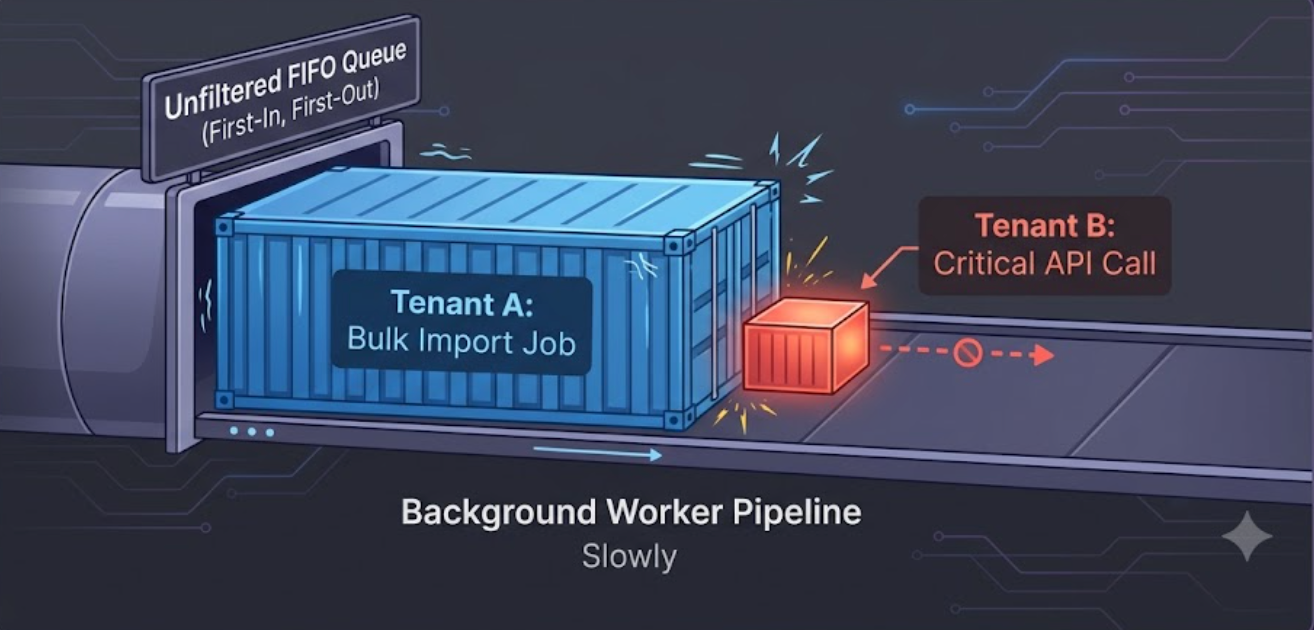
Now you have new problems. What if tenant A schedules 100,000 jobs at midnight and tenant B’s two jobs never run? What if one tenant’s job crashes and takes a worker down with it? When a tenant says “every day at 9am,” whose 9am is it? And if you run three copies of the scheduler for safety, how do you stop the same job from running three times?
This guide builds the system up from scratch. We start with the simple version everyone writes first, then fix it step by step until it can handle real load. The code is pseudocode on purpose. The patterns matter more than the language, and you can map them onto Celery, BullMQ, Quartz, Sidekiq, a cloud scheduler, or your own setup.
The setup we are working with
Throughout this guide, assume:
- You have tenants (customers), each with their own data and settings.
- Each tenant has jobs they want to run on a schedule: a nightly report, a sync, a billing run, a cleanup.
- You run several scheduler instances and a pool of workers for safety and speed.
The system has to decide what should run and when, then run it reliably and fairly, so that no single tenant slows things down for everyone else.
Step 0: The simple version (and why it breaks)
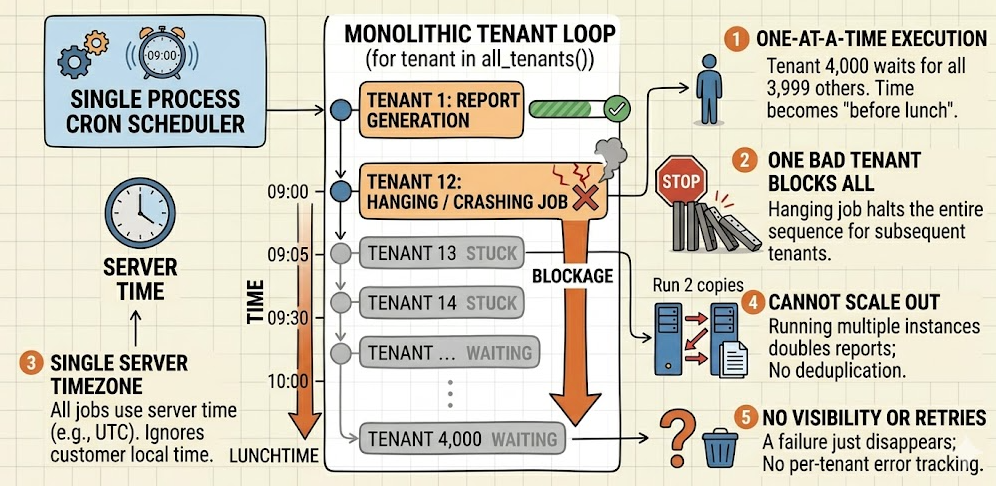
Here is what most people write first. One cron entry per job, and inside it you loop over tenants:
every day at 09:00:
    for tenant in all_tenants():
        generate_daily_report(tenant)
This works great in a demo and breaks in production. Here is why:
- It runs one at a time. Tenant number 4,000 waits for the 3,999 in front of it. “9am” turns into “sometime before lunch.”
- One bad tenant blocks everyone. If the report hangs or crashes for tenant number 12, every tenant after it is stuck.
- It assumes one timezone. “9am” means 9am on the server, not 9am for the customer.
- It cannot scale out. Run two copies for safety and every tenant gets their report twice.
- No retries, no visibility. A failure just disappears.
Every fix below answers one of these problems. The main idea is to stop doing the work inside the scheduler. Instead, the scheduler should hand out work that a pool of workers picks up.
Step 1: Split scheduling from running

The most important change is to split the system into two parts:
- A scheduler decides what is due and drops a small message onto a queue. It does no real work.
- A pool of workers picks messages off the queue and does the actual job.
# Scheduler: runs often, does almost nothing
every minute:
    due = find_due_jobs(now)          # cheap query
    for job in due:
        enqueue(job)                  # just a message
        mark_scheduled(job, now)

# Workers: many of them, running at the same time
loop:
    job = queue.take()                # waits until work shows up
    execute(job)
This one change gives you a lot. Many workers can run jobs at the same time. You can scale running and scheduling on their own. And the queue gives you a clean place to add retries and slow things down when needed.
A job message should be small. It should hold enough to find the work, not the work itself:
JobMessage {
    job_id          # which schedule this is
    tenant_id       # who it belongs to
    run_id          # unique per run (for safety and tracing)
    scheduled_for   # the time it was due
}
That tenant_id field is what makes the queue multi-tenant. Almost every step below uses it.
Step 2: Per-tenant schedules and timezones

In a multi-tenant app, the schedule is usually not yours to hardcode. It belongs to the tenant. Different customers want different timings, and “9am” means their 9am. So schedules become data, not code:
Schedule {
    job_id
    tenant_id
    cron_expression   # "0 9 * * *"
    timezone          # "Europe/Kyiv", "America/New_York"
    enabled
    next_run_at       # worked out ahead of time, stored, indexed
}
The trick is to work out next_run_at ahead of time and store it, instead of checking every tenant's cron on every tick. Your scheduler loop then becomes a cheap indexed query:
every minute:
    due = SELECT * FROM schedules
          WHERE enabled = true AND next_run_at <= now()
          LIMIT batch_size
    for schedule in due:
        enqueue(make_job_message(schedule))
        schedule.next_run_at = compute_next(schedule.cron, schedule.timezone, now)
        save(schedule)
Two things to get right:
Work out the timezone at run time, not as a fixed offset. If you store “9am Kyiv” as one fixed UTC time, daylight saving will shift the tenant’s job by an hour twice a year. Always find the next run using the named timezone (Europe/Kyiv) and let the timezone database handle the changes.
Decide what to do with missed runs. If the scheduler was down from 08:55 to 09:10, do you still run the 9am job, skip it, or run only the latest one? Make this a clear setting. The default, which is to quietly drop it, tends to surprise people.
Step 3: Be fair, so one tenant cannot starve the rest

Here is the problem that makes multi-tenant scheduling hard. At midnight, tenant A’s schedule turns into 100,000 jobs. Tenant B has two. If everything goes into one line, tenant B’s two jobs sit behind tenant A’s hundred thousand and run hours late. Now tenant B is having a bad day because of a tenant they have never heard of. This is the noisy neighbor problem, and a single queue makes it happen every time.
The fix is to stop treating the queue as one line and start sharing time across tenants. A few ways to do it, from simple to more work:
One queue per tenant, drained in turns. Give each tenant (or each tenant tier) its own queue, and have workers take from tenants in a rotation instead of draining one tenant first.
queues = { tenant_id -> queue_of_jobs }

worker loop:
    tenant = pick_next_tenant_in_turn(queues)   # rotate fairly
    job = queues[tenant].take_nonblocking()
    if job: execute(job)
Weighted turns. Plain rotation treats a free-tier tenant the same as your biggest customer. Often you want weights, so larger tenants get more worker time per round. This is just rotation with a budget per tenant.
A limit on jobs per tenant at once. On top of ordering, cap how many jobs a single tenant can run at the same time. This is the most useful guardrail, and it is cheap:
execute(job):
    if running_count[job.tenant_id] >= max_concurrency_for(job.tenant_id):
        requeue_with_delay(job)      # try again soon, let others run
        return
    running_count[job.tenant_id] += 1
    try:
        do_work(job)
    finally:
        running_count[job.tenant_id] -= 1
If you do nothing else from this section, add a per-tenant limit. One tenant can never take more than its share of the workers.
Step 4: Keep failures contained

Fairness is about order. Containment is about failure. A job for one tenant should never be able to break the system for everyone.
Wrap every job. A worker should treat a crashing job as normal, never as a reason to die:
execute(job):
    try:
        with timeout(job.max_duration):
            do_work(job)
        record_success(job)
    except Timeout:
        record_failure(job, "timeout"); maybe_retry(job)
    except Exception as e:
        record_failure(job, e); maybe_retry(job)
The timeout matters as much as the try. A job with no time limit is a worker you might never get back, and that is one fewer worker for everyone.
Stop jobs that always fail. A job that fails every time will, with naive retries, get re-queued forever and burn time that belongs to other tenants. After a set number of tries, move it to a dead-letter queue and stop:
maybe_retry(job):
    if job.attempts < max_attempts:
        requeue_with_backoff(job, attempt = job.attempts + 1)
    else:
        send_to_dead_letter(job)     # stop retrying, alert, move on
Think about separating heavy tenants. If a tenant runs huge batch jobs or risky code, send them to their own worker pool so they cannot touch the shared one. This is more work to run, so save it for the cases that need it. But it is good to know the option exists.
Step 5: Assume every job can run twice

Distributed scheduling gives you at least once, not exactly once. A worker can finish a job, then crash before it confirms, so the queue sends it again. Two scheduler instances can both think a job is due. Sooner or later, a job will run twice. Plan for it instead of hoping it will not happen.
The standard tool is the run_id from Step 1, a unique key per run, plus a record of what is already done:
execute(job):
    if already_processed(job.run_id):     # seen this exact run?
        ack_and_skip(job)
        return
    do_work(job)
    mark_processed(job.run_id)            # ideally in the same transaction as the work
Where you can, make the work safe to repeat so duplicates do no harm. Use INSERT ... ON CONFLICT DO NOTHING, upserts keyed by (tenant_id, run_id), or a "create invoice for period X" that does nothing if the invoice is already there. The safest version records "this run is done" in the same transaction as the work, so a crash can never leave the two out of sync.
Step 6: Watch each tenant, not just the totals

In a single-tenant app, “are jobs running?” is one question. In a multi-tenant app, the real question is usually “are this tenant’s jobs running?”, because that is what shows up in a support ticket. So tag everything with tenant_id from the start: metrics, logs, traces.
The metrics worth having, all split by tenant (or at least by tier):
- Scheduling lag:
now - scheduled_forwhen a job is picked up. Rising lag is your first warning that the system is falling behind. - Run time: to spot a tenant whose jobs are getting slower.
- Failure rate and dead-letter count: per tenant, so one broken customer is easy to see instead of buried in a total.
- Queue size per tenant: to catch a tenant flooding the system before it starves the others.
metrics.histogram("job.lag_seconds",  now - job.scheduled_for, tags={tenant: job.tenant_id})
metrics.histogram("job.duration",     elapsed,                 tags={tenant: job.tenant_id})
metrics.increment("job.result",       tags={tenant: job.tenant_id, status: result})
A simple test: if you cannot answer “how late are tenant X’s jobs right now?” from a dashboard, you will be answering it by reading logs at 2am.
Step 7: Run more than one scheduler without double-firing

One scheduler is a single point of failure, so you will want to run a few. But if each one runs “what’s due?”, every due job gets sent once per scheduler. You need exactly one instance making the call at any time. Two common ways to do this:
Leader election. The instances agree on a leader (using a lock in your database, a distributed lock, or a built-in leader-election feature). The leader does the scheduling, the rest wait. If the leader dies, another takes over.
loop:
    if try_acquire_leader_lock(ttl = 30s):    # only one wins
        scan_and_enqueue_due_jobs()
        renew_lock()
    else:
        sleep(); continue                      # standby
Claim each job atomically. Instead of one leader, let every instance scan, but make claiming a job atomic so only one wins it. A conditional update is enough:
UPDATE schedules
SET next_run_at = compute_next(...), claimed_by = :instance, claimed_at = now()
WHERE id = :id AND next_run_at <= now()
RETURNING *      -- if you get the row back, this run is yours; if not, someone else got it
Either way, the rule is the same: make “this job is mine to run” a single atomic step. Together with the safety from Step 5, the system can handle the rare double-run instead of depending on it never happening.
Putting it together
Step back and the whole thing is small and clear:
A scheduler (one active leader, or many instances claiming jobs atomically) runs a cheap indexed query every minute over per-tenant schedules with stored
next_run_atand named timezones. For each due job it sends a small message tagged withtenant_idand arun_id. A pool of workers drains those messages with fair sharing (turns or weights) and a per-tenant limit, runs each job inside a timeout and try/except with bounded retries into a dead-letter queue, makes the work safe to repeat usingrun_id, and reports per-tenant metrics for lag, run time, and failures.
Every part is there to handle a problem the simple loop could not.
A checklist before you ship
- Scheduling is split from running (scheduler sends, workers run).
- Schedules are per-tenant data with named timezones, and
next_run_atis stored and indexed. - You have a clear rule for missed runs.
- Sharing is fair: turns or weights, plus a per-tenant limit.
- Every job runs inside a timeout and a catch-all, so nothing a tenant does can kill a worker.
- Retries have a limit, and failures land in a dead-letter queue with an alert.
- Jobs are safe to repeat, using a per-run
run_id. You assume at-least-once delivery. - More than one scheduler can run, using leader election or atomic claims.
- Metrics, logs, and traces are tagged with
tenant_id, and lag is on a dashboard.
Summary
The single-tenant version of this is a library call. The multi-tenant version is about fairness and containment: making sure no tenant can take more than its share of time, capacity, or your on-call sleep. If you remember one thing, let it be this. The tenant_id is not just a column for filtering data. It is the thing you schedule, limit, isolate, and watch by. Build around that, and the system grows from your first customer to your ten-thousandth without a rewrite.
메타데이터
- post_id
- 4672f2d70dbb
- slug
- how-to-run-scheduled-jobs-in-a-multi-tenant-app-4672f2d70dbb
- url
- https://medium.com/@_suleyman/how-to-run-scheduled-jobs-in-a-multi-tenant-app-4672f2d70dbb
- canonical_url
- https://medium.com/@_suleyman/how-to-run-scheduled-jobs-in-a-multi-tenant-app-4672f2d70dbb
- author_url
- https://medium.com/@_suleyman
- status
- ok
- fetched_at
- 2026-06-15 20:49:13