Eslint flat config and new system an ultimate deep dive 2023
Eslint flat config, deep dive, full guide. With examples and practice and a large covering.
Eslint flat config and new system an ultimate deep dive 2023
Eslint flat config, deep dive, full guide. With examples and practice and a large covering.
- this article intends to cover all that can be covered about the new system. Too long. The ultimate guide. If no time. Consume with skimming (TLDS)

Was AI used in the writing of this article?
- In most of my articles, I don’t use AI. In case I would do. I would write and mention notices and show where at every place.
- For this one, Absolute zero (not at all). First, I wrote in my knowledge base docs (Months ago). I decided to give time to share it. If you love follow for more deep articles.
Navigation of this article
The article goes in this structure
- Introduce you to the new system
Flat Configand compare it witheslintrc, and what changed. As well as fundamentals. And it’s very long. ◌ Many parts are a repetition over what theeslint teamshared through their blog (refs included below). But I go into more details in every place where there is what to show. + formatting … - After that. We go with important examples
- And, in the last section, I do go into
FlatCompatand that would help further empower understanding and solidify-ing how to work with the new system. And also gain confidence. I covered clearing any possible guessing. And covered everything well. By going deep through the code source and explaining going through it.
You’ll find those section separated by section separator ( . . . ) in the middle
- I believe also it’s critical to cover a good insight about the fundamentals and this whole transition to the new system base. After it you’ll be in solid foot.
Overview and What You Learn
Eslintcame a long way. Anew systemis taking place. And things changed and we are moving to a better place- Old config:
eslintrc. ◌ New one:flat config - The goals and design choices when making
flat config(Eslint team) - What changed between the old and the new and what to look-up for
- New
eslint— better default behavior and config Config file=> only one format now, js onlyFlat configenv variableconfigformatEsmsupport is here and is the default (No esm support before)- Files matching in the new
flat conf, andignores flat cascadeand howconfig objectsare mergedLanguage optionsare better now- Things that were removed (
extends,overrides,env) - Things that were moved and structured better
- Things that remained the same
- Globals handed back to us
◌ (Goodbye
environments, helloglobals) - Use of
globalspackage - Setting
ecmaVersionandsourceType Packcagesno morestrings. Now we import all. And we can add things betterCustom parsersandparser options(mostly the same, but better) [no you import, object config]Pluginsand their loading and their config, and the**naming** and therules- The
naming conventionwhen youimport pluginsthe strong guide processorslinter optionspredefined configs◌stringway ◌objectway- How to extends and configure
old pluginsandpackages, the new way and using a helper that translates old configs and backward compatibility - Deep dive into
FlatCompateslintrctranslation tool Vscodeextensionsetup (activate flat config)- Productivity: Be productive setting up eslint
- Some critical one [TODO]
— — — — — — — — — — — — — — — —
- understand
eslintnaming convention, and string resolution configsof**disablingrulesand of `enabling**rules, **order of insertion **◌plugin`, config name to package name (not scoped, and scoped)eslintwithprettierandJSON support◌new wayandFlatCompatold way ◌ How to name the plugins ◌ The different ways forprettier◌eslint-plugin-prettier◌eslint-plugin-prettiervseslint-config-prettier◌ How doeseslint-config-prettier◌ Well-set templates to use
— — — — — — — — —
- Deep deep dive into how FlatCompat, Eslintrc translation tool works (resume, and Link to a second article in the Eslint series) ◌ Deep from code detailing how the old config translates to the new. And a lot of clearing, coming from the code directly ◌ how to use Vscode debugger to analyze projects and code like a pro ◌ Awesome patterns used in such type of work
Doc and references
- https://eslint.org/blog/2022/08/new-config-system-part-2/ 🔥🔥 ◌ best intro from the eslint team
- https://eslint.org/docs/latest/use/configure/configuration-files-new#using-predefined-configurations ◌ have more details or examples
- https://eslint.org/docs/latest/use/configure/migration-guide 🔥🔥 ◌ migration guide ◌ contains more details and examples and clarifications
- https://eslint.org/blog/2023/11/whats-coming-in-eslint-9.0.0/ 🔥🔥 ◌ The v9 alpha release details (removed and dropped things and slightly modified or added things) and the plan ahead
- https://eslint.org/blog/2023/10/flat-config-rollout-plans/ 🔥
◌
FlatConfigrollout plan and timeline ◌FlatConfigdefault in v9.Eslintrcto be fully removed in V10 - https://eslint.org/blog/2023/09/preparing-custom-rules-eslint-v9/ 🔥 ◌ Custom rules API change in V9
Migration guide
Let’s show you an example to get you fired up (long, brain, memory, image, hook)
/** @type {import('eslint').Linter.FlatConfig[]} */
export default [
  // js files
  {
    files: ['**/*.{mjs,cjs,js}'],
    languageOptions: {
      globals: {
        ...globals.es2021,
      },
      // ecmascriptVersion, and sourceType, default is right
    },
    // extends: ['plugin:prettier/recommended', 'airbnb-base'],
    plugins: {
      prettier: prettierPlugin
    },
    rules: {
      ...jsRules,
      ...prettierPlugin.configs.recommended.rules,
      ...eslintConfigPrettier.rules
    },
  },
  // json files
  {
     // ...
  }
]
/** @type {import('eslint').Linter.FlatConfig[]} */
export default [{},{},{}][
{
//...
},
` // ...
...compat.extends('plugin:prettier/recommended'),
];- The first one is a prettier config done fully in
flat-configway the best way ◌ The details and the certainty and the logic of how to manage will be explained and we will go to more than just this example. Including the full signature. ◌ This is an example, for your brain conditioning and image construction. Flat take an array. - FlatCompat tool does the same, magic translation — will leave philosophy for later.
◌ Through its analysis. You will understand more about how a lot works in the
new flat config(all last section) and how to translate and migrate theold configto thenew one.
The goals of flat config
(By Eslint team, ref already included in doc above, a good and must read)
To set the stage for the changes in the flat config, we had several goals:
- Logical defaults — the way people write JavaScript has changed a lot in the past nine years, and we wanted the new config system to reflect our current reality rather than the one we lived in when ESLint was first released.
- One way to define configs — we didn’t want folks to have multiple ways to do the same thing any longer. There should be one way to define configs for any given project.
- Rules configs should remain unchanged — we felt like the way rules were configured already worked fine, so to make it easier to transition to flat config, we didn’t want to make any changes to rule configs. The same
ruleskey can be used the same way in flat config. - Use native loading for everything — one of our biggest regrets about
eslintrcwas recreating the Node.jsrequireresolution in a custom way. This was a significant source of complexity and, in hindsight, unnecessary. Going forward, we wanted to leverage the loading capabilities of the JavaScript runtime directly. - Better organized top-level keys — the number of keys at the
top-levelofeslintrchad grown dramatically since ESLint was released. We need to look at which keys were necessary and how they related to one another. - Existing plugins should work — the ESLint ecosystem is filled with hundreds of plugins. It was important that these plugins continued to work.
- Backwards compatibility should be a priority — even though we are moving to a new config system, we didn’t want to leave all of the existing ecosystem behind. In particular, we wanted to have ways for shareable configs to continue to work as closely as possible. While we knew 100% compatibility was probably unrealistic, we wanted to do our best to ensure existing shareable configs would work.
With these goals in mind, we came up with the new flat config system.
Logical defaults (Awesome) 🔥
✨ ecmaVersion defaulting to "latest"
(ecmaVersion)
ecmaVersion: "latest"for all JavaScript files - That’s right, by default all JavaScript files will be set to thelatest versionof ECMAScript. This mimics howJavaScript runtimeswork, in that every upgrade means you are opting-in to thelatestandgreatest versionofJavaScript. This change should mean that you probably won’t have to manually setecmaVersionin your config unless you want to enforce a previous version due to runtime constraints. You will still be able to setecmaVersionall the way down to3if necessary.- Old was:
◌ defaults to
es5(Doc Ref) ◌ Globals and features were different, to support some globals you had to use{ “env”: { “es6”: true } }
✨ sourceType defaulting
(sourceType)
- Default of all
.jsand.mjsfiles ◌sourceType: "module"◌ - By default, flat config assumes you are writing ESM. ◌ If not, you can always setsourceTypeback to"script". .cjsfiles ◌sourceType: "commonjs"◌ - We are still in a transition period where a lot of Node.js code is written in CommonJS. ◌ To support those users, we added a newsourceTypeof"commonjs"that configures everything correctly for that environment.- OLD
◌ default:
script◌ nocommonjs(onlyscriptormodule) ◌ Doc Ref
✨ search for .js .mjs .cjs (old system searched for .js only)
- With flat config
◌ ESLint searches for
.js,.mjs, and.cjsfiles ◌ all three of the most common JavaScript filename extensions are automatically searched. - With
eslintrc(OLD) ◌.jsfiles only. ◌ and you would need to use the--extflag to define more. ▶︎— ext jsx,cjs,js
Config file 🔥🔥 (only one)
- Flat config ◌ support only one config file and place to configure
eslint.config.js◌ in root
◌ No support for other formats
◌ no configuration in package.json
- Old (
eslintrc).eslintrc.js .eslintrc.cjs .eslintrc.yaml .eslintrc.yml .eslintrc.json package.json
Reasons and goals
- Unifying configuration ◌ Same cross all projects ◌ one way and an efficient one (js give all possibilities) ◌ No need to think of what file type, format, and limitations
- Optimizing config file search upward traversal
◌ When the
ESLint CLIis used, ▶︎ By default, it searches foreslint.config.jsfrom thecurrent working directory. - ︎and if not found will continue the search up the
directory’s ancestors - until the
fileis found or theroot directoryis hit. 🔥🔥 ▶ ︎The oneeslint.config.jsfile only, does dramatically reduce the disk access required - as compared to
eslintrc, which had to check for all the other supportedconfigfiles formats. At every directory level.
The benefit of configuring with js
- Additionally, using a JavaScript file allowed us (
eslint team) ◌ to rely on users to load additional information that their config file might need. ◌ Instead ofextendsandpluginsloading things by name, you can now just useimportandrequireas necessary to bring in those additional resources. ▶︎ That doesn't make things more flexible. Alsojsis the most dynamic way. I personally (me Allal), I preferjs, forvariablesreusability …
✨ Specifying the config manually
ESLINT_USE_FLAT_CONFIG=true npx eslint --config eslint.config.js **/*.js- setting the
ESLINT_USE_FLAT_CONFIGenvironment variable totrue - and using the
-cor--configoption on the command line to specify an alternate configuration file, such as—config config/eslint.config.js
Flat config env variable ESLINT_USE_FLAT_CONFIG
ESLINT_USE_FLAT_CONFIG=true: Only useeslint.config.js(flat config).ESLINT_USE_FLAT_CONFIG=false: Only useeslintrcfiles (the many formats).- Unset or any other value: First try
eslint.config.js, theneslintrc.
❗Wait. A set back
Eslint usage: CLI & Core library (nodejs) & integrations
(Usage, CLI, Core library, integration)
- Through CLI, or the nodejs library API, or integrations ◌ 3 ways
The eslint core is exposed in the eslint package
- The
eslintpackage is required on all setup - Generally, for version purposes, we install
eslintper projectpnpm add eslint --save-dev - CLI does use the core library. And so the Integrations
- We can
programmaticallyuse, and executeeslintand configure it.
✨ CLI
# All default files in lib
# - For Eslintrc => .js only
# - For FlatEslint => .js, .cjs, .mjs
npx eslint lib/
# jsx and js files in lib/
npx eslint --ext .jsx --ext .js lib/
npx eslint --ext .jsx --ext .js lib/ --fix- In most cases, we do use the
CLI - We would use
nodejsscripting andcore library◌ In advanced cases where we need somethinggranularor event-based. Or part of abuild script. ◌ Or if we are usingeslintpart of aplugin, anotherlibrary, orsoftwarewe are building.
✨ Core Library (programmatically)
- Before (
Eslintrc)
const { ESLint } = require("eslint");
(async function main() {
// 1. Create an instance.
const eslint = new ESLint();
// 2. Lint files.
const results = await eslint.lintFiles(["lib/**/*.js"]);
// 3. Format the results.
const formatter = await eslint.loadFormatter("stylish");
const resultText = formatter.format(results);
// 4. Output it.
console.log(resultText);
})().catch((error) => {
process.exitCode = 1;
console.error(error);
});const { ESLint } = require("eslint");
(async function main() {
// 1. Create an instance with the `fix` option.
const eslint = new ESLint({ fix: true });
// 2. Lint files. This doesn't modify target files.
const results = await eslint.lintFiles(["lib/**/*.js"]);
// 3. Modify the files with the fixed code.
await ESLint.outputFixes(results);
// 4. Format the results.
const formatter = await eslint.loadFormatter("stylish");
const resultText = formatter.format(results);
// 5. Output it.
console.log(resultText);
})().catch((error) => {
process.exitCode = 1;
console.error(error);
});const config: = [];
const eslint = new ESLint({
useEslintrc: false,
overrideConfig: config,
fix: true
});
// Lint the specified files and return the results
async function lintAndFix(eslint, filePaths) {
const results = await eslint.lintFiles(filePaths);
// Apply automatic fixes and output fixed code
await ESLint.outputFixes(results);
return results;
}◌ Doc Ref
- The new Flat config
(Flat config)
— — — — -
✨ Flat config with Linter class
— — — — -
◌ If you are currently using Linter from the eslint package, you can enable flat config by setting configType: "flat" as an option on the constructor.
const linter = new Linter({ configType: "flat" });
const messages = linter.verify("new Map()", {
languageOptions: {
ecmaVersion: 5,
sourceType: "script"
},
rules: {
"no-undef": "error"
}
}, "filename.js");◌ While this base case works the same regardless of which config system you’re using, there are some important differences:
defineRule(),defineRules(), anddefineParser()now throw errors. Runtime plugins (discussed in my previous post) make these methods obsolete.getRules()also throws an error. This method would return different data depending on when it was called, so it can’t be used withflat config.
— — — — -
✨ Flat config with Eslint class ✨
— — — — -
◌ Introduction of FlatEslint class
- Temporal class for transition (in the future it will be renamed back to
Eslint) ◌ Eslint team :
While implementing
flat configwe discovered that it would be too difficult to create an option to switch between config systems like we did for*Linter. Instead, we created a `FlatESLint* class that encapsulates all of the existing functionality inESLint` but usesflat configinstead ofeslintrc. The*FlatESLintclass is intended only as a preview of functionality; once we switch over toflat configpermanently, the current `ESLint* class will be **deleted** andFlatESLint` will be renamed to*ESLint*.
- You can access
FlatEslintthrougheslint/use-at-your-own-risk
// ESM
import pkg from "eslint/use-at-your-own-risk";
const { FlatESLint } = pkg;
// CommonJS
const { FlatESLint } = require("eslint/use-at-your-own-risk");
// Usage
const eslint = new FlatESLint({
cwd: originalDir,
overrideConfigFile: "other.config.js"
});
const results = await eslint.lintText("foo");- As with
Linter, there are a few differences betweenFlatESLintandESLintworth pointing out: ◌ Caching is not yet implemented inFlatESLint, socache: truethrows an error. ◌ TheuseEslintrcoption has been removed. If you want to avoid automatic loading ofeslint.config.jswithout specifying an alternate config file, setoverrideConfigFile: true. 🔥 ◌ Theenvsoption has been removed. ◌ TheresolvePluginsRelativeTooption has been removed. ◌ TherulePathsoption has been removed. Custom rules must be added directly by config (imported). - 🔥 The best demonstration (example) of the usage is in the
vscode-eslintextension ◌ https://github.com/microsoft/vscode-eslint/blob/24d2ac45b2fe1b8cc8639038b724ba48610da8e2/server/src/eslint.ts#L872C102-L872C102 ◌ That’s the line that brings for us the experimental option in the vscodeeslintextension. ◌ ✨ The whole construct also shows a great example of 🔥 how to make a smooth transition to a whole new system 🔥. We can see the good thinking that was put by theeslint team. And the introduction of an experimental API. And how a depending project uses it. Asvscode-eslintdid to provide the experimental features. ✨
✨ Integrations
❗let’s resume
Config format
The format is a flat array of FaltConfig objects
/** @type {import('eslint').Linter.FlatConfig[]} */
export default [{},{},{}]- That comment will add
auto-completeforvscode🔥
The FlatConfig
interface FlatConfig {
      /**
       * An array of glob patterns indicating the files that the configuration
       * object should apply to. If not specified, the configuration object applies
       * to all files
       */
      files?: Array<FlatConfigFileSpec | FlatConfigFileSpec[]>;
      /**
       * An array of glob patterns indicating the files that the configuration
       * object should not apply to. If not specified, the configuration object
       * applies to all files matched by files
       */
      ignores?: FlatConfigFileSpec[];
      /**
       * An object containing settings related to how JavaScript is configured for
       * linting.
       */
      languageOptions?: {
        /**
         * The version of ECMAScript to support. May be any year (i.e., 2022) or
         * version (i.e., 5). Set to "latest" for the most recent supported version.
         * @default "latest"
         */
        ecmaVersion?: ParserOptions["ecmaVersion"],
        /**
         * The type of JavaScript source code. Possible values are "script" for
         * traditional script files, "module" for ECMAScript modules (ESM), and
         * "commonjs" for CommonJS files. (default: "module" for .js and .mjs
         * files; "commonjs" for .cjs files)
         */
        sourceType?: "script" | "module" | "commonjs",
        /**
         * An object specifying additional objects that should be added to the
         * global scope during linting.
         */
        globals?: ESLint.Environment["globals"],
        /**
         * An object containing a parse() or parseForESLint() method.
         * If not configured, the default ESLint parser (Espree) will be used.
         */
        parser?: ParserModule,
        /**
         * An object specifying additional options that are passed directly to the
         * parser() method on the parser. The available options are parser-dependent
         */
        parserOptions?: ESLint.Environment["parserOptions"],
      };
      /**
       * An object containing settings related to the linting process
       */
      linterOptions?: {
        /**
         * A Boolean value indicating if inline configuration is allowed.
         */
        noInlineConfig?: boolean,
        /**
         * A Boolean value indicating if unused disable directives should be
         * tracked and reported.
         */
        reportUnusedDisableDirectives?: boolean,
      };
      /**
       * Either an object containing preprocess() and postprocess() methods or a
       * string indicating the name of a processor inside of a plugin
       * (i.e., "pluginName/processorName").
       */
      processor?: string | Processor;
      /**
       * An object containing a name-value mapping of plugin names to plugin objects.
       * When files is specified, these plugins are only available to the matching files.
       */
      plugins?: Record<string, ESLint.Plugin>;
      /**
       * An object containing the configured rules. When files or ignores are specified,
       * these rule configurations are only available to the matching files.
       */
      rules?: RulesRecord;
      /**
       * An object containing name-value pairs of information that should be
       * available to all rules.
       */
      settings?: Record<string, unknown>;
    }
✨ Finally supporting ESM
- The format now is
esmby default.
Files matching with globs
✨ files and ignores
filesto matchignoresto ignore files ◌ filters files matched byfiles- use minimatch-based
glob patternsto match files
❗ if no files, then
- match all at
fileslevel ◌ignoreswill filter them after
process
files
• Matches the file
- if yes ◌ Check if should be ignored ▶︎ if not — matched ✅ ▶︎ if yes — not matched ❌
- if no ◌ good not matched ❌
• Mainly, I guess a glob-based solution is used. Which already support ignore
✨ Ignoring files completely (special behavior)
- What if you want to ignore files completely?
- You can do that by specifying a config object that has only an
ignoreskey, like this:
export default [
    {
        ignores: ["**/*.test.js"]
    },
    {
        files: ["**/*.js"],
        rules: {
            "semi": "error",
            "no-unused-vars": "error"
        }
    }
];- With this config, all JavaScript files ending with
.test.jswill be ignored. You can think of this as the equivalent ofignorePatternsineslintrc, albeit withminimatchpatterns.
If
*ignores* is used without any other keys in the configuration object, then the patterns act as global ignores.
export default [
    {
        ignores: [".config/*"]
    }
];
export default [
{
ignores: [
"!node_modules/", // unignore `node_modules/` directory
"node_modules/*", // ignore its content
"!node_modules/mylibrary/" // unignore `node_modules/mylibrary` directory
]
}
];Removed extends
extendsare now replaced byflat cascade◌ overriding nature offlat config
flat cascade and how config objects are merged
(flat cascade, config object merging)
▶︎ Objects that have overlapping patterns
- are merged from top to down
▶︎ Process
- Linter => gonna lint a file
- file when matched, had the array of matched configs
eslintwill take those configs ◌ merge them from top to down (first to last)- With deep merge ◌ The last config will override the other ones
✨ How to use this to extends and create base configs
(extends, base config)
- The
base config. Should go first - You can have multiple ones
- The one coming after would override the one before 🔥🔥
✨ Examples
While we wanted to get rid of the
*directory-basedconfig `cascade*,flat config` actually still has a*flat cascadedefined directly in your `eslint.config.js`* file.
Inside of the
*array, `ESLint* finds allconfig objects` that*matchthe `file being linted* andmerges` them*togetherin much the same way that `eslintrc`* did. The only real difference is the merge happens from the top of the array down to the bottom instead of using files in a directory structure.
For example:
export default [
    {
        files: ["**/*.js", "**/*.cjs"],
        rules: {
            "semi": "error",
            "no-unused-vars": "error"
        }
    },
    {
        files: ["**/*.js"],
        rules: {
            "no-undef": "error",
            "semi": "warn"
        }
    }
];
This config has two config objects with overlapping files patterns. The first config object applies to all .js and .cjs files while the second applies only to .js files. When linting a file ending with .js, ESLint combines both config objects to create the final config for the file. Because the second config sets semi to a severity of "warn", that takes precedence over the "error" that was set in the first config. The last matching config always wins when there is a conflict (overlapping).
What this means for shareable configs is that you can insert them directly into the array instead of using extends, such as:
import customConfig from "eslint-config-custom";

export default [
    customConfig,
    {
        files: ["**/*.js", "**/*.cjs"],
        rules: {
            "semi": "error",
            "no-unused-vars": "error"
        }
    },
    {
        files: ["**/*.js"],
        rules: {
            "no-undef": "error",
            "semi": "warn"
        }
    }
];
Here, customConfig is inserted first in the array so that it becomes the base configuration for this file. Each of the following config objects builds upon that base to create the final config for a given JavaScript file.
Language options (restructured well)
(eslint team)
- 🔥
ESLinthas always had a strange mix of options that affected how JavaScript was interpreted. There was the top-levelglobalskey that modified availableglobalvariables, andecmaVersionandsourceTypeasparserOptions, not to mentionenvto add more globals. Perhaps the most confusing is that you had to set bothecmaVersionand add an environment likees6to enable both the syntax you wanted and ensure that the correct global variables would be available. - 🔥 In flat config, we moved all keys related to JavaScript evaluation into a new top-level
keycalledlanguageOptions.
{
  languageOptions?: {
    /**
     * The version of ECMAScript to support. May be any year (i.e., 2022) or
     * version (i.e., 5). Set to "latest" for the most recent supported version.
     * @default "latest"
     */
    ecmaVersion?: ParserOptions["ecmaVersion"],
    /**
     * The type of JavaScript source code. Possible values are "script" for
     * traditional script files, "module" for ECMAScript modules (ESM), and
     * "commonjs" for CommonJS files. (default: "module" for .js and .mjs
     * files; "commonjs" for .cjs files)
     */
    sourceType?: "script" | "module" | "commonjs",
    /**
     * An object specifying additional objects that should be added to the
     * global scope during linting.
     */
    globals?: ESLint.Environment["globals"],
    /**
     * An object containing a parse() or parseForESLint() method.
     * If not configured, the default ESLint parser (Espree) will be used.
     */
    parser?: ParserModule,
    /**
     * An object specifying additional options that are passed directly to the
     * parser() method on the parser. The available options are parser-dependent
     */
    parserOptions?: ESLint.Environment["parserOptions"],
  };
]
✨ Env removed
- No more need to set
envandecmaVersionboth 🔥❗ - only
languageOptions - no more duplications
- better structured
▪️ Most of the time now because of newlogical defaults (Already mentioned above 👆)
ecmaScriptis set tolatest◌ most of the time you wouldn’t need to change that
Setting ecmaVersion and sourceType
(ecmaVerision, sourceType)
▪️ moved to languageOptions
- ︎Apply them only when you need to
- The default already works well in most cases
- new
◌
globalsin the new system are set byecmaVersionorsourceType
export default [
    {
        files: ["**/*.js"],
        languageOptions: {
            ecmaVersion: 5,
            sourceType: "script"
        }
    }
];
✨ ecmaVersion
New
▪️ Enable both syntax and global variables based on the specified version of ECMAScript.
global variablesare set- In contrast to
old system◌ set inenv◌ which created the need to set things in two places (env,parserOptions.ecmaVersion) [Ref]
✨ sourceType
- Similar to
ecmaVersion, this key affects not just how a file is parsed, but also howESLintevaluates its scope structure. - We kept the traditional
"module"for ESM - and
"script"for scripts, - and also added
"commonjs".(enablecommonjsglobals) ◌ which letsESLintknow that it should treat the file asCommonJS◌ which also enablesCommonJS-specific globals.🔥🔥 - If you are using
ecmaVersion: 3orecmaVersion: 5, be sure to setsourceType: script
Goodbye environments , hello globals🔥
(environments, globals)
▪️ doc: configuring-global-variables
▪️ env fully removed
▪️ in the old system
eslintwas managingenvironmentsandglobals◌ They do change through time ◌ did need new releases to update them- was using
globalspackage under the hood ◌ they worked with the author
▪️ env removing
- Because it’s no longer needed.
◌ All of the custom functionality we hooked onto environments for use with Node.js is now covered by
sourceType: "commonjs"◌ so all that was left was for environments to manage global variables. ◌ It doesn’t make sense forESLintto do this in the core, so we arehanding this responsibility back to you.(Eslint team) globalspackage to help you with setting globals 🔥- Now 🔥
◌ with
globalshanded to us ◌ We can update theglobalsimmediately without needing to wait for neweslintrelease
export default [
    {
        files: ["**/*.js"],
        languageOptions: {
            globals: {
                var1: "writable",
                var2: "readonly"
            }
        }
    }
];
▪️ Old ( eslintrc ) - to clear things -
- environments (env) ◌ are presets of predefined globals
- ex: es2020, es…, node, and, jest, mocha, …. there is so many
- And they are defined in this file (using
globalspackage) - globals
◌ Defined In top level
globalsprop inconfig, or throughcommentsin code files. ◌ Allow adding specificcustom globals. Or basically, it’s the mean for settingglobalsmanually. Andenvwas a helper (preset).
✨ Use of globals package
(globals)
install globals package
pnpm add globals -D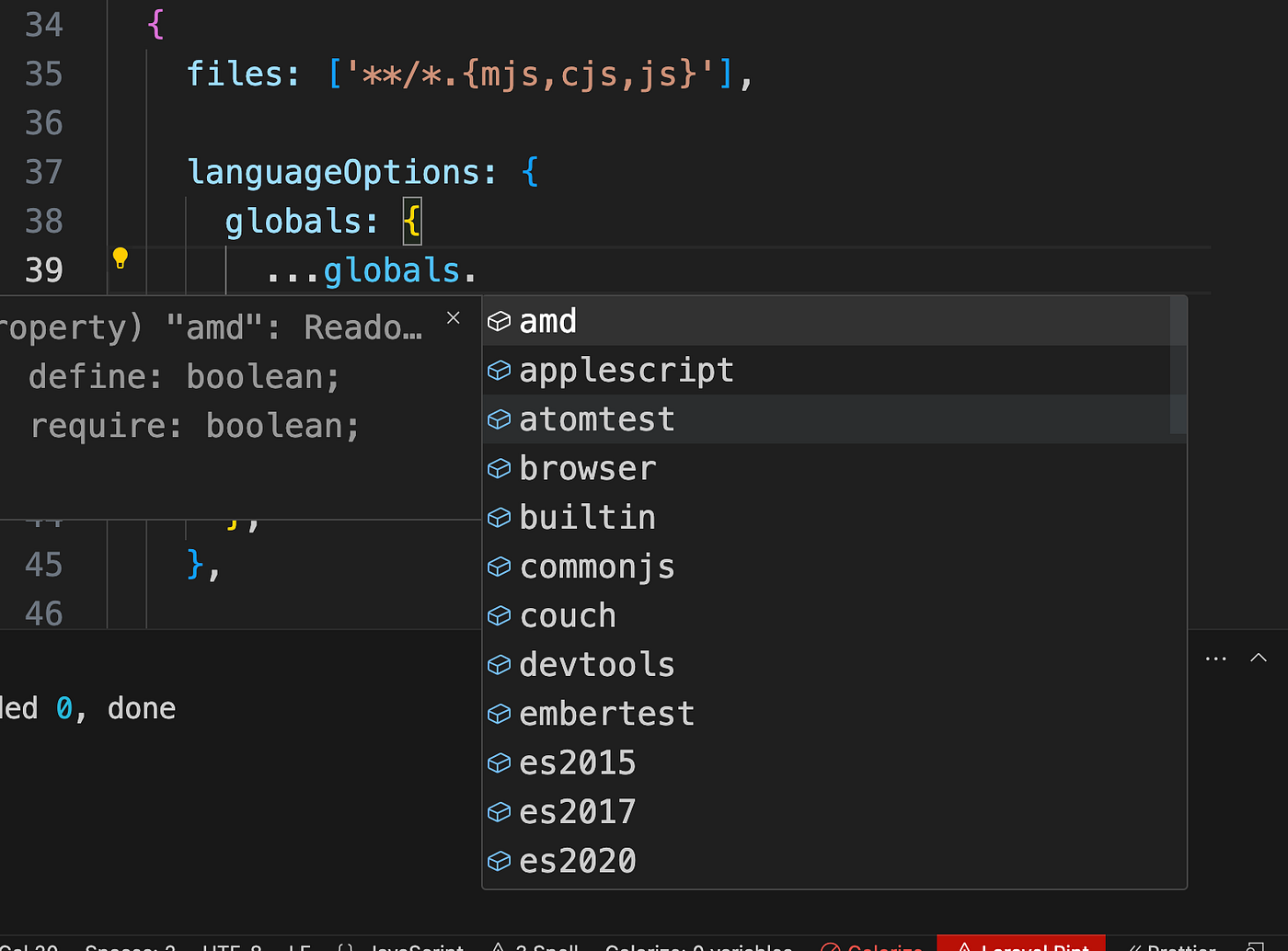

- For the moment
esis limited ates2021
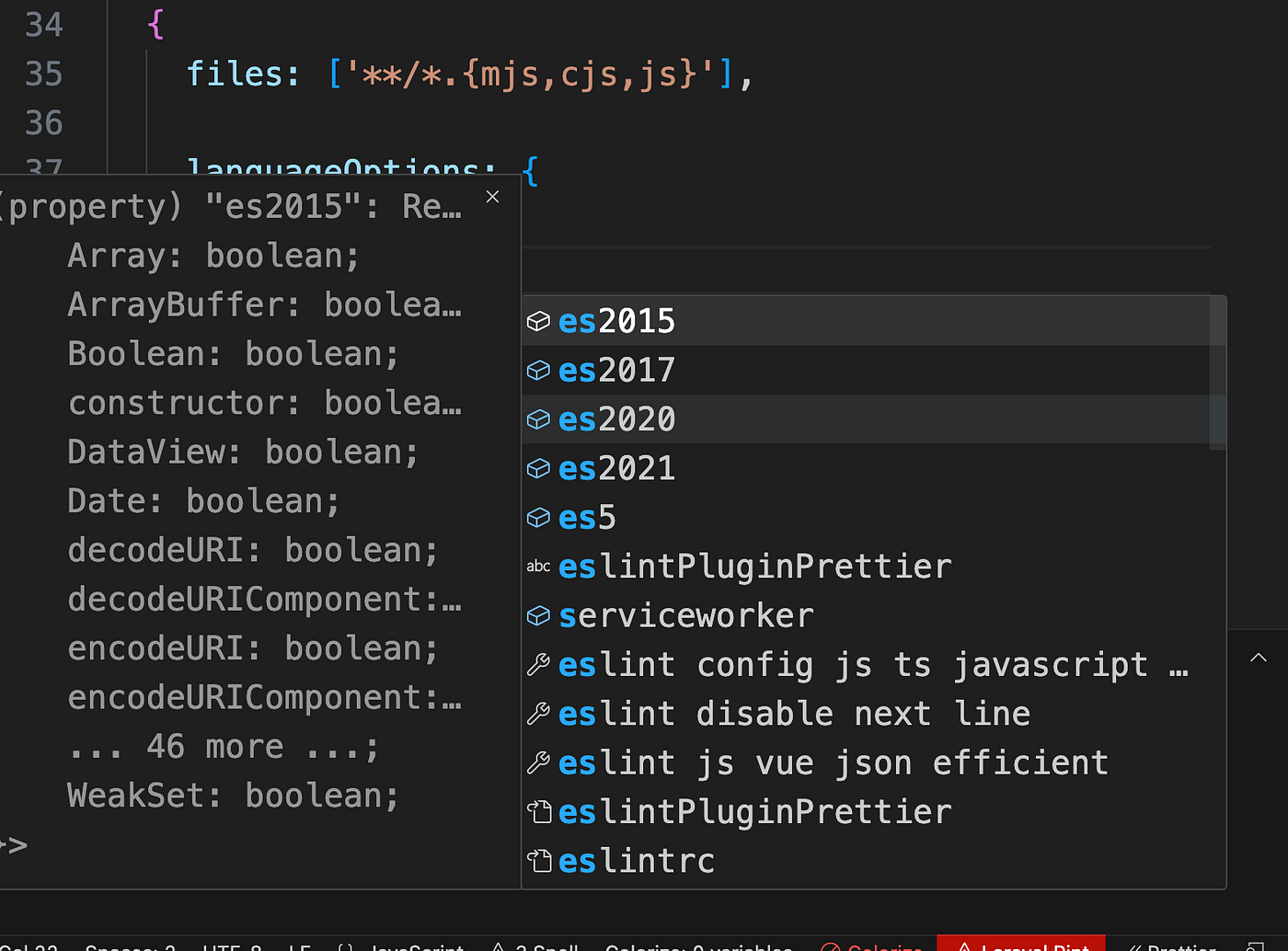
- And there isn’t a
eslatestorlatestsomething option 🔥
import globals from "globals";

export default [
    {
        files: ["**/*.js"],
        languageOptions: {
            globals: {
                ...globals.browser,
                myCustomGlobal: "readonly"
            }
        }
    }
];
✨ Disabling globals
Globals can be disabled with the string "off". For example, in an environment where most ES2015 globals are available but Promise is unavailable, you might use this config:
export default [
    {
        languageOptions: {
            globals: {
                Promise: "off"
            }
        }
    }
];- For historical reasons, the boolean value
falseand the string value"readable"are equivalent to"readonly". Similarly, the boolean valuetrueand the string value"writeable"are equivalent to"writable". However, the use of older values is deprecated.
blog saying about env and globals
- https://eslint.org/blog/2022/08/new-config-system-part-2/#goodbye-environments%2C-hello-globals (
Eslint team) — This is a repetition for extra details!
Environments in eslintrc provided a known set of globals and were a constant source of confusion for users. They need to be kept up to date (especially in the case of browser) and that update needs to wait for ESLint releases. Plus, we had hooked some additional functionality onto environments to make it easier to work with Node.js, and in the end, we made a mess.
For flat config, we decided to remove the env key completely. Why? Because it’s no longer needed. All of the custom functionality we hooked onto environments for use with Node.js is now covered by sourceType: "commonjs", so all that was left was for environments to manage global variables. It doesn’t make sense for ESLint to do this in the core, so we are handing this responsibility back to you.
Years ago, we worked with Sindre Sorhus to create the [globals](https://npmjs.com/package/globals) package, which extracted all of the environment information from ESLint so that it would be available to other packages. ESLint then used globals as the source for its environments.
With flat config, you can use the globals package directly, updating it whenever you want, to get all of the same functionality that environments used to provide. For example, here is how you add browser globals into your configuration:
import globals from "globals";

export default [
    {
        files: ["**/*.js"],
        languageOptions: {
            globals: {
                ...globals.browser,
                myCustomGlobal: "readonly"
            }
        }
    }
];
The languageOptions.globals key works the same as it did in eslintrc, only now, you can use JavaScript to dynamically insert any global variables that you want.
Custom parsers and parser options (mostly the same, but better)
(Custom parsers, parser options)
The parser and parserOptions keys have now moved into the languageOptions key, but they mostly work the same as in eslintrc with two specific differences:
-
You can now insert the
parser objectdirectly into theconfig.
Parserscan now be bundled withplugins- and you can specify a
string valueforparserto use aparserfrom aplugin. (Described more in the next section.)
Here’s an example using the Babel ESLint parser:
import babelParser from "@babel/eslint-parser";

export default [
    {
        files: ["**/*.js", "**/*.mjs"],
        languageOptions: {
            parser: babelParser
        }
    }
];
This configuration ensures that the Babel parser, rather than the default, will be used to parse all files ending with .js and .mjs.
You can also pass options directly to the custom parser by using the parserOptions key in the same way as it works in eslintrc:
import babelParser from "@babel/eslint-parser";

export default [
    {
        files: ["**/*.js", "**/*.mjs"],
        languageOptions: {
            parser: babelParser,
            parserOptions: {
                requireConfigFile: false,
                babelOptions: {
                    babelrc: false,
                    configFile: false,
                    // your babel options
                    presets: ["@babel/preset-env"],
                }
            }
        }
    }
];
Using plugins
✨ More powerful and configurable plugins
The strength of ESLint is the ecosystem of plugins that individuals and companies maintain to customize their linting strategy. As such, we wanted to be sure that existing plugins continued to work without modification as well as allowing plugins to do things they were never able to do in the past.
On the surface, using a plugin in flat config looks very similar to using a plugin in eslintrc.
▪️ The big difference is
- that
eslintrcusedstringswhereasflat configsusesobjects(imported). - In
FlatConfignow you can name a plugin whatever you want ◌ Instead of usingplugin **string**name. Now you import anobjectand pass it with anameof your choice ▶︎ However there are cases where you should name apluginin a specific way 🔥. If some of thepluginsdepend on others and require a specific name (very rare case).
import jsdoc from "eslint-plugin-jsdoc";

export default [
    {
        files: ["**/*.js"],
        plugins: {
            jsdoc
        }
        rules: {
            "jsdoc/require-description": "error",
            "jsdoc/check-values": "error"
        }
    }
];
This config uses the [eslint-plugin-jsdoc](https://npmjs.com/package/eslint-plugin-jsdoc) plugin by importing it as a local jsdoc variable and then inserting it into the plugins key in the config. After that, the rules inside the plugin are referenced using the jsdoc namespace.
Note: Because
pluginsare now imported like any other JavaScript module, there’s no more strict enforcement of plugin package names. You no longer need to includeeslint-plugin-as the prefix for your package names…but we would like it if you did. (Eslint team)
✨ Personalized plugin namespaces
Because the name of the plugin in your config is now decoupled from the name of the plugin package, you can choose any name you want, as in this example:
import jsdoc from "eslint-plugin-jsdoc";

export default [
    {
        files: ["**/*.js"],
        plugins: {
            jsd: jsdoc
        }
        rules: {
            "jsd/require-description": "error",
            "jsd/check-values": "error"
        }
    }
];
Here, the plugin is named jsd in the config, so the rules also use jsd to indicate which plugin they are coming from.
import jsdoc from "eslint-plugin-jsdoc";

export default [
    {
        files: ["**/*.js"],
        plugins: {
            someDomain: jsdoc
        }
        rules: {
            "someDomain/require-description": "error",
            "someDomain/check-values": "error"
        }
    }
];- I set the
namespaceto besomeDomaininstead. And it would work. - However, in general, it’s advised to follow a certain
naming convention. Will explain it in the next section. - If some modules depend on some plugins. And does set
rulesof aplugin. Then thenamingof thatpluginwhen set in theconfiguration. isrequiredto be set with the samenamethat themoduledefines theruleswith. We will show an example of such a case later on.
How to use example
✨ Good practices ✨
✨ How to name plugins convention 🔥
- Read the doc of the
pluginand check forflat config◌CTRL|CMD+F
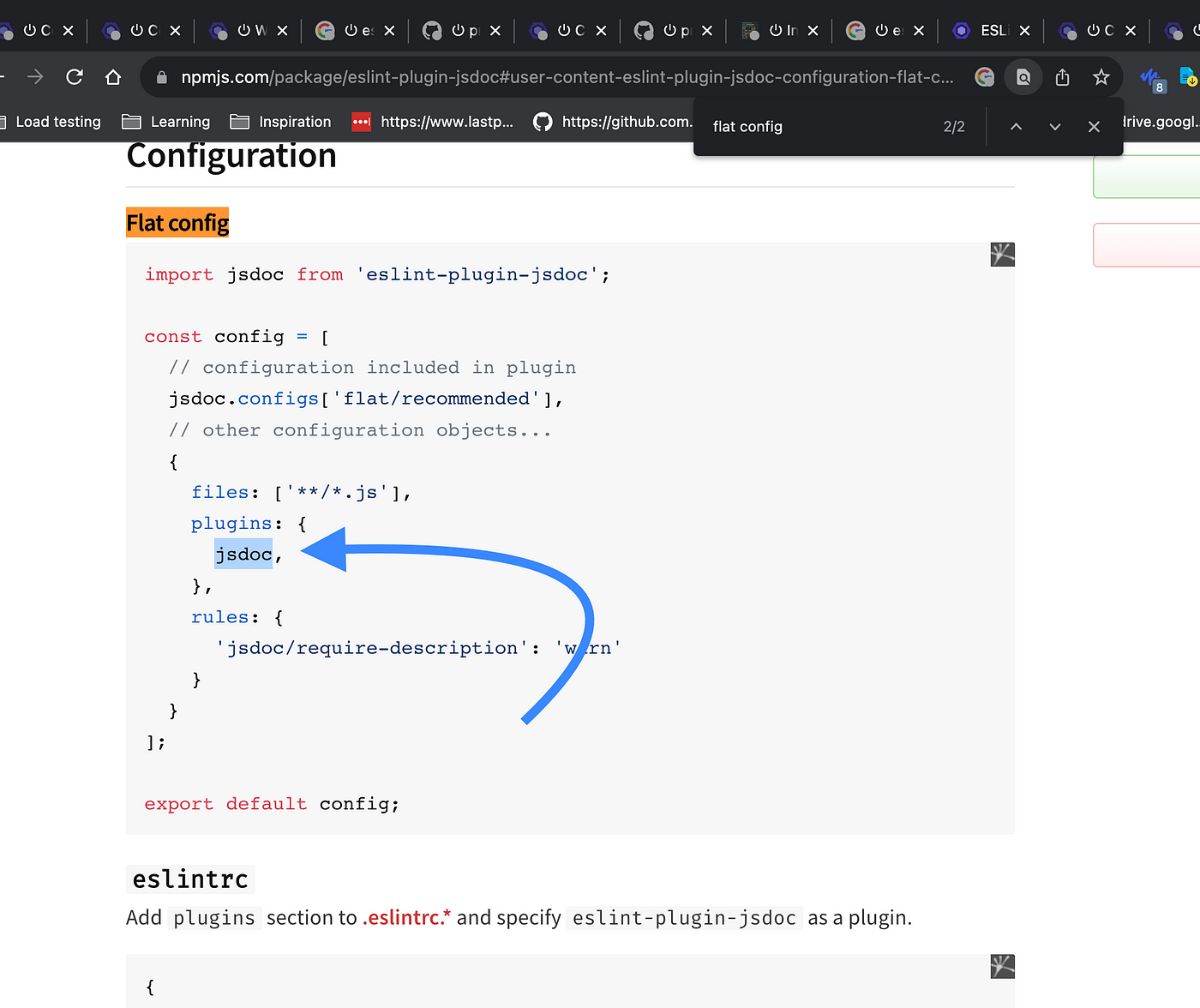
◌ If found, follow it
▶︎ if not
▪️ If plugin is an old one and doesn’t do anything for new flat-config
"eslint-plugin-jsdoc"if named witheslint-plugin-◌ takejsdoc(what comes after) ◌ use it as the name ◌ to stay consistent with that time naming
▪️ If not following eslint-plugin-
- like
@typescript/eslint-pluginplugin does - https://github.com/prettier/eslint-config-prettier#eslintconfigjs-flat-config-plugin-caveat
- Follow the doc first
◌ Search for
Flat config. - If there is nothing. Then follow the convention detailed in the following article of this series. Which tackle it pretty well. ◌ Eslint: how to name plugins 🔥🔥
- And remember you can always check for the
plugin sourceand it’sdependenciesto see if and how therulesare referring to theplugin. The article above did show that in detail.
Custom rules
- Simply load the rule file
- And either use spread to include
- or create a custom plugin (object) and add the rules in it ◌ example below
✨ From --rulesdir to runtime plugins
( — rulesdir)
( eslint team)
- With
eslintrc, rules needed to be loaded by the CLI directly in order to be available inside of aconfigfile. This means eitherbundling custom rulesin apluginor using the--rulesdirflag to specify the directory from which ESLint should load custom rules. Both approaches required some extra work to set up and were a frequent cause of frustration for our users. - ✨ With
flat config, you can load custom rules directly in the config file. Becausepluginsare nowobjectsdirectly in theconfig, you can easily createruntime pluginsthat exist only in your config file, such as:
import myrule from "./custom-rules/myrule.js";

export default [
    {
        files: ["**/*.js"],
        plugins: {
            custom: {
                rules: {
                    myrule
                }
            }
        }
        rules: {
            "custom/myrule": "error"
        }
    }
];
Here, a custom rule is imported as myrule and then a runtime plugin is created named custom to provide that rule to the config as custom/myrule.
🔥 As a result, we will be removing --rulesdir once the transition to flat config is complete. 🔥
Processors work in a similar way to eslintrc
(processsors)
▪️ The one addition in flat config is that processor can now also be an object containing both a preprocess() and a postprocess() method.
▪️ Primary use case
- specify to use a
processordefined in apluginwithplugin/processorstring:"markdown/markdown"◌markdownplugin (named by us)plugins: { markdown: markdownPlugin, ...}◌ usemarkdownprocessorof thatplugin
import markdown from "eslint-plugin-markdown";

export default [
    {
        files: ["**/*.md"],
        plugins: {
            markdown
        },
        processor: "markdown/markdown"
    }
];- use processor
markdownthat is defined in plugineslint-plugin-markdown
Organized linter options
In eslintrc, there were a couple of keys that related directly to how the linter operated, namely noInlineConfig and reportUnusedDisableDirectives. These have moved into the new linterOptions key but work exactly the same as in eslintrc. Here’s an example:
export default [
    {
        files: ["**/*.js"],
        linterOptions: {
            noInlineConfig: true,
            reportUnusedDisableDirectives: true
        }
    }
];
Shared settings are exactly the same
The top-level settings key behaves the exact same way as in eslintrc. You can define an object with key-value pairs that should be available to all rules. Here’s an example:
export default [
    {
        settings: {
            sharedData: "Hello"
        }
    }
];
Using predefined configs
stringobjects◌ with imports
✨ String way
ESLint has two predefined configs:
eslint:recommended- enables the rules thatESLintrecommendseveryone to use to avoid potential errorseslint:all- enables all of the rules shipped withESLint
To include these predefined configs, you can insert the string values into the exported array and then make any modifications to other properties in subsequent configuration objects:
export default [
    "eslint:recommended",
    {
        rules: {
            semi: ["warn", "always"]
        }
    }
];- Here, the
eslint:recommendedpredefinedconfigurationis applied first and then anotherconfiguration objectadds the desiredconfigurationforsemi.
✨ Object way 🔥
import js from "@eslint/js";

export default [
    js.configs.recommended,
    {
        rules: {
            semi: ["warn", "always"]
        }
    }
];- You’ll find
auto-completionthis way 🔥
✨ Object way allows specifying to only a subset of files 🔥🔥
import js from "@eslint/js";

export default [
    {
        files: ["**/src/safe/*.js"],
        ...js.configs.recommended
    }
];- We can be precise to
what part, andmatched files, we are going to apply therules - Granual
setting.
Backward compatibility with old config, and using old config
✨ FlatCompatBackwards compatibility utility
( FlatCompat )
As mentioned previously, we felt like there needed to be a good amount of backwards compatibility with eslintrc in order to ease the transition. The
[@eslint/eslintrc](https://npmjs.com/package/@eslint/eslintrc) package provides aFlatCompatclass that makes it easy to continue using eslintrc-style shared configs and settings within a flat config file. Here’s an example:
import { FlatCompat } from "@eslint/eslintrc";
import path from "path";
import { fileURLToPath } from "url";

// mimic CommonJS variables -- not needed if using CommonJS
const __filename = fileURLToPath(import.meta.url);
const __dirname = path.dirname(__filename);

const compat = new FlatCompat({
    baseDirectory: __dirname
});

export default [
    // mimic ESLintRC-style extends
    ...compat.extends("standard", "example"),
    // mimic environments
    ...compat.env({
        es2020: true,
        node: true
    }),
    // mimic plugins
    ...compat.plugins("airbnb", "react"),
    // translate an entire config
    ...compat.config({
        plugins: ["airbnb", "react"],
        extends: "standard",
        env: {
            es2020: true,
            node: true
        },
        rules: {
            semi: "error"
        }
    })
];
Using the
FlatCompatclass allows you to continue using all of your existingeslintrcfiles while optimizing them for use withflat config. We envision this as a necessarytransitionalstep to allow theecosystemto slowly convert over toflat config. 🔥🔥
✨ Translating a whole old config
// translate an entire config
    ...compat.config({
        plugins: ["airbnb", "react"],
        extends: "standard",
        env: {
            es2020: true,
            node: true
        },
        rules: {
            semi: "error"
        }
    })
▪️ without overrides
▪️ if you have overrides
- use flat objects for each
override - set the
no overrideglobalbase configas the firstflat object - use
compat.config()to translateglobaland eachoverride config
Better use new configuration
- There is no need for
translation🔥 - unless you want to save
time - but the
whole ecosystemis moving toflat configs◌ so u would get to it, you would get to it
Vscode extension setup
To have the extension support Flat config. We need to activate that in settings.


▪️ to setup for the project repo only
- choose
Workspace◌Workspacewill create the config in.vscode/settings.json Userwould create it invscode app directory◌ depending on your system- in my case
~/Library/Application Support/Code/User/settings.json

- that would add the following to
.vscode/setting.json

"eslint.experimental.useFlatConfig": true- you can add this directly
without UI - Which is basically managed by
the extensionthrough this **code** 👀using theexperiment feature.
Productivity
✨ Your own eslint modular packages
— — -
✨ In old eslintrc you could extend eslint with
— — -
PluginsSharable configs◌Sharable configsis the simplest great way ◌ https://eslint.org/docs/latest/extend/shareable-configs ◌ A popular example eslint-config-airbnb
// index.js
module.exports = {

    globals: {
        MyGlobal: true
    },

    rules: {
        semi: [2, "always"]
    }

};
◌ Then publish to npm
◌ And use with
{
    "extends": "eslint-config-myconfig"
}
or
{
    "extends": "myconfig"
}
◌ As the convention eslint-config- allows that.
◌ Follow this for scoped modules @scope/eslint-config-myconfig
- And you can check Eslint: how to name plugins 👀 article for the
naming conventionfor more details. - https://eslint.org/docs/latest/extend/ways-to-extend
— — -
✨ Flat config
— — -
- All the
sharingnow is natural. And very flexible. Just publish and make about any module for any piece. And you can include it and use it across all projects flexibly with any part of theconfig. And merge things easily and gradually … ◌ So for example you can set differentrules◌ You can have one module that contains all the different things and organize them in a good structure (configs,rules,plugins, …) ◌ 🔥 One good thing when you set such kinds of modules is youcan include the dependencies within them. So no need to remember any package to install 🔥. ◌ that also applies for oldeslintrc
✨ Vscode or some other tool snippets
vscode snippetsare critical ◌ invscodeto be super fastraycast snippetor others ◌ works across all editors …
By setting the config as snippet, you wouldn’t waste any time
Even when you setup your packages for reusability
- create a
snippetfor that particular usage - you may like to install some
snippet extensionsto make snippet creation even better as an experience (and for speed) - For details on how you can be really productive with snippets and integrate them in your flow check Be extremely productive with snippets setup, part of your flow article 👀 🔥. I wrote about it. It’s a big deal for those who are missing out on it!
◌ For
eslint=> createeslint.config.js=> typeeslintyou get yoursnippet suggestions(IntelliSense) => Pick the right one (this can be skipped if you type something that pick you the thing directly ex:eslintjsjson) => Your config is ready (5–10 secs max) - If you tweak it => 1mins, 5 mins …
It makes a huge difference and lowers friction fully. And the need to remember. The article above does go deeply into the details.
✨ Boiler
▪️ manage boiler
- either through a
repoforall boilers locally - make a shortcut to open it in
vscodefast ◌ I useraycastand have a command to do that ◌ it takes me a second literally

- search fast with
vscodethrough file search for ex:eslint js json prettier(depending on what you name ◌ you get fast the boiler folder ◌ copy files ◌ and past Boileris too great when you setupmultiple files all at once◌ Thetooling setupcan make a huge difference
✨ another option is npm packages with create cli
▪️ create script
▪️ that allows you to easily call using npm
▪️ And with a CLI that has interaction
▪️ You can have one project for all your configs
▪️ One CLI to pick up from all
- can be inspired by tools like
◌
nextjs◌tauri◌ … ◌ reuse their CLI code - and do it fast
Personally, at least for now. I’m sticking with the combination of snippets, boiler and modules. And generally i always use snippets as it works faster for me, with no friction.
- I’m counting on doing better though.
Example: Setting up Eslint and Prettier with eslint-prettier-plugin
▪️ Flat config: Setting up Eslint and Prettier with eslint-prettier-plugin 🔥🔥 👀
- Three ways to use
prettierwithEslint✨eslint-config-prettier+prettierrun separately -
eslint-config-prettier=> disableeslintconflictingruleswithprettier=> So you can useprettierseparately along. ✨ UsingEslint plugin:eslint-plugin-prettier(Full eslint integration)
-
- Provides
formattingwithEslint, andlining(seeingred lines) ✨ Usingprettier-eslint(Not recommended)
- Provides
-
- Details in article above
- How to pick
◌ I recommend
eslint-plugin-prettier◌ Considereslint-config-prettierwithprettierrun separately. If you would ever hit something with the first way, like performance (which I think you will never get to encounter.) -
- Details in the article above
✨ Setting up eslint-config-prettier
Two ways
- Using
FlatCompatutil ( from@eslint/eslintrcpackage ) - Pure
Flat ConfigwithoutFlatCompat
✨ First FlatCompatway gonna be by simply adding
import { FlatCompat } from '@eslint/eslintrc';
import globals from 'globals';
import * as url from 'url';

const __filename = url.fileURLToPath(import.meta.url);
const __dirname = url.fileURLToPath(new URL('.', import.meta.url));
const compat = new FlatCompat({
  baseDirectory: __dirname, // optional; default: process.cwd()
  resolvePluginsRelativeTo: __dirname, // optional
});

/** @type {import('eslint').Linter.FlatConfig[]} */
export default [
  // js files
  {
    files: ['**/*.{mjs,cjs,js}'],
    languageOptions: {
      globals: {
        ...globals.es2021,
      },
      // ecmascriptVersion, and sourceType, default is right
    },
    rules: {
      // ...eslintPluginPrettier.rules,
      ...jsRules,
    },
  },
  // prettier config all above this one are supposed to use prettier
  ...compat.extends('plugin:prettier/recommended'),
];
✨ And pure Flat Config gonna be with
import prettierPlugin from 'eslint-plugin-prettier';
import eslintConfigPrettier from 'eslint-config-prettier';
import globals from 'globals';

// ...

/** @type {import('eslint').Linter.FlatConfig[]} */
export default [
  // js files
  {
    files: ['**/*.{mjs,cjs,js}'],
    languageOptions: {
      globals: {
        ...globals.es2021,
      },
      // ecmascriptVersion, and sourceType, default is right
    },
    plugins: {
      prettier: prettierPlugin
    },
    rules: {
      ...jsRules,
      ...prettierPlugin.configs.recommended.rules,
      ...eslintConfigPrettier.rules
    },
  }
];
🔥❗ How to figure out what to do? details?=> Detailed article above
- Check as well
What about if you want to do some things for just some filestitle at the end
🔥 Should you pick up pure Flat Config or FlatCompat
- It’s up to you.
- I recommend Pure
Flat Configas it gives you aprecisegranularcontrol - Use
FlatCompatif you want to gofaster. But generally, you would set theconfigonce and for all. So I would still recommend in general, to give the little time to check theplugin's source. And theirstructure. So you know how and what to import. And it doesn’t take long, once you clearly know what you should do. And the article above does detail all of that well.
How FlatCompat utility works and how to translate from eslintrc to Flat Config
- Eslint: FlatCompat utility and its work and magic, a deep dive that demystifies Flat config and translation from eslintrc 🔥🔥 ✨👀 ◌ Very great deep dive, that covers a lot. Check the navigation notice. To know how to navigate the article. Skimming or directly going to the resume at the end
Eslint: strings names resolution
- Eslint: strings names resolution 🔥🔥 ✨ ◌ Do you know how the string resolution works? And the convention. Here more details, and examples then we covered above.
My Other Eslint related articles ✨
▪️ Flat config system
- Eslint: FlatCompat utility and its work and magic, a deep dive that demystifies Flat config and translation from eslintrc 🔥
- Eslint: how to name plugins 🔥
-
- All below
▪️ Eslint prettier
- Flat config: Setting up Eslint and Prettier with eslint-prettier-plugin 🔥
- eslint-plugin-prettier vs eslint-config-prettier 🔥
- How does eslint-config-prettier works ? 🔥
▪️ String, name resolution (plugin, config)
메타데이터
- post_id
- 46aa151cbf2b
- slug
- eslint-flat-config-and-new-system-an-ultimate-deep-dive-2023-46aa151cbf2b
- url
- https://medium.com/@allalmohamedlamine/eslint-flat-config-and-new-system-an-ultimate-deep-dive-2023-46aa151cbf2b
- canonical_url
- https://medium.com/@allalmohamedlamine/eslint-flat-config-and-new-system-an-ultimate-deep-dive-2023-46aa151cbf2b
- author_url
- https://medium.com/@allalmohamedlamine
- status
- ok
- fetched_at
- 2026-07-28 16:12:54