Server-Sent Events (SSE) in Angular
Server-Sent Events (SSE) is not a newly introduced technology. However, when I look at many modern web applications, I rarely see it being…
Server-Sent Events (SSE) in Angular
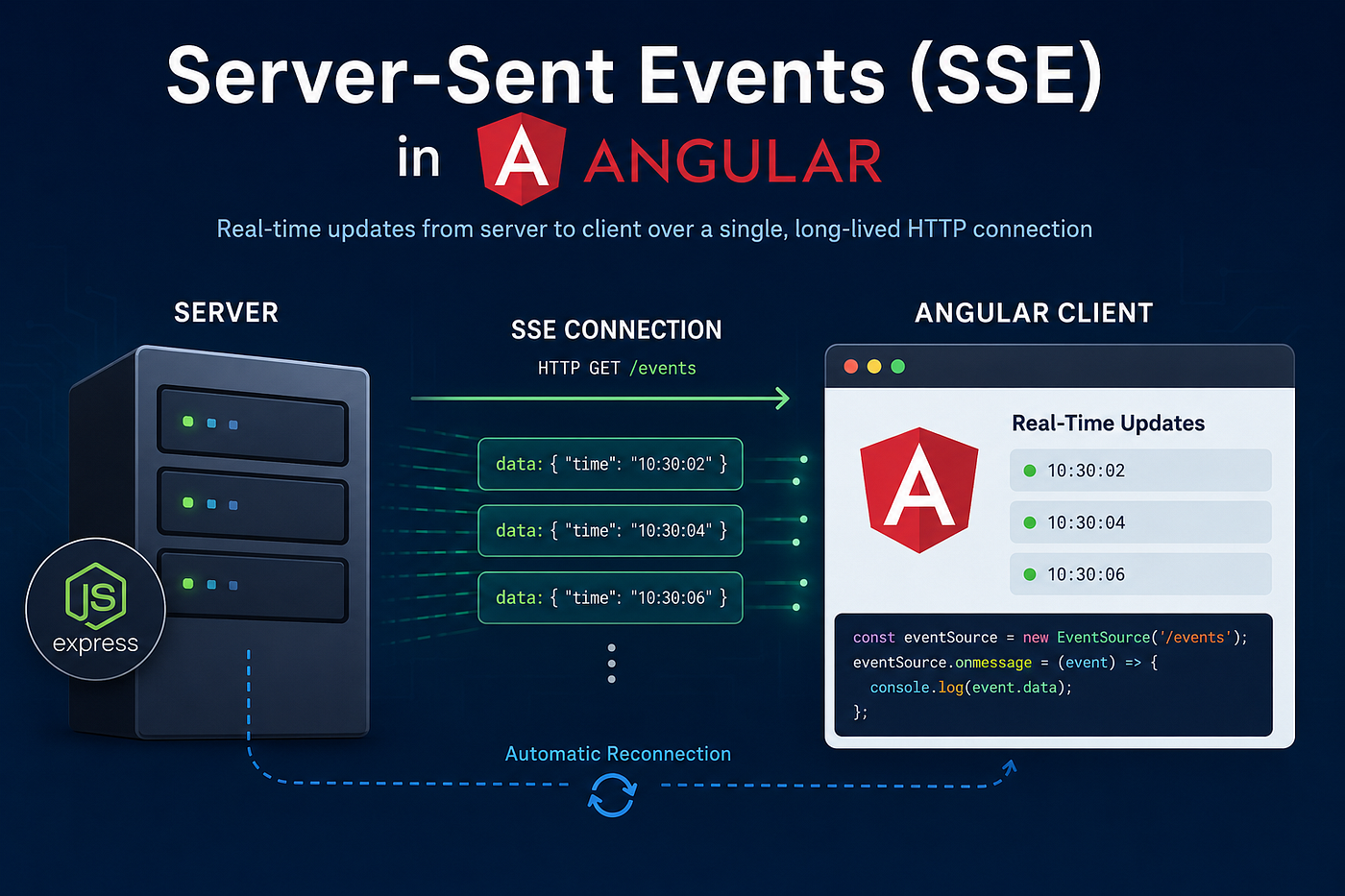
Server-Sent Events (SSE) is not a newly introduced technology. However, when I look at many modern web applications, I rarely see it being used. Because of that, I thought it would be worthwhile to write about it and explain where it can be useful.
What Are Server-Sent Events?
Server-Sent Events (SSE) is a web technology that allows a server to push real-time updates to a browser over a single, long-lived HTTP connection.
Unlike WebSockets, which provide bidirectional communication, SSE is strictly unidirectional (server-to-client). It is lightweight, efficient, and includes built-in automatic reconnection support.
Common use cases include:
- Real-time dashboards
- System monitoring
- Notifications
- Live status updates
- Stock price updates
- Progress tracking
Server-Side Implementation
An SSE connection is established through a standard HTTP GET request with the content type set to text/event-stream.
Unlike a traditional HTTP request, the server does not close the connection after sending a response. Instead, the connection remains open and the server continues to stream updates whenever new data becomes available.
Node.js and Express Example
app.get('/events', (req, res) => {
    // Required headers for SSE
    res.setHeader('Content-Type', 'text/event-stream');
    res.setHeader('Cache-Control', 'no-cache');
    res.setHeader('Connection', 'keep-alive');
// Disable buffering for proxies such as Nginx
res.setHeader('X-Accel-Buffering', 'no'); const intervalId = setInterval(() => {
const timeData = new Date().toLocaleTimeString(); // SSE format: data: <message>\n\n
res.write(`data: ${timeData}\n\n`);
}, 2000); req.on('close', () => {
clearInterval(intervalId);
res.end();
console.log('Client disconnected.');
});
});Important Notes
- SSE supports only UTF-8 encoded text.
- Binary data cannot be sent directly.
- JSON payloads can be transmitted as strings and parsed on the client.
- Browsers automatically attempt to reconnect if the connection is lost.
Client-Side Implementation
The browser provides a built-in EventSource API for working with SSE.
<!DOCTYPE html>
<html lang="en">
<head>
    <meta charset="UTF-8">
    <title>SSE Real-Time Demo</title>
</head>
<body>
    <h1>Real-Time Server Updates</h1>
    <div id="updates">Waiting for data...</div>
<script>
const eventSource = new EventSource('/events'); const updatesDiv = document.getElementById('updates'); eventSource.onmessage = function(event) {
updatesDiv.innerHTML =
`Latest Server Time: <strong>${event.data}</strong>`;
}; eventSource.onerror = function(error) {
console.error('EventSource failed:', error);
};
</script>
</body>
</html>How to Use SSE in Angular
Since Angular’s HttpClient is designed for request-response communication, it does not directly support Server-Sent Events. Instead, we can use the browser's native EventSource API and wrap it inside an RxJS Observable.
SSE Service
import { Injectable } from '@angular/core';
import { Observable } from 'rxjs';
@Injectable({
providedIn: 'root'
})
export class SseService { connect(url: string): Observable<string> {
return new Observable(observer => { const eventSource = new EventSource(url); eventSource.onmessage = event => {
observer.next(event.data);
}; eventSource.onerror = error => {
observer.error(error);
eventSource.close();
}; return () => {
eventSource.close();
};
});
}
}Angular Component
import { Component, OnInit, inject } from '@angular/core';
import { SseService } from './sse.service';
@Component({
selector: 'app-root',
standalone: true,
template: `
<h2>Server Time</h2>
<p>{{ serverTime }}</p>
`
})
export class AppComponent implements OnInit { private sseService = inject(SseService); serverTime = ''; ngOnInit(): void {
this.sseService
.connect('http://localhost:3000/events')
.subscribe(data => {
this.serverTime = data;
});
}
}Advantages of SSE
Simpler than WebSockets
SSE uses standard HTTP and does not require a special protocol upgrade.
Automatic Reconnection
Browsers automatically reconnect when the connection drops.
Lightweight
For server-to-client communication, SSE typically requires less overhead than WebSockets.
Firewall Friendly
Since SSE uses regular HTTP connections, it works well through most proxies and firewalls.
Limitations
One-Way Communication
Data can only flow from the server to the client.
Text-Only Protocol
Only UTF-8 encoded text data can be transmitted directly.
Browser Connection Limits
Under HTTP/1.1, browsers typically limit the number of simultaneous connections per domain. HTTP/2 significantly improves this limitation.
No Native Angular HttpClient Support
Developers must use the browser’s EventSource API instead of Angular's HttpClient.
When Should You Use SSE?
SSE is an excellent choice when your application only needs server-to-client updates, such as:
- Monitoring dashboards
- Build or deployment status tracking
- Notification systems
- Live metrics
- IoT device status updates
- OpenBMC event monitoring
If your application requires two-way communication, such as chat applications, collaborative editing, or remote control functionality, WebSockets remain the better choice.
Final Thoughts
Many developers immediately think of WebSockets when implementing real-time functionality. However, in many scenarios, the communication is only one-way, making Server-Sent Events a simpler and more efficient solution.
The next time you need real-time updates in an Angular application, consider SSE before reaching for WebSockets. It might be all you need.
메타데이터
- post_id
- 474a9ba5a212
- slug
- server-sent-events-sse-in-angular-474a9ba5a212
- url
- https://medium.com/@josephamirthasamy/server-sent-events-sse-in-angular-474a9ba5a212
- canonical_url
- https://medium.com/@josephamirthasamy/server-sent-events-sse-in-angular-474a9ba5a212
- author_url
- https://medium.com/@josephamirthasamy
- status
- ok
- fetched_at
- 2026-06-13 12:55:53




