H100 vs A100 in 2026: The Real Differences, and Where to Actually Get One for Free (or Almost Free)
A practical, no-hype guide for builders who’ve outgrown Colab’s free T4 and need real training and inference horsepower, without a…
H100 vs A100 in 2026: The Real Differences, and Where to Actually Get One for Free (or Almost Free)
A practical, no-hype guide for builders who’ve outgrown Colab’s free T4 and need real training and inference horsepower, without a five-figure cloud bill. [Github]
Note on Target Audience
This guide is written for students, researchers, independent developers, early-stage founders, and individual builders who have outgrown Colab’s free T4 and want practical, low-cost (or free) access to real A100/H100 GPUs.
It focuses on stacking credits, cost optimization during prototyping, and realistic options on a limited budget.
Enterprise teams, large organizations, or hyperscaler users typically have different priorities (SLAs, compliance, dedicated capacity, support, and production reliability) and may find this guide less relevant.
Why This Guide Exists
If you’ve tried fine-tuning a 7B+ model, training a diffusion model from scratch, or serving an LLM with usable throughput on Colab’s free tier, you already know the wall: 16 GB VRAM, no native FP8, and performance that’s roughly an order of magnitude behind what serious AI work actually runs on.
T4s are excellent for learning and tiny experiments. They are not representative of the hardware your code will eventually run on in production or at research scale.
This guide does two things clearly:
- Compares A100 vs H100 honestly — architecture, real training/inference gains, memory bandwidth, and where each one makes economic sense at hobbyist, startup, and frontier-lab scale.
- Maps every realistic path to free, near-free, or radically discounted A100/H100 access in 2026 — separating genuine top-tier hardware from marketing claims.
All information is cross-checked against current provider documentation, recent benchmarks, and program pages as of mid-2026.
Part 1: H100 vs A100 — What’s Actually Different
The A100 (Ampere, 2020) and H100 (Hopper, 2022–23) are a full architectural generation apart. That gap now meaningfully shapes cost/performance decisions.
Architectural Comparison

Key nuances often missed:
- The headline memory-bandwidth jump to 3.35 TB/s is primarily on SXM H100. PCIe H100 cards have bandwidth much closer to A100.
- NVLink 4.0 reduces communication overhead significantly on 70B+ models during distributed training.
- FP8 + Transformer Engine is the real unlock for inference (and some training) — not raw FLOPs. These gains only appear with optimized runtimes (vLLM, TensorRT-LLM) on transformer models.
Training Performance (Real-World)
In unoptimized PyTorch (BF16/FP16), H100 typically delivers ~2.4–2.7× throughput vs A100 across model sizes.
With FP8 and proper optimization on LLM workloads, the gap widens. Industry analyses in 2025–2026 consistently show H100 delivering roughly 3× the training speed per dollar versus A100 once you account for both higher hourly rate and faster completion. For long-running jobs (days, not hours), H100 often wins on total cost despite higher per-hour pricing.
When A100 wins on training cost: LoRA/QLoRA fine-tuning on ≤30B models where you can accept 2–3× longer wall time, or when using cheap spot A100 instances.
When H100 wins: Pre-training, continued pre-training, or any workload where time-to-result has high value.
Inference Performance
This is where the gap is largest:
- Untuned serving: H100 typically gives 2–4× higher throughput and lower latency.
- Optimized FP8 serving (vLLM/TensorRT-LLM, 70B-class models): Gains of up to 10×+ versus A100 FP16 have been reported. These numbers compare optimized H100 FP8 against unoptimized A100 FP16 — realistic but not apples-to-apples.
- Memory-bound decode: Higher H100 bandwidth helps even before FP8, especially once models are quantized.
Practical rule of thumb (2026):
- Chat-style, low-latency, high-concurrency serving (13B–70B) → H100 + FP8 is dramatically more cost-effective per token.
- Batch inference on quantized ≤30B models at moderate throughput → A100 remains very competitive.
When to Actually Choose Which GPU
Choose A100 when:
- LoRA/QLoRA fine-tuning up to ~30B parameters and you can tolerate longer runs.
- Batch inference on quantized smaller models.
- You need cheap MIG partitioning (up to 7 isolated instances per card).
- You have access to very low-cost spot A100 (~$0.45–0.70/hr).
Choose H100 when:
- Training speed or time-to-result is critical.
- Production inference at scale with FP8 optimizations.
- Multi-GPU distributed training on large models (NVLink advantage).
- Low-latency, high-concurrency serving is the goal.
2026 footnote on next-gen: Blackwell (B200) and H200 (HBM3e refresh of H100 with 141 GB) are appearing on select clouds at a premium. For most individual builders and startups, A100 and H100 remain the practical sweet spot.
Part 2: Where to Get Free or Near-Free A100/H100 Access
Organized by how “real” and accessible the access actually is.
Tier 1: Genuinely Free, No Credit Card, Real High-End Hardware
These are the only options that give you A100/H100-class (or better) silicon at $0 with no payment method required.
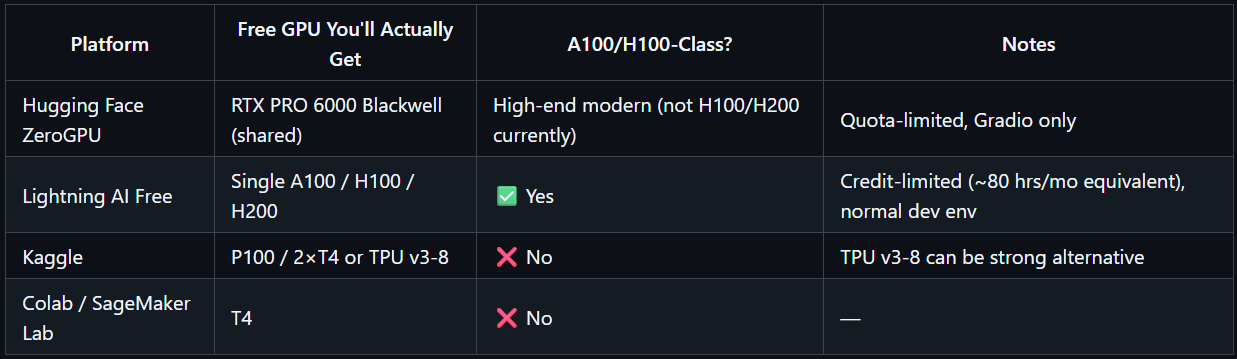
Hugging Face Spaces — ZeroGPU ZeroGPU provides dynamic, shared GPU allocation for Gradio-based Spaces. It has used A100 and H200 hardware in the past. As of mid-2026, it primarily runs on NVIDIA RTX PRO 6000 Blackwell GPUs (48 GB “large” or 96 GB “xlarge” slices). Free-tier users get limited daily quota (a few minutes); PRO multiplies quota significantly.
- Best for: Running inference demos and Gradio apps on open models.
- Not for: Long unattended training or arbitrary shell access.
- Reality check: It is currently the only widely available no-card option with high-end modern GPUs, but access is quota-limited and Gradio-shaped.
Lightning AI — Free Tier Free-tier users can spin up single A100 (40/80 GB), H100, and H200 GPU machines at $0 (in addition to a free always-on CPU Studio). Allocation is credit-based (~15 free credits/month ≈ 80 GPU hours on interruptible instances). Includes 50 GB persistent storage, SSH/VS Code access, and background execution. Free studios typically have 4-hour restart requirements.
- Best for: Real prototyping, small-to-medium training/fine-tuning, and normal development workflows on top-tier hardware.
- Why it matters: This is the closest thing to “Colab, but with an A100/H100 instead of a T4.”
Kaggle Notebooks ~30 hours/week GPU time (typically P100 or dual T4) plus free TPU v3–8. Not A100/H100, but the TPU v3–8 option can outperform a single A100 on certain JAX/TensorFlow workloads.
Others (explicitly not qualifying): Google Colab free (T4), AWS SageMaker Studio Lab (T4), older Paperspace free notebooks — all top out at T4-class or lower.
Reality-check table — Tier 1
Tier 2: Free Credit Programs (Card Often Required, Quota-Gated)
These give you dollars (or equivalent) that can be spent on A100/H100 if quota is approved.
Hyperscaler new-account credits:
- Google Cloud: $300 (90 days). GPU quota increase often required.
- Azure: $200 new account + ~$100 for verified students (Azure for Students).
- AWS standard Free Tier: Mostly CPU/low-GPU; real A100/H100 comes via Activate program.
Startup/founder programs (several require no funding):
- Microsoft for Startups Founders Hub: Up to $150K Azure credits (live product + traction; no VC required). Strong on ND-series A100.
- Google for Startups Cloud (AI tier): Up to $350K for VC-backed AI startups through Series A (explicit H100/A3 access).
- DigitalOcean Hatch/Startups program: Up to $100K credits + support benefits for qualifying early-stage/AI startups. GPU Droplet access is often discounted (around $1.90/hr range in some programs) rather than fully free 8×H100 droplets (older program terms varied). Check current eligibility.
- NVIDIA Inception (free, no equity): Unlocks preferred pricing, partner cloud credits, and technical support across multiple providers. Excellent gateway program.
- Alibaba Cloud AI Catalyst: Up to $120K lifetime for APAC-focused startups.
- Modal: $30/month recurring free credit on serverless platform (H100 ~$3.95/hr equivalent, A100 ~$2.50/hr).
Smaller/low-friction:
- Thunder Compute: $20 student credit (verified .edu) on top of already-low A100 rates (~$0.78/hr).
- GMI Cloud and similar: Targeted startup/student credits for H100/A100 testing.
Honest summary of Tier 2: These are real money, but success depends on (1) GPU quota approval, (2) expiry windows, and (3) your eligibility. Most accessible for individuals: GCP $300, Azure for Students, Thunder $20, and Modal recurring credits.
Tier 3: Academic & Research Compute Grants (Best Lever if Eligible)
If you have any university or research affiliation (even informal/thesis work), this tier offers the largest absolute resources.
- NVIDIA Academic Grant Program: Has offered up to 30,000 H100 80 GB GPU-hours (or hardware alternatives like RTX PRO 6000 or DGX Spark) for qualifying projects. Currently not accepting new applications on the main page — monitor for new calls for proposals (some targeted CFPs with June 30 deadlines have appeared in 2026). Worldwide eligibility for faculty; competitive.
- NAIRR Pilot (US): NSF-led program providing A100 and H100 cluster access (via Microsoft Azure and other partners like Voltage Park) plus datasets/models. Open to US-based researchers, educators, grad students (with advisor letter), non-profits, and some startups with federal grants. 12-month allocations.
- NSF ACCESS / NERSC ERCAP: Time on systems with thousands of A100 GPUs (e.g., Perlmutter). Annual cycles; requires code readiness.
- University HPC clusters: Often underused A100/H100 resources — simply ask your advisor or HPC admin.
- Google TPU Research Cloud (TRC): Not GPUs, but large free TPU pod slices for JAX/TensorFlow researchers.
Strategic note: Academic grants are the only tier where “tens of thousands of GPU-hours” numbers appear without needing a funded startup.
Tier 4: Cheapest “Might As Well Be Free” Paid Options (When Credits Run Out)
As of mid-2026, realistic sustained rates on marketplaces:

Tips for this tier:
- Marketplace platforms (Vast.ai, RunPod Community) offer the lowest prices but variable reliability — best with frequent checkpointing.
- Per-second billing (Thunder, Modal, RunPod serverless) saves money on short/bursty sessions.
- Spot/preemptible instances are routinely 60–90% cheaper and should be the default for checkpointable workloads.
Part 3: Practical Stacking Strategy + Prototyping Cost Optimization Playbook
Step-by-Step Stacking Approach
- Start today at $0: Create a Lightning AI account and use the free-tier A100/H100/H200 allocation. Also explore Hugging Face ZeroGPU for inference demos.
- If student/researcher: Apply/monitor NVIDIA Academic Grant Program and check your university HPC allocation. These can dwarf everything else.
- Claim easy credits: GCP $300 (request GPU quota immediately), Azure for Students if eligible, Thunder $20 student credit, Modal recurring $30/month.
- If building a product: Join NVIDIA Inception (free) and apply to Microsoft for Startups Founders Hub or DigitalOcean Hatch.
- Sustained work: Move steady workloads to lowest reliable on-demand (Thunder Compute, RunPod) and use Vast.ai/spot for fault-tolerant jobs.
Prototyping Cost Optimization Playbook: 10 Practical Tricks
Once you move beyond free tiers, the real skill is not just getting access — it’s keeping costs from exploding during the messy, iterative prototyping phase (short experiments, frequent restarts, oversized instances, and idle time). Here are the highest-impact, battle-tested techniques that work across providers.
- Use Spot or Preemptible Instances AWS Spot, Google Preemptible, and equivalent marketplace spot pricing routinely deliver 60–90% discounts versus on-demand. Perfect for any workload that checkpoints regularly (most modern training scripts do this automatically). The only real downside is occasional interruptions — plan for them.
- Choose Providers with Per-Minute (or Per-Second) Billing Hourly billing is brutal for bursty development work. If your notebook or script runs for 17 minutes and then stops, you still pay for a full hour. Providers like Thunder Compute (and some serverless options) bill by the minute or second and can cut costs on this kind of usage by 30–40%.
- Automate Idle Shutdowns Set up simple scripts or cron jobs that stop instances when GPU utilization drops below 10% for a few minutes. Tools like gcloud compute instances stop or equivalent AWS/Azure commands, combined with basic monitoring, can easily save hundreds of idle GPU-hours per month.
- Right-Size Early — Don’t Default to H100 Most fine-tuning and prototyping work fits comfortably on a single A100 80 GB. Start there (or even on cheaper cards like RTX A6000 for lighter workloads) and only move to H100 when you have clear evidence you need the extra speed or memory bandwidth. Benchmark quickly on cheaper hardware first.
- Train with Mixed Precision (BF16 or FP16) Switch from FP32 to mixed precision. It roughly halves memory usage and speeds up compute on modern GPUs with little to no accuracy loss in most cases. This is one of the highest-ROI changes you can make.
- Use 8-Bit Optimizers (bitsandbytes) The 8-bit Adam optimizer cuts optimizer-state memory by about half. In practice, this often lets you run the same model on a smaller/cheaper GPU or with larger batch sizes. Hugging Face’s 8-bit documentation shows how to implement it in just a few lines of code.
- Adopt Parameter-Efficient Fine-Tuning (LoRA / QLoRA) Instead of updating all parameters, LoRA trains tiny low-rank adaptation matrices — often only 0.1% of the original parameters. Result: dramatically lower memory, faster epochs, and much smaller bills while still getting excellent task performance.
- Use Gradient Accumulation Simulate large batch sizes by accumulating gradients over several smaller mini-batches. This preserves training dynamics and accuracy without needing to rent expensive multi-GPU clusters during prototyping.
- Set Spend Alerts Early Enable budget alerts at 50%, 75%, and 90% of your monthly limit on every cloud account. This simple habit prevents nasty surprises and forces you to right-size or switch to spot capacity before costs spiral.
- Tag Resources and Review Regularly Tag every instance, notebook, and experiment with project, owner, and purpose. Review spend weekly during active prototyping phases. Small leaks (forgotten idle instances, oversized VMs) add up fast.
These techniques compound. Many developers report cutting effective GPU spend by 40–70% during the prototyping phase simply by combining right-sizing, mixed precision + LoRA, spot instances, and idle automation — without sacrificing iteration speed.
Bottom Line
- H100 vs A100 is not simply “newer is better.” A100 remains the smarter economic choice for many LoRA fine-tuning and moderate inference workloads. H100 wins decisively on FP8-optimized production inference and large-scale/distributed training where speed drives total cost.
- Truly free A100/H100-class access exists but is limited: Lightning AI free tier (real single A100/H100/H200 with normal dev environment) and Hugging Face ZeroGPU (currently RTX PRO 6000 Blackwell, quota-limited, Gradio-shaped). Everything else marketed as “free GPU” usually tops out at T4/P100.
- The biggest lever for students and researchers is the academic-grant tier (NVIDIA Academic, NAIRR, university HPC).
- When credits run out, A100 and H100 are now available below $1/hr and ~$1.50–2/hr respectively on marketplaces, making near-free sustained access realistic for checkpointed work.
- During prototyping, the difference between a sustainable budget and painful bills often comes down to the 10 tricks above — especially right-sizing early, aggressive idle management, and precision/parameter-efficient techniques.
The landscape changes monthly. Always verify current pricing, quota rules, and program status directly on provider sites before committing.
Sources & Further Reading (selected, cross-checked)
- Thunder Compute — Free Cloud GPU Credits in 2026, Cut Cloud GPU Costs During Prototyping, A100 vs H100, and related pricing guides
- GMI Cloud — Best Free GPU Trials for Online Deep Learning (2026) and related guides
- AIMultiple — Comparison of Top 6 Free Cloud GPU Services
- NVIDIA official Academic Grant & Inception pages
- Lightning AI pricing page
- Hugging Face Spaces ZeroGPU documentation & community discussions (2026 updates)
- NAIRR Pilot / NSF ACCESS resources
- Spheron, RunPod, Vast.ai, Jarvis Labs, and Northflank pricing & comparison articles (2026)
- Granted AI grant database
- Various independent benchmarks (Jarvis Labs, Lyceum, ComputeStacker, etc.)
Cloud GPU pricing and program terms change frequently. All dollar figures and availability are directional as of mid-2026 — always confirm live details.
메타데이터
- post_id
- 4764d37a2e82
- slug
- h100-vs-a100-in-2026-the-real-differences-and-where-to-actually-get-one-for-free-or-almost-free-4764d37a2e82
- url
- https://medium.com/@mattral-lifelong-learning/h100-vs-a100-in-2026-the-real-differences-and-where-to-actually-get-one-for-free-or-almost-free-4764d37a2e82
- canonical_url
- https://medium.com/@mattral-lifelong-learning/h100-vs-a100-in-2026-the-real-differences-and-where-to-actually-get-one-for-free-or-almost-free-4764d37a2e82
- author_url
- https://medium.com/@mattral-lifelong-learning
- status
- ok
- fetched_at
- 2026-06-15 20:49:13