CPU vs GPU Computing in HPC: When Should You Use Each?
Previous Article: Understanding HPC Job Schedulers: Slurm, PBS, and LSF
CPU vs GPU Computing in HPC: When Should You Use Each?
CPU vs CPU in HPC
Previous Article: Understanding HPC Job Schedulers: Slurm, PBS, and LSF
Introduction
Modern High Performance Computing (HPC) systems rely on both CPUs and GPUs to process complex workloads. While both are powerful computing resources, they are designed for different types of tasks.
As HPC workloads continue to grow in fields such as artificial intelligence, scientific simulations, weather forecasting, and engineering analysis, understanding when to use a CPU versus a GPU has become increasingly important.
In this article, we’ll explore the differences between CPUs and GPUs, their strengths, and the types of workloads each handles best.
What Is a CPU?
A Central Processing Unit (CPU) is often called the brain of a computer.
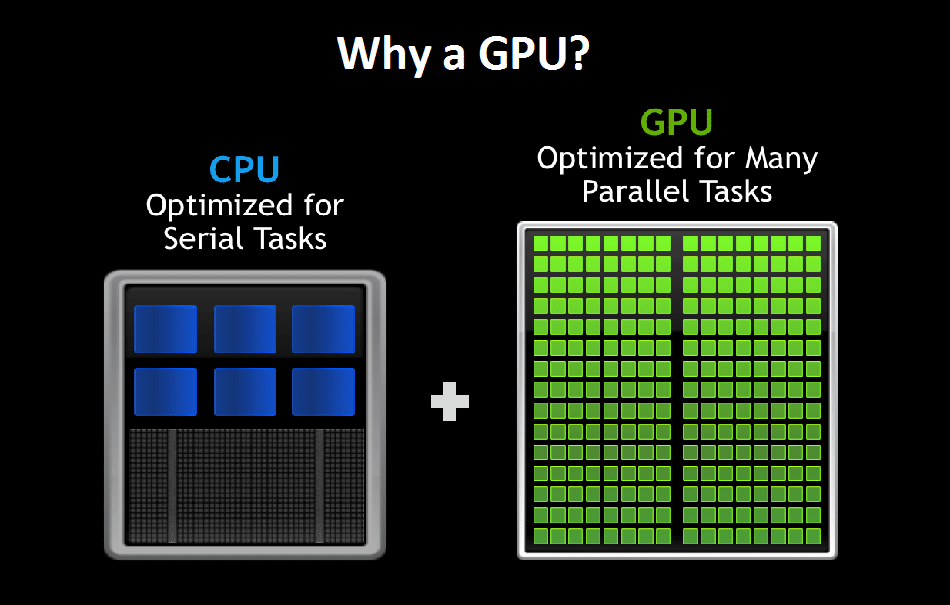
CPUs are designed to handle a wide variety of tasks efficiently and are optimized for sequential processing, complex logic, and decision-making operations.
Key Characteristics of CPUs
- Fewer cores (typically 8–128 in HPC servers)
- High clock speeds
- Large cache memory
- Excellent for sequential workloads
- Strong performance for complex instructions
Typical CPU Workloads
- Operating systems
- Database processing
- Job scheduling
- Scientific simulations with complex branching
- Web applications
- Enterprise software
What Is a GPU?
A Graphics Processing Unit (GPU) was originally developed for rendering graphics but has evolved into one of the most important accelerators in HPC and AI.
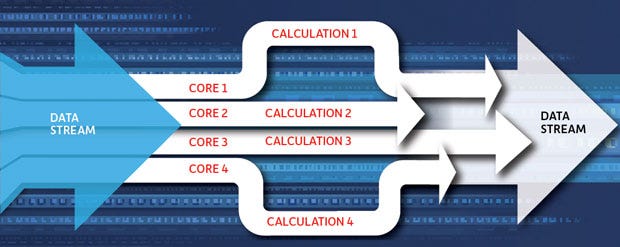
Unlike CPUs, GPUs contain thousands of smaller cores designed to execute many operations simultaneously.
Key Characteristics of GPUs
- Thousands of processing cores
- Massive parallelism
- High throughput
- Exceptional performance for repetitive calculations
- Optimized for matrix and vector operations
Typical GPU Workloads
- Artificial Intelligence
- Machine Learning
- Deep Learning
- Scientific Computing
- Image Processing
- Video Rendering
- Molecular Modeling
CPU vs GPU: Understanding the Difference
The primary difference lies in how they process tasks.
CPU Approach
A CPU focuses on completing a few tasks very quickly.
Think of a CPU as: A team of highly skilled specialists solving complex problems one at a time.
GPU Approach
A GPU focuses on completing thousands of similar tasks simultaneously.
Think of a GPU as: A massive workforce handling many small tasks in parallel.
CPU vs GPU Comparison

When Should You Use a CPU?
CPUs are the better choice when workloads require:
Complex Decision Making
Applications with many conditional statements and branching logic perform better on CPUs.
Sequential Processing
Tasks that must execute step-by-step are ideal for CPU execution.
General-Purpose Computing
Most operating systems and enterprise applications rely heavily on CPUs.
Low-Latency Workloads
Applications that require immediate responses often benefit from CPU processing.
When Should You Use a GPU?
GPUs excel when workloads involve:
Massive Parallel Processing
Thousands or millions of calculations can run simultaneously.
Artificial Intelligence
Training large language models and neural networks depends heavily on GPUs.
Scientific Simulations
Weather prediction, fluid dynamics, and molecular simulations often leverage GPU acceleration.
Big Data Analytics
Processing large datasets can be significantly
Real-World HPC Examples
Weather Forecasting
Weather models perform billions of calculations across large geographic grids.
GPUs accelerate these calculations dramatically, reducing forecast generation time.
Artificial Intelligence
Modern AI systems such as large language models depend heavily on GPU clusters.
Training a model on CPUs alone could take months, while GPUs reduce training time significantly.
Engineering Simulations
Automotive and aerospace companies use GPUs for computational fluid dynamics (CFD) and crash simulations.
Financial Modeling
Banks and financial institutions use GPU acceleration for risk analysis and market simulations.
Why Modern HPC Clusters Use Both?
Most modern HPC clusters combine CPUs and GPUs.
CPUs Handle
- Job scheduling
- Operating system functions
- Workflow management
- Input/output operations
GPUs Handle
- Parallel computation
- AI model training
- Simulation workloads
- Data-intensive calculations
This hybrid approach delivers maximum performance and efficiency.
The Rise of GPU-Accelerated HPC
The world’s fastest supercomputers increasingly rely on GPUs.
Major HPC systems use GPU accelerators to achieve unprecedented levels of performance while maintaining energy efficiency.
As AI adoption continues to grow, GPU-based HPC is becoming the standard architecture for many research institutions and enterprises
Conclusion
CPUs and GPUs are not competitors — they are complementary technologies that work together within modern HPC environments.
CPUs excel at complex, sequential, and general-purpose computing tasks, while GPUs dominate workloads that require massive parallel processing.
Choosing the right processor depends on the nature of the workload. For AI training, scientific simulations, and large-scale analytics, GPUs often provide significant performance advantages. For operating systems, scheduling, and complex logic-driven applications, CPUs remain essential.
Understanding these differences helps organizations build more efficient HPC infrastructures and optimize performance for their most demanding workloads.
AETPL is an end-to-end IT solutions company providing HPC, AMC/CAMC, hardware supply, website development, PostgreSQL services, and more.
🌐 https://aetpl.org/ 📧 aetpl@aetpl.org
메타데이터
- post_id
- 476b11a2ebf1
- slug
- cpu-vs-gpu-computing-in-hpc-when-should-you-use-each-476b11a2ebf1
- url
- https://medium.com/@aetpl/cpu-vs-gpu-computing-in-hpc-when-should-you-use-each-476b11a2ebf1
- canonical_url
- https://medium.com/@aetpl/cpu-vs-gpu-computing-in-hpc-when-should-you-use-each-476b11a2ebf1
- author_url
- https://medium.com/@aetpl
- status
- ok
- fetched_at
- 2026-06-11 05:11:55