A better way to use SSHFS in macOS Finder in 2026
Step-by-step solutions to enable macOS Finder to access and open Linux folders and files using SSHFS
A better way to use SSHFS in macOS Finder in 2026
Step-by-step solutions to enable macOS Finder to access and open Linux folders and files using SSHFS
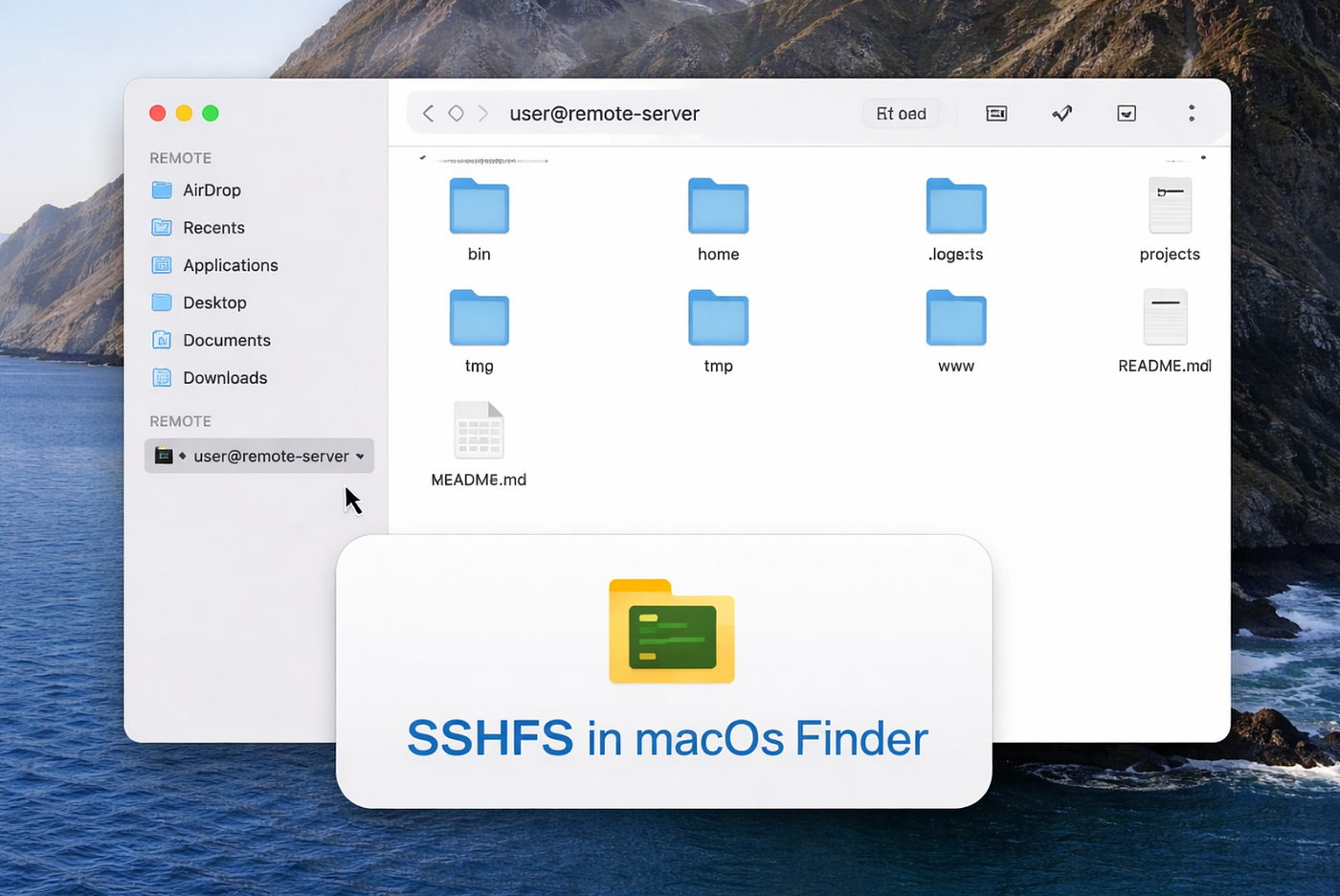
The old way
When you ask AI a question like: “How to install sshfs in my macOS”, you get a command:brew install sshfs. But you will only get this:
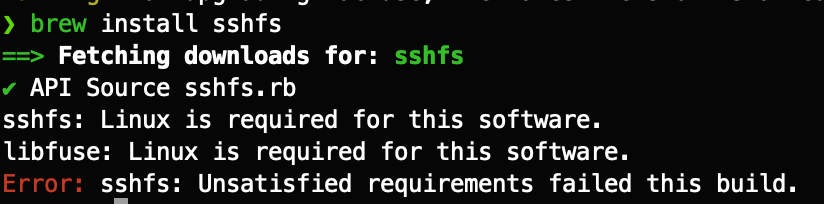
This is because the sshfs formula was removed from the official Homebrew repository. After all, it depends on MacFUSE, which is no longer open-source, and Homebrew only supports fully open-source software in its core repository. You can still install it using the following steps.
- Install macFUSE
brew install --cask macfuse- Homebrew’s sshfs formula is Linux-only now, so use the macOS build
brew install gromgit/fuse/sshfs-macBut you will have to restart your Mac device and enable kernel extensions.
A way better new way
In 2026, I found FUSE-T is a better method for mounting folders using SSHFS on macOS, because it avoids the security risks and installation hurdles of kernel extensions. It works by emulating a local NFS server that macOS connects to natively.
Before installing it, you’d better uninstall the macfus and sshfs-mac if you have installed those:
brew uninstall macfuse
brew uninstall romgit/fuse/sshfs-mac
Next, install FUSE-T using the following command:
brew tap macos-fuse-t/homebrew-cask
brew install fuse-t
brew install fuse-t-sshfs
In the above script, brew tap adding a new repository from an external vendor. macos-fuse-t is the GitHub username of the developers who created FUSE-T. homebrew_cask is a temporary repo for homebrew installs.
Mount folders
You can use the following sample script to mount folders using either the old or the new way.
Mount a folder:
sshfs username@source_server:/path/to/folder ~/path/to/target/folderTo unmount a folder:
umount ~/path/to/target/folderWrap Up
I just used the new way to set up folder mounting in macOS, so that I can open my Linux server folder in the Finder like local folders. It is so easy to use. Let me know if you have any questions or problems when setting it up.
Appendix — how to automatically mount sshfs files on macOS startup
The above solution works, but every time I restart macOS, the mounting will go away, and I need to rerun the script, I can’t remember so many things, I need it to be automated, here are the steps: Step 1. Create a Mount Script
Create a script that handles all mounts:
# Create the script
nano ~/Scripts/mount-sshfs.sh
Then paste this content (make adjust for your version):
#!/bin/bash

# SSHFS Auto-mount Script
# Exit if any mount fails
set -e

# Define mount points
REMOTE_HOST="your_name@192.168.xxx.xxx"
MOUNT_BASE="$HOME/mnt"

# Create mount directories if they don't exist
mkdir -p "$MOUNT_BASE/target_folder"

# Wait for network to be ready
echo "Waiting for network..."
sleep 5

# Check if SSH host is reachable
if ! ping -c 1 192.168.xxx.xxx > /dev/null 2>&1; then
    echo "Host 192.168.xxx.xxx not reachable, skipping mount"
    exit 0
fi

# Mount the filesystems
sshfs "$REMOTE_HOST:/home/andrewzhu" "$MOUNT_BASE/target_folder" \
    -o reconnect,ServerAliveInterval=15,ServerAliveCountMax=3,volname=128g_home_vol

echo "All sshfs mounts completed successfully"
Make it executable:
chmod +x ~/Scripts/mount-sshfs.shStep 2.Create the LaunchAgent plist
mkdir -p ~/Library/LaunchAgents
nano ~/Library/LaunchAgents/com.andrewzhu.sshfs-mount.plist
Paste this:
<?xml version="1.0" encoding="UTF-8"?>
<!DOCTYPE plist PUBLIC "-//Apple//DTD PLIST 1.0//EN" "http://www.apple.com/DTDs/PropertyList-1.0.dtd">
<plist version="1.0">
<dict>
    <key>Label</key>
    <string>com.andrewzhu.sshfs-mount</string>

    <key>ProgramArguments</key>
    <array>
        <string>/bin/bash</string>
        <string>-c</string>
        <string>/Users/andrewzhu/Scripts/mount-sshfs.sh</string>
    </array>

    <key>RunAtLoad</key>
    <true/>

    <key>KeepAlive</key>
    <dict>
        <key>NetworkState</key>
        <true/>
    </dict>

    <key>StandardOutPath</key>
    <string>/tmp/sshfs-mount.log</string>

    <key>StandardErrorPath</key>
    <string>/tmp/sshfs-mount-error.log</string>
</dict>
</plist>Important: Update the path /Users/andrewzhu/Scripts/mount-sshfs.sh to match your actual username and path.
Step 3: Load the LaunchAgent
# Load the agent
launchctl load ~/Library/LaunchAgents/com.andrewzhu.sshfs-mount.plist

# Verify it's loaded
launchctl list | grep sshfs
메타데이터
- post_id
- 479b3b79bdf7
- slug
- a-better-way-to-use-sshfs-in-macos-finder-in-2026-479b3b79bdf7
- url
- https://medium.com/macoclock/a-better-way-to-use-sshfs-in-macos-finder-in-2026-479b3b79bdf7
- canonical_url
- https://medium.com/macoclock/a-better-way-to-use-sshfs-in-macos-finder-in-2026-479b3b79bdf7
- author_url
- https://medium.com/@xhinker
- status
- ok
- fetched_at
- 2026-07-15 06:14:08