Create a Stylish Flip Clock on an ESP32-S3 Development Board with a 1.9-inch TFT Display
Many clock projects for the ESP32 family simulate an analog clock or use themed digits (e.g., my Christmas clock); however, in this…
Create a Stylish Flip Clock on an ESP32-S3 Development Board with a 1.9-inch TFT Display
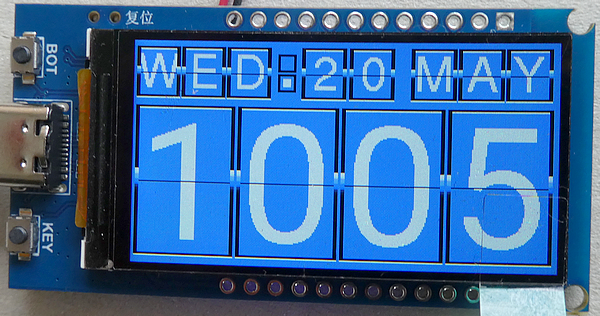
Many clock projects for the ESP32 family simulate an analog clock or use themed digits (e.g., my Christmas clock); however, in this tutorial, I will show you how to display a once-very-popular style of clock — specifically, a flip clock — on your display. What makes this flip clock project special is that the flipping of the digits is animated. Many such projects simply swap out the images, but with this flip clock, you get the sense that an actual flipping motion is taking place (all that’s missing is the characteristic “click” sound).
Topics of this Tutorial
- Hard- and Software for the development
- Description of the sketch
- Summary
Hard- and Software for the development
For development, I am using an ESP32-S3 board that I purchased many months ago — but which I am only now able to use, as I discovered the correct pin assignments for the display more or less by chance. This board is equipped with a 1.9-inch TFT display featuring a resolution of 170 x 320 pixels, driven by an ST7789 chip.
I did not develop this project myself; instead, I am using the existing project “Flip Clock on a Cheap Yellow Display (CYD),” created by Thom Dyson. Therefore, all credits go to him. However, in his project, he utilizes the graphics library “**TFT_eSPI” by Bodmer — a library that, as of now, is no longer under active development. This frequently leads to compilation or runtime errors, particularly when using ESP32 boards with Arduino version 3.x. I have therefore replaced this graphics library with the “[LovyanGFX](https://github.com/lovyan03/LovyanGFX)” library by lovyan03**.
The code was developed on Arduino IDE version 2.3.8 (Windows) and esp32 (boards) version 3.3.8.
Description of the sketch
The program follows a simple structure: a connection to the Wi-Fi router is established, the current time is synchronized with a Network Protocol Server (NTP), and all sprites are set up. The Lovyan Graphics Library functions exactly as we are accustomed to from the TFT_eSPI library; however, there are very minor differences in the function names for certain commands.
You can find a similar project in my tutorial “**Create a digital Christmas clock on an ESP32 with 1.9-inches display (small Cheap Yellow Display)**,” in which I explain — among other things — how time synchronization works.
The exciting part begins in the “loop()” phase: to prevent flickering, all sprites are duplicated, and the “new” version is transferred to the display in a single batch, rather than replacing each element individually.
The screen brightness can be adjusted using the two buttons: the Boot button increases the display brightness, while the Key button decreases it.
Please note: the TFT display is enabled by default when you power the device by USB, but when powering the device by battery the display will stay black until you enable the display by setting GPIO pin 15 to HIGH:
in header:
#define TFT_POWER 15
in setup():
pinMode(TFT_POWER, OUTPUT);
digitalWrite(TFT_POWER, HIGH);
Summary
Once you have the pin assignments for the display, you can also use this development board with the LovyanGFX graphics library to bring this lovely flip clock to life on the screen.
Source code of the app
You find the complete code of the app in my GitHub repositoriy.
Happy coding !
메타데이터
- post_id
- 47b0496e4fcf
- slug
- create-a-stylish-flip-clock-on-an-esp32-s3-development-board-with-a-1-9-inch-tft-display-47b0496e4fcf
- url
- https://medium.com/@androidcrypto/create-a-stylish-flip-clock-on-an-esp32-s3-development-board-with-a-1-9-inch-tft-display-47b0496e4fcf
- canonical_url
- https://medium.com/@androidcrypto/create-a-stylish-flip-clock-on-an-esp32-s3-development-board-with-a-1-9-inch-tft-display-47b0496e4fcf
- author_url
- https://medium.com/@androidcrypto
- status
- ok
- fetched_at
- 2026-06-26 21:52:29