GOT-OCR2.0 in Action: Optical Character Recognition Applications and Code Examples
I’ve been diving into GOT-OCR2.0 lately, and it’s pretty impressive.
GOT-OCR2.0 in Action: Optical Character Recognition Applications and Code Examples
I’ve been diving into GOT-OCR2.0 lately, and it’s pretty impressive.
I thought I’d walk you through some code examples and share what I’ve learned so far, since it could be a key component for some of your projects.
GOT-OCR2.0 stands for General OCR Theory 2.0, and it’s a fresh take on optical character recognition.
Traditional OCR systems (what they call OCR-1.0) usually involve complex pipelines with multiple modules — think element detection, region cropping, character recognition, and so on.
Each of these modules can be a pain to maintain and optimize.
GOT-OCR2.0 simplifies this by introducing an end-to-end architecture. It’s built on an encoder-decoder paradigm:
- Encoder: A high compression rate encoder that can handle high-resolution images (up to 1024×1024 pixels). It compresses the image into a manageable number of tokens (256×1024 dimensions).
- Decoder: A decoder with a long context length (supports up to 8K tokens), allowing it to handle lengthy and dense text outputs.

What’s really awesome about GOT-OCR2.0 is how it streamlines everything into a single model.
No more dealing with complicated pipelines or multiple modules — it’s all unified.
And it’s not just limited to text recognition.
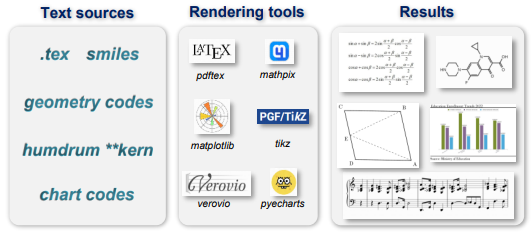
This thing can handle sheet music, mathematical formulas, charts, and even geometric shapes. Plus, it supports outputs in LaTeX and Markdown, which is super handy for documentation and academic papers.
From a product development standpoint, there are some real advantages here.
- The end-to-end model simplifies the integration of OCR into applications, reducing complexity significantly.
- Since it requires less computational power, we can deploy it on less powerful hardware, which helps cut down on infrastructure costs.
- Its versatility means we can explore new possibilities beyond standard text recognition, like processing technical documents, converting handwritten notes, or analyzing charts and diagrams.
- And the fact that it’s faster and more accurate can really enhance user-facing features — think instant document scanning or real-time data extraction. It’s pretty exciting stuff.
Let’s see it in action!

Setting up the environment
Setting up GOT-OCR2.0 is straightforward. Here’s how you can get it running in your environment.
Prerequisites:
- CUDA 11.8
- PyTorch 2.0.1
First, clone the repository and setup a virtual or conda environment
git clone https://github.com/Ucas-HaoranWei/GOT-OCR2.0.git
cd GOT-OCR2.0

conda create -n got python=3.10 -y
conda activate got
Then install the GOT-OCR2.0 package
pip install -e .You can also install Flash-Attention, which accelerates the attention mechanism in transformer models.
pip install ninja
pip install flash-attn --no-build-isolation
Now, you are ready to use GOT-OCR2.0.
Part 1: Running the OCR Script and Capturing Raw Output
Here’s how you can get the raw output for a given image:
import os
import subprocess

def run_ocr(client, model_name, image_path):
    # Define the OCR script directory
    ocr_dir = "/path/to/GOT-OCR2.0/GOT-OCR-2.0-master"

    # Get the relative path of the image file
    rel_image_path = os.path.relpath(image_path, ocr_dir)

    command = [
        "python3",
        "GOT/demo/run_ocr_2.0.py",
        "--model-name",
        "./GOT_weights/",
        "--image-file",
        rel_image_path,
        "--type",
        "ocr"
    ]

    try:
        result = subprocess.run(
            command,
            capture_output=True,
            text=True,
            check=True,
            cwd=ocr_dir
        )
        raw_output = result.stdout.strip()
In this first part, we’re setting up and executing the OCR script provided by GOT-OCR2.0 to process the image and capture the raw OCR output.
- We define
ocr_dir, which is the directory where the GOT-OCR2.0 scripts are located. You'll need to replace"/path/to/GOT-OCR2.0/GOT-OCR-2.0-master"with the actual path on your system. - We calculate
rel_image_pathto get the path of the image relative to the OCR directory. This is important because the OCR script might expect the image path to be relative to its working directory.
Then we construct a list called command that includes all the arguments needed to run the OCR script:
"python3": Specifies that we want to run a Python 3 script."GOT/demo/run_ocr_2.0.py": The OCR script that processes the image."--model-name", "./GOT_weights/": Points to the model weights to be used."--image-file", rel_image_path: The image we want to process."--type", "ocr": Specifies the type of operation.
Then we use subprocess.run to execute the OCR command:
capture_output=True: Captures the script's output so we can use it later.text=True: Ensures that the output is captured as a string rather than bytes.check=True: Raises an exception if the command exits with a non-zero status (indicating an error).cwd=ocr_dir: Sets the working directory to the OCR directory so that all relative paths are resolved correctly.
For example, for image such as the following:
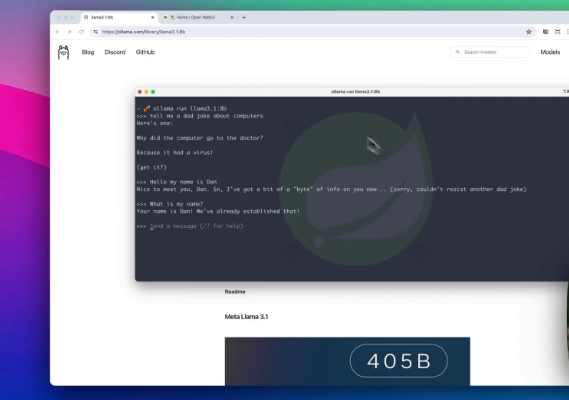
You will get the following output:
lana 3.1 bb Home( Open Web u https: / / ella ma. com/ library/ llama
3.1 bb 88888888888888888888 888888888888888888  Blog Disc or d G
it Hub Q Search models Models Sign in Download oll on a run l
loma 3.1 bb > > > tell me a do d joke about computers Here' s one:
Why did the computer goto the doctor?  Because it had a virus!  Get
it?  > > > Hello my name is Dan Nice to meet you, Dan. So, I' ve got a
bit of a\u201c byte\u201d of info on you now. . . ( sorry, couldn' t
 resist another dod joke)  > > > What is my name?  Your name is Dan!
 Me' ve already established that!  > > > Send a message. ( ? for help)
Read me Meta Llama 3.1 405 B
Which is not very useful, and that’s where you can use LLM like Claude to clean and extract meaningful parts.
Part 2: Extracting OCR Text and Preparing the Prompt
We will prepare a utility function and a prompt to extract text from raw OCR output:
def extract_ocr_text(raw_output):
    # Find the OCR text starting from "<|im_start|>assistant\n\n"
    match = re.search(r'<\|im_start\|>assistant\n\n(.*?)(?=<\|im_end\|>|$)', raw_output, re.DOTALL)
    if match:
        return match.group(1).strip()
    else:
        return "No OCR text found"

# Extract the OCR text
ocr_text = extract_ocr_text(raw_output)  # You'll need to implement this function

prompt = f"""
The following text is raw OCR output from an image. Please extract any meaningful text or code snippets from it,
ignoring any noise or irrelevant information. If it's code, format it properly. If it's text, clean it up and
present it in a readable format.

Raw OCR output:
{ocr_text}

Output should include ONLY extracted content. No intro, no outro, no formatting, no comments, no explanations, no nothing:
"""
In the second part, we process the raw OCR output to extract meaningful content and prepare it for further refinement.
- We call a function
extract_ocr_text(raw_output)to parse the raw output from the OCR script and extract the actual text. - We create a multi-line string
promptthat we'll send to the language model for processing.
The prompt instructs the language model to:
- Extract meaningful text or code snippets.
- Ignore noise or irrelevant information.
- Format code properly if any is detected.
- Clean up text and present it in a readable format.
I want to personally thank you for taking your time to be here — I truly appreciate it!
If you enjoyed this piece, it would mean a lot if you could **follow Agent Issue on Medium**, give this article a clap, and drop a quick hello in the comments!
I also share more insights over on X — come join the conversation!
We include the extracted OCR text in the prompt so the language model knows what to work with, and we specify that the output should include only the extracted content, with no additional comments or explanations.
Part 3: Using the Language Model to Clean Up Text and Returning Results
We can now call the LLM.
    message = client.messages.create(
        max_tokens=1024,
        messages=[
            {
                "role": "user",
                "content": prompt,
            }
        ],
        model=model_name,
    )

    extracted_content = message.content[0].text.strip()

    return {
        "raw_ocr": ocr_text,
        "extracted_content": extracted_content
    }
except subprocess.CalledProcessError as e:
    print(f"Error running OCR on {image_path}: {e}")
    return None
Which will return:
  "ocr_text": {
    "raw_ocr": "lana 3.1 bb Home( Open Web u https: / / ella ma. com/ library/ llama 3.1 bb 88888888888888888888 888888888888888888  Blog Disc or d G it Hub Q Search models Models Sign in Download oll on a run l loma 3.1 bb > > > tell me a do d joke about computers Here' s one:  Why did the computer goto the doctor?  Because it had a virus!  Get it?  > > > Hello my name is Dan Nice to meet you, Dan. So, I' ve got a bit of a\u201c byte\u201d of info on you now. . . ( sorry, couldn' t resist another dod joke)  > > > What is my name?  Your name is Dan! Me' ve already established that!  > > > Send a message. ( ? for help)  Read me Meta Llama 3.1 405 B",
    "extracted_content": "Q: Why did the computer go to the doctor?\nA: Because it had a virus!\n\nHello my name is Dan\n\nYour name is Dan! We've already established that!"
  }
In the final part, we refined the extracted OCR text and then return the results.
The result is close to what we want, and to truly understand its capabilities, you need to run experiements on your own data.
And let’s not forget the community and ongoing developments.
As more engineers and researchers adopt and contribute to GOT-OCR2.0, we’ll see continuous improvements and innovative features that keep pushing the boundaries of what’s possible with OCR technology.
Feel free to reach out if you hit any snags or have cool ideas to share.
Bonus Content : Building with AI
And don’t forget to have a look at some practitioner resources that we published recently:
Thank you for stopping by, and being an integral part of our community.
메타데이터
- post_id
- 47f38642ff20
- slug
- got-ocr2-0-in-action-optical-character-recognition-applications-and-code-examples-47f38642ff20
- url
- https://medium.com/@agentnativedev/got-ocr2-0-in-action-optical-character-recognition-applications-and-code-examples-47f38642ff20
- canonical_url
- https://medium.com/@agentnativedev/got-ocr2-0-in-action-optical-character-recognition-applications-and-code-examples-47f38642ff20
- author_url
- https://medium.com/@agentnativedev
- status
- ok
- fetched_at
- 2026-07-18 10:09:19