VTable Master-Detail Table Plugin
Author of this article:
VTable Master-Detail Table Plugin
Author of this article:
Potato Chips (https://github.com/Violet2314) Guangdong University of Finance & Economics
Introduction
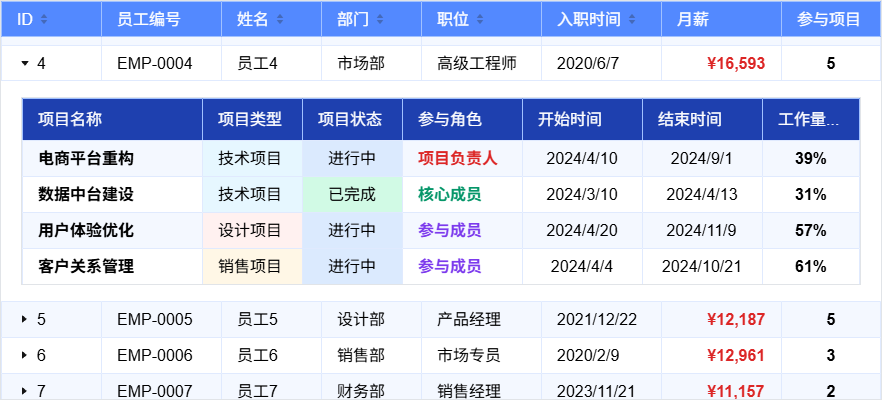
The VTable Master-Detail Table Plugin (MasterDetailPlugin) is an enterprise-level data visualization component developed based on VisActor VTable, specifically designed to solve the needs of hierarchical data display in complex business scenarios. This plugin breaks through the flat limitations of traditional tables and implements an innovative interaction mode of embedding complete sub-tables within master table rows, providing users with an intuitive and efficient data drill-down and detail viewing experience.
Core Capabilities
- Supports embedding complete sub-tables within master table rows, making complex data structures clear at a glance
- Supports both static configuration and dynamic function configuration to meet various business scenarios
- Supports lazy loading mechanism to optimize performance in large data volume scenarios
Typical Business Scenarios
Business ScenarioMaster Table DataSub-table DataOrder ManagementOrder basic informationProduct list, logistics detailsProject ManagementProject overviewTask list, member assignmentsFinancial ManagementSummary dataDetailed accounts, voucher informationInventory ManagementProduct categoriesSKU details, inventory dynamicsCustomer ManagementCustomer basic informationContact records, transaction history
Quick Start
Get NPM Package
First, you need to install using the following command in your project root directory:
# Install using npm
npm install @visactor/vtable @visactor/vtable-plugins

# Install using yarn
yarn add @visactor/vtable @visactor/vtable-plugins
Import Master-Detail Plugin
Import via NPM package
import * as VTable from '@visactor/vtable';
import { MasterDetailPlugin } from '@visactor/vtable-plugins';

function generateData(count) {
  const depts = ['Engineering', 'Marketing', 'Sales', 'HR', 'Finance'];
  return Array.from({ length: count }).map((_, i) => ({
    id: i + 1,
    rowNo: i + 1,
    name: `Name ${i + 1}`,
    department: depts[i % depts.length],
    score: Math.floor(Math.random() * 100),
    amount: Math.floor(Math.random() * 10000) / 100,
    children:
      i % 4 === 0
        ? [
            { task: `Sub-task A-${i + 1}`, status: 'open' },
            { task: `Sub-task B-${i + 1}`, status: 'done' }
          ]
        : undefined
  }));
}

const records = generateData(11);
const masterDetailPlugin = new VTablePlugins.MasterDetailPlugin({
  id: 'master-detail-static-3',
  detailTableOptions: {
    columns: [
      { field: 'task', title: 'Task Name', width: 220 },
      { field: 'status', title: 'Status', width: 120 }
    ],
    defaultRowHeight: 30,
    defaultHeaderRowHeight: 30,
    style: { margin: 12, height: 160 },
    theme: VTable.themes.BRIGHT
  }
});

const columns = [
  { field: 'id', title: 'ID', width: 70, sort: true },
  { field: 'rowNo', title: '#', width: 60, headerType: 'text', cellType: 'text' },
  { field: 'name', title: 'Name', width: 140, sort: true },
  { field: 'department', title: 'Department', width: 140, sort: true },
  { field: 'score', title: 'Score', width: 100, sort: true },
  {
    field: 'amount',
    title: 'Amount',
    width: 120,
    sort: true,
    fieldFormat: (v) => {
      if (typeof v === 'number' && !isNaN(v)) {
        return `$${v.toFixed(2)}`;
      }
      return v === undefined || v === null ? '' : String(v);
    }
  }
];

const option = {
  container: document.getElementById(CONTAINER_ID),
  columns,
  records,
  autoFillWidth: true,
  hierarchyTextStartAlignment: true,
  plugins: [masterDetailPlugin]
};

const tableInstance = new VTable.ListTable(option);
Running effect:

Parameter Configuration
Parameter NameTypeDefault ValueFunction Descriptionidstringmaster-detail-${timestamp}Global unique identifier for the plugin instance, used to distinguish multiple plugin instancesenableCheckboxCascadebooleantrueWhether to enable checkbox cascade functionality between master and detail tables, checkbox selections in the master table will automatically sync with corresponding sub-tablesdetailTableOptionsDetailTableOptions | Function-Sub-table configuration options, supports static object configuration or dynamic configuration function based on data
Dynamic configuration example:
const masterDetailPlugin = new MasterDetailPlugin({
  id: 'employee-detail-plugin',
  detailTableOptions: ({ data, bodyRowIndex }) => {
    if (bodyRowIndex === 0) {
      return {
        columns: [
          //......
        ],
        theme: VTable.themes.BRIGHT,
        style: {
          margin: 20,
          height: 300
        }
      };
    }
    return {
      columns: [
        //......
      ],
      theme: VTable.themes.DARK,
      style: {
        margin: 20,
        height: 300
      }
    };
  }
});
Main Capabilities of Master-Detail Plugin
Row Expansion and Sub-table Rendering
When a user clicks the expand icon of a table row, the system dynamically creates a complete sub-table instance below that row. The sub-table has independent configuration, data source and interaction capabilities, forming a hierarchical data display structure with the master table.

When a user clicks the expand icon, it triggers the following processing chain:
User clicks expand icon
    ↓
EventManager.handleIconClick()
    ↓
MasterDetailPlugin.expandRow(rowIndex, colIndex)
    ↓
Check if row is already expanded (isRowExpanded)
    ↓
Get record data (getRecordByRowIndex)
    ↓
MasterDetailPlugin.getChildren()
    ↓
ConfigManager.getDetailConfigForRecord()
    ↓
updateRowHeightForExpand()
    ↓
updateContainerHeight()
    ↓
SubTableManager.renderSubTable()
    ↓
recalculateAllSubTablePositions(bodyRowIndex + 1)
    ↓
drawUnderlineForRow()
    ↓
refreshRowIcon()
Technical Features
- Independent Instance: Each sub-table is a complete VTable instance, supporting all table functions
- Dynamic Row Height: Master table row height automatically adapts to sub-table content, supporting both adaptive and fixed height
- Position Synchronization: Sub-table positions follow in real-time when the master table scrolls, maintaining visual continuity
- Memory Management: Automatically destroys sub-table instances when collapsed, recreates when expanded
Lifecycle Management
Creation Phase: Master table row expands → Parse configuration → Instantiate sub-table
Running Phase: Position synchronization → Event handling → Data updates
Destruction Phase: Row collapses → Clean up events → Destroy instance → Reclaim memory
Scroll Synchronization Mechanism
When the master table scrolls, all sub-tables follow the scroll in real-time, maintaining a visually integrated effect. The scroll event trigger mechanism has been optimized, and there is also a master-detail scroll separation mechanism: when the mouse scrolls within the sub-table and has not reached the top or bottom boundary, only the sub-table content scrolls and the master table does not scroll; when the master table scrolls, the sub-table does not scroll.

Technical Features
- scrollEventAlwaysTrigger: Automatically set to true, ensuring boundary scrolling also triggers events
- Batch Update: Batch updates all sub-table positions with one scroll event
Master-Detail Checkbox Linkage
Master-detail checkbox linkage implements intelligent synchronization of selection states between master and detail tables. When a master table row is selected, all rows in its corresponding sub-table are automatically selected; when some rows in the sub-table are selected/deselected, the selection state of the master table row updates accordingly. Use the enableCheckboxCascade parameter to determine whether to enable it, default is true.
Master table checkbox click → Detect sub-table existence → Traverse all sub-table rows → Sync selection state → Trigger linkage callback
Sub-table checkbox click → Count sub-table selected quantity → Calculate master table state → Update master table checkbox → Trigger linkage callback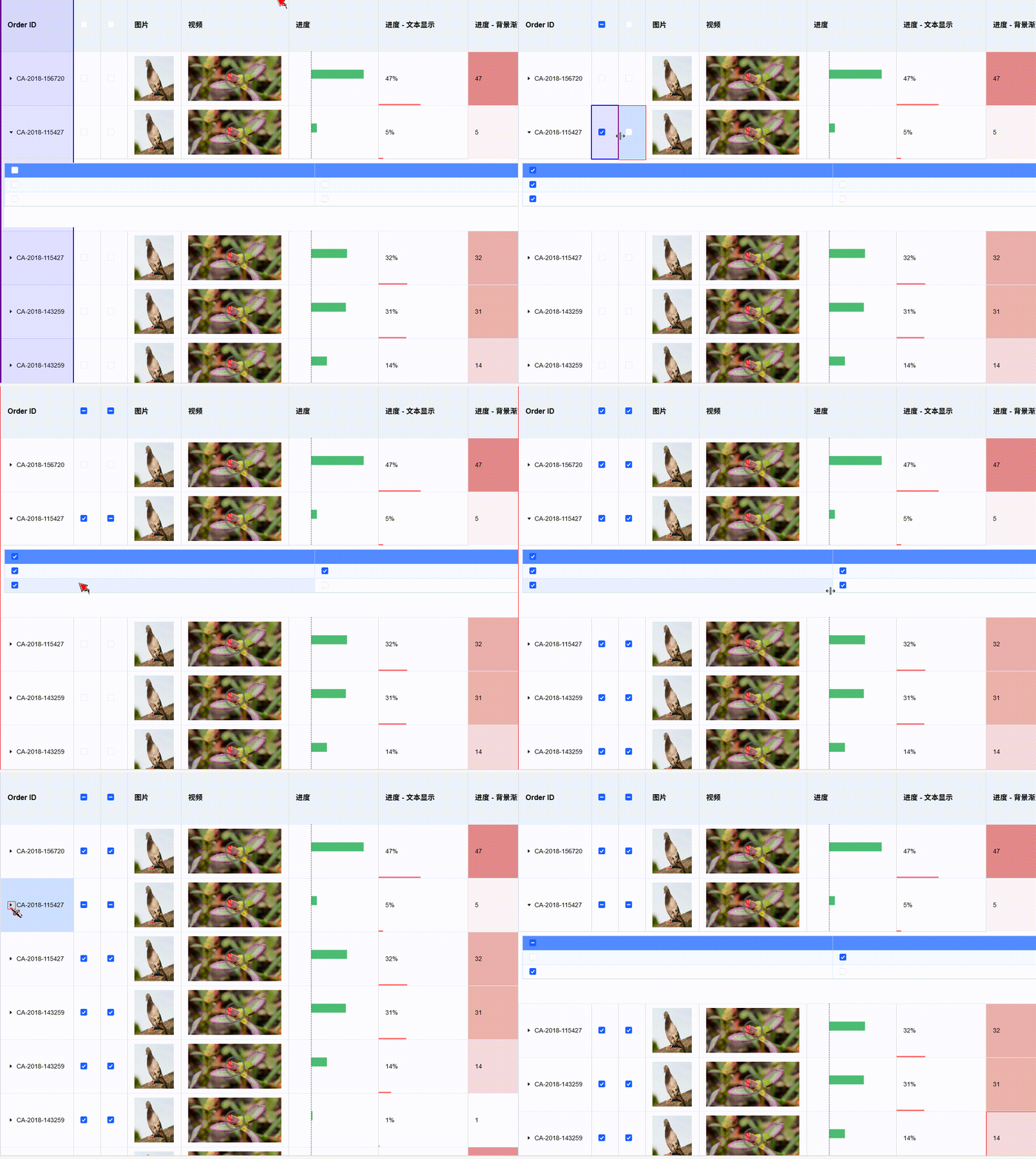
Technical Implementation
- Event Listening: Monitors checkbox change events in both master and sub-tables
- State Synchronization: Maintains selection state mapping relationships through internal state manager
- Callback Notification: Triggers corresponding callback functions when selection state changes, facilitating business processing
This linkage mechanism greatly improves the operational efficiency of complex data structures, allowing users to perform batch selection operations with simple clicks.
Lazy Loading Functionality
When the parent row record’s children field is true, it indicates this is a lazy loading node that requires asynchronous data retrieval by listening to the VTable TREE_HIERARCHY_STATE_CHANGE event.
When a user clicks the expand icon containing a lazy loading node, it triggers the following call chain:
User clicks expand icon
    ↓
table.toggleHierarchyState()
    ↓
Trigger TREE_HIERARCHY_STATE_CHANGE event
    ↓
User event handler receives event parameters
    ↓
tableInstance.setLoadingHierarchyState(col, row) displays loading icon
    ↓
Asynchronous data retrieval
    ↓
plugin.setRecordChildren(detailData, col, row) sets data and expands
    ↓
Renders sub-table and completes expansionMethodDescriptionParametersplugin.setLoadingHierarchyState(col, row)Display loading iconcol: column index, row: row indexplugin.setRecordChildren(children, col, row)Set child data and expandchildren: child data array, col: column index, row: row index

User Configuration Example
const masterData = [
  { id: 1, name: 'Order001', children: true },    // Lazy loading identifier
  { id: 2, name: 'Order002', children: [...] }   // Static data
];
const plugin = new MasterDetailPlugin({
detailTableOptions: {
// Sub-table configuration
}
});const tableInstance = new VTable.ListTable(options);// Listen to master-detail hierarchy state change event
const { MASTER_DETAIL_HIERARCHY_STATE_CHANGE } = VTable.ListTable.EVENT_TYPE;
tableInstance.on(MASTER_DETAIL_HIERARCHY_STATE_CHANGE, async (args) => {
if (args.hierarchyState === VTable.TYPES.HierarchyState.expand &&
args.originData?.children === true) {
// Show loading state
plugin.setLoadingHierarchyState(args.col, args.row);
try {
// Asynchronous data retrieval
const detailData = await fetchDataFromAPI(args.originData.id);
// Set child data and automatically expand
plugin.setRecordChildren(detailData, args.col, args.row);
} catch (error) {
console.error('Failed to load detail data:', error);
}
}
});Intelligent Caching Mechanism
- One-time Loading: After successful data loading,
children: trueautomatically converts to actual data array - Permanent Cache: When clicked again, it is recognized as static data and expands directly without reloading
This design implements transparent on-demand loading. Users only need to configure the onLazyLoad callback, and the rest of the state management is completely handled automatically by the plugin.
Summary
The VTable Master-Detail Table Plugin is a growing open source data display plugin, committed to providing excellent hierarchical data display solutions for web applications.
It brings the capability of displaying complex master-detail data relationships to the web while fully leveraging the interactive advantages of modern web technology. Whether you’re building order management systems, project management platforms, financial reporting systems, or any web application that requires master-detail table functionality, the VTable Master-Detail Plugin can provide you with an excellent choice.
Online Demo and Tutorials
Demo: https://visactor.com/vtable/demo/table-type/list-table-master-detail-table
Tutorial: https://visactor.com/vtable/guide/plugin/master-detail
Welcome to Connect
Finally, we sincerely welcome all friends interested in data visualization to participate in VisActor’s open source development:
VTable: VTable Official Website, VTable Github (Welcome to Star)
VisActor Official Website: www.visactor.io/ or www.viactor.com
Discord: discord.gg/3wPyxVyH6m
Feishu Group (External Network): Open Link to Scan QR Code

WeChat Official Account: Open Link to Scan QR Code

GitHub: github.com/VisActor
메타데이터
- post_id
- 47fc16dd8a3a
- slug
- vtable-master-detail-table-plugin-47fc16dd8a3a
- url
- https://medium.com/@xuanhun9/vtable-master-detail-table-plugin-47fc16dd8a3a
- canonical_url
- https://medium.com/@xuanhun9/vtable-master-detail-table-plugin-47fc16dd8a3a
- author_url
- https://medium.com/@xuanhun9
- status
- ok
- fetched_at
- 2026-07-16 17:42:09