Understanding Istio and Ambient (Mode-Mesh)
What Is a Istio
Understanding Istio and Ambient (Mode-Mesh)
What Is a Istio
Istio is an open source service mesh that layers transparently onto existing distributed applications. Istio’s powerful features provide a uniform and more efficient way to secure, connect, and monitor services. Istio is the path to load balancing, service-to-service authentication, and monitoring — with few or no service code changes. It gives you:* Do this
- Secure service-to-service communication in a cluster with mutual TLS encryption, strong identity-based authentication and authorization
- Automatic load balancing for HTTP, gRPC, WebSocket, and TCP traffic
- Fine-grained control of traffic behavior with rich routing rules, retries, failovers, and fault injection
- A pluggable policy layer and configuration API supporting access controls, rate limits and quotas
- Automatic metrics, logs, and traces for all traffic within a cluster, including cluster ingress and egress
Istio is designed for extensibility and can handle a diverse range of deployment needs. Istio’s control plane runs on Kubernetes, and you can add applications deployed in that cluster to your mesh, extend the mesh to other clusters, or even connect VMs or other endpoints running outside of Kubernetes.
A large ecosystem of contributors, partners, integrations, and distributors extend and leverage Istio for a wide variety of scenarios. You can install Istio yourself, or a large number of vendors have products that integrate Istio and manage it for you.
How it Works?
Istio leverages a proxy to intercept all network traffic, enabling a wide range of application-aware features based on the configuration you define.
The control plane takes the desired configuration and service information, dynamically programming the proxy servers and updating them whenever rules or the environment change.
The data plane handles communication between services. Without a service mesh, the network lacks understanding of the traffic being sent, making it unable to make decisions about the type of traffic or its source and destination.
Istio offers two data plane modes:
- Sidecar mode: Deploys an Envoy proxy alongside each pod in your cluster or with services running on VMs.
- Ambient mode: Utilizes a per-node Layer 4 proxy and optionally a per-namespace Envoy proxy to handle Layer 7 features.
Comparison of Sidecar Mode and Ambient Mode
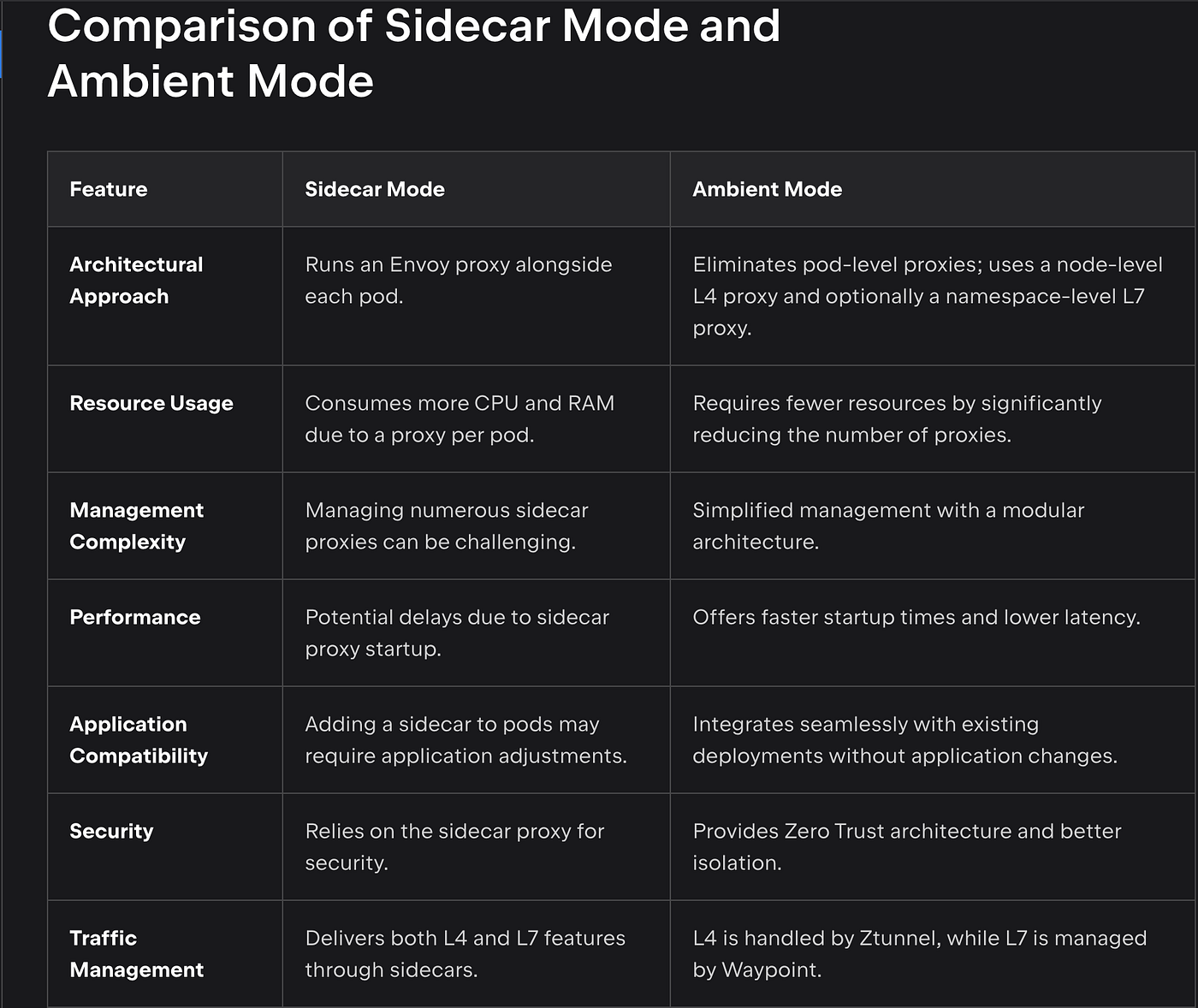
I used Writerside EAP while writing this article, but I couldn’t transfer this table from Markdown to Medium. I uploaded it as a screenshot, and I recreated the table in Excel as well. The link to that version is below. Thank you for your understanding.
[embed]
Performance Metrics
Resource Consumption and Latency Comparison
- CPU Usage: Ambient Mode reduces CPU overhead by removing sidecar proxies. Instead of running a proxy for each pod, a single node-level proxy manages traffic.
- Memory Usage: With fewer proxies, Ambient Mode also decreases memory usage, which is especially beneficial in microservices with heavy traffic.
- Startup Time: Ambient Mode avoids the time required for adding and configuring sidecars, leading to shorter pod startup times. This accelerates deployments during CI/CD workflows.
- Traffic Handling Capacity: Ambient Mode’s modular architecture enables more efficient traffic handling and better performance under high loads.
What is a Istio Ambient Mode?
Istio Ambient Mesh differs from traditional Service Mesh by not requiring a sidecar proxy for each pod. This approach significantly lowers resource usage and simplifies management. The Ambient Mesh architecture includes Istio CNI and Ztunnel for providing zero trust/mTLS and Layer 4 (L4) security at the pod level, along with Istio Waypoint to manage Layer 7 (L7) capabilities. The main advantages of Ambient Mesh are reduced resource overhead, enhanced security through better component isolation, and a more streamlined architecture that supports the gradual adoption of new features.
What is the difference between Istio Ambient mode and Ambient mesh
“Ambient mode” is the official terminology Istio uses to describe a sidecarless architecture. “Ambient Mesh” is a colloquial term used to describe a service mesh without sidecars.
Istio Components
Istio have a two components. Control Plane and Data Plane
- Control Plane The control plane serves as the central management hub, overseeing and directing the network of microservices.
It is responsible for configuring and managing proxies to route traffic effectively. The control plane also sets up Mixers to enforce policies and gather telemetry data.
- Data Plane
The data plane consists of a network of intelligent proxies (Envoy) deployed as sidecars.
These proxies manage and regulate all communication between microservices, working alongside Mixer, which acts as a policy and telemetry center.
The sidecars that are deployed within services and function as proxies together create the service mesh network.
The typical behavior is that a Service Mesh acts as an intermediary layer within the cluster network. It secures communication channels between dedicated containers by running alongside the primary application containers as a sidecar container. This setup provides a network connection through a proxy server, ensuring seamless integration between the proxy server and the main application over the local network.
Benefits of Ambient Mode
- Ambient Mesh features a modular architecture that separates L4 and L7 capabilities into distinct components, reducing resource usage compared to sidecar proxy setups.
Discovering Service Mesh Observability with Kiali Dashboard
One of the biggest advantages Istio offers as a service mesh is providing deep visibility into your microservices architecture. This is where a tool like Kiali becomes indispensable. Kiali is an open-source observability and management tool specifically designed for Istio. Let’s explore how Kiali helps monitor microservice interactions using two screenshots.
Traffic Graph: Real-Time Monitoring of Microservice Interactions

The screenshot showcases Kiali’s Traffic Graph feature. Here, the BookInfo Application takes center stage, presenting detailed interactions between its microservices (e.g., productpage, reviews, ratings).
- Key Highlights:
- Arrows and statistics display the flow and rate of requests between services.
- Mutual TLS (mTLS) is enabled between services, ensuring all communications are secure.
- Real-time metrics (e.g., request rates and success percentages) provide insights into the overall health of the system.
This graph is invaluable for identifying bottlenecks, tracking request patterns, and ensuring secure and efficient communication between services.
Mesh Overview: A Holistic View of Your System

The screenshot highlights Kiali’s Mesh Overview feature. This section offers a summary of connections between the Istio control plane and other components. For instance, within the cluster.local mesh, the following components are visible:
- Istio control plane (
istiod) - Monitoring tools like Prometheus and Kiali
- An external setup, Grafana
The mesh overview ensures that all components are functioning as expected. For example, the red line indicating a broken link with Grafana suggests an error or misconfiguration. Detecting and resolving such issues promptly is crucial for system health.
How Does Kiali Enhance Microservice Observability?
Through the dashboards Kiali offers, you can:
- Easily visualize traffic flow between microservices.
- Debug communication issues quickly using mTLS and request metrics.
- Monitor the overall health of mesh components and their connections.
When combined, these insights empower teams to optimize resource usage, enhance security, and improve application performance.
메타데이터
- post_id
- 481eb7ea48e5
- slug
- understanding-istio-and-ambient-mode-mesh-481eb7ea48e5
- url
- https://medium.com/devopsturkiye/understanding-istio-and-ambient-mode-mesh-481eb7ea48e5
- canonical_url
- https://medium.com/devopsturkiye/understanding-istio-and-ambient-mode-mesh-481eb7ea48e5
- author_url
- https://medium.com/@merttpolat
- status
- ok
- fetched_at
- 2026-07-13 06:23:13