How I Would Clean Up an AWS Account with AWS Nuke
You spin up a POC account. You test something. It works. Everyone moves on. Then later someone checks Billing and realizes the account was…
How I Would Clean Up an AWS Account with AWS Nuke
You spin up a POC account. You test something. It works. Everyone moves on. Then later someone checks Billing and realizes the account was never really cleaned up. A few things are still running.
Quick credit first: this post idea came from Sir Ike Gabriel Yuson. The 🐐
If you have not used it before, AWS Nuke is a tool that finds resources in an AWS account and deletes them.
It sounds useful. and it also sounds dangerous.
So If a POC account was left running and I had to close it down properly, these are the steps I would follow
Step 1: Install AWS Nuke
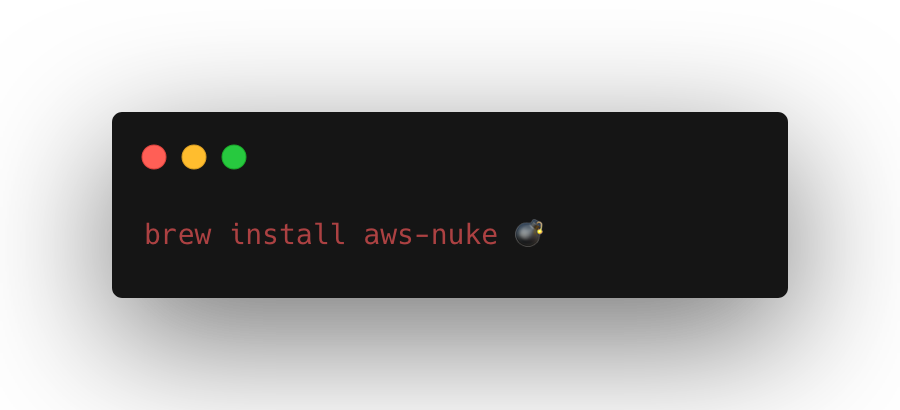
On macOS, I would use Homebrew:
brew install aws-nukeYou can also download binaries from the GitHub releases page. The docs recommend GitHub releases because they support more operating systems and CPU architectures.
Check that it works:
aws-nuke versionStep 2: Check Your AWS Identity
Before writing the config, I want the terminal to tell me which AWS account I am using.
aws sts get-caller-identity --profile cleanupExample:
{
  "UserId": "AIDAEXAMPLE",
  "Account": "111122223333",
  "Arn": "arn:aws:iam::111122223333:user/matt"
}
That Account value matters. That is the account AWS Nuke will work against. I also check the AWS Console at this point. The CLI and console should agree. If they do not agree, stop.
Step 3: Let AWS Nuke Check the Account Too
AWS Nuke has an account details command.
I run this before any dry run.
aws-nuke account-details --profile cleanupExample output:
Account ID:       111122223333
Account ARN:      arn:aws:iam::111122223333:root
Account Alias:    matt-cleanup
Default Region:   us-east-1
Enabled Regions:  [global us-east-1 us-west-2 ap-southeast-1]
Again, double check the details:
- correct account ID
- correct account alias
- expected regions
Step 4: Create the Config
AWS Nuke needs a YAML config file.
Create nuke-config.yaml.
This is the kind of config I would start with:
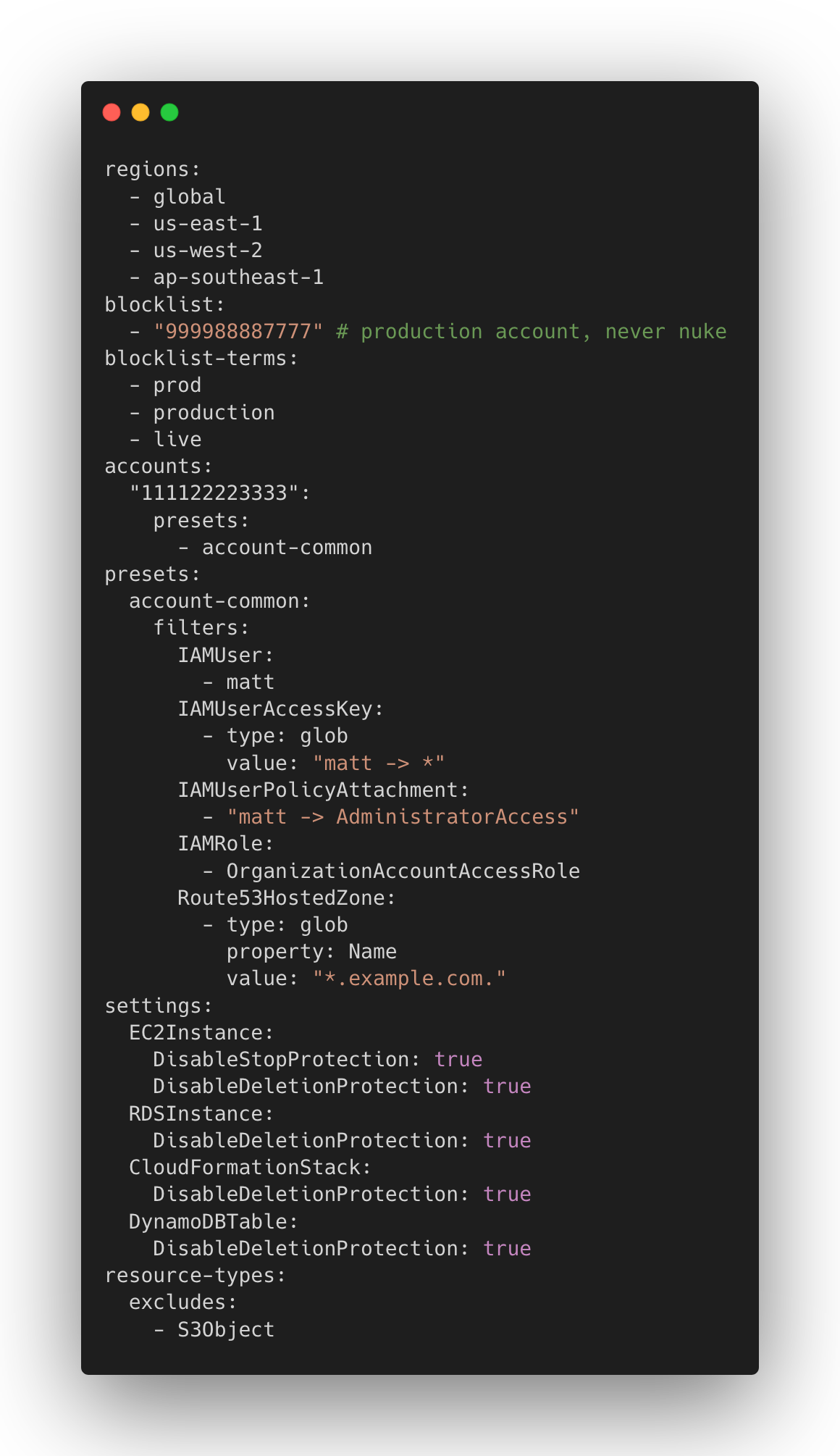
Some plain notes:
regionstells AWS Nuke where to look.globalis needed for IAM and other global resources.blocklistis for accounts AWS Nuke should refuse to touch.blocklist-termsblocks account aliases with words likeprod.filtersare resources I want to keep.S3Objectis excluded because bucket deletion handles objects.
Your filters should match your account.
Step 5: Explain the Config
Before the dry run, I want AWS Nuke to explain what it thinks the config means.
aws-nuke explain-config \
  --config nuke-config.yaml \
  --profile cleanup \
  --account-id 111122223333 \
  --with-included \
  --with-excluded \
  --with-filtered
I check:
- Is the target account there?
- Is the production account blocklisted?
- Are my filters showing up?
- Are the regions right?
- Did I exclude something by mistake?
Step 6: Run the Dry Run
By default, AWS Nuke does a dry run.
So this does not delete yet:
aws-nuke run \
  --config nuke-config.yaml \
  --profile cleanup
I usually save the output:
aws-nuke run \
  --config nuke-config.yaml \
  --profile cleanup \
  2>&1 | tee nuke-dry-run.txt
Then search for the important lines:
rg "would remove|filtered by config|failed|error" nuke-dry-run.txtI care about two things:
would removefiltered by config
would remove means AWS Nuke found something it plans to delete.
filtered by config means my config protected something.
Step 7: Make the Output Easier to Read
The dry run can be long and these are just the stuff i do for sanity or my own preferences.
I like grouping it by resource type:
rg "would remove" nuke-dry-run.txt \
  | sed -E 's/^([^ ]+) .*/\1/' \
  | sort \
  | uniq -c \
  | sort -nr
Example:
42 CloudWatchLogsLogGroup
  18 EC2SecurityGroup
  11 IAMRolePolicyAttachment
   8 LambdaFunction
   5 S3Bucket
   3 CloudFormationStack
Now I can ask better questions.
- Why do I have 42 log groups?
- Are those Lambda functions from my last test?
- Do I recognize those buckets?
- Is there anything here that should have been filtered?
- If something looks wrong, I fix the config and run the dry run again.
Step 8: Add Filters for Things You Want to Keep
Let’s say the dry run shows this:
S3Bucket - my-artifacts-to-keep - would removeBut I want that bucket to stay.
I add a filter:
accounts:
  "111122223333":
    presets:
      - account-common
    filters:
      S3Bucket:
        - my-artifacts-to-keep
Or if I want to keep buckets with a naming pattern:
accounts:
  "111122223333":
    filters:
      S3Bucket:
        - type: glob
          value: "matt-keep-*"
Then I dry run again:
aws-nuke run \
  --config nuke-config.yaml \
  --profile cleanup \
  2>&1 | tee nuke-dry-run-2.txt
rg "my-artifacts-to-keep|matt-keep" nuke-dry-run-2.txt
I do not move on until the dry run makes sense.
Step 9: Run It for Real, this time
When the dry run looks right, add --no-dry-run.
aws-nuke run \
  --config nuke-config.yaml \
  --profile cleanup \
  --no-dry-run
Read the prompt.
Check the account ID again.
Then save the real output too:
aws-nuke run \
  --config nuke-config.yaml \
  --profile cleanup \
  --no-dry-run \
  2>&1 | tee nuke-run.txt
Some things might fail the first time. That is normal because AWS resources depend on other AWS resources.
A VPC may not delete until subnets, route tables, NAT gateways, endpoints, ENIs, and security groups are gone. An IAM role may not delete until policy attachments are gone. A log group might come back if something is still writing logs.
So I run it again:
aws-nuke run \
  --config nuke-config.yaml \
  --profile cleanup \
  --no-dry-run \
  2>&1 | tee nuke-run-2.txt
The second or third run is usually cleaner.
Step 10: Check What Is Left
After the real run, I do another dry run:
aws-nuke run \
  --config nuke-config.yaml \
  --profile cleanup \
  2>&1 | tee nuke-after.txt
Then I summarize it again:
rg "would remove" nuke-after.txt \
  | sed -E 's/^([^ ]+) .*/\1/' \
  | sort \
  | uniq -c \
  | sort -nr
I also check common expensive services manually:
aws ec2 describe-nat-gateways --profile cleanup --region us-east-1
aws rds describe-db-instances --profile cleanup --region us-east-1
aws elbv2 describe-load-balancers --profile cleanup --region us-east-1
aws eks list-clusters --profile cleanup --region us-east-1
If I used more regions, I check those too.
Optional: Add a Small Makefile
After doing this once, I do not want to remember every flag.
Things I Would Watch For
A few notes from testing it:
- The first run might not delete everything.
- Dependencies can block deletion.
- Some default AWS-managed resources may still show up.
- Filters depend on the resource identifier in the dry-run output.
globalmatters.allmeans all enabled regions.- Dry run is useful, but it is not a backup.
- The blocklist is important.
Also, AWS Nuke is not a replacement for Infrastructure as Code.
If I made something with CDK, Terraform, SST, or CloudFormation, I should destroy it with that same tool first.
AWS Nuke is for the leftovers.
The messy cleanup.
The “what is still running in this POC account?” situation.
My Checklist
Next time, I would follow this:
- Open the AWS Console and confirm the account.
- Run
aws sts get-caller-identity. - Run
aws-nuke account-details. - Put production accounts in
blocklist. - Add account alias blocklist terms.
- Start with explicit regions.
- Add filters for anything I want to keep.
- Run
explain-config. - Run dry run and save the output.
- Review resource types.
- Update filters.
- Dry run again.
- Run with
--no-dry-run. - Run it again if dependencies blocked deletion.
- Run one final dry run.
- Check Billing or Resource Explorer later.
Thats it!
Final Thoughts
AWS Nuke feels risky because it is risky but I get why people use it.
For a forgotten POC account, it is way faster than clicking around the console and guessing what is still alive. The trick is to treat the dry run as the real work. The delete command is just the last step.
So yeah, I would use AWS Nuke again.
Carefully. With the account ID checked way too many times. 😂
Sources:
- AWS Nuke installation docs: https://aws-nuke.ekristen.dev/installation/
- AWS Nuke CLI usage docs: https://aws-nuke.ekristen.dev/cli-usage/
- AWS Nuke config docs: https://aws-nuke.ekristen.dev/config/
- AWS Nuke filtering docs: https://aws-nuke.ekristen.dev/config-filtering/
- AWS Nuke starter config: https://aws-nuke.ekristen.dev/starter-config/
Tags: AWS, Cloud Computing, DevOps, AWS CLI, Infrastructure
메타데이터
- post_id
- 482ea88e2815
- slug
- how-i-would-clean-up-an-aws-account-with-aws-nuke-482ea88e2815
- url
- https://medium.com/@mattenarle/how-i-would-clean-up-an-aws-account-with-aws-nuke-482ea88e2815
- canonical_url
- https://medium.com/@mattenarle/how-i-would-clean-up-an-aws-account-with-aws-nuke-482ea88e2815
- author_url
- https://medium.com/@mattenarle
- status
- ok
- fetched_at
- 2026-06-09 15:37:30