We Built a Background Coding Agent. Here’s What Actually Happened.
By Frank Li & Hiep Doan
We Built a Background Coding Agent. Here’s What Actually Happened.
How we went from “checkout my branch” to building a durable, multi-player AI agent for cross functional software building.
The Problem
Our development workflow was a relay race 🏃♀️➡️🏃. Build locally, test locally, screenshare to get feedback, open a PR, wait for review, deploy, and then finally let stakeholders try it. Every handoff leaked context. Every step added latency. Early feedback was expensive, so people just… didn’t give it.
We wanted something different: a background agent that 🧠 lives where the code lives, 🛠️ uses real engineering tools, 👥 supports multiple people in the same session, ⏱️ keeps running instead of resetting every interaction, and 🧪 lets stakeholders click, test, and watch things update in real time.
We called it Psyduck.
Why Not Just Use Cursor?
We like Cursor. We still use it. Our designers love its visual editing mode for frontend work, and we’re exploring having Cursor connect to our remote sandboxes as part of the broader stack. This isn’t a replacement story. It’s a “we needed something additional” story.
Cursor is great as a code editor and for interactive, developer-in-the-loop workflows. But for background agent orchestration (async, multi-player, long-running) we kept hitting gaps that a purpose-built system could fill.
👥 Multi-player and persona awareness: Cursor is a single-player code editor. That’s its job and it’s great at it. We needed a shared session where engineers, PMs, and designers interact with the same agent in Slack, and where the agent adjusts how it responds depending on who’s talking. A PM asking “what changed?” should get a different answer than an engineer asking the same thing.
📌 Durable background sessions: We needed sessions that survive restarts, handle queued prompts when the agent is already busy, and keep running across multi-step tasks over hours. Not task-style interactions. Actual long-lived processes with lifecycle tracking.
🛠️ Full environment and orchestration control: We needed our own sandboxes, WireGuard tunnels into our VPC, our own images and security posture. But more importantly, because we own the orchestration layer, the agent doesn’t have to wait for someone to type a message. We can hook into webhooks from Jira or Linear and spin up the agent on trigger. A ticket gets created, a bug gets filed, and the agent starts working before anyone opens Slack.
There are other differences too (feedback loop speed, git workflow control) but the above are the ones that really forced our hand. Cursor handles the interactive, single-player editing (our designers especially love the visual editing mode for FE work). Psyduck handles the async, multi-player, infrastructure-heavy stuff that no code editor was designed to solve.
Where We Are Today
Before diving into the messy journey, here’s the current architecture at a glance:
- Slack as the primary multi-player client
- A stateless orchestrator running in ECS, handling routing and lifecycle
- Cloudflare Durable Objects as the session coordinator, storing sessions, work queues, and prompt events
- e2b sandboxes: secure microVMs where the code, agent, and applications actually run
- Claude SDK powering the coding agent itself
- WireGuard tunneling sandbox traffic into our private AWS VPC
This setup works. But it didn’t come together quickly.
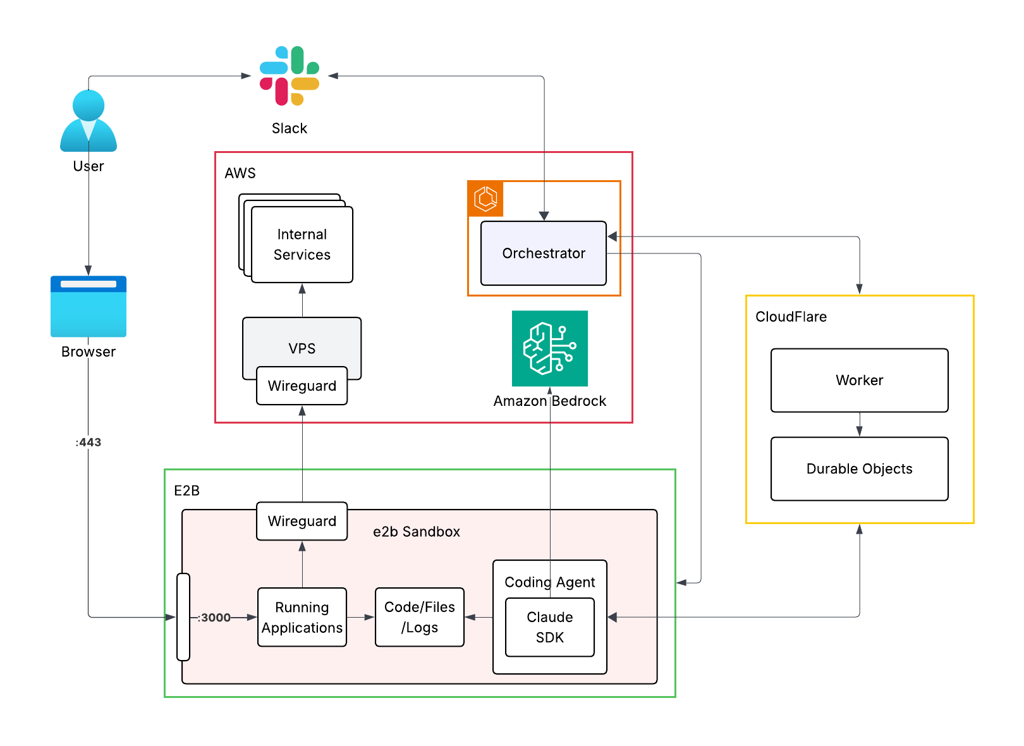
Architecture (for part 1 of this blog!)
The Devlog
Day 1: Sandbox Testing
We started with a very concrete question: how do we give an agent the same tools as a software engineer while letting everyone look at the same thing?
The first thing we tried was deploying an e2b sandbox that could pull code from GitHub, expose file read/write tools to the agent, and surface changes through a public URL. The LLM was central, but all the actual tools (reading files, writing files, running commands) came from the sandbox environment.
It was intentionally primitive. But we could watch the agent make changes and see the app update in real time. That was enough to keep going.
What we learned: e2b spins up environments fast. Its microVMs feel close to real VMs. You can install almost anything and give the agent powerful tooling.
Day 2: Solving Agent Access
Once the end-to-end loop was working, performance issues showed up fast.
Every file read and write went over the network via sandbox APIs. The latency added up and made the agent feel sluggish. The realization was simple: it’s much better for the agent to sit where the code is.
We installed OpenCode directly inside the sandbox, running in CLI mode and writing output to files. The orchestrator would read those files, parse responses (tool calls, plain text, etc.), and stream them back to the client.
Around this time, we also moved from a web client to Slack. Multi-player collaboration was always a requirement, and Slack is the natural medium inside the company.
What we learned: OpenCode CLI requires a pseudo-terminal to run properly. File-based communication works but is fragile and awkward.
Day 3: Solving Networking and Internal Access
At this point we had a Slack bot, the ability to spin up a sandbox per thread, and an agent running inside it. The next blocker: making the sandbox actually useful.
To properly test changes, the sandbox needed access to internal services inside our AWS VPC. e2b sandboxes live outside our infrastructure, so this wasn’t trivial. We solved it by deploying a VPS inside our VPC, installing WireGuard on both the VPS and each sandbox, and tunneling traffic through: sandbox → VPS → internal services.
Credentials were another challenge. The sandbox runs outside our trust boundary. For things like Bedrock access, the orchestrator mints short-lived API keys (12-hour expiry) and injects them at runtime.
What we learned: Tailscale doesn’t work well in containerized sandbox environments. WireGuard is explicit, boring, and reliable. Deploying a background agent is 95% infrastructure, 5% LLM.
Day 4: Solving Agent Reliability
After using OpenCode for a while, reliability problems became impossible to ignore. Sometimes the agent would hang indefinitely, wait for user input that never came, or fail to signal when it was done.
This turned out to be a fundamental mismatch. Terminal-based agents like OpenCode (and Aider) are designed for interactive use, not autonomous background execution. We tried server mode. It didn’t help much. We spent time hacking around the output, trying to infer when the agent was thinking, responding, finished, or waiting for input. The complexity kept growing and the system was still unreliable.
Eventually, we stopped trying to adapt existing tools and hand-rolled our own coding agent: an LLM, a small set of tools (read, write, search files), LiteLLM for routing, and full control over lifecycle and streaming. The result was noticeably better. Because we owned every step, we could stream responses reliably and know exactly what state the agent was in.
What we learned: Interactive CLI agents don’t map well to background execution. Owning the agent lifecycle dramatically improves reliability.
Day 5: Durable Objects. The “Aha” Moment

This was the turning point.
In Slack, you can’t disable the input box while the agent is “thinking.” Users will inevitably double-prompt or interrupt the agent mid-task. We needed a way to manage concurrency without losing conversation state if a server restarted.
Cloudflare Durable Objects became the single source of truth, managing three distinct entities:
🔄 The WorkQueue acts as the global pulse. Instead of the orchestrator polling every open Slack thread, it only checks this queue for “active sessions”, threads where prompts are currently pending. This prevents unnecessary compute on idle threads while ensuring no message gets dropped.
🧠 The Session is the brain for a specific Slack thread. When a user sends a message while the agent is busy, the Durable Object enqueues the prompt rather than dropping it or causing a race condition. It stores the full session history, so if the agent or orchestrator crashes, it can resume exactly where it left off.
📋 The Prompt tracks every user request as a unique object with its own lifecycle (pending, processing, completed, or failed) plus event logging to surface status back in Slack.
We chose polling over WebSockets or webhooks for the orchestrator-to-WorkQueue communication. It’s significantly easier to reason about and debug. If the network blips, the orchestrator just picks up the next item, making the system inherently self-healing.
Day 6: Functionality and Moving to Claude SDK
With the system stable, we started layering in higher-level features: full thread context (the agent reads the entire Slack thread, not just messages it’s tagged in) and persona awareness (adjusting responses depending on whether it’s talking to a manager, designer, PM, or engineer).
Around this time, we moved from our hand-rolled agent to Claude SDK. It isn’t heavily advertised, but it fit our use case extremely well. 🧩 Claude Code as a library, stronger coding tools, built-in MCP support, and cleaner context window management. Its streaming APIs let us continuously pipe what the agent is doing back to users, even though the agent runs autonomously as a long-running process.
The Problems Nobody Warns You About
Getting here forced us to confront a different class of problems than we initially expected. Some were obvious early on: slow feedback loops, unreliable agents, difficulty sharing a consistent view of the system.
Others only emerged once we started deploying agents “for real”: how to enqueue prompts when users message an agent that’s already working, how to tell when an agent is thinking vs. stuck, how to keep sessions alive across restarts, how to give sandboxes secure access to internal services, how to manage credentials in an environment that isn’t fully trusted.
Most of these problems had very little to do with the LLM itself.
What’s Next
Building the agent from scratch taught us a lot about the problem space, but going forward we want to spend less time on plumbing and more on what the agent can do. We’re looking at more managed options — AWS AgentCore and LangGraph in particular — so we can lean on existing orchestration and focus on multi-player behavior, tooling, and reliability instead of reinventing the stack. We’ll share what we learn.
If you’re building something similar or have opinions about background agent architectures, we’d love to hear from you.
메타데이터
- post_id
- 491be4cea8f6
- slug
- we-built-a-background-coding-agent-heres-what-actually-happened-491be4cea8f6
- url
- https://engineering.immutable.com/we-built-a-background-coding-agent-heres-what-actually-happened-491be4cea8f6
- canonical_url
- https://engineering.immutable.com/we-built-a-background-coding-agent-heres-what-actually-happened-491be4cea8f6
- author_url
- https://medium.com/@b439988l
- status
- ok
- fetched_at
- 2026-07-13 06:23:13



