What Happens Internally When You Put Data into a HashMap?
Imagine you are in a Java interview, and the interviewer asks:
What Happens Internally When You Put Data into a HashMap?

Imagine you are in a Java interview, and the interviewer asks:
“What happens internally when you call map.put(key, value)?”
Most candidates usually say:
“HashMap calculates the hash and stores the value.”
That is true.
But that is only a small part of the story.
Behind this single line of code:
map.put("user_id_123", "john");HashMap internally does a lot of work.
If you are not a member, checkout this YouTube tutorial link — How HashMap.put Actually Works
It lazily creates its internal table.
It calculates the hash.
It finds the correct bucket.
It handles collisions.
It may convert a linked list into a Red-Black Tree.
And when the map gets too full, it resizes the entire table.
Let’s break down exactly what happens, one step at a time.
Step 1: Creating the HashMap

Let’s start with this line:
HashMap<String, String> map = new HashMap<>();After reading this, you might think Java immediately allocates memory for 16 buckets because the default initial capacity of a HashMap is 16.
But it does not.
At this point, the internal bucket array is still null.
HashMap delays creating the bucket array until you insert the very first key-value pair.
This optimization is known as lazy initialization.
The reason is simple.
Not every HashMap that gets created is actually used.
Imagine an application creating thousands of HashMap objects during its lifetime.
If Java immediately allocated 16 buckets for every single one, a significant amount of memory would be wasted on maps that might never store a single entry.
So Java waits until the first insertion.
Step 2: First Insertion

Now let’s insert our first entry.
map.put("user_id_123", "john");Since this is the very first insertion, HashMap checks whether its internal bucket array has been created.
It has not.
So HashMap allocates the bucket array.
By default, it creates 16 buckets.
You can think of this as an array containing 16 slots.
Each slot is called a bucket, and every key-value pair will eventually be stored in one of these buckets.
Now that the table is ready, the next question is:
Which bucket should store "user_id_123"?
To answer that, HashMap needs the hash of the key.
Step 3: Calculating the Hash

HashMap first calls the hashCode() method of the key.
key.hashCode();A hash code is simply a number that represents an object.
HashMap uses this number to quickly decide where the key should be stored.
For a String, Java already provides its own implementation of hashCode().
For example:
String s1 = "Apple";
String s2 = "Apple";
System.out.println(s1.hashCode());
System.out.println(s2.hashCode());Both statements print the same hash code because both strings contain the same characters.
Now let’s see what happens with a custom class.
class Person {
    String name;
Person(String name) {
this.name = name;
}
}Now create two objects with the same data:
Person p1 = new Person("john");
Person p2 = new Person("john");
System.out.println(p1.hashCode());
System.out.println(p2.hashCode());Even though both objects contain the same data, they will usually produce different hash codes because we are using the default implementation inherited from Object.
That default implementation is based on object identity, not object content.
That is why, if you use a custom object as a HashMap key, you should override both:
hashCode()
equals()
Otherwise, HashMap will not be able to recognize two logically equal objects as the same key.
Now suppose our key generates this hash code:
154678923Does HashMap use this value directly?
Not yet.
Before calculating the bucket, it performs one extra operation:
hash ^ (hash >>> 16)This mixes the higher bits into the lower bits.
Why?
Because the bucket index calculation mostly depends on the lower bits of the hash.
So this extra step helps distribute keys more evenly across buckets and reduces collisions.
Step 4: Finding the Bucket

Now that the final hash is ready, HashMap needs to answer one question:
Which bucket should this key go into?
It calculates the bucket index using this expression:
index = (table.length - 1) & hash;If the table has 16 buckets, this calculation might return:
5So HashMap directly jumps to Bucket 5 instead of searching the entire table.
You might be wondering:
Why use & instead of the modulo operator %?
Because the table size in HashMap is always a power of two:
16, 32, 64, 128 ...When the table size is a power of two, this expression:
(table.length - 1) & hashworks like modulo, but it is faster and more efficient.
Step 5: Is the Bucket Empty?

Now HashMap goes to Bucket 5.
There are two possibilities.
First, the bucket may be empty.
If the bucket is empty, HashMap creates a new node.
That node stores:
hash
key
value
next reference
Then HashMap places this node into Bucket 5.
And that is it.
The insertion is complete.
But what if Bucket 5 already contains another node?
That means two different keys have landed in the same bucket.
This situation is called a hash collision.
Now HashMap needs a different strategy to store the new entry.
Step 6: Handling Collisions
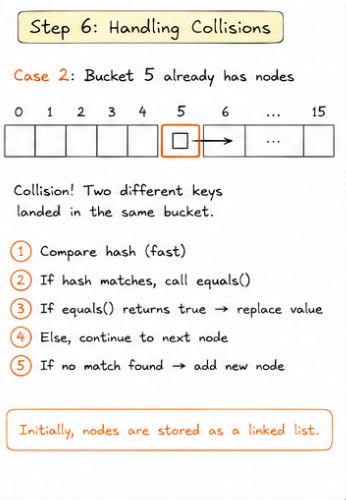
A collision simply means two different keys end up in the same bucket.
This is completely normal and expected.
When a collision occurs, HashMap starts traversing the nodes already present in that bucket.
For each node, it first compares the stored hash.
Why?
Because comparing two integers is much faster than comparing two objects.
If the hashes do not match, HashMap immediately moves to the next node.
If the hashes match, it performs one more check by calling:
equals()This step is important because two different objects can sometimes produce the same hash code.
Only when both conditions match:
same hash code
equals() returns true
does HashMap treat it as the same key and replace the existing value.
Otherwise, it continues searching.
If no matching key is found, HashMap creates a new node and adds it to the bucket.
Initially, all the nodes in a bucket are connected together as a linked list.
Step 7: When Does It Become a Red-Black Tree?
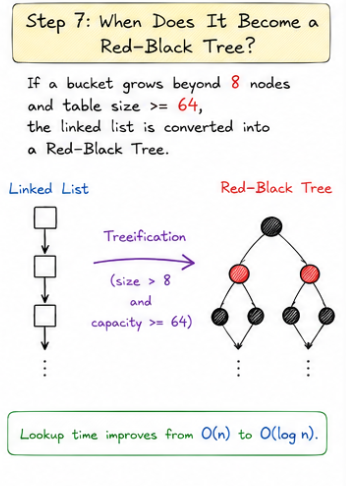
Now imagine a worst-case scenario.
More and more keys keep landing in the same bucket.
The linked list keeps growing.
Now every lookup has to scan one node after another.
As the list gets longer, search performance degrades to:
O(n)To prevent this, Java introduced an optimization in Java 8.
If a bucket grows beyond 8 nodes and the HashMap has at least 64 buckets, the linked list is converted into a Red-Black Tree.
In simple terms:
bucket size > 8
table size >= 64
Then treeification can happen.
Why the 64-bucket condition?
Because if the table is still small, collisions are usually caused by a lack of buckets, not necessarily bad hash distribution.
In that case, it is more effective to resize the table and allow entries to spread across more buckets instead of paying the overhead of maintaining a tree.
Once the bucket is converted into a Red-Black Tree, lookup time improves from:
O(n)to:
O(log n)Step 8: What Happens When the Map Gets Full?
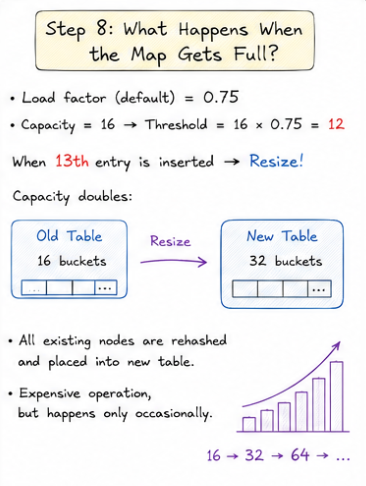
HashMap also keeps track of how full the table is.
By default, it uses a load factor of:
0.75With an initial capacity of 16 buckets, the resize threshold becomes:
16 × 0.75 = 12This means the table can hold up to 12 entries before it needs to grow.
When you insert the 13th entry, HashMap automatically resizes the table.
The capacity doubles from:
16 → 32Why use a load factor of 0.75?
Because it is a practical balance between memory usage and performance.
A lower load factor reduces collisions but wastes more memory.
A higher load factor uses memory better but increases collisions.
So 0.75 is a good default for most applications.
But resizing is not as simple as allocating a bigger array.
Every existing node has to be redistributed into the new table because the bucket index depends on the table size.
Earlier, with 16 buckets, the index was calculated like this:
(16 - 1) & hashAfter resizing to 32 buckets, the index becomes:
(32 - 1) & hashSo the same key may now belong to a different bucket.
That is why entries need to be redistributed.
Although resizing is an expensive operation, it does not happen on every insertion.
It happens only occasionally.
That is why HashMap still provides average O(1) performance for insertions and lookups.
Time Complexity of HashMap
Let’s quickly summarize the performance.
Average insertion:
O(1)Average lookup:
O(1)Worst case with long linked lists:
O(n)After treeification:
O(log n)So in normal cases, HashMap is very fast.
But in bad collision scenarios, performance can degrade.
That is exactly why Java 8 introduced treeification.
Conclusion
The next time someone asks:
“What actually happens when we call HashMap.put()?”
You do not have to answer with just:
“It hashes the key.”
Now you know the complete journey.
HashMap lazily initializes its internal table.
It calculates the hash.
It finds the correct bucket.
It handles collisions.
It compares keys using hashCode() and equals().
It may convert a linked list into a Red-Black Tree.
And when the map becomes too full, it resizes the internal table.
That is what makes HashMap one of the fastest and most commonly used data structures in Java.
But this is only half the story.
In the next article, we will understand how HashMap.get() works internally.
메타데이터
- post_id
- 4920cd3a9232
- slug
- what-happens-internally-when-you-put-data-into-a-hashmap-4920cd3a9232
- url
- https://medium.com/javarevisited/what-happens-internally-when-you-put-data-into-a-hashmap-4920cd3a9232
- canonical_url
- https://medium.com/javarevisited/what-happens-internally-when-you-put-data-into-a-hashmap-4920cd3a9232
- author_url
- https://medium.com/@ProgrammingTutorials
- status
- ok
- fetched_at
- 2026-07-20 16:22:49