Nim: A Python-Like C/C++ Alternative Every Programmer Should Learn
A statically typed, but Python-like systems programming language that transpiles to C, C++, and JavaScript
Nim: A Python-Like C/C++ Alternative Every Programmer Should Learn
A statically typed, but Python-like systems programming language that transpiles to C, C++, and JavaScript
Photo by Daniil Komov on Unsplash, edited with Canva
Rust and Go are the most popular systems programming languages in the current software industry. Low-level software product developers chose Rust, and cloud infrastructure developers chose Go. However, programmers still use C and C++ and choose them over Rust and Go. Meanwhile, C/C++ programmers who dislike Go’s heaviness and Rust’s complexity started seeking true C/C++ alternatives. As a result, languages like Zig, C3, Odin, D, and V began to gain popularity.
I still write most code in C/C++, but started worrying after seeing the evolved syntactical, memory safety, and standard library features in Rust and Go. As a result, I started evaluating all available C/C++ alternatives, except hyped Rust and Go, to find a better programming language for the future. I evaluated Zig, D, C3, V, and Odin and compared them with C/C++, Rust, and Go in my previous articles. In this article, I’ll evaluate the statically typed, compiled Nim systems programming language that comes with impressive macro-based metaprogramming features.
Let’s learn Nim’s features, understand its core design philosophy, and experiment with it by writing some sample programs.
What is Nim — is it similar to V?
Nim is a modern systems programming language initially released in 2008. Its design philosophy is inspired by developer-loved syntax, semantics, and built-in features of Python, Ada, and Modula, but also combines unique language-specific features (e.g., distinct types, functional programming features, macro-based metaprogramming support, and more) to compete with other languages.
Nim doesn’t use an LLVM backend like Rust or its own backend like Go. Instead, it chose to transpile to C and generate machine code using the user-installed C compiler, i.e, GCC on GNU/Linux.
Wait, is it like V? (If you don’t know about V, you can read my V programming article); it also transpiles to C, right?
Nim is more than a decade older than V, which was initially released in 2019 — Nim is a mature C/C++ alternative that every programmer should try, especially if they love Python’s syntax and semantics.
Nim vs. Python vs. V
Nim looks like Python extended with systems programming features, and V and Nim have many similarities from the compiler design perspective. Here is how Nim became so different and unique compared to Python and V:
- Python: Not a systems programming language. It’s a general-purpose, dynamic programming language suitable for web, cross-platform apps, data-oriented system development, and automation
- V: Both Nim and V use the same fundamental compiler backend design concept — they both transpile to C (also supports JavaScript), but V inherits syntax and semantics mostly from Go and Rust — not from Python
Python isn’t a C/C++ alternative. V is great for programmers who like Go but hate its heaviness and low-level programming barriers. Systems programmers who like Pythonic coding style will love using Nim
Highlighted features of Nim
Apart from the productive Python-like syntax and semantical foundation, Nim offers the following features to attract C/C++ programmers who are willing to modernize their classic C/C++ coding style and adapt to a new, versatile yet systems programming language:
- Better language complexity management: Nim doesn’t drop general developer-loved features that exist in Python, C++, and C. The whole Nim language isn’t technically simple, but the language is carefully designed with concepts like pragmas, macros, operators, and unique tokens to have opt-in complexity like C++ — you can write incredibly simple Pythonic code or write advanced code with elevated complexity
- Python-like but with unique syntax: Nim syntax isn’t 100% Python-compatible. Nim uses Python syntax as the base with well-known syntactical features (e.g., implements UFCS (uniform function call syntax) similar to D), but also offers unique features, such as calling procedures without parentheses, distinct types, a unique
usingstatement, and more; write Pythonic code but adapts to unique features whenever needed - Multiple backends without LLVM: No heavyweight LLVM included — Nim’s self-hosted compiler can directly emit intermediate, readable, C, C++, and JavaScript code from the AST. Uses the C/C++ compiler installed on the user’s PC to generate platform-specific executables
- JavaScript backend and integration features: The Nim CLI can generate readable JavaScript code from Nim source files, and Nim offers JavaScript DOM, console, BigInt, fetch, async, and more API wrappers, along with a productive FFI (foreign function interface) to integrate JavaScript libraries within Nim
- Unique, flexible C/C++ interop: Offers a unique but highly productive C/C++ interop by blending the unique compiler pragma syntax in function and type definitions. Nim even lets you directly emit C/C++ code using
{.emit}pragma to make its C/C++ interop even more interesting - Flexible memory management: Offers 8 different memory management strategies to suit all systems and even general-purpose programming scenarios. Supports various garbage collector implementations, RAII, and low-level manual memory management
- Fully featured standard library: Nim’s standard library goes beyond systems programming. It offers pre-developed data structures, algorithms (e.g., sorting, permutation, searching, hashing, and more), string manipulation, math, multi-threading, parsing (e.g., JSON, HTML, and more), database connection, and cross-platform operating system features (e.g., child-process, file-handling, dynamic library function calling, and many wrapper APIs) for general-purpose programming
- Metaprogramming with macros: Nim's versatile macro system helps you implement from simple code replacement templates to building advanced domain-specific languages (DSLs). You can inspect the AST and modify it effectively through macros
- OOP and generics: Nim effectively reuses the
typekeyword to create OOP classes, and lets you override methods using themethodkeyword— all primary OOP concepts are supported along with a dedicated generics syntax - Truly multi-paradigm: Write procedural, functional, OOP, async, or custom-styled code without any compiler restriction or limitation
- Batteries included: Built-in package manager (Nimble), test runner, shell scripting features (NimScript), hot reloading, code documentation generator, code formatter (NimPretty), and code editor features (NimSuggest). An official C to Nim code translator is also available
Nim offers everything you need for general-purpose and systems programming, like D and V programming languages.
Getting started with Nim programming
Let’s write some code in Nim to experiment with its interesting syntax and features.
Installing Nim
You can install Nim from the official Nim version manager CLI (choosenim), downloading pre-built binaries from the official website, using OS-specific package managers, or building from source. Visit the official installation guide and choose your preferred installation method.
I downloaded the pre-built compiler package for Linux and configured the system path as follows:
export PATH="$PATH:$HOME/programs/nim/bin"Note: If you don’t want to install Nim right now, you can still go through this tutorial by executing code snippets online on the official Nim playground
If your installation was successful, the nim command will work:
nim --version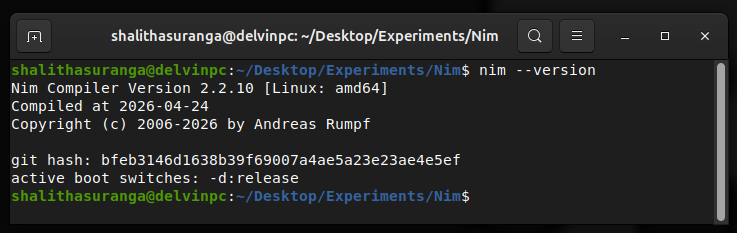
Testing the nim command after installing the Nim compiler, a screenshot by the author
Writing a basic Nim program
Create main.nim and add the following code snippet:
echo "Nim programming"Yes, as you already noticed, the same code snippet will work on Bash too. Nim isn’t a command language like Bash or Tcl, but it lets you call procedures omitting parentheses.
The echo() built-in procedure (defined within the pre-imported system module) can be called with parentheses too:
echo("Nim programming")Nim runs top-level code, unlike all popular C/C++ alternatives, so the above code will run without wrapping with a main() procedure.
Run the source file using the nim CLI as follows:
nim r --hints:off main.nim
Compiling and running the sample Nim program, a screenshot by the author
Even though there is no explicit main() procedure, you can use the isMainModule constant with compile-time when to avoid running the entry point when the specific file is imported, similar to Python’s __name__ == "__main__" :
when isMainModule:
  echo "Nim programming"
Transpiling to C, C++, and JavaScript
The nim r command transpiles Nim to C within the Nim compiler’s cache directory, creates executables using your C compiler, and executes the final binaries. If you need to inspect C source files before generating machine code, you can do so as follows:
nim c -c --nimcache:cout main.nimThe above command transpiles Nim to C and places readable C source inside the ./cout directory:
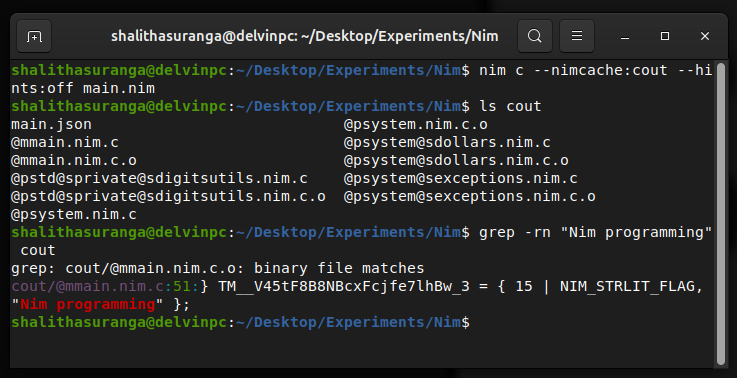
Inspecting auto-generated C source files, a screenshot by the author
Similarly, you can use the nim cpp command to output C++. The nim js command will generate main.js directly in your project directory.
Primary data types
Nim offers fundamental integer, floating point, boolean, character, string, and pointer types, including an automatic type, like any other systems programming language.
Here is a demonstration of some common atomic types:
const
  a: int = 10
  b: int8 = 120
  c: int16 = -2000
  d: uint8 = 255
  e: uint16 = 2000
  f: float32 = 222.1
  g: float64 = 2.20001

echo "a = ", a
echo "b = ", b
echo "c = ", c
echo "d = ", d
echo "e = ", e
echo "f = ", f
echo "g = ", g
Nim lets you define constants in a block to avoid the repetitive const keyword. The above sample uses Python-like type syntax for creating constants, but you can also use Nim-specific type suffixes:
const
  a = 10  # int
  b = 120'i8
  c = -2000'i16
  d = 255'u8
  e = 2000'u16
  f = 222.1'f32
  g = 2.20001'f64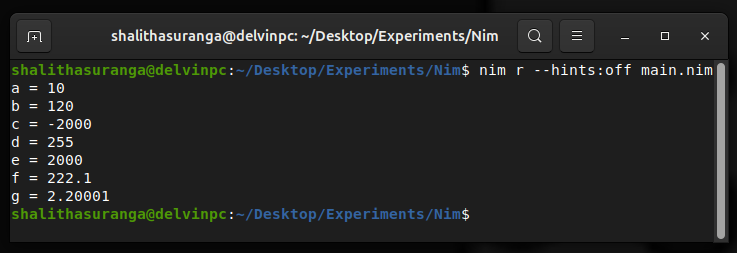
Demonstrating using primary data types in Nim, a screenshot by the author
String and character types are available with similar quotation mark syntax as C. Here is a simple demonstration using the built-in typeof() procedure:
const
  s = "Nim"
  c = 'N'

echo s, " ", typeof(s)          # Nim string
echo c, " ", typeof(c)          # N char
Nim’s ordinal types (including integers, characters, and booleans) support special operations via built-in procedures. For example, you can increment and decrement integers using inc() and dec():
var x = 10

inc(x)
echo x           # 11

dec(x)
echo x           # 10
Special ordinal built-ins are available to increment/decrement by a specific integer and calculate the integer successor/predesessor based on an integer input (they are very useful with enumerations).
Built-in type classes, custom types, and distinct types
Unlike other compiled languages, Nim offers several built-in type classes to accept different types at compile-time. For example, the following print() procedure can be used to print integers and floating-point numbers:
proc print(n: SomeNumber): void =
  echo n, " ", typeof(n)

print(10)
print(2.2)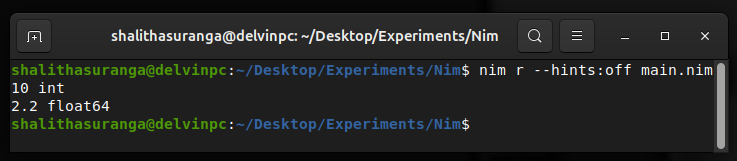
Using the SomeNumber type class, a screenshot by the author
Here we can pass any number type to print() since the SomeNumber type class accepts all number types. SomeInteger, SomeFloat, and more type classes are available.
Note: The
print()procedure doesn’t look so Python-like. We’ll discuss more about Nim’s unique procedure syntax and more features in an upcoming section
You can create custom type classes using a TypeScript-like union operator. If you use the following SomeByte in the above print() procedure, you can only pass int8 and uint8 types:
type SomeByte = int8 | uint8Nim lets you create different types using the same underlying type using the distinct keyword:
type
  USD = distinct int
  EUR = distinct int

var
  t1 = USD(2000)
  t2 = EUR(1500)
  t3 = USD(1000)

t1 = t3
t1 = t2  # error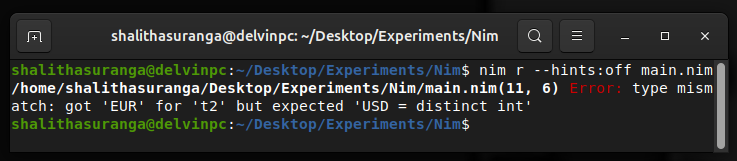
Compilation fails when one distinct type gets assigned to another, a screenshot by the author
Complex types and structures
Nim offers enumerations, objects (similar to C/C++ structs), arrays, sequences, sets, slices, and ranges. Nim doesn’t offer a native map structure like other popular languages, but it provides a hash table implementation with a map-like syntax from the standard library.
Let’s use some complex structures to practice their syntax and features.
You can define enums using the type and enum keywords and use the ord() built-in to retrieve the underlying integer value:
type
  Status = enum
    ready, starting, started, stopped

let s = Status.ready

echo Status.ready, " ", s == Status.ready   # ready true
echo ord(Status.started)                    # 2
No hacks needed to get previous and next enum values as in other compiled languages — the successor and predecessor built-ins help you do so with clear semantics:
let s = Status.starting

stdout.write pred(s), " -> "
stdout.write s, "(current) -> "
stdout.write succ(s), " -> "
stdout.write succ(s, 2), "\n"
Using pred() and succ() built-in procedures with enums, a screenshot by the author
Structs can be created using objects, as demonstrated in the following code snippet:
type
  Document = object
    id: uint
    title: string

var doc = Document(id: 1000, title: "Nim basics")
echo doc.id
echo doc.title
You can create fixed arrays and slice them as follows using a D-language-like syntax:
var
  a = [10, 20, 50, 100]
  s = a[1..2]

echo a
echo s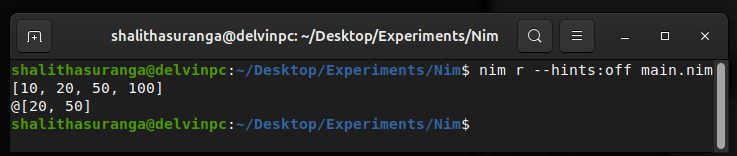
Creating arrays and slicing them, a screenshot by the author
A sequence is a dynamic list similar to Python. Once a sequence is created, you can manipulate its data using sequence methods thanks to Nim’s UFCS. You can create a sequence similar to arrays, but with a @ prefix, as demonstrated below:
var l = @[10, 20]
l.add(100)
l.insert(50, 1)
l.delete(2)

echo l             # @[10, 50, 100]
The sequtils module provides procedures for additional sequence operations, including filtering, searching, zipping/unzipping, removing duplicate elements, and more. The following example creates a new sequence by deduplicating elements and creating three cycles:
import std/sequtils

const l = @[4, 4, 5, 5, 6]
const c = l.deduplicate()
           .cycle(3)

echo c            # @[4, 5, 6, 4, 5, 6, 4, 5, 6]
Note: Here we used an explicit import to import a module from the standard library for the first time (built-in procedures like
echo()are defined in the pre-importedsystemmodule). We’ll discuss more standard library features in upcoming sections
Procedures
Similar to Odin, general functions are known as procedures in Nim. Nim procedures use a similar syntax to Python functions, but use proc instead of def and also use a = token at the end of the procedure signature. Look at the following procedure implementation:
import std/strformat

proc add(a, b: int): int =
  return a + b

const
  a = 10
  b = 30

echo &"{a} + {b} = {add(a, b)}"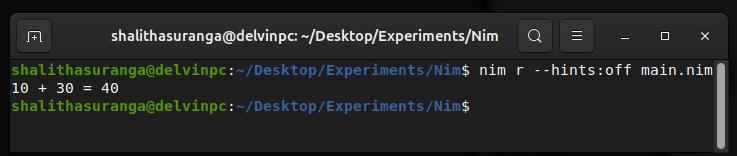
Demonstrating a simple procedure in Nim, a screenshot by the author
Note: The above code uses the
¯o/template for string interpolation. You can alternatively use thefmtmacro too.
Nim offers some unique features with procedures that other languages don’t offer. You can use the automatically created result variable instead of the return statement to change the return value at any point within the procedure block:
proc add(a, b: int): int =
  result = a + b
  echo &"result is {result}"
You can even use ; to separate parameters:
proc add(a: int; b: int): int = Nim allows us to write one-line short procedures, omitting the return statement to simplify your source code further:
proc add(a: int; b: int): int = a + bHere is how you can turn the above procedure into a lambda procedure:
const add = proc(a, b: int): int = a + bNim natively supports the pure functions concept in functional programming and offers the func keyword to define pure functions. You can create pure functions in the same way you used to create procedures, but using func, as shown below:
var m = 10

func f1(n: int): int =
  return n * 10 + 2

func f2(n: int): int =
  return n * 20 + m             # error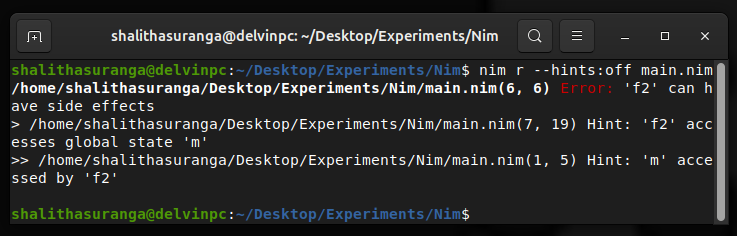
Compilation fails since the f2() function is not a pure function, a screenshot by the author
The second function won’t compile since it depends on a top-level variable. Changing var to const will fix the compile-time error that occurred above.
Writing simple Go-like OOP code is possible by creating object-specific procedures and calling them with the UFCS syntax:
type
  Document = ref object
    id: uint
    title: string

proc print(doc: Document, copies: int) =
  echo "Printing document #", doc.id, ", copies = ", copies

var doc = Document(id: 1000, title: "Nim basics")
doc.print(3)  # expands to: print(doc, 3)
Control structures
Python-like if statement, Odin-like compile-time when statement, and a simple for loop statement is available along with a Modula-inspired case statement, and a C-like while loop. Control statements are generally Python-like, but Nim adds unique features without affecting code readability.
Here is a simple demonstration of the Pythonic if statement:
from std/strutils import parseInt

let c = readLine(stdin).parseInt()

if c == 1:
  echo "Task: 1"
elif c == 2 or c == 3:
  echo "Task: 2 or 3"
elif c > 3 and c < 10:
  echo "Task: 3 to 10"
else:
  echo "ERR: Invalid input"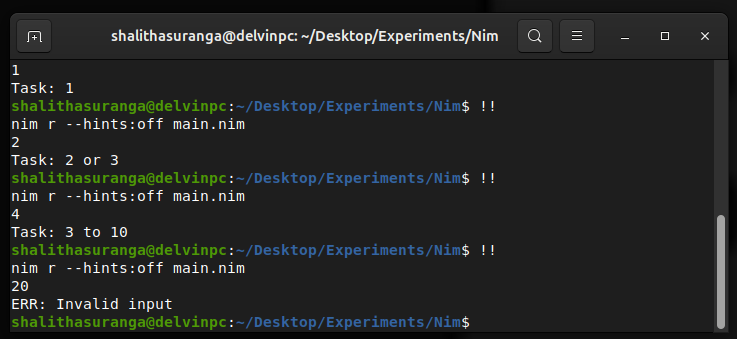
Testing the sample program that uses an if-elif block, a screenshot by the author
The case statement is similar to a general switch statement, but additionally supports Odin-like multiple matches and range matching syntax.
Let’s turn the above if block into a case block:
case c:
  of 1:
    echo "Task: 1"
  of 2, 3:
    echo "Task: 2 or 3"
  of 4..9:
    echo "Task: 3 to 10"
  else:
    echo "ERR: Invalid input"
The for statement can be used to iterate over sequences similar to Python. It additionally supports a native range syntax, and more built-in procedures are available for creating various ranges:
for i in 0..10:
  stdout.write i, " "
echo ""

for i in countup(0, 10, 2):
  stdout.write i, " "
echo ""

const a = @[10, 20, 30, 100]
for n in a:
  stdout.write n, " "
echo ""

for i, n in a:
  stdout.write n, "[idx: ", i, "] "
echo ""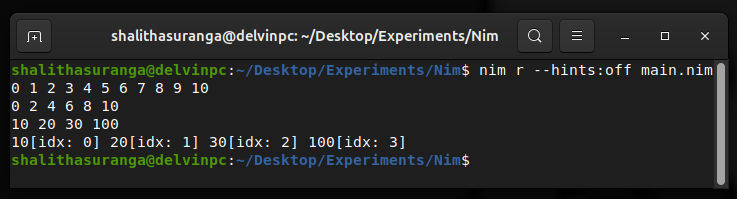
Experimenting with Nim’s for loop variants, a screenshot by the author
No native reserve for loop like D, C3, and Odin, but you can do so easily with the countdown() built-in:
const a = @[10, 20, 30, 100]
for i in countdown(a.high, a.low):
  stdout.write a[i], " "
echo ""
Error-handling features
Nim is a language with opt-in complexity, somewhat similar to C++ (not that much complex), so for error handling, it lets you use C-like return codes, using the pre-developed Result type from a library, JavaScript-like callbacks, modern optional values, Go-like multiple returns, and Python-like exceptions. You can even implement your own error-handling strategy using types, macros, and other language features. You have the freedom to choose an error-handling strategy that suits your preferences.
The following example uses std/options (optional values) for error handling:
import
  std/options,
  std/strformat

proc divide(a, b: int): Option[int] =
  if b == 0:
    return none(int)
  return some(a div b)

const
  n = [10, 30, 50]
  d = [2, 0, 25]

for i in countup(0, n.high):
  let (a, b) = (n[i], d[i])
  if (let res = divide(a, b); res.isSome):
    echo &"{a} / {b} = {res.get()}"
  else:
    echo &"{a} / {b} = ?"
Error-handling using the options module, a screenshot by the author
Go-like multi-return error-handling is possible using Nim tuples by modifying the above procedure as follows:
type
  Error = enum
    ok, divisionError

proc divide(a, b: int): (int, Error) =
  if b == 0:
    return (0, Error.divisionError)
  return (a div b, Error.ok)
Then, you’ll have to call the above function and check the error with the tuple assignment syntax:
let (ans, err) = divide(a, b)
if err == Error.ok:
  ...
Nim doesn’t force you to avoid traditional exceptions if you are migrating to Nim as a C++ exceptions user. Here is how you can turn the above sample program into a Python-like exception-based one:
type
  DivisionError = object of CatchableError

proc divide(a, b: int): int =
  if b == 0:
    raise newException(DivisionError, "Can't divide by zero")
  return a div b

const
  n = [10, 30, 50]
  d = [2, 0, 25]

for i in countup(0, n.high):
  let (a, b) = (n[i], d[i])
  try:
    let ans = divide(a, b)
    echo &"{a} / {b} = {ans}"
  except DivisionError:
    echo &"{a} / {b} = ?"
These are not the only ways to handle errors; you can use the popular Result type, callbacks, and C-like status codes.
Compared to all the C/C++ alternatives I tried, Nim is the only language that offers this much flexibility in error handling.
Memory management
Nim offers 8 different memory management strategies to suit every systems programming scenario and compete with garbage-collected, general-purpose programming languages. It implements well-known Boehm, Mark-and-sweep-like garbage collector runtimes, compile-time RAII-like strategies, and hybrid memory management strategies.
By default, the Nim compiler uses ORC (optimized reference counting) memory management strategy, which combines these two strategies:
- ARC (automatic reference counting): A hybrid automatic memory management strategy that injects cleanup code at compile time and does reference counting-based memory cleanup
- Cycle collector: A runtime cycle collector algorithm that detects and cleans reference cycles
The following heap-allocated object doesn’t need a manual memory cleanup; the ARC strategy automatically adds cleanup code at compile time:
type Player = ref object
  username: string
  score: int

let p = new(Player)
p.username = "john"
p.score = 100

echo p.username, ": ", p.score 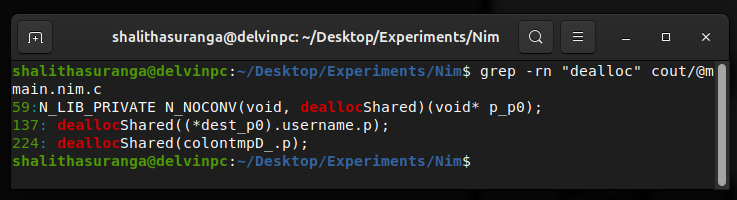
Memory-freeing calls auto-generated by the Nim compiler with the default memory management mode (ORC), a screenshot by the author
You can activate other automatic memory management strategies using the --mm:<name> command-line argument. For example, the following command compiles the above project with the Boehm garbage collector implementation:
nim c --mm:boehm main.nimARC (--mm:arc) has a little runtime overhead only for reference counting, so it’s recommended for most systems programming projects, but if you use Nim for building very low-level projects like operating systems, you can use manual memory management.
Here is how you can turn the above code into manual memory management:
proc printf(format: cstring): cint
  {.importc: "printf", header: "<stdio.h>", varargs.}

type Player = object
  username: cstring
  score: int

let p = cast[ptr Player](alloc(sizeof(Player)))
p.score = 100
p.username = cast[cstring](alloc(5))
copyMem(p.username, cstring("john"), 5)

discard printf("%s: %d\n", p.username, p.score)
dealloc(p.username)
dealloc(p)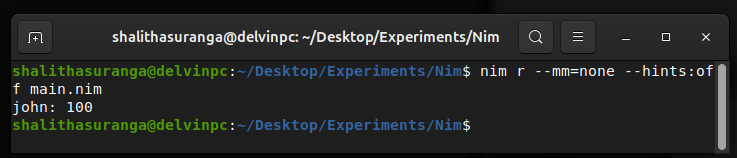
Compiling and running the above manual memory management example without garbage collectors, a screenshot by the author
Here I used the low-level alloc() procedure to allocate memory for the object; however, the high-level create() procedure can also be used:
let p = create(Player)Note: The above example deliberately avoids
stringandecho()since they use garbage-collected memory allocations internally
Using the standard library
In previous code examples, we already used system (pre-imported), sequtils, and strformat modules from the standard library. The Nim standard library offers modules for general-purpose and systems programming. It even offers some niche modules that you won’t see in standard libraries of other C/C++ alternatives, including a color API, language enhancement macros (for enhancing anonymous procedure calls, method chaining, dumping expressions, and more), statistics framework, a fast string structure (via the rope module), etc.
Let’s experiment with several standard library features.
You can use Nim’s process management features as follows to execute a command and get output:
from std/osproc import execCmdEx
import std/strutils

let (output, exitCode) = execCmdEx("node --version")
if exitCode == 0:
  let version = output.strip().replace("v", "")
  echo "Node.js version: ", version
else:
echo "ERR: Node isn't installed" 
Executing a command and retrieving the output using execCmdEx(), a screenshot by the author
The standard library’s operating system features are shell-scripting-friendly. If you use Nim for cross-platform shell scripting, you can productively execute a command and display output as follows:
discard execCmd("node --version")Note: Nim doesn’t allow calling procedures that return values without assigning them, so the above statement uses the
discardkeyword to do so
Here is how you can write a file line by line using syncio. Working with Nim gives you a dynamic scripting language feeling, even though it’s a systems programming language:
import std/syncio

let file = open("languages.txt", fmWrite)
file.writeLine("Nim")
file.writeLine("Rust")
file.writeLine("JavaScript")
file.close()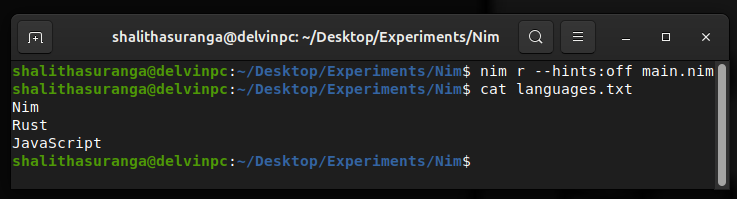
Writing a text file line-by-line in Nim, a screenshot by the author
If you use the above file handling code within a procedure, you can use a defer block too to close the file:
defer: file.close()Nim doesn’t offer a core map (dictionary) type, so you should import the tables module to create maps with hashtables. Even though tables is a separate module, simple native-like map syntax and features are available, thanks to operator overloading and iterators:
import std/tables

var scores = {"alice": 100, "ann": 120, "mark": 130}.toTable()
scores["ann"] += 10

for k, v in scores:
  echo k, ": ", v
The sugar module extends language syntax via macros. Here is how it lets you use a shorthand syntax to create anonymous functions. If a procedure expects a procedure from a parameter, the normal way to create an anonymous procedure is this:
import std/sequtils

let n = @[10, 20, 100, 20]
let m = n.map(proc(v: int): int = v * 2)
# mapIt(it * 2) works calling map() for demonstration purposes

echo m
Creating a new sequence based on an existing sequence using the map() procedure, a screenshot by the author
Using the sugar module, you can simplify the above code as follows:
import
  std/sequtils,
  std/sugar

let n = @[10, 20, 100, 20]
let m = n.map(v => v * 2)

echo m
Browse the official standard library documentation to browse all available modules and their capabilities.
Metaprogramming features
Compared to all C/C++ alternatives I tried, Nim offers the most feature-rich, flexible macro system. The language itself effectively uses macros to extend syntax and semantics without increasing the core language design complexity, e.g., the sugar module. The macro system capabilities can range from simple code replacement templates to advanced AST analysis.
Here is how you can write a macro to print an expression and its output:
import
  std/macros,
  std/math

macro processExpr(e: untyped): untyped =
  let estr = e.repr
  result = quote do:
    echo `estr`, " -> ", `e`

processExpr 2 + 10 - 1
processExpr 2 ^ 3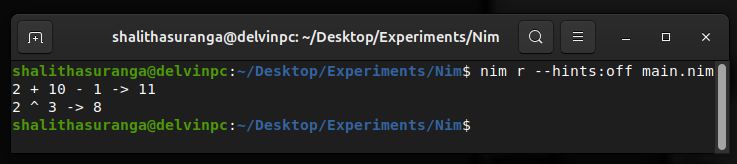
Printing expressions and evaluated results using a Nim macro, a screenshot by the author
Here the quote do is used to generate AST nodes, and backticks are used to insert each expression during AST generation.
Calling C from Nim
Nim transpiles to C, so it has an API-level C interoperability — you can directly call C functions from Nim using C-specific data types. Nim’s compiler pragmas make C integration even more productive.
Assume that you need to call the following add() C function implemented in calc.c
int add(int a, int b) {
  return a + b;
}
Use compiler pragmas as follows to instruct the Nim compiler to include the above add() C function implementation within the final executable:
{.compile: "calc.c"}

proc add(a, b: cint): cint {.importc}

echo 10, " + ", 20, " = ", add(10, 20)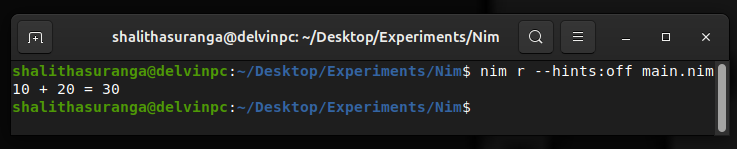
Calling C functions from Nim using compiler pragmas, a screenshot by the author
Alternatively, you can remove the {.compile} pragma, create a platform-specific static library, and link it to the final executable as follows, similar to Odin’s C interop recommendation.
Here is how you can do so on GNU/Linux:
gcc -c calc.c
ar rvs calc.a calc.o
nim c --passL:calc.a main.nim
Conclusion
Nim is not as simple as C3-like simplified C alternatives; instead, it has opt-in complexity, similar to C++ — you can use complex features if you need them based on coding requirements, but writing minimal code is also possible. Nim uses Python-like, scripting-language-like syntax even though it’s a system programming language, but it also offers low-level systems programming features as C does, e.g., Assembly blocks, pointers, manual memory management, etc. Impressive metaprogramming support, feature-rich shell-scripting-friendly standard library, UFCS, simple language core with macro- and operator-overloading-based extensions, compiler pragmas are Nim’s highlights.
Nim is a modern systems programming language with coding productivity-focused general-purpose programming features. When you start programming with Nim, you’ll find out hundreds of unique productivity tricks.
Thanks for reading.
메타데이터
- post_id
- 493fde01b17c
- slug
- nim-a-python-like-c-c-alternative-every-programmer-should-learn-493fde01b17c
- url
- https://levelup.gitconnected.com/nim-a-python-like-c-c-alternative-every-programmer-should-learn-493fde01b17c
- canonical_url
- https://levelup.gitconnected.com/nim-a-python-like-c-c-alternative-every-programmer-should-learn-493fde01b17c
- author_url
- https://medium.com/@shalithasuranga
- status
- ok
- fetched_at
- 2026-07-18 04:02:46