How I Bought a Product for ₹1 and Forged an Admin Session: A Live Web CTF Walkthrough
In application security, a common phrase is: “Security tools look for known patterns, but human testers look for logical mistakes.”
How I Bought a Product for ₹1 and Forged an Admin Session: A Live Web CTF Walkthrough
In application security, a common phrase is: “Security tools look for known patterns, but human testers look for logical mistakes.”
As a Test Lead transitioning into cybersecurity, I recently audited a live, meme-themed Capture The Flag (CTF) web application called *Mitron Market*. Applying a disciplined software validation background alongside offensive security methodologies, I performed a complete application-level assessment.
The audit uncovered critical weaknesses aligning directly with the OWASP Top 10 — specifically focusing on source code cryptographic exposure, Broken Access Control, and unauthenticated Business Logic vulnerabilities. Here is the step-by-step technical breakdown of how I systematically exposed these flaws to capture all hidden flags.
Phase 1: Information Gathering & Reconnaissance
Every successful VAPT assessment begins with thorough reconnaissance. I initiated my active directory enumeration by checking the application’s crawler mapping file at the standard boundary path:
https://maankibaat-nine.vercel.app/robots.txt
The file contained explicit rules hiding sensitive administrative and development pathways from search engine indexing scraping:
User-agent: *
Disallow: /modi
Disallow: /admin
Phase 2: Source Code Review & JWT Signature Forgery (Flag 1)
Navigating directly to the restricted /admin subdirectory triggered an immediate access block from the server, returning a client-side warning: "User ho aukat me raho". This confirmed that the endpoint evaluated active user sessions and blocked standard profile levels.
To analyze how the authentication layer worked, I performed a thorough front-end source code review. In the HTML header, I isolated an external JavaScript file: /js/modi_hai_to_admin_hai.js.
Upon opening the script directly in my browser, I discovered a catastrophic cryptographic security exposure. The developer had hardcoded the global JWT signature validation key directly inside a public window property:
window.jwtSecret = "modi_hai_to_admin_hai";The Exploit:
- I opened my browser’s DevTools, navigated to the Application tab, and extracted my session cookie containing an active JSON Web Token (JWT).
- I copied the token and pasted it into JWT.io.
- I tampered with the payload data, elevating my authorization privileges by altering the identity values from a standard role to an administrative context:
{"role": "admin"}. - Instead of trying to crack an unknown signature, I used the exposed
modi_hai_to_admin_haisecret string directly inside the JWT.io signature box to sign the forged payload validly. - I swapped out my original browser session cookie with this newly forged admin token using a cookie editor.
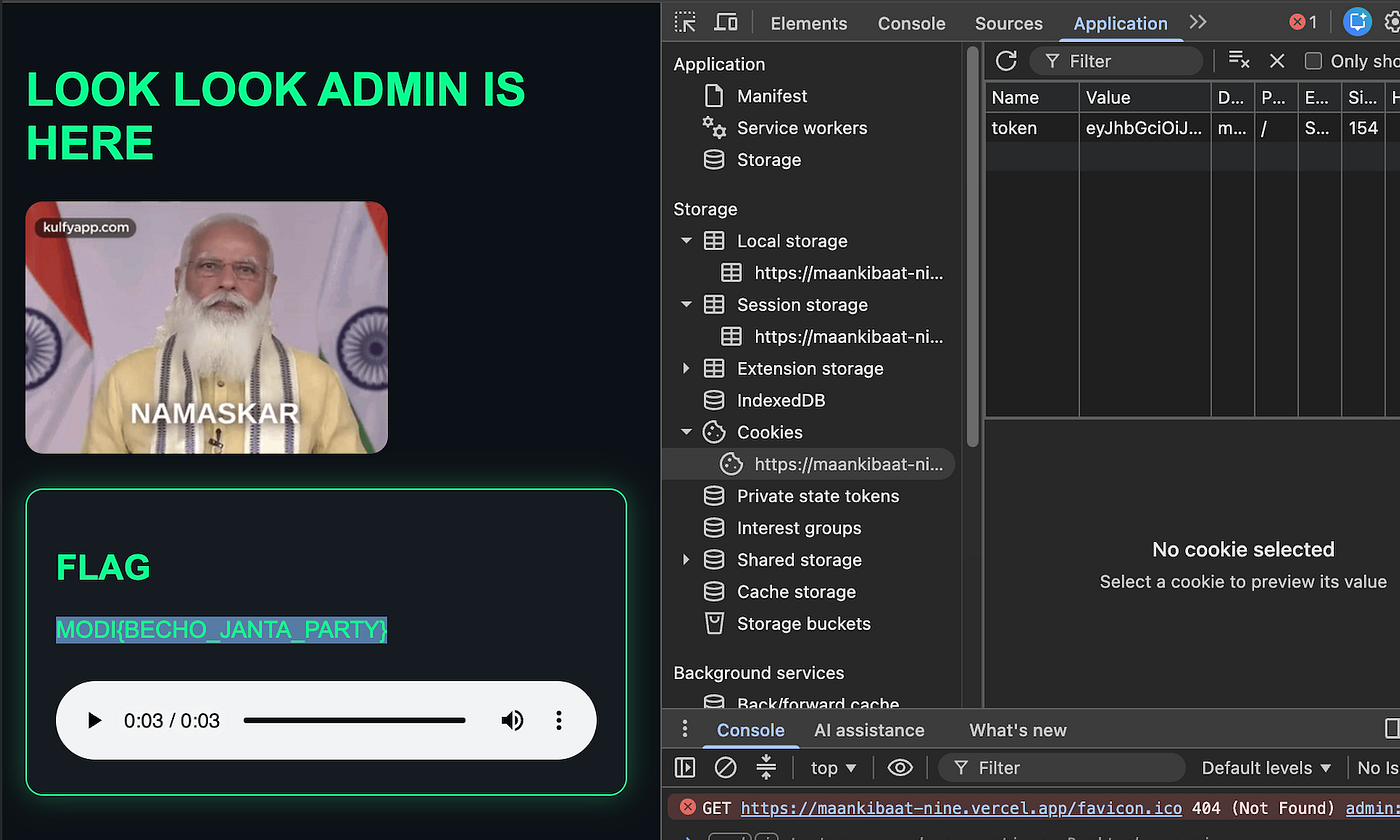
Upon refreshing the /admin path with the forged cryptographic session, the access control layer validated the signature perfectly, exposing the first hidden flag: MODI{BECHO_JANTA_PARTY}.
Phase 3: Stateless Request Manipulation & Parameter Tampering (Flag 2)
Next, I moved over to investigate the second hidden pathway identified during recon: /modi. On this page, hitting the "Buy Now" Call-To-Action (CTA) routinely generated a "Price too high" server error due to an unreachable asset value constraint of ₹7 Crore.
To understand how the transaction parameters were sent to the backend, I routed my browser’s outbound network traffic directly through Burp Suite Proxy and executed the buy click again to intercept the raw request lifecycle.
The transaction was being dispatched to a dedicated backend endpoint via a structured JSON message mapping a strict pricing value:
POST /buy HTTP/2
Host: maankibaat-nine.vercel.app
Content-Type: application/json

{
    "product": "Modi Ka Dimag",
    "price": 70000000
}
The Exploit:
I immediately transferred the raw interception block into Burp Suite Repeater to run controlled payload modifications. During my analysis, I noticed a second architectural flaw: The application completely lacked any Cookie or Authorization headers in the transaction request. The backend was treating a critical transactional endpoint as completely stateless and unauthenticated.
Taking advantage of this, I performed an active Parameter Tampering attack. I directly targeted the input body parameters within Burp Suite, wiping out the multi-million constraint and reducing the purchasing parameter down to a single unit: "price": "1".

I hit Send, and because the server lacked proper server-side data validation or identity checks, it blindly trusted the user-controlled client payload. The backend successfully authorized the tampered ₹1 purchase and returned a 200 OK response containing the final target flag:MODI{Desh_Bachalo_Mitron}.
Security Remediation & Engineering Recommendations
Uncovering vulnerabilities is only half the job; a core responsibility of a VAPT analyst is providing actionable architectural solutions to help development teams properly secure the system.
- Eliminate Hardcoded Frontend Secrets: Cryptographic signing secrets, configuration passwords, or backend private keys must never, under any circumstance, be exposed inside public client-side scopes or frontend script bundles. All signing operations must happen strictly on an isolated server utilizing robust environment management profiles.
- Implement Enforced Session Context: Sensitive operational actions or high-stakes endpoints (such as purchasing processes) must explicitly require valid session tokens or cryptographic authorization headers throughout their entire lifecycle.
- Strict Server-Side Validation Principle: Never rely on input prices or validation parameters supplied directly by a client-side request body. Financial values and item costs must always be cross-verified and pulled directly from an authoritative, read-only system database server-side.
메타데이터
- post_id
- 4964f2cd6f22
- slug
- how-i-bought-a-product-for-1-and-forged-an-admin-session-a-live-web-ctf-walkthrough-4964f2cd6f22
- url
- https://medium.com/@kavitajoshi.kiran/how-i-bought-a-product-for-1-and-forged-an-admin-session-a-live-web-ctf-walkthrough-4964f2cd6f22
- canonical_url
- https://medium.com/@kavitajoshi.kiran/how-i-bought-a-product-for-1-and-forged-an-admin-session-a-live-web-ctf-walkthrough-4964f2cd6f22
- author_url
- https://medium.com/@kavitajoshi.kiran
- status
- ok
- fetched_at
- 2026-06-21 22:26:41


