I Deleted a User, Hijacked a Login, and Got 6 Flags — HTTP Explained
TryHackMe — HTTP in Detail
I Deleted a User, Hijacked a Login, and Got 6 Flags — HTTP Explained
TryHackMe — HTTP in Detail
Every time you open a website, your browser is having a conversation with a web server. It asks for things, the server responds, and somehow a webpage appears on your screen. That conversation happens over HTTP — and understanding it is the single most important thing you can learn as a web security researcher.
Today I completed TryHackMe’s HTTP in Detail room. I didn’t just read about HTTP methods and status codes — I actually made GET, POST, PUT, and DELETE requests to a simulated web server, manipulated parameters, and captured 6 flags in the process.
Here’s everything that happened.
HTTP vs HTTPS — What’s the Difference?
HTTP (HyperText Transfer Protocol) was developed by Tim Berners-Lee — the same person who invented the World Wide Web. It’s the set of rules that governs how your browser communicates with web servers to fetch HTML, images, videos, and everything else you see online.
HTTPS is the secure version. The difference is encryption — HTTPS scrambles all data in transit so nobody can intercept what you’re sending or receiving. It also verifies you’re talking to the real server and not an impersonator.
The room demonstrated this with a practical task — accessing a site over plain HTTP (no certificate) revealed the flag hidden in the invalid certificate warning:
THM{INVALID_HTTP_CERT}
This is exactly why your browser shows a scary warning when a site’s SSL certificate is missing or expired.
Anatomy of a URL
Before making requests, I needed to understand what a URL actually contains. This diagram from the room broke it down perfectly:
http://user:password@tryhackme.com:80/view-room?id=1#task3Part Value Purpose
Scheme http:// Which protocol to use
User user:password@ Authentication credentials
Host tryhackme.com The server's domain or IP
Port :80 80 for HTTP, 443 for HTTPS
Path /view-room The specific resource
Query String ?id=1 Extra parameters
Fragment #task3 Jump to a section on the page
The query string part (?id=1) is particularly interesting from a security perspective — this is where a lot of web vulnerabilities live, including SQL injection and IDOR attacks.
What Does an HTTP Request Actually Look Like?
The simplest possible HTTP request is just one line:
GET / HTTP/1.1
This tells the server: “I want to GET the root page, using HTTP version 1.1.”
A real request with headers looks like this:
GET / HTTP/1.1 Host: tryhackme.com User-Agent: Mozilla/5.0 Firefox/87.0 Referer: https://tryhackme.com/
The server then responds:
HTTP/1.1 200 OK Server: nginx/1.15.8 Content-Type: text/html Content-Length: 98
<html> <body>Welcome To TryHackMe.com</body> </html>
The first line of every response contains a status code — the server’s way of telling you what happened.

common http method
Task 1 — GET /room
The simplest request — just ask for a page.
GET /room HTTP/1.1
Host: tryhackme.com
GET request and response
Response: Welcome to the Room page → THM{YOU'RE_IN_THE_ROOM}
Task 2 — GET /blog?id=1 (Query String Attack)
This one uses a query string parameter. By adding ?id=1 to the URL, I'm telling the server which blog article I want.
GET /blog?id=1 HTTP/1.1
Host: tryhackme.com
Response: Viewing Blog article 1 → THM{YOU_FOUND_THE_BLOG}
Security note: Changing ?id=1 to ?id=2 to see someone else's article is called IDOR (Insecure Direct Object Reference) — one of the most common web vulnerabilities. If the server doesn't check permissions, you can access data you're not supposed to.
Task 3 — DELETE /user/1
Now it gets more powerful — deleting a user record entirely.
DELETE /user/1 HTTP/1.1
Host: tryhackme.com
Response: The user has been deleted → THM{USER_IS_DELETED}
Task 4 — PUT /user/2 (Update to Admin)
PUT requests update existing data. Here I changed a user’s username to “admin”:
PUT /user/2 HTTP/1.1
Host: tryhackme.com
username=admin
Response: Username changed to admin → THM{USER_HAS_UPDATED}
Security note: If a server doesn’t properly restrict PUT requests, an attacker can elevate their own privileges to admin — this is called privilege escalation.
Task 5 — POST /login (The Login Attack)
The most interesting one — submitting login credentials via POST:
POST /login HTTP/1.1
Host: tryhackme.com
Content-Type: application/x-www-form-urlencoded
Content-Length: 29
username=thm&password=letmein
Response: You logged in! Welcome Back → THM{HTTP_REQUEST_MASTER} Security note: POST data is in the request body, not the URL — but it’s still not encrypted on plain HTTP. Anyone intercepting the connection can read username=thm&password=letmein in plaintext. This is why HTTPS is non-negotiable for login pages.
HTTP Status Codes
Every server response starts with a status code. Here are the categories and the ones you’ll see most often:

status code
The ones every web security researcher memorises:

common status code
A 403 is interesting — it tells you the resource exists but you can’t access it. A 404 means it doesn’t exist at all. This distinction matters in reconnaissance.
Headers — The Hidden Metadata
Request Headers (Browser → Server)
Host— which website you wantUser-Agent— your browser and OS (can be faked!)Cookie— your session data, sent automatically with every request
Response Headers (Server → Browser)
Set-Cookie— tells browser to save this cookieContent-Type— what kind of data is being sent backServer— what software the server runs (nginx, Apache, IIS — useful for attackers)
Cookies — The Key to Session Attacks
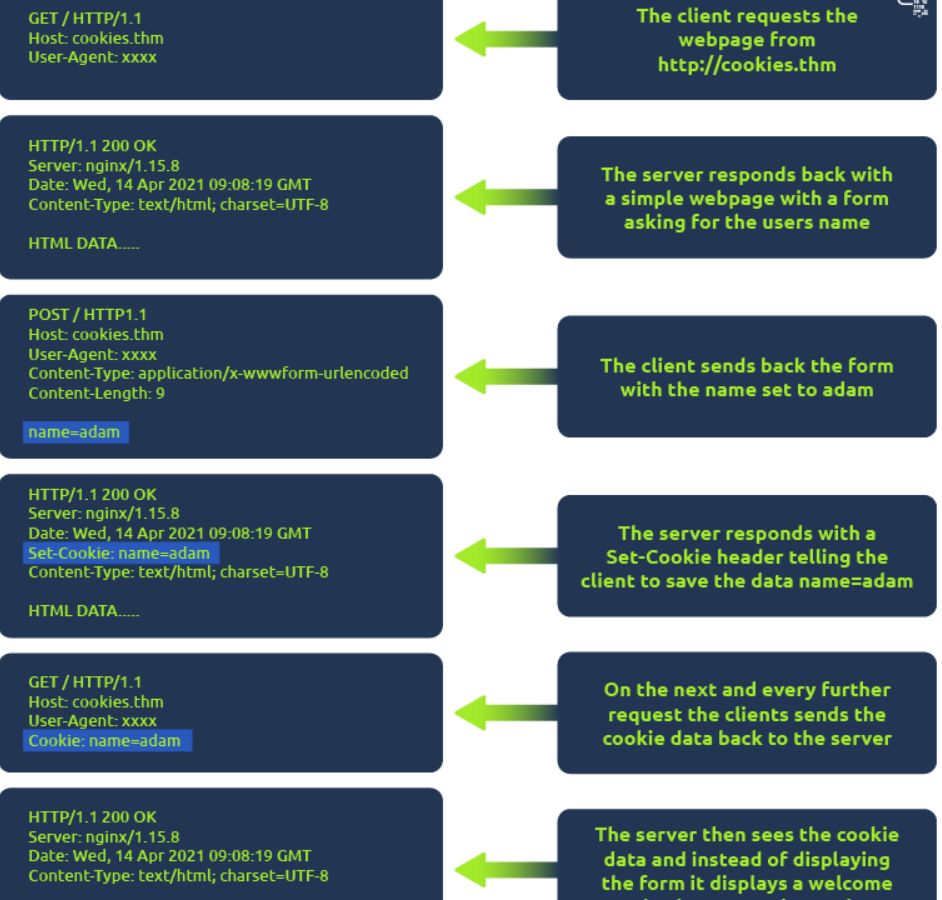
Cookies are how websites remember you between requests. HTTP is stateless — every request is independent. Cookies fix this.
Here’s the full flow:
- You visit a site for the first time → server sends
Set-Cookie: name=adam - Your browser saves it
- Every future request automatically includes
Cookie: name=adam - Server sees the cookie and knows it’s you
The security problem: If someone steals your cookie, they can impersonate you completely — no password needed. This is called session hijacking and it’s done through:
- XSS attacks — injecting JavaScript that reads
document.cookie - Network interception — sniffing HTTP traffic (not HTTPS)
- Malware — stealing cookie files from browser storage
You can view cookies in your browser right now: F12 → Developer Tools → Network tab → click any request → Cookies tab.
Why HTTP Knowledge is Core to Offensive Security
Every major web vulnerability class works through HTTP:
- SQL Injection — manipulating GET/POST parameters
- XSS — injecting scripts via request fields
- IDOR — changing IDs in GET requests
- Authentication bypass — manipulating POST login data
- Session hijacking — stealing Cookie headers
- SSRF — making the server send HTTP requests on your behalf
You cannot do web penetration testing without understanding HTTP deeply. Tools like Burp Suite (which I’ll be using next) are essentially HTTP interceptors — they sit between your browser and the server and let you modify every request in real time.
Key Takeaways
- HTTP is the language of the web — every attack goes through it
- URLs have 7 parts — query strings and paths are prime attack vectors
- GET retrieves, POST creates, PUT updates, DELETE removes
- Status codes tell you what happened — 403 vs 404 matters in recon
- Headers carry hidden metadata — User-Agent can be faked, Server header reveals tech stack
- Cookies enable sessions — and stealing them = stealing identity
- HTTPS encrypts everything — plain HTTP exposes credentials in transit
메타데이터
- post_id
- 49a45a88a69a
- slug
- i-deleted-a-user-hijacked-a-login-and-got-6-flags-http-explained-49a45a88a69a
- url
- https://medium.com/@rajprashantwork/i-deleted-a-user-hijacked-a-login-and-got-6-flags-http-explained-49a45a88a69a
- canonical_url
- https://medium.com/@rajprashantwork/i-deleted-a-user-hijacked-a-login-and-got-6-flags-http-explained-49a45a88a69a
- author_url
- https://medium.com/@rajprashantwork
- status
- ok
- fetched_at
- 2026-07-23 20:09:59



