Inside-Out: Building a High-Performance On-Device LLM Client in Flutter with Qualcomm’s QNN
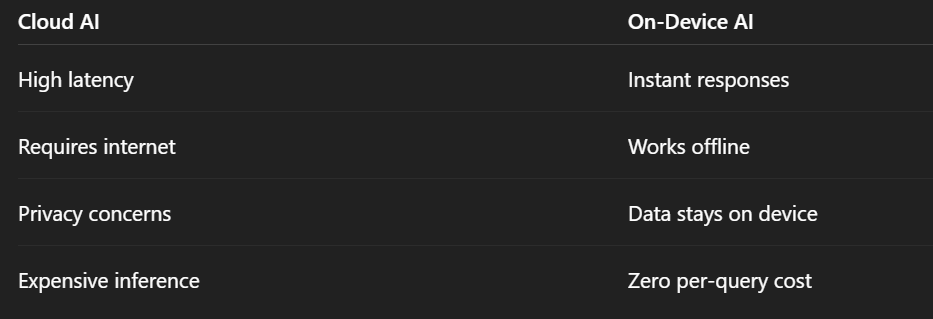
Running Large Language Models (LLMs) directly on smartphones used to feel like a demo you’d show once and never use again. The models were…
Inside-Out: Building a High-Performance On-Device LLM Client in Flutter with Qualcomm’s QNN
Running Large Language Models (LLMs) directly on smartphones used to feel like a demo you’d show once and never use again. The models were too large, inference was too slow, and mobile hardware simply wasn’t ready.
That’s changing.
Modern Snapdragon platforms ship with dedicated NPUs capable of running sophisticated generative AI workloads locally. Combined with Google’s LiteRT runtime and Qualcomm’s QNN stack, it’s now possible to achieve impressive token generation speeds on consumer devices like the Galaxy S24 and S25 series.
The hardware is finally here.
The developer experience, however, is another story.
Building an on-device LLM client means navigating a maze of challenges:
- Downloading multi-gigabyte model files during development
- Dealing with Android’s Scoped Storage restrictions
- Understanding when to use MediaPipe delegates versus Dart FFI
- Handling native library loading failures
- Designing user experiences around streaming reasoning models
- Debugging interactions between Flutter, native Android, and NPU runtimes

Over the past few months, we built Flutter QNN Chat, an open-source on-device LLM client optimized for Qualcomm’s Hexagon NPU using QNN and LiteRT-LM. The goal wasn’t simply to run models on-device — it was to create a development workflow that made iteration fast enough to be enjoyable.
This article is an inside look at the engineering decisions, workarounds, and architectural choices that helped us get there.
From Flutter to the Hexagon NPU
One of the biggest misconceptions around on-device AI is that applications somehow “talk directly” to the NPU.
They don’t.
Inference travels through multiple layers of abstractions, with each layer responsible for model orchestration, native dispatching, and hardware acceleration.
Prompt → Flutter UI → Dart FFI → LiteRT-LM Runtime → Qualcomm QNN → Hexagon CDSP
Understanding this stack became critical because nearly every debugging issue we encountered happened at the boundaries between these layers.

The FFI Problem Nobody Tells You About
The first major roadblock appeared almost immediately.
Our model loaded successfully.
Then it crashed.
The error looked like this:
gemma-4-E2B-it.litertlm is a LiteRT-LM model — it should be handled by Dart FFI (LiteRtLmFfiClient), not by EngineFactory.
At first glance, this error is confusing. The model exists. The file is valid. Why does loading fail?
The answer lies in the fact that LiteRT currently exposes two different execution paths:
MediaPipe Java Wrapper
- Excellent for
.taskmodels - Works well for models like Gemma 3 1B and SmolLM
Dart FFI Client
- Required for
.litertlmmodels - Used by Gemma 4 and Qwen3
Passing a .litertlm file through the Java delegate causes an immediate failure because the delegate rejects the model header.
The fix itself was simple.
The difficult part was understanding that model file extensions aren’t merely metadata — they determine the entire execution pipeline.

// Mapped specifically to use ModelFileType.litertlm for FFI routing
ModelInfo(
  id: 'gemma4_e2b',
  name: 'Gemma 4 E2B',
  family: 'Gemma 4',
  url: 'https://.../gemma-4-E2B-it.litertlm',
  sizeGB: 2.4,
  modelType: ModelType.gemma4,
  fileType: ModelFileType.litertlm, // <-- Routes to LiteRtLmFfiClient
  supportsThinking: true,
)
Why We Stopped Downloading Models Inside the App
Model downloads are great in production.
They’re terrible during development.
A single Gemma 4 model can easily exceed 2 GB. Waiting for repeated downloads after every test cycle destroys iteration speed.
We needed a way to push models directly from our workstation.
Unfortunately, Android’s Scoped Storage system prevents writing directly into the application sandbox.
No amount of adb push commands can bypass this restriction.
The Workaround
Instead of fighting Android’s storage model, we worked with it.
- Push the model into
/data/local/tmp - Execute a copy command under the application’s context using
run-as - Remove the temporary file
- Let the application discover and register the model automatically
What previously took fifteen minutes now takes roughly thirty seconds.
This single workflow improvement dramatically changed our development velocity.

Building a Self-Healing Model Registry
Copying a model into the application directory wasn’t enough.
The plugin maintains installation metadata inside SharedPreferences.
Without those entries, the application assumes the model doesn’t exist and attempts to download it again.
The file is physically present.
The application thinks it isn’t.
To solve this mismatch, we introduced a self-healing startup mechanism.
Whenever the application launches:
- Scan the local model directory
- Verify model file sizes
- Register missing metadata automatically
- Mark the model as ready
The application became resilient to manual model transfers, crashes, and interrupted installations.

Sometimes the best developer experience improvements are simply removing opportunities for developers to make mistakes.
Future<bool> isModelInstalled(ModelInfo model) async {
  final filename = model.url.split('/').last;
  final isInstalled = await FlutterGemma.isModelInstalled(filename);
  if (isInstalled) return true;

  // Self-healing: if file exists locally, register it in preferences!
  final fileExists = await _checkFileExists(filename);
  if (fileExists) {
    await _registerLocalModel(filename, model.url, (model.sizeGB * 1024 * 1024 * 1024).toInt());
    return true;
  }
  return false;
}
Streaming Reasoning Models Without Breaking the UI
Reasoning models introduce an entirely different challenge.
Models like DeepSeek R1 and Gemma 4 don’t immediately generate answers.
They think first.
During inference, they emit intermediate reasoning wrapped inside:
…
Rendering these tokens directly inside a Markdown view causes constant layout shifts:
- Text jumps around
- Responses reflow continuously
- The interface feels unstable
Even when generation speeds are fast, the experience feels slow.

Our Solution: Separate Thinking From Answering
We built a streaming parser that treats reasoning tokens and response tokens as two distinct streams.
Thinking tokens are buffered independently.
Response tokens continue flowing through the main chat.
The UI then presents reasoning inside a collapsible “Thinking Process” panel.

This keeps conversations clean while still allowing developers to inspect model reasoning when they want to.
The result feels significantly more polished than exposing raw reasoning tokens directly in the chat window.
Loading the Right Hardware Libraries
Running on Snapdragon’s NPU isn’t as simple as shipping an APK.
Applications must load the appropriate delegate libraries at runtime.
On startup, the application extracts and initializes:
libQnnHtp.solibLiteRtDispatch_Qualcomm.so
If the application runs on unsupported hardware, execution gracefully falls back to GPU acceleration through OpenCL and eventually to CPU execution if necessary.
Supporting multiple execution paths increased complexity, but it also made the application portable across a much wider range of Android devices.

Lessons Learned Building On-Device AI Applications
Building on-device AI isn’t only about inference speed.
It’s about optimizing the entire development loop.
A few principles made a disproportionate difference:
Treat model formats as execution contracts. File extensions determine which runtime should execute the model.
Automate local model discovery. Developers shouldn’t have to manually repair metadata after moving files.
Design for reasoning-first models. Streaming chains of thought directly into the UI creates a poor user experience.
Optimize iteration speed relentlessly. The faster developers can test changes, the faster on-device AI applications improve.

The hardware ecosystem for on-device generative AI is maturing rapidly. Snapdragon NPUs, LiteRT, and Qualcomm’s QNN stack have made experiences that once felt experimental increasingly practical.
The next challenge isn’t making LLMs run on phones.
It’s making them pleasant to build.
메타데이터
- post_id
- 4a19c482ffdb
- slug
- inside-out-building-a-high-performance-on-device-llm-client-in-flutter-with-qualcomms-qnn-4a19c482ffdb
- url
- https://medium.com/@carrycooldude/inside-out-building-a-high-performance-on-device-llm-client-in-flutter-with-qualcomms-qnn-4a19c482ffdb
- canonical_url
- https://medium.com/@carrycooldude/inside-out-building-a-high-performance-on-device-llm-client-in-flutter-with-qualcomms-qnn-4a19c482ffdb
- author_url
- https://medium.com/@carrycooldude
- status
- ok
- fetched_at
- 2026-06-15 22:55:51