Best 5 AI Video Translators in 2026: Stop Letting Language Barriers Kill Your Reach
Recording videos in English has become routine for creators in 2026. Yet manually translating subtitles, re-recording voiceovers, and…
Best 5 AI Video Translators in 2026: Stop Letting Language Barriers Kill Your Reach
Recording videos in English has become routine for creators in 2026. Yet manually translating subtitles, re-recording voiceovers, and syncing audio to video wastes dozens of hours every month. Each new language means another round of production. Most creators simply never expand beyond English because the cost and effort are too high.
Modern AI video translator tools turn any video into a multilingual asset in minutes. They handle transcription, translation, voice cloning, and lip-sync automatically. After testing the mainstream platforms on translation accuracy, language coverage, ease of use, and pricing, we have sorted out the top 5 AI video translators for content creators. Among them, VideoTranscriber.ai stands out as the only truly free option with no sign-up required, and we will break down exactly why it belongs at the top of the list. A reliable AI video translator should handle the entire workflow from transcript to dubbed video without requiring you to stitch together three separate tools.
1. VideoTranscriber.ai: The Only Free AI Video Translator With No Sign-Up
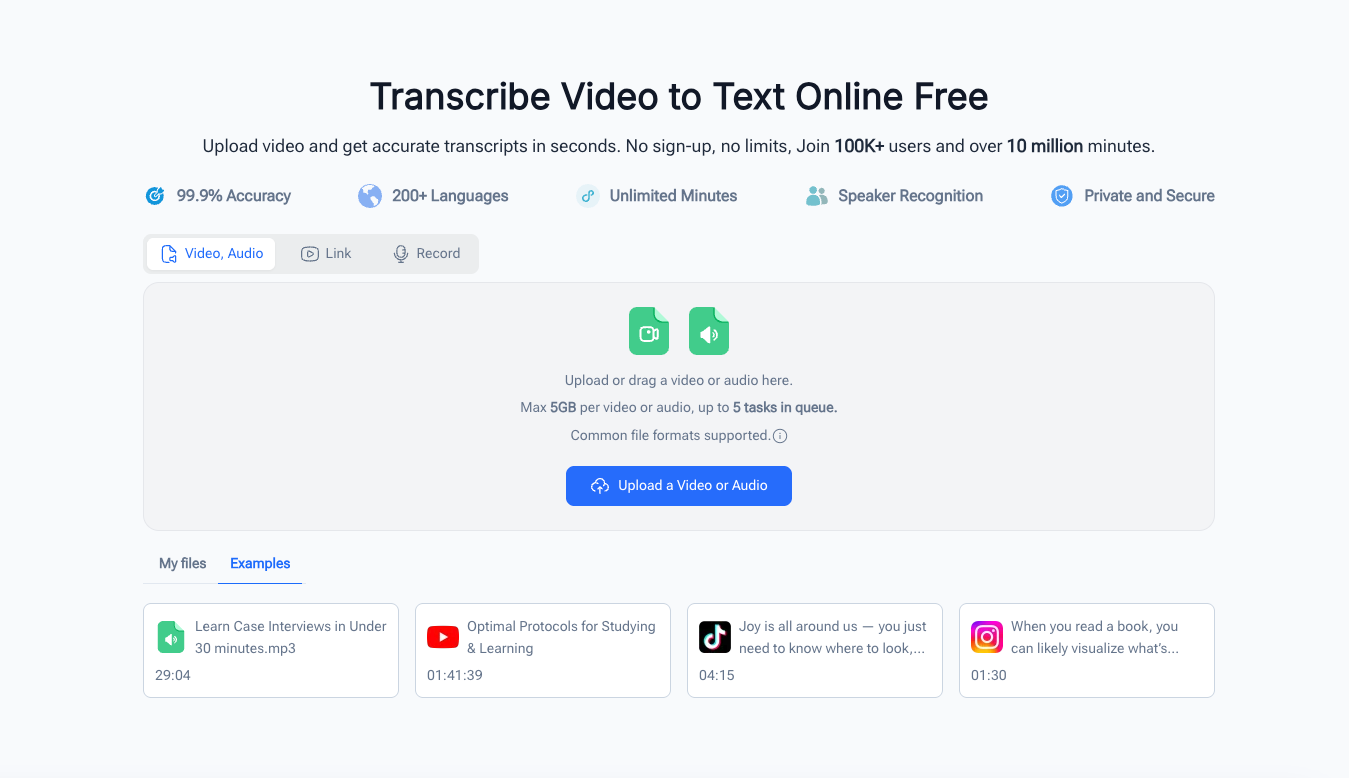
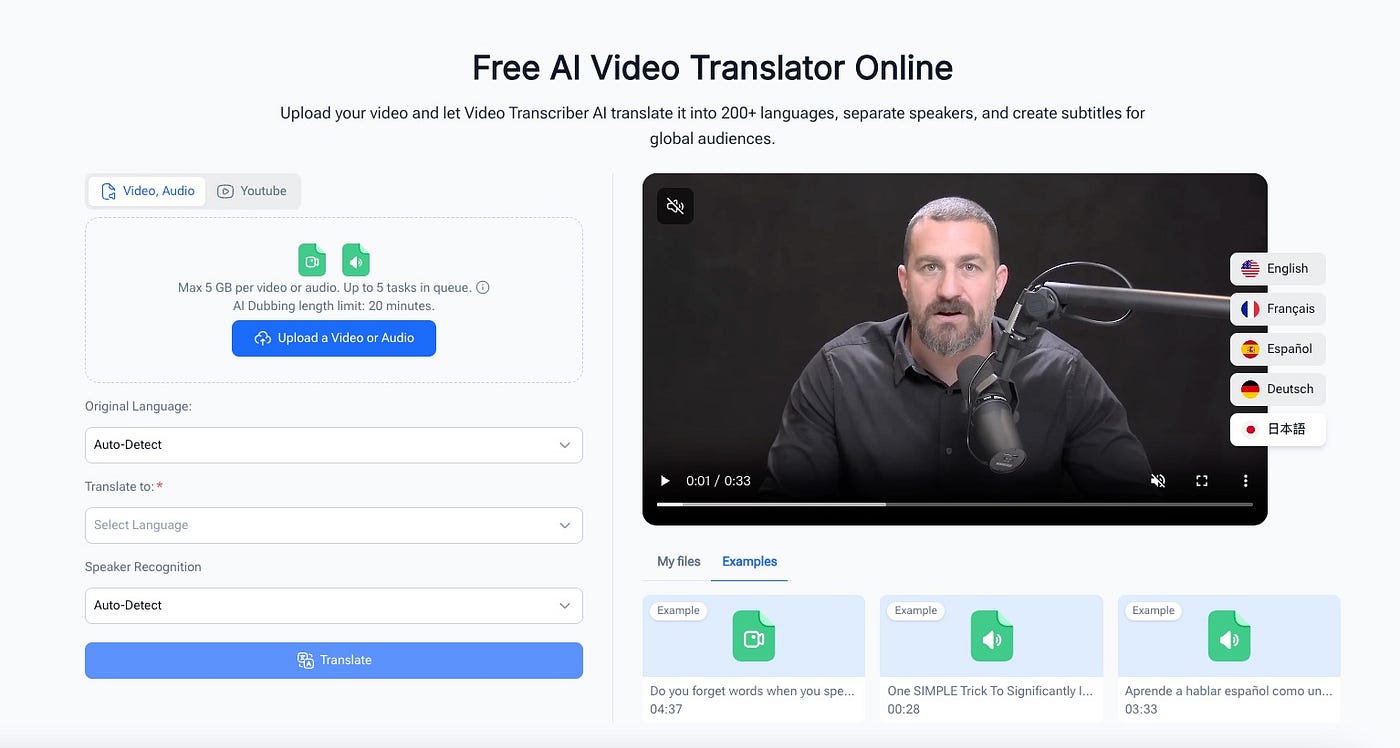
VideoTranscriber.ai is an online AI video translator that requires no registration, no credit card, and no software installation. Paste any public video link or upload a file, pick your target language, and get a translated video with synced subtitles and dubbing in seconds.
Core Highlights
Most translation tools lock core features behind a paywall. VideoTranscriber.ai unlocks everything from the first use. It supports more than 200 languages, which is broader coverage than nearly every paid competitor. The platform also handles speaker detection, so videos with multiple people are translated with separate voice tracks for each speaker.
The editing interface is fully online. After the initial translation finishes, you can review and adjust the subtitle text, switch between single-language and bilingual display, and choose from multiple AI voice styles before exporting. This means you are not stuck with a raw machine output. You can polish the result before publishing.
Another advantage is input flexibility. The tool accepts TikTok, YouTube, and Instagram links directly. You can also upload local MP4 or MP3 files, or pull videos from Google Drive and Dropbox. This makes it useful whether you are translating a draft you just filmed or a published video on another platform.
Standout Features
- 200+ language support with dialect-level accuracy. The translation engine handles context and idioms rather than producing word-for-word substitutions, which makes the dubbed audio sound natural to native listeners.
- Speaker recognition built in. The tool identifies when a video has multiple speakers and assigns separate voice tracks to each person. This is genuinely useful for interviews, podcasts, and reaction videos.
- Single and bilingual subtitle modes. You can export subtitles in the target language only, or show both the original and translated text side by side. This helps audiences who are still learning the new language.
- Multiple AI voice styles to choose from. Instead of one generic voice per language, you can pick from several tone options to match your content style, whether that is casual, professional, or energetic.
- Export to TXT, SRT, DOCX, VTT, and CSV. The translated subtitles and transcripts download in whatever format your editing workflow needs. You can drop them straight into CapCut, Premiere, or your CMS.
This particular AI video translator also keeps processing times reasonable on free usage. Many paid platforms throttle free users with long wait times, but VideoTranscriber.ai processes most short-form videos in under two minutes.
Simple 3-Step Workflow
Step 1: Paste a video link or upload a file. The tool accepts TikTok, YouTube, Instagram, local files, Google Drive, and Dropbox links.
Step 2: Select your target language and voice style, then let the AI process the translation and dubbing automatically.
Step 3: Review the generated subtitles in the online editor, adjust any lines you want to change, then export the video or download the subtitle files.
Who It’s For
VideoTranscriber.ai fits creators who publish on TikTok, YouTube, or Instagram and want to reach international audiences without adding production overhead. It also works well for educators who record course content once and need it in multiple languages, and for small teams that cannot justify a monthly subscription for occasional translation work.
Pros: Completely free with no sign-up. Supports 200+ languages. Speaker detection included. Multiple export formats. Browser-based editing.
Cons: Lip-sync quality is functional rather than broadcast-grade. Very long videos may take several minutes to process. Advanced voice cloning is not as nuanced as premium paid tools.
2. HeyGen: Best for Lip-Sync Quality
HeyGen is the most widely recognized name in AI video translation. Its lip-sync technology produces some of the most convincing results available, particularly for front-facing camera footage where mouth movements need to match the dubbed audio precisely. This AI video translator delivers excellent visual quality for creators who film directly to camera.
HeyGen offers a free plan that translates up to 3 videos per month, each up to 3 minutes long. This is enough to test the quality, but regular use requires a paid subscription. The Creator plan starts at 39 dollars per seat per month with a two-seat minimum, which puts it out of reach for many solo creators.
Pros & Cons
- Pros: Excellent lip-sync quality. Supports 175+ languages and dialects. Generous free tier for testing. Voice cloning preserves speaker tone and rhythm.
- Cons: Paid plans are expensive for solo creators. Multi-seat minimum on entry plan. Free tier is limited to 3 short videos per month.
Ideal Scenarios
HeyGen fits creators who film face-to-camera content and need the translated version to look seamless. It is especially strong for course creators, personal brand videos, and YouTube channels where visual quality matters as much as audio accuracy.
3. Rask AI: Best for Multi-Speaker Videos
Rask AI positions itself as a full localization platform rather than a single-purpose translation tool. Its standout feature is multi-speaker detection. The tool automatically identifies different voices in a video and assigns separate translated voice clones to each speaker. This AI video translator is particularly strong for podcasts, interviews, and panel discussions where multiple people speak.
The platform supports more than 130 languages. Basic plans start at 19 dollars per month, but lip-sync features require a higher-tier plan priced at approximately 50 dollars per month. New users get 14 minutes of free dubbing at signup to test the quality.
Pros & Cons
- Pros: Strong multi-speaker detection. Supports 130+ languages. End-to-end localization workflow. Transparent pricing tiers.
- Cons: Best features locked behind higher-tier plans. Lip-sync quality is good but not as polished as HeyGen. Interface has a learning curve for new users.
Ideal Scenarios
Rask AI is built for creators who produce interview-style content, podcasts, or corporate training videos with multiple speakers. It also suits teams that need to localize a content library into many languages systematically rather than one video at a time.
4. ElevenLabs Dubbing: Best for Voice Quality
ElevenLabs built its reputation on producing the highest-quality AI voice synthesis available. Its Dubbing Studio brings that same voice fidelity to video translation. The cloned voices retain emotional inflections, speaking rhythms, and subtle characteristics that most AI video translator tools flatten out. This focus on audio quality makes it the strongest choice for narration-heavy content.
The platform supports 32 languages with a manual editing interface for precise timing adjustments. Pricing is usage-based at 0.18 dollars per minute for dubbed audio. Subscription plans start at 5 dollars per month for the voice synthesis component, but lip-sync video generation costs extra.
Pros & Cons
- Pros: Industry-leading voice cloning quality. Preserves emotion and speaking style. Manual editing studio for timing adjustments. API access for automation.
- Cons: Only 32 languages supported. Not a full video platform, requires separate video editing tools. Lip-sync is an add-on cost. Pricing per minute adds up for long content.
Ideal Scenarios
ElevenLabs Dubbing is the right choice when voice quality matters more than visual lip-sync. It fits narration-heavy videos, documentaries, and editorial content where the audience listens more than they watch. It also works well for creators who already use ElevenLabs for voiceovers and want to extend into video translation.
5. VEED: Best for Browser-Based Editing
VEED is a browser-based video editing platform with built-in translation and subtitle tools. You do not need to install any software. The platform automatically transcribes video audio, translates it into the target language, and generates subtitles that sync to the timeline. For creators who want a simple AI video translator without managing separate tools, VEED covers both editing and translation in one workflow.
VEED offers a free tier with basic features. Paid plans start at 18 dollars per month. The translation feature is part of the broader editing suite, which makes it convenient if you also need to trim, crop, or add visual elements to your video.
Pros & Cons
- Pros: No software installation required. Free tier available. Combines editing and translation in one workflow. Subtitle accuracy is high for major languages. Intuitive timeline interface.
- Cons: Dubbing and voice cloning are limited compared to dedicated translation tools. Advanced features require paid subscription. Export quality and format options depend on plan level. Not designed for large-scale localization work.
Ideal Scenarios
VEED fits creators who want to translate and edit in one place. It is particularly useful for social media content where you need to trim the video, add translated subtitles, and export directly to a publishable format without switching between multiple tools.
Comparison & Final Recommendation for 2026
If you prioritize zero cost and zero registration, VideoTranscriber.ai is the clear choice. Unlike HeyGen and Rask AI that require paid subscriptions for regular use, it keeps every feature free and accessible from the first visit. The 200+ language support also exceeds what HeyGen (175+) and Rask AI (130+) offer.
For lip-sync quality where the speaker’s face is visible, pick HeyGen. For podcasts and multi-speaker interviews, Rask AI handles speaker separation best. For narration-heavy content where voice emotion matters most, ElevenLabs Dubbing leads on audio fidelity. For quick edits with translation in the same browser tab, VEED covers both needs in one workflow.
Most creators posting on TikTok, YouTube Shorts, and Instagram Reels do not need broadcast-grade lip-sync. They need a fast, accurate AI video translator that helps their content reach viewers who do not speak English. For that use case, VideoTranscriber.ai covers the core workflow without adding another subscription to the pile.
Conclusion
AI video translator tools remove the language barrier that keeps content stuck in one market. In 2026, the tools are fast enough and accurate enough to make multilingual publishing realistic for solo creators and small teams. You no longer need a translation agency or a voice actor for every language you want to reach.
For most content creators, VideoTranscriber.ai delivers the best balance of cost, language coverage, and ease of use. It is the only AI video translator that combines 200+ language support with a completely free workflow. Head to the tool to translate your first video and expand your reach to a global audience today.
메타데이터
- post_id
- 4a5f9d13494d
- slug
- best-5-ai-video-translators-in-2026-stop-letting-language-barriers-kill-your-reach-4a5f9d13494d
- url
- https://medium.com/@eaglenlemarie376/best-5-ai-video-translators-in-2026-stop-letting-language-barriers-kill-your-reach-4a5f9d13494d
- canonical_url
- https://medium.com/@eaglenlemarie376/best-5-ai-video-translators-in-2026-stop-letting-language-barriers-kill-your-reach-4a5f9d13494d
- author_url
- https://medium.com/@eaglenlemarie376
- status
- ok
- fetched_at
- 2026-07-23 23:41:22