Building an LDAP / Active Directory Integration Framework for Database Authentication and…
How we centralized PostgreSQL and MariaDB access management using Active Directory, ldap2pg, PAM, and automated policy execution
Building an LDAP / Active Directory Integration Framework for Database Authentication and Authorization
How we centralized PostgreSQL and MariaDB access management using Active Directory, ldap2pg, PAM, and automated policy execution
Managing database users manually can become difficult as an organization grows.
At the beginning, local database users may be manageable. A DBA or system administrator creates users, grants permissions, updates access, and removes accounts when needed.
But over time, this approach becomes risky.
Users move between teams. Staff leave the organization. New projects need new access. Developers need temporary permissions. Auditors need read-only access. Application users must remain separate from human users. Every database may have different permission rules.
If this is handled manually, the risks are clear:
Local database passwords spread across systems
User access becomes inconsistent
Old accounts may remain active
Permission changes are hard to audit
DBAs spend too much time on repetitive access requests
Security teams have limited visibility
To solve this, we designed a centralized LDAP / Active Directory Integration and Database Authorization Automation Framework.
The goal was simple:
Use Active Directory as the single source of identity, and automate database access management for PostgreSQL and MariaDB.
1. Executive Summary
This framework centralizes database authentication and authorization using Microsoft Active Directory.
The solution combines:
Active Directory for identity management
PostgreSQL LDAP authentication
PostgreSQL role synchronization with ldap2pg
MariaDB authentication using PAM and LDAP
Connector Service for AD synchronization
Task Executor Service for permission automation
Policy-based authorization for PostgreSQL and MariaDB
Audit logs for governance and traceability
Instead of manually creating database users and assigning permissions, access is controlled through Active Directory groups and policy files.
When a user is added to an AD group, the system can automatically create or update the related database access.
When a user is removed from a group, permissions can be revoked according to policy.
This gives the organization a consistent and auditable access management process.
2. Why We Needed This Framework
Database access management is not only a technical task. It is also a security and governance responsibility.
In a production environment, access should answer these questions clearly:
Who has access?
Which database can they access?
What permission level do they have?
Who approved the access?
When was the access granted?
When was it changed or removed?
Was the change successful?
Manual database user management makes these questions difficult to answer.
By integrating with Active Directory, we can use existing security groups to control database roles.
For example:
AD Group: DB_ADMIN
Database Role: admin
AD Group: DB_DEVELOPER
Database Role: developerAD Group: DB_AUDIT
Database Role: auditAD Group: DB_READ_ONLY
Database Role: read_onlyThis creates a clean bridge between enterprise identity management and database authorization.
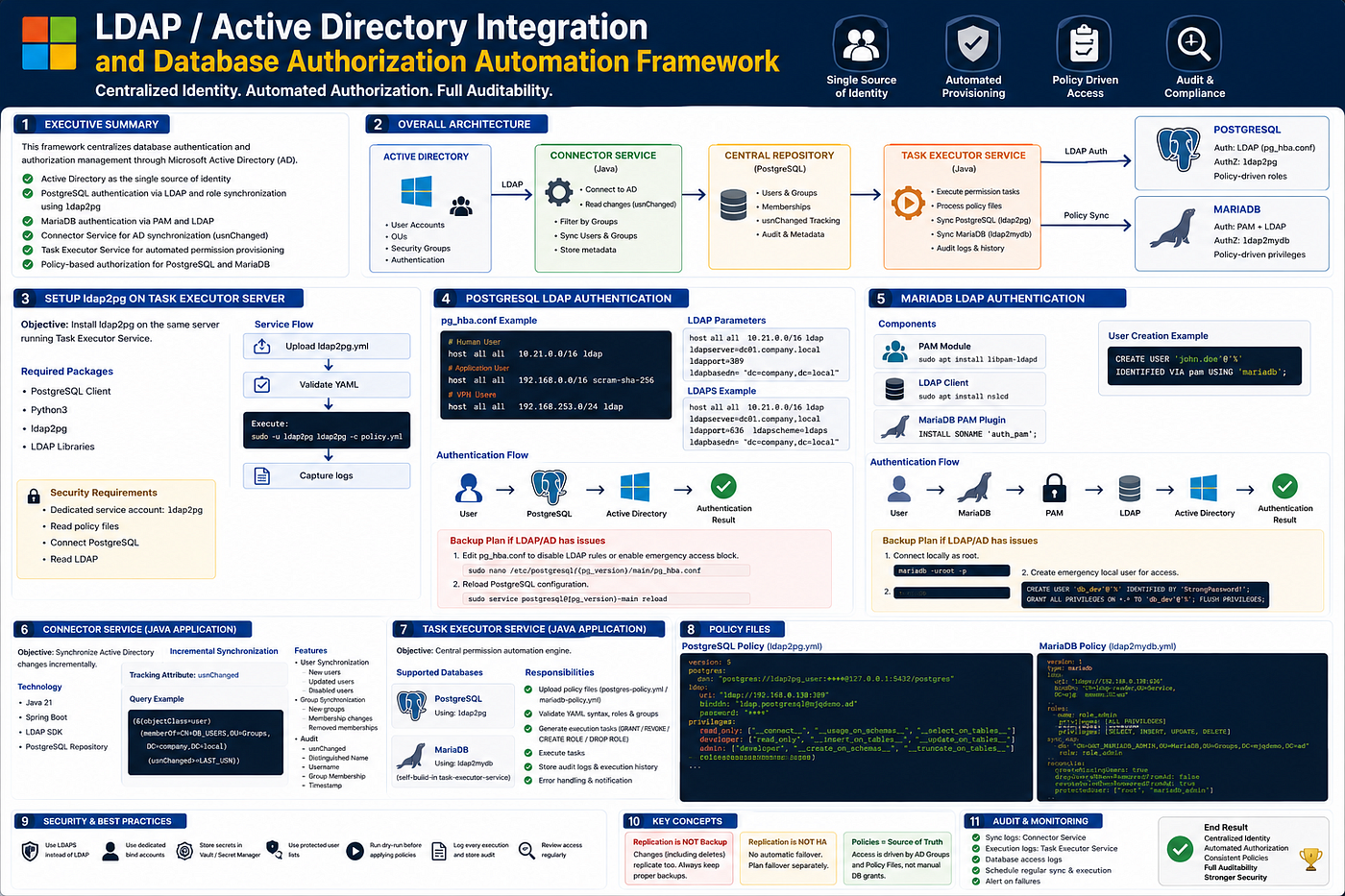
3. Overall Architecture
The framework consists of several major components.
Active Directory
        ↓
Connector Service
        ↓
Central Repository
        ↓
Task Executor Service
        ↓
PostgreSQL / MariaDB
Each component has a clear responsibility.
Active Directory
Active Directory is the source of identity.
It manages:
User accounts
Organizational Units
Security groups
Group membership
Account status
Authentication source
Instead of creating users directly in every database manually, we use AD groups to define who should receive access.
Connector Service
The Connector Service is a Java application responsible for synchronizing Active Directory information.
Its responsibilities include:
Connect to Active Directory
Read user and group information
Detect incremental changes using usnChanged
Filter users by configured AD groups
Synchronize metadata into a central repository
Track group membership changes
Store audit information
The service uses the usnChanged attribute to avoid scanning everything every time.
This allows incremental synchronization.
Example LDAP filter:
(&(objectClass=user)
 (memberOf=CN=DB_USERS,OU=Groups,DC=company,DC=local)
 (usnChanged>=LAST_USN))
This means the service can detect only users changed after the last synchronization.
Task Executor Service
The Task Executor Service is the central automation engine.
It is responsible for:
Uploading policy files
Validating YAML syntax
Checking role and group definitions
Executing permission provisioning tasks
Running ldap2pg for PostgreSQL
Running custom ldap2mydb logic for MariaDB
Generating GRANT and REVOKE actions
Storing execution logs
Keeping audit history
This service allows administrators to manage access through policy files instead of manually writing SQL every time.
PostgreSQL
PostgreSQL integration has two parts:
Authentication: LDAP through pg_hba.conf
Authorization: Role and permission management through ldap2pg
Users authenticate with their Active Directory credentials.
Database roles and permissions are synchronized using ldap2pg.
MariaDB
MariaDB integration also has two parts:
Authentication: PAM + LDAP
Authorization: Policy-based privilege management through ldap2mydb
MariaDB uses PAM to authenticate users against LDAP or Active Directory.
The custom policy engine manages user creation, role mapping, grants, revokes, and audit logs.
4. PostgreSQL LDAP Authentication
PostgreSQL can authenticate users against Active Directory using LDAP configuration in pg_hba.conf.
Example:
# Human users
host all all 10.21.0.0/16 ldap
# Application users
host all all 192.168.0.0/16 scram-sha-256# VPN users
host all all 192.168.253.0/24 ldapThis design separates human users from application users.
Human users authenticate through Active Directory.
Application users continue using PostgreSQL native authentication such as scram-sha-256.
LDAP Example
host all all 10.21.0.0/16 ldap ldapserver=dc01.company.local ldapport=389 ldapbasedn="dc=company,dc=local"LDAPS Example
For encrypted LDAP authentication:
host all all 10.21.0.0/16 ldap ldapserver=dc01.company.local ldapport=636 ldapscheme=ldaps ldapbasedn="dc=company,dc=local"The authentication flow is:
User
  ↓
PostgreSQL
  ↓
Active Directory
  ↓
Authentication result
5. PostgreSQL Backup Access Plan
When using LDAP authentication, it is important to prepare a backup access plan.
If Active Directory or LDAP has an issue, administrators must still be able to access PostgreSQL.
The backup plan can include a separate pg_hba.conf block for emergency access.
Edit the PostgreSQL authentication file:
sudo nano /etc/postgresql/{pg_version}/main/pg_hba.confAfter making changes, reload PostgreSQL:
sudo service postgresql@{pg_version}-main reloadRecommended practice:
Keep emergency local admin access documented.
Do not rely only on LDAP for all administrator access.
Test the backup access plan before production deployment.
6. Setting Up ldap2pg on the Task Executor Server
ldap2pg is used to synchronize PostgreSQL roles and permissions based on LDAP or Active Directory groups.
It should be installed on the same server that runs the Task Executor Service.
Required components:
PostgreSQL client
Python 3
ldap2pg
LDAP libraries
Dedicated ldap2pg service account
The execution flow is:
Task Executor Service
  ↓
Upload ldap2pg.yml
  ↓
Validate YAML
  ↓
Execute ldap2pg
  ↓
Capture logs
  ↓
Store execution result
Example execution:
sudo -u ldap2pg ldap2pg -c policy.ymlSecurity requirements:
Use a dedicated Linux user: ldap2pg
Allow read access only to policy files
Allow PostgreSQL connection only with required privileges
Allow LDAP read access only with service account
Store execution logs for audit
7. PostgreSQL Authorization Policy with ldap2pg
The PostgreSQL policy file defines how AD groups map to PostgreSQL roles.
The policy file is usually named:
ldap2pg.ymlIt controls:
PostgreSQL connection
LDAP connection
Managed databases
Managed schemas
Role blacklist
Reusable privilege templates
Group role creation
User synchronization
Role inheritance
Permission grants
Example PostgreSQL Policy Structure
version: 5postgres:
dsn: "postgres://ldap2pg_user:CHANGE_ME@127.0.0.1:5432/postgres" databases_query: |
SELECT datname
FROM pg_database
WHERE datallowconn
AND NOT datistemplate
AND datname NOT IN ('postgres'); schemas_query: |
SELECT nspname
FROM pg_namespace
WHERE nspname NOT LIKE 'pg_%'
AND nspname <> 'information_schema'; roles_blacklist_query:
- postgres
- "pg_*"
- ldap2pg_userldap:
uri: "ldap://192.168.0.138:389"
binddn: "ldap.postgresql@mjqdemo.ad"
password: "CHANGE_ME"The postgres section defines how ldap2pg connects to PostgreSQL and which databases or schemas it manages.
The ldap section defines how ldap2pg connects to Active Directory.
8. PostgreSQL Privilege Templates
Privilege templates make permission management reusable and consistent.
Example:
privileges:
  read_only:
    - __connect__
    - __usage_on_schemas__
    - __select_on_tables__
    - __select_on_sequences__
audit:
- read_only developer:
- read_only
- __insert_on_tables__
- __update_on_tables__
- __delete_on_tables__
- __usage_on_sequences__
- __execute_on_functions__ admin:
- developer
- __create_on_schemas__
- __truncate_on_tables__This creates a clear permission hierarchy:
read_only  → basic read access
audit      → inherits read_only
developer  → inherits read_only plus write and execute permissions
admin      → inherits developer plus create and truncate permissions
This model avoids repeated permission definitions.
9. PostgreSQL Group Roles
Reusable PostgreSQL group roles are created as NOLOGIN roles.
rules:
  - description: "Create reusable group roles"
    roles:
      - name: pg_admin
        options: NOLOGIN
      - name: pg_audit
        options: NOLOGIN
      - name: pg_developer
        options: NOLOGIN
      - name: pg_read_only
        options: NOLOGIN
These group roles are then assigned privileges.
- description: "Grant policy to group roles on all databases"
    grant:
      - privilege: admin
        role: pg_admin
        databases: __all__
        schemas: __all__
- privilege: audit
role: pg_audit
databases: __all__
schemas: __all__ - privilege: developer
role: pg_developer
databases: __all__
schemas: __all__ - privilege: read_only
role: pg_read_only
databases: __all__
schemas: __all__This makes the design easier to manage.
Users inherit access from parent group roles.
10. PostgreSQL AD Group Mapping
AD groups are mapped to PostgreSQL group roles.
AD GroupPostgreSQL RolePrivilege TemplateADMINpg_adminadminAUDITpg_auditauditDEVELOPERpg_developerdeveloperREAD_ONLYpg_read_onlyread_only
Example user synchronization rule:
- description: "Sync AD developer users"
    ldapsearch:
      base: "DC=mjqdemo,DC=ad"
      filter: "(&(objectClass=user)(memberOf=CN=DEVELOPER,OU=pg_sms_cluster,OU=permissions,OU=IT,OU=Demo_AD,DC=mjqdemo,DC=ad))"
      attributes: [sAMAccountName]
    roles:
      - name: "{sAMAccountName}"
        options: LOGIN
        parent: pg_developer
This rule means:
Find AD users in the DEVELOPER group.
Create PostgreSQL login roles using sAMAccountName.
Assign each user to pg_developer.
11. PostgreSQL Permission Flow
The PostgreSQL authorization flow is:
1. ldap2pg connects to Active Directory.
2. Users are retrieved using LDAP filters.
3. PostgreSQL roles are created from sAMAccountName.
4. Users are assigned to parent group roles.
5. Group roles inherit configured privilege templates.
6. Permissions are applied across configured databases and schemas.
Example:
AD UserAD GroupPostgreSQL UserParent Rolejohn.doeADMINjohn.doepg_adminmary.auditAUDITmary.auditpg_auditchanna.devDEVELOPERchanna.devpg_developervanna.userREAD_ONLYvanna.userpg_read_only
12. MariaDB LDAP Authentication
MariaDB authentication can be integrated with Active Directory using PAM and LDAP.
Required components:
PAM module
LDAP client
MariaDB PAM plugin
Install PAM LDAP module:
sudo apt install libpam-ldapdInstall LDAP client service:
sudo apt install nslcdInstall or enable MariaDB PAM plugin:
INSTALL SONAME 'auth_pam';Create a MariaDB user authenticated through PAM:
CREATE USER 'john.doe'@'%'
IDENTIFIED VIA pam USING 'mariadb';
Authentication flow:
User
  ↓
MariaDB
  ↓
PAM
  ↓
LDAP
  ↓
Active Directory
  ↓
Authentication result
13. MariaDB Backup Access Plan
Just like PostgreSQL, MariaDB also needs a backup access plan.
If LDAP or Active Directory has an issue, administrators should still have a way to connect.
Example emergency local user:
CREATE USER 'db_dev'@'%' IDENTIFIED BY 'StrongPasswordHere';
GRANT SELECT, INSERT, UPDATE, DELETE ON *.* TO 'db_dev'@'%';
FLUSH PRIVILEGES;
Recommended practice:
Keep at least one protected local admin account.
Do not depend only on LDAP authentication.
Document when and how emergency accounts can be used.
Rotate emergency credentials securely.
14. MariaDB Policy File with ldap2mydb
For MariaDB authorization, the framework uses a custom policy engine called ldap2mydb, interpreted by the Task Executor Service.
The policy file is usually named:
ldap2mydb.ymlExample structure:
version: 1
type: mariadb
ldap:
url: "ldaps://192.168.0.138:636"
bindDn: "CN=ldap-reader,OU=Service,DC=mjqdemo,DC=ad"
bindPasswordRef: "vault:ldap/mjqdemo/password"
baseDn: "DC=mjqdemo,DC=ad"
userAttribute: "sAMAccountName"datasource:
url: "jdbc:mariadb://10.10.1.20:3306/mysql"
username: "db_access_admin"
password: "password"pam:
service: "mariadb"
host: "%"This policy defines:
LDAP connection
MariaDB datasource connection
PAM service
Host pattern
User attribute
15. MariaDB Role and Privilege Definition
Example roles:
roles:
  - name: role_admin
    privileges:
      - database: "*"
        table: "*"
        grants:
          - ALL PRIVILEGES
- name: role_developer
privileges:
- database: "*"
table: "*"
grants: [SELECT, INSERT, UPDATE, DELETE, CREATE, ALTER, INDEX] - name: role_audit
privileges:
- database: "*"
table: "*"
grants: [SELECT, SHOW VIEW] - name: role_read_only
privileges:
- database: "*"
table: "*"
grants: [SELECT, SHOW VIEW]This gives MariaDB a policy-based structure similar to PostgreSQL.
16. MariaDB AD Group Mapping
The sync_map section maps Active Directory groups to MariaDB roles.
sync_map:
  - description: "UAT MariaDB Admin users"
    dn: "CN=UAT_MARIADB_ADMIN,OU=MariaDB,OU=Groups,DC=mjqdemo,DC=ad"
    role: role_admin
    ldapFilter: "(&(objectClass=user)(memberOf=CN=UAT_MARIADB_ADMIN,OU=MariaDB,OU=Groups,DC=mjqdemo,DC=ad))"
- description: "UAT MariaDB Developer users"
dn: "CN=UAT_MARIADB_DEVELOPER,OU=MariaDB,OU=Groups,DC=mjqdemo,DC=ad"
role: role_developer
ldapFilter: "(&(objectClass=user)(memberOf=CN=UAT_MARIADB_DEVELOPER,OU=MariaDB,OU=Groups,DC=mjqdemo,DC=ad))" - description: "UAT MariaDB Audit users"
dn: "CN=UAT_MARIADB_AUDIT,OU=MariaDB,OU=Groups,DC=mjqdemo,DC=ad"
role: role_audit
ldapFilter: "(&(objectClass=user)(memberOf=CN=UAT_MARIADB_AUDIT,OU=MariaDB,OU=Groups,DC=mjqdemo,DC=ad))" - description: "UAT MariaDB Read Only users"
dn: "CN=UAT_MARIADB_READ_ONLY,OU=MariaDB,OU=Groups,DC=mjqdemo,DC=ad"
role: role_read_only
ldapFilter: "(&(objectClass=user)(memberOf=CN=UAT_MARIADB_READ_ONLY,OU=MariaDB,OU=Groups,DC=mjqdemo,DC=ad))"Each AD group maps to one MariaDB role.
17. MariaDB Reconciliation Rules
The reconcile section controls how access should be synchronized.
reconcile:
  createMissingUsers: true
  dropUsersWhenRemovedFromAd: false
  revokeRoleWhenRemovedFromAd: true
  setDefaultRole: true
  manageRolePrivileges: true
  protectedUser: ["root", "mariadb_admin"]
Explanation:
SettingMeaningcreateMissingUsersCreates database users if they exist in AD groupdropUsersWhenRemovedFromAdControls whether removed AD users are droppedrevokeRoleWhenRemovedFromAdRevokes access when user is removed from AD groupsetDefaultRoleSets default role for usersmanageRolePrivilegesAllows the engine to manage grantsprotectedUserPrevents important users from being changed
In production, it is usually safer to keep:
dropUsersWhenRemovedFromAd: falseThis avoids accidentally dropping database users.
Revoking access is safer than deleting users immediately.
18. MariaDB Policy Processing Flow
The Task Executor Service processes MariaDB policies like this:
1. Read ldap2mydb.yml.
2. Validate YAML syntax.
3. Connect to Active Directory.
4. Query AD group membership.
5. Connect to MariaDB.
6. Create missing users if enabled.
7. Assign roles or grants.
8. Revoke access if users were removed from AD groups.
9. Protect whitelisted users.
10. Store audit logs.
Example generated SQL:
GRANT SELECT
ON school.*
TO 'john.doe';
Supported actions include:
Create user
Assign role
Grant privileges
Revoke privileges
Set default role
Protect admin users
Store execution logs
19. Policy Upload Process
Administrators can upload policy files through the internal backoffice portal.
Example location:
Backoffice → Setup → ldap2pgA single policy file can contain four standard access levels:
ADMIN
DEVELOPER
AUDIT
READ_ONLY
Recommended workflow:
1. Prepare the policy file.
2. Copy the correct AD group DN.
3. Upload the policy file.
4. Validate the policy.
5. Run dry-run mode if available.
6. Execute the policy.
7. Review execution logs.
8. Confirm database permissions.
20. Security Controls
The framework includes three important security layers.
Authentication
Authentication can be handled through:
LDAP
LDAPS
PAM
PostgreSQL LDAP authentication
MariaDB PAM authentication
LDAPS is recommended for production because credentials are transmitted through an encrypted channel.
Authorization
Authorization is controlled through:
Active Directory security groups
Policy files
Database group roles
Privilege templates
Role inheritance
This allows security teams and database administrators to standardize access control.
Auditing
Every execution should store:
User
Group
Database
Action
Timestamp
Execution result
Policy file reference
Executor service user
Error message if failed
Audit logs are important for compliance, troubleshooting, and security review.
21. Expected Benefits
This framework provides several important benefits.
Centralized identity management
Reduced local database passwords
Automated permission provisioning
Consistent access policies
PostgreSQL and MariaDB standardization
Clear AD group to database role mapping
Full auditability
Reduced operational overhead
Better security governance
Faster onboarding and offboarding
Instead of managing each database manually, database access becomes policy-driven and AD-controlled.
22. Production Best Practices
For production deployment, follow these practices:
Use LDAPS instead of plain LDAP
Use dedicated LDAP bind accounts
Store secrets in Vault or another secret manager
Use protected user lists
Keep emergency local admin accounts
Run dry-run before applying permissions
Log every policy execution
Review access regularly
Do not grant SUPERUSER unless required
Separate human users from application users
Use least privilege by default
For PostgreSQL, avoid giving normal users SUPERUSER.
For MariaDB, avoid using % host access unless required.
For both systems, prefer group-based access management instead of individual manual grants.
Final Thoughts
Database access management becomes harder as systems grow.
Manual user creation and permission grants may work for a small environment, but they do not scale well for enterprise systems.
By integrating PostgreSQL and MariaDB with Active Directory, and by using policy-based automation through ldap2pg, PAM, and a Task Executor Service, we can create a more secure and consistent access management process.
The key lesson is simple:
Active Directory should be the source of identity, and database permissions should be managed through automated, auditable policies.
This approach improves security, reduces manual work, and gives the organization a stronger foundation for database governance.
If this article helped you, follow me on Medium for more real-world backend, DevOps, PostgreSQL, Airflow, GLPI, and system engineering tutorials.
메타데이터
- post_id
- 4a8de2a39d55
- slug
- building-an-ldap-active-directory-integration-framework-for-database-authentication-and-4a8de2a39d55
- url
- https://medium.com/@vitchum/building-an-ldap-active-directory-integration-framework-for-database-authentication-and-4a8de2a39d55
- canonical_url
- https://medium.com/@vitchum/building-an-ldap-active-directory-integration-framework-for-database-authentication-and-4a8de2a39d55
- author_url
- https://medium.com/@vitchum
- status
- ok
- fetched_at
- 2026-06-16 19:09:56