Setting up Gitlab MCP for Claude Code in 3 steps
Prerequisites
Setting up Gitlab MCP for Claude Code in 3 steps
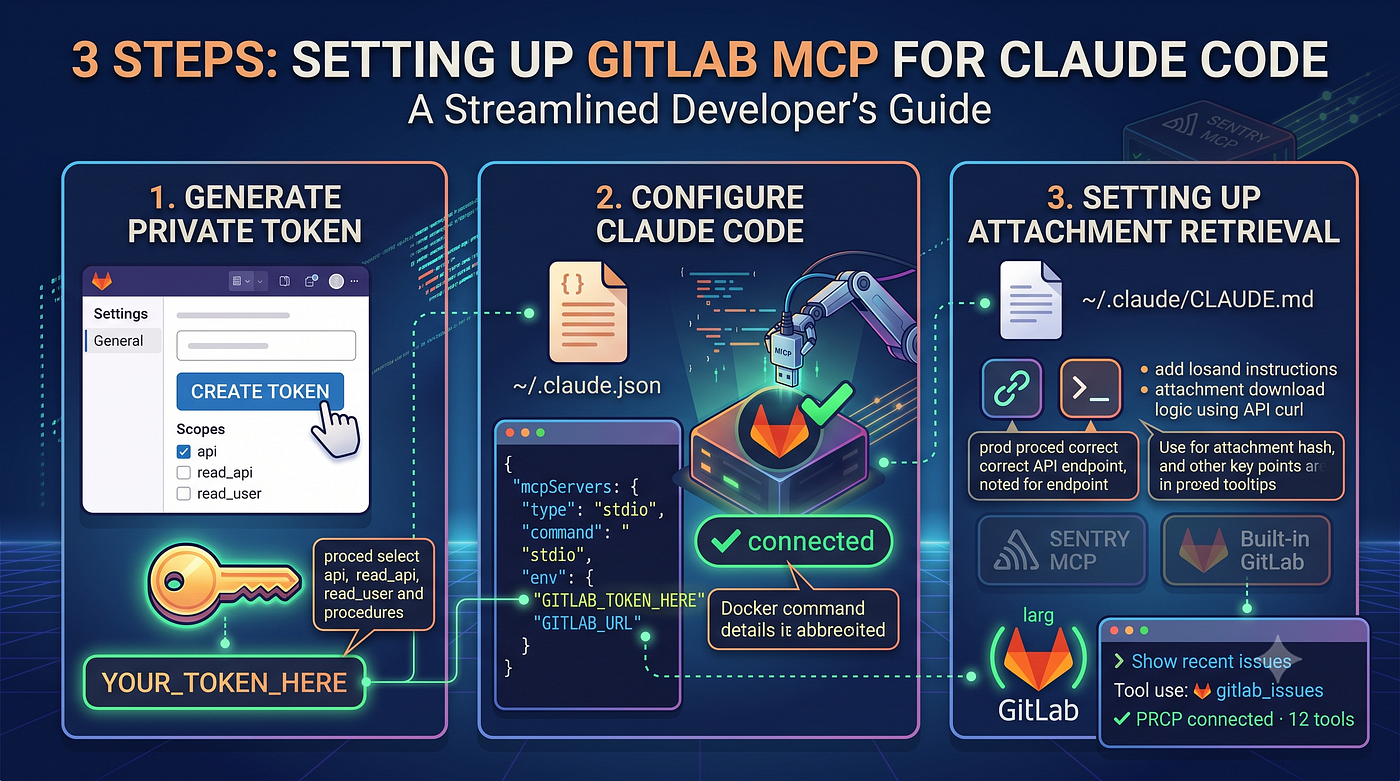
3 Steps setting up Gitlab MCP
Prerequisites
- Claude Code installed
- Docker installed and running
- A GitLab personal access token (see below)
Step 1: Generate a GitLab Personal Access Token
- Go to
[https://gitlab.com/-/user_settings/personal_access_tokens](https://gitlab.c0d1um.io/-/user_settings/personal_access_tokens) - Click
**Add new token** - Give it a name (e.g. claude-mcp)
- Set an
expiry date(recommended: 1 year) - Select scopes:
api,read_api,read_user - Click
**Create personal access token** - Copy the
token— you won’t see it again
Step 2: Configure Claude Code
Open (or create) ~/.claude.json and add the gitlab entry under mcpServers:
(ใส่เข้าไปใน repo gitlab ที่เราต้องการนะ เป็นการ config gitlab mcp แบบ individual)
{
  "mcpServers": {
    "gitlab": {
      "type": "stdio",
      "command": "docker",
      "args": [
        "run",
        "-i",
        "--rm",
        "-e", "GITLAB_TOKEN",
        "-e", "GITLAB_URL",
        "registry.gitlab.com/fforster/gitlab-mcp:latest"
      ],
      "env": {
        "GITLAB_TOKEN": "YOUR_TOKEN_HERE",
        "GITLAB_URL": "https://gitlab.com"
      }
    }
  }
}
Replace **YOUR_TOKEN_HERE with the token from Step 1 and also correct `GITLAB_URL`**
▎ If you already have other entries in mcpServers, just add “gitlab”: { … } alongside them.
Step 3: Setting up Attachment Retrieval
By default, GitLab MCP cannot view attachments inside the issue. Here’s the instruction you’ll need to put it into your CLAUDE.md to let Claude Code understand how to retrieve that information.
Put this in your ~/.claude/CLAUDE.md
## 5. Integration Specifics
### GitLab Attachments

- The GitLab MCP doesn't have a tool for downloading uploads/attachments.
- To download, use curl with the **API endpoint** (not the web URL):
curl -sS --header "PRIVATE-TOKEN: $TOKEN" \ "https://gitlab.com/api/v4/projects/<PROJECT_ID>/uploads/<HASH>/<FILENAME>" \ -o <OUTPUT_FILE>
- The token is stored in `~/.claude.json` under `mcpServers.gitlab.env.GITLAB_TOKEN`.
- The web URL format (`/<namespace>/<project>/uploads/...`) does NOT work with `PRIVATE-TOKEN` header — it expects session cookies.
- To find the project ID from a URL like `/-/project/<ID>/uploads/...`, the ID is already in the URL. To find the project path, use the GitLab MCP `list_project_issues` or the API (`/api/v4/projects/<ID>`).
Verify It Works
Restart Claude Code, then in a new session try:
List my open merge requests
or
Show me recent issues in project
Claude should respond with live data from GitLab.

ทดสอบโดยถามว่าใน issue board ของ Gitlab มีการ์ดอะไรบ้าง ซึ่ง claude สามารถไปเชื่อมมาบอกได้อย่างถูกต้อง แสดงว่า MCP work well
END !
If you think it’s useful for you, just clap your hands 👏 to be encouraged me.
Reference:
https://gitlab.com/fforster/gitlab-mcp
Path: Users/atthana/.claude.json and Users/atthana/.claude/CLAUDE.md
메타데이터
- post_id
- 4b082a49c0d9
- slug
- setting-up-gitlab-mcp-for-claude-code-in-3-steps-4b082a49c0d9
- url
- https://medium.com/@grassrootengineer/setting-up-gitlab-mcp-for-claude-code-in-3-steps-4b082a49c0d9
- canonical_url
- https://medium.com/@grassrootengineer/setting-up-gitlab-mcp-for-claude-code-in-3-steps-4b082a49c0d9
- author_url
- https://medium.com/@grassrootengineer
- status
- ok
- fetched_at
- 2026-07-09 18:09:57