Adaptive Touch to Histograms — CLAHE
A Comprehensive Look at Histogram and Its Implementations…
Adaptive Touch to Histograms— CLAHE
A Comprehensive Look at Histogram and Its Implementations
Photo by Giorgio Tomassetti on Unsplash
Preprocessing operation is the longest and laborious part of images processing as in the other machine fields.
To put it briefly,
- Data Normalization,
- Data Shifting to a specific domain,
- Incorrect data elimination,
- Decide the outliers condition,
- Dimension reduction,
- Select the features that affect the result the most,
and many more ….
In addition to these processes, for images, extra operations should be applied compared to the excel-based dataset such as,
- Fix the image size,
- Equalize the histogram,
- Add randomness to decline overfit,
- Reduce the size especially for high-resolution images,
- Decide the number of channel : 3 channel for RGB , 1 channel for Grayscale,
- Augment Data,
In this article, we will examine the Histogram Equalization which is among the ones I have just mentioned.
First of all, What is a histogram in an image?
The histogram is a concept which counts the number of pixels having the same value and shows them in a specific range.

(https://tr.wikipedia.org/wiki/Histogram )
By looking at histograms of image, it is possible to detect brightness, contrast and intensity distribution of images.
If we dig deeper into its relevance to the image,
In general, existing pixel values range from 0 to 255 unless they are not normalized, 0 to 1 if they are normalized.
Let’s pick one of the pixels to examine,
For gray-scale images, 0 stands for black and 255 stands for white color. Values in between these 2 are for the transition from black to white.
RGB images have 3 channels, which R,G, and B colors are represented in divided channels and full of the value between 0 and 255.

http://www.sci.utah.edu/~acoste/uou/Image/project1/Arthur_COSTE_Project_1_report.html
Histogram’s duty is to put the same pixel values to one group and make an intensity plot.
To clarify histograms,
Count of pixel values having 0 → 0sCount of pixel values having 1 → 1s....Count of pixel values having 255 → 255sSo, what are the purposes of grouping pixels?
In essence, to equalize the contrast, because too bright or too dark images are not the ones which we want. The goal is to disperse the clustered values to all range, which is called histogram equalization, contributing to the solution of the accumulated pixels problem. But we might overlook the details by applying histogram equalization, so the way of enhancing image quality might cause the opposite results.
It is also required to define what a good image is . In general, the good image is an image that has nearly equal number of pixels along the range.

http://www.sci.utah.edu/~acoste/uou/Image/project1/Arthur_COSTE_Project_1_report.html
There are several methods in pixel distribution. For instance, one of the opinions argues that normal distribution is better for equalization. In this method, middle values are significantly more than side pixels, which are 0 and 255.

http://www.sci.utah.edu/~acoste/uou/Image/project1/Arthur_COSTE_Project_1_report.html
Of course, you should decide which opinion is better among image enhancement technics, because it is quite subjective and may alter for each different image.
As I have mentioned before , we might face negative results by applying histogram equalization.
To clarify it ,
For example, a randomly chosen image has black objects or parts. There are 2 possibilities for that. One is that these parts are really black or it is caused by cameras problem or environmental factors.
If the objects are truly black and we apply histogram equalization, it leads to lightening the pixels and black object loses its property, so we should be really careful with such these problems.
This issues bring us to type of histograms, “Old” and Modern”
____OLD__
Old technics are based to equalize the contrast of whole image. It is favorable for some but it may led to soften like applying low pass filter.
To Equalize the range, the rounding method is used. Our image pixels, for instance, have only values between 50 and 100. By this technics, new range became 0 to 255 .As you can imagine , 100 value in old image becomes 255 and 50 becomes 0 .
Since all values are used, the images are likely to be faded. In addition to that, noisy pixels can be emerged due to this operation. We will also see in the code section how the image becomes faded.
__MODERN____
Another approach is CLAHE , which classified as modern and is quite popular nowadays.
This equalization technic consists of kernels and by sliding kernels onto pixels, adaptive equalization is applied locally, meaning that one black object which is anywhere in the image will not affect the whole image contrast.
First things to do: Read Images,
It would be beneficial to take it as “LAB” format. After that, the LAB image will be divided into l, a, b.
L represents the lightness of the LAB image. A and B stand for colors.
In essence, intensity is the core parameter that we mainly deal with, so the lightness of the image will be enough to equalize histogram, and color value a and b will not be affected.
If we don't convert RGB to LAB format, we have to apply same operation to all 3 channels.
In this article, we will see 4 approaches with their code.
- The first one is the oldest and all code blocks are written manually.
- Parts 2 , 3, and 4 have one line code and are easy to call since they are put on the modules by open source communities.
- In the final, we will compare all the results and choose the best.
The original image that we will do the operation on is shown below. As you can see, it is too dark and difficult to distinguish the differences.
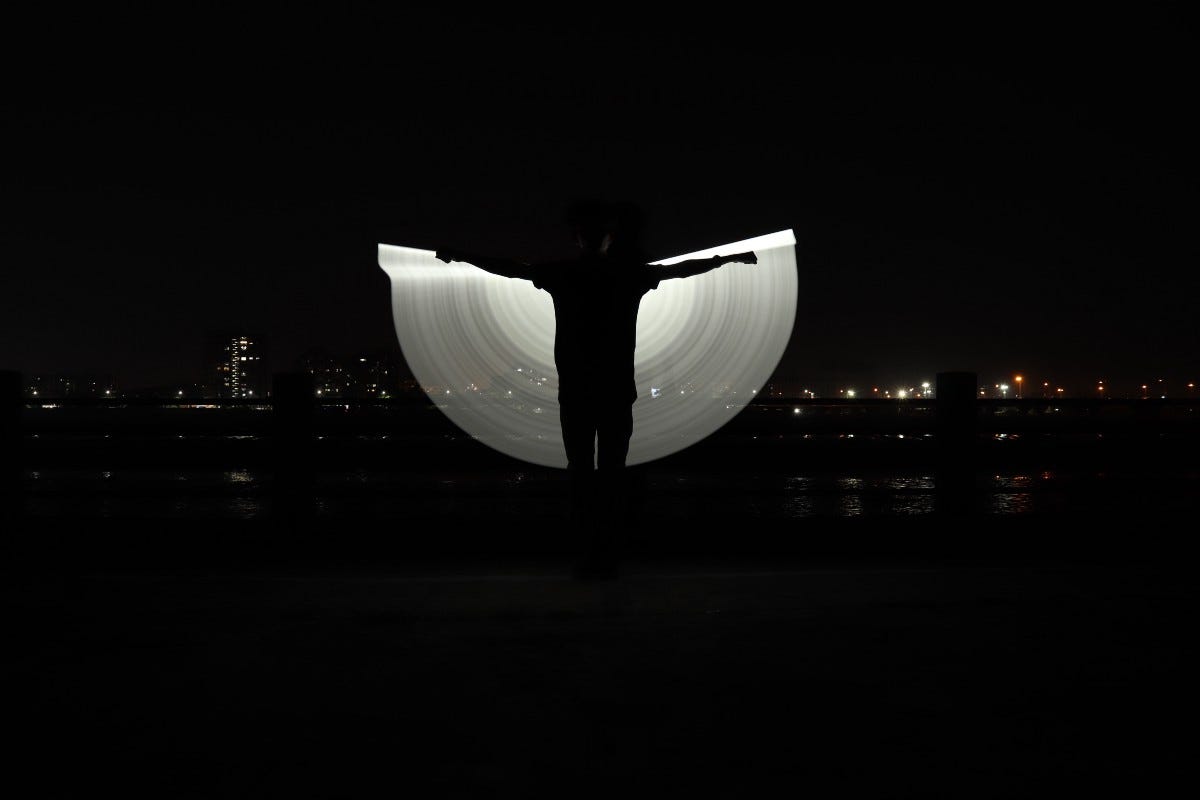
Photo by Universal Kalakar on Unsplash
Let’s do some code,
[embed]RGB → LAB format
The initial duty is to split the image into l, a, and b. Lightness part of the image and cumulative plots are like that,


L Image && Cumulative Histogram of Raw Image
To show only the L part by using Matplotlib library. The result indicates that the whiter part is brighter
As it can be seen from the cumulative graph, almost all pixels having lower values are considered as black. We can infer from these plots that accumulated images in specific regions allow us to do histogram operations.
1- Traditional Approach (Long Way)
→ When a traditional way is used, the brighter part spreads the whole image.
[embed]
Equalized Lightness part is like that ,

Equalized L Part
As you can see, the image range increases as 0 to 255 but the images loses its feature and become quite faded.


Equalized Cumulative Graph && Equalized Image
2- Traditional Approach with OpenCv
[embed]
→ It is the short form of the long way but the result is almost the same. Because the implementation is quite straightforward, it is preferable.

Equalized Image with cv2.EqualizeHist
3-Adaptive Equalization with Skimage
[embed]
→ It is definitely better than traditional way but it is a bit problematic because at first sight it might seem to people as drawing.
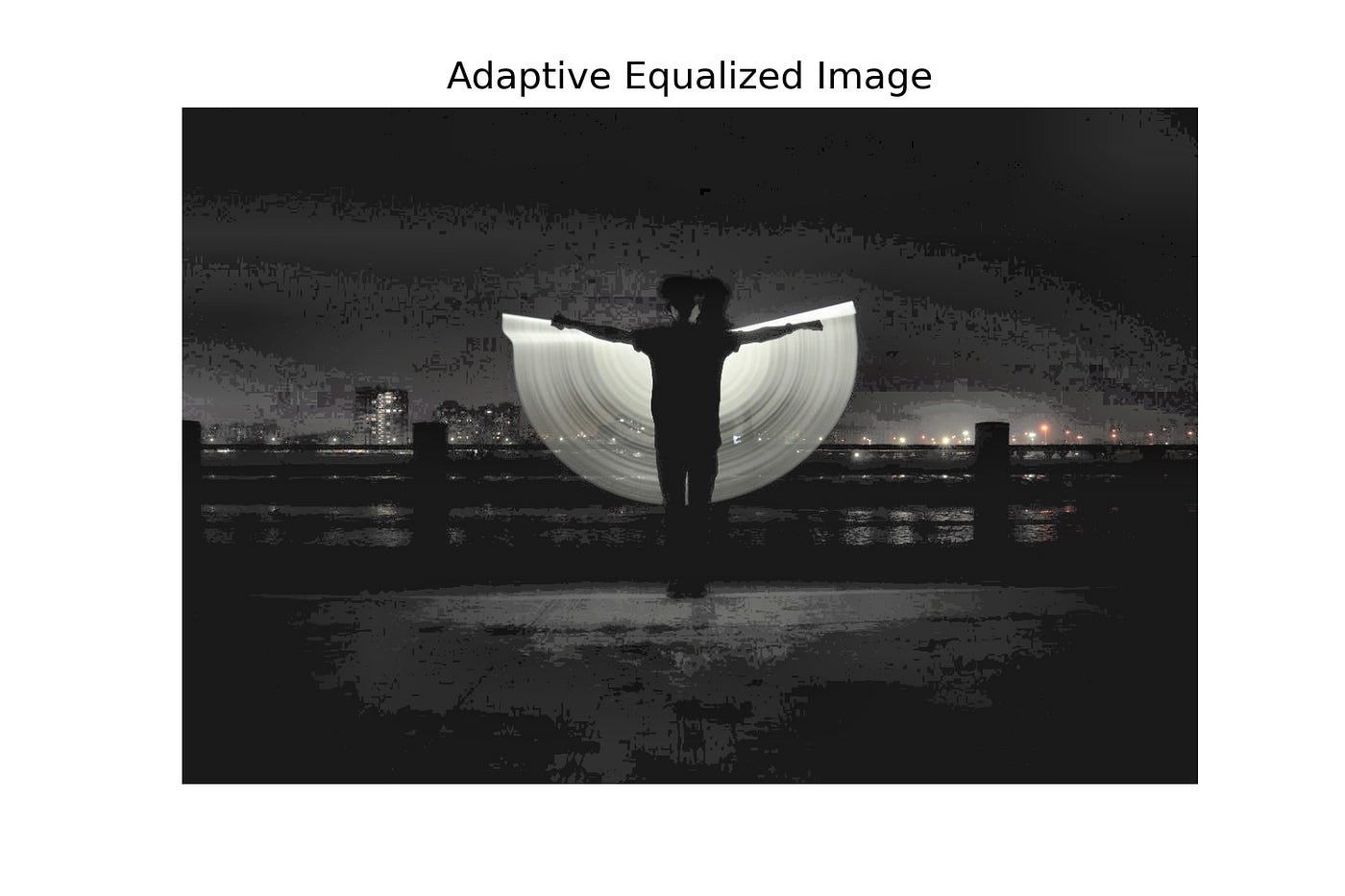
Equalized Image with Skimage
4-CLAHE Method with OpenCv
[embed]
→ As seen with CLAHE, we have achieved the best equalization among the other 3 methods without making the image faded.
When you turn back to the first image, you can see that the fence is not observable but in here it is quite distinctive.

CLAHE View
When it comes to the negative parts of CLAHE, kernel size and cutting limits are kind of hyperparameters, which you have to decide it.
Finally, CLAHE is ahead of other methods by a large margin and it makes CLAHE a preferable application to preserve local edges while equalizing.
I want to share the codes that I have mentioned in advance as well. I would be glad if you follow.
If there are any incomprehensible points, you can always reach me from LinkedIn
메타데이터
- post_id
- 4b0db004e2bd
- slug
- adaptive-touch-to-histograms-clahe-4b0db004e2bd
- url
- https://medium.com/@mntalha.kilic/adaptive-touch-to-histograms-clahe-4b0db004e2bd
- canonical_url
- https://medium.com/@mntalha.kilic/adaptive-touch-to-histograms-clahe-4b0db004e2bd
- author_url
- https://medium.com/@mntalha.kilic
- status
- ok
- fetched_at
- 2026-07-27 23:39:06