KC7 — VirusTotal Fundamentals
Introduction
KC7 — VirusTotal Fundamentals

Introduction
Before diving into this write-up, I highly encourage you to attempt the exercises and solve the questions on your own first. Hands-on practice is the best way to build your investigation skills!
Keep in mind that as you move through the exercise, the questions often build on one another. An answer or piece of data you uncover in one step will likely serve as the foundation for your next query.
Note: This write-up won’t cover every single question, but rather focuses on the ones most critical to the core investigation. While I will be including the answers, remember that individual answers can change over time, but the analytical methodology and the way you find them remains exactly the same.
VirusTotal 101
**VirusTotal** is a website that scans files, webpages, domains, and IPs, against a large number of antivirus scanners. This allows a user to get feedback from a large number of sources and helps them determine if something is known to be malicious or known to be benign.
Files and URLs can be uploaded to VirusTotal. ⚠️However, once they are uploaded, they should be considered public.⚠️ Organizations that pay for access can download uploaded files. As a result, do not upload sensitive files or files that belong to your employer.

It is common for analysts to use VirusTotal to inspect malicious files, but it is also critical for recognising benign files.
At VirusTotal, perform a lookup for the following filehash by selecting
Searchand entering the hash60517f898bfac156cd298fd0a45f2e06cecee232a54667213458b99dc8d80de7and pressing enter.

In the header, VirusTotal provides a summary about the file.
In the top left, is a detection ratio: the number is the number of detections as malicious out of the total number of detection engines.
How many detection engines flagged this file?

The hash scored 0/71, meaning 0 out of 71 connected security vendors and antivirus engines flagged the file hash as malicious
The header also contains the
SHA256hash of the file and a name for the file. VirusTotal calls this the "meaningful name". VirusTotal may pull it from the file'soriginal name,internal nameof the file, or the name may be the name of the first file with this hash that was uploaded. As a result, the name in the header may differ from the name of the file that was uploaded.
VirusTotal will also tag the file with key indicators below the file name.
One important tag to be familiar with is
known-distributor. This tag is used for files that are provided to VirusTotal by a reliable source. During an investigation, if you start investigating a file with theknown-distributortag, there are a few possible scenarios:
First:
Perhaps you grabbed the wrong file hash. That is, sometimes a legitimate file is executing or loading a malicious one and security tools will often share the hash of the executing process. In this case, double-check the file hash.
Who is the distributor of this file?

The file was distributed by Microsoft.
Second: Perhaps the legitimate file was renamed. This technique is called
masquerading. This is a common technique of attackers to avoid detections which may look for a specific process name.
MITRE ATT&CK is a catalog of cyber attacks and has an entry for this technique.
You can find the list of MITRE ATT&CK techniques at attack.mitre.org.
What is the MITRE ATT&CK Technique ID for masquerading?
Navigate to attack.mitre.org

The first row that begins with “Reconnaissance” are the tactics which represent an adversary’s goals (the “why”) during an attack lifecycle and the IDs always start with “TA”. Everything else below the tactics are the techniques, which represent the specific actions an attacker takes to achieve a tactic and their IDs always start with “T”.
Masquerading is an attempt by malicious actors to manipulate features of their artifacts to make them appear legitimate or benign to users and/or security tools. This technique belongs under the “Stealth” tactic as its an action to hide and conceal an action to appear as normal behavior.

Hover or click on the technique to see the ID.

Third:
Perhaps the legitimate file is being used in a malicious manner. One example is
DLL Search Order Hijacking. A DLL is code that can be shared by multiple programs and this technique tricks a file to load something malicious instead of the normal code by renaming a malicious file to have the same name as a benign DLL.
What is the MITRE ATT&CK Technique ID for DLL Search Order Hijacking?
Use the search box to search for DLL Search Order Hijacking.

The first technique we see is T1574.001: Hijack Execution Flow which utilizes DLL Search Order Hijacking to execute malware.
Fourth:
It is rare, but it is also possible that the supplier has been compromised and is unknowingly distributing malicious files.
In 2023, a creator of Voice Over IP (
VOIP) phones and software was found to be compromised and used to distribute malicious files.
What was the name of the affected company?

Source: Fortinet Blog
According to Fortinet 3CX was the affected company.
On the right side of the header, we see other details such as the file size,
Last Modification Date, and file type.
What is the file type of this file?
Now back to VirusTotal.

The file is a Windows executable (exe) file.
The
Last Modification Daterefers to the last time the report was last updated. This matches theLast Analysis Datein another part of the report. You should always think of this date in the header as the last time the file was analyzed.
Users can manually trigger the file to be analyzed again by using the
Reanalyzebutton above the last modification date.
Next to the Reanalyze button are two other buttons,
SimilarandMore. Unfortunately, these options are not available to us with a free account. These options require subscriptions and cost a boat-load of money. However, we won't let that stop us from learning. We'll keep on analyzing.
To finish this question, type
Nothing can hold me back.
**Nothing can hold me back.**
Reanalyzing files is important in two situations:
First, the file appears to be old. Perhaps the file was uploaded to VirusTotal several years ago and the last analysis was also years ago. Reanalyzing the file will process the file again against new detections that may have become available since the time that the file was previously analyzed.
Second, the file may be very new. It is common with emerging threats that detections may not exist and VirusTotal may present the user with a low score (less than 10 detections) or even a clean score (0 detections). Reanalyzing the file will check the file against the detection engines again.
Let’s move over to the
Detailstab.
In the
Detailstab, under theHistorysection, you can see the LastAnalysis date.
The
First Submissiondate is for when the file was first uploaded to VirusTotal.
To complete this question, provide the whole timestamp for the
First Submission.

First submission was at 2021–06–18 09:31:41 UTC.
The
Creation timeis based on the file's metadata.
Malware developers can change this date and sometimes, a weird date can be a suspicious indicator, but not always. Some types of files even default to having a certain date.
Microsoft sets funky dates intentionally for their files. They do this so that they can build files with a consistent file hash. More can be read about that on their blog.
Submit the file’s creation time to complete this question.

Creation time is at 2040–03–02 02:49:27 UTC.
Seems like the creation time was modified.
No one really knows what the
First seen in the Wilddate means. VirusTotal doesn't explain it anywhere and the timestamp doesn't make sense consistently. Don't put much trust into it.
The last analysis date here is useful as it helps us know how long ago the file has been analyzed in contrast to the first submission.
The
Last Submissiondate indicates the last time the file was uploaded. If something is new and being seen by many people, you can see theLast Submissionget updated each time you refresh.
Another indication of users uploading the same file is the
Namessection, which is just below theHistorysection.
The
Namesare the names of the files that have been uploaded. One of the uploads isrKpPlCbFgHgAfYwYlYjWua seemingly random name. (More and more keep getting uploaded causing problems with this question, but the important thing is that you know where to find these names.)
Enter
rKpPlCbFgHgAfYwYlYjWuto complete this question.
rKpPlCbFgHgAfYwYlYjWu
Why might someone have uploaded a legitimate file with a wacky name like that?
Enter the name of the technique to complete this question.
masquerading
As you may have concluded already: changing the name of a file doesn’t affect its file hash. The file hash will stay the same no matter what the file is named.
In this case, the list of
Namesis pretty long.rundll32commonly gets abused, so it is important to be careful: that is, you don’t want to set security tools to block or alert a file namedrKpPlCbFgHgAfYwYlYjWujust to find out that you blocked a legitimate Windows application! Blocking a legitimate file could cause an outage for users or for a whole enterprise.
To complete this question, type Do not block!
Do not block!
Above the
Historysection is aBasic Propertiessection. This section contains a variety of file hash types. If you ever need anMD5orSHA-1hash, this is a good place to find it. The other hashes may become useful to you as you get familiar with other hash types.
This section also provides more detail on the file type. This can be useful if the file type isn’t completely clear or if you need to know more nuanced details about the file type.
To complete this question, enter the version number of the C/C++ compiler according to the details in the Basic Properties section.

Microsoft Visual C/C++ version 19.28.29395
VirusTotal 102
Below the
Namessection, there is an optionalSignature Infosection.
Developers can digitally sign files as evidence the file came from them. The signature contains a hash of the file so that if the file is modified in any way, the signature will flag as
Invalidindicating that the file has been tampered with.
Microsoft often signs their files, but not always. As a result, the signature can be an unreliable source of truth as to if the file is from Microsoft or not.
To complete this question type You do you, Microsoft.
You do you, Microsoft.
In order to sign a file, a company needs to “prove” to a certificate issuer that they are a legitimate company.
This system can be abused, so it is important to take a look at the company in the certificate and determine if it makes sense with everything else you know about the file.
The file is then signed by the developer and then signed by the certificate issuer. The developer’s name is usually listed first.
Take a look at the first signer of the file with the hash:
4788925332fc6128c895b0e0736a1d7d90e3891f2abb456523cbf0c1ced7d1e2.
(Search for that hash, and look in the
Detailstab.)
Does that company make sense to be providing software? To complete this question, enter the name of the first signer for the file hash.
Scroll down to “Signature info”.

Why is a brewery distributing software? That’s not normal.
In the
Signature Infosection, theFile Version Informationis extracted from the file itself. The copyright, product, description, original name, and other details are all controlled by the creator of the file. Since they are controlled by the creator, they should only be trusted if you trust the file.
Look at the File version information for the following file:
549ff37e56d372d076a3d11cd33af660568dc1048b1f4ecce77d8b334582c6c8.
At the time of this writing, the last time the file was analyzed was a year ago, and the certificate appears valid. The file only had 2/70 detections. According to the file, the copyright belongs to
Intel Corporation.
But who is the first signer?
Scroll down to “Signature info”.

A fellow SOC analyst informed us that they found a sample with the same Certificate signer as in question 3! The file hash is
a50bcbf0ef744f6b7780685cfd2f41a13be4c921d4b401384efd85c6109d7c00, however, it has a lot more hits by detection engines!
Let’s look at the
Detectionstab.
There are a few sections of this page that are only visible if you are logged in. These sections are
Crowdsourced YARA rulesandCrowdsourced Sigma Rules. It is beyond the purpose of this lesson to discuss YARA rules and Sigma rules, but the important thing right now is knowing that VirusTotal users can contribute custom rules. You are also able to view these rules by hovering over the rule and clickingView Ruleset. This is useful if you want to understand why the rule fired or if you want to use the rule elsewhere.
One of the YARA rules identified that the file included encrypted content. What is the name of the rule?

INDICATOR_EXE_DotNET_Encrypted
The largest section on the page is the
Security vendors’ analysis. This section shows the results from many different security vendors. The number of vendors who detected something malicious contributes to the detection ratio in the header.
Newer analysts can sometimes make a mistake of assuming something is malicious because it has some detections, but it is good to understand who is detecting what. No vendor is perfect, but there are definitely some vendors who are more reliable and well known than others.
Sometimes, directly above this section, there is a bar that summarizes some of the detections. This includes a Popular threat label and a summary of tags.
What is the popular threat label for a50bcbf0ef744f6b7780685cfd2f41a13be4c921d4b401384efd85c6109d7c00?

trojan.stealer/msil
That label suggests the file is a Trojan and Stealer (also known as Information Stealing malware) which may steal passwords from the computer and browser. The community tab can often help us learn more.
Let’s go to the
communitytab. Make sure you are logged into your account. You will see a section calledContained in CollectionsorContained in Graphs.
VirusTotal allows users to group common files and indicators together in a collection or graph. According to this page, some users have a collection/graph that contains this file. By looking at those, or the information associated with them, we can learn more about the file
According to some of the Contained in Collections groups and the comments, what threat actor used this file?
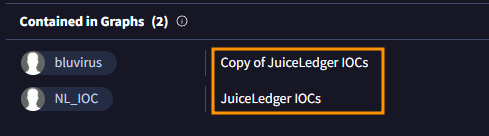

According to the link referenced in the comments, JuicyLedger is a relatively new threat actor in 2022, focused on infostealing through a .NET assembly called ‘JuiceStealer’.
The
Commentssection contains information submitted by registered users and can often help an investigation substantially. We can use information we find here and see if it matches the behavior in our investigation.
Let’s look at a new file: the file hash is
a54ca708c3bbef76dbaec817a9bb36d8b52e492b293d2127cd5be284caabb6d1.
The file has a low detection ratio:
7/62at the time of this writing. (Note: this ratio may change as more vendors either scan or detect this file).
Just looking at the numbers, this ratio is inconclusive as to whether the file is malicious or not. However, if we look at the
Communitytab and theCommentssection, we see a helpful comment from colinc_sophos.
What malware does colinc_sophos claim this file is?

colinc_sophos claims the malware to be Batloader.
Be careful: threat actors leave comments too!
Previously, this malware had a comment from a threat actor stating that it was
Clean! The threat actor has now been banned from VirusTotal and their comments removed.
In that situation, colinc left robust comments on all the same files that the threat actor had commented on. colinc was able to do this because you can see all of someone’s comments by clicking on their profile image.
Looking at someone’s profile can help you understand how reliable someone is and it may also help you find related malware.
After clicking on their image, the profile header has their username and their name.
What is the name of the user posting as colinc_sophos?
Click on the name to view their user profile.

The user’s name is Colin Cowie.
This file has a low score because of anti-analysis techniques and because it can no longer retrieve its malicious payloads. As a result, most of the behavior is unavailable to the sandboxes and from the detection engines.
As a result, comments like those left by colinc_sophos can help provide context that VirusTotal itself does not provide.
When you analyze files in the future, consider leaving comments for others who may investigate the same file as you. You can also vote using the
Community Scorebuttons under the detection ratio. The 🢓 will downvote, and the 𝧶 will upvote.
According to colinc_sophos, how is this malware distributed?
The user claims the batloader to be distributed by fake software websites & malvertizing.
MITRE ATT&CK describes the technique from the last question like this:
“Adversaries may purchase online advertisements that can be abused to distribute malware to victims. Ads can be purchased to plant as well as favorably position artifacts in specific locations online, such as prominently placed within search engine results. These ads may make it more difficult for users to distinguish between actual search results and advertisements. Purchased ads may also target specific audiences using the advertising network’s capabilities, potentially further taking advantage of the trust inherently given to search engines and popular websites.”
What is the MITRE ATT&CK technique ID for this technique?

Malvertising is a sub-technique of Acquire Infrastructure under the Resource Development tactic.
Click or hover on Malvertising to see the ID.

Another SOC analyst contacted us to let us know they found yet another file with the same Certificate signer as in Question 3, but its behavior is different. This file has the file hash
0221bf1e1bd171c17527a863531518a95bcc025c87888e66b9512a5651073d16. Let's take a look at it.
Oh dear! This file has even more detections than the last one.
Based on the header, someone appears to have uploaded the file with a name that includes the file hash.
Was the file uploaded with another name? (Hint: it was)
To complete this question, provide the other file name.
This file currently has 42 detections.

IRS_form_Package_17–01–2023_19–25–53.exe
Based on the
Commentstab for the same file in Question 11, what malware family is this file?
Enter the malware family name to complete this question.
What is a “malware family”?
A malware family is a group of malicious software programs that share the same codebase, underlying architecture, or developer origins, even if they have different versions or specific targets.

This malware belongs to the icedid family.
Let’s look at the
Relations tabfor the same file from the last two questions. In this tab, we will see information such as what domains and IP addresses a file connects to.
According to the relations tab, what domain was contacted by this file?
When we navigate to the Relations tab , we can see the file makes a connection to http[:]//plivetrakoy[.]com.

The
Relationstab is a great place to pivot on suspicious indicators.
To “pivot” is to take an indicator and use it to turn in a new direction. This can help find new indicators and can help find related files. To pivot on the domain, click the domain that you found in the last question. Clicking the domain will navigate to the VirusTotal page for that domain.
Up until this point, we have only looked at file analysis in VirusTotal, but VirusTotal also has analysis for domains and IP addressess.
The
Detailspage is consistent with what you might expect for a domain, such as details about DNS Records. We will not dig into these details for this lesson, but it is good to know they are here.
If we look at the
Relationstab, we can see a section calledPassive DNS Replication. These are the IP addresses that had resolved to the suspicious domain.
What IP address resolved to this domain on the date closest to when the file was submitted to VirusTotal?
First we need to navigate to the Details tab to note the submission date.

The file was submitted on 2023–01–18.
Now we need to navigate to the Relations tab and click on the domain, which will take us to the VirusTotal page for that domain.

From there we can navigate to the Relations tab were we will see the Passive DNS Replication.

The date closest to the file’s submission date is 2023–01–17 with the IP address 193.149.180.175.
Pivoting gives you as an analyst more information to search on. You can also leverage this information to identify if hosts in the environment have indicators you found while pivoting. Originally, we only had a filehash, but now we have a filehash, a domain, and an IP address.
While on the VirusTotal page for the domain, we can look at the
Communicating Filessection on theRelationstab. This section can be useful when you don’t know if an IP address is being used maliciously or not.
In this case, there are 5 files uploaded to VirusTotal which communicate with this IP address, and one of them is the file we saw previously.
What is the general disposition of the files? Answer with one of the following: The files look OK , Mixed Results, or All bad

All the files are bad with the lowest having 25 detections.
Let’s return to the previous file. We can do this by clicking the filename in the
Communicating Filessection or by searching for the file hash0221bf1e1bd171c17527a863531518a95bcc025c87888e66b9512a5651073d16again.
Returning to the
Relationstab:
We also see a section called
Execution Parents. This section exists when a file was dropped by another during analysis. This can give us some clues as to where the file came from. In this case, it looks like it came from a ZIP file.
What is the name of this file’s execution parent?

IRS_form_Package_17–01–2023_19–25–53 (1).zip
If we click the file name of the execution parent, we can pivot to that file. This file is a ZIP file.
Any ZIP file uploaded to VirusTotal will be extracted and the contents will be submitted for their own analysis. This is important to know in case other files in the ZIP are necessary for the malicious file to execute. That is not the case in this situation: it appears the ZIP file only has 1 file inside of it based off of the
Relationstab.
To complete this question, provide the SHA-1 hash for the ZIP file.
The SHA-1 hash can be found on the Details tab.

VirusTotal 103
While we were working, our Threat Intel team informed us they found yet another file with the same certificate signer! The Intel team informs us that criminals impersonate companies to get certificates and then sell the certificates to sign the malware for multiple malware developers!
The hash of the file is
2bf0a64fe7aea262c96fc7d52b1e28486ff607caa9513fd88583e19454f9c500.
What is the status of the certificate of this file?
Navigating to the Details tab then the Signature info section shows us the status of the certificate.

The certificate was revoked.
What is the Creation Time for this file?

1992–06–19 22:22:17 UTC
The creation time for this file is actually normal for this type of file. Every file made with this compiler version has the same timestamp.
What is the name of the compiler of this file?
We can view the compiler name on the properties section.

Borland Delphi (7)
A user reported a command-and-control (C2) server in the comments section. If we look, we won’t see this C2 IP address in the relations tab. If we trust this user, we could investigate this IP in our own investigation.
What is the name of the DLL file which was observed connecting to this IP address on 2025-02-12?
Search for the C2’s IP address on VirusTotal and navigate to the Relations tab.

On the Communicating Files section we can see the date and name of the DLL file we are looking for.
WABCDEFGHIJKLMNOPQRSTUVWXYZABCDEFGHIJKLMNOPQRSTUVWXYZoYDHNFTTPDJL50NWXNEWCHBUDCPJOeEZNbd
Let’s look back to the file from questions 1–3. We will now look at the
Behaviortab to understand what this file does.
2bf0a64fe7aea262c96fc7d52b1e28486ff607caa9513fd88583e19454f9c500
At the top of the
Behaviortab, it will list any sandboxes that were used to analyze the file. At the time of writing this, the only sandbox in this instance isDrWeb vxCube.
There are often more sandbox reports, but there may only be one sandbox due to the file’s large size. Many sandboxes cannot handle sizes larger than 100MB and the maximum size that can be uploaded to VirusTotal is 650MB.
What is the file’s size?

Attackers are aware of these size limitations and
pumporinflatetheir files to be too large for sandbox analysis.
Defenders can defeat this technique by
deflatingthe file. One tool that does this is calledDebloat.
A deflated copy of this file was uploaded to VirusTotal:
71d5a558096b640366dbc711ef2870c0269b4138352bb98da0be30d9b6d6bb9b. When uploaded, it was able to be analyzed with 5 sandboxes this time.
What is the size of the deflated file?

Let’s return to the inflated file from question 5 and look back to the
Behaviortab. When we look at the report, we can learn a lot about what the file did.
2bf0a64fe7aea262c96fc7d52b1e28486ff607caa9513fd88583e19454f9c500
File system actionsrecords any filesopened,written, ordroppedby the file. During the analysis, a file was written in an important file path. Any file in this file path will be executed when the user logs onto the device.
To complete this question, provide the full filepath. (Note: leave the filename off as it may change if this file is re-analyzed.)
In the Behavior tab, scroll down to File System Actions section.
Since the file was written to a file path, we need to look in the Files Written category. We need to look for the file path that executes files when a user logs onto the device, on Windows the

%APPDATA%\microsoft\windows\start menu\programs\startup\
Below the
File system actionssection is a section calledRegistry actions. On a Windows machine, the Registry is responsible for the device's configuration and the Registry handles many aspects of the computer.
When this file executed, it modified some registry keys. Registry keys are separated into
hivesand thehiveassociated with the registry key is listed at the beginning of the key. Theregistry hivemodified by the malware is abbreviatedHKCU.
What is the full name of the registry hive?
The unabridged word for the term HKCU is HKEY_CURRENT_USER.
VirusTotal records what is written in the registry keys when they are modified. To view the contents, click the + to the left of the registry key.
One of the keys contains the path
shell\open\command.
What program will the registry key execute when called? This is the first word written to the registry key.
Navigate to the Registry keys set category to find the registry key with the path containing shell\open\command.

The registry key will execute Powershell when called.
A lot of content was written to the registry key including something about
Cryptography?
What type of encryption algorithm is mentioned and used by the registry key?
The encryption algorithm mentioned is AES which stands for Advanced Encryption Standard.
Below the
Registry actionssection is a section calledProcess and service actions. One of the categories here isProcess tree.
A
Process treeshows the relation between executed files. If a process spawns another process, the first process is called aparent processand the second is called achild process.
Child Processesare indicated here with an arrow curving to the right.
What is the child process of our file?
Look for the process containing hash of our file. Underneath it we can see the child process.

Thank you for reading.
메타데이터
- post_id
- 4b24b2d2fd34
- slug
- kc7-virustotal-fundamentals-4b24b2d2fd34
- url
- https://medium.com/@yxager/kc7-virustotal-fundamentals-4b24b2d2fd34
- canonical_url
- https://medium.com/@yxager/kc7-virustotal-fundamentals-4b24b2d2fd34
- author_url
- https://medium.com/@yxager
- status
- ok
- fetched_at
- 2026-07-10 11:40:45