Level 0
The objective of this level is to establish an SSH connection to bandit.labs.overthewire.org on port 2220. The login credentials for this…
Level 0
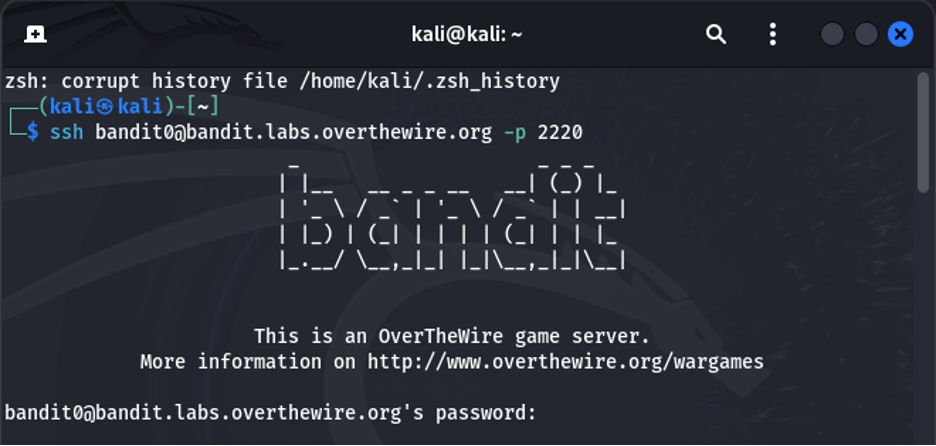
The objective of this level is to establish an SSH connection to bandit.labs.overthewire.org on port 2220. The login credentials for this account are as follows: username *“bandit0” and the password will be requested by the shell. The password is “bandit0.”*
ssh [bandit0@bandit.labs.overthewire.org](mailto:bandit0@bandit.labs.overthewire.org) -p 2220
bandit0 (password)
Level 0 → Level 1
The goal of this stage is to gain access to the “readme” file located in the current directory. The password for bandit1 is contained within this file.
ls
cat readme
exit

Level 1 → Level 2
The goal of this level is to obtain the password for the next level by accessing the file named “-” . Upon executing the “ls” command in the shell, a file with the name “-” is observed, which may seems weird.
ssh [bandit1@bandit.labs.overthewire.org](mailto:bandit1@bandit.labs.overthewire.org) -p 2220
(password L0 → L1)
ls
cat ./-
exit

Level 2 → Level 3
In the home directory, there is a file with a filename containing spaces. Its content can still be displayed using the “cat” command by enclosing the filename in single quotes or by escaping the spaces with a backslash .
ssh [bandit2@bandit.labs.overthewire.org](mailto:bandit2@bandit.labs.overthewire.org) -p 2220
(password L1 → L2)
ls
cat “spaces in this filename”
exit


Level 3 → Level 4
Within the current directory, there exists a subdirectory named “inhere.” Upon executing the “ls” command, no files are initially visible because the file within this directory is hidden.
ssh [bandit3@bandit.labs.overthewire.org](mailto:bandit3@bandit.labs.overthewire.org) -p 2220
(password L2 → L3)
ls -al
cd inhere
ls -al
cat …Hiding-From-You
cd
exit


Level 4 → Level 5
In the next level, the “inhere” directory is revisited, and within it, 9 files are found. The password for the next level is located exclusively within the file containing human-readable content in this directory.
ssh [bandit4@bandit.labs.overthewire.org](mailto:bandit4@bandit.labs.overthewire.org) -p 2220
(password L3 → L4)
ls -al
cd inhere
ls -al


Level 5→ Level 6
The password for the next level is contained within a file that meets specific criteria: it’s 1033 bytes in size, it’s meant for human readability rather than program execution, and it’s located within the “inhere” directory.
ssh [bandit5@bandit.labs.overthewire.org](mailto:bandit4@bandit.labs.overthewire.org) -p 2220
(password L4 → L5)
ls
cd inhere
ls
. -type f -size 1033c
cat ./maybehere07/ .file2
exit


Level 6→ Level 7
The password for the next level is stored somewhere on the server and has all of the following properties:
owned by user bandit7
owned by group bandit6
33 bytes in size
The file was owned by user “bandit7,” owned by group “bandit6,” and 33 bytes in size
ssh [bandit6@bandit.labs.overthewire.org](mailto:bandit4@bandit.labs.overthewire.org) -p 2220
(password L5 → L6)
ls

The file meeting the specified criteria was found in the directory: “/var/lib/dpkg/info/bandit7.password.”

Level 7→ Level 8
The password for the next level is located in the “data.txt” file next to the word “millionth.”
ssh [bandit7@bandit.labs.overthewire.org](mailto:bandit4@bandit.labs.overthewire.org) -p 2220
(password L6 → L7)


Level 8→ Level 9
The password for the next level is stored in the file data.txt and is the only line of text that occurs only once
ssh [bandit8@bandit.labs.overthewire.org](mailto:bandit4@bandit.labs.overthewire.org) -p 2220
(password L7→ L8)


Level 9→ Level 10
The password for the next level is stored in the file data.txt in one of the few human-readable strings, beginning with several �=� characters.
ssh [bandit9@bandit.labs.overthewire.org](mailto:bandit4@bandit.labs.overthewire.org) -p 2220
(password L8→ L9)


Level 10→ Level 11
The password for the next level is stored in a file named data.txt. To locate it, the “ls” command is employed. A hint is provided that the password is encoded in Base64.
ssh [bandit10@bandit.labs.overthewire.org](mailto:bandit4@bandit.labs.overthewire.org) -p 2220
(password L9→ L10)


Level 11→ Level 12
In the home directory, a file named data.txt can be located. When this file is extracted, it reveals a sequence of characters that appears to be nonsensical.
ssh [bandit11@bandit.labs.overthewire.org](mailto:bandit4@bandit.labs.overthewire.org) -p 2220
(password L10→ L11)


Level 12→ Level 13
The password for the following level can be located in the file data.txt, which is a hexdump of a file that has undergone multiple rounds of compression.
ssh [bandit12@bandit.labs.overthewire.org](mailto:bandit4@bandit.labs.overthewire.org) -p 2220
(password L11→ L12)


Level 13→ Level 14
It has been conveyed to us that a password for the next level will not be provided. Instead, an SSH private key has been given. To advance to the next level, the SSH private key will be used.
ssh [bandit13@bandit.labs.overthewire.org](mailto:bandit4@bandit.labs.overthewire.org) -p 2220
(password L12→ L13)

Level 14→ Level 15
The password for the next level can be retrieved by submitting the password of the current level to port 30000 on localhost. According to the hint we have to connect to port 30000 on localhost and we have to send a string containing the current password.
ssh [bandit14@bandit.labs.overthewire.org](mailto:bandit4@bandit.labs.overthewire.org) -p 2220
(password L13→ L14)
메타데이터
- post_id
- 4b3296533faa
- slug
- level-0-4b3296533faa
- url
- https://medium.com/@anujakw48/level-0-4b3296533faa
- canonical_url
- https://medium.com/@anujakw48/level-0-4b3296533faa
- author_url
- https://medium.com/@anujakw48
- status
- ok
- fetched_at
- 2026-07-20 18:49:13