SwiftUI: Locate Peers with Nearby Interaction Framework
Let’s make a simple peer discovery app!
SwiftUI: Locate Peers with Nearby Interaction Framework
***Nearby Interaction*** Framework allows us to get the position of other devices with the Ultra Wide-band (UWB) chip (High Tech~)! That can be another iPhone (11 or later), Apple Watch, or even third-party accessories.
Of course, what we can do is more than just locating!
Because technically speaking, what we have here is using OUR OWN DEVICE to control what is shown on OTHER DEVICES!
For example, we can create a multiplayer game where the user get to use their own device as a (simple) game controller to control the gameplay on peer’s device.
We can even combine Nearby Interaction with ARKit for more precise measurements and more interesting usages. Here is an ***example*** provided by Apple if you want to check it out.
It is really cool!
Anyway!
In this article, we will start simple! Checking out how we can locate our peer’s device with Nearby interaction. Specifically, we will be targeting iPhones.
Demo code available on **GitHub**! Like Always!
Overview
Let’s start with a high level overview of what information we can obtain using Nearby Interaction and the steps to that.
Information available
[distance](https://developer.apple.com/documentation/nearbyinteraction/ninearbyobject/3601348-distance): distance from the user’s device to the peer device in meters[direction](https://developer.apple.com/documentation/nearbyinteraction/ninearbyobject/3601347-direction): A[simd_float3](https://developer.apple.com/documentation/simd/simd_float3) vector that points from the user’s device in the direction of the peer device.[horizontalAngle](https://developer.apple.com/documentation/nearbyinteraction/ninearbyobject/horizontalangle-hsg): An angle in radians that indicates the azimuthal direction to the nearby object.[verticalDirectionEstimate](https://developer.apple.com/documentation/nearbyinteraction/ninearbyobject/verticaldirectionestimate-swift.property): The estimation of a nearby object’s vertical position as it relates to the user’s device.
[distance](https://developer.apple.com/documentation/nearbyinteraction/ninearbyobject/3601348-distance) and [direction](https://developer.apple.com/documentation/nearbyinteraction/ninearbyobject/3601347-direction) are the basic ones. For peer device out of range, both value will be nil. If the device is out of the line of sight, [direction](https://developer.apple.com/documentation/nearbyinteraction/ninearbyobject/3601347-direction) will be nil.
We then have the [horizontalAngle](https://developer.apple.com/documentation/nearbyinteraction/ninearbyobject/horizontalangle-hsg) and [verticalDirectionEstimate](https://developer.apple.com/documentation/nearbyinteraction/ninearbyobject/verticaldirectionestimate-swift.property) that will only be available if [isCameraAssistanceEnabled](https://developer.apple.com/documentation/nearbyinteraction/ninearbypeerconfiguration/iscameraassistanceenabled) is true, telling the framework to use ***ARKit*** to provide a nearby object’s [distance](https://developer.apple.com/documentation/nearbyinteraction/ninearbyobject/distance-9atp7) and [direction](https://developer.apple.com/documentation/nearbyinteraction/ninearbyobject/direction-4qh5w) in a wider range of environmental conditions.
When we don’t have [isCameraAssistanceEnabled](https://developer.apple.com/documentation/nearbyinteraction/ninearbypeerconfiguration/iscameraassistanceenabled) to true, we can also calculate the azimuthal and vertical direction between the devices from the [simd_float3](https://developer.apple.com/documentation/simd/simd_float3) [direction](https://developer.apple.com/documentation/nearbyinteraction/ninearbyobject/3601347-direction) like following.
extension NINearbyObject {
    var azimuth: Float? {
        if let horizontalAngle {
            return horizontalAngle
        }
        guard let direction else {
            return nil
        }
        return asin(direction.x)
    }

    var elevation: Float? {
        guard let direction else {
            return nil
        }
        return atan2(direction.z, direction.y) + .pi / 2
    }
}
Nearby Interaction works best when peer iPhone devices are:
- Within 9 meters of each other
- In portrait orientation
- Facing each other with their back camera
as demonstrated by the following image.
Basic Steps
- Locate and connect with the peers with ***Core Bluetooth, [Multipeer Connectivity](https://developer.apple.com/documentation/MultipeerConnectivity), [Watch Connectivity](https://developer.apple.com/documentation/WatchConnectivity)***, or a custom server deployment
- Create an
[NISession](https://developer.apple.com/documentation/nearbyinteraction/nisession) and assign[NISessionDelegate](https://developer.apple.com/documentation/nearbyinteraction/nisessiondelegate) - Exchange
[discoveryToken](https://developer.apple.com/documentation/nearbyinteraction/nisession/discoverytoken) - Create
[NIConfiguration](https://developer.apple.com/documentation/nearbyinteraction/niconfiguration) from peer’s token using one of the subclasses:[NINearbyPeerConfiguration](https://developer.apple.com/documentation/nearbyinteraction/ninearbypeerconfiguration) or[NINearbyAccessoryConfiguration](https://developer.apple.com/documentation/nearbyinteraction/ninearbyaccessoryconfiguration) [run](https://developer.apple.com/documentation/nearbyinteraction/nisession/run(_:)) the configuration to start an interaction session- Read peer’s position with the
[session(_:didUpdate:)](https://developer.apple.com/documentation/nearbyinteraction/nisessiondelegate/session(_:didupdate:)) method ofNISessionDelegate
Set Up
Like ALWAYS! Permission related stuff first!
Common Prerequisite
First of all, we will need to add the [NSNearbyInteractionUsageDescription](https://developer.apple.com/documentation/bundleresources/information-property-list/nsnearbyinteractionusagedescription) key to our Info.plist. This will ask for user permission to begin an interaction session with nearby devices and prompt the reason for it.

Framework Specific
In addition, we will also need to add couple other keys depending on which framework we use to locate peers and exchange tokens. As I have mentioned above, this can be either ***Core Bluetooth, [Multipeer Connectivity](https://developer.apple.com/documentation/MultipeerConnectivity), [Watch Connectivity](https://developer.apple.com/documentation/WatchConnectivity)***, or a custom server deployment.
In this article, we will be using the ***Multipeer Connectivity***.
If you want to use Core Bluetooth instead, please feel free to check out my previous articles: ***Low Energy Bluetooth (Part1: Peripheral Side) and [Part2: Central Side](https://levelup.gitconnected.com/swiftui-low-energy-bluetooth-part2-central-side-1f3148217334)*** where we have token a super detailed look at the framework.
Please allow me to assume that you have some basic experiences with this ***Multipeer Connectivity framework. If you need a quick catch up on this, how we can find peers and exchange messages, please give my previous article: [SwiftUI: Peer-to-Peer (P2P) with Multipeer Connectivity Framework ](https://medium.com/@itsuki.enjoy/swiftui-peer-to-peer-p2p-with-multipeer-connectivity-framework-eb76f13e2b4e)***a look and hope that it can clarify some of the concept for you!
Two additional keys we need to add.
[NSLocalNetworkUsageDescription](https://developer.apple.com/documentation/BundleResources/Information-Property-List/NSLocalNetworkUsageDescription)[NSBonjourServices](https://developer.apple.com/documentation/BundleResources/Information-Property-List/NSBonjourServices)

We have two items within the Bonjour services array. The first substring identifies the application protocol and the second identifies the transport protocol.
It needs to match the serviceType that we will be using later while creating [MCNearbyServiceAdvertiser](https://developer.apple.com/documentation/multipeerconnectivity/mcnearbyserviceadvertiser) and [MCNearbyServiceBrowser](https://developer.apple.com/documentation/multipeerconnectivity/mcnearbyservicebrowser).
Implementation
Full Code
Code first! We will have a MultipeerManager class for managing Multipeer Connectivity, InteractionManager for Nearby Interaction, and a ViewModel wrapping those two together.
import SwiftUI
import MultipeerConnectivity
import NearbyInteraction

@MainActor
@Observable
class ViewModel {

    enum _Error: Error {

        // multipeer
        case invitationFailed(String)
        case startBrowsingFailed(String)
        case startAdvertisingFailed(String)
        case sendMessageFailed(String)
        case peerDisconnected
        case invalidMCSessionState

        // nearby interaction
        case deviceUnsupported
        case tokenCreationFailed
        case niSessionEnded(String)


        var message: String {
            switch self {
            case .invitationFailed(let message):
                return message
            case .startBrowsingFailed(let message):
                return message
            case .startAdvertisingFailed(let message):
                return message
            case .sendMessageFailed(let message):
                return message
            case .peerDisconnected:
                return "Peer disconnected. Please try to invite again."
            case .invalidMCSessionState:
                return "Peer not connected. Please invite to connect first."
            case .deviceUnsupported:
                return "Device does not supported nearby interaction."
            case .tokenCreationFailed:
                return "Failed to create discovery token for nearby interaction."
            case .niSessionEnded(let message):
                return message
            }
        }

    }

    var error: _Error? = nil {
        didSet {
            DispatchQueue.main.asyncAfter(deadline: .now() + 2, execute: {
                self.error = nil
            })
        }
    }

    var coachingMessage: String? = nil {
        didSet {
            DispatchQueue.main.asyncAfter(deadline: .now() + 2, execute: {
                self.coachingMessage = nil
            })
        }
    }

    var multipeerManager = MultipeerManager()
    var interactionManager = InteractionManager()

    init() {

        // Multipeer related initializations
        multipeerManager.setError = self.setError
        multipeerManager.peerConnectedHandler = self.connectedToPeer
        multipeerManager.peerDisconnectedHandler = self.disconnectedFromPeer
        multipeerManager.peerDataHandler = self.dataReceivedHandler

        // interaction
        interactionManager.setError = self.setError
        interactionManager.setCoachingMessage = self.setCoachingMessage
    }
}

extension ViewModel {

    func sendInteractionRequest(to peerID: MCPeerID) {
        if multipeerManager.managedPeers[peerID] != .connected {
            self.error = .invalidMCSessionState
            return
        }
        interactionManager.shareDiscoveryToken(with: peerID, sendDateHandler: multipeerManager.send)
    }


    // peer token already received
    func acceptInteractionRequest(from peerID: MCPeerID) {
        if multipeerManager.managedPeers[peerID] != .connected {
            self.error = .invalidMCSessionState
            return
        }
        interactionManager.shareDiscoveryToken(with: peerID, sendDateHandler: multipeerManager.send)
        interactionManager.runConfiguration(with: peerID)
    }

    func reset() {
        self.interactionManager.reset()
        self.multipeerManager.reset()
    }

    private func setError(_ error: _Error) {
        print("error: \(error)")
        self.error = error
    }

    private func setCoachingMessage(_ message: String) {
        self.coachingMessage = message
    }

    private func connectedToPeer(_ peerID: MCPeerID) {
        interactionManager.initializePeer(peerID)
    }

    private func disconnectedFromPeer(_ peerID: MCPeerID) {
        self.error = .peerDisconnected
        interactionManager.invalidateInteraction(with: peerID)
    }

    private func dataReceivedHandler(_ peerID: MCPeerID, data: Data) {
        guard multipeerManager.managedPeers[peerID] != nil else {
            return
        }

        interactionManager.peerTokenReceived(for: peerID, data: data)

        // if own token already shared
        if interactionManager.managedPeers[peerID]?.tokenShared == true {
            interactionManager.runConfiguration(with: peerID)
        }
    }
}

@Observable
class InteractionManager: NSObject {
    var setError: ((ViewModel._Error) -> Void)?
    var setCoachingMessage: ((String) -> Void)?

    struct NIInfo {
        var niSession: NISession = NISession()
        var peerToken: NIDiscoveryToken?
        var tokenShared: Bool = false
        var updates: [NINearbyObject] = []
    }

    var managedPeers: [MCPeerID : NIInfo] = [:]

    override init() {
        super.init()
    }
}

extension InteractionManager {

    @MainActor func reset() {
        for niInfo in managedPeers.values {
            niInfo.niSession.invalidate()
        }
        managedPeers.removeAll()
    }


    @MainActor
    func initializePeer(_ peerID: MCPeerID) {
        self.managedPeers[peerID] = .init()
        self.managedPeers[peerID]!.niSession.delegate = self
    }

    @MainActor
    func shareDiscoveryToken(with peerID: MCPeerID, sendDateHandler: @escaping (Data, MCPeerID) -> Void) {
        if !checkAvailability() {
            return
        }

        if self.managedPeers[peerID] == nil {
            initializePeer(peerID)
        }

        if self.managedPeers[peerID]?.tokenShared == true {
            return
        }

        guard let sessionInfo = managedPeers[peerID], let token = sessionInfo.niSession.discoveryToken, let data = try? NSKeyedArchiver.archivedData(withRootObject: token, requiringSecureCoding: true) else {
            setError?(.tokenCreationFailed)
            return
        }

        print("sharing token with peer \(peerID.displayName)")

        sendDateHandler(data, peerID)
        self.managedPeers[peerID]?.tokenShared = true
    }


    @MainActor
    func peerTokenReceived(for peerID: MCPeerID, data: Data) {
        if self.managedPeers[peerID] == nil {
            initializePeer(peerID)
        }

        if let peerDiscoverToken = try? NSKeyedUnarchiver.unarchivedObject(ofClass: NIDiscoveryToken.self, from: data) {
            self.managedPeers[peerID]?.peerToken = peerDiscoverToken
            return
        }
    }


    @MainActor
    func runConfiguration(with peerID: MCPeerID) {
        if !checkAvailability() {
            return
        }

        guard let sessionInfo = managedPeers[peerID], let peerToken = sessionInfo.peerToken else {
            return
        }
        let niSession = sessionInfo.niSession
        print("Start Interaction with \(peerID)")
        let config = NINearbyPeerConfiguration(peerToken: peerToken)
        if NISession.deviceCapabilities.supportsCameraAssistance {
            config.isCameraAssistanceEnabled = true
        }
        niSession.run(config)
    }


    @MainActor
    func invalidateInteraction(with peerID: MCPeerID) {
        guard let sessionInfo = managedPeers[peerID] else {
            return
        }
        sessionInfo.niSession.invalidate()
        initializePeer(peerID)
    }

    private func checkAvailability() -> Bool {
        if !NISession.deviceCapabilities.supportsPreciseDistanceMeasurement {
            setError?(.deviceUnsupported)
            return false
        }

        return true
    }
}

extension InteractionManager: NISessionDelegate {

    // functions for session that call session.starts
    func sessionDidStartRunning(_ session: NISession) {
        print("session started running")
    }

    // session suspend due to own device
    func sessionWasSuspended(_ session: NISession) {
        print("session was suspended")
    }

    func sessionSuspensionEnded(_ session: NISession) {
        // Session suspension ended. The session can now be run again.
        print("session suspension ended")
        if let config = session.configuration {
            session.run(config)
        }
    }

    // error code: https://developer.apple.com/documentation/nearbyinteraction/nierror/code
    func session(_ session: NISession, didInvalidateWith error: any Error) {
        print("session didInvalidateWith error: \(error)")
        self.setError?(.niSessionEnded(error.localizedDescription))
        DispatchQueue.main.async {
            if let peerID = self.managedPeers.first(where: {$0.value.niSession == session})?.key {
                self.invalidateInteraction(with: peerID)
            }
        }
    }


    // functions for session that generates and send the discoveryToken to the peer device
    func session(_ session: NISession, didUpdate nearbyObjects: [NINearbyObject]) {
        if let peerID = self.managedPeers.first(where: {$0.value.niSession == session})?.key {
            let objects = nearbyObjects.filter({$0.discoveryToken == self.managedPeers[peerID]?.peerToken})
            DispatchQueue.main.async {
                self.managedPeers[peerID]?.updates.insert(contentsOf: objects, at: 0)
            }
        }
    }

    func session(_ session: NISession, didUpdateAlgorithmConvergence convergence: NIAlgorithmConvergence, for object: NINearbyObject?) {

        if case .notConverged(let reasons) = convergence.status {
            guard !reasons.isEmpty else { return }
            var message = "Please perform the following for better measurements."
            for reason in reasons {

                switch reason {

                case .insufficientSignalStrength:
                    // Indicate to the user that the devices might be too far apart
                    message += "\n- move the device closer. "
                    break
                case .insufficientHorizontalSweep:
                    // Tell user to sweep device horizontally from side to side
                    message += "\n- sweep device horizontally from side to side. "
                    break
                case .insufficientVerticalSweep:
                    // Tell user to sweep device vertically up and down
                    message += "\n- sweep device vertically up and down. "
                    break
                case .insufficientMovement:
                    // Tell user to move around
                    message += "\n- move the device around. "

                    break
                case .insufficientLighting:
                    // Tell user to turn on the light
                    message += "\n- increase the environmental lighting. "
                    break
                default:
                    break
                }
            }

            setCoachingMessage?(message)
        }
    }


    // Session suspend/end due to peer device
    func session(_ session: NISession, didRemove nearbyObjects: [NINearbyObject], reason: NINearbyObject.RemovalReason) {
        print("session \(session) didRemove nearbyObjects: \(nearbyObjects), reason: \(reason)")
        guard let peerID = self.managedPeers.first(where: {$0.value.niSession == session})?.key else {
            return
        }
        DispatchQueue.main.async {
            self.setError?(.niSessionEnded("Peer removed. Please try to resend the request."))
            self.invalidateInteraction(with: peerID)

        }
    }

}

@Observable
class MultipeerManager: NSObject {

    var setError: ((ViewModel._Error) -> Void)?
    var peerConnectedHandler: ((MCPeerID) -> Void)?
    var peerDisconnectedHandler: ((MCPeerID) -> Void)?
    var peerDataHandler: ((MCPeerID, Data) -> Void)?


    var isAdvertising: Bool = false {
        didSet {
            isAdvertising ? startAdvertising() : stopAdvertising()
        }
    }

    var isBrowsing: Bool = false {
        didSet {
            isBrowsing ? startBrowsing() : stopBrowsing()
        }
    }

    // peers that are not connected and are available to invite
    var peersAvailableToInvite: [MCPeerID : [String : String]?] {
        discoveredPeers.filter({ discoveredPeer in
            !managedPeers.contains(where: { managedPeer in
                return discoveredPeer.key == managedPeer.key && managedPeer.value == .connected
            })
        })
    }
    private var discoveredPeers: [MCPeerID : [String : String]?] = [:]

    // invitations from other devices
    var invitationsReceived: [MCPeerID : (Data?, (Bool, MCSession?) -> Void)] = [:]

    // peers managed by the MCSession
    var managedPeers: [MCPeerID : MCSessionState?] = [:]

    private let serviceType = "ni-service" // same as that in info.plist

    private static let peerIdKey = "peerIdKey"
    private var peerIDData: Data? = UserDefaults.standard.data(forKey: MultipeerManager.peerIdKey) {
        didSet {
            UserDefaults.standard.set(peerIDData, forKey: MultipeerManager.peerIdKey)
        }
    }

    private var session: MCSession?
    private var advertiser: MCNearbyServiceAdvertiser?
    private var browser: MCNearbyServiceBrowser?

    override init() {
        super.init()

        let peerID: MCPeerID = getMyPeerID()

        // session
        initializeSession(myPeerID: peerID)

        // advertiser
        advertiser = MCNearbyServiceAdvertiser(peer: peerID, discoveryInfo: nil, serviceType: serviceType)
        advertiser?.delegate = self

        // browser
        browser = MCNearbyServiceBrowser(peer: peerID, serviceType: serviceType)
        browser?.delegate = self
    }

}

extension MultipeerManager {

    func reset() {
        self.isBrowsing = false
        self.isAdvertising = false
        self.disconnectSession()
        self.discoveredPeers.removeAll()
        self.invitationsReceived.removeAll()
        self.initializeSession(myPeerID: getMyPeerID())

        Array(self.managedPeers.keys).forEach({peerID in
            self.managedPeers[peerID] = .notConnected
        })
    }

    // peer id
    private func getMyPeerID() -> MCPeerID {
        let peerID: MCPeerID
        if let peerIDData, let _peerID = try? NSKeyedUnarchiver.unarchivedObject(ofClass: MCPeerID.self, from: peerIDData) {
            peerID = _peerID
        } else {
            peerID = MCPeerID(displayName: UIDevice.current.name)
            peerIDData = try? NSKeyedArchiver.archivedData(withRootObject: peerID, requiringSecureCoding: true)
        }
        return peerID
    }


    // session
    private func disconnectSession() {
        session?.disconnect()
    }

    private func initializeSession(myPeerID: MCPeerID) {
        let session = MCSession(peer: myPeerID, securityIdentity: nil, encryptionPreference: .required)
        session.delegate = self
        self.session = session
    }


    func send(_ data: Data, to peerID: MCPeerID) {
        guard let session else {
            setError?(.sendMessageFailed("Session not available."))
            return
        }
        do {
            try session.send(data, toPeers: [peerID], with: .reliable)
        } catch (let error) {
            setError?(.sendMessageFailed(error.localizedDescription))
        }
    }


    // Advertisement
    private func startAdvertising() {
        advertiser?.startAdvertisingPeer()
    }

    private func stopAdvertising() {
        advertiser?.stopAdvertisingPeer()
    }

    func handleInvitation(_ peerID: MCPeerID, accept: Bool) {
        guard let info = invitationsReceived[peerID] else {
            return
        }
        info.1(accept, session)
        DispatchQueue.main.async {
            self.managedPeers[peerID] = nil as MCSessionState?
            self.invitationsReceived.removeValue(forKey: peerID)
        }
    }

    // Browse
    private func startBrowsing() {
        browser?.startBrowsingForPeers()
    }

    private func stopBrowsing() {
        browser?.stopBrowsingForPeers()
    }

    func invite(_ peerID: MCPeerID, context: Data? = nil, timeout: TimeInterval /*sec*/) {
        guard let session else {
            setError?(.invitationFailed("Session not available."))
            return
        }
        browser?.invitePeer(peerID, to: session, withContext: context, timeout: timeout)
        DispatchQueue.main.async {
            self.managedPeers[peerID] = nil as MCSessionState?
        }
    }
}

extension MultipeerManager: MCNearbyServiceBrowserDelegate {
    func browser(_ browser: MCNearbyServiceBrowser, foundPeer peerID: MCPeerID, withDiscoveryInfo info: [String : String]?) {
        print("found peer: \(peerID.displayName) with info \(String(describing: info))")
        DispatchQueue.main.async {
            self.discoveredPeers[peerID] = info
        }
    }

    func browser(_ browser: MCNearbyServiceBrowser, lostPeer peerID: MCPeerID) {
        print("lost peer: \(peerID.displayName)")
        DispatchQueue.main.async {
            self.discoveredPeers.removeValue(forKey: peerID)
        }
    }

    func browser(_ browser: MCNearbyServiceBrowser, didNotStartBrowsingForPeers error: any Error) {
        self.setError?(.startBrowsingFailed("Failed to start browsing for peers with error: \(error.localizedDescription)"))
    }
}

extension MultipeerManager: MCNearbyServiceAdvertiserDelegate {
    func advertiser(_ advertiser: MCNearbyServiceAdvertiser, didReceiveInvitationFromPeer peerID: MCPeerID, withContext context: Data?, invitationHandler: @escaping (Bool, MCSession?) -> Void) {
        print("invitation received from \(peerID.displayName), with context: \(String(describing: context?.string))")
        DispatchQueue.main.async {
            self.invitationsReceived[peerID] = (context, invitationHandler)
        }
    }

    func advertiser(_ advertiser: MCNearbyServiceAdvertiser, didNotStartAdvertisingPeer error: any Error) {
        self.setError?(.startAdvertisingFailed("Failed to start advertising with error: \(error.localizedDescription)"))
    }
}

extension MultipeerManager: MCSessionDelegate {
    func session(_ session: MCSession, peer peerID: MCPeerID, didChange state: MCSessionState) {
        print("peer state changed for \(peerID.displayName): \(state.displayString)")
        if state == .connected {
            peerConnectedHandler?(peerID)
        }
        if state == .notConnected {
            peerDisconnectedHandler?(peerID)
        }
        self.managedPeers[peerID] = state
    }

    func session(_ session: MCSession, didReceive data: Data, fromPeer peerID: MCPeerID) {
        peerDataHandler?(peerID, data)
    }

    func session(_ session: MCSession, didReceive stream: InputStream, withName streamName: String, fromPeer peerID: MCPeerID) {
        print("receive stream.")
    }

    func session(_ session: MCSession, didStartReceivingResourceWithName resourceName: String, fromPeer peerID: MCPeerID, with progress: Progress) {
        print("start receiving resource with progress: \(progress)")
    }

    func session(_ session: MCSession, didFinishReceivingResourceWithName resourceName: String, fromPeer peerID: MCPeerID, at localURL: URL?, withError error: (any Error)?) {
        print("finish receiving resource. url: \(String(describing: localURL)), error: \(String(describing: error))")
    }

}
The MultipeerManager, our helper for advertising our own device, browsing for other peers and making connections using the Multipeer Connectivity stays pretty much (almost exactly) the same as what I have shared with you in ***SwiftUI: Peer-to-Peer (P2P) with Multipeer Connectivity Framework .***
The only thing to keep in mind here are the following three handlers where we will be using as triggers to initialize, start and stop nearby interactions.
var peerConnectedHandler: ((MCPeerID) -> Void)?
var peerDisconnectedHandler: ((MCPeerID) -> Void)?
var peerDataHandler: ((MCPeerID, Data) -> Void)?
I will skip the rest of my explanations and focusing on the important parts! Our Nearby Interaction framework!
So! Again! If you need a catch up, ***SwiftUI: Peer-to-Peer (P2P) with Multipeer Connectivity Framework*** is there for you!
Locate and Connect to Peers
We are pretty much doing nothing (nearby interaction wise, multipeer connectivity is doing some hard work) until our peerConnectedHandler is called, telling our ViewModel that a peer has connected to our device.
We can then initializePeer by creating an [NISession](https://developer.apple.com/documentation/nearbyinteraction/nisession) and assign [NISessionDelegate](https://developer.apple.com/documentation/nearbyinteraction/nisessiondelegate).
// InteractionManager
func initializePeer(_ peerID: MCPeerID) {
    self.managedPeers[peerID] = .init()
    self.managedPeers[peerID]!.niSession.delegate = self
}
That’s it!
I have decided that I will not try to automatically start an interaction section upon connection and let my user decide whether if they want to interact.
But if you were to, all you have to do is to add interactionManager.shareDiscoveryToken, the exchange token function that we will be taking a more detailed look next, after assigning the delegate. And move the interactionManager.runConfiguration outside of the if clause within the dataReceivedHandler.
IMPORTANT NOTE!
One session represents an interaction between the user and a SINGLE nearby object.
By that means, we will need a separate session for each nearby objects (I meant peers…).
If you want to find out more about
- locating a paired Apple Watch using Watch Connectivity, see ***Implementing proximity-based interactions between a phone and watch***, or
- locating a third-party accessory using Core Bluetooth, see ***Implementing spatial interactions with third-party accessories***.
Check Availability
Before we can do anything with the Nearby Interaction framework, we will first need to make sure that the device our app running on actually supports it by checking the [deviceCapabilities](https://developer.apple.com/documentation/nearbyinteraction/nisession/devicecapabilities) property
// InteractionManager
private func checkAvailability() -> Bool {
    if !NISession.deviceCapabilities.supportsPreciseDistanceMeasurement {
        setError?(.deviceUnsupported)
        return false
    }

    return true
}
If you are planning on supporting iOS 15 or earlier, you can check the session’s [isSupported](https://developer.apple.com/documentation/nearbyinteraction/nisession/issupported) flag.
Exchange Token
[discoveryToken](https://developer.apple.com/documentation/nearbyinteraction/nisession/discoverytoken) is a property set by the framework automatically when an [NISession](https://developer.apple.com/documentation/nearbyinteraction/nisession) is created.This value is unique to the session and identifies the device that created the session.
To begin a session, we will first need to share it with the peer that we have connected to above.
// InteractionManager
@MainActor
func shareDiscoveryToken(with peerID: MCPeerID, sendDateHandler: @escaping (Data, MCPeerID) -> Void) {
    if !checkAvailability() {
        return
    }

    if self.managedPeers[peerID] == nil {
        initializePeer(peerID)
    }

    if self.managedPeers[peerID]?.tokenShared == true {
        return
    }

    guard let sessionInfo = managedPeers[peerID], let token = sessionInfo.niSession.discoveryToken, let data = try? NSKeyedArchiver.archivedData(withRootObject: token, requiringSecureCoding: true) else {
        setError?(.tokenCreationFailed)
        return
    }
    sendDateHandler(data, peerID)

    self.managedPeers[peerID]?.tokenShared = true
}
We are using [NSKeyedArchiver.archivedData](https://developer.apple.com/documentation/foundation/nskeyedarchiver/2962880-archiveddata) to convert the [discoveryToken](https://developer.apple.com/documentation/nearbyinteraction/nisession/discoverytoken) to Data so that we can share it through Multipeer connectivity framework.
Create Configuration and Run
Upon receiving the data from our peers, we can parse the data to [discoveryToken](https://developer.apple.com/documentation/nearbyinteraction/nisession/discoverytoken), if possible.
// InteractionManager
@MainActor
func peerTokenReceived(for peerID: MCPeerID, data: Data) {
    if self.managedPeers[peerID] == nil {
        initializePeer(peerID)
    }

    if let peerDiscoverToken = try? NSKeyedUnarchiver.unarchivedObject(ofClass: NIDiscoveryToken.self, from: data) {
        self.managedPeers[peerID]?.peerToken = peerDiscoverToken
        return
    }
}
And call runConfiguration to create an [NINearbyPeerConfiguration](https://developer.apple.com/documentation/nearbyinteraction/ninearbypeerconfiguration) from the [discoveryToken](https://developer.apple.com/documentation/nearbyinteraction/nisession/discoverytoken) and [run](https://developer.apple.com/documentation/nearbyinteraction/nisession/run(_:)) the configuration to start an interaction session.
// InteractionManager
@MainActor
func runConfiguration(with peerID: MCPeerID) {
    if !checkAvailability() {
        return
    }

    guard let sessionInfo = managedPeers[peerID], let peerToken = sessionInfo.peerToken else {
        return
    }
    let niSession = sessionInfo.niSession
    let config = NINearbyPeerConfiguration(peerToken: peerToken)
    if NISession.deviceCapabilities.supportsCameraAssistance {
        config.isCameraAssistanceEnabled = true
    }
    niSession.run(config)
}
Little Discussion: Send Only vs Exchange
Before we move onto the delegation methods, let’s take a look at where we are calling the shareDiscoveryToken and runConfiguration really quick for a short discussion on whether we need two-way exchange or not.
For shareDiscoveryToken, two places. ViewModel.sendInteractionRequest and ViewModel.acceptInteractionRequest, where the first one is to send a peer saying Hey, I want to interact with you, and the second one being Hey, I got your request and I do want to interact!
runConfiguration is also called twice. One being the ViewModel.acceptInteractionRequest above, and another one being ViewModel.dataReceivedHandler where if we have already shared our token, ie: we are the requesting side, we will run the configuration using the token we received.
It might be more clear after checking out a simple View example that I will be sharing with you shortly, but keep it somewhere in mind.
What was I trying to say here?
Each method is called twice, once from each side!
Why I am doing this?
Because I want both devices to see the measurements!
Only the device that call runConfiguration with the peer token received will have [session(_:didUpdate:)](https://developer.apple.com/documentation/nearbyinteraction/nisessiondelegate/session(_:didupdate:)) triggered with measurements data.
That is if we want both devices to be able to check out the measurements, we will have to exchange two ways, sending our token to the peer and receiving the token from the peer!
NISessionDelegate
Let’s start with the [session(_:didUpdate:)](https://developer.apple.com/documentation/nearbyinteraction/nisessiondelegate/session(_:didupdate:)) method that we will be receiving our measurement data. All we will be doing here is adding the new [NINearbyObject](https://developer.apple.com/documentation/nearbyinteraction/ninearbyobject)s to our array.
func session(_ session: NISession, didUpdate nearbyObjects: [NINearbyObject]) {
    if let peerID = self.managedPeers.first(where: {$0.value.niSession == session})?.key {
        let objects = nearbyObjects.filter({$0.discoveryToken == self.managedPeers[peerID]?.peerToken})
        DispatchQueue.main.async {
            self.managedPeers[peerID]?.updates.insert(contentsOf: objects, at: 0)
        }
    }
}
If we are interacting with third-party accessories, the [session(_:didGenerateShareableConfigurationData:for:)](https://developer.apple.com/documentation/nearbyinteraction/nisessiondelegate/session(_:didgenerateshareableconfigurationdata:for:)) method will be invoked instead, passing in configuration data that the app sends to the accessory.
In the case where we have isCameraAssistanceEnabled setting to true, we will also have [session(_:didUpdateAlgorithmConvergence:for:)](https://developer.apple.com/documentation/nearbyinteraction/nisessiondelegate/session(_:didupdatealgorithmconvergence:for:)) providing recommended actions the user can take to facilitate the framework’s Camera Assistance.
func session(_ session: NISession, didUpdateAlgorithmConvergence convergence: NIAlgorithmConvergence, for object: NINearbyObject?) {

    if case .notConverged(let reasons) = convergence.status {
        guard !reasons.isEmpty else { return }
        var message = "Please perform the following for better measurements."
        for reason in reasons {

            switch reason {

            case .insufficientSignalStrength:
                // Indicate to the user that the devices might be too far apart
                message += "\n- move the device closer. "
                break
            case .insufficientHorizontalSweep:
                // Tell user to sweep device horizontally from side to side
                message += "\n- sweep device horizontally from side to side. "
                break
            case .insufficientVerticalSweep:
                // Tell user to sweep device vertically up and down
                message += "\n- sweep device vertically up and down. "
                break
            case .insufficientMovement:
                // Tell user to move around
                message += "\n- move the device around. "

                break
            case .insufficientLighting:
                // Tell user to turn on the light
                message += "\n- increase the environmental lighting. "
                break
            default:
                break
            }
        }

        setCoachingMessage?(message)
    }
}
In addition, we also have couple other methods that help us managing our own session state and that of our peer.
To manage our own session state, we first have [session(_:didInvalidateWith:)](https://developer.apple.com/documentation/nearbyinteraction/nisessiondelegate/session(_:didinvalidatewith:)). This will tell us that a specific NISession is invalidate by the system with the [error](https://developer.apple.com/documentation/nearbyinteraction/nierror/code) describing the reason.
We then have
[sessionDidStartRunning(_:)](https://developer.apple.com/documentation/nearbyinteraction/nisessiondelegate/sessiondidstartrunning(_:)) if our configuration[run](https://developer.apple.com/documentation/nearbyinteraction/nisession/run(_:)) with success[sessionWasSuspended(_:)](https://developer.apple.com/documentation/nearbyinteraction/nisessiondelegate/sessionwassuspended(_:)) if the session is suspended by the system. This is normally due to our app going into background and we will no longer receive any[session(_:didUpdate:)](https://developer.apple.com/documentation/nearbyinteraction/nisessiondelegate/session(_:didupdate:)) callbacks in this state.[sessionSuspensionEnded(_:)](https://developer.apple.com/documentation/nearbyinteraction/nisessiondelegate/sessionsuspensionended(_:)) when our app coming back to the foreground. Since a suspended session won’t resume on its own, we will resume the session by calling[run(_:)](https://developer.apple.com/documentation/nearbyinteraction/nisession/run(_:)) again using the same configuration. NOTE! We can ONLY resume a suspended session after this callback is invoked!.
// functions for session that call session.starts
func sessionDidStartRunning(_ session: NISession) {
    print("session started running")
}

// session suspend due to own device
func sessionWasSuspended(_ session: NISession) {
    print("session was suspended")
}

func sessionSuspensionEnded(_ session: NISession) {
    // Session suspension ended. The session can now be run again.
    print("session suspension ended")
    if let config = session.configuration {
        session.run(config)
    }
}

func session(_ session: NISession, didInvalidateWith error: any Error) {
    print("session didInvalidateWith error: \(error)")
    self.setError?(.niSessionEnded(error.localizedDescription))
    DispatchQueue.main.async {
        if let peerID = self.managedPeers.first(where: {$0.value.niSession == session})?.key {
            self.invalidateInteraction(with: peerID)
        }
    }
}
If the app stays backgrounded for too long during a suspension, the session will be invalidated and [session(_:didInvalidateWith:)](https://developer.apple.com/documentation/nearbyinteraction/nisessiondelegate/session(_:didinvalidatewith:)) will be invoked with [NIError.Code.resourceUsageTimeout](https://developer.apple.com/documentation/nearbyinteraction/nierror/code/resourceusagetimeout).
To manage our peer state, we have [session(_:didRemove:reason:)](https://developer.apple.com/documentation/nearbyinteraction/nisessiondelegate/session(_:didremove:reason:)).
This will be invoked in our peer’s device, for example, in the above scenario where our app stays backgrounded for too long with the reason being [NINearbyObject.RemovalReason.timeout](https://developer.apple.com/documentation/nearbyinteraction/ninearbyobject/removalreason/timeout). If we have called [invalidate()](https://developer.apple.com/documentation/nearbyinteraction/nisession/invalidate()) in our device, then our peer will receive the [didRemove](https://developer.apple.com/documentation/nearbyinteraction/nisessiondelegate/session(_:didremove:reason:)) call with [NINearbyObject.RemovalReason.peerEnded](https://developer.apple.com/documentation/nearbyinteraction/ninearbyobject/removalreason/peerended).
func session(_ session: NISession, didRemove nearbyObjects: [NINearbyObject], reason: NINearbyObject.RemovalReason) {
    print("session \(session) didRemove nearbyObjects: \(nearbyObjects), reason: \(reason)")
    guard let peerID = self.managedPeers.first(where: {$0.value.niSession == session})?.key else {
        return
    }
    DispatchQueue.main.async {
        self.setError?(.niSessionEnded("Peer removed. Please try to resend the request."))
        self.invalidateInteraction(with: peerID)
    }
}
I am handling both cases the same way but you could also check the reason and handle accordingly, for example, try to reconnect if it is time out by calling [run(_:)](https://developer.apple.com/documentation/nearbyinteraction/nisession/run(_:)) again.
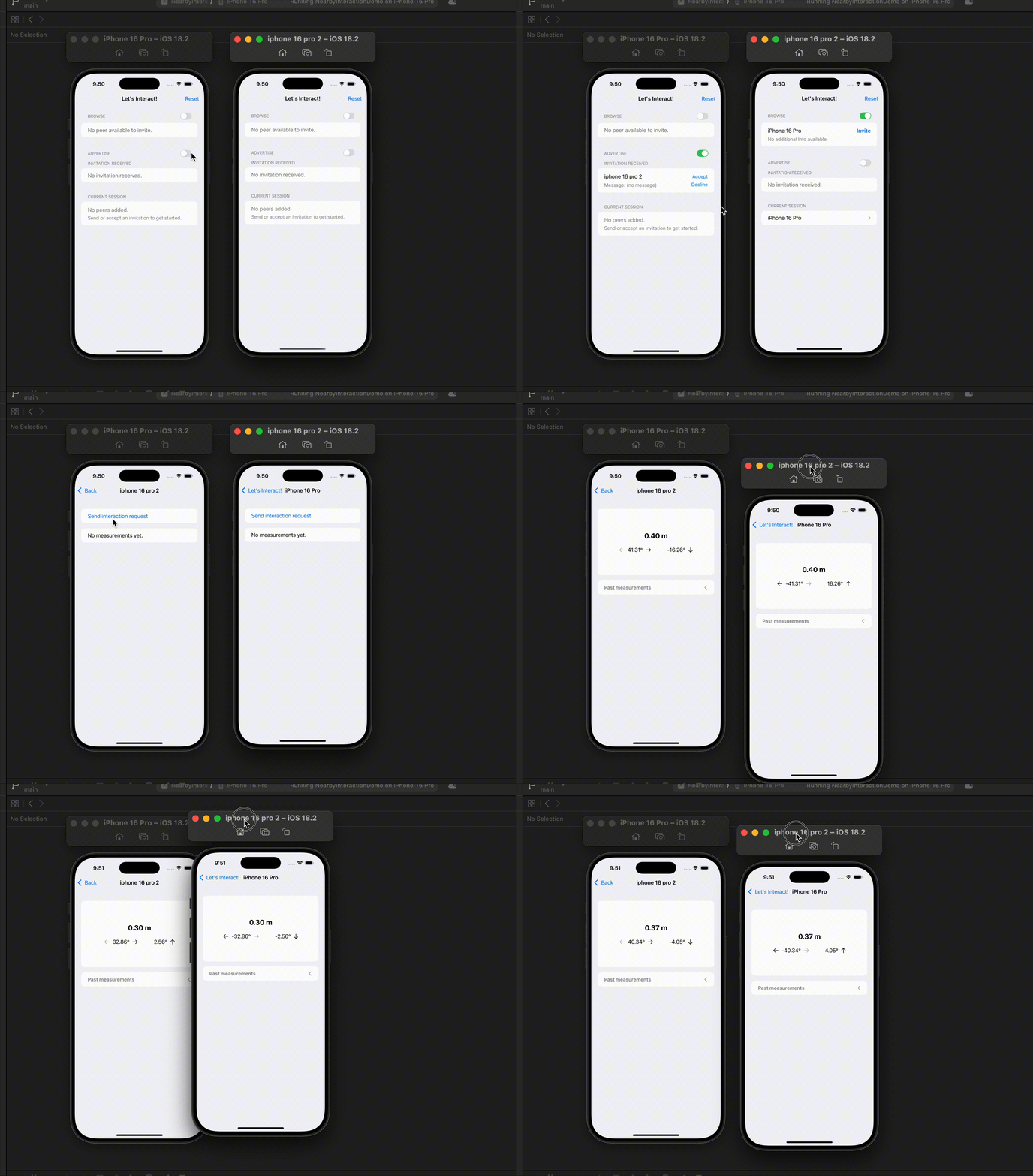
Sample Views
That’s all we need to know about Nearby Interaction to start interacting with our peers and receive measurements!
Let’s create couple sample views just to check out when exactly those functions are called!
import SwiftUI
import MultipeerConnectivity
import NearbyInteraction
struct ContentView: View {
@State private var viewModel = ViewModel()
@Environment(\.scenePhase) private var scenePhase
@State private var showInvitationSheet = false
@State private var selectedPeerID: MCPeerID? = nil
@State private var invitationMessage: String = ""
@State private var invitationTimeout: Int = 30
var body: some View {
@Bindable var viewModel = viewModel
List {
if let error = viewModel.error {
Text(error.message)
.multilineTextAlignment(.leading)
.foregroundStyle(.red)
}
Section {
if viewModel.multipeerManager.peersAvailableToInvite.isEmpty {
Text("No peer available to invite.")
.foregroundStyle(.secondary)
}
ForEach(Array(viewModel.multipeerManager.peersAvailableToInvite.keys), id: \.self) { key in
let peerID: MCPeerID = key
let discoveryInfo = viewModel.multipeerManager.peersAvailableToInvite[key] ?? [:]
HStack(alignment: .top) {
VStack(alignment: .leading, spacing: 4) {
Text(peerID.displayName)
.lineLimit(1)
.truncationMode(.tail)
.minimumScaleFactor(0.8)
if let discoveryInfo = discoveryInfo, discoveryInfo.isEmpty == false {
VStack(alignment: .leading, spacing: 0) {
Text("additional Info:")
ForEach(Array(discoveryInfo.keys), id: \.self) { discoveryInfoKey in
if let info = discoveryInfo[discoveryInfoKey] {
Text("\(discoveryInfoKey): \(info)")
}
}
}
.font(.subheadline)
.foregroundStyle(.secondary)
} else {
Text("No additional Info available.")
.font(.subheadline)
.foregroundStyle(.secondary)
}
}
Spacer()
Button(action: {
selectedPeerID = peerID
showInvitationSheet = true
}, label: {
Text("Invite")
})
.buttonStyle(.borderless)
.font(.headline)
}
}
} header: {
HStack {
Text("Browse")
Toggle("", isOn: $viewModel.multipeerManager.isBrowsing)
.scaleEffect(0.7, anchor: .trailing)
}
}
Section {
if viewModel.multipeerManager.invitationsReceived.isEmpty {
Text("No invitation received.")
.foregroundStyle(.secondary)
}
ForEach(Array(viewModel.multipeerManager.invitationsReceived.keys), id: \.self) { key in
let peerID: MCPeerID = key
let context: Data? = viewModel.multipeerManager.invitationsReceived[key]?.0
HStack(alignment: .center) {
VStack(alignment: .leading, spacing: 4) {
Text(peerID.displayName)
.lineLimit(1)
.truncationMode(.tail)
.minimumScaleFactor(0.8)
let message = if let s = context?.string, !s.isEmpty {
s
} else {
"(no message)"
}
Text("Message: \(message)")
.font(.subheadline)
.foregroundStyle(.secondary)
}
.frame(maxHeight: .infinity)
Spacer()
VStack(alignment: .trailing, spacing: 4) {
Button(action: {
viewModel.multipeerManager.handleInvitation(peerID, accept: true)
}, label: {
Text("Accept")
})
Button(action: {
viewModel.multipeerManager.handleInvitation(peerID, accept: false)
}, label: {
Text("Decline")
})
}
.buttonStyle(.borderless)
.font(.subheadline)
.frame(maxHeight: .infinity)
}
.fixedSize(horizontal: false, vertical: true)
}
} header: {
VStack(alignment: .leading) {
HStack {
Text("Advertise")
Toggle("", isOn: $viewModel.multipeerManager.isAdvertising)
.scaleEffect(0.7, anchor: .trailing)
}
Text("Invitation Received")
}
}
Section {
if viewModel.multipeerManager.managedPeers.isEmpty {
VStack(alignment: .leading) {
Text("No peers added.")
Text("Send or accept an invitation to get started.")
.font(.subheadline)
}
.foregroundStyle(.secondary)
}
ForEach(Array(viewModel.multipeerManager.managedPeers.keys), id: \.self) { key in
let peerID: MCPeerID = key
let state: MCSessionState? = viewModel.multipeerManager.managedPeers[key] ?? nil
NavigationLink(destination: {
InteractionView(peerID: peerID)
.environment(viewModel)
}, label: {
HStack {
Text(peerID.displayName)
.lineLimit(1)
.truncationMode(.tail)
.minimumScaleFactor(0.8)
Spacer()
if let state {
Text(state.displayString)
.font(.subheadline)
.foregroundStyle(.secondary)
}
}
})
}
} header: {
HStack {
Text("Current Session")
}
}
}
.buttonStyle(.plain)
.navigationTitle("Let's Interact!")
.navigationBarTitleDisplayMode(.inline)
.onChange(of: scenePhase, {
print("scene phase changed")
if scenePhase == .background || scenePhase == .inactive {
self.viewModel.multipeerManager.isBrowsing = false
self.viewModel.multipeerManager.isAdvertising = false
}
})
.toolbar(content: {
Button(action: {
viewModel.reset()
}, label: {
Text("Reset")
})
})
.sheet(isPresented: $showInvitationSheet, content: {
VStack(spacing: 24) {
HStack {
Text("Invitation Details")
.font(.headline)
.lineLimit(1)
HStack(spacing: 16) {
Button(action: {
showInvitationSheet = false
}, label: {
Text("Cancel")
.foregroundStyle(.red)
})
.buttonStyle(.bordered)
Button(action: {
guard let peerID = selectedPeerID else {
return
}
let timeout = TimeInterval(invitationTimeout)
viewModel.multipeerManager.invite(peerID, context: invitationMessage.data, timeout: timeout)
showInvitationSheet = false
}, label: {
Text("Send")
})
.buttonStyle(.bordered)
}
.frame(maxWidth: .infinity, alignment: .trailing)
}
VStack(alignment: .leading) {
Text("Messages")
TextField("", text: $invitationMessage, axis: .vertical)
.lineLimit(2, reservesSpace: true)
}
VStack(alignment: .leading) {
HStack {
Text("Timeout (sec)")
Spacer()
TextField("", value: $invitationTimeout, format: .number)
.keyboardType(.numberPad)
.frame(width: 48)
}
Text("If a negative value or zero is specified, the default timeout (30 seconds) is used.")
.multilineTextAlignment(.leading)
.font(.subheadline)
.foregroundStyle(.secondary)
}
}
.textFieldStyle(.roundedBorder)
.padding(.all, 32)
.frame(maxHeight: .infinity, alignment: .top)
.presentationDetents(.init([.height(360)]))
.onAppear {
invitationMessage = ""
}
.onChange(of: showInvitationSheet, initial: true, {
if !showInvitationSheet {
selectedPeerID = nil
}
})
})
}
}
import simd
struct InteractionView: View {
@Environment(ViewModel.self) private var viewModel
var peerID: MCPeerID
@State private var showPastUpdates: Bool = false
var body: some View {
let state: MCSessionState? = viewModel.multipeerManager.managedPeers[peerID] ?? nil
let niInfo: InteractionManager.NIInfo? = viewModel.interactionManager.managedPeers[peerID]
List {
if let error = viewModel.error {
Text(error.message)
.multilineTextAlignment(.leading)
.foregroundStyle(.red)
}
if let niInfo, state == .connected {
if !niInfo.tokenShared && niInfo.peerToken == nil {
Button(action: {
viewModel.sendInteractionRequest(to: peerID)
}, label: {
Text("Send interaction request")
})
.buttonStyle(.borderless)
}
if niInfo.peerToken != nil && !niInfo.tokenShared {
HStack {
Text("Interaction request received")
Spacer()
Button(action: {
viewModel.acceptInteractionRequest(from: peerID)
}, label: {
Text("Accept")
})
.buttonStyle(.borderless)
}
}
if let latestUpdate = niInfo.updates.first {
let distance = latestUpdate.distance
let direction = latestUpdate.direction
let azimuth = latestUpdate.azimuth
let elevation = latestUpdate.elevation
VStack(spacing: 16) {
if let message = viewModel.coachingMessage {
Text(message)
.font(.headline)
.multilineTextAlignment(.leading)
}
if distance == nil && direction == nil {
VStack {
Text("Measurements unavailable")
.font(.title3)
.fontWeight(.bold)
.minimumScaleFactor(0.5)
.lineLimit(1)
Text("Peer device out of range")
Text("Please move closer")
}
}
if let distance {
Text("\(distance.displayString) m")
.font(.title2)
.fontWeight(.bold)
if let azimuth, let elevation {
HStack(spacing: 48) {
HStack {
Image(systemName: "arrow.left")
.opacity(azimuth < 0 ? 1 : 0.3)
Text("\(azimuth.radiansToDegrees.displayString)°")
Image(systemName: "arrow.right")
.opacity(azimuth > 0 ? 1 : 0.3)
}
HStack {
Text("\(elevation.radiansToDegrees.displayString)°")
Image(systemName: elevation > 0 ? "arrow.up" : "arrow.down")
}
}
} else {
VStack {
Text("Direction unavailable")
.font(.title3)
.fontWeight(.bold)
.minimumScaleFactor(0.5)
.lineLimit(1)
Text("Peer device out of line of sight")
Text("Please point to each other")
}
}
}
}
.frame(maxWidth: .infinity)
.frame(minHeight: 180)
} else {
Text("No measurements yet.")
}
// past updates
let pastUpdates: [NINearbyObject] = niInfo.updates
if pastUpdates.count > 1 {
VStack(alignment: .leading, spacing: 16) {
Button(action: {
showPastUpdates.toggle()
}, label: {
HStack {
Text("Past measurements")
.fontWeight(.bold)
Spacer()
Image(systemName: showPastUpdates ? "chevron.down" : "chevron.left")
}
})
.frame(maxWidth: .infinity, alignment: .leading)
if showPastUpdates {
ForEach(0..<pastUpdates.count, id:\.self) { index in
let update = pastUpdates[index]
let distance = if let s = update.distance?.displayString {
"\(s) m"
} else {
"(not available)"
}
let azimuth = if let s = update.azimuth?.radiansToDegrees.displayString {
"\(s)°"
} else {
"(not available)"
}
let elevation = if let s = update.elevation?.radiansToDegrees.displayString {
"\(s)°"
} else {
"(not available)"
}
Text("- **distance**: \(distance) m; **azimuth**: \(azimuth); **elevation**: \(elevation)")
}
}
}
.font(.subheadline)
.foregroundStyle(.gray)
}
} else {
VStack(alignment: .leading) {
Text("Peer not connected.")
Text("Please go back to invite!")
}
}
}
.listRowSpacing(16)
.listRowSeparator(.hidden)
.navigationTitle("\(peerID.displayName)")
.navigationBarTitleDisplayMode(.inline)
.buttonStyle(.plain)
.scrollDisabled(!showPastUpdates)
.onDisappear {
viewModel.interactionManager.invalidateInteraction(with: peerID)
}
}
}
extension Float {
var radiansToDegrees: Self {
self * 180 / .pi
}
var displayString: String {
String(format: "%.2f", self)
}
}
extension MCSessionState {
var displayString: String {
switch self {
case .notConnected:
return "Not Connected"
case .connecting:
return "Connecting..."
case .connected:
return "Connected"
@unknown default:
return "Unknown"
}
}
}
Thank you for reading!
Again, feel free to grab the demo project from my ***GitHub*!**
Happy Interacting!
메타데이터
- post_id
- 4b799e0dbf39
- slug
- swiftui-locate-peers-with-nearby-interaction-framework-4b799e0dbf39
- url
- https://levelup.gitconnected.com/swiftui-locate-peers-with-nearby-interaction-framework-4b799e0dbf39
- canonical_url
- https://levelup.gitconnected.com/swiftui-locate-peers-with-nearby-interaction-framework-4b799e0dbf39
- author_url
- https://medium.com/@itsuki.enjoy
- status
- ok
- fetched_at
- 2026-09-05 13:46:36









