LimaCharlie & Tines Automation
Hey everyone, today we will be starting a project that will help us understand how SOAR & EDR tools work together, it is actually one of…
LimaCharlie & Tines Automation
Hey everyone, today we will be starting a project that will help us understand how SOAR & EDR tools work together, it is actually one of the most fascinating things I learned about, the way all these tools complete each other is really amazing.
To get some things clear from the start this can be done using different tools, at the end of the day they’re just tools, how we use them is what matters most, so you are free to do what you want.
Prerequisites:
You need two VMs, one Windows 11/10 machine and a Windows Server.
Diagram:
Okay let’s start, to better explain how everything works and how it's going to be connected together, I created a diagram to visualize the whole process.
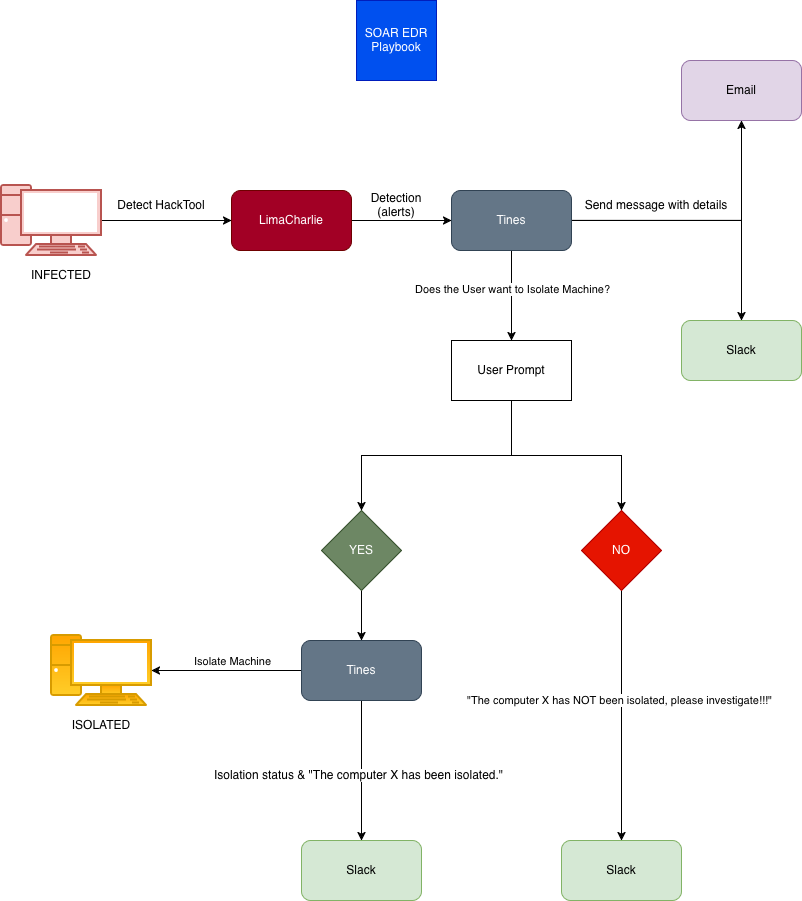
First, we will have an infected machine which is our Windows server, Lima Charlie will detect the Hack Tool and send the alert over to Tines, then Tines will send a message to the user containing details like the computer name, Source IP and many other things via both Email and Slack, also the user would get a user prompt where he can choose if he wants to isolate the machine or not, if he chooses NO then only a message is sent to Slack but if he clicks YES, Lima Charlie will isolate the machine, this could be done from Tines, and finally send a message to Slack confirming the isolation.
Nice, now let’s start implementing what’s in the diagram step by step.
1- Install LimaCharlie and generate events:
Create an account and go to the installation keys page, create an installation key, and at the bottom install the EDR depending on which version of Windows server you have

Copy the Sensor key from the installation you created, open PowerShell as administrator and run the following command:
<executable> -i <SENSOR KEY>Then open services and check that LimaCharlie is running. You can now see your machine in the overview page.

And if you scroll down to Timeline, you will see events are starting to generate with details for help.

2- Generate Telemetry and detect with a custom D&R rule
We will be using an application called LaZagne that retrieves credentials on a local computer, so go ahead and install it from GitHub then run it (you should disable Windows Defender)
https://github.com/AlessandroZ/LaZagne/releases/tag/v2.4.7
let’s head to Automation → D&R rules and create our custom rule, since we are new to this we can get a rule similar to what we want and tweak it to our needs. Rules from GitHub:
Rules are split into two parts, Detect and response.
Detect:
events:
  - NEW_PROCESS
  - EXISTING_PROCESS
op: and
rules:
  - op: is windows
  - op: or
    rules:
      - case sensitive: false
        op: ends with
        path: event/FILE_PATH
        value: \lazagne.exe
      - case sensitive: false
        op: ends with
        path: event/COMMAND_LINE
        value: all
      - case sensitive: false
        op: contains
        path: event/COMMAND_LINE
        value: lazagne
      - case sensitive: false
        op: is
        path: event/HASH
        value: dc06d62ee95062e714f2566c95b8edaabfd387023b1bf98a09078b84007d5268
Response:
- action: report
  metadata:
    author: Moichou
    description: Detects lazagne (SOAR-EDR-TOOL)
    falsepositives:
      - Propably
    level: medium
    tags:
      - attack.credential_access
  name: LaZagne HackTool Detection
there is a test button at the bottom, just copy one of the events that has laZagne in it, you should an output similar to this

Now go to Sensors → Detections and remove any previous detections, then rerun the LaZagne program, our detection rule would show up if you did everything correctly.

3- Setup Tines:
First, create an email and a Slack so that we could receive alerts through both of them from Tines, create a channel in Slack where Tines can send messages. Right now, we should test the connection between Tines and LimaCharlie
Create a webhook in tines and copy the webhook URL over to LimaCharlie

In LimaCharlie go to Outputs → Add Output → Detections → Tines, paste the URL there and save the new output. You will get a refresh sample button, click it after running the LaZagne executable one more time, you should notice that the event generated there and when you head over Tines you’ll find the detection

So now that we are getting detections, what's left is to perform the automation that's in our diagram.
4- Send messages to Slack and email:

To get to here you need to add the templates of both slack and email, for slack put the Channel ID, and also you have to add its credentials to Tines, for email just add the email you want to receive the message. This is an example how the message/body should be if you want to send information about the alert: Title: <<retreive_detections.body.cat>>
That was the title, you could add as much information as you want, but in the end you should receive a slack like this:

5- Add prompt and isolate the machine:
For this step, I will leave most of the work for you and guide you only through some things.
First add User Prompt from Tines, you can customize it how you want, just ask the user if he wants to isolate the machine or not.

The Yes and No in the diagram are just triggers in Tines connected to the user prompt:

Lets from the No trigger because it's easier, you read the answer from the prompt and if it is equal to “No” then send the custom message from the diagram: “The computer X has NOT been isolated, please investigate!!!”
For the Yes trigger, you should first add the credentials for LimaCharlie like you with Slack but since it's not supported you will have to do it manually by getting the API Key for LimaCharlie and adding it to Tines from the credentials page only then will it work, to check send a Yes trigger from the prompt, then over in your infected machine if run ping you will get a “General failure” message. All it's left is to add another LimaCharlie template for the isolation status and connect it also with slack.
P.S: Don't forget to change the credentials for it also to the one you created earlier.

After you connect everything together, your machine should be isolated

and in Slack, you should get the message:

And that’s everything, I hope this was helpful, at least we got a little bit familiar with Tines and LimaCharlie, so now we can work with any SOAR or EDR tool in the world, hopefully.
메타데이터
- post_id
- 4bdc0ff3256d
- slug
- automating-security-with-tines-and-limacharlie-4bdc0ff3256d
- url
- https://meetcyber.net/automating-security-with-tines-and-limacharlie-4bdc0ff3256d
- canonical_url
- https://meetcyber.net/automating-security-with-tines-and-limacharlie-4bdc0ff3256d
- author_url
- https://medium.com/@uncle_sony
- status
- ok
- fetched_at
- 2026-07-24 07:19:16